

Most portable radiology rigs are a liability masquerading as a convenience. If your portable diagnostic reading station relies on consumer-grade hardware or uncalibrated screens, you're risking more than just a slow workflow; you're risking a misdiagnosis. It's frustrating to wait for PACS images to load on remote hardware while wondering if your luminance levels meet the ACR-AAPM-SIIM minimum of 350 cd/m². You shouldn't have to sacrifice the precision of a hospital reading room for the flexibility of teleradiology.
This guide helps you master the technical requirements and workflow benefits of a high-performance mobile setup. We'll show you how to ensure diagnostic-grade accuracy anywhere by maintaining strict DICOM Part 14 compliance and optimized ambient lighting. You will learn to integrate specialized tools like PACS Harmony and RadVoice for a seamless experience that reduces eye strain and physical fatigue. By the end, you'll know how to build a fully compliant, ergonomic remote reading environment that mirrors the reliability of your primary workstation.
Key Takeaways
- Identify why DICOM Part 14 compliance is essential for accuracy so you don't risk a misdiagnosis while working remotely.
- Learn how a dedicated portable diagnostic reading station provides the security of FDA-cleared hardware, removing the technical uncertainty of DIY setups.
- Master the environmental adjustments needed to control ambient light and optimize ergonomics for long-term comfort.
- Discover how unifying your workflow with PACS Harmony and RadVoice ensures your reporting speed doesn't drop when you're away from the hospital.
- See how a unified mobile ecosystem transforms high-pressure environments into manageable, streamlined operations.
The Shift to Mobile Radiology: Why Portable Diagnostic Reading Stations are Essential
Radiology is no longer confined to the dark basements of hospital wings. The global expansion of teleradiology systems has decentralized the clinical workflow, allowing specialists to provide critical expertise across different time zones and geographies. This transition has highlighted a "diagnostic gap" where the radiologist is mobile, but their high-performance hardware is not. A portable diagnostic reading station resolves this conflict by packaging clinical-grade precision into a mobile framework.
In 2026, technology has finally caught up with the "read anywhere" ambition. Desktop-class performance is now available in luggable form factors that don't compromise on processing speed or display quality. These stations are indispensable for disaster recovery and emergency imaging. When a hospital's local infrastructure is compromised, a mobile unit allows for immediate, high-fidelity interpretation in the field, ensuring that patient care doesn't stall during a crisis.
Teleradiology Trends in 2026
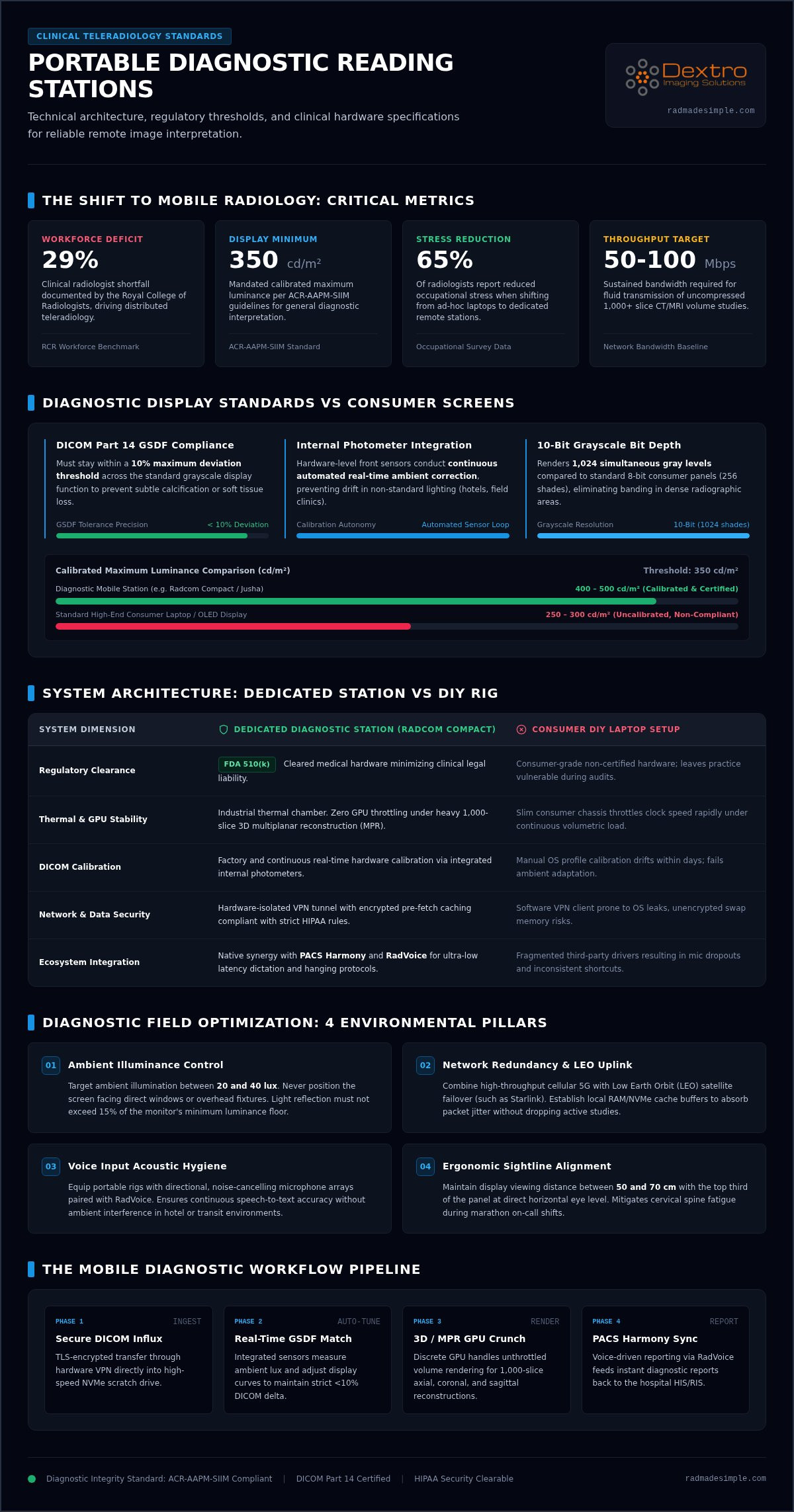
The demand for remote sub-specialty reading continues to grow, driven largely by a systemic deficit in the workforce. The Royal College of Radiologists (RCR) documented a 29% clinical radiologist shortfall, making distributed reading essential for health systems to manage rising study volumes. Modern workflows also integrate AI-assisted triage, which places heavy computational demands on hardware. Standard consumer laptops lack the thermal stability and GPU power to handle these 2026 workloads without significant lag or hardware failure.
Overcoming the Challenges of Remote Interpretation
Remote work introduces unique hurdles for data security and network stability. Professional stations address these by utilizing hardware-isolated VPN connections and encrypted storage to ensure HIPAA compliance on the move. Managing high-volume datasets, such as 1,000-slice CT or MRI stacks, is now possible over 5G or LEO satellite networks like Starlink, provided the workstation is engineered for high-throughput data caching. Beyond the technical specs, using a portable diagnostic reading station offers a psychological advantage. Moving from a personal device to a dedicated professional station helps maintain focus and has contributed to the 65% of radiologists who report a reduction in occupational stress when working remotely.
Technical Requirements for a Diagnostic-Grade Portable Station
A true portable diagnostic reading station is not merely a high-end laptop with a bright screen. It is a specialized, mobile-optimized ecosystem built to maintain clinical integrity outside the hospital. While consumer hardware focuses on aesthetics, diagnostic-grade systems prioritize strict adherence to the ACR–AAPM–SIIM technical standards. These guidelines mandate a calibrated maximum luminance of at least 350 cd/m² for general radiology. If your display falls below this threshold or lacks DICOM Part 14 compliance, you risk missing subtle pathology in high-density areas. Modern 2026 workflows also require dedicated GPUs capable of rendering complex 3D reconstructions without thermal throttling, which is a common failure point in standard portable rigs.
The rendering of large-scale imaging studies, such as 1,000-slice CT stacks, demands hardware that doesn't stutter under load. Beyond the screen, the system must support a sustained connection speed of 50 to 100 Mbps to handle uncompressed DICOM transmission. This ensures that your mobile environment provides the same diagnostic confidence as a fixed reading room. Without these specific benchmarks, portability becomes a liability rather than an asset.
Display Standards: Beyond Resolution
Accuracy depends on the display’s ability to reproduce gray levels consistently. Unlike consumer OLED or IPS panels, Jusha medical monitors are engineered with internal photometers that perform real-time automated ambient light correction. This ensures the grayscale standard display function (GSDF) curve remains within a 10% deviation threshold. High contrast ratios and a minimum 10-bit grayscale depth are non-negotiable for detecting faint calcifications. These integrated calibration sensors allow the station to remain compliant in varied environments, from hotel rooms to field clinics, without requiring external laboratory equipment.
Processing Power and I/O for 2026 Workflows
Processing modern datasets requires significant computational overhead. Your station should feature a high-performance CPU capable of running simultaneous PACS, voice recognition, and AI-assisted triage software. We recommend at least 32GB of RAM to prevent latency during multi-planar reconstructions. Connectivity is equally vital. High-speed I/O like Thunderbolt 4 or 5 is necessary for rapid data transfer from external encrypted storage or secondary diagnostic panels. If you want to ensure your setup meets these rigorous benchmarks, you can review our range of Portable Radiology Workstations for a turnkey solution that simplifies these complex requirements.
Radcom Compact vs. DIY: Comparing Portable Architectures
Building a custom mobile rig is a tempting prospect for many tech-savvy radiologists. However, piecing together consumer monitors and high-end laptops often results in a "Frankenstein" setup that lacks the necessary reliability for clinical work. A professional portable diagnostic reading station functions as a purpose-built medical appliance. Unlike DIY kits, integrated systems like the Radcom Compact are engineered to meet specific regulatory requirements, including FDA 510(k) clearance for primary diagnosis. This distinction is vital for maintaining professional liability standards while working outside the hospital.
The total cost of ownership (TCO) for an integrated portable diagnostic reading station is often lower than a DIY alternative when you factor in longevity and compliance. DIY setups frequently encounter issues with display drift and loose cable assemblies that are susceptible to transit damage. Integrated architectures protect your investment by housing all components in a ruggedized, TSA-compliant case. With a weight range of 32 to 35 lbs, these units fit into standard overhead compartments; this allows you to move through airports without the risk of checking fragile diagnostic equipment as cargo.
Integrated vs. Modular Mobile Workstations
Stability is the primary advantage of an integrated workstation. A single external power cord and one master switch replace the chaotic web of cables found in modular setups. This streamlined design reduces the risk of port wear and accidental disconnections during a shift. By consolidating the hardware, the Radcom Compact simplifies the traveling radiologist workstation setup, enabling full deployment in under five minutes. This efficiency allows you to focus on clinical interpretation rather than troubleshooting hardware connectivity in a remote environment.
Durability and Field Performance
Field performance depends heavily on thermal management. Portable enclosures must be designed to dissipate heat effectively to prevent GPU and CPU throttling during high-volume studies. Standard laptops often slow down under the sustained load of multi-planar reconstructions, but specialized stations use industrial-grade cooling to maintain peak performance. Integrated displays for remote reading also benefit from protected mounting, which prevents screen flex and pressure spots during travel. Choosing a medical-specific station ensures you have access to technical assistance that understands the nuances of PACS and DICOM calibration, a service rarely available for consumer-grade DIY builds.
Optimizing the Remote Environment for Portable Stations
Setting up a portable diagnostic reading station requires more than a flat surface and a power outlet. To mirror the accuracy of a hospital environment, you must control external variables that impact visual perception and physical endurance. Ambient lighting is the most critical environmental factor. Excessive light creates screen glare that obscures subtle details in low-contrast images. Professional standards suggest maintaining room brightness between 25 and 75 lux to minimize reflections without causing eye strain. This controlled "reading zone" ensures that your focus remains on the clinical data rather than environmental distractions.
Connectivity is the lifeblood of remote radiology. While residential fiber is ideal, 2026 technology allows for high-fidelity reading over 5G networks or LEO satellite systems. You need a sustained throughput of 50 to 100 Mbps to fetch large studies quickly. Without this bandwidth, the lag during image scrolling can lead to fatigue and workflow bottlenecks. Establishing a dedicated, distraction-free space is vital for maintaining the high report turnaround times expected in modern teleradiology.
Lighting and Visual Fatigue Management
Managing visual fatigue is essential during extended night shifts. Use soft bias lighting behind your monitors to reduce the contrast between the screen and the surrounding walls. This technique prevents the "tunnel vision" effect that often occurs in pitch-black rooms. For a complete list of environmental requirements, refer to our 2026 radiology equipment compliance checklist. These standards protect your diagnostic accuracy and your long-term ocular health by ensuring your mobile office meets clinical benchmarks.
Ergonomics on the Go
Physical strain is a common complaint among teleradiologists using sub-optimal setups. To prevent "laptop neck," your primary diagnostic panels must be positioned at eye level. Use portable stands or the integrated height adjustments found in professional radiology reading workstations. Complement this with medical-grade peripherals; programmable keypads and high-precision mice allow for faster navigation through PACS stacks with minimal wrist movement. Maintaining a neutral posture is not a luxury; it's a prerequisite for a sustainable remote career. If you're ready to optimize your mobile workflow, explore our professional portable solutions to find the right fit for your practice.
The Dextro Ecosystem: Integrating Software and Hardware
A high-performance portable diagnostic reading station is only as effective as the software that drives it. Dextro acts as a "simplifier" in this field; we bridge the gap between complex hardware and the daily operational needs of a teleradiologist. Our ecosystem ensures that your mobile workflow isn't a collection of disparate tools but a unified medical imaging appliance. This integration allows you to move from unboxing to your first diagnostic-grade read in under 15 minutes, removing the technical friction that often plagues remote setups. By consolidating hardware and software, we provide a proactive solution that focuses on your success and ease of mind.
Efficiency in 2026 relies on how quickly you can access and manipulate heavy datasets. PACS Harmony unifies disparate imaging interfaces into a single, fluid portable workflow. This software allows for intelligent local caching, which is essential for maintaining performance on 5G or satellite networks where bandwidth can fluctuate. By ensuring zero-footprint viewers perform with the same responsiveness as full-client installations, we eliminate the lag that frustrates remote users. Understanding radiology PACS pricing is also vital for decentralized groups looking to scale their mobile fleets without unpredictable overhead or hidden costs.
PACS and Workflow Fluidity
Managing high-volume studies requires a sophisticated approach to data handling. Cloud-based viewers are convenient, but local caching strategies are necessary to prevent rendering delays during multi-planar reconstructions. The Dextro architecture optimizes this balance, ensuring that portable diagnostic reading station users have immediate access to current and prior studies. This seamlessness is what allows a remote station to mirror the reliability of a hospital reading room, regardless of the physical location.
Reporting and Voice Recognition
Reporting speed is the final piece of the productivity puzzle. RadVoice is specifically optimized for mobile reporting; it reduces turnaround time (TAT) by integrating directly with the station's hardware. We focus on optimizing voice recognition for radiologists to work flawlessly with portable microphones in non-traditional environments. This setup is built to handle the next generation of AI reporting tools, ensuring your station remains future-proof as clinical requirements evolve. Beyond software, Dextro provides real-time tech support and remote monitoring. If a configuration issue arises in the field, our team can provide technical assistance immediately to protect your productivity and ensure your high-stakes requirements are met with precision.
Securing the Future of Mobile Radiology
Diagnostic accuracy shouldn't be tethered to a hospital desk. Success in 2026 requires a portable diagnostic reading station that prioritizes DICOM compliance and seamless software integration. You've seen how specialized hardware like Jusha monitors and vendor-neutral software like PACS Harmony eliminate the risks and frustrations of uncalibrated DIY setups. Transitioning to a mobile workflow is no longer about compromise; it's about empowerment through professional-grade technology. This shift allows you to provide high-stakes expertise from any location without sacrificing the standards your patients deserve.
The Radcom Compact delivers TSA-compliant power and portability while maintaining the rigorous luminance levels required for primary diagnosis. By optimizing your remote environment and utilizing the Dextro ecosystem, you can maintain hospital-grade precision anywhere in the world. Take control of your professional flexibility with a system built for the modern teleradiologist. Explore Dextro's Portable Solutions and the Radcom Compact today to streamline your mobile workflow and reclaim your productivity. Your expertise is mobile; your hardware should be too.
Frequently Asked Questions
Is a portable reading station as accurate as a desktop diagnostic monitor?
Yes, a professional portable diagnostic reading station provides the same level of accuracy as a desktop setup when it utilizes medical-grade panels. Specialized units like the Radcom Compact use Jusha diagnostic monitors that meet the ACR-AAPM-SIIM requirement of 350 cd/m² luminance. These stations are engineered to maintain clinical integrity, ensuring that your diagnostic confidence remains high regardless of your physical location or the mobile nature of the hardware.
Do portable radiology stations need to be DICOM Part 14 compliant?
DICOM Part 14 compliance is a non-negotiable requirement for any system used for primary diagnostic interpretation. This standard ensures that grayscale values are displayed consistently across different devices. A mobile station must maintain a deviation of less than 10% from the Grayscale Standard Display Function (GSDF) curve. Without this calibration, subtle pathologies might be invisible, creating a significant risk of misdiagnosis and professional liability when reading in remote environments.
Can I use a standard high-end gaming laptop for diagnostic reading?
You shouldn't use a standard gaming laptop for primary diagnostic reading. While these devices possess high processing power, they lack FDA 510(k) clearance and DICOM-calibrated displays. Gaming screens are optimized for vibrant colors and high refresh rates, not the precise grayscale accuracy required for radiology. Additionally, consumer devices often suffer from thermal throttling during intensive multi-planar reconstructions, which compromises performance and reliability during long clinical shifts in non-traditional reading areas.
What are the weight and size limits for portable workstations on airplanes?
To comply with TSA carry-on regulations, a portable station should fit within standard overhead compartment dimensions. The Radcom Compact is specifically designed for air travel, measuring 21" H x 17" W x 11" D and weighing between 32 and 35 lbs. This form factor allows radiologists to transport their entire portable diagnostic reading station without the risks associated with checking fragile hardware as cargo, ensuring your equipment stays with you during transit.
How do I ensure HIPAA compliance when using a portable station at home?
HIPAA compliance requires a combination of secure hardware and disciplined workflows. You should utilize hardware-isolated VPN connections and encrypted storage to protect patient data during transmission. Professional stations often support zero-footprint viewers to ensure no patient data remains on the local drive after a session. It's also vital to maintain a private, secure reading area to prevent unauthorized viewing of protected health information by unauthorized individuals or family members in your home.
What happens if my portable hardware needs technical support while I'm traveling?
Dextro provides specialized technical assistance and remote monitoring for mobile fleets to ensure minimal downtime. If you encounter an issue while traveling, our support team can access the system remotely to troubleshoot software integrations or calibration settings. This level of service is a key advantage over consumer electronics. Our technicians understand the specific requirements of PACS Harmony, RadVoice, and DICOM standards, providing a secure and rapid solution to technical hurdles.
Does the Radcom Compact support multi-monitor setups?
Yes, the Radcom Compact features a sophisticated multi-monitor architecture built directly into the unit. It is typically configured with two integrated 6-megapixel diagnostic displays and two built-in 4K monitors for worklists and navigation. This quad-display setup ensures you have ample screen real estate for complex studies without needing additional external hardware. The system is engineered to run all four panels off a single internal power bus, maintaining a streamlined workspace in remote settings.
How do I calibrate a portable medical monitor?
Modern portable medical monitors, such as those from Jusha, utilize integrated photometers for automated calibration. These internal sensors constantly monitor the panel's luminance and adjust the output in real-time to maintain adherence to the DICOM GSDF curve. This automated approach removes the complexity of manual calibration and ensures the station remains compliant in varied lighting environments. You don't need external laboratory equipment or specialized technicians to keep your station performing at a diagnostic-grade level.


