

In 2026, radiology compliance is a technical hardware challenge, not just a radiation safety protocol. Most diagnostic chains feel the mounting pressure of shifting ACR standards and the technical uncertainty surrounding home-reading setups. You've likely felt the anxiety of a pending state audit or the frustration of costly downtime when hardware fails to meet clinical standards. Securing expert radiology equipment compliance support is no longer a luxury; it's a necessity for protecting your diagnostic accuracy and your bottom line.
This guide helps you master the technical and regulatory requirements for your entire diagnostic chain through a comprehensive compliance framework. We'll provide a clear, actionable checklist for hardware audits that covers everything from DICOM Part 14 monitor calibration to the new July 2026 ADA accessibility mandates. By the end of this article, you'll have the documented technical standards needed to reduce liability and the confidence that your displays meet every modern benchmark. We'll explore the transition from reactive repairs to the new Quality Management System Regulation standards that define the current imaging landscape.
Key Takeaways
- Transition from traditional radiation-centric models to modern data-centric frameworks with dedicated radiology equipment compliance support.
- Implement a technical audit for DICOM Part 14 Grayscale Standard Display Function (GSDF) and luminance levels to protect clinical accuracy.
- Secure your diagnostic environment by integrating PACS Harmony and auditing workstation hardware for encrypted drive requirements.
- Develop a structured preventative maintenance schedule and comprehensive compliance logs to reduce liability and eliminate unexpected downtime.
- Simplify your workflow using Jusha diagnostic monitors and Dextro Reading Stations that arrive pre-configured for regulatory precision.
Defining Radiology Equipment Compliance in 2026
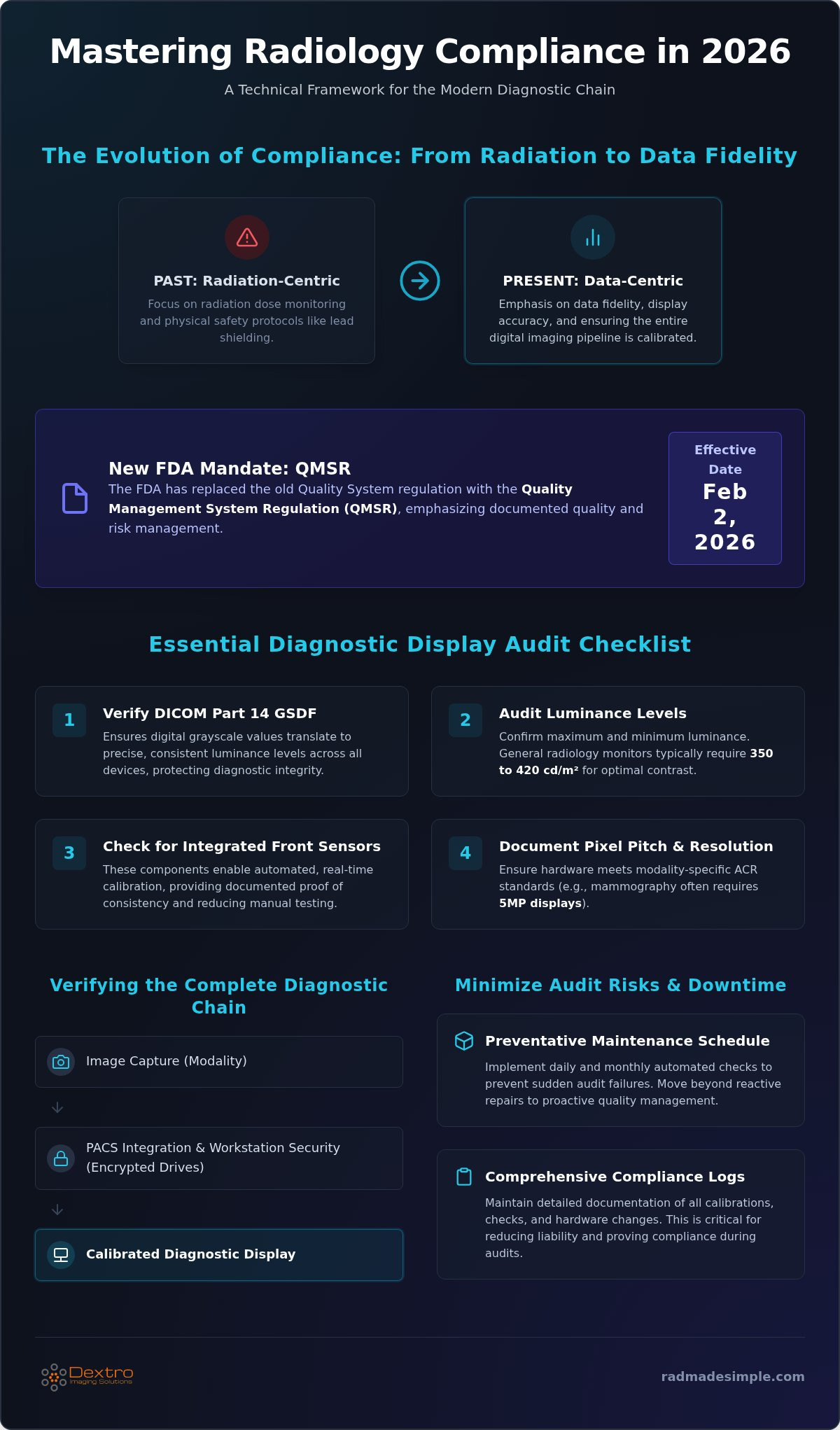
Historically, compliance meant monitoring radiation dose and maintaining lead shielding. While safety remains vital, the 2026 regulatory environment focuses heavily on data fidelity and display accuracy. The industry has moved from "radiation-centric" to "data-centric" models. This reflects a digital-first reality where a single dead pixel or an uncalibrated monitor can lead to a misdiagnosis. Modern compliance ensures that the digital image captured is exactly what the radiologist sees on their screen.
Organizations like the American College of Radiology (ACR) and the FDA now enforce stricter standards for the entire imaging pipeline. As of February 2, 2026, the FDA officially replaced the old Quality System regulation with the Quality Management System Regulation (QMSR). This update emphasizes documented quality processes and risk management for all medical device compliance regulations. Auditors now scrutinize the entire diagnostic chain, from the PACS software to the specific hardware used at reading stations. Failing to maintain these standards carries heavy penalties. Beyond state-specific fines, non-compliant hardware increases the risk of medical malpractice litigation and costly system downtime.
The Scope of Technical Compliance
Compliance overlaps where hardware meets software. It's not enough for your PACS to function; it must display images according to the DICOM Part 14 Grayscale Standard Display Function (GSDF). This standard ensures consistent image quality across different devices, regardless of the manufacturer. Diagnostic Chain Compliance is the verification of every pixel from capture to final report. Without this continuity, diagnostic accuracy is compromised, and your facility risks failing ACR audits that require specific luminance and contrast ratios.
Identifying Your Compliance Stakeholders
Maintaining a compliant facility requires a coordinated effort across several teams. Your IT department manages PACS Harmony integration and ensures network security protocols meet current standards. Clinical leads oversee display calibration and daily quality control tests to ensure radiologists have the best possible tools. However, internal teams often struggle with the technical density of hardware maintenance. Investing in radiology equipment compliance support provides a dedicated partner to handle these complexities. Professional radiology equipment compliance support ensures your Jusha monitors and Dextro Reading Stations stay audit-ready, acting as technical insurance against regulatory failures and hardware-related downtime.
Diagnostic Display Checklist: DICOM Part 14 and Luminance
The visual endpoint of the diagnostic chain is where most compliance failures occur. While many facilities focus on the modality itself, the monitor determines whether the radiologist sees the pathology. Understanding FDA compliance requirements is the first step in auditing your hardware. The FDA will accept declarations of conformity for older standards until December 20, 2026, but transitioning to the latest 2026c standards now provides the best protection against future audits. Professional radiology equipment compliance support helps you navigate these technical shifts without interrupting your clinical workflow.
- Step 1: Verify DICOM Part 14 GSDF compliance. This ensures the monitor translates digital grayscale values into precise, predictable luminance levels across all devices in your network.
- Step 2: Audit maximum and minimum luminance levels. High-performance monitors must maintain specific thresholds, often between 350 and 420 cd/m2 for general radiology, to ensure contrast remains visible in various lighting.
- Step 3: Check for integrated front sensors. These components allow for automated, real-time calibration. They remove the need for manual photometer tests and provide documented proof of consistency.
- Step 4: Document pixel pitch and resolution. Ensure your hardware matches the modality requirements. For example, mammography typically requires 5MP displays with a specific pixel pitch to meet ACR clinical standards.
Calibration and Consistency Monitoring
Factory calibration is a starting point, not a permanent solution. Monitors drift as they age, losing brightness and contrast. Clinical compliance requires ongoing verification. While annual physicist inspections are mandatory, daily and monthly automated checks are the best way to prevent sudden audit failures. For a deeper dive into high-resolution display standards, see the Jusha Medical Monitors: The 2026 Professional Reference Guide. Consistent radiology equipment compliance support automates these logs, ensuring you have a digital trail ready for state inspectors at any moment.
Ambient Light and Environment Controls
The reading environment is just as critical as the monitor itself. High ambient light washes out contrast, making DICOM compliance technically impossible. Reading rooms should maintain a consistent, low lux level. Consumer-grade monitors lack the brightness to overcome variable lighting, whereas medical-grade displays use sensors to adjust based on the room's conditions. Audit your stations for dimmable backlighting to reduce eye strain and maintain the integrity of the Grayscale Standard Display Function. If your current reading room setup feels outdated, you can explore compliant workstation solutions to bridge the technical gap.
Workstation and PACS Compliance: Security and Integration
While diagnostic displays provide the visual endpoint, the workstation and PACS serve as the operational core. In 2026, auditors look beyond the monitor to verify that the entire data pipeline is secure and interoperable. Achieving PACS Harmony requires more than just connecting software to a server. It involves ensuring that your image management system integrates seamlessly across various vendor hardware without compromising data integrity. High-quality imaging depends on the DICOM standard, which ensures that image compression does not violate diagnostic quality. If your PACS uses "lossy" compression to save storage space, you risk falling below ACR standards for primary interpretation.
Hardware security is now a major component of radiology equipment compliance support. Modern workstations must feature self-encrypting drives (SEDs) and secure BIOS configurations to prevent unauthorized data access. These physical security measures are essential for protecting patient Protected Health Information (PHI) at the hardware level. Redundancy protocols are also critical; mission-critical imaging centers must have failover systems to maintain uptime during hardware or network failures. Without these safeguards, a single hardware failure can lead to significant clinical delays and legal liability.
HIPAA Compliance for Remote Reading
Remote reading is standard in 2026, but it introduces new technical vulnerabilities. Securing a home office requires the same level of technical scrutiny as an on-site reading room. This includes robust VPNs and endpoint security to manage PACS access. For those moving between locations, following a Traveling Radiologist Workstation Setup ensures that mobile diagnostic accuracy is never sacrificed for convenience. Your home workstation must meet the same encryption and display standards as your clinical site to remain compliant with HIPAA privacy rules expected to update in late 2026.
PACS Integration and Workflow Audits
Small-site connectivity is often a weak link in the diagnostic chain. Solutions like Radcom Compact help manage these environments by unifying disparate systems into a compliant network. This prevents data silos and ensures that every study is accessible for future audits. Additionally, your workflow tools must be part of the audit trail. This includes verifying that voice recognition tools, such as RadVoice, are fully HIPAA-compliant and integrated into the PACS environment. Expert radiology equipment compliance support ensures these disparate components work as a single, audit-proof unit, allowing your team to focus on diagnostic accuracy rather than technical troubleshooting.
Maintenance Protocols: Minimizing Audit Risks and Downtime
Proactive maintenance is the cornerstone of regulatory safety in 2026. Transitioning from a reactive "break-fix" mindset to a structured preventative maintenance (PM) schedule is essential for high-volume imaging centers. Research shows that preventive maintenance can save three to five times the cost of avoided emergency repairs. For example, a CT tube replacement can cost between $60,000 and $150,000; however, consistent monitoring of the cooling systems and power supply can extend its lifespan significantly. Your PM schedule should include monthly physical inspections, quarterly deeper technical audits, and automated daily calibration checks for every diagnostic display.
Managing firmware updates is another critical layer of modern compliance. Outdated firmware can lead to security vulnerabilities or software conflicts within your PACS environment. These updates must be managed systematically to avoid disrupting clinical workflows. Similarly, end-of-life (EOL) planning ensures your facility remains audit-ready. A monitor is no longer fit for purpose when it can no longer hit the required luminance levels (Nits/Cd/m2) during calibration, even if the screen appears functional to the naked eye. Retiring hardware before it fails a state inspection prevents emergency downtime and potential legal liability.
Technical Support as a Compliance Strategy
In high-stakes environments, technical support is more than just a repair service; it's compliance insurance. High-volume centers require 24/7 technical support to ensure that a hardware failure at 2:00 AM doesn't halt emergency diagnostics. Maintenance contracts provide a predictable framework for these requirements, ensuring that expert technicians are always available to troubleshoot display drift or connectivity issues. The "Compliance Gap" occurs the moment hardware support expires, leaving your facility vulnerable to unmonitored display drift and immediate audit failure. Utilizing professional radiology equipment compliance support bridges this gap by providing continuous oversight of your hardware's performance and regulatory status.
Documentation and Record Keeping
Auditors in 2026 have a clear preference for digital logs over traditional paper records. Digital trails are harder to lose and easier to search during a high-pressure audit. Your records must include specific data points for every piece of equipment, such as calibration dates, maximum luminance readings, and a full repair history. Centralizing this data is the most efficient way to maintain "Audit Readiness." Solutions like PACS Harmony allow you to centralize reporting and audit trails across multiple sites. This integration ensures that when an inspector asks for documentation, your team can produce a comprehensive report in seconds. To ensure your facility stays ahead of these requirements, you can request a compliance audit for your current hardware. Effective radiology equipment compliance support turns documentation from a chore into a strategic asset.
Simplifying Compliance with Dextro Imaging Solutions
Managing a diagnostic chain requires a partner that transforms technical complexity into streamlined operations. Dextro Imaging Solutions provides comprehensive radiology equipment compliance support by delivering hardware that's audit-ready from day one. Dextro Reading Stations arrive pre-configured for regulatory standards, eliminating the guesswork of workstation assembly and ensuring immediate clinical readiness. This proactive approach allows administrators to focus on patient outcomes rather than technical troubleshooting.
The core of this reliability lies in Jusha Diagnostic Monitors. These displays feature built-in compliance sensors that perform real-time, automated DICOM Part 14 calibration. Because these sensors monitor luminance levels continuously, they prevent the display drift that often leads to audit failures. Dextro's technical support leverages these features to automate your maintenance schedule, providing a digital trail of consistency that state inspectors require. Custom PACS integration services further secure this pipeline, ensuring that data integrity is maintained across the entire enterprise.
Integrated Hardware and Software Solutions
Achieving a unified compliance footprint is easier when your hardware and software work in tandem. Combining aycan PACS with Dextro workstations creates a seamless environment where images are archived, transmitted, and displayed with absolute precision. This integration reduces vendor-bloat by providing a single point of contact for your monitors, workstations, and PACS. For detailed insights on optimizing your diagnostic environment, refer to Radiology Reading Workstations: The 2026 Guide to Performance & Compliance. This streamlined model ensures that every pixel remains compliant from the moment of capture to the final report.
The Dextro Partnership Model
Dextro doesn't just sell equipment; it provides a long-term strategy for operational success. Ongoing maintenance contracts act as "compliance insurance," evolving with your facility as your diagnostic needs grow. This model is particularly valuable when upgrading legacy radiology departments where old infrastructure often clashes with modern standards. Dextro’s expert consultants guide you through these transitions, ensuring that every new component integrates perfectly with your existing workflow. As a final step in your compliance strategy, contact Dextro Imaging Solutions for a comprehensive equipment compliance audit to verify your facility’s 2026 readiness.
Future-Proof Your Diagnostic Chain
Compliance in 2026 demands a shift from reactive repairs to integrated technical oversight. Every pixel from the PACS server to the diagnostic display must meet rigorous DICOM Part 14 and FDA standards to protect clinical accuracy. By centralizing your workflow with PACS Harmony and utilizing monitors with built-in sensors, you eliminate the manual errors that trigger audit failures. Securing expert radiology equipment compliance support isn't just about passing inspections; it's about ensuring your facility remains operational and liability-free.
Dextro Imaging Solutions provides the specialized technical support and maintenance contracts you need to manage these high-stakes requirements. With industry-leading Jusha Diagnostic Monitors and seamless integration services, we turn regulatory complexity into a streamlined advantage. Don't wait for an inspector to find a gap in your documentation. Schedule your 2026 Equipment Compliance Audit with Dextro Imaging Solutions today. Your path to absolute regulatory confidence starts with a single, proactive step.
Frequently Asked Questions
What is the difference between medical-grade and consumer-grade monitors for compliance?
Medical-grade monitors are specifically engineered to meet DICOM Part 14 standards, offering higher luminance and built-in calibration sensors. Consumer-grade monitors lack the grayscale precision and brightness consistency required for primary diagnosis. Using consumer screens for clinical interpretation increases the risk of missed pathologies and immediate audit failures. Medical displays are designed for long-term stability, whereas consumer models drift in color and brightness within months, compromising the integrity of the diagnostic chain.
How often does the ACR require monitor calibration?
The ACR requires an annual physicist evaluation, but facilities must also perform monthly and daily quality control checks. Daily tests involve a visual inspection of test patterns like SMPTE or TG18-QC. Monthly audits require technical measurements of luminance and contrast ratios. Professional radiology equipment compliance support automates these logs, ensuring your facility remains audit-ready without manual data entry. This proactive approach saves time and provides a documented digital trail for state inspectors.
Is DICOM Part 14 compliance mandatory for all radiology displays?
DICOM Part 14 compliance is mandatory for all displays used for primary diagnostic interpretation. This grayscale standard ensures that digital values are mapped consistently across different hardware. Without it, an image might look different on a workstation than it does on a modality console. While review-only stations have more flexibility, any monitor where a final clinical report is generated must adhere to these precise grayscale standards to ensure diagnostic accuracy and regulatory safety.
What are the specific HIPAA requirements for home radiology workstations?
Home workstations must mirror the security and technical standards of on-site reading rooms. This includes using encrypted drives, secure VPNs, and endpoint protection to prevent unauthorized data access. Physical security is also vital; the screen shouldn't be visible to unauthorized individuals. If you are considering building a dedicated detached office to ensure a private and compliant workspace, ADUDesk can connect you with vetted professionals for the project. New 2026 HIPAA updates emphasize robust access controls for all remote teleradiology environments. Your home workstation must meet the same luminance and calibration benchmarks as your clinical site to remain fully compliant.
PACS software acts as the critical bridge between the modality and the display. It must transmit images using "lossless" compression to maintain ACR clinical standards. Solutions like PACS Harmony ensure that different hardware components communicate without data degradation. If the PACS software doesn't support the latest DICOM tags or security protocols, the entire diagnostic chain becomes non-compliant. The software must facilitate an accurate audit trail, linking every image to its specific calibration and interpretation metadata.
What should be included in a radiology hardware maintenance contract?
A comprehensive contract should include 24/7 technical support, rapid on-site repair response, and regular preventative maintenance visits. It must also cover firmware updates and automated calibration monitoring. Effective radiology equipment compliance support acts as technical insurance, providing documented proof of upkeep for state inspectors. Ensure your contract specifies that all repairs use medical-grade components. This maintains the original regulatory certification of your reading stations and prevents the "Compliance Gap" that occurs when support expires.
Can portable radiology stations be fully diagnostic compliant?
Modern portable radiology workstations are engineered to meet the same diagnostic standards as fixed reading rooms. These units integrate high-resolution displays and secure computing power into a mobile footprint. For compliance, they must undergo regular DICOM calibration and meet specific luminance thresholds. When configured with secure BIOS and encrypted storage, these stations provide full diagnostic accuracy for teleradiology or emergency bedside interpretation. They are an essential tool for maintaining clinical standards in dynamic healthcare environments.
How do I document compliance for an upcoming state audit?
Documentation should be centralized in digital logs for maximum efficiency. You must provide calibration history, luminance measurements, and preventative maintenance records for every diagnostic monitor. Auditors in 2026 prioritize a clear "chain of compliance" that shows consistent quality control. Using integrated reporting tools allows you to generate a comprehensive audit trail in seconds. This proves that your hardware has met all technical standards over time and reduces the liability associated with manual record keeping.


