

Imaging utilization is projected to increase by up to 26.9% by 2055, but the radiologist workforce isn't growing fast enough to keep pace. This widening gap makes high-performance radiology reading workstations a critical tool for maintaining diagnostic accuracy and operational efficiency. You've likely felt the physical toll of non-calibrated monitors and the mental friction of switching between disparate PACS interfaces. Long shifts are demanding enough without fighting your equipment or worrying about evolving compliance standards.
Discover how to eliminate these bottlenecks by integrating medical-grade hardware with seamless software and ergonomic design. This guide from Dextro Imaging Solutions provides a roadmap to achieving full DICOM Part 14 compliance and leveraging unified systems like PACS Harmony to accelerate reporting turnaround times. We'll examine specialized solutions, from Jusha diagnostic monitors to the Radcom Compact, ensuring your environment is optimized for both precision and diagnostic confidence.
Key Takeaways
- Understand the mandatory requirements for DICOM Part 14 compliance to ensure consistent diagnostic accuracy across all radiology reading workstations.
- Learn how to select the optimal resolution for diagnostic monitors based on specific modalities, from standard X-ray to high-resolution mammography.
- Discover how to create a unified cockpit using PACS Harmony and RadVoice to eliminate login fatigue and accelerate reporting turnaround times.
- Explore the latest performance standards for portable reading stations that support the growing demand for teleradiology without sacrificing processing power.
- Gain a clear roadmap for the Dextro "simplifier" process to transition from technical audits to a fully customized, ergonomic reading environment.
What Defines a Modern Radiology Reading Workstation?
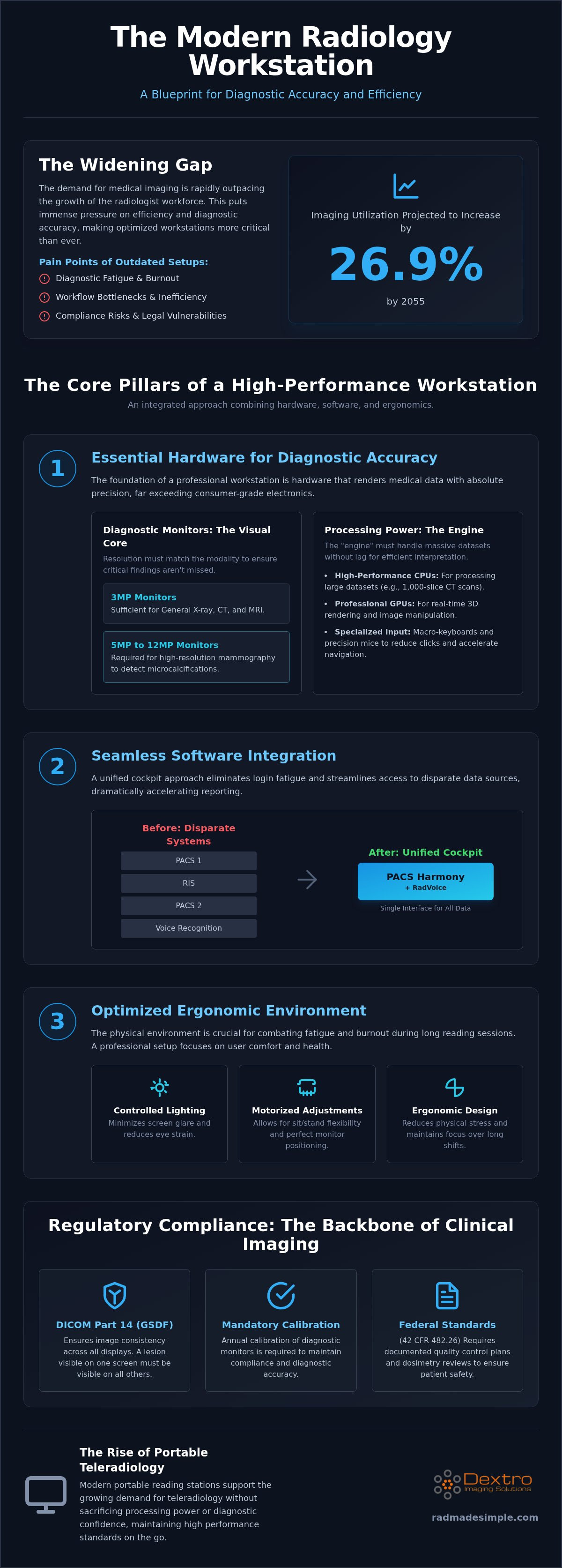
A modern radiology reading workstation is a sophisticated diagnostic environment, not just a place to sit. It represents a fundamental shift from simple image viewing to high-volume diagnostic interpretation. As imaging utilization is projected to increase by up to 26.9% by 2055, the workstation becomes the primary tool for managing this growing workload. Professional radiology reading workstations integrate specialized hardware and software to ensure every pixel is rendered with absolute clinical accuracy.
Consumer-grade setups frequently fail to meet these high-stakes requirements. Standard office monitors lack the necessary luminance and contrast ratios required to identify subtle pathologies. Relying on uncalibrated hardware for radiology reading workstations introduces legal vulnerabilities and increases the risk of diagnostic fatigue. A professional setup removes these complexities, allowing radiologists to focus entirely on patient care while maintaining full compliance with clinical standards.
The Core Pillars of Clinical Workstation Design
High-performance design relies on three integrated pillars. The hardware must include Jusha Diagnostic Monitors with specific resolutions and CPUs optimized for 3D rendering. Software integration is equally vital. By utilizing a Picture archiving and communication system (PACS) alongside tools like PACS Harmony, radiologists can access disparate data through a single interface. This unified cockpit approach minimizes workflow bottlenecks. Finally, the environment must be optimized. Dextro Reading Stations provide the ergonomic foundation, incorporating motorized adjustments and controlled lighting to combat the physical fatigue that often leads to burnout.
Compliance and Regulatory Standards
Regulatory adherence is the backbone of any clinical imaging facility. The DICOM Part 14 Grayscale Standard Display Function (GSDF) provides the technical framework for image consistency. Without this standard, a lesion visible on one screen might be invisible on another. Federal standards under 42 CFR 482.26 further require documented quality control plans and dosimetry reviews to keep radiation exposure as low as reasonably achievable. These rules protect both the patient and the practitioner. Annual calibration of diagnostic monitors is mandatory to ensure ongoing compliance with federal and state regulatory requirements. This proactive maintenance guarantees that the equipment remains within the strict tolerances required for accurate medical reporting.
Essential Hardware Components for Diagnostic Accuracy
While many discussions regarding radiology reading workstations focus on ergonomic furniture, the true engine of diagnostic accuracy is the hardware's ability to render medical data with absolute precision. High-performance imaging requires a specialized synergy between diagnostic displays and processing power to maintain clinical standards. You can't rely on consumer-grade electronics when the goal is identifying subtle pathologies in high-volume environments. Professional hardware ensures that every pixel remains consistent, protecting both patient outcomes and the radiologist's diagnostic confidence.
Diagnostic monitors are the most visible component of this ecosystem. The required resolution depends entirely on the modality being interpreted. A 3MP monitor is typically sufficient for general X-ray and cross-sectional imaging like CT or MRI. However, mammography demands 5MP or even 12MP displays to accurately capture microcalcifications. These medical-grade units maintain high luminance levels that far exceed standard office displays. This adherence to the design requirements for modern workstations ensures that practitioners don't miss critical findings due to poor contrast or screen degradation.
The "engine" driving these displays must handle massive datasets without lag. Processing a 1,000-slice CT scan or performing real-time 3D rendering requires high-performance CPUs and professional GPUs. To complement this power, specialized input devices like macro-keyboards and high-precision mice allow for rapid navigation. These tools reduce the number of physical clicks required to window, level, or scroll through a series, directly impacting your daily reporting speed.
The Jusha Advantage in Diagnostic Displays
Jusha Diagnostic Monitors provide a technical edge through high-luminance technology, which is essential for detecting subtle pathology in dense tissues. These units feature built-in front sensors that perform real-time DICOM auto-calibration. This automation removes the complexity of manual testing and ensures the display always meets regulatory standards. Wide viewing angles are also integrated into the design, which minimizes parallax errors during clinical consultations when multiple doctors are viewing the screen simultaneously.
Configuring the Dextro Reading Station
Customizing your setup for specific workloads like PET-CT or Neuroimaging requires a focus on reliability and environment. Dextro Reading Stations utilize advanced thermal management systems to keep high-performance components cool while remaining nearly silent. This quiet operation is vital for maintaining focus in a dark reading room. For 24/7 clinical uptime, these stations incorporate dual-power supplies and RAID storage. This level of redundancy ensures that a single component failure won't halt your workflow. If you're looking to upgrade, you can explore customizing your diagnostic environment to match these high-performance specifications.
Streamlining Workflow: Integrating PACS and Voice Recognition
Efficiency in the reading room depends on more than just the physical resolution of your displays. While the hardware provides the canvas, the software layer acts as the operating system for your professional life. High-performance radiology reading workstations must function as a "unified cockpit" where all imaging data and reporting tools converge into a single, intuitive flow. This integration is essential for reducing the mental friction caused by disparate systems, allowing you to maintain focus on complex diagnostic tasks. By aligning your software environment with the ACR technical standards for displays, you create a workspace that is both legally compliant and operationally superior.
Unified Interfaces with PACS Harmony
The modern radiologist often manages studies from multiple facilities, each with its own legacy system. This disparate landscape creates a "multiple login" problem that drains time and increases the risk of error. PACS Harmony addresses this by allowing you to view images through a vendor-neutral interface. It maintains your preferred hanging protocols across different hospital systems, ensuring that every study looks exactly how you expect it to. A unified PACS interface significantly reduces cognitive load during high-pressure cross-cover shifts by providing a familiar environment regardless of the original data source.
RadVoice: The Future of Dictation
Reporting turnaround time (TAT) is a primary metric of success, and dictation is often the slowest part of the process. RadVoice utilizes AI-enhanced voice recognition to handle complex medical terminology with high accuracy. This software isn't a standalone tool; it's designed for direct integration with the Dextro Reading Station hardware. By automating repetitive tasks through smart templates, you can finalize reports faster without sacrificing detail. This level of automation is vital in 2026 as imaging volumes continue to outpace the growth of the radiologist workforce.
Reducing "click fatigue" is a major priority for long shifts. Intelligent software-hardware mapping allows you to link specific RadVoice commands to the macro-keys on your specialized keyboard. This synergy means you spend less time navigating menus and more time analyzing pathology. When your software and hardware work in tandem, the workstation ceases to be a collection of components and becomes a seamless extension of your clinical expertise.
The Rise of Portable Radiology Reading Stations
The teleradiology revolution has fundamentally changed how clinical data is consumed. Mobility is no longer a compromise for the modern practitioner. While traditional radiology reading workstations were once anchored to hospital basements, today's professionals require the flexibility to interpret studies from home offices or satellite clinics. This shift is driven by a growing radiologist shortage and the expansion of the "radiology as a service" market, which is projected to grow to $6.38 billion by 2030. To maintain diagnostic integrity, these mobile environments must replicate the performance of a stationary clinical cockpit.
Balancing weight and power is the primary challenge for portable hardware. A diagnostic-grade mobile station needs sufficient processing speed to handle multi-slice datasets without the bulk of a full tower. These radiology reading workstations must also address the variable lighting conditions found in non-traditional environments. Maintaining DICOM Part 14 compliance is non-negotiable, even when you're working outside the hospital. Professional portable solutions ensure that calibration remains stable, protecting your diagnostic confidence regardless of your physical location.
Teleradiology Hardware for the Home Office
Setting up a home-based station requires a focus on security and environmental control. Utilizing aycan PACS allows for secure remote access to imaging data without compromising speed. Security is paramount, so dedicated VPN hardware and secure endpoints are essential to protect patient privacy. You also need to manage ambient light carefully. Unlike a controlled hospital reading room, a home office often has windows or overhead lights that can cause glare. Using specialized monitor hoods and Jusha displays helps mitigate these environmental variables, ensuring that your diagnostic accuracy remains high.
Mobile Solutions: The Radcom Compact
The Radcom Compact is designed to solve the problem of connectivity for massive imaging datasets. It provides a stable, high-speed link that ensures you aren't waiting for studies to load during emergency "on-call" shifts. Dextro’s approach to mobile diagnostic-grade setups focuses on delivering a full-performance environment in a condensed footprint. These portable systems allow for rapid deployment in temporary sites or home environments. If you're ready to transition to a flexible workspace, you can explore our portable radiology workstations to find the right balance of mobility and power for your practice.
Implementing Your Professional Reading Setup with Dextro
Implementing a high-performance environment shouldn't be a burden for your clinical or IT staff. Dextro acts as a simplifier, managing technical complexity so you can focus on diagnostic precision. Our process begins with a comprehensive technical audit. We evaluate your current PACS interfaces, room lighting, and existing hardware to identify specific bottlenecks. This methodical approach leads to a streamlined installation of radiology reading workstations that are ready for immediate clinical use. We handle the integration of hardware and software, ensuring your new cockpit is fully operational from day one.
Customization is central to our philosophy. A neuroradiologist interpreting complex 3D datasets requires different processing power than a breast imager utilizing 12MP displays. We tailor the hardware specs of your Dextro Reading Stations to match these sub-specialty requirements. Whether you're focusing on MSK, Neuro, or Breast imaging, your station is built to handle the specific voxel density and resolution your work demands. This ensures your equipment isn't just powerful; it's optimized for your specific daily tasks.
AI integration is another critical factor for 2026. As AI-native reporting platforms become standard, your hardware must have the GPU headroom to support these computational tools. We future-proof every setup, ensuring compatibility with AI workflows and upcoming 8K display standards. This proactive design protects your investment and keeps your department at the forefront of imaging technology. You don't have to worry about your equipment becoming obsolete as new software tools emerge.
Technical Support and Maintenance
System reliability is the foundation of a 100% uptime goal. We provide remote monitoring for monitor calibration and overall hardware health. This automated oversight ensures your displays always meet DICOM Part 14 standards without requiring manual testing. For hospital-wide workstation deployments, we offer on-site support to handle complex integrations across multiple departments. Our service contracts include rapid response guarantees, ensuring that technical issues never halt your clinical workflow. This level of support provides the security you need in high-stakes environments.
Next Steps: Upgrading Your Imaging Environment
Evaluating the return on investment for radiology reading workstations requires looking at long-term efficiency. Integrated hardware-software bundles offer superior ROI compared to piecemeal upgrades. When your Jusha monitors, RadVoice software, and ergonomic desks work in unison, you finalize reports faster and experience less physical fatigue. You can begin this transformation by requesting a customized quote tailored to your facility's volume and specialty needs. Our team guides you through the selection process to ensure every component adds immediate value to your practice.
Optimize your workflow with a Dextro Reading Station today.
Elevating Your Diagnostic Environment for 2026
The evolution of clinical imaging demands a fundamental shift from fragmented components to a unified diagnostic ecosystem. High-performance radiology reading workstations are no longer just furniture; they are the foundation of diagnostic accuracy and practitioner well-being. By integrating DICOM Part 14 compliant solutions with seamless software like PACS Harmony, you remove the operational friction that often leads to burnout and reporting delays. Each element of your workspace should function as a reliable extension of your clinical expertise.
As an authorized Jusha medical distributor, Dextro provides the specialized hardware needed to meet evolving 2026 standards. Whether you're deploying a hospital-wide solution or seeking specialized teleradiology hardware for remote interpretation, the focus remains on streamlining complexity. You don't have to manage these technical shifts alone. Our team acts as a competent guide, ensuring your department stays at the forefront of technological progress while protecting your diagnostic confidence and operational stability.
Take the next step toward a more efficient and manageable workflow. Explore Dextro High-Performance Radiology Workstations. We look forward to helping you transform your reading room into a high-performance cockpit designed for the future of radiology.
Frequently Asked Questions
What is the difference between a clinical review monitor and a diagnostic monitor?
Diagnostic monitors meet strict DICOM Part 14 standards for luminance and contrast required for primary interpretation. Clinical review monitors are designed for secondary viewing by non-radiologists and lack the bit-depth and automated calibration sensors necessary for identifying subtle pathologies. Relying on review monitors for primary diagnosis increases clinical risk and fails to meet regulatory compliance standards.
Do I really need a medical-grade workstation for my home teleradiology setup?
Yes, if you're performing primary diagnostic interpretation from a remote location. Using a consumer-grade setup for teleradiology increases the risk of misdiagnosis and non-compliance with legal standards. Professional radiology reading workstations at home ensure that the images you see match what is seen in the hospital, providing the consistency required for high-stakes medical decisions.
How does PACS Harmony integrate with my existing hospital systems?
PACS Harmony acts as a vendor-neutral overlay that communicates with disparate systems via HL7 and DICOM protocols. It aggregates studies from multiple locations into a single, intuitive worklist. This allows you to maintain consistent hanging protocols and avoid the inefficiency of multiple logins across different facilities, effectively turning your workstation into a unified diagnostic cockpit.
What are the minimum GPU requirements for a radiology workstation in 2026?
For 2026, a professional-grade GPU is essential to handle 3D rendering and AI-driven image analysis without latency. You should prioritize cards designed for medical imaging that support high-resolution output for 8MP or 12MP displays. High-performance GPUs ensure smooth scrolling through large datasets, such as 1,000-slice CT scans, which is critical for maintaining a brisk reporting pace.
How often do Jusha diagnostic monitors need to be calibrated for compliance?
Jusha diagnostic monitors feature built-in front sensors that perform real-time auto-calibration to maintain consistency. While this automation handles daily adjustments, a formal compliance audit and recalibration are typically required annually to meet state and federal regulatory standards. This proactive maintenance ensures the hardware remains within the strict tolerances defined by the DICOM Grayscale Standard Display Function.
Can I use voice recognition software like RadVoice on a portable workstation?
Yes, RadVoice is fully compatible with high-performance portable radiology reading workstations. Its AI-enhanced engine is optimized to run on mobile hardware, allowing you to maintain reporting speed and accuracy from any location. This ensures that your reporting turnaround times remain consistent whether you're working in the hospital, at a satellite clinic, or from a home office.
What ergonomic features are most important for reducing eye strain?
High-luminance displays and anti-reflective coatings are vital for reducing visual fatigue during long shifts. You should also utilize integrated ambient lighting controls to balance the brightness of your reading room with your monitor output. Motorized height and tilt adjustments are equally important, as they allow you to maintain a comfortable viewing angle that prevents physical strain and improves focus.
How does the Radcom Compact improve remote reading connectivity?
Radcom Compact utilizes specialized hardware to provide a secure, high-speed tunnel for massive imaging datasets. It prioritizes DICOM traffic and ensures stable data transfer, which prevents the lag often associated with standard VPN connections. This stability is essential for emergency on-call reading sessions where rapid access to large studies can directly impact patient outcomes and clinical efficiency.


