

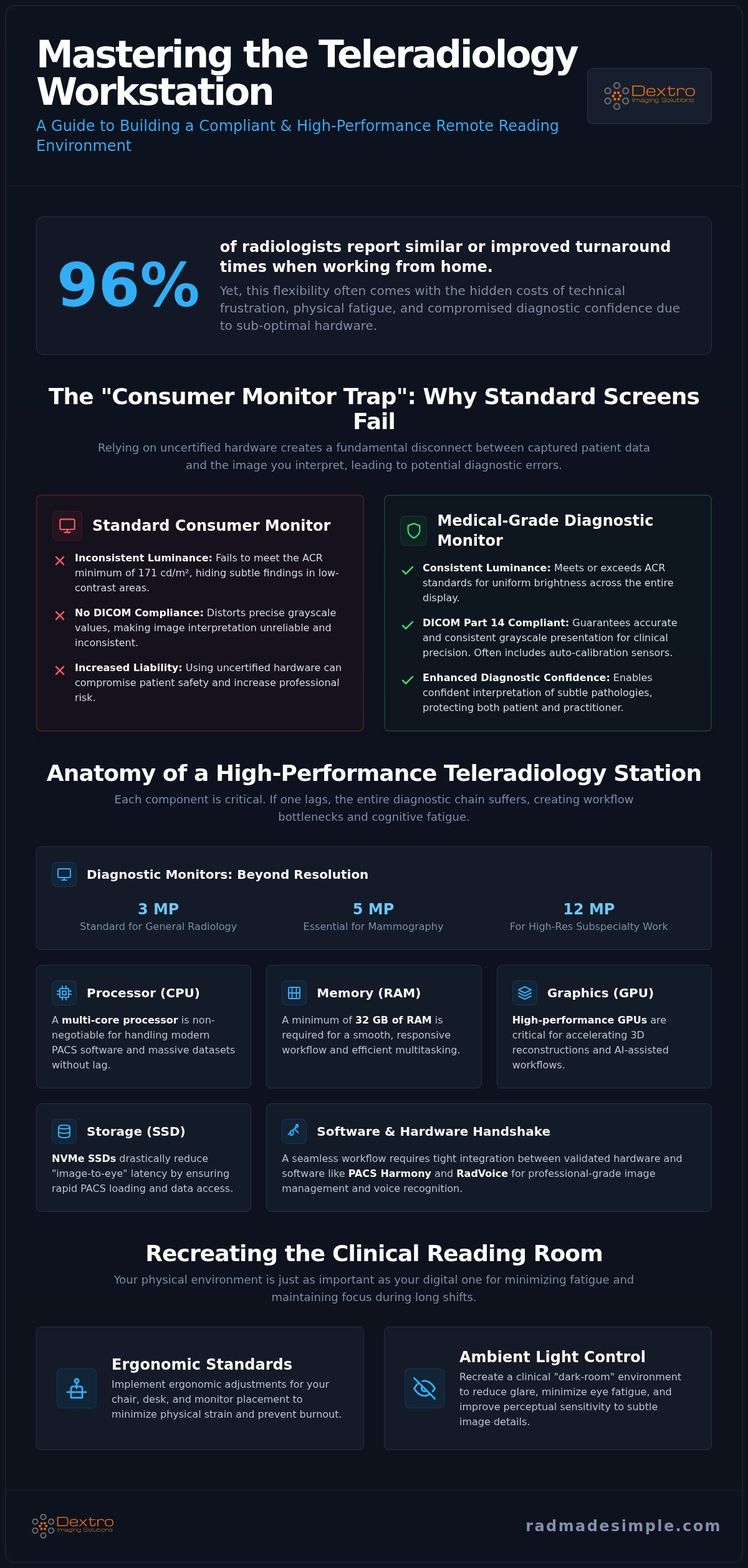
A 2025 study revealed that 96% of radiologists reported similar or improved report turnaround times when working from home, yet the transition often comes with the hidden cost of technical frustration and physical fatigue. You likely chose teleradiology for the flexibility and focus it offers. However, struggling with slow PACS loading or questioning a subtle finding because of an inferior screen can quickly erode your professional confidence. It's difficult to maintain peak diagnostic accuracy when your teleradiology hardware setup doesn't match the standards of the hospital reading room.
This guide empowers you to master your remote environment to ensure every pixel meets clinical standards while protecting your own physical well-being. We'll explore the critical requirements for DICOM-compliant monitors, the processing power needed for seamless workflow integration, and the ergonomic adjustments that transform a home office into a high-performance diagnostic suite. You'll gain a clear roadmap to a compliant, high-performance station that ensures diagnostic precision from any location.
Key Takeaways
- Understand why DICOM Part 14 compliance is a non-negotiable requirement and why standard consumer-grade monitors are insufficient for clinical diagnostic accuracy.
- Optimize your teleradiology hardware setup with high-performance GPUs and SSDs to ensure rapid PACS loading and a seamless, lag-free workflow.
- Identify the critical software-hardware handshake necessary to integrate tools like PACS Harmony and RadVoice for professional-grade voice recognition and image management.
- Implement ergonomic standards and ambient light controls to recreate a clinical dark-room environment that minimizes eye fatigue and physical strain during long shifts.
- Explore how specialized portable units like the Radcom Compact allow for high-stakes diagnostic mobility without compromising on technical reliability or regulatory compliance.
The Shift to Remote Reading: Why Standard Hardware Fails
Transitioning to remote work offers unparalleled flexibility, but a professional teleradiology setup requires more than a fast internet connection and a high-resolution laptop. Many practitioners fall into the "Consumer Monitor Trap," assuming that a high-end 4K office screen provides sufficient detail for clinical interpretation. This is a dangerous misconception. A true teleradiology hardware setup is a specialized ecosystem of DICOM-compliant tools designed to replicate the precision of a hospital reading room. Without medical-grade equipment, you risk missing subtle pathologies, increasing your professional liability, and compromising patient safety.
The American College of Radiology (ACR) maintains strict technical standards that consumer electronics simply cannot meet. In 2026, the complexity of imaging data continues to grow, making the gap between professional and consumer hardware even wider. Relying on uncertified hardware doesn't just slow you down; it creates a fundamental disconnect between the data captured and the image you interpret. This technical gap is where diagnostic errors often take root.
The Risks of Non-Compliant Displays
Standard screens suffer from significant luminance inconsistency. They often fail to meet the ACR minimum luminance standard of 171 cd/m² for non-mammography workstations. When a monitor cannot maintain uniform brightness across the entire panel, subtle findings in low-contrast areas can vanish. Consumer-grade color processing also distorts the precise grayscale values necessary for accurate diagnosis. DICOM Part 14 is the grayscale standard for medical displays that ensures consistent image presentation across all compliant devices. Using non-compliant displays means you're interpreting images on a fluctuating baseline, which directly erodes diagnostic confidence.
Workflow Bottlenecks in Home Environments
Modern imaging demands significant computational power. As 3D reconstruction and AI-assisted workflows become standard in 2026, standard consumer CPUs and GPUs often struggle to handle massive datasets. This leads to "image-to-eye" latency, where the delay between clicking a study and seeing the full-fidelity image creates a fragmented workflow. These technical micro-frustrations accumulate throughout an eight-hour shift. Specialized systems like Dextro Reading Stations are engineered to eliminate these bottlenecks by utilizing high-performance GPUs specifically validated for PACS Harmony. Reducing this latency is essential for preventing the cognitive fatigue and hardware-related frustration that contribute to radiologist burnout.
The Core Components: Diagnostic Monitors and Workstations
Building an effective teleradiology hardware setup requires a symbiotic relationship between your display and your processing power. If one component lags, the entire diagnostic chain suffers. You need a station that handles massive DICOM files without stuttering while presenting them with clinical fidelity. Achieving this balance ensures that your remote environment is as capable as any hospital suite, allowing you to focus entirely on the patient's data rather than technical limitations.
Diagnostic Monitors: Beyond Resolution
High-performance monitors are defined by their ability to maintain consistent luminance and contrast over time. High-quality diagnostic monitors are essential, often featuring built-in sensors that automatically ensure DICOM Part 14 compliance. Choosing between grayscale and color depends on your specific focus. While grayscale offers superior luminance for traditional X-rays, modern color monitors now provide the versatility needed for multi-modality reading. You'll need to select the right megapixel (MP) count for your workload. A 3MP display is standard for general radiology, but 5MP or 12MP options are essential for mammography and high-resolution subspecialty work. Understanding the cost of diagnostic radiology monitors helps in planning a budget that prioritizes long-term reliability over short-term savings.
High-Performance Workstations for Intensive Workloads
Your workstation acts as the engine of your practice. In 2026, a minimum of 32 GB of RAM and a multi-core processor are non-negotiable for handling modern PACS software efficiently. High-performance GPUs are critical; they don't just render images, they accelerate the complex 3D reconstructions and AI algorithms now integrated into daily workflows. NVMe SSDs further reduce load times by providing rapid data access. For those managing a limited home office footprint or requiring mobility, the Radcom Compact provides a professional-grade solution in a streamlined form factor. It delivers the power of a full-sized tower without the bulk, making it ideal for a traveling radiologist workstation setup.
Balancing these high-performance components ensures that your remote environment is as capable as any hospital suite. If you're looking to streamline your procurement, exploring integrated Dextro Reading Stations can simplify the technical selection process. This approach ensures every component is pre-validated for compatibility and performance, removing the complexity of building a station from scratch.
Connectivity and Software Integration: PACS and Voice
A high-performance teleradiology hardware setup is only as effective as its integration with the clinical network. In 2026, the complexity of remote reading demands a seamless "handshake" between your physical workstation and specialized software like PACS Harmony. This integration ensures that image data flows without interruption, maintaining the speed of a local hospital network even from a home office. Without this synchronization, even the fastest hardware can't overcome the friction of poorly optimized software interfaces.
Optimizing the PACS Interface
PACS Harmony acts as the central nervous system for your remote practice, unifying disparate imaging interfaces into a single, cohesive environment. To support advanced tools like aycan PACS and real-time 3D reconstruction, your hardware must possess the data throughput to handle high-volume streams. Integrating multiple PACS into a single interface eliminates the need to toggle between different hospital systems, significantly reducing context switching.
Local caching plays a vital role in this process. By storing frequently accessed or upcoming studies on your local NVMe SSD, you eliminate the latency associated with fetching large image sets over a VPN. This proactive data management allows for a "zero-wait" reading experience, which is essential for maintaining productivity during high-volume shifts. It's the difference between a fragmented workflow and one that moves at the speed of thought.
RadVoice and Modern Dictation Hardware
Reporting is the final, critical step in the diagnostic chain. Modern solutions like RadVoice utilize advanced AI transcription that requires dedicated local processing power to maintain real-time accuracy. Relying on built-in laptop microphones is a common mistake that leads to increased error rates and repetitive corrections. Professional, noise-canceling hardware ensures that your voice is captured clearly, even in a home environment with ambient background noise.
Choosing the right input device is just as important as the software itself. High-fidelity microphones designed for medical use allow the AI to distinguish subtle phonetic differences in complex terminology. For a deeper look at how these tools are evolving, explore the latest trends in voice recognition for radiologists. This investment pays off through faster turnaround times and reduced cognitive load.
Secure Connectivity and Compliance
Maintaining HIPAA compliance is a non-negotiable aspect of your remote infrastructure. A secure teleradiology hardware setup must include a dedicated hardware firewall and a robust VPN configuration. Unlike software-only solutions, a hardware-based firewall provides a physical layer of security that protects patient data from external threats. This setup ensures that your connection to the hospital’s PACS remains encrypted and stable, preventing the data leaks or connection drops that can derail a workday. By prioritizing these secure connections, you protect your practice and maintain the trust of the facilities you serve.
Creating a Compliant Environment: Ergonomics and Calibration
Establishing a clinical-grade teleradiology hardware setup requires meticulous control over your physical surroundings. Ambient light is the primary antagonist of diagnostic precision; reflections and glare on the screen can obscure subtle findings. You must strive for the "Dark Room" standard, ensuring that your reading environment mimics the controlled lighting of a hospital radiology department. This isn't just about comfort. It's about maintaining the integrity of the DICOM image from the server to your eyes.
Hardware redundancy is equally vital for professional reliability. Every remote station needs a high-capacity Uninterruptible Power Supply (UPS). A UPS protects your sensitive Jusha monitors and workstations from power surges and provides the critical minutes needed to save work and shut down safely during an outage. This prevents the technical frustration of corrupted studies and ensures you remain operational during high-stakes shifts.
Monitor Positioning and Eye Health
Eye fatigue is a significant risk during eight-hour shifts. To mitigate this, radiologists should follow the 20-20-20 rule: every 20 minutes, look at something 20 feet away for 20 seconds. Modern hardware assists with this by allowing for precise ergonomic adjustments. Your diagnostic monitors should be positioned at eye level, approximately 20 to 30 inches from your face, with an angle that prevents neck strain. Jusha monitors further protect your vision with built-in sensors that provide real-time luminance adjustment. These sensors detect changes in ambient light and automatically calibrate the screen to maintain a consistent reading baseline, reducing the cognitive load on the reader.
Calibration and Maintenance Checklist
Maintaining DICOM compliance is an ongoing process, not a one-time event. Hardware performance naturally drifts over time, making regular calibration essential for 2026 reporting standards. Use this checklist to ensure your station remains compliant:
- Step 1: Measure ambient light levels with a photometer to ensure they stay below 50 lux.
- Step 2: Run DICOM Part 14 calibration software weekly to verify grayscale consistency.
- Step 3: Review your 2026 radiology equipment compliance checklist to verify that your GPU and monitor drivers are current.
If you find the manual management of these standards overwhelming, a pre-configured solution can simplify your workflow. You can explore Dextro Reading Stations to see how integrated hardware can automate your compliance and ergonomic requirements. These systems are designed to remove technical complexity, allowing you to focus on diagnostic accuracy without the burden of constant manual adjustments.
Dextro Imaging Solutions: Your Teleradiology Infrastructure Partner
Dextro Imaging Solutions acts as a specialized bridge between high-stakes clinical requirements and the practical realities of remote work. Procuring a professional teleradiology hardware setup often involves navigating fragmented vendor lists and complex compatibility charts. Dextro removes this complexity by offering integrated hardware-software bundles designed to work together out of the box. This unified approach ensures that your Jusha monitors, high-performance GPUs, and PACS Harmony software operate as a single, optimized ecosystem. You don't have to worry about whether your graphics card supports your monitor's bit depth because the system is pre-validated for that exact purpose.
Technical reliability is the cornerstone of a successful remote practice. Dextro provides comprehensive support and maintenance services aimed at achieving zero downtime for remote readers. By selecting components specifically for intensive radiology workloads, Dextro minimizes the risk of hardware failure that plagues consumer-grade systems. If a technical issue does arise, their specialized support team understands the urgency of diagnostic workflows. They provide rapid resolutions that keep you on schedule and ensure your patients don't wait for critical results.
Tailored Solutions for Individual Radiologists
Every radiologist has unique needs based on their subspecialty and modality focus. Dextro offers the ability to customize your reading station, ensuring you have the specific megapixel count and processing power required for your daily list. Their white-glove installation services extend beyond physical setup to include remote software integration. This means your workstation arrives ready for immediate use, with aycan PACS and RadVoice already tuned to your hardware's specific capabilities. This proactive service model makes Dextro the preferred partner for modernizing professional workflows without the traditional technical headaches.
Scalable Hardware for Teleradiology Groups
For teleradiology groups, managing a distributed team of radiologists presents significant logistical challenges. Dextro simplifies this through bulk procurement options and centralized IT support strategies. Groups can deploy a fleet of Radcom Compact units to their readers, ensuring a standardized level of performance across the entire organization. Centralized management of Jusha medical monitors ensures that every reader in the group meets DICOM Part 14 compliance, regardless of their location. This scalability allows groups to expand their capacity quickly without sacrificing diagnostic quality or regulatory standards.
As AI-driven imaging continues to evolve in 2026, your infrastructure must be capable of handling increased computational demands. Dextro future-proofs your investment by selecting components that exceed current requirements, providing the headroom needed for next-generation diagnostic tools. Optimize your remote workflow with Dextro Imaging Solutions today.
Elevating Your Practice with Precision Infrastructure
Transitioning to a home-based practice is a strategic move that requires a technical foundation equal to the clinical stakes. A high-performance teleradiology hardware setup isn't a luxury; it's a regulatory and professional necessity. By prioritizing DICOM Part 14 compliance and seamless software integration, you eliminate the technical bottlenecks that lead to diagnostic fatigue and burnout. Your remote environment should empower your expertise, providing the same clarity and speed you expect from a hospital reading room.
Dextro Imaging Solutions simplifies this transition by providing the specific tools you need for sustained success. From industry-leading Jusha Diagnostic Monitors to the mobile agility of Radcom Compact Portable Workstations, our solutions are engineered specifically for intensive radiology workloads. We support your practice with 24/7 technical assistance for remote teams, ensuring your station remains operational and compliant around the clock. Explore the Dextro Reading Station Collection to modernize your environment today. Your commitment to diagnostic accuracy deserves a platform that never compromises on performance or reliability.
Frequently Asked Questions
Can I use a 4K gaming monitor for teleradiology if I calibrate it?
No, you cannot use a consumer 4K gaming monitor for diagnostic interpretation. These screens lack the sustained luminance and precise grayscale bit depth required for clinical accuracy. Even with calibration, consumer hardware cannot meet the strict DICOM Part 14 standards. A professional teleradiology hardware setup requires medical-grade displays, such as Jusha monitors, which are specifically engineered to reveal subtle pathology that general-purpose screens often obscure or distort during interpretation.
What are the minimum internet speed requirements for a home teleradiology setup?
A stable internet connection with speeds between 50 and 100 Mbps is the recommended minimum for professional remote reading. While lower speeds might technically function, they cause significant delays when loading large 3D datasets or high-resolution studies. You should prioritize a wired Ethernet connection over Wi-Fi to ensure maximum stability. This bandwidth comfortably supports the heavy data throughput required by PACS Harmony while maintaining a secure, encrypted VPN tunnel to your clinical network.
How often do I need to calibrate my Jusha diagnostic monitor?
Jusha diagnostic monitors feature integrated front sensors that provide automated, real-time calibration to maintain DICOM Part 14 compliance. While these sensors handle the daily adjustments, you should perform a manual validation check at least once a month using specialized software. This consistency ensures that the luminance levels remain within the strict clinical thresholds required for diagnostic accuracy. Regular validation prevents performance drift and protects your interpretations from subtle display errors over time.
Is a dedicated GPU necessary for reading standard X-rays remotely?
Yes, a dedicated GPU is essential for a modern teleradiology hardware setup. While standard X-rays may seem less demanding, contemporary PACS software uses the GPU to accelerate image rendering and 3D reconstructions. A high-performance graphics card reduces "image-to-eye" latency, ensuring that studies load instantly without any stuttering. This hardware acceleration is particularly important when running AI-assisted diagnostic tools or managing multiple high-resolution monitor outputs simultaneously during a high-volume shift.
What is the difference between a portable workstation and a standard laptop for radiology?
A portable workstation like the Radcom Compact is engineered specifically for intensive diagnostic workloads, unlike a standard consumer laptop. These units feature high-performance cooling systems, specialized GPUs, and the necessary ports to drive multiple medical-grade monitors. Standard laptops often throttle their performance under the heavy load of imaging software. A professional portable workstation ensures consistent processing power and the reliability needed for high-stakes clinical reporting from any location without compromising technical standards.
Does Dextro Imaging Solutions provide technical support for home setups?
Dextro Imaging Solutions provides comprehensive technical support for all home and office configurations. Our team assists with initial hardware installation, software integration, and ongoing maintenance to ensure your system remains compliant. We offer specialized service agreements that cover everything from Jusha monitor calibration to troubleshooting PACS Harmony connectivity issues. This proactive support model is designed to achieve zero downtime, allowing radiologists to focus entirely on their diagnostic responsibilities with complete peace of mind.
How do I ensure my home hardware setup is HIPAA compliant?
Achieving HIPAA compliance at home requires a combination of secure hardware and strict physical protocols. You should utilize a dedicated hardware firewall and an encrypted VPN to protect patient data during transmission. Your workstation must be located in a private, secure area to prevent unauthorized viewing of sensitive images. Additionally, ensuring your station includes encrypted storage and automated screen locks further mitigates the risk of a data breach in a remote reading environment.
What is the best ambient lighting for a remote reading room?
The optimal ambient lighting for a remote reading room is less than 50 lux, often referred to as the "Dark Room" standard. Controlling light prevents glare and reflections on your diagnostic monitor, which can mask subtle findings in low-contrast images. You should use dimmable, indirect lighting and blackout curtains to maintain a consistent environment. This controlled setting reduces eye strain and ensures that the monitor's luminance remains the primary light source for the practitioner.


