

Can you truly trust a 4,000-slice CT study on a standard laptop screen while working from a remote clinic? You've likely felt the familiar sting of eye strain after an eight-hour shift or the nagging anxiety that a non-calibrated display might be masking a subtle finding. Relying on consumer-grade gear for professional diagnostics isn't just frustrating; it's a risk to clinical accuracy. Finding a professional traveling radiologist workstation setup has traditionally meant choosing between back-breaking equipment or suboptimal image quality.
It's time to stop compromising your standards for the sake of portability. You deserve a workflow that's as agile as your career without sacrificing the DICOM Part 14 GSDF PS3.14 2026c compliance required for high-stakes interpretations. This guide provides the ultimate blueprint for building a lightweight, high-performance mobile ecosystem. We'll examine how to integrate leading medical-grade diagnostic monitors and the Radcom Compact to ensure every pixel is precise. You'll learn to master ergonomic configurations that prevent burnout and discover how unified tools like PACS Harmony keep your studies loading at hospital speeds, no matter where you're stationed.
Key Takeaways
- Identify the technical limitations of consumer-grade displays and why DICOM Part 14 compliance is non-negotiable for remote diagnostics.
- Master the essential hardware specifications, including the 350-nit luminance baseline required for a high-performance mobile environment.
- Learn how to configure a professional traveling radiologist workstation setup that integrates medical-grade monitors with portable connectivity.
- Explore ergonomic solutions and mobile dictation tools to prevent burnout and maintain accuracy during extended reading sessions on the road.
- Compare integrated reading stations with DIY configurations to determine the most efficient and compliant strategy for your teleradiology practice.
The Mobile Diagnostic Gap: Why Standard Laptops Fail Traveling Radiologists
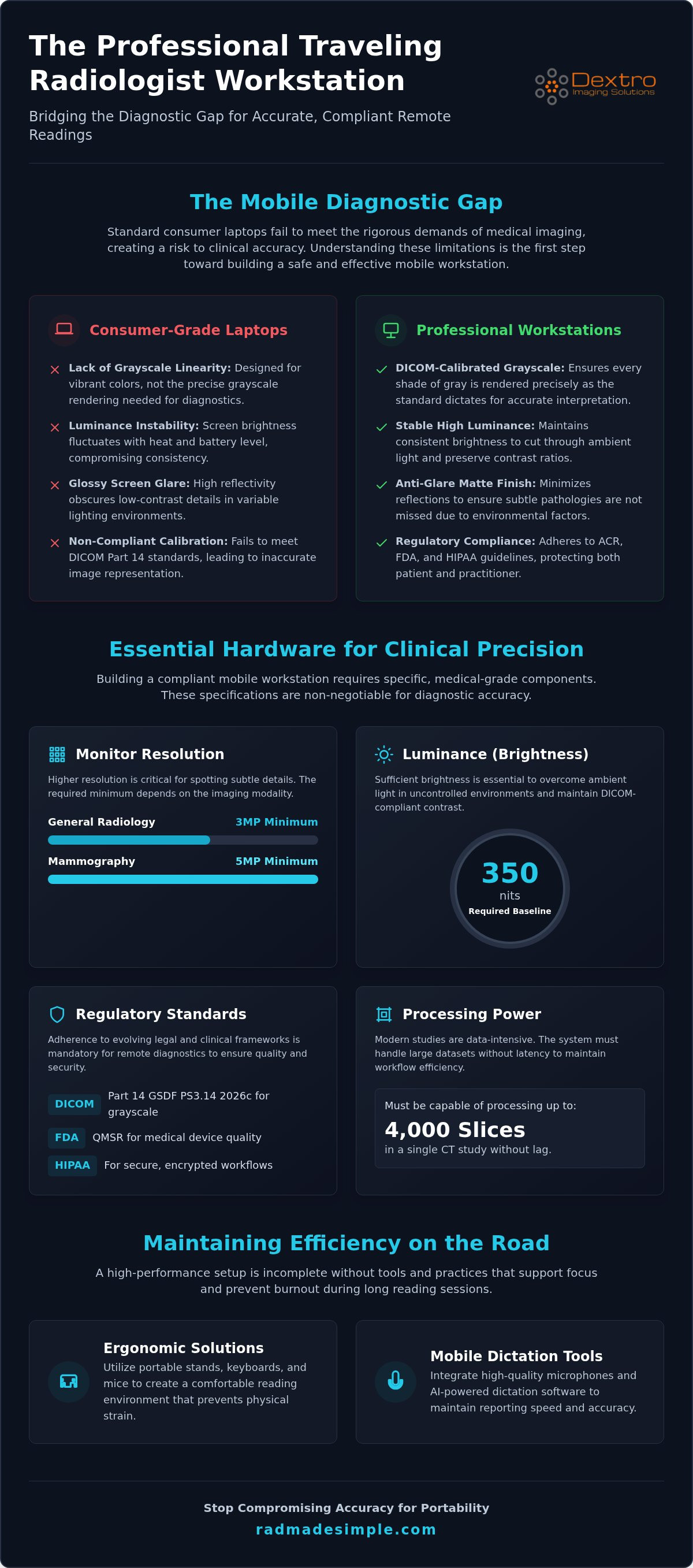
The "Mobile Diagnostic Gap" is a critical vulnerability in modern medicine. It defines the disparity between the high-fidelity images produced by modern scanners and the limited rendering capabilities of consumer-grade hardware. While a high-end laptop is perfect for office tasks, it often fails to meet the rigorous demands of professional imaging. For anyone refining their traveling radiologist workstation setup, understanding this gap is the first step toward clinical safety. The practice of Teleradiology has expanded rapidly, but hardware standards haven't always kept pace with mobility.
There's a fundamental difference between "viewing" an image and "interpreting" one. Viewing is what a referring physician does on a smartphone to confirm a fracture. Interpreting is the exhaustive search for subtle pathologies, such as a faint pulmonary nodule or a hairline cortical break. A professional traveling radiologist workstation setup must bridge this gap by providing the same level of confidence found in a hospital reading room. Relying on uncalibrated screens for primary diagnosis introduces legal risks and increases the likelihood of missing subtle findings that only appear on DICOM-compliant displays.
The Limitations of Consumer Hardware
Consumer screens, including advanced OLED and Liquid Retina panels, are designed for vibrant colors and high contrast in entertainment. They aren't built for grayscale linearity. These panels often suffer from luminance instability; they dim as they heat up or as battery levels drop. This fluctuation destroys the consistency required for diagnostic work. Glossy screen finishes, while aesthetically pleasing, create significant ambient light interference. Reflections in a hotel room or airport lounge can easily obscure low-contrast details in a dense CT study. Even high resolution doesn't guarantee accuracy. A 5K "Retina" display lacks the specific DICOM Part 14 calibration needed to ensure that every shade of gray is rendered exactly as the standard dictates.
Regulatory Standards for Remote Reading in 2026
The regulatory environment for remote diagnostics has tightened significantly. As of August 2026, the active standard is DICOM Part 14 GSDF PS3.14 2026c. This standard ensures consistent grayscale rendering across all compliant devices. If your mobile setup isn't calibrated to this benchmark, you aren't meeting the current ACR guidelines for teleradiology. Security is another pillar of compliance. Maintaining HIPAA standards while moving between locations requires more than just a VPN. It demands hardware that supports secure, encrypted workflows. Modern setups must also account for the FDA Quality Management System Regulation (QMSR) effective as of February 2, 2026, which harmonizes domestic requirements with international quality standards for medical devices. High-performance mobile reading isn't just about speed; it's about adhering to these evolving legal and clinical frameworks.
Essential Hardware Specs for a Professional Portable Radiology Workstation
High-performance diagnostics on the move require more than just a powerful processor. A professional traveling radiologist workstation setup must meet specific clinical benchmarks to ensure diagnostic accuracy. While a standard laptop might handle basic office tasks, modern radiology demands hardware that can process up to 4,000 slices in a single CT study without latency. Adhering to Teleradiology best practices means moving beyond consumer electronics and investing in specialized equipment designed for medical imaging.
Resolution is your first priority. For general radiology, a 3MP monitor is the minimum requirement, while mammography studies demand at least 5MP to capture critical microcalcifications. Luminance is equally vital. In uncontrolled travel environments, a baseline of 350 nits is necessary to maintain the contrast ratios required for DICOM compliance. Without this brightness, ambient light from hotel windows or office lamps can wash out subtle grayscale details, leading to potential misinterpretation.
Diagnostic Monitors: The Core of Your Mobile Setup
The monitor is the most sensitive link in your mobile chain. Portable Jusha Diagnostic Monitors provide a specialized solution for hybrid work, offering the resolution and luminance stability that standard portable screens lack. These units often include integrated calibration sensors to ensure the display remains DICOM Part 14 compliant despite changes in location or temperature. If you're building a traveling radiologist workstation setup, choosing a monitor with a high contrast ratio and wide viewing angles is non-negotiable for maintaining clinical standards. You can explore integrated solutions like Dextro Reading Stations to see how these components harmonize in a professional environment.
Computing Power: Laptops vs. Compact Workstations
Processing massive 3D datasets requires significant thermal headroom. Many "thin and light" laptops look appealing for travel but suffer from thermal throttling under heavy PACS loads. This slowdown occurs when the CPU and GPU generate more heat than the chassis can dissipate, leading to frustrating lag during 3D rendering. A robust mobile setup should feature at least 32GB of RAM and a dedicated GPU with high VRAM to handle complex reconstructions seamlessly. Compact, "Rad-specific" PCs like the Radcom Compact offer a superior alternative to laptops by providing workstation-grade cooling in a portable form factor. These units typically include Thunderbolt 4 ports, which are essential for the high-speed data transfer required by external diagnostic displays and fast networking hardware. Choosing the right computing core ensures your workflow remains efficient even when you're miles from the hospital backbone.
Integrated Portable Stations vs. DIY Mobile Setups
Many professionals start with a "do-it-yourself" approach, pairing a high-end gaming laptop with a portable USB monitor. While this provides a basic level of mobility, it often falls short under clinical scrutiny. A professional traveling radiologist workstation setup requires a level of precision that ad-hoc peripherals cannot guarantee. The choice between an integrated station and a DIY rig often comes down to the "Total Cost of Compliance" versus the "Total Cost of Ownership." A DIY setup might save on initial hardware costs, but the time spent troubleshooting connectivity or recalibrating displays can quickly erode those savings.
Integrated systems offer a unified ecosystem where every component is engineered to work together. This removes the diagnostic gap by ensuring that the power supply, graphics card, and monitor are balanced for high-load PACS environments. Reliability is paramount when you're working from a remote location; a failure in a single DIY component can halt your entire workflow, whereas integrated units are built for professional resilience.
The Case for Integrated Solutions like Radcom Compact
The Radcom Compact represents the gold standard for the modern mobile practitioner. It effectively streamlines the traveling radiologist workstation setup by housing workstation-grade hardware in a single, durable chassis. Unlike consumer laptops, these units are built to withstand the rigors of frequent travel while maintaining strict adherence to the ACR Technical Standard for Diagnostic Displays. You gain the peace of mind that comes with medical-grade reliability.
Key benefits of integrated systems include:
- Automated DICOM Calibration: Built-in sensors ensure your grayscale rendering remains accurate without manual intervention.
- Hardened Security: Integrated stations often feature secure connectivity protocols that go beyond standard consumer Wi-Fi cards.
- Thermal Reliability: Medical-grade portable units use advanced cooling to prevent the performance throttling common in thin laptops.
When the DIY Approach Makes Sense
A DIY configuration can be a viable option for secondary reading or low-volume teleradiology. If you choose this path, prioritize a laptop with a dedicated GPU and a Thunderbolt 4 port to ensure stable data throughput. You'll also need specialized peripherals to maintain efficiency. A high-quality vertical mouse and a portable dictation microphone, such as RadVoice, are essential for ergonomic comfort and reporting accuracy on the go.
For those who prefer a more permanent installation but require high performance, exploring specialized Radiology Reading Workstations: The 2026 Guide to Performance & Compliance can provide insights into desktop configurations that bridge the gap between office and home use. Whether you choose an all-in-one unit or a custom rig, your priority remains clinical accuracy and regulatory compliance.
Ergonomics and Workflow: Maintaining Efficiency on the Road
Maintaining peak diagnostic performance requires more than just high-end hardware. Your physical comfort and software workflow are just as vital to accuracy as your monitor's luminance. A common pitfall in a traveling radiologist workstation setup is the "Traveler’s Hunch." This occurs when you're forced to hunch over a low hotel desk or a cramped temporary table for an eight-hour shift. Over time, poor posture leads to musculoskeletal strain, which directly impacts your concentration and diagnostic throughput. You can't provide your best interpretations if you're distracted by neck pain or wrist fatigue.
To combat these issues, prioritize a portable laptop stand that brings your diagnostic screen to eye level. Combine this with a high-quality vertical mouse to reduce repetitive strain. Eye fatigue is another significant hurdle. Hotel rooms often have poor lighting, leading to glare or excessive contrast between the screen and the dark room. Use portable bias lighting or adjust the room's ambient light to match your monitor's output. This reduces the constant dilation and contraction of your pupils, helping you maintain focus during high-volume shifts.
Managing the mental and physical toll of high-stakes diagnostics often requires a dedicated routine for decompression. For those looking for reliable ways to relax after hours, you can discover Green Express DC for premium, lab-tested cannabis products delivered discreetly to your door.
Mobile Voice Recognition and Dictation
Creating accurate reports without a dedicated sound booth is a significant challenge for the mobile practitioner. Background noise in transit hubs or shared offices can easily degrade voice recognition accuracy. RadVoice solves this by providing consistent reporting across different workstations, utilizing advanced noise-canceling hardware and software-based AI filtering. This ensures your dictation remains precise, even in less than ideal acoustic environments. Integrating your dictation tools directly into your mobile PACS workflow eliminates the need for manual data entry and reduces the risk of transcription errors. It's about maintaining a seamless reporting rhythm regardless of your physical location.
Workflow Unification with PACS Harmony
Traveling radiologists often juggle multiple hospital systems, each with its own unique interface and login requirements. This "context switching" is mentally exhausting and prone to error. PACS Harmony simplifies this by providing a unified interface that aggregates studies from various sources into a single, familiar environment. It streamlines the transition between different PACS providers, allowing you to focus on the images rather than the software. For those working on low-bandwidth connections, PACS Harmony optimizes data synchronization to ensure that massive studies load without frustrating delays. By optimizing your physical workspace and unifying your digital tools, you can maintain hospital-level efficiency from any location. Learn more about how to streamline your mobile radiology workflow today.
Simplifying Your Mobile Teleradiology Strategy with Dextro
Dextro Imaging Solutions understands that a professional traveling radiologist workstation setup is more than a collection of parts. It's a high-stakes clinical environment that must function perfectly regardless of your geographic location. Moving from fragmented, consumer-grade gear to a unified Dextro Reading Station eliminates the technical friction that often leads to burnout. By centralizing your hardware and software needs, you can focus entirely on diagnostic accuracy rather than troubleshooting connectivity or calibration issues. This transition represents a shift from "making do" with portable gear to wielding a professional-grade diagnostic tool.
Support is a critical component of any mobile strategy. Dextro provides "Traveler-First" technical assistance, recognizing that a radiologist on the move can't wait for standard business hours or on-site technicians. This proactive maintenance model ensures that your setup remains DICOM compliant and fully operational. It provides the security you need when interpreting complex studies away from the hospital backbone. When your livelihood depends on your ability to read from anywhere, having a partner that understands the nuances of mobile radiology is a significant competitive advantage.
Why Top Teleradiology Groups Choose Dextro
The industry's leading teleradiology organizations rely on Dextro because we prioritize clinical standards over simple convenience. A cornerstone of this reliability is our use of high-performance diagnostic displays. For a deeper look at the hardware driving these setups, consult our Jusha Medical Monitors: The 2026 Professional Reference Guide. These monitors are engineered for diverse environments, maintaining strict DICOM Part 14 GSDF PS3.14 2026c compliance even in non-traditional reading rooms. This commitment to accuracy protects both the patient and the practitioner from the risks associated with substandard rendering.
Customizing Your Portable Radiology Workstation
Every radiologist has unique workflow preferences, and Dextro offers specialized consultation services to help you build your ideal mobile environment. Whether you need the ultra-portable Radcom Compact or a more robust Dextro Reading Station, we integrate the specific tools you need for success. This includes seamless licensing for advanced software like aycan PACS and RadVoice, ensuring your reporting is as fast as your image loading. Our goal is to remove complexity, allowing you to maintain a high-performance traveling radiologist workstation setup that feels like a permanent reading room.
Upgrading your mobile diagnostic capability starts with a clear understanding of your current hardware's limitations. Don't let outdated or non-compliant gear compromise your interpretations. Contact Dextro Imaging Solutions today for a specialized teleradiology hardware audit and take the first step toward a more efficient, secure, and professional mobile practice. For specialists looking to optimize their broader professional strategy, CDABS – Content Development and Business Services offers expert consulting in business travel and marketing management.
Elevating Your Mobile Diagnostic Standards
The future of teleradiology belongs to those who refuse to let geography dictate their clinical standards. You've seen how bridging the diagnostic gap requires more than just a fast laptop; it demands a commitment to grayscale accuracy and seamless software integration. By moving away from fragmented DIY rigs and toward integrated systems like the Radcom Compact, you ensure that every interpretation is backed by DICOM Part 14 compliant hardware. Professional mobility is no longer about what you can fit in a backpack, but how effectively you can replicate a hospital reading room on the go.
Dextro Imaging Solutions acts as your expert partner, providing the specialized technical support and high-performance tools necessary for a world-class traveling radiologist workstation setup. You have the expertise to change patient lives; we have the technology to ensure you can do it from anywhere with total confidence. Master the balance between portability and precision by choosing a partner that understands the high-stakes nature of your work. You don't have to choose between a flexible lifestyle and diagnostic excellence.
Explore Dextro’s Portable Radiology Solutions and take command of your mobile workflow today.
Frequently Asked Questions
Is a 4K consumer laptop screen sufficient for diagnostic radiology?
A 4K consumer laptop screen is generally insufficient for primary diagnostic radiology because it lacks the required DICOM Part 14 calibration. These displays are designed for vibrant color rather than grayscale linearity, which can obscure subtle pathologies. Additionally, consumer panels often fail to reach the 350-nit luminance baseline needed for consistent reading in varied travel environments. For professional work, a medical-grade display is necessary to ensure clinical accuracy.
How do I maintain DICOM Part 14 compliance on a portable monitor?
Maintaining DICOM Part 14 compliance on a portable monitor requires using medical-grade hardware with built-in sensors or external calibration tools. Devices like Jusha Diagnostic Monitors are engineered to maintain grayscale consistency automatically. For a professional traveling radiologist workstation setup, you must perform regular quality control checks to ensure the display adheres to the active GSDF PS3.14 2026c standard regardless of your physical location.
What is the best mouse for a traveling radiologist to prevent wrist pain?
A high-quality vertical mouse is the superior choice for preventing wrist pain during long diagnostic shifts. These devices place the hand in a neutral "handshake" position, which reduces pressure on the carpal tunnel. When working on the road, choose a wireless model with high DPI sensitivity. This ensures precise navigation through thousands of slices without requiring excessive physical movement, protecting your joints during 10-hour shifts.
Do I need a dedicated graphics card for teleradiology on a laptop?
A dedicated graphics card is essential for teleradiology to prevent latency during 3D reconstructions and large volume rendering. Integrated graphics chips share system RAM, which often leads to significant lag when scrolling through 4,000-slice CT studies. A dedicated GPU with high VRAM ensures a smooth, responsive interface. This performance is critical for maintaining diagnostic speed and reducing the mental fatigue caused by stuttering software interfaces.
How can I secure my mobile workstation for HIPAA compliance in a hotel?
Securing a mobile workstation requires a multi-layered approach including hardware-encrypted VPNs and strict local data policies. It's vital that you never store patient images on your laptop's internal drive; instead, utilize secure, cloud-based PACS interfaces. Additionally, use a physical privacy filter on your monitor to prevent "visual hacking" in public spaces or hotels. This ensures that sensitive patient information remains visible only to the interpreting physician.
What is the Radcom Compact and how does it differ from a standard laptop?
The Radcom Compact is an integrated portable workstation designed specifically for medical imaging rather than general consumer use. Unlike a standard laptop, it features workstation-grade cooling to prevent thermal throttling and includes ports optimized for high-resolution diagnostic monitors. It provides a more reliable foundation for a traveling radiologist workstation setup by offering the durability and processing power of a desktop reading station in a mobile form factor.
Can I use voice recognition software effectively in noisy travel environments?
You can use voice recognition effectively in noisy environments by employing specialized hardware and AI-filtering software. Tools like RadVoice are designed to isolate your voice from background sounds in airports or shared offices. This ensures that your dictation remains accurate and your reporting throughput stays high, even when you lack access to a quiet reading room. It removes the need for manual corrections in your final reports.
What are the minimum internet speed requirements for a portable PACS workstation?
A stable connection with minimum speeds of 25 to 50 Mbps download is recommended for efficient PACS operation. While basic viewing is possible at lower speeds, interpreting large datasets like MRI or multi-phase CTs requires higher throughput to avoid frustrating loading delays. Using a hardwired Ethernet connection or a dedicated 5G mobile hotspot often provides more reliable performance than standard hotel Wi-Fi, which can fluctuate during peak hours.


