

By 2025, 95% of healthcare providers were predicted to have moved over half their applications to the cloud, yet the final leap to cloud-native imaging remains a high-stakes technical hurdle. You've likely spent years refining your current workflow, only to face legacy end-of-life support and the pressure to modernize. Mapping out a Philips Vue PACS migration path is no longer just about software updates; it's about transitioning to the HealthSuite Imaging ecosystem on AWS while securing your massive DICOM archives. We understand that the fear of downtime and radiologist resistance to new interfaces can stall even the most necessary upgrades.
This guide provides a definitive roadmap to master the technical and operational shift to cloud-native platforms without disrupting your diagnostic output. You'll learn how to navigate a phased transition that ensures DICOM Part 14 compliance and integrates high-performance hardware like Jusha diagnostic monitors. We'll explore how PACS Harmony can bridge the gap between legacy systems and next-generation AI tools. This ensures your facility meets 2026 regulatory standards with precision and minimal friction, protecting your productivity as you move toward a more agile, modern infrastructure.
Key Takeaways
- Understand the technical transition from legacy on-premises systems to the cloud-native HealthSuite Imaging platform hosted on AWS.
- Identify the hardware upgrades required for AI-enabled workflows, specifically why Jusha diagnostic monitors are essential for maintaining DICOM Part 14 compliance.
- Master a phased Philips Vue PACS migration path using PACS Harmony to bridge disparate interfaces and prevent workflow disruption during the shift.
- Navigate the 2026 regulatory landscape, including mandatory AES-256 encryption for data at rest and new ADA accessibility standards for diagnostic equipment.
- Establish network latency and data integrity protocols to ensure high-speed, secure remote reading without compromising diagnostic accuracy.
The Evolution of Philips Imaging: From IntelliSpace to HealthSuite
The digital backbone of radiology, known as a Picture archiving and communication system (PACS), has reached a technological crossroads. For years, Philips IntelliSpace served as the industry standard, providing robust image management for high-volume environments. However, the modern demand for distributed reading and AI integration has rendered legacy architectures insufficient. Most organizations now face a definitive Philips Vue PACS migration path as they transition toward unified, cloud-ready architectures. This evolution isn't merely a software patch; it's a structural reimagining of how clinical data flows through an enterprise.
Understanding the Legacy IntelliSpace End-of-Life
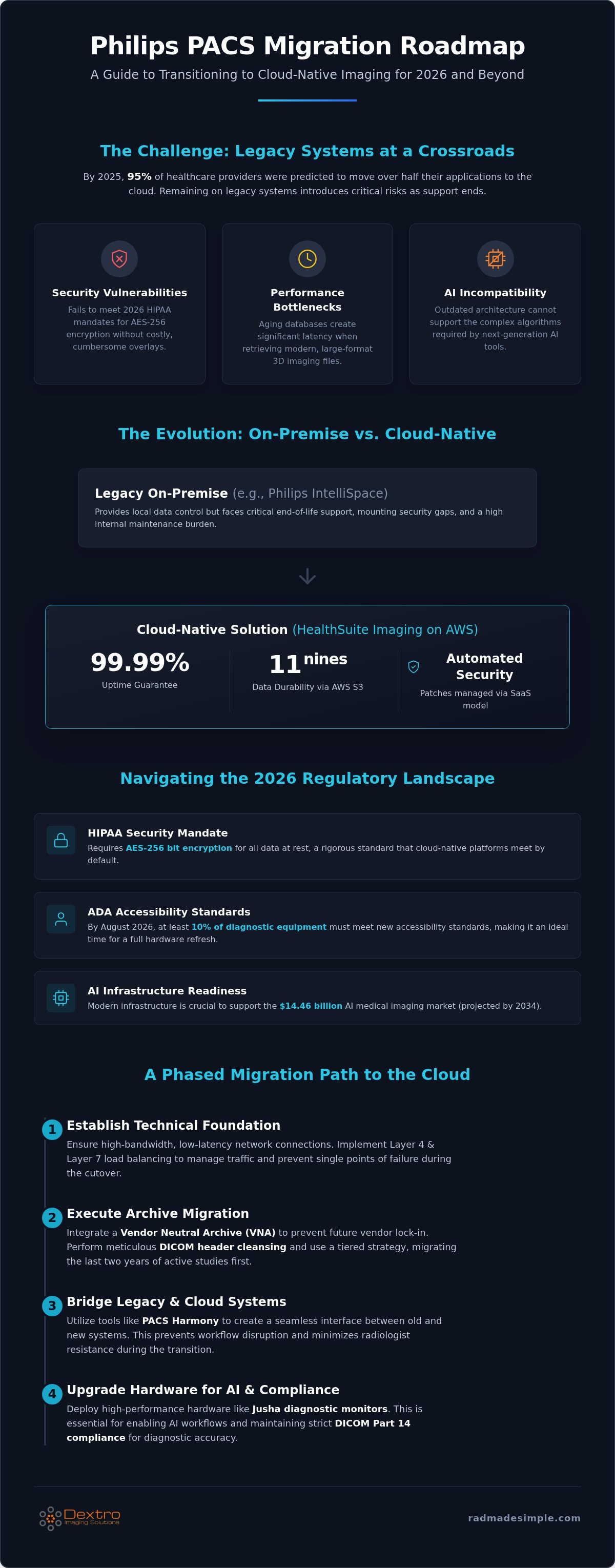
Legacy software modules are approaching final support dates, making the status quo a liability. Maintaining these systems introduces significant operational risks. Aging databases often struggle with the massive file sizes of modern 3D imaging, which leads to noticeable latency during study retrieval. Security remains the most pressing concern. As of 2026, HIPAA mandates AES-256 bit encryption for data at rest. Many legacy systems lack the native infrastructure to meet these rigorous standards without costly, cumbersome third-party overlays. Transitioning away from these end-of-life systems is the only way to ensure both patient data security and diagnostic efficiency.
Vue PACS vs. HealthSuite Imaging: Choosing Your Destination
Facilities must decide between the on-premise stability of Vue PACS and the cloud-native agility of HealthSuite Imaging. Vue PACS offers an enterprise-grade solution for those requiring local control or hybrid configurations. In contrast, HealthSuite Imaging, hosted on Amazon Web Services (AWS), represents an AI-first evolution. It delivers a 99.99% uptime guarantee and manages security patches automatically via a SaaS model. HealthSuite Imaging also offers 99.999999999% data durability through AWS S3 technology, a level of protection nearly impossible to replicate on-site. This shift removes the burden of server maintenance from internal IT teams, allowing them to focus on clinical optimization.
2026 is a pivotal year for this transition. The AI medical imaging market is projected to reach $14.46 billion by 2034, and your infrastructure must be ready to support these complex algorithms. This makes 2026 the critical window for evaluating radiology PACS pricing and total cost of ownership. Upgrading now ensures your facility can leverage high-performance AI tools without being throttled by outdated hardware or software limitations. By August 2026, at least 10% of diagnostic equipment must also meet new ADA accessibility standards, making it the perfect time to modernize your entire reading environment. Following a clear Philips Vue PACS migration path allows you to integrate these regulatory requirements seamlessly into your broader technological roadmap.
Technical Requirements for a Successful Migration Path
A successful Philips Vue PACS migration path depends on a rigorous technical foundation. Unlike on-premises systems, cloud-native platforms like HealthSuite Imaging rely heavily on network performance. By 2026, radiologists expect near-instantaneous image loading, even for large datasets. This requires dedicated high-bandwidth connections and minimal latency to ensure the diagnostic workflow remains fluid. Load balancing at both Layer 4 and Layer 7 is critical during the cutover phase. It prevents single points of failure and manages traffic between legacy servers and the new cloud environment. Integrating a Vendor Neutral Archive (VNA) at this stage is a strategic move. It separates the storage layer from the application layer. This prevents future vendor lock-in and simplifies subsequent upgrades. Facilities that prioritize these technical benchmarks often experience fewer post-migration support tickets than those that rush the transition.
Archive Migration and DICOM Cleansing
Migrating decades of imaging data requires meticulous DICOM header cleansing. Metadata often becomes inconsistent across disparate legacy databases over time. You must standardize these tags before they reach the cloud to prevent search errors. We recommend a tiered strategy. Prioritize the migration of active studies from the last two years. Move long-term archives in the background to preserve bandwidth. Post-migration validation is mandatory. It ensures that every image remains bit-for-bit identical to the original. This process also verifies that all DICOM Part 14 standards are maintained for diagnostic accuracy on high-end displays.
Interoperability Standards: HL7 and FHIR in 2026
Seamless communication between the PACS and the hospital RIS is non-negotiable. In 2026, the industry has shifted toward the FHIR standard. This is essential for integrating modern AI-reporting tools that require real-time data exchange. Managing patient identity is another technical hurdle within the Philips Vue PACS migration path. You must ensure that patient IDs remain synchronized across migrated Philips instances to avoid duplicate records. To streamline this complex integration, many facilities use PACS Harmony to unify disparate interfaces and maintain a single source of truth. This approach ensures that your clinical data remains accessible and accurate; regardless of which underlying database is active during the transition.
The Hardware Gap: Upgrading Workstations for AI-Enabled PACS
Many organizations focus exclusively on server-side architecture during a Philips Vue PACS migration path, yet the diagnostic endpoint is where clinical accuracy is realized. Cloud-native systems like HealthSuite Imaging offload the storage burden to AWS, but they simultaneously intensify the processing demands on local hardware. As AI moves from proof-of-concept to an operational tool in 2026, the workstation must act as a high-performance engine for real-time triage and automated measurements. Transitioning to the cloud doesn't imply a move to thin clients; rather, it necessitates local endpoints capable of rendering complex 3D datasets and AI overlays without latency.
The processing demands for 2026 AI-driven radiology reporting are substantial. Industry guidance suggests that workstations should utilize high-end GPUs, such as the NVIDIA RTX PRO 6000 with 96GB of ECC VRAM, to process the large datasets required by modern algorithms. Matching your monitor resolution to the advanced visualization features of Vue PACS is equally critical. High-resolution displays allow radiologists to utilize the full clinical potential of the software's native toolsets. Modernizing with specialized radiology reading workstations ensures that your facility can handle these intensified workloads while maintaining peak diagnostic speed.
Diagnostic Display Compliance in Cloud Environments
Maintaining diagnostic standards becomes more complex in distributed cloud environments. It's vital to ensure Jusha medical monitors maintain DICOM Part 14 calibration, especially in remote or home-office setups. Resolution requirements for CT, MRI, and X-ray within the HealthSuite ecosystem are strict. High luminance levels are necessary because they directly impact the effectiveness of AI-assisted lesion detection. A monitor with insufficient brightness can mask subtle findings that the AI has flagged, creating a dangerous disconnect between the software's capabilities and the radiologist's visual confirmation.
Portable Workstations for Distributed Radiology
The shift to teleradiology is a core component of the modern Philips Vue PACS migration path. Supporting a distributed workforce requires hardware that doesn't sacrifice accuracy for mobility. A professional traveling radiologist workstation setup must include calibrated displays and sufficient GPU power to run AI tools remotely. Security remains paramount; local hardware must utilize AES-256 bit encryption and secure TLS protocols when accessing cloud-native archives. This ensures that every remote diagnostic session remains as secure and reliable as one conducted within the hospital walls.
Phased Migration Strategy and Risk Mitigation
A successful transition to a cloud-native environment is a marathon, not a sprint. Establishing a clear Philips Vue PACS migration path involves five distinct phases designed to protect clinical continuity. This structured approach prevents the "big bang" failure common in rushed deployments. By breaking the process into manageable milestones, IT teams can address technical friction points before they impact patient care. This strategy ensures that diagnostic accuracy remains the priority while the underlying architecture undergoes a complete modernization.
- Phase 1: Baseline audit of current legacy hardware and software versions to identify compatibility gaps.
- Phase 2: Implementing a unified interface like PACS Harmony to bridge systems and provide a consistent user experience.
- Phase 3: Pilot migration of a single modality, such as Ultrasound, to test cloud latency and data integrity protocols.
- Phase 4: Full-scale archive migration combined with intensive staff retraining on the new HealthSuite interface.
- Phase 5: Post-migration optimization, including hardware calibration and workflow fine-tuning for 2026 compliance.
Bridging the Gap with PACS Harmony
The transition period often forces radiologists to toggle between legacy IntelliSpace instances and new cloud-native viewers. This creates significant cognitive load and increases the risk of diagnostic fatigue. PACS Harmony serves as a critical bridge during your Philips Vue PACS migration path by unifying these disparate interfaces into a single, streamlined view. It allows your team to maintain workflow continuity even as backend databases are being moved to AWS. To further enhance productivity, we recommend integrating voice recognition for radiologists early in the migration process. This ensures that reporting speed keeps pace with the faster image delivery of cloud-native systems.
Training and Adoption: The Human Factor
Technical success doesn't guarantee clinical adoption. Radiologists often resist new systems because of changes to their familiar hanging protocols. Customizing these protocols within the new HealthSuite environment is essential for gaining user buy-in. We recommend establishing dedicated feedback loops for IT support during the first 30 days of the full-scale move. This proactive communication identifies small frustrations before they become systemic roadblocks. When users feel supported during the shift from IntelliSpace to Vue, the organization can realize the full benefits of cloud-native imaging much faster. Simplify your multi-system workflow today to ensure your team remains focused on the patient rather than the platform.
Optimizing Your New Environment for 2026 Compliance
Finalizing the Philips Vue PACS migration path requires a shift from deployment to long-term optimization. It's not enough to be live; you must ensure the environment meets the rigorous 2026 standards. Start by conducting a 2026 radiology equipment compliance checklist. This ensures your new cloud-native ecosystem adheres to the latest ADA and HIPAA mandates. Leveraging tools like RadVoice within the new PACS environment can significantly accelerate reporting turnaround times. This allows your team to capitalize on the speed of HealthSuite Imaging. Establishing long-term hardware maintenance contracts is also vital for ensuring consistent diagnostic uptime and protecting your capital investment.
Continuous Calibration and QA
Remote QA monitoring is essential for distributed reading teams. You don't have to manually check every station. Instead, use automated systems to document compliance for hospital accreditation audits. Accreditation bodies now require granular proof of monitor performance. Automated logs from your display network provide this evidence without manual intervention. This documentation is a cornerstone of professional liability protection. Jusha diagnostic monitors play a central role here. Their built-in sensors maintain accuracy by constantly adjusting luminance and DICOM Part 14 calibration. This proactive approach eliminates the risk of human error during the QA process. It provides a secure, reliable environment for every radiologist, regardless of their physical location.
Future-Proofing with Scalable Hardware
The Philips Vue PACS migration path ends with the decommissioning of legacy servers. Decommissioning is the final symbolic and technical step. It's not just about turning off the power; you must follow strict data destruction protocols to remain HIPAA compliant. Once the old hardware is removed, you can reallocate those physical resources or reduce your data center footprint entirely. When selecting new workstations, prioritize modular hardware design over all-in-one consumer solutions. Modular systems allow you to upgrade GPUs or memory without replacing the entire unit. This is critical for scaling with future AI algorithm updates that will undoubtedly demand more processing power. Choosing Dextro workstations ensures your facility remains at the forefront of technological shifts. This protects your investment and empowers your clinicians to deliver high-precision care for years to come.
Securing Your Diagnostic Future in the Cloud
Transitioning to a cloud-native environment is a total modernization of your clinical workflow. A successful Philips Vue PACS migration path requires careful planning, from metadata cleansing to upgrading local hardware for AI workloads. By following a phased approach and leveraging solutions like PACS Harmony, you can minimize downtime and ensure 2026 compliance. Your infrastructure must be ready to support the next generation of AI-driven diagnostics without sacrificing speed or accuracy.
Success depends on a robust diagnostic foundation. Jusha Diagnostic Monitors ensure you maintain DICOM Part 14 compliance, while Dextro workstations provide the necessary local processing power for AI-heavy workloads found in HealthSuite Imaging. Upgrade your diagnostic foundation for Philips HealthSuite with Dextro Imaging Solutions to stay ahead of the curve. You've mapped the route; now it's time to build the engine that will power your facility for years to come.
Frequently Asked Questions
What is the primary difference between Philips Vue PACS and HealthSuite Imaging?
HealthSuite Imaging is a cloud-native SaaS platform hosted on AWS, while Philips Vue PACS is an enterprise-grade on-premises or hybrid solution. HealthSuite offers 99.99% uptime and 99.999999999% data durability through AWS S3 technology. Updates and security patches are managed automatically by Philips, removing the maintenance burden from IT teams. Vue PACS remains a powerful choice for facilities requiring local server control or specific hybrid configurations.
Can I migrate directly from Philips IntelliSpace to the cloud-native HealthSuite?
You can migrate directly to HealthSuite Imaging, although most facilities follow a phased Philips Vue PACS migration path to manage risk. A parallel migration strategy allows you to go live on the new cloud system for current studies while historical data moves in the background. This minimizes clinical disruption. It's essential to audit your legacy IntelliSpace database for metadata consistency before the move to prevent search errors in the cloud.
How do I ensure DICOM Part 14 compliance on home monitors during a migration?
Ensuring DICOM Part 14 compliance requires medical-grade hardware with integrated calibration tools. Jusha Diagnostic Monitors are specifically designed for this purpose, featuring built-in sensors that constantly adjust luminance and contrast. These monitors automate the quality assurance process for distributed reading teams, documenting compliance for hospital accreditation audits. Without specialized hardware, maintaining diagnostic accuracy in remote environments is difficult, as consumer-grade screens cannot sustain the necessary calibration levels.
What are the biggest risks during a PACS data migration?
The most significant risks include clinical downtime, loss of DICOM metadata, and network latency issues. If headers aren't properly cleansed during the move, patient records can become fragmented or unsearchable. In 2026, security is also a major risk factor. You must ensure that all data in transit uses Transport Layer Security (TLS) and that data at rest is protected with AES-256 bit encryption to meet mandatory HIPAA safeguards.
Do I need new hardware to run the AI tools in Philips' 2026 PACS update?
Yes, you typically need hardware upgrades to leverage the AI-enabled clinical workflows available in 2026. While the PACS software resides in the cloud, the intensive processing of AI algorithms often happens at the local endpoint. We recommend high-performance Dextro workstations equipped with NVIDIA RTX PRO 6000 GPUs. These units provide the 96GB of ECC VRAM required to handle complex datasets and real-time AI overlays without diagnostic lag.
How long does a typical enterprise PACS migration take?
A typical enterprise migration can take anywhere from six to eighteen months depending on archive volume. The initial setup and pilot phase usually occur within the first 90 days. However, migrating massive historical DICOM archives to the cloud is a bandwidth-intensive process that often runs in the background for several months. A phased Philips Vue PACS migration path helps manage this timeline by prioritizing active studies for immediate clinical use.
Is a hybrid PACS approach better than a full cloud migration for large hospitals?
A full cloud migration is often preferred for its scalability and lower upfront costs, but a hybrid approach offers a safety net for large hospitals. Hybrid models keep active studies on local servers to eliminate latency while using the cloud for long-term archiving and disaster recovery. However, with the 99.99% uptime guarantee of HealthSuite Imaging on AWS, many organizations are now moving toward pure cloud environments to simplify their infrastructure and operations.
How does PACS Harmony help during a multi-phase migration?
PACS Harmony acts as a simplifier by unifying disparate legacy and modern interfaces into a single diagnostic viewer. During a multi-phase migration, your radiologists might need to access studies from IntelliSpace, Vue, and HealthSuite simultaneously. This tool bridges that gap, allowing for a consistent workflow regardless of where the data is stored. It significantly reduces radiologist fatigue and prevents the productivity dips often associated with learning multiple new software interfaces at once.


