

What if the environment where you spend your most critical hours was engineered to actively protect your diagnostic focus rather than drain it? For many clinicians, a standard shift has become an endurance test against persistent neck strain, lower back pain, and the subtle onset of visual fatigue. It is time to treat radiologist workstation ergonomics as a foundational part of your medical toolkit rather than a luxury or an afterthought. This 2026 guide provides the blueprint for constructing a high-performance reading environment that eliminates physical friction and maximizes diagnostic accuracy. We will explore how a cohesive strategy pairing medical-grade hardware with frictionless software creates a future-proof setup that supports your expertise for every hour of your shift.
Key Takeaways
- Understand how radiologist workstation ergonomics acts as a critical intervention against the high rates of musculoskeletal disorders among diagnostic professionals.
- Learn to configure a physical foundation using medical-grade sit-stand desks and specialized seating that supports your posture throughout 10 hour shifts.
- Identify the technical requirements for monitor stacks, including why 3MP and 5MP Jusha displays are essential for modality-specific diagnostic accuracy.
- Reduce cognitive load and click fatigue by integrating AI-driven tools like RadVoice and unified software interfaces like PACS Harmony.
- Transition from a piecemeal hardware setup to a cohesive, future-proof reading environment designed for maximum workflow efficiency and diagnostic speed.
The Crisis of Radiologist Burnout and the Role of Ergonomics
Modern radiologist workstation ergonomics represents a multi-disciplinary approach that synchronizes physical health with clinical productivity. In the 2026 landscape, clinicians face an intense reality where rising scan volumes frequently exceed the physical limits of the human body. We no longer view "Radiologist Elbow" or carpal tunnel syndrome as minor inconveniences. These conditions are clear symptoms of a failed workstation ecosystem. The science of Human factors and ergonomics teaches us that when systems don't account for human biology, the results are costly. Poor setups lead to significant economic impacts, including increased absenteeism, staff turnover, and preventable diagnostic errors.
Musculoskeletal Disorders (MSDs) in Modern Radiology
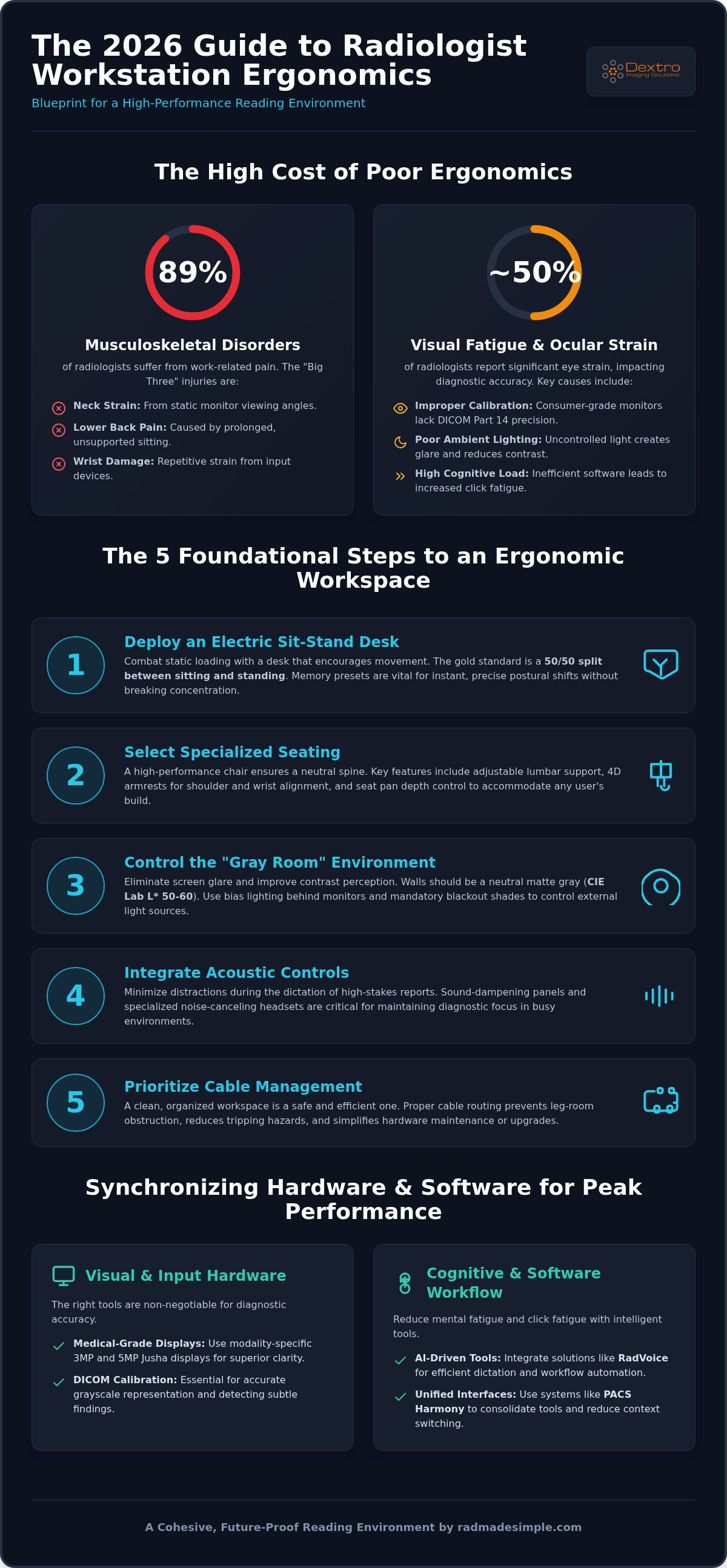
Recent studies indicate that nearly 89% of radiologists suffer from work-related musculoskeletal disorders. The "Big Three" injuries remain neck strain, lower back pain, and repetitive wrist damage. These issues often arise from static loading, where the body remains in a fixed position for hours. This lack of movement triggers chronic inflammation in the joints and soft tissues. To combat this, you need a workspace that encourages micro-breaks and frequent postural shifts without breaking your concentration. High-performance radiologist workstation ergonomics must facilitate these movements through adjustable hardware that responds to the user's needs.
Visual Fatigue and Diagnostic Accuracy
Maintaining diagnostic accuracy requires peak visual performance, yet nearly half of all radiologists report significant ocular strain. Consumer-grade monitors typically fail because they lack the precise DICOM Part 14 calibration required for medical imaging. When your eyes struggle to resolve subtle contrast differences, fatigue sets in quickly. This exhaustion directly impacts your ability to detect faint findings or small nodules. Digital Eye Strain in medical imaging is the physiological fatigue and loss of focus caused by prolonged interaction with high-luminance diagnostic displays that lack proper ambient light synchronization. Professional environments solve this by pairing medical-grade monitors with controlled lighting to preserve both the reader's health and the integrity of the diagnosis.
The Physical Foundation: Designing the Reading Room Environment
Establishing a superior environment for medical imaging requires more than just high-quality monitors. It demands a deliberate focus on radiologist workstation ergonomics through five foundational steps. When these elements are synchronized, they create a workspace that supports the clinician's physical health while removing the friction that often leads to diagnostic fatigue. By transforming the reading room into a purpose-built diagnostic suite, you protect your focus during high-volume shifts.
- Step 1: Deploy a medical-grade electric sit-stand desk. Memory presets are vital for ensuring instant, precise transitions between posture-perfect positions throughout the day.
- Step 2: Select an ergonomic chair featuring adjustable lumbar support, 4D armrests, and seat pan depth. This ensures the spine remains neutral regardless of the user's height or build.
- Step 3: Calibrate ambient lighting. Proper illumination levels are critical to eliminate screen glare and improve contrast perception on diagnostic displays.
- Step 4: Integrate acoustic controls. Using sound-dampening panels or specialized headsets helps minimize distractions during the dictation of high-stakes reports.
- Step 5: Prioritize cable management. Organized routing is a practical necessity that prevents leg-room obstruction and reduces potential safety hazards.
Optimizing Ambient Lighting and Wall Color
The "Gray Room" standard is essential for maintaining diagnostic integrity and reducing ocular fatigue. Walls should be painted a neutral matte gray, specifically within the CIE Lab L* 50-60 range. This specific shade prevents color cast and ensures that the monitor's brightness is the primary focus of your vision. We recommend using bias lighting placed behind monitors to provide a soft glow on the wall. This reduces the intensity of the contrast between the screen and the background without causing reflections on the glass. For teleradiologists or hospital staff in rooms with windows, blackout shades are mandatory to maintain consistent DICOM calibration as natural light shifts throughout the day.
The Sit-Stand Paradigm for Radiologists
Movement is the best defense against the static loading that causes chronic inflammation in the spine and joints. A 50/50 split between sitting and standing is the current gold standard for maintaining metabolic health during 10 hour shifts. When in a standing position, it's beneficial to use anti-fatigue mats and supportive footwear to cushion the lower extremities and reduce pressure on the feet. Dextro Reading Stations simplify this process by integrating desk height controls directly into the digital workflow. This level of physical integration ensures that radiologist workstation ergonomics stays dynamic, making postural transitions effortless and encouraging a more agile way of working.
Visual and Input Ergonomics: Monitors and Specialized Hardware
Achieving peak performance in medical imaging depends heavily on the interface between the clinician and the data. While the desk and chair provide the foundation, the monitor stack and input devices represent the primary tools of the trade. Proper radiologist workstation ergonomics requires a careful selection of resolution based on modality. For instance, 3MP monitors are typically sufficient for CT and MRI, but 5MP displays are the standard for digital mammography to ensure microcalcifications aren't missed. This technical precision prevents the eye from straining to resolve details that should be immediately apparent.
Positioning these displays is equally critical. You should place your primary diagnostic monitor directly in front of your field of vision to minimize repetitive neck rotation. Secondary displays, used for worklists or prior reports, should be angled slightly to maintain a comfortable "wraparound" feel. This arrangement, combined with strict DICOM Part 14 calibration, reduces the time spent "hunting" for findings by ensuring that grayscale transitions are consistent and predictable across the entire visual field.
Jusha Diagnostic Monitors: Accuracy Meets Comfort
High-luminance technology in Jusha medical monitors allows for a more comfortable reading environment by reducing the need for completely dark rooms. These displays feature built-in calibration sensors that automatically maintain brightness and contrast levels, ensuring every study looks the same across the entire department. Their narrow bezel design is specifically engineered for seamless multi-monitor configurations, which helps maintain focus during complex cross-sectional reviews without the distraction of thick black borders.
Input Device Customization for RSI Prevention
Efficient workflow often hinges on minimizing repetitive movements. While some suggest gaming mice, professional medical-grade devices offer superior durability and meet hospital cleaning standards. Mapping your most frequent PACS commands to programmable buttons can significantly reduce click fatigue. This shift from keyboard-heavy navigation to mouse-integrated controls streamlines the interpretation process.
- Vertical mice and trackballs are excellent options for reducing ulnar deviation and carpal tunnel pressure.
- Specialized 3D controllers allow for intuitive scrolling through large datasets with minimal wrist movement.
- Programmable keyboards can consolidate complex shortcuts into single keystrokes, protecting your fingers from overextension.
For high-resolution diagnostic displays, we recommend setting your mouse sensitivity to approximately 1200 DPI to balance precision with efficient screen travel. This adjustment ensures you can navigate across multiple 5MP monitors without excessive physical exertion, protecting your wrist from long-term strain while maintaining the accuracy needed for precise measurements.
Cognitive Ergonomics: Software Workflow and Mental Fatigue
While physical adjustments to desks and chairs are vital, true radiologist workstation ergonomics must also address the mental friction inherent in complex software environments. Cognitive ergonomics focuses on how information is presented and how much effort is required to process it. Click fatigue, a common byproduct of inefficient UI design, leads to rapid cognitive overload and decreased diagnostic accuracy. By implementing unified interfaces, you can prevent the mental exhaustion that stems from navigating disparate hospital systems. PACS Harmony acts as a central orchestrator, ensuring that the right study is on the right monitor at the precisely correct time, which effectively eliminates unnecessary context switching.
Voice Recognition as an Ergonomic Tool
Dictation technology has evolved into a primary ergonomic intervention. Using RadVoice allows you to dictate complex reports without ever taking your eyes off the diagnostic images. This "eyes-on-image" approach is critical for maintaining focus and detecting subtle pathologies. Modern AI-driven engines provide high-accuracy reporting that significantly reduces the need for manual corrections or re-typing. Beyond simple dictation, voice-activated PACS commands offer the ultimate hands-free upgrade. You can manipulate images, change window levels, or scroll through stacks using only your voice, which protects your hands from the repetitive strain of traditional mouse navigation.
Frictionless Workflow with PACS Harmony
A streamlined workflow is the best defense against reporting fatigue. Consolidating multiple worklists into a single, intelligent view reduces the physical and mental act of searching for cases. PACS Harmony optimizes hanging protocols to minimize the need for manual zooming or windowing, allowing the software to anticipate your specific reading style. Integrating voice recognition for radiologists directly into the PACS UI creates a unified desktop experience that removes technical friction. This level of integration ensures your mental energy doesn't go toward technical troubleshooting. To see how these tools can transform your practice, optimize your diagnostic workflow today.
Implementing the Future: The Dextro Integrated Solution
Many facilities attempt to address radiologist workstation ergonomics by purchasing high-end furniture in isolation. However, individual components often fail to deliver results without a cohesive system design. If your diagnostic monitor doesn't align with your desk height or your software creates unnecessary click fatigue, the physical benefits of a good chair are quickly negated. We focus on a unified approach that pairs high-performance hardware with optimized software to remove technical friction. This integration ensures that every element of your environment works toward the single goal of diagnostic excellence.
The long-term ROI of investing in a professional radiology reading workstation extends far beyond simple comfort. It's a strategic move that protects your most valuable asset: the clinician's focus and health. By reducing the physical toll of 10 hour shifts, you decrease the likelihood of burnout and diagnostic errors. This comprehensive strategy ensures your practice remains compliant with evolving medical standards while maximizing throughput and accuracy.
Dextro Reading Stations: Purpose-Built for Radiologists
The Dextro hardware ecosystem is engineered specifically for the unique demands of medical imaging. Unlike general office furniture, these stations offer customizable configurations tailored for high-intensity modalities like mammography, CT, and MRI. We integrate the Radcom Compact into our setups to provide secure, high-speed data connectivity, which is essential for remote or hybrid environments. This purpose-built design ensures that your hardware doesn't just sit in a room; it actively supports your workflow. Our systems are also designed to help facilities meet the new HHS and DOJ accessibility regulations effective July 8, 2026, ensuring your reading room is both inclusive and compliant.
Portable Solutions for the Teleradiologist
Maintaining diagnostic standards shouldn't be limited to the hospital basement. Portable Radiology Workstations allow you to replicate a high-performance experience in a compact footprint. For clinicians utilizing traveling radiologist workstation setups, the priority remains DICOM Part 14 compliance and ergonomic posture. These mobile solutions utilize Jusha Diagnostic Monitors and integrated software like aycan PACS to ensure you don't sacrifice accuracy for mobility. Whether you're in a home office or a temporary site, our portable stations provide the stability and precision required for high-stakes reporting. This transition from traditional, cumbersome methods to agile ways of working is the hallmark of a modern radiology practice.
Elevating Your Diagnostic Performance for 2026 and Beyond
Transforming your reading room into a high-performance environment is a strategic investment in both your health and diagnostic accuracy. We've explored how professional radiologist workstation ergonomics requires a seamless blend of physical support, medical-grade displays, and frictionless software. By moving away from piecemeal setups and toward integrated solutions, you eliminate the systemic causes of burnout while staying ahead of 2026 regulatory shifts. A truly optimized workspace doesn't just reduce pain; it empowers you to work with greater speed and precision.
Dextro Imaging Solutions provides the expertise and technology needed to simplify this transition. Our ecosystem features DICOM Part 14 Compliant Monitors for unparalleled visual precision and AI-Powered RadVoice Integration to remove reporting friction. With our Global Technical Support and Compliance Assistance, you can be confident that your setup meets the highest medical standards. We're here to ensure your high-stakes professional requirements are met with reliability and sophistication.
Ready to reclaim your focus and eliminate physical strain? Build Your Custom 2026 Ergonomic Workstation with Dextro Imaging Solutions and experience a more agile, productive way of working. Your future self, and your patients, will thank you for this commitment to excellence.
Frequently Asked Questions
What is the ideal distance between a radiologist and their diagnostic monitor?
The ideal viewing distance for most diagnostic setups is between 20 and 30 inches from the eyes to the screen surface. This range ensures that you can see the entire display area without excessive head movement while maintaining focus on subtle grayscale details. For larger 5MP displays, you might prefer the upper end of this range to reduce eye strain. Proper positioning is a core component of radiologist workstation ergonomics that prevents premature fatigue during long shifts.
Can I use a high-end gaming monitor for radiology if I calibrate it myself?
Consumer gaming monitors aren't suitable for diagnostic use because they lack the sustained luminance and DICOM Part 14 compliance required for medical imaging. While manual calibration helps, these screens don't have the internal sensors found in Jusha Diagnostic Monitors that maintain consistency over time. Using non-medical hardware risks missing subtle pathologies and failing to meet hospital safety standards. Professional workstations require hardware designed for high-stakes accuracy rather than entertainment.
How many monitors are recommended for an ergonomic radiology workstation?
Most professional setups utilize two or three high-resolution diagnostic monitors paired with a single administrative display for worklists and dictation. This configuration allows you to view current and prior studies side-by-side without overlapping windows. Using too many monitors can lead to excessive neck rotation, so it's vital to arrange them in a slight arc. Dextro Reading Stations are specifically engineered to support these multi-display configurations while maintaining a focused, ergonomic workspace.
What are the most common repetitive stress injuries for radiologists?
Radiologists frequently experience carpal tunnel syndrome and ulnar nerve entrapment due to repetitive mouse usage. Cervical strain and lower back pain are also highly prevalent, often stemming from poor posture and static loading during 10 hour shifts. These injuries are usually the result of a failed hardware ecosystem rather than individual habits. Addressing radiologist workstation ergonomics through adjustable seating and programmable input devices is the most effective way to prevent these chronic conditions.
How does ambient lighting affect diagnostic accuracy in the reading room?
Ambient lighting directly impacts your ability to perceive subtle contrast differences on a diagnostic screen. Excessive light causes glare and reflections, which can obscure small nodules or faint findings. Conversely, a completely dark room increases ocular fatigue because of the high contrast between the screen and the surrounding walls. The best approach involves using bias lighting behind the monitors and maintaining a dim, consistent environment to ensure your eyes remain comfortable and accurate.
Is a standing desk actually better for a radiologist's productivity?
A standing desk significantly improves productivity by encouraging movement and preventing the metabolic slowdown associated with prolonged sitting. Alternating between sitting and standing every 30 to 60 minutes helps maintain alertness and reduces the physical discomfort that leads to diagnostic errors. Dextro Reading Stations feature motorized controls with memory presets, making these transitions seamless. This flexibility allows you to stay in a "flow state" longer while protecting your long-term physical health.
What software tools can help reduce physical strain during reporting?
AI-driven voice recognition tools like RadVoice are essential for reducing the physical strain of manual typing and mouse clicks. By dictating reports and using voice commands for PACS navigation, you can keep your eyes on the images and your hands in a neutral position. Additionally, workflow orchestration tools like PACS Harmony minimize the mental and physical effort required to search for cases. These software solutions work alongside hardware to create a truly frictionless, ergonomic environment.


