

Did you know the medical imaging workstation market has reached a valuation of $8.72 billion in 2026, driven largely by the shift toward AI-enhanced workflows? Understanding the current radiology workstation price is no longer just about comparing monitor specs; it's about evaluating a multi-year investment in diagnostic accuracy. You're likely feeling the pressure to balance high-end DICOM compliance with a sustainable budget, all while trying to avoid the hidden costs of software licensing and hardware maintenance. It's a complex environment where the wrong choice can lead to workflow bottlenecks or clinical errors.
We recognize that navigating the technical requirements of medical-grade hardware and integrated software can feel overwhelming. You want a streamlined setup that empowers your team without surprising your finance department with unforeseen expenses. This guide provides a comprehensive breakdown of the total cost of ownership for professional workstations this year, from Jusha diagnostic monitors to integrated solutions like PACS Harmony. You'll gain a transparent view of hardware versus software expenses, a clear justification for high-end equipment, and a definitive checklist for a 2026-compliant reading room.
Key Takeaways
- Understand the technical distinctions between 2MP and 12MP monitors to ensure your diagnostic setup meets 2026 DICOM Part 14 calibration standards.
- Identify every variable that influences a radiology workstation price, moving beyond initial hardware costs to include long-term software licensing and maintenance.
- Evaluate the financial impact of shifting from legacy perpetual software licenses to modern SaaS models for PACS Harmony and voice recognition tools.
- Discover how to calculate the true total cost of ownership by accounting for hidden expenses like professional calibration and ergonomic workspace optimization.
- Learn how pre-configured bundles like Dextro Reading Stations simplify procurement by integrating high-performance hardware with seamless software connectivity.
What Defines a Radiology Workstation Price in 2026?
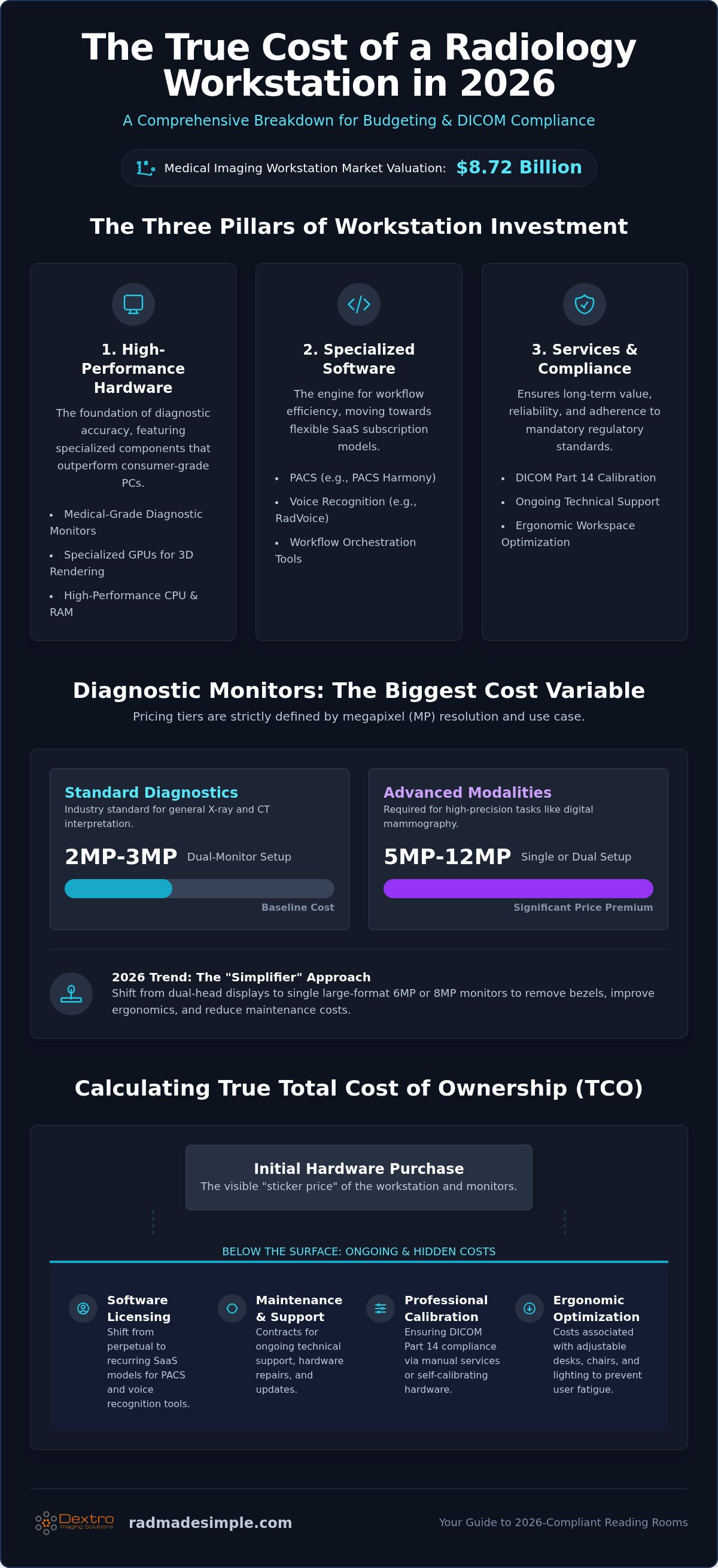
Evaluating a radiology workstation price in 2026 requires looking beyond the sticker price of a desktop tower. A professional workstation is not a single piece of hardware; it is a sophisticated triad of high-performance computing, specialized software, and an optimized ergonomic environment. This year, the industry has moved toward a model where diagnostic accuracy and workflow speed are the primary drivers of cost. Investing in a workstation means you are paying for the reliability of a system that must operate flawlessly in high-pressure, 24/7 clinical environments.
Consumer-grade pricing is entirely irrelevant for diagnostic-level accuracy. While a high-end gaming PC might share some specifications with a medical unit, it lacks the specialized GPUs and grayscale consistency required for clinical interpretation. A standard monitor cannot maintain the luminance levels or the pixel pitch necessary to spot subtle pathologies. In 2026, the core components of a compliant setup include a high-performance CPU with significant RAM, medical-grade displays, and secure interfaces for a Picture Archiving and Communication System (PACS). This year also marks a definitive shift toward integrated teleradiology setups, where remote reading stations must provide the same security and performance as on-site hospital units.
The Three Pillars of Workstation Investment
High-performance hardware forms the foundation of your investment. This includes diagnostic monitors, such as those from Jusha, which provide the exact megapixel resolution needed for specific modalities. You also need specialized GPUs capable of rendering complex 3D reconstructions without lag. Software represents the second pillar, encompassing licensing for PACS Harmony, RadVoice for dictation, and advanced workflow orchestration tools that automate routine tasks. Finally, professional services ensure your radiology workstation price includes long-term value. These services cover initial calibration, ongoing technical support, and the maintenance of strict compliance standards throughout the equipment's lifecycle.
Why 2026 Compliance Standards Affect Your Budget
Regulatory updates in 2026 have increased the cost of maintaining DICOM Part 14 compliance, especially in high-volume environments. Modern standards now favor self-calibrating hardware that reduces the need for manual intervention, though these units often carry a higher initial cost. As diagnostic volumes rise, the efficiency gained from automated QA tools becomes a significant budget saver over time. Medical imaging compliance equipment represents a non-negotiable cost factor because it ensures diagnostic accuracy remains consistent over the lifespan of the hardware. Investing in newer, self-calibrating displays helps you avoid the recurring expense and downtime associated with external manual calibration services.
Diagnostic Monitor Pricing: From 2MP to 12MP Solutions
The display system is often the most significant variable in a radiology workstation price. You aren't simply purchasing a screen; you're investing in a calibrated diagnostic tool that must maintain luminance and grayscale consistency over years of heavy use. In 2026, pricing tiers are strictly defined by megapixel (MP) resolution and specialized certifications. While a dual 3MP setup remains the industry standard for general X-ray and CT interpretation, advanced modalities like digital mammography require 5MP or 12MP solutions to meet ACR technical standards for displays. These high-resolution units carry a price premium due to the rigorous engineering required for such extreme precision.
A major trend in 2026 is the shift from dual-head monitors to large-format single screens. Using a single Jusha 6MP or 8MP monitor simplifies the physical workspace and removes the distracting bezel in the center of the visual field. This "simplifier" approach improves ergonomic flow and reduces the number of connection points, which can lower long-term maintenance costs. For specialists on the move, portable radiology workstations have emerged as a high-performance alternative. These mobile setups offer an impressive price-to-performance ratio for teleradiologists who require diagnostic-level accuracy outside of a traditional hospital reading room.
Resolution vs. Modality: Finding the Budget Sweet Spot
Choosing the right resolution is essential for balancing your budget with clinical requirements. A 3MP or 5MP setup is typically sufficient for MRI, CT, and general radiography. However, if your facility handles high-volume mammography, a 12MP multi-modality display is the gold standard. These premium units allow you to view multiple images side-by-side without losing the fine detail necessary for spotting microcalcifications. If you are unsure which resolution fits your current volume, it's helpful to review your modality mix before finalizing your hardware selection.
The Role of Jusha Diagnostic Monitors in 2026
Strategic procurement often leads clinical directors toward Jusha medical monitors due to their exceptional cost-efficiency compared to legacy brands. These displays include built-in front sensors that handle DICOM Part 14 calibration automatically. This feature significantly impacts the overall radiology workstation price by eliminating the need for expensive external calibration kits and manual technician visits. Additionally, the longevity of modern LED backlights ensures these monitors maintain their peak brightness for a 5-7 year replacement cycle, protecting your investment from premature degradation. You can explore our range of Jusha displays to find a configuration that aligns with your specific diagnostic needs.
Software Licensing: PACS and Voice Recognition Costs
Software isn't just a secondary line item. In 2026, it's the primary driver of workflow efficiency. While hardware provides the physical interface, software determines how many studies a radiologist can interpret per hour. This directly impacts the long-term radiology workstation price. You must decide between legacy perpetual licenses and modern, recurring subscription models. Perpetual licenses offer a high initial cost with escalating annual maintenance fees. In contrast, SaaS models provide predictable monthly expenses and automatic security updates that keep your system compliant without manual intervention.
Integrating disparate software tools into a single environment is the most effective way to control costs. When your PACS, voice recognition, and reporting tools work in silos, you lose time and increase the risk of errors. Solutions like PACS Harmony address this by creating a unified interface. This eliminates the need to manage multiple vendor contracts and reduces the technical overhead on your IT staff. By streamlining your software stack, you're not just buying a tool; you're optimizing your entire diagnostic pipeline and removing the friction that leads to radiologist fatigue.
Enterprise PACS vs. Cloud-Based Solutions
Independent practices and hospital systems face different financial realities. For smaller setups, cloud-based radiology PACS pricing usually follows a per-study or per-user model. This approach lowers the initial barrier to entry and aligns costs with actual usage. Large hospital systems often prefer enterprise-grade installations that require significant setup fees but offer lower marginal costs at high volumes. Integrating these systems with hospital RIS or HIS platforms involves professional service fees you should budget for upfront.
Optimizing Reporting with Voice Recognition
Modern voice recognition for radiologists is a productivity multiplier. In 2026, AI-integrated tools like RadVoice have replaced traditional dictation hardware. This shift removes the need for expensive proprietary microphones and specialized transcriptionist overhead. Licensing for RadVoice is typically a predictable subscription. This allows your facility to scale reporting capacity based on patient volume without investing in stagnant hardware. The hidden savings in reduced turnaround times often justify the software investment within the first year.
Ultimately, your software choices define the ROI of your equipment. A high-end monitor is only as effective as the PACS that delivers the images and the voice recognition tool that captures the findings. Understanding the software ecosystem is vital when calculating a total radiology workstation price that balances performance with long-term financial sustainability.
Total Cost of Ownership: Maintenance, Calibration, and Ergonomics
Calculating the total cost of ownership (TCO) is essential for any facility aiming for long-term financial stability. The initial radiology workstation price represents only the first phase of your investment. To maintain diagnostic integrity, you must account for recurring costs such as professional calibration, annual compliance testing, and technical support. These expenses ensure that your equipment remains a reliable asset rather than a liability. In high-stakes environments, minimizing downtime is a priority, making technical support contracts a critical component of your operational budget. Systems that lack a unified support structure often face longer recovery times, which can lead to significant revenue loss during outages.
Energy efficiency also plays a role in long-term costs. Modern hardware, such as Jusha displays, is designed with power-saving technologies that reduce heat output and electricity consumption. Over a five-year lifecycle, these incremental savings contribute to a lower operational overhead. By choosing integrated, high-performance systems, you protect your facility from the compounding costs of fragmented maintenance schedules and premature hardware failure. A streamlined approach to hardware selection ensures that every component is optimized for the specific rigors of a clinical reading room.
Calibration and Compliance Services
Compliance is a continuous requirement. Industry data indicates the medical equipment calibration services market is expected to reach $2.02 billion in 2026, reflecting the increasing complexity of regulatory standards. Diagnostic monitors must undergo calibration checks at least once a month if they lack automated internal sensors. While external calibration services are available, investing in hardware with built-in QA tools reduces the need for manual intervention and expensive technical documentation fees. Professional maintenance contracts protect hardware longevity by ensuring that your displays and processing units operate within peak performance tolerances year after year.
Ergonomic Environment: Desks, Lighting, and Input Devices
Radiologist burnout is often linked to poor physical environments. Investing in motorized sit-stand radiology desks allows users to vary their posture throughout long shifts, which improves focus and reduces physical strain. Specialized input devices, such as vertical mice and programmable hotkey pads, further streamline the reporting process by reducing repetitive motions. Ambient lighting is another critical factor. Using high-quality, dimmable lighting solutions prevents screen glare and eye fatigue, both of which can compromise diagnostic accuracy. These ergonomic investments are productivity multipliers that directly impact the quality of patient care.
You can ensure your facility remains compliant and efficient by choosing a professional radiology workstation configuration that includes integrated ergonomic and calibration features.
Dextro Reading Stations: Tailored Solutions for 2026
Procurement in 2026 has moved away from the tedious process of assembling individual components. While some believe building a system manually is cheaper, they often ignore the hidden costs of integration, troubleshooting, and downtime. Dextro Reading Stations provide a superior alternative through pre-configured, high-performance bundles that arrive ready for clinical use. By unifying Jusha diagnostic monitors with integrated software like PACS Harmony and RadVoice, these stations eliminate the technical friction that often inflates a radiology workstation price over time. You get a system that is validated for performance before it ever reaches your reading room.
For specialists who require high-performance connectivity in a smaller footprint, the Radcom Compact serves as a powerful entry point. It delivers the same diagnostic reliability as larger setups but is optimized for space-constrained environments or dedicated connectivity hubs. Regardless of the specific model, Dextro’s global technical support and maintenance agreements ensure your equipment remains operational. This proactive approach to maintenance prevents the revenue loss associated with system failures in high-stakes environments. It's about securing your workflow with a partner that understands the urgency of diagnostic medicine.
Why Integrated Radiology Reading Workstations Save Money
Pre-validated hardware and software stacks significantly reduce IT overhead. Your technical team won't spend hours verifying compatibility between GPUs and PACS interfaces because Dextro has already completed that validation. This single-point-of-contact support model ends the finger-pointing between different vendors when a technical issue arises. If a problem occurs, one call addresses the entire system. This efficiency future-proofs your investment, ensuring your station meets the evolving standards of 2026 and the years that follow. It simplifies the complex and protects your long-term radiology workstation price from unexpected service fees.
Customizing Your Dextro Setup
Flexibility is a core requirement for modern imaging departments. You can scale your investment from a basic remote station for teleradiology to a multi-modality hospital hub capable of handling complex 3D reconstructions. For radiologists who move between facilities, adding Portable Radiology Workstations ensures diagnostic accuracy is never sacrificed for mobility. This modular approach allows you to build a system that matches your current volume while leaving room for future expansion. You don't have to navigate the complexities of 2026 compliance alone. Choosing a unified solution protects your workflow and your budget from the risks of fragmented technology.
Request a customized quote for your Dextro workstation today to see how an integrated setup can transform your practice.
Optimizing Your Diagnostic Investment for 2026
Investing in a professional setup requires a strategic shift in perspective. You aren't simply purchasing a monitor; you're securing a high-performance environment that maintains clinical accuracy and operational efficiency for years. A competitive radiology workstation price must account for the long-term savings found in automated calibration, integrated software, and ergonomic design. By moving away from fragmented, DIY configurations, you eliminate the technical friction that leads to costly downtime and radiologist fatigue.
We specialize in removing these complexities. As an authorized Jusha Medical Monitor distributor, we provide the specialized hardware and teleradiology support teams necessary for a modern, high-volume practice. Our integrated PACS and voice recognition solutions ensure a seamless handoff between image interpretation and reporting, protecting both your diagnostic integrity and your bottom line. It's time to transition from traditional, cumbersome methods to a more agile and reliable way of working.
Build your custom 2026 radiology workstation with Dextro Imaging Solutions. Take the next step toward a more efficient, compliant, and productive reading room today.
Frequently Asked Questions
What is the average price range for a diagnostic radiology monitor in 2026?
In 2026, a set of dual medical-grade diagnostic monitors typically ranges from $6,000 to $12,000 depending on resolution. Entry-level 2MP monitors are available for approximately $1,050. These prices reflect the specialized engineering required for DICOM Part 14 compliance and consistent luminance. When calculating your total radiology workstation price, you must account for the specific megapixel requirements of your primary diagnostic modalities, such as mammography or general radiography.
Can I use a high-end gaming monitor for radiology reading to save costs?
You cannot use a high-end gaming monitor for primary diagnostic interpretation because it lacks DICOM Part 14 compliance. While gaming screens offer high refresh rates, they cannot maintain the grayscale consistency or the peak luminance levels required by regulatory standards. Using non-medical displays increases the risk of misdiagnosis and legal liability. Medical-grade units, like Jusha diagnostic monitors, include specialized sensors that ensure every pixel remains calibrated to meet strict clinical accuracy requirements throughout their entire lifespan.
How often do I need to budget for workstation hardware replacement?
Most facilities budget for a workstation hardware replacement cycle every five to seven years. While high-performance CPUs may remain functional longer, the LED backlights in diagnostic monitors naturally degrade over time; they eventually fail to meet minimum luminance standards. Planning for this cycle ensures your team always works with reliable, high-performance equipment. Proactive replacement also allows you to integrate newer technology, such as the Radcom Compact, which offers improved connectivity and processing power for modern AI-enhanced workflows.
Does PACS software require a separate license for every workstation?
Licensing requirements for PACS software depend on whether you choose a per-user, per-study, or enterprise model. Many modern systems, such as PACS Harmony, offer flexible licensing that can be scaled based on your facility’s specific volume. Some SaaS models charge between $40 and $150 per named user monthly, while others focus on the number of concurrent connections. It is essential to verify your software agreement to ensure your workstation count aligns with your active license permissions.
Are there specific tax incentives for upgrading medical imaging equipment?
In the United States, Section 179 of the tax code often allows businesses to deduct the full purchase price of qualifying medical equipment in the year they are put into service. This incentive is designed to encourage healthcare facilities to invest in modernization and high-performance technology. You should consult with a tax professional to confirm current limits for 2026 and determine how these deductions apply to your specific radiology workstation price and software licensing expenses.
What are the most expensive components of a radiology workstation?
The diagnostic monitors and the specialized graphics processing units are typically the most expensive components of any setup. High-resolution displays, such as 12MP multi-modality units, require significant engineering to ensure grayscale accuracy and long-term stability. Additionally, the computing tower must feature a high-performance CPU and extensive RAM to handle large imaging datasets without lag. These hardware costs are often matched by the initial licensing fees for integrated PACS and voice recognition software.
How much should I budget for annual maintenance and calibration?
You should typically budget approximately 5% of the initial software purchase price for annual PACS maintenance and support. For hardware, external calibration kits can range from $500 to $2,000 if your monitors do not feature automated internal sensors. Facilities that utilize Dextro Reading Stations often find that integrated support contracts simplify these costs by combining hardware maintenance and software updates into a single line item. This streamlined approach helps prevent unexpected expenses and ensures continuous compliance.


