

In 2026, purchasing a diagnostic display is no longer a simple hardware procurement; it's a critical investment in clinical throughput and long-term regulatory safety. We understand the complexity of balancing tight 2026 budgets with the non-negotiable need for DICOM-compliant precision. The uncertainty surrounding the cost of diagnostic radiology monitors can be a significant hurdle, especially when you're trying to avoid the eye strain and integration issues caused by sub-par equipment. You need a high-performance environment that removes friction rather than adding to it.
This guide provides the clarity you need to master the 2026 market by breaking down pricing drivers, technical requirements, and the true total cost of ownership. You'll gain a clear budget roadmap that prioritizes compliance-ready hardware and seamless integration with existing teleradiology workflows. We'll explore how modern tools like Jusha diagnostic monitors and PACS Harmony software work together to optimize your daily operations. By the end of this article, you'll have the insights required to modernize your reading station with absolute confidence and precision.
Key Takeaways
- Understand how AI-integrated hardware is transforming the 2026 display market and why it's the optimal time for a facility-wide upgrade.
- Identify the specific technical requirements, such as resolution and grayscale capabilities, that determine the cost of diagnostic radiology monitors for different modalities.
- Learn to calculate the true total cost of ownership by accounting for workstation compatibility and the critical role of high-performance graphics cards.
- Discover how to future-proof your teleradiology setup by establishing 4K as your minimum baseline for 2026 procurement and beyond.
- Navigate complex regulatory requirements for mammography and general radiology to ensure your hardware remains fully FDA and MQSA compliant.
The 2026 Market for Diagnostic Radiology Monitors
The 2026 radiology display market has moved beyond the supply chain volatility of previous years. Stability has returned; however, technology shifts are driving a new wave of equipment replacement. You'll find that 2026 is the definitive year for AI-integrated hardware. Modern displays no longer just show an image. They actively assist with noise reduction and feature enhancement at the hardware level. This shift transforms the traditional desktop into a high-performance station, such as Dextro Reading Stations, where ergonomics and processing power meet. Regulatory updates, particularly evolving standards for mammography and high-resolution imaging, are forcing a recalibration of display procurement budgets. Facilities are moving away from piecemeal upgrades toward comprehensive, integrated solutions that simplify the reading environment.
Key Drivers of Diagnostic Display Costs
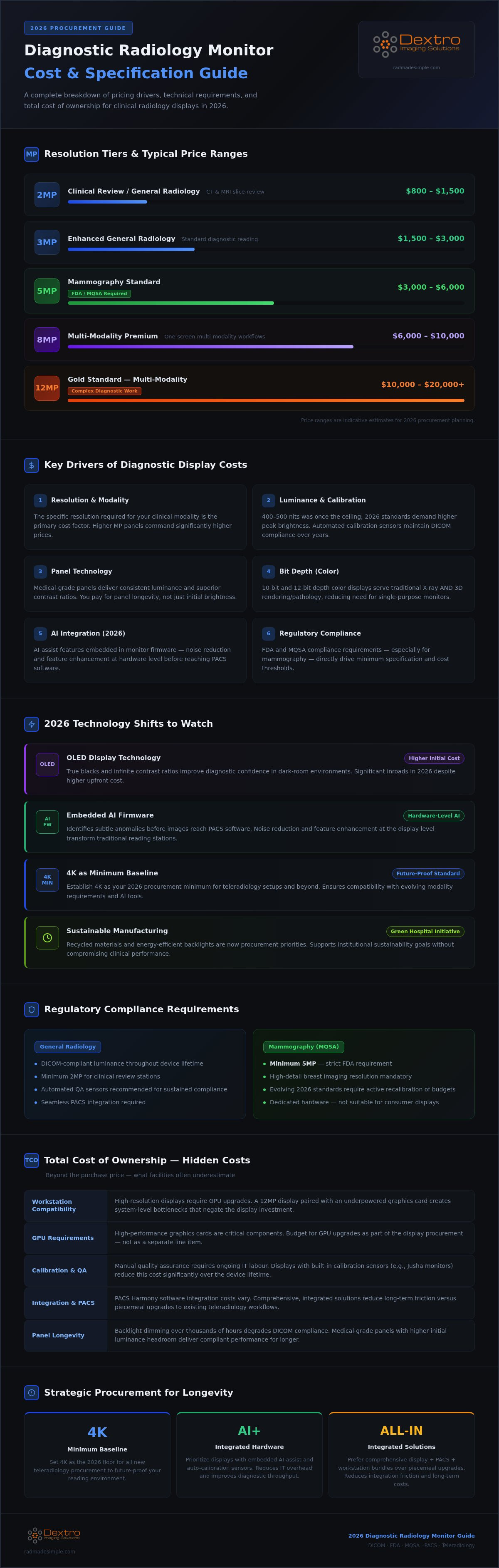
The primary factor affecting the cost of diagnostic radiology monitors remains the specific resolution required for your clinical modality. A 2MP monitor might suffice for general review, but 12MP multi-modality displays represent the gold standard for complex diagnostic work. Medical-grade panels command a premium because they deliver consistent luminance and superior contrast ratios that consumer screens cannot match. You aren't just paying for the initial brightness. You're investing in panel longevity and the automated calibration sensors that maintain DICOM compliance over thousands of hours of operation. High-performance hardware like Jusha Diagnostic Monitors incorporates these sensors to remove the burden of manual quality assurance. This automation ensures that your displays remain compliant without constant IT intervention.
New Standards in 2026: What to Watch
OLED technology is making significant inroads into diagnostic imaging during 2026. While the initial cost of diagnostic radiology monitors using OLED is higher, the benefit of true blacks and infinite contrast can improve diagnostic confidence in dark-room environments. We're also seeing integrated AI-assist features embedded directly into the monitor's firmware. These tools help identify subtle anomalies before the image even reaches your PACS Harmony software. Additionally, sustainable manufacturing is becoming a procurement priority. Manufacturers are now using recycled materials and energy-efficient backlights to meet new green hospital initiatives. These shifts ensure your investment supports both clinical excellence and institutional goals while maintaining a modern, efficient workflow.
Technical Specifications that Dictate Pricing
Technical specifications aren't just a list of features; they're the primary drivers of the cost of diagnostic radiology monitors. In 2026, the value of a display is measured by how effectively it supports clinical decision-making and workflow efficiency. High-end specifications translate directly to clinical ROI through faster interpretation times and reduced eye fatigue. When you invest in medical-grade hardware, you're paying for the precision required to identify subtle anomalies that consumer-grade screens simply cannot resolve. Finding the right balance between these technical requirements and your facility's budget is the key to a successful procurement strategy.
Luminance is a critical factor that has seen significant shifts recently. While 400 to 500 nits was once the industry ceiling, 2026 standards often demand much higher peak brightness. This overhead ensures the monitor can maintain DICOM-compliant luminance even as the backlight naturally dims over years of heavy use. Similarly, the choice between grayscale and color has evolved. Modern color displays now offer the 10-bit or 12-bit depth necessary for traditional X-ray interpretation while providing the versatility needed for 3D rendering and pathology. This multi-use capability often justifies a higher initial price point by reducing the need for specialized, single-purpose monitors.
Megapixel Breakdown: 2MP to 12MP
Choosing the correct resolution is the most direct way to manage the cost of diagnostic radiology monitors while meeting clinical standards. We categorize these by their intended modality:
- 2MP and 3MP: These are the standard for clinical review stations and general radiology tasks, such as viewing CT or MRI slices.
- 5MP: This remains the benchmark for mammography. It's designed to meet strict FDA and MQSA requirements for high-detail breast imaging.
- 8MP and 12MP: These high-resolution panels represent the premium tier. They support "one-screen" multi-modality workflows, allowing a single large display to replace a traditional dual-monitor setup.
DICOM Part 14 Compliance and Calibration
Compliance isn't a one-time event; it's a continuous technical requirement that influences the long-term value of your hardware. While external photometers are available, they often lead to increased labor costs and scheduled downtime. High-performance Jusha Diagnostic Monitors simplify this process by integrating internal front-sensors for real-time, automated calibration. This built-in hardware ensures your display consistently adheres to the Grayscale Standard Display Function (GSDF) without manual intervention. For a complete look at how to maintain your fleet, review our 2026 Radiology Equipment Compliance Checklist to ensure your workstation meets every current regulatory standard.
Roundup: Best Monitors for Radiology Reading by Category
Selecting the right hardware requires matching the display to your specific clinical workflow. For general radiology, high-performance color displays have become the standard for CT and MRI interpretation. These units provide the versatility to handle color-mapped 3D reconstructions alongside traditional grayscale slices. In contrast, mammography demands specialized 5MP displays that strictly adhere to FDA and MQSA standards. While these compliance requirements can increase the cost of diagnostic radiology monitors, they're essential for diagnostic accuracy in breast imaging. High-detail tasks require a level of precision that only these dedicated panels can provide.
Teleradiology has evolved significantly, moving toward high-resolution portable solutions that don't sacrifice precision for mobility. For referral and consultation tasks, clinical review displays offer a cost-effective alternative. These monitors provide DICOM-calibrated viewing for non-diagnostic areas, ensuring consistency across the entire hospital enterprise without the premium price of a primary diagnostic station. Finding the right fit ensures you don't overspend on specifications where they aren't clinically required. This strategic approach allows you to allocate your budget toward the high-stakes areas that demand the most advanced technology.
Jusha Diagnostic Monitors: Accuracy and Reliability
The 2026 Jusha lineup addresses the diverse needs of modern imaging departments by offering specialized solutions for every modality. These monitors are designed to balance high-end technical specifications with competitive pricing, making them an ideal choice for facilities looking to modernize their fleet. By integrating advanced backlight stabilization and automated calibration, Jusha removes the complexity of maintaining a compliant reading environment. These systems ensure that the cost of diagnostic radiology monitors is offset by lower long-term maintenance requirements. For a deeper look at specific models, consult our Jusha Medical Monitors: The 2026 Professional Reference Guide.
Portable Radiology Workstations for Remote Reading
The demand for high-resolution mobile diagnostic stations has surged as more radiologists transition to hybrid or remote work models. When evaluating these units, the primary pricing factors include screen durability, weight, and the ability to maintain calibration in varied lighting environments. These stations must integrate seamlessly with tools like PACS Harmony to ensure a consistent experience regardless of location. Investing in a dedicated mobile setup protects diagnostic accuracy during off-site shifts and provides a reliable platform for teleradiology. You can explore the essential components of a mobile rig in our Traveling Radiologist Workstation Setup: The 2026 Guide to Mobile Diagnostic Accuracy.
The Hidden Costs: Calculating Total Cost of Ownership (TCO)
The sticker price of a display is only the starting point for your procurement budget. To truly understand the cost of diagnostic radiology monitors, you must account for the entire infrastructure supporting them. High-performance displays require specialized medical-grade graphics cards to render images with the necessary precision and speed. If your workstation doesn't match your monitor's resolution, you risk lag and artifacts that compromise clinical accuracy. This hardware mismatch leads to screen flickering and slow image loading, which directly impacts your radiologists' hourly throughput and increases frustration.
Beyond the hardware, the software layer plays a vital role in your daily operations. Integrated tools like RadVoice for voice recognition and PACS Harmony for image management carry their own licensing fees but significantly improve productivity. These systems remove the friction of moving between different interfaces, allowing for a more streamlined workflow. When calculating TCO, it's essential to view these components as a single, cohesive unit rather than isolated purchases. You can explore our fully integrated Dextro Reading Stations to see how hardware and software synergy reduces long-term operational costs.
Integration and PACS Compatibility
Integration shouldn't be an afterthought in your 2026 planning. Setting up a new display within an existing PACS Harmony environment requires careful configuration to ensure seamless image delivery and metadata synchronization. Choosing vendor-neutral hardware can prevent long-term lock-in and help manage hardware costs over time as your facility grows. These integration steps often involve IT labor costs that must be factored into your initial budget. For a detailed breakdown of these software-related expenses and integration fees, see our Radiology PACS Pricing: The 2026 Guide to Total Cost of Ownership.
Technical Support and Warranty Structures
Support and maintenance are vital for minimizing downtime in high-volume clinics. Standard warranties often fall short during a critical hardware failure, leaving your team without a primary reading station for days. We recommend advanced replacement programs that ship a functional unit before you return the faulty one. This is especially critical for teleradiology networks operating 24/7 where every hour of downtime translates to a backlog of unread studies. Budgeting for annual calibration and compliance audits ensures your fleet remains within legal standards. While Jusha Diagnostic Monitors offer automated tools to simplify this, your facility still needs a structured protocol for oversight to protect your investment and maintain diagnostic confidence.
Strategic Procurement: How to Buy for Longevity
Long-term value in 2026 depends on selecting hardware that exceeds current minimum standards. Establishing 4K resolution as your baseline ensures that your fleet remains clinically relevant as imaging modalities continue to increase in detail. When you evaluate the cost of diagnostic radiology monitors, view it as a multi-year performance cycle rather than a one-time expense. Bundling hardware with integrated software like PACS Harmony creates a higher ROI by reducing integration friction and streamlining your support contracts. This holistic approach removes the complexity of managing multiple vendors and disparate systems, allowing for a more stable and predictable budget.
Hospital departments often choose between leasing and direct purchasing to manage their capital expenditure. Leasing allows for regular technology refreshes, ensuring your radiologists always work with the latest high-performance displays. Conversely, purchasing may offer lower long-term costs for facilities with stable, high-volume requirements. Working with an integrated solutions provider allows you to adopt a "simplifier" strategy. This means your partner handles the technical heavy lifting, from initial configuration to ongoing compliance, allowing your team to focus exclusively on diagnostic excellence and patient care.
Building the Ultimate Radiology Reading Station
For organizations looking to extend this efficiency to their broader partner networks and optimize their marketing spend, check out Computer Market Research for insights on maximizing marketing development funds.
Creating an optimized environment requires more than just a high-quality screen. Combining Dextro Reading Stations with Jusha Diagnostic Monitors provides a seamless, ergonomic workspace designed for high-stakes professional use. Small investments in adjustable lighting and ergonomic desk configurations yield significant gains in productivity and reduce the risk of long-term fatigue. You can learn more about optimizing your environment in our Radiology Reading Workstations: The 2026 Guide to Performance & Compliance. These adjustments ensure that the cost of diagnostic radiology monitors is supported by an environment that maximizes their technical capabilities.
Final Checklist for Procurement Managers
Before finalizing any equipment purchase, verify that every unit meets the current DICOM Part 14 and MQSA standards. These certifications are non-negotiable for maintaining legal and clinical integrity. Evaluate your vendor's ability to provide on-site integration and ongoing technical support, especially for complex teleradiology setups. We recommend requesting a trial or demo for any high-stakes diagnostic environment to ensure the hardware meets your specific clinical needs. A hands-on evaluation allows your team to confirm that the display's performance matches their professional requirements before you commit to a facility-wide rollout.
Modernizing Your Imaging Infrastructure for 2026
Modernizing your radiology department requires a fundamental shift from viewing hardware as a simple purchase to managing a high-performance clinical cycle. By accounting for the true cost of diagnostic radiology monitors, including long-term calibration and workstation compatibility, you protect both your budget and your diagnostic accuracy. Integrating advanced displays with tools like PACS Harmony and RadVoice removes the technical friction that often slows down teleradiology workflows. It's about creating an environment where technology empowers the radiologist rather than creating new hurdles.
We specialize in simplifying these complex, high-stakes environments. As an authorized Jusha distributor and specialists in DICOM-compliant teleradiology setups, we provide the technical authority needed to streamline your operations. Our solutions combine high-performance hardware with integrated PACS and voice recognition support to ensure your facility stays ahead of 2026 standards. Explore our 2026 lineup of Jusha monitors and Dextro reading stations to build a more efficient, future-proof reading room. We're ready to help you navigate these technological shifts with confidence and precision.
Frequently Asked Questions
How much should I budget for a 5MP diagnostic monitor in 2026?
You should budget for a premium price point compared to general review monitors because 5MP units must meet strict FDA and MQSA requirements for mammography. While the cost of diagnostic radiology monitors varies by manufacturer, these specialized displays include advanced backlight stabilization and internal sensors for automated compliance. These features ensure long-term reliability and diagnostic confidence, which are critical for high-stakes clinical environments where precision is non-negotiable.
Can I use a high-end consumer 4K monitor for radiology reading?
No, consumer 4K monitors lack the specialized features required for primary diagnostic interpretation. They don't support DICOM Part 14 calibration or the consistent luminance levels necessary for medical standards. Using non-medical displays can lead to missed findings and regulatory non-compliance. Diagnostic-grade hardware, such as Jusha Diagnostic Monitors, provides the stable grayscale performance and high-contrast ratios required to identify subtle anomalies that consumer panels simply cannot resolve accurately.
Is DICOM calibration software included with the purchase of a monitor?
Most professional diagnostic displays include proprietary DICOM calibration software as part of the package. This software works in tandem with internal front-sensors to automate the quality assurance process. For example, Jusha monitors utilize integrated tools to maintain the Grayscale Standard Display Function without requiring manual external photometers. This inclusion simplifies your workflow and ensures that your equipment remains compliant with minimal intervention from your IT department or clinical staff.
What happens if my diagnostic monitor fails during a shift?
Downtime during a clinical shift can create significant backlogs and delay patient care. High-performance providers offer advanced replacement programs that ship a functional unit before you return the faulty hardware. This is essential for teleradiology networks and high-volume clinics. We recommend choosing vendors that offer 24/7 technical support and robust warranty structures to minimize operational friction. Reliable hardware integration ensures your reading station stays online when it's needed most.
How often do radiology monitors need to be replaced for compliance?
Most facilities plan for a hardware refresh every five to seven years to maintain technical and regulatory compliance. Over time, backlights lose their peak luminance, making it difficult to meet DICOM standards even with frequent calibration. Upgrading your fleet ensures you benefit from the latest advancements, such as OLED technology or AI-integrated firmware. Consistent replacement cycles protect your diagnostic accuracy and ensure your workstation remains compatible with modern PACS Harmony software.
Does monitor resolution affect clinical diagnostic accuracy?
Yes, resolution directly impacts your ability to visualize fine anatomical details and subtle pathologies. Higher megapixel counts, such as 5MP for mammography or 12MP for multi-modality work, reduce the need for constant panning and zooming. This improves your interpretive efficiency and reduces the risk of eye fatigue. Matching the resolution to the specific clinical modality ensures that the cost of diagnostic radiology monitors translates into better patient outcomes and higher diagnostic confidence.
Are portable radiology workstations as accurate as desktop setups?
Modern Portable Radiology Workstations are designed to deliver the same level of diagnostic accuracy as traditional desktop setups. These units feature high-resolution, DICOM-compliant displays and powerful internal processing to handle complex imaging studies remotely. When paired with integrated tools like RadVoice and aycan PACS, they provide a seamless experience for teleradiologists. The key to their accuracy is maintaining calibration in varied lighting environments, which modern mobile hardware manages through advanced internal sensors.
What graphics cards are required for 12MP diagnostic displays?
High-resolution 12MP displays require specialized medical-grade graphics cards that support 10-bit or 12-bit grayscale output. These cards are engineered to handle the massive data throughput required for multi-modality workflows without lag or artifacts. Consumer-grade cards often lack the specialized drivers needed for DICOM calibration and consistent image rendering across large panels. Ensuring your workstation hardware matches your display's technical requirements is vital for maintaining a stable, high-performance reading environment in 2026.


