

What if your diagnostic speed was no longer tethered to a physical server room in the basement? You've likely felt the frustration of latency while loading large DICOM files from a remote location or the sting of unexpected data egress fees. It's clear that the traditional, hardware-heavy approach to medical imaging is becoming a bottleneck for growing practices. You need a solution that balances rapid access with the rigorous security demands of the 2026 HIPAA updates.
This guide empowers you to master the technical and operational shift to a modern cloud based PACS system. We'll show you how to build a high-performance, compliant diagnostic environment that supports seamless remote reading without the heavy upfront CapEx of legacy infrastructure. By the end of this article, you'll understand how to synchronize specialized hardware, like Jusha diagnostic monitors, with sophisticated software for a streamlined workflow.
We'll explore the critical architecture required for success, including mandatory AES-256 encryption and the transition to HL7 FHIR R4 standards. You'll also discover how to integrate AI-driven reporting to transform your facility into a truly agile imaging center that remains at the forefront of technological shifts.
Key Takeaways
- Understand the transition from decentralized on-premise servers to high-speed, web-based archives that eliminate physical bottlenecks.
- Identify the mandatory 2026 security requirements for a cloud based PACS system, including AES-256 encryption and universal multi-factor authentication.
- Compare the financial benefits of shifting from heavy upfront CapEx to predictable OpEx models that allow for instant storage scalability.
- Learn why diagnostic reliability requires pairing cloud software with DICOM Part 14 compliant hardware like Jusha monitors.
- Discover how to unify disparate imaging interfaces and accelerate reporting times using PACS Harmony and RadVoice integration.
What is a Cloud-Based PACS System?
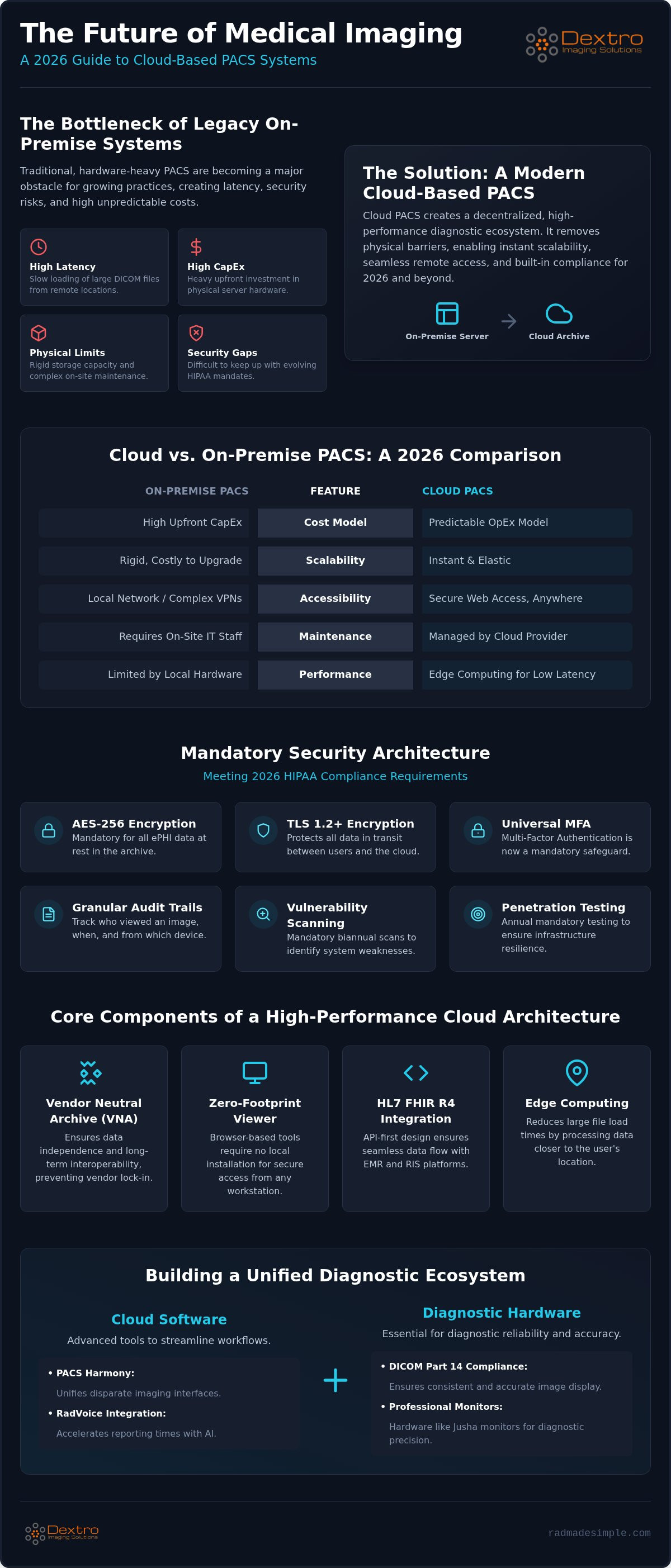
A modern Picture archiving and communication system (PACS) has evolved far beyond the confines of local server rooms. In 2026, a cloud based PACS system represents a decentralized diagnostic ecosystem where medical images are stored, managed, and distributed via high-security web architectures. This shift removes the physical barriers of on-premise hardware, replacing them with elastic, virtualized environments that scale instantly as your study volume grows.
The system relies on three pillars: storage, viewing software, and communication protocols. While traditional setups required complex VPNs and local maintenance, cloud-native solutions like aycan PACS utilize secure internet protocols to deliver diagnostic-grade images to any authorized workstation. Central to this architecture is the Vendor Neutral Archive (VNA). A VNA ensures that your data remains independent of any single software vendor, allowing for long-term interoperability and easier migration between different imaging modalities.
The Evolution of Image Archiving
The journey from physical film to digital local storage reached its limit as data volumes exploded. By 2026, the sheer size of high-resolution 3D reconstructions and AI-enhanced datasets made local servers a liability. Cloud PACS is a scalable, internet-accessible repository for DICOM data. This year marks a tipping point because cloud deployments now offer lower latency and better security than most private hospital networks. Facilities are moving away from rigid capital investments in servers, opting instead for the flexibility of decentralized archives that support teleradiology and cross-site collaboration without technical friction.
Key Components of a Modern Cloud Architecture
A high-performance cloud environment prioritizes accessibility through zero-footprint viewers. These browser-based tools require no local installation, ensuring that radiologists can work from any secure location without compromising performance. Integration with Electronic Medical Records (EMR) and Radiology Information Systems (RIS) is managed through an API-first design. This approach utilizes modern standards like HL7 FHIR R4 to ensure data flows seamlessly between different healthcare platforms.
To solve the challenge of loading massive DICOM files over the internet, modern systems employ edge computing. By processing data closer to the user's location, edge nodes significantly reduce initial image load times. This ensures that the transition to the cloud doesn't come at the cost of diagnostic speed, providing a responsive experience that rivals local hardware performance.
Security, Compliance, and Technical Architecture
Protecting patient data is the highest priority when deploying a cloud based PACS system. Many administrators still harbor the misconception that local servers offer superior protection. In reality, modern cloud environments provide sophisticated defenses that most on-site IT departments can't replicate. By 2026, the HIPAA Security Rule has moved several previously addressable safeguards into the mandatory category. This includes universal Multi-Factor Authentication (MFA) and mandatory encryption for all electronic Protected Health Information (ePHI).
To maintain a HIPAA Compliant PACS System, your architecture must utilize AES-256 encryption for data at rest and TLS 1.2 or higher for data in transit. These technical hurdles ensure that even if data is intercepted, it remains unreadable. Professional software solutions like aycan PACS integrate these standards natively, removing the burden of manual configuration from your clinical staff. This proactive approach to security protects your facility from the rising costs of data breaches and regulatory fines.
Maintaining HIPAA Compliance in the Cloud
Compliance in 2026 requires more than a signed Business Associate Agreement (BAA). Covered entities must now obtain annual written confirmation that their associates have implemented specific technical safeguards. This shift emphasizes verifiable security over simple paperwork. Your system needs granular audit trails to track who viewed an image, when they accessed it, and from which device. Biannual vulnerability scanning and annual penetration testing are also now mandatory to ensure your infrastructure remains resilient against evolving threats.
The Hybrid PACS Strategy
The transition to a fully decentralized archive doesn't have to happen overnight. Many facilities adopt a hybrid model to bridge the gap between legacy hardware and a modern cloud based PACS system. This strategy involves keeping a local cache for immediate diagnostic needs while the primary archive resides in the cloud. It ensures that even if there's a temporary internet disruption, your radiologists can continue reading the most recent studies without delay.
Synchronizing these local workstations with the cloud requires precise orchestration to prevent data loss. For a deeper look at the technical requirements, review our 2026 Radiology Equipment Compliance Checklist. This balanced approach allows you to leverage the scalability of the cloud while maintaining the high-speed performance of local hardware. If you're ready to simplify this transition, you can consult with our integration specialists to design a custom roadmap.
Cloud PACS vs. Traditional On-Site PACS: A 2026 Comparison
The financial architecture of medical imaging has shifted from heavy capital expenditure (CapEx) to predictable operating expenses (OpEx). Traditional on-site systems require significant upfront investment in server hardware, cooling infrastructure, and dedicated rack space. In contrast, a cloud based PACS system allows facilities to pay for what they use. This model eliminates the "refresh cycle" where hardware must be replaced every few years. Scalability is perhaps the most visible advantage. Expanding storage for 100,000 studies in a cloud environment happens instantly, whereas local systems often require physical drive installations and complex downtime for migration.
Reliability also looks different in 2026. Local systems rely on tape or disk backups that are often vulnerable to the same physical site failures as the primary server. Cloud providers offer built-in redundancy across multiple geographic zones. This ensures near-perfect uptime and immediate disaster recovery. Additionally, software maintenance is handled automatically. Instead of waiting for an IT team to schedule manual patches, cloud users receive continuous updates that include the latest security protocols and feature enhancements without disrupting the clinical workflow.
Cost Analysis: Beyond the Subscription Fee
Evaluating the true cost of an imaging system requires looking past the monthly bill. Local servers carry substantial hidden costs, such as electricity for high-performance processors and the specialized labor required for 24/7 maintenance. While cloud storage involves data egress fees and tiering (hot vs. cold storage), these are often offset by the reduction in local IT overhead. Understanding these variables is essential for a realistic Radiology PACS Pricing: The 2026 Guide to Total Cost of Ownership.
Security is another factor in the TCO equation. Managing the Security Risks in Connected Medical Devices requires constant vigilance that is often more effectively managed by dedicated cloud security teams than by general hospital IT. By outsourcing the infrastructure, facilities can redirect their internal resources toward patient care rather than server patching.
Performance and Latency Reality Check
Latency was once the primary argument against cloud adoption, but modern streaming protocols have closed the gap. Advanced solutions like aycan PACS use intelligent data handling to deliver large 3D datasets almost instantly. This performance ensures that diagnostic turnaround time (TAT) remains low, even for remote readers. In many cases, a cloud based PACS system running on modern data center hardware will outperform aging local servers that struggle with the processing demands of 2026 imaging modalities. Your internet bandwidth is now the primary variable, making high-speed connectivity a critical component of the modern diagnostic suite.
Integrating Cloud PACS with Diagnostic Hardware
Many facilities make the mistake of treating software and hardware as separate entities. In reality, a cloud based PACS system is only as effective as the monitor displaying the data. If your high-resolution DICOM files are rendered on a consumer-grade screen, the diagnostic nuances are lost. Professional reading requires strict adherence to DICOM Part 14 standards to ensure consistent grayscale mapping. This level of precision is essential for remote reading where environmental lighting and hardware variables can fluctuate.
Integrating aycan PACS with specialized Dextro Reading Stations creates a high-performance ecosystem. This synergy ensures that the speed of the cloud is matched by the ergonomic and technical capabilities of the workstation. By pairing sophisticated software with purpose-built hardware, you eliminate the technical friction that often plagues teleradiology setups. It's about building a streamlined environment where the technology works for the radiologist, not against them.
The Role of DICOM-Calibrated Monitors
Consumer-grade screens fail in a cloud-based diagnostic workflow because they lack the luminance and contrast ratios required for medical accuracy. For a detailed breakdown of the technical specs required for clinical confidence, see our Jusha Medical Monitors: The 2026 Professional Reference Guide. Jusha monitors maintain calibration even when accessing images via cloud viewers, providing a stable diagnostic environment regardless of the user's location. This consistency is vital for maintaining standards across a decentralized team.
Portable Workstations for Teleradiology
The rise of remote reading demands a setup that mirrors the hospital experience without being anchored to a single room. Portable Radiology Workstations provide the necessary processing power and screen quality to handle heavy imaging loads from any location. These units facilitate secure, encrypted tunnel connectivity to the cloud PACS, ensuring that patient data remains protected even outside the hospital firewall. For practical tips on building a mobile office that doesn't sacrifice fidelity, refer to our Traveling Radiologist Workstation Setup: The 2026 Guide to Mobile Diagnostic Accuracy.
If you want to optimize your diagnostic environment, contact our team to explore integrated hardware and software bundles.
Optimizing the Reporting Workflow: PACS Harmony and RadVoice
A cloud based PACS system shouldn't just store images; it should accelerate the final report. Radiologists often face a fragmented experience when reading for multiple sites, switching between various software versions and login credentials. PACS Harmony addresses this by unifying disparate cloud and local interfaces into a single, cohesive environment. This integration reduces the cognitive load on clinicians, allowing them to focus on diagnostic accuracy rather than software navigation. By streamlining the interface, you create a more manageable, high-pressure environment that supports better patient outcomes.
The future of the cloud based PACS system lies in its ability to act as a proactive partner in the diagnostic process. We're seeing a shift toward AI-assisted triaging and automated measurement tools that work in the background. These features flag critical findings and populate reports with quantitative data before the radiologist even opens the study. This level of automation doesn't just save time; it provides a safety net that catches subtle details, ensuring that your facility remains at the forefront of modern medical standards.
Unifying Disparate Systems with PACS Harmony
Teleradiology often forces clinicians to manage a "multiple login" nightmare that slows down productivity. PACS Harmony solves this by creating a single, unified worklist that spans different facilities and cloud instances. Instead of jumping between various browser tabs or local applications, the user sees one prioritized list. This streamlined approach significantly reduces administrative overhead for multi-site imaging centers. It allows your team to work with a sense of order and efficiency, regardless of where the data originates.
AI-Driven Reporting with RadVoice
Reporting efficiency reaches its peak when you integrate voice recognition directly into the diagnostic viewer. RadVoice offers a seamless synergy between cloud-delivered images and cloud-processed speech-to-text. Because the system is cloud-native, it leverages advanced AI to interpret complex medical terminology with high precision. For a deeper look at these capabilities, see our Voice Recognition for Radiologists: 2026 AI Reporting Guide. This tool integrates directly into the diagnostic workstation, ensuring that the reporting process is as fast as the image loading itself.
This unified workflow directly impacts the bottom line by reducing radiologist fatigue and increasing daily study throughput. When the PACS, the monitor, and the reporting software speak the same language, the entire diagnostic cycle becomes more reliable. Investing in these integrated tools ensures your practice is prepared for the increasing volumes and technical demands of the 2026 healthcare landscape.
Modernizing Your Diagnostic Ecosystem
Adopting a cloud based PACS system is no longer a luxury for forward-thinking facilities; it's a technical necessity for maintaining speed and security. You've seen how the 2026 HIPAA standards demand more than simple paperwork, requiring robust technical safeguards and mandatory multi-factor authentication. Success in this decentralized landscape depends on the synergy between high-performance software and medical-grade hardware. By unifying your workflow through integrated reporting tools, you eliminate the friction that leads to burnout and diagnostic delays.
Dextro Imaging Solutions acts as your expert guide in this transition. As the exclusive distributor of Jusha medical-grade monitors, we ensure your visual fidelity matches the speed of your cloud archive. We specialize in portable radiology workstations for remote reading and provide comprehensive support for PACS Harmony and aycan PACS integration. The path to a more agile, secure, and efficient practice is clear. Take the next step toward a streamlined future today.
Explore Dextro’s Integrated PACS and Hardware Solutions
Frequently Asked Questions
Is a cloud-based PACS system secure enough for HIPAA compliance?
Modern cloud based PACS system solutions are built to exceed the 2026 HIPAA Security Rule mandates. These systems utilize mandatory AES-256 encryption for data at rest and TLS 1.2 or higher for transit. Beyond encryption, they require universal Multi-Factor Authentication (MFA) for all access points. Dextro's aycan PACS implementation ensures these technical safeguards are active, protecting patient privacy while providing the verifiable audit trails and annual penetration testing required by current regulations.
How much bandwidth is required for a cloud PACS to function without lag?
Optimal performance typically requires a stable connection of at least 50 to 100 Mbps for an individual radiologist. While large DICOM files are substantial, modern streaming protocols and edge computing nodes reduce the initial load times significantly. High-volume centers may require dedicated fiber connections to maintain zero-lag performance during peak hours. It's essential to test both upload and download speeds, as reporting and data synchronization rely on consistent, bidirectional data flow for real-time diagnostic accuracy.
Can I use my existing diagnostic monitors with a cloud-based PACS?
You can use existing hardware, but every screen must meet DICOM Part 14 calibration standards for diagnostic accuracy. Consumer-grade monitors lack the luminance and grayscale consistency required for medical interpretation. If your current monitors don't support automated calibration or lack the necessary contrast ratios, upgrading to a Jusha diagnostic monitor is recommended. These professional displays ensure that the high-fidelity images delivered by your cloud based PACS system are rendered with clinical precision across all reading locations.
What happens to my imaging data if the internet goes down?
A hybrid cloud model protects your workflow by maintaining a local cache of recent studies on your workstation. If your primary internet connection fails, radiologists can continue reading from the local storage until connectivity is restored. Most modern systems also support automatic synchronization once the link is back online, ensuring no data loss occurs. This redundancy ensures that urgent diagnostic tasks aren't interrupted by external network issues, providing a secure and reliable bridge between local and decentralized archives.
What is the difference between a cloud PACS and a Vendor Neutral Archive (VNA)?
A cloud PACS focuses on the immediate diagnostic workflow, including image viewing, reporting, and distribution. In contrast, a Vendor Neutral Archive (VNA) is designed for long-term, vendor-independent storage of medical images across the entire enterprise. While a PACS often includes storage, a VNA ensures that data remains accessible and migratable even if you change software vendors. Many facilities use both to balance daily performance with a long-term data strategy that prioritizes interoperability and data ownership.
Does a cloud PACS support 3D post-processing and advanced visualization?
Advanced cloud systems support 3D post-processing through server-side rendering, which offloads the heavy computational work to the cloud. This allows radiologists to perform complex reconstructions and visualizations on standard workstations or even portable units without needing high-end local GPUs. Solutions like aycan PACS integrate these tools directly into the viewer, providing a seamless experience for multi-planar reconstructions and volumetric rendering regardless of the user's physical location or the technical specs of their local hardware.
How does cloud-based PACS impact teleradiology workflows?
Cloud architecture is the backbone of modern teleradiology, allowing radiologists to access studies from any secure location. It eliminates the need for complex site-to-site VPNs and local server maintenance. By using tools like PACS Harmony, clinicians can view a unified worklist from multiple facilities in a single interface. This centralized approach reduces administrative friction, speeds up turnaround times, and allows practices to scale their reading capacity without geographic limitations, ensuring high-stakes professional requirements are met with precision.
What are the typical storage costs associated with cloud PACS in 2026?
Storage expenses in 2026 are primarily driven by study volume and the duration of data retention requirements. Most providers utilize a tiered model where active studies are kept in "hot" storage for immediate access, while older records move to lower-cost archives. Costs are also influenced by data egress fees and the level of redundancy required for disaster recovery. Transitioning to an OpEx model allows facilities to avoid large hardware investments, paying only for the capacity they actually consume.


