

Portability in radiology is a liability unless it's anchored by DICOM-compliant diagnostic fidelity and seamless synchronization. You likely recognize the professional tension of interpreting critical images outside the hospital; the constant battle with shifting ambient light, the worry over mobile data security, and the physical strain of improvised setups. It's difficult to feel fully confident in a high-stakes diagnosis when your display doesn't meet the rigorous standards of a dedicated reading room.
This guide shows you exactly how to bridge that gap by integrating portable radiology workstations with PACS to achieve a mobile environment that mirrors clinical performance. We'll explore how to maintain calibration in non-traditional settings and ensure your workflow stays compliant with the June 2026 DICOM 2026c release. You'll discover the hardware and software configurations needed to eliminate complexity, streamline your reporting, and provide the same level of diagnostic precision whether you're in a remote clinic or a home office. We'll break down everything from ergonomic optimization to the latest FDA-cleared 8MP display technology to ensure your mobile transition is both secure and highly efficient.
Key Takeaways
- Learn how to transition from simple mobile acquisition to full-scale diagnostic interpretation without sacrificing accuracy.
- Ensure your mobile setup meets the June 2026 DICOM Part 14 GSDF standards and resolution requirements for X-ray viewing.
- Optimize your remote workflow by integrating portable radiology workstations with PACS through secure, HIPAA-compliant connections.
- Discover how high-performance diagnostic monitors and ergonomic workstation designs allow mobile setups to mirror the diagnostic precision of fixed reading rooms.
The Evolution of Portable Radiology Interpretation in 2026
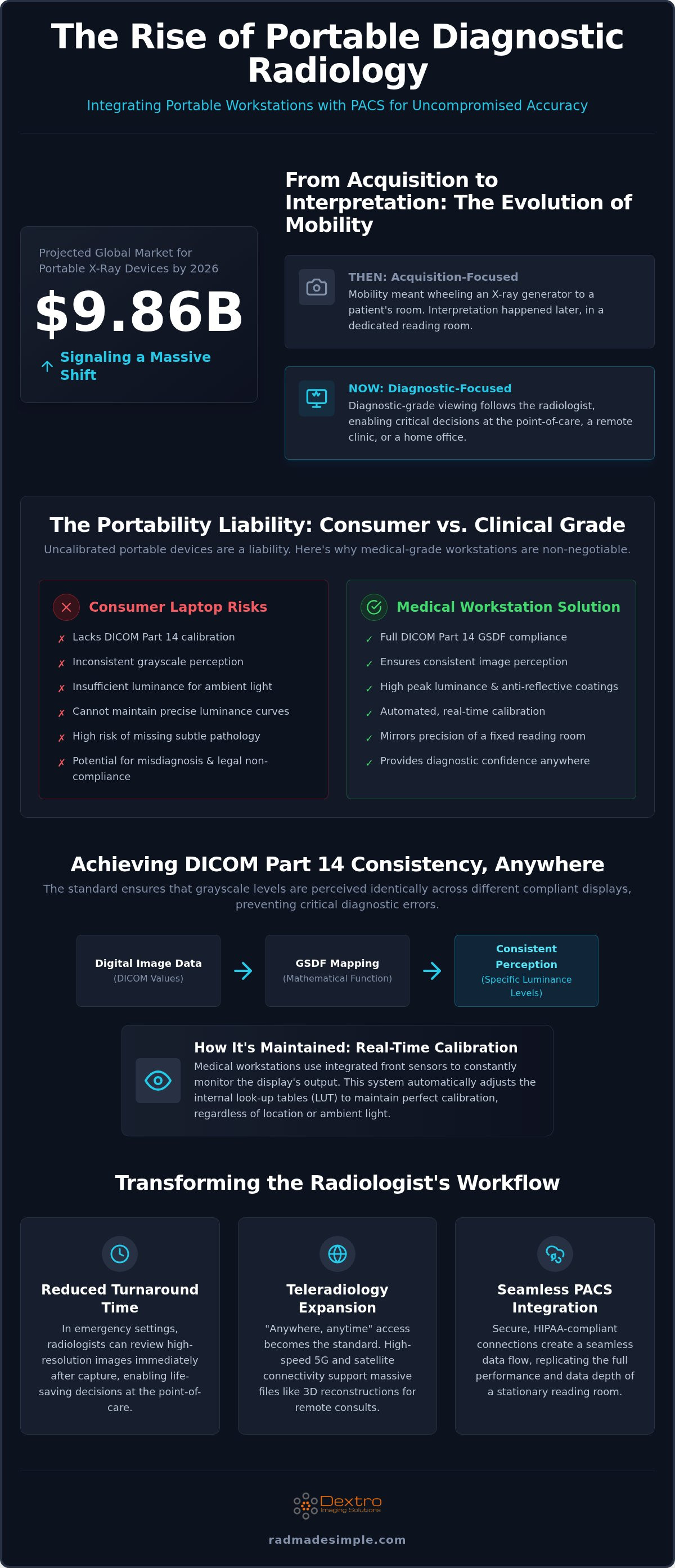
In 2026, the global portable X-ray devices market is estimated to reach 9.86 billion dollars, signaling a massive shift toward decentralized imaging. While mobility used to be defined by how easily a technician could wheel an X-ray generator to a patient's room, the focus has shifted. Today, the bottleneck isn't acquisition; it's the speed and accuracy of the interpretation. Modern clinical workflows require diagnostic-grade viewing capabilities that follow the radiologist, ensuring that critical decisions happen at the point of care rather than hours later in a basement reading room.
This evolution relies heavily on integrating portable radiology workstations with PACS to provide a seamless data flow that maintains clinical integrity. Transitioning from acquisition-only mobility to diagnostic-grade portable viewing requires a fundamental change in hardware. Traditional consumer laptops fail to meet clinical standards because they lack the necessary DICOM Part 14 calibration and the specific luminance required for subtle pathology detection. Without these standards, radiologists risk missing critical findings that a calibrated, high-performance station would reveal.
Point-of-Care vs. Traditional Reading Rooms
The gap between bedside acquisition and remote diagnostic interpretation is closing fast. In emergency settings, reducing Turnaround Time (TAT) can be life-saving. Portable viewing stations allow radiologists to review high-resolution images immediately after they're captured. A professional Picture archiving and communication system (PACS) connection requires more than just a web browser; it needs a hardware-software synergy that replicates the fixed reading room's performance. High-speed connectivity now allows these mobile units to sync instantly, providing the same depth of data available at a stationary desk.
The Teleradiology Expansion
Remote reading setups are no longer a luxury; they're the 2026 industry standard for specialized consults. The expectation for "anywhere, anytime" access has transformed the radiologist's lifestyle. High-speed 5G and satellite connectivity now support the massive file sizes associated with 3D reconstructions and high-resolution X-rays. For those moving between facilities, a proper traveling radiologist workstation setup is essential to maintain diagnostic confidence. This shift ensures that even in remote clinics, patients receive the same level of expertise as those in major metropolitan hospitals. By integrating portable radiology workstations with PACS, teleradiologists eliminate the friction of data transmission and focus on the patient's diagnosis.
Technical Compliance: DICOM and Display Standards for Mobile Stations
Portability doesn't excuse a drop in clinical standards. When integrating portable radiology workstations with PACS, the most critical technical hurdle is maintaining DICOM Part 14 Grayscale Standard Display Function (GSDF) compliance. This standard ensures that the grayscale levels of an image are perceived consistently across different displays. Without it, a subtle pneumothorax or a hairline fracture visible on a hospital's fixed monitor might disappear when viewed on a mobile screen.
Medical-grade monitors differ from consumer electronics in their luminance and contrast capabilities. A standard laptop screen often lacks the brightness to overcome ambient light in a bright clinic or an outdoor mobile unit. High-performance portable stations utilize displays with high peak luminance and specialized anti-reflective coatings. These features ensure that the contrast ratio remains high enough for diagnostic work, even in non-ideal lighting conditions. Automated calibration software is a necessity here; it performs regular checks to ensure the display hasn't drifted from its required performance profile.
Achieving DICOM Part 14 Consistency Anywhere
Consumer-grade screens risk misdiagnosis and legal non-compliance because they cannot maintain the precise luminance curves required for medical imaging. DICOM Part 14 compliance for portable monitors is defined as the mathematical mapping of digital input values to specific luminance levels to ensure consistent grayscale perception. Modern portable units solve this by using integrated front-sensors. These sensors constantly monitor the display's output and adjust the internal look-up tables (LUT) to maintain calibration in real-time, regardless of the workstation's location.
Hardware Requirements for High-Resolution Interpretation
Resolution is non-negotiable for X-ray interpretation. While a 2MP screen might suffice for basic review, diagnostic-grade viewing requires at least 3MP or 5MP resolution to capture the fine details of bone trabeculae or lung markings. Handling these massive DICOM datasets requires significant processing power and high-speed internal buses to prevent lag during scrolling or zooming. Laggy interfaces don't just frustrate the user; they can lead to oversight during rapid image review.
Balancing performance with battery life is a common challenge for mobile rounds. High-resolution displays and powerful GPUs draw significant power. The best solutions utilize high-capacity internal cells that provide several hours of continuous diagnostic performance without needing a tether. For those seeking the gold standard in mobile display technology, Jusha medical monitors offer the high-resolution accuracy needed for mobile environments.
Maintaining this level of technical compliance is much simpler when you use a turnkey solution like Dextro Reading Stations, which are pre-configured for immediate clinical use. By integrating portable radiology workstations with PACS that feature automated calibration software, facilities can ensure every diagnosis is based on accurate, standardized data.
Comparing Performance: Can Portable Stations Match Fixed Reading Rooms?
Skepticism often exists regarding whether a mobile unit can truly handle the high-volume diagnostic workload of a traditional hospital suite. Historically, portable viewing was relegated to preliminary or "wet" reads, intended only for immediate triage. By 2026, this distinction has vanished. Performance is no longer a compromise. Modern portable stations now deliver the technical specifications required for final, definitive diagnostic reports, provided the hardware and software are correctly optimized.
Efficiency in a satellite clinic or remote site depends on integrating portable radiology workstations with PACS to ensure data parity. When the mobile station functions as a true node on the hospital network, the radiologist experiences no lag in image retrieval or tool availability. This level of integration allows for a cost-effective deployment strategy. Instead of building out multiple permanent reading rooms in smaller facilities, organizations can deploy high-performance portable units that offer the same clinical utility at a fraction of the infrastructure cost.
Diagnostic Accuracy and Luminance Benchmarks
The idea that mobile stations are only for "quick looks" is outdated. Modern Jusha Diagnostic Monitors bridge the gap between mobile and desktop performance by offering luminance levels that match or exceed stationary displays. These monitors provide the consistent 500 to 1,000 cd/m² brightness necessary for detecting subtle contrast changes in dense tissue. Evidence-based clinical workflows show that immediate bedside interpretation reduces the risk of communication errors and significantly lowers patient turnaround time. When a radiologist has diagnostic-grade tools at the point of care, they can confirm findings and consult with the attending team in a single, streamlined interaction.
Workflow Speed: Integrating PACS and AI Reporting
Workflow velocity is the true test of any mobile setup. Comparing login-to-report times reveals that unified systems consistently outperform disparate ones. A portable station must do more than just display an image; it must facilitate the entire reporting lifecycle. This is where integrating portable radiology workstations with PACS becomes essential for maintaining high throughput. Using integrated voice recognition like RadVoice allows for hands-free reporting, which is critical in the non-traditional environments where mobile stations are often deployed.
- Reduced Footprint: Mobile stations eliminate the need for large desks while maintaining 8MP of diagnostic real estate.
- Edge Computing: Localized processing ensures that 3D rendering and AI-assisted triage happen instantly, regardless of server load.
- Ergonomic Support: Adjustable, specialized mobile carts allow radiologists to maintain proper posture during full 8-hour shifts, preventing the fatigue associated with standard laptop use.
These advancements ensure that the quality of care remains high, regardless of where the interpretation occurs. By choosing a setup that prioritizes both display accuracy and software integration, facilities can confidently expand their reach without sacrificing diagnostic excellence.
Best Practices for Integrating Portable Workstations with PACS
Successful deployment requires a methodical approach that goes beyond simply purchasing a mobile device. You must ensure the entire ecosystem, from hardware to software, works in unison to maintain clinical standards. This process begins with selecting hardware tailored to your specific modality. While a 3MP display might suffice for general X-ray viewing, CT and MRI datasets require significantly higher processing power for multiplanar reconstructions and 3D rendering.
Security and calibration form the middle stages of a professional setup. You need a robust, HIPAA-compliant VPN to protect patient data during mobile transmission. Site-specific calibration is also vital; mobile environments have varying ambient light, so your workstation must adjust its luminance to compensate. The final stages involve the actual process of integrating portable radiology workstations with PACS and reporting tools like RadVoice. A unified interface prevents the friction of switching between applications. Finally, establish a maintenance schedule to ensure the display stays within DICOM Part 14 tolerances over time.
Connectivity and Data Security Protocols
Protecting patient privacy is paramount when working outside the hospital firewall. Use AES-256 encryption for all DICOM images in transit to prevent unauthorized interception. Managing user access is equally important. Integrating RFID authentication or multi-factor protocols on your portable units allows for rapid, secure logins without the risk of compromised passwords. Always prioritize zero-footprint viewing solutions. These ensure that no patient data is stored locally on the mobile device, which significantly reduces the risk of a data breach if the hardware is lost or stolen.
Step-by-Step Configuration for Remote Environments
Ergonomics are often overlooked in mobile setups. Use adjustable stands that allow for proper monitor height and tilt, regardless of the desk surface available at the remote site. Since mobile reading often occurs in high-pressure environments, managing eye fatigue is vital. Implement blue light reduction settings and ensure your display maintains a flicker-free output during high-volume shifts. These adjustments prevent the physical strain that can lead to diagnostic errors. For a deeper look at hardware standards, see our guide on radiology reading workstations.
Implementing these best practices ensures your mobile team operates with the same precision as your hospital-based staff. If you're ready to modernize your workflow, contact Dextro Imaging Solutions today to discuss our integrated PACS Harmony and Radcom Compact options.
Dextro Solutions: The Future of Mobile Diagnostic Excellence
As the demand for remote diagnostic capability grows, the need for specialized hardware becomes undeniable. Dextro Reading Stations are engineered specifically to eliminate the technical friction associated with integrating portable radiology workstations with PACS. By providing a turnkey solution that combines high-performance computing with medical-grade displays, we empower radiologists to work with confidence in any environment. Our systems are designed to handle the heavy lifting of 2026 clinical workloads, ensuring that mobility never comes at the cost of diagnostic precision.
Global technical support is a cornerstone of our service model. We understand that imaging operations are mission-critical, and downtime isn't an option. Our team provides proactive monitoring and rapid response to ensure your stations remain online and compliant with the latest regulatory standards. This commitment to reliability allows healthcare facilities to scale their mobile operations without the burden of increased IT overhead.
Leveraging Jusha Monitors and Portable Workstations
Our portable radiology workstations, such as the Radcom Compact, simplify remote interpretation by packaging reading-room performance into a mobile form factor. These units leverage Jusha Diagnostic Monitors to provide uncompromised resolution, allowing for the detection of subtle pathologies that consumer screens would miss. Dextro acts as a dedicated simplifier that transforms complex, high-pressure imaging environments into streamlined, manageable workflows through intelligent design. Whether you're outfitting a hospital department or a private practice, our configurations are fully customizable to meet your specific modality requirements.
Unified Reporting with PACS Harmony and RadVoice
Software friction is often the biggest hurdle in a mobile setup. We eliminate this by providing seamless PACS Harmony and aycan PACS integration, ensuring your workflow remains consistent regardless of your physical location. By integrating portable radiology workstations with PACS through our unified interface, you reduce the time spent toggling between applications and focus entirely on the patient's data. Adding RadVoice to the mix further optimizes the reporting process, allowing for accurate, hands-free dictation that syncs directly with your reporting platform.
Ready to modernize your imaging setup? Contact Dextro for a custom quote to see how our solutions can empower your team. Requesting a demo of our portable diagnostic reading stations is the next step toward achieving mobile excellence without compromise. We're here to guide you through the transition to a more agile, high-performance future.
Modernizing Your Diagnostic Workflow with Mobile Accuracy
The clinical requirements of 2026 demand that radiologists remain agile without sacrificing technical integrity. High-performance portable stations have successfully bridged the gap between the traditional reading room and the point of care. By utilizing DICOM Part 14 compliant hardware and specialized Jusha monitors, clinicians can make life-saving decisions from any location with complete confidence. These advancements ensure that patient care is never limited by the physical boundaries of a hospital wing.
Modern efficiency relies on integrating portable radiology workstations with PACS to ensure every pixel and report is synchronized in real-time. It's an approach that eliminates the complexity of remote workflows while maintaining rigorous security standards. Dextro Imaging Solutions provides the turnkey infrastructure needed for this transition. With integrated PACS and voice recognition, alongside global technical support and maintenance, your team stays focused on patient outcomes rather than technical hurdles. Explore Dextro Portable Radiology Workstations to modernize your clinical operations today. Your journey toward a more flexible and accurate diagnostic future starts with the right equipment.
Frequently Asked Questions
What is the minimum resolution required for a portable X-ray viewing station?
Diagnostic-grade viewing typically requires a minimum of 3MP for general radiography. For high-detail studies like complex skeletal X-rays, 5MP is the professional standard. Using a 3MP or 5MP Jusha monitor ensures that fine details, such as trabecular bone patterns or subtle lung markings, remain visible. This resolution is essential for maintaining accuracy when interpreting images outside of a traditional hospital reading room where ambient light can interfere with clarity.
Can I use a standard high-end laptop for diagnostic X-ray interpretation?
No, a standard high-end laptop is generally unsuitable for final diagnostic interpretation. Consumer screens lack the DICOM Part 14 calibration and the specific luminance levels required for clinical accuracy. They cannot maintain the consistent grayscale mapping necessary to detect subtle pathologies. For professional results, you should use specialized hardware like the Radcom Compact, which features medical-grade displays designed to meet rigorous regulatory and diagnostic standards for teleradiology.
How do I ensure my portable radiology station is DICOM compliant?
Compliance is achieved by using hardware that supports the DICOM Part 14 Grayscale Standard Display Function (GSDF). You must use a monitor with integrated sensors that monitor and adjust luminance in real-time. Automated calibration software is critical for integrating portable radiology workstations with PACS while ensuring the display remains within tolerance. Regular quality assurance checks, as specified by the latest 2026 standards, are necessary to maintain this compliance over time.
What are the security requirements for viewing medical images on a mobile device?
Security requirements center on HIPAA compliance and data protection. You must use AES-256 encryption for all data in transit and implement secure VPN tunnels for remote access. Multi-factor authentication or RFID logins are recommended to prevent unauthorized access. Additionally, utilizing zero-footprint viewing ensures that no DICOM data is stored locally on the portable unit, which significantly reduces the risk of a data breach if the device is lost or stolen.
How often should a portable diagnostic monitor be calibrated?
Most medical-grade monitors should undergo a full calibration check at least once every three to six months. However, modern Jusha Diagnostic Monitors feature integrated front sensors that perform automated daily checks. These sensors adjust the display's output to compensate for backlight aging and ambient light changes. This proactive approach ensures that your setup remains compliant with the June 2026 DICOM 2026c release without requiring constant manual intervention from your IT staff.
Does Dextro provide software for mobile radiology reporting?
Yes, Dextro offers a suite of integrated software solutions including PACS Harmony and RadVoice. These tools are specifically designed to streamline the reporting process by integrating portable radiology workstations with PACS for a unified interface. RadVoice provides voice recognition capabilities that allow for hands-free dictation in mobile environments. This integration eliminates software friction, allowing radiologists to focus entirely on diagnostic interpretation rather than toggling between disparate and unoptimized applications.
What is the difference between an acquisition station and a viewing station?
An acquisition station is primarily used by technicians to capture and preview images at the bedside for immediate quality control. It does not require full diagnostic calibration. In contrast, a viewing station, such as a Dextro Reading Station, is engineered for the radiologist to perform final interpretations. It features high-resolution, DICOM-compliant displays and powerful processing capabilities to handle complex datasets and 3D reconstructions with clinical-grade accuracy and high-performance rendering.
Can portable viewing stations handle 3D reconstructions and large CT datasets?
High-performance portable stations are fully capable of handling large datasets and 3D reconstructions. Units like the Radcom Compact utilize powerful GPUs and high-speed internal buses to ensure smooth scrolling and rapid rendering of CT or MRI slices. When combined with PACS Harmony, these workstations provide the same diagnostic real estate and processing speed found in a traditional reading room, ensuring that complex multiplanar reconstructions happen without lag or performance degradation during critical reviews.


