

In 2026, the success of your medical imaging facility is no longer defined by the power of your magnets, but by the precision of your pixels. As you plan your next radiology department equipment upgrade, the focus has shifted from mere hardware replacement to a total optimization of the diagnostic chain. It's a high-stakes environment where technical obsolescence doesn't just slow down your team; it directly impacts diagnostic accuracy and your regulatory standing.
You're likely facing the daily frustration of aging monitors that fail calibration and fragmented PACS workflows that force radiologists to navigate multiple interfaces. We understand that managing these bottlenecks while staying compliant with new FDA Quality Management System Regulations is a complex task. This guide provides a strategic roadmap to help you navigate these transitions with confidence. You'll learn how to implement a streamlined, DICOM-compliant workflow that reduces reporting turnaround times and future-proofs your department. We'll examine the critical integration of high-performance hardware and unified software architecture to ensure your facility remains at the forefront of modern radiology.
Key Takeaways
- Learn how to audit your existing diagnostic chain to identify hardware nearing the end of its life cycle and prevent software compatibility gaps.
- Master the 2026 DICOM Part 14 calibration standards to ensure your display systems meet precise luminance and contrast requirements for specialized imaging.
- Discover how to select high-performance monitors and reading stations tailored to the resolution demands of CT, MRI, and mammography.
- Streamline fragmented workflows by unifying disparate PACS interfaces and integrating AI-powered voice recognition for faster reporting turnaround.
- Execute a phased radiology department equipment upgrade that maintains total operational continuity while ensuring your staff is proficient with new hardware.
Phase 1: Auditing the Diagnostic Chain and Identifying Obsolescence
Before beginning a radiology department equipment upgrade, it is essential to consider the full scope of your facility's imaging needs, including research and pathology. For institutions that require high-resolution specimen analysis, Electron Optics Instruments, LLC offers advanced benchtop scanning electron microscopes that complement traditional diagnostic tools by providing detailed structural insights.
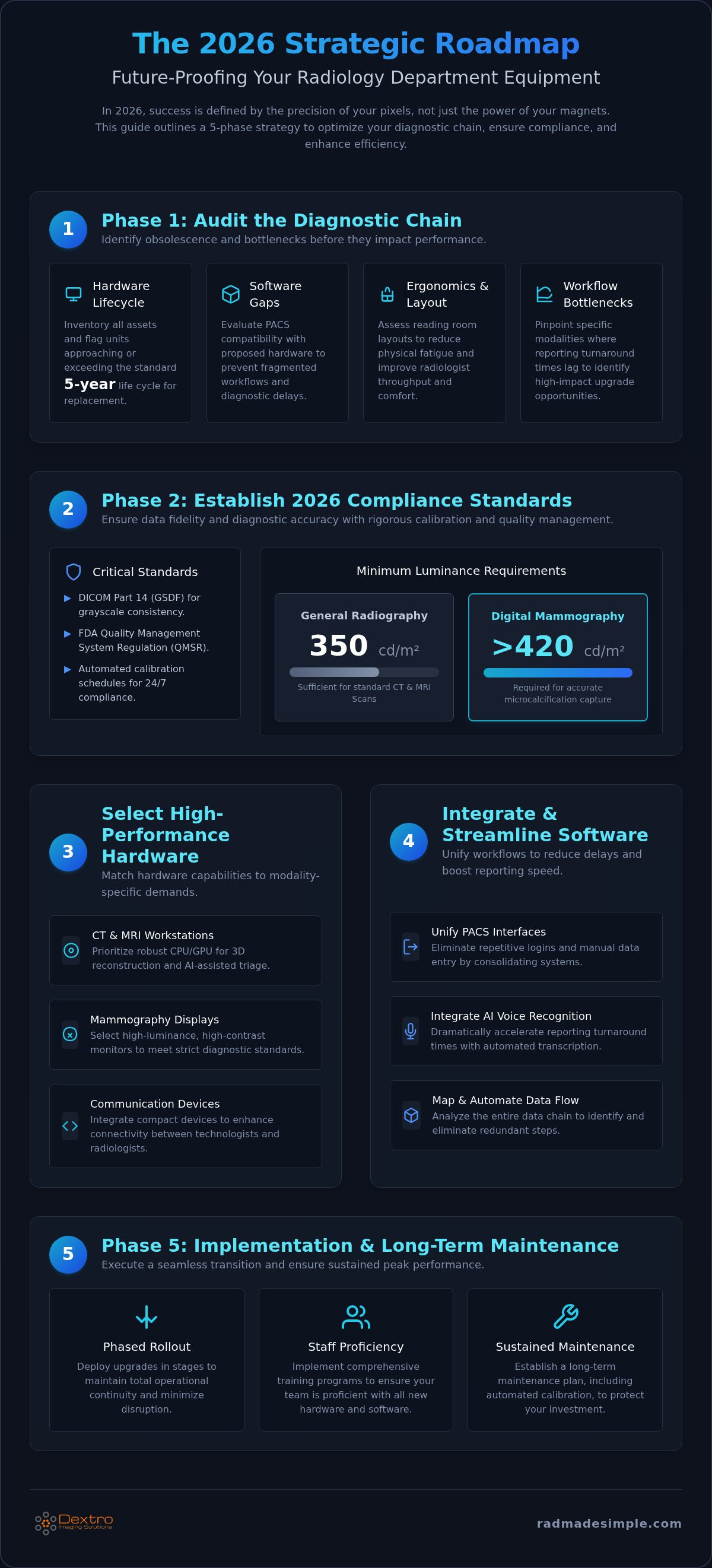
A successful radiology department equipment upgrade begins with a rigorous audit of your existing infrastructure. You can't modernize what you haven't measured. Start by inventorying every hardware asset to identify units approaching or exceeding the standard 5-year life cycle. In the field of Radiology, hardware that remains functional may still be technically obsolete if it cannot support modern imaging protocols or current security patches. Units in years four and five of their lifespan should be flagged for immediate replacement to avoid unplanned downtime and escalating maintenance costs.
Your audit must also evaluate the compatibility between your current PACS versions and any proposed diagnostic hardware. Software gaps often lead to fragmented workflows and diagnostic delays. Beyond technical specs, assess the physical environment of your facility. Poor radiologist ergonomics and inefficient workspace layouts contribute to physical fatigue and decreased throughput. Finally, pinpoint specific bottleneck modalities where reporting turnaround times consistently lag behind departmental benchmarks. These areas often indicate where a radiology department equipment upgrade will deliver the highest immediate return on investment.
Technological Obsolescence vs. Functional Utility
Technological obsolescence isn't always a total failure; it's often a gradual decline in performance that compromises clinical confidence. For example, a diagnostic monitor that no longer meets minimum luminance standards can hide subtle pathologies. Modern 3D reconstruction and AI-assisted triage require robust CPU and GPU capabilities that older machines simply lack. These technical deficiencies have a direct impact on the performance of radiology reading workstations, where high-performance hardware is essential for maintaining accuracy and meeting 2026 throughput targets.
The Workflow Audit: Software and Connectivity
Efficiency thrives on seamless connectivity. Map your data flow from the initial modality capture through the PACS and finally to the workstation. This mapping process often reveals redundant steps, such as manual data entry or repetitive logins, that modern software can automate. Streamlining these touchpoints is vital for departmental agility. Integrating compact radiology communication devices can significantly enhance connectivity between technologists and radiologists. This ensures that urgent findings move through the diagnostic chain without the friction of outdated communication methods, directly improving patient outcomes.
Phase 2: Establishing 2026 Compliance and Calibration Standards
Modern imaging standards have shifted from a primary focus on radiation safety to an absolute emphasis on data fidelity and display accuracy. When you plan a radiology department equipment upgrade, you must define DICOM Part 14 Grayscale Standard Display Function (GSDF) requirements for every new monitor in the facility. This standard ensures that the grayscale values of a digital image are translated into consistent luminance levels on screen. Without this consistency, subtle findings in CT or MRI scans may be visible on one workstation but invisible on another. Adhering to Radiological Equipment Renewal Guidelines helps your department avoid the clinical risks associated with display variations.
Luminance and contrast ratios are not one size fits all. For general radiography, a minimum luminance of 350 cd/m² is typically sufficient. However, specialized modalities like digital mammography require significantly higher performance, often exceeding 420 cd/m², to capture microcalcifications accurately. Your 2026 compliance strategy should also address the new FDA Quality Management System Regulation (QMSR). This regulation demands documented quality processes and rigorous risk management for all medical devices. Integrating automated calibration schedules into your maintenance plan removes the burden of manual checks and ensures every station remains within tolerance 24/7.
DICOM Compliance and Diagnostic Accuracy
Consumer-grade monitors simply don't have the internal sensors or backlight stability to maintain diagnostic standards over time. They drift. This drift creates a liability gap that can compromise patient care. Investing in professional medical display calibration is essential for both legal protection and clinical accuracy. By standardizing luminance across the entire department, you ensure that a radiologist sees the same high-fidelity image regardless of which reading room they use. If you're looking to simplify this process, exploring integrated diagnostic hardware solutions can help you maintain these standards effortlessly.
Regulatory Documentation and Reporting
Audits are no longer a matter of if, but when. You need a digital compliance log for every diagnostic workstation. Manual spreadsheets are prone to error and difficult to manage at scale. Automation is the answer. By automating your calibration reports, you can provide instant proof of performance for radiology equipment compliance support audits. Beyond software, train your staff to recognize early signs of display degradation, such as flickering or uneven brightness. Proactive identification prevents downtime and ensures that your radiology department equipment upgrade delivers long-term value and safety.
Phase 3: Selecting High-Performance Hardware for the Modern Reading Room
Selecting the right hardware is the most visible stage of your radiology department equipment upgrade. While large imaging modalities like MRI and CT scanners are the workhorses of data collection, the reading room is where that data becomes a diagnosis. You must match your hardware specs to the specific clinical demands of each modality. For instance, while a 3-megapixel (3MP) display is suitable for cross-sectional CT and MRI studies, digital mammography requires at least 5MP to ensure microcalcifications aren't missed. Modern workstations must also feature high-speed GPUs and CPUs to handle the computational load of AI-assisted triage and 3D post-processing without lag.
Beyond raw power, ergonomics play a critical role in throughput. A well-designed station should include adjustable stands to prevent neck strain and integrated ambient lighting controls to maintain optimal contrast in varying room conditions. To further support these environments, integrating advanced building sensor technology from smartdetect.ch can help automate the monitoring of ambient conditions, ensuring that lighting and temperature remain at optimal levels for prolonged diagnostic sessions. Hybrid teleradiology models have also introduced a need for portable yet powerful reading stations that maintain DICOM compliance outside the traditional hospital environment. Every hardware choice in your radiology department equipment upgrade should focus on removing technical friction for the radiologist.
Diagnostic Monitor Selection Criteria
When evaluating display technology, Jusha medical monitors stand out for their specialized panel types and high megapixel counts. Many facilities are now moving toward multi-modality displays, which allow radiologists to view disparate imaging types on a single large screen. This shift reduces the number of screens per workstation and minimizes the eye fatigue caused by scanning across multiple bezels. These high-performance displays often feature internal sensors that monitor luminance in real-time, ensuring the workstation stays within DICOM Part 14 tolerances without manual intervention.
Optimizing the Radiologist's Workstation
A high-performance workstation must balance power with environmental comfort. In dense reading rooms, look for hardware that offers silent operation and advanced heat management to prevent the room from becoming uncomfortably warm. Navigation speed is another critical factor. Integrating specialized input devices, such as programmable keyboards and 3D mice, allows for faster scrolling through large datasets. Whether you're deploying fixed hospital stations or portable radiology workstations for remote use, the goal is a seamless, responsive environment that empowers the user to focus entirely on the image. Beyond the reading room, creating a supportive atmosphere for patients is also vital; for example, solutions from Find Memory Care can help hospitals maintain a dementia-friendly environment that reduces patient stress during diagnostic visits.
Software acts as the connective tissue of a successful radiology department equipment upgrade. While high-performance hardware provides the necessary resolution, your software architecture determines the speed and accuracy of the final report. One of the most significant challenges in 2026 is managing the influx of data from diverse modalities. Implementing a Vendor-Neutral Archive (VNA) is a critical strategy to prevent future data silos. By decoupling the storage layer from the viewing application, you ensure that patient data remains accessible even as you replace individual imaging machines. Security protocols for cloud-based PACS have also evolved. Modern systems now require end-to-end encryption and multi-factor authentication to support secure remote access for teleradiologists. To implement these complex infrastructures, many facilities rely on the expertise of GenX Systems LLC for specialized IT hardware and networking solutions that guarantee secure, high-speed data transmission.
Unifying the Interface with PACS Harmony
Many facilities suffer from what radiologists call the "toggle tax," which is the time wasted switching between different vendor interfaces to view a single patient's history. PACS Harmony eliminates this inefficiency by bringing disparate imaging streams into a single pane of glass. This software allows you to integrate legacy data from older systems directly into your new diagnostic workstations. It ensures that image loading speeds remain consistent, even when handling the massive datasets generated by modern CT and MRI scanners. Centralizing the interface reduces cognitive load and allows the radiologist to focus entirely on diagnostic interpretation.
If your current workflow feels fragmented by multiple logins and inconsistent tools, explore how our integrated software solutions can unify your department.
Accelerating Reporting with RadVoice
Reporting is the final, critical link in the diagnostic chain. Transitioning from manual dictation to AI-powered reporting is the fastest way to reduce turnaround times. RadVoice utilizes advanced AI-driven voice recognition to achieve high dictation accuracy, even with complex anatomical terminology. You can customize departmental templates and macros to ensure that every report meets your facility's quality standards. This automation significantly reduces transcription costs and the need for administrative oversight. Because radiologists can sign off on reports in real-time, the entire diagnostic process moves faster, directly benefiting patient care and hospital throughput.
Efficiency in the reading room depends on the seamless interaction between your input devices and your reporting software. By standardizing these tools across your workstations, you create a predictable environment that minimizes errors. This software-centric approach ensures that your hardware investment delivers the maximum possible value to your clinical team. To further enhance operational performance, you can learn more about FrontRunnerHC, Inc. and how their software optimizes healthcare data and reimbursement workflows.
The final phase of your radiology department equipment upgrade turns your strategic planning into operational reality. Successful implementation depends on a methodical rollout that prioritizes patient care continuity over installation speed. It's not enough to simply install new hardware; you must ensure your radiologists and IT teams are fully proficient with the new diagnostic environment. Once the systems are live, a post-implementation audit is essential. You need to measure improvements in reporting speed and diagnostic accuracy against the baseline data you gathered in Phase 1. This data-driven approach proves the value of the investment and identifies any remaining friction points in the workflow. To share these successes at medical conferences or corporate meetings, Debut Media offers professional audio-visual services that help you present your findings with clarity.
Minimizing Operational Downtime
A truly optimized facility also requires high-performance labeling for patient safety and asset management; learn more about DuraFast Label Company to discover specialized in-house printing solutions for the medical sector.
Beyond specialized labeling, maintaining robust safety across all facility infrastructure is vital; for those managing hazardous or high-stakes industrial zones, ExSafe offers Ex-certified ventilation, power distribution, and lighting equipment.
Updating a high-volume facility requires precision timing to avoid service interruptions. You should schedule hardware swaps during low-volume periods or off-peak hours to minimize the impact on active cases. Using "swing-space" reading stations allows radiologists to maintain their throughput in a temporary environment while their primary workstations are being modernized. A pilot program in a single reading room is another effective strategy. This allows you to identify and resolve any unforeseen integration issues on a small scale before proceeding with a department-wide rollout. This cautious approach ensures that your radiology department equipment upgrade remains a benefit rather than a disruption.
The Role of Technical Support Contracts
Modern diagnostic hardware is a long-term investment that requires proactive care to maintain its peak performance. Evaluating the ROI of a radiology hardware maintenance contract is a critical step in your 2026 planning. These agreements should provide more than just reactive repairs; they must include 24/7 technical support for critical workstations and a clear schedule for software patch management. Proactive hardware refreshes ensure that your monitors and processing units don't drift out of compliance as they age. By securing a comprehensive support agreement, you protect your facility from the high costs of emergency downtime. This ensures that your diagnostic chain remains reliable, secure, and fully optimized for years to come.
Staff training remains the final piece of the maintenance puzzle. As software updates are released, your team needs ongoing education to leverage new features and security protocols. A well-trained staff reduces the number of support tickets and ensures that your sophisticated hardware is used to its full potential. This commitment to both technical and human performance is what separates a simple equipment replacement from a truly transformative departmental upgrade.
Modernizing Your Diagnostic Workflow for 2026
Executing a successful radiology department equipment upgrade requires more than just buying new machines. It's a strategic shift toward a unified diagnostic chain where high-performance hardware and intelligent software work in perfect synchronization. By prioritizing DICOM Part 14 compliance and auditing your infrastructure for technical obsolescence, you eliminate the bottlenecks that cause diagnostic delays and staff fatigue. Integrating advanced AI-powered reporting and vendor-neutral archives ensures your facility remains agile as imaging demands and regulatory requirements continue to grow.
Complexity shouldn't stand in the way of clinical excellence. Upgrade your department with Dextro Imaging Solutions to access specialized Jusha Diagnostic Monitors and integrated PACS Harmony software. Our team provides the expert technical support and maintenance agreements needed to keep your reading rooms at peak performance 24/7. It's time to transform your department from a collection of aging assets into a streamlined, future-proofed diagnostic powerhouse. Your team deserves a workspace that matches their expertise, and we're here to help you build it.
Frequently Asked Questions
How often should a radiology department upgrade its diagnostic monitors?
Most facilities follow a five-year replacement cycle to maintain clinical standards. Beyond five years, monitors often struggle to maintain the luminance levels required for DICOM Part 14 compliance. This drift can obscure subtle pathologies and increase the risk of hardware failure. Planning your radiology department equipment upgrade around this timeline ensures your radiologists always work with high-fidelity displays that meet modern 2026 diagnostic requirements without unexpected downtime.
What is the difference between a consumer monitor and a medical-grade diagnostic monitor?
Medical-grade monitors feature specialized internal sensors and backlight stabilization that consumer screens lack. These features allow for automated DICOM Part 14 calibration to ensure consistent grayscale rendering across all workstations. Consumer monitors don't provide the high luminance or contrast ratios necessary for specialized imaging like mammography. Using medical-grade hardware protects your facility from the legal and clinical risks associated with display drift and inaccurate diagnostic interpretations.
Is a PACS upgrade necessary when upgrading radiology hardware?
A full PACS replacement isn't always required, but you must verify software version compatibility with new hardware. Many departments choose to implement integration software like PACS Harmony to unify disparate imaging streams into a single interface. This approach allows you to modernize your workstations and monitors without the massive disruption of a total PACS migration. It's often the most efficient way to streamline workflows and reduce "toggle tax" during an upgrade.
How can we minimize downtime during a department-wide equipment upgrade?
You can minimize disruption by executing a phased rollout rather than a department-wide swap. Scheduling hardware installations during off-peak hours or low-volume periods ensures that patient care continues without interruption. Utilizing "swing-space" reading stations allows radiologists to remain productive while their primary workstations are being updated. Starting with a pilot program in a single reading room helps identify potential technical friction before you scale the implementation across the entire facility.
What are the key DICOM compliance requirements for 2026?
The 2026 standards prioritize display accuracy and documented quality management under the new FDA QMSR. All diagnostic monitors must adhere to DICOM Part 14 Grayscale Standard Display Function requirements. General radiography requires a minimum luminance of 350 cd/m2, while specialized modalities often demand higher thresholds. Automated calibration logs are now essential for satisfying audit requirements and ensuring that every display in your facility provides a consistent, high-fidelity diagnostic image.
Can AI reporting software be integrated into existing radiology workstations?
Most modern AI reporting tools are designed for seamless integration with existing high-performance workstations. These software solutions use advanced voice recognition to automate dictation and generate reports with high accuracy. Integrating AI doesn't usually require a total hardware overhaul, provided your current CPUs and GPUs meet the necessary processing requirements. This integration is a key component of a radiology department equipment upgrade, as it significantly reduces reporting turnaround times and administrative costs.
What is the typical ROI for a radiology equipment upgrade?
ROI is typically realized through increased throughput and reduced operational costs. Modernizing your diagnostic chain leads to faster image loading and reporting, which allows your team to handle higher volumes with greater accuracy. You'll also see a reduction in transcription fees when moving to AI-powered dictation. Lower maintenance costs for new, warrantied hardware further improve the financial outlook by preventing the expensive emergency repairs associated with technical obsolescence and aging equipment.
Should we choose portable or fixed workstations for our radiology department?
The choice depends on your facility’s specific workflow and staffing model. Fixed reading stations offer maximum stability and power for high-volume hospital environments where radiologists remain on-site. Conversely, Portable Radiology Workstations are essential for hybrid models that support secure remote reading or teleradiology. Many modern departments implement a mix of both to provide flexibility while ensuring that every workstation, whether fixed or portable, maintains the same high standards for diagnostic accuracy.


