

Your high-end consumer display is likely the weakest link in your diagnostic chain. It's a common frustration for radiologists who struggle to distinguish between impressive consumer specs and the rigid technical standards required for clinical interpretation. You aren't alone if you feel the weight of potential misdiagnosis due to subtle display degradation over time. Understanding the latest ACR guidelines for diagnostic monitors is no longer just about meeting a checklist; it's about protecting your practice and your patients through technical precision.
This guide simplifies the path to total compliance and clinical confidence. You'll master the specific luminance and calibration requirements necessary to ensure your reading room meets 2026 standards. We provide a clear roadmap for your quality assurance program and a practical procurement strategy for medical-grade hardware. From distinguishing between primary and secondary displays to implementing Jusha diagnostic monitors, this manual ensures your operations remain streamlined, modern, and fully compliant.
Key Takeaways
- Identify the critical technical gaps that prevent consumer-grade screens from meeting medical standards to protect your practice from misdiagnosis risks.
- Master the specific luminance and contrast benchmarks required for DICOM Part 14 compliance, focusing on the 350-420 cd/m² sweet spot for 2026.
- Align your display resolution with specific imaging modalities to satisfy the latest ACR guidelines for diagnostic monitors and optimize spatial accuracy.
- Implement automated quality assurance workflows using internal sensors and TG18 patterns to maintain peak performance without manual complexity.
- Discover how to integrate Jusha diagnostic monitors and high-performance GPUs to create a seamless, ACR-compliant workstation environment.
The ACR-AAPM-SIIM Framework: Why Diagnostic Standards Matter
The American College of Radiology (ACR) establishes the benchmark for imaging through a collaborative effort with AAPM and SIIM. These standards ensure that every pixel on your screen represents clinical reality. While a high-end consumer 4K display might look sharp, it lacks the internal controls required to maintain consistent luminance and grayscale response over time. The ACR guidelines for diagnostic monitors exist to prevent subtle pathology from being masked by hardware degradation or improper calibration. Success in the reading room depends on this technical foundation.
Central to these requirements is the Digital Imaging and Communications in Medicine (DICOM) standard, specifically Part 14, which governs the Grayscale Standard Display Function (GSDF). Consumer screens prioritize vibrant colors and high refresh rates for entertainment, but diagnostic monitors focus on the precise reproduction of gray shades. Relying on non-compliant hardware introduces significant legal and liability risks. If a missed diagnosis is traced back to a display that failed to meet technical standards, the radiologist's professional standing and the facility's accreditation are at stake. Professional hardware provides the security that your interpretations are based on accurate data.
Primary vs. Secondary Displays
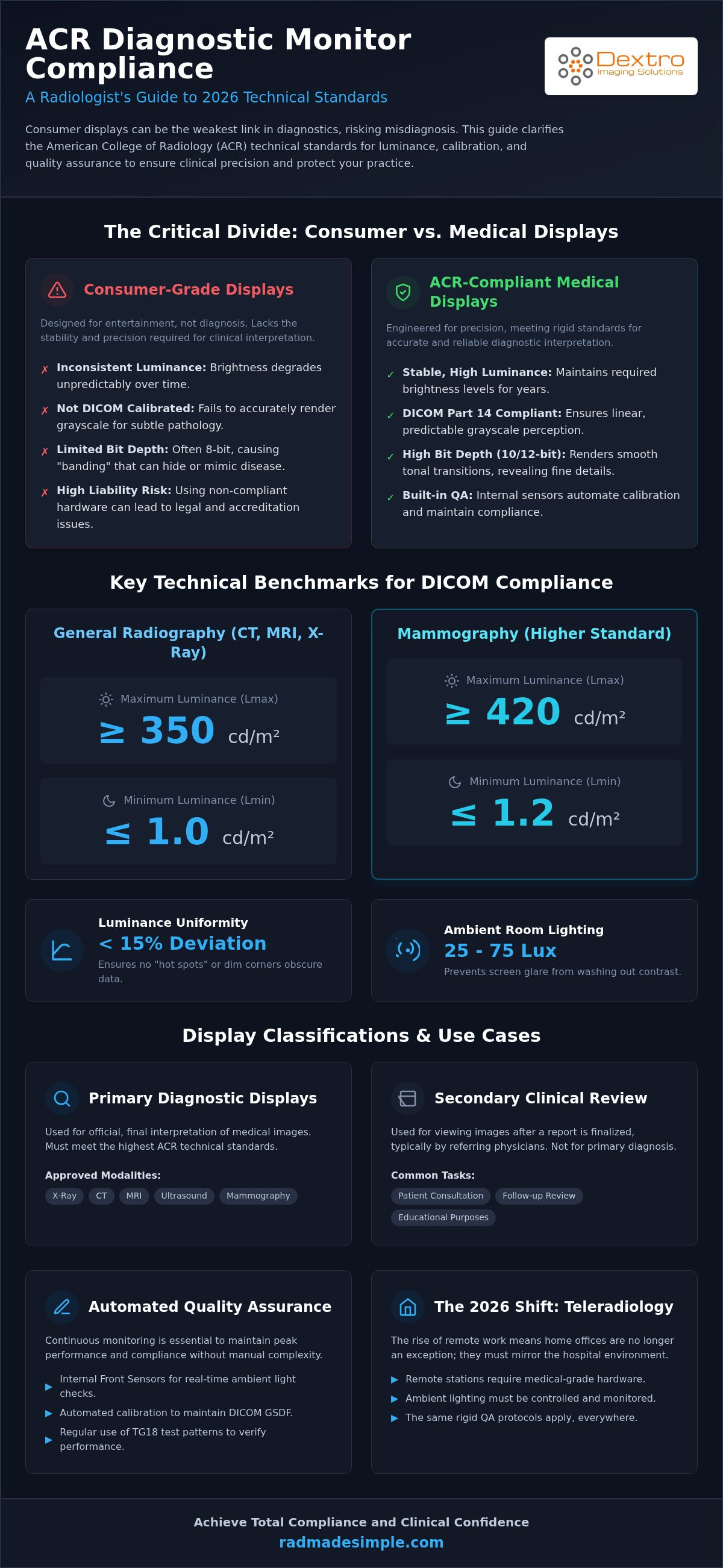
A primary diagnostic display is the only acceptable tool for the final interpretation of modalities like X-ray, CT, MRI, and Ultrasound. These monitors must hit specific benchmarks for maximum luminance and pixel pitch to ensure spatial accuracy. In contrast, clinical review monitors are intended for secondary tasks. Referring physicians use them to view images after a report is finalized. Using a prosumer monitor for primary diagnosis is a dangerous middle ground. These displays often lack the 10-bit or 12-bit depth necessary for medical imaging, leading to banding that mimics or hides disease.
The Evolution of Standards in 2026
The rise of teleradiology has forced a shift in how we apply ACR guidelines for diagnostic monitors. In 2026, the home office is no longer an exception; it must mirror the hospital environment. This means remote stations require medical-grade hardware and controlled ambient lighting to ensure consistency. Modern Portable Radiology Workstations now allow for high-stakes reading in remote or temporary environments, provided they adhere to the same rigid QA protocols as stationary setups. To ensure your entire fleet meets these evolving demands, consult the 2026 Radiology Equipment Compliance Checklist for a detailed breakdown of current hardware mandates.
Luminance and Contrast: The Core of DICOM Part 14 Compliance
Luminance is the engine of diagnostic accuracy. It determines whether a radiologist can perceive the subtle differences between normal anatomy and early-stage pathology. Under the latest ACR Practice Parameters & Technical Standards, the benchmark for maximum luminance (Lmax) has been solidified. For general medical image interpretation, a display must hit at least 350 cd/m². If you are interpreting mammography, that requirement jumps to 420 cd/m². These values ensure that the human eye operates in its most sensitive range for contrast detection.
Contrast is not just about the brightest white; it's equally dependent on the minimum luminance (Lmin), or the "black level." For general displays, Lmin must be at least 1.0 cd/m², while mammography requires 1.2 cd/m². The resulting luminance ratio should ideally hit a target of 350. To maintain this across the entire viewing area, ACR guidelines for diagnostic monitors mandate a luminance uniformity deviation of less than 15%. This prevents "hot spots" or dim corners from obscuring critical data. The DICOM Part 14 Grayscale Standard Display Function (GSDF) acts as the mathematical map, ensuring these digital values translate into linear, predictable brightness levels that the eye can interpret reliably.
Ambient Lighting and Illuminance
The performance of a world-class monitor is easily neutralized by poor room lighting. ACR standards state that ambient illuminance should be maintained between 25 and 75 lux. If the room is too bright, reflected glare on the screen surface washes out the black levels and invalidates your calibration. Modern solutions like Jusha Diagnostic Monitors often include integrated front sensors that continuously monitor these environmental shifts. These sensors allow for real-time adjustments, ensuring the display stays compliant even as the sun moves or office lights change. You can find more details on environmental requirements in our 2026 Radiology Equipment Compliance Checklist.
Bit Depth and Grayscale Precision
Precision requires a deep palette of gray. Standard 8-bit consumer monitors only offer 256 shades, which often leads to "contouring" or visible banding in soft tissue. Diagnostic displays require at least 10-bit (1,024 shades) or 12-bit depth to ensure smooth transitions and accurate reproduction. Bit depth determines the monitor’s ability to show subtle tissue density changes. High-performance Look-Up Tables (LUT) within the hardware manage these shades to keep the grayscale response perfectly aligned with the GSDF. Maintaining this level of precision is critical for high-stakes interpretations in teleradiology and hospital environments alike.
Resolution and Pixel Pitch: Requirements by Modality
Resolution is the primary driver of spatial accuracy in medical imaging. The ACR-AAPM Technical Standard for Diagnostic Interpretation Displays details how many pixels are necessary to represent fine anatomical details without interpolation errors. Choosing the right megapixel (MP) count depends entirely on the modality you interpret most frequently. High-resolution displays prevent the loss of critical information that occurs when an image is downscaled to fit a lower-resolution screen.
Pixel pitch is the distance between the center of two pixels, measured in millimeters. When this distance is too large, radiologists experience the "screen door effect," where the space between pixels becomes visible during close-up examination. Professional Jusha Medical Monitors maintain a tight pixel pitch to prevent this visual fatigue. Additionally, these displays favor 4:3 or 3:2 aspect ratios. These shapes maximize the viewing area for traditional radiographs, unlike consumer 16:9 widescreen monitors that leave excessive, unusable black space on the sides of the image.
| Modality | ACR Resolution Benchmark | Recommended Display MP |
|---|---|---|
| Digital Mammography / Tomo | 2048 x 2560 (Minimum) | 5MP (Dual) or 12MP (Fusion) |
| General Radiography (CR/DR) | 1536 x 2048 | 3MP |
| Cross-Sectional (CT/MRI) | 1200 x 1600 | 2MP or 3MP |
The 5MP Standard for Breast Imaging
Breast imaging is the most demanding modality for display hardware. The ACR guidelines for diagnostic monitors require a 5MP resolution for digital mammography to ensure microcalcifications are visible. The industry is currently shifting toward 12MP "Jumbo" displays. These high-resolution screens replace traditional dual-head setups, offering a seamless workspace that eliminates the physical bezel between images. This modernization is particularly valuable for Tomosynthesis, where scrolling through large datasets requires a flicker-free, high-speed interface.
Resolution for CT, MRI, and Ultrasound
For cross-sectional imaging like CT and MRI, 2MP or 3MP displays are generally sufficient. These modalities produce smaller matrix sizes than projection radiography, so a higher pixel count doesn't always translate to better diagnostic yield. However, many modern practices adopt high-resolution "Fusion" displays. These allow radiologists to view multi-modality studies on a single screen without sacrificing the spatial precision required for any individual image. Fusion displays streamline the workflow by allowing 3D reconstructions and ultrasound loops to be viewed alongside high-resolution CT slices on the same compliant surface.
Quality Assurance (QA) and Ongoing Calibration
Maintaining compliance with ACR guidelines for diagnostic monitors is a continuous commitment, not a one-time setup. As displays age, their backlights inevitably dim and their grayscale response shifts. To ensure clinical accuracy, the 2026 standards require a maximum error of ±10% from the DICOM Grayscale Standard Display Function (GSDF). While manual calibration once required specialized luminometers and hours of downtime, modern diagnostic displays have transformed this workflow. Integrated front-sensors now perform automated calibration, often scheduled after hours to ensure the reading room remains operational without interruption.
The logistical burden on IT departments has also decreased through the adoption of centralized management dashboards. These platforms allow for remote QA across an entire hospital network or teleradiology fleet. Instead of visiting every station, administrators can monitor luminance stability and calibration history from a single interface. This shift toward automated, AI-assisted QA ensures that every monitor in the system provides a consistent visual experience, regardless of its location or age. Documentation for ACR accreditation and hospital audits is generated automatically, providing a digital paper trail that proves every display meets the required 15% luminance uniformity threshold.
The Daily QC Checklist
Radiologists play a vital role in the early detection of hardware failure. Before beginning a shift, a quick visual inspection of the AAPM TG18-QC test pattern helps identify dead pixels, artifacts, or geometric distortions. Most high-performance Radiology Reading Workstations include a dedicated status light that glows green when the monitor is within its calibrated range. If the light is amber or red, the internal sensor has detected a shift that requires immediate attention. Keeping the screen surface clean and free of fingerprints is equally essential to prevent false positives during interpretation.
Annual Physicist Review
While daily and quarterly checks are qualitative, a formal ACR physicist inspection is a quantitative deep dive. Once a year, a Qualified Medical Physicist must verify that the display hits the minimum luminance of 1.0 cd/m² and the maximum of 350-420 cd/m² depending on the modality. This review also tests for luminance decay. When a monitor can no longer reach its target brightness without excessive noise, it has reached its "end of diagnostic life" and must be retired. Proactive replacement schedules based on these annual reports prevent sudden hardware failures that could disrupt clinical services.
Ready to upgrade your fleet with self-calibrating hardware? Explore our pre-configured diagnostic monitor solutions today.
Selecting an ACR-Compliant Workstation Solution
Selecting hardware that satisfies the ACR guidelines for diagnostic monitors is the final step in building a high-performance reading room. A monitor doesn't function in isolation; it requires a compatible Graphics Processing Unit (GPU) capable of supporting 10-bit or 12-bit grayscale output. Standard consumer GPUs often truncate this data, leading to banding that can obscure subtle lesions. High-performance GPUs ensure the signal sent to your Jusha monitors remains pure and uncompressed. Beyond internal specs, the physical configuration of the workstation determines clinical efficiency. Proper monitor height and tilt are essential to maintain a radiologist's optimal visual field and reduce neck strain during long shifts. Integrating RadVoice for reporting and PACS Harmony for image management creates a seamless environment where the technology supports the user rather than complicating the workflow.
Building the Compliant Home Office
Achieving ACR-grade interpretation in a teleradiology environment requires a specialized approach. Remote setups often struggle with environmental lighting and inconsistent hardware. Dextro Reading Stations provide a pre-configured answer to these challenges. These systems arrive pre-calibrated for immediate deployment, offering the "Dextro Advantage" by removing the technical burden from the radiologist. For those on the move, specialized Portable Radiology Workstations offer a compact yet fully compliant solution for emergency or remote use. You can find more details on optimizing these mobile environments in our guide to the Traveling Radiologist Workstation Setup.
Total Cost of Ownership (TCO) for Compliance
Maintaining ACR guidelines for diagnostic monitors requires a long-term view of your equipment's lifecycle. While the upfront cost of medical-grade hardware is higher than consumer alternatives, the value lies in automated QA and extended lifespans. Investing in integrated systems reduces the manual labor required for hospital audits and physicist reviews. To better understand how hardware costs fit into your broader software budget, refer to our analysis of Radiology PACS Pricing. This comprehensive view helps you balance initial procurement with the ongoing maintenance required to stay compliant through 2026 and beyond.
Ensuring your reading room remains compliant is a high-stakes task. Dextro is here to simplify the process through expert guidance and specialized hardware. Contact Dextro today for a custom ACR-compliant display audit and ensure your workstation is optimized for diagnostic precision.
Securing Your Diagnostic Future
Mastering the technical landscape of medical imaging requires more than just high-resolution screens. It demands a rigorous adherence to the ACR guidelines for diagnostic monitors to ensure every interpretation is backed by verified accuracy. We've explored how 2026 standards prioritize specific luminance benchmarks, modality-specific resolutions, and the critical role of automated quality assurance. By moving away from consumer-grade limitations and embracing medical-grade precision, you protect your patients and your professional reputation.
Dextro Imaging Solutions simplifies this transition. As an authorized Jusha Medical Monitor distributor, we provide systems with pre-configured DICOM Part 14 compliance and expert technical support for PACS integration. Whether you're optimizing a hospital reading room or a remote home office, our team ensures your hardware meets every regulatory hurdle with ease. Our specialized workstations remove the complexity of setup so you can focus on clinical outcomes.
Ready to eliminate technical uncertainty? Request an ACR-Compliant Display Consultation and take the first step toward a modernized, fully compliant workspace. Your clinical excellence deserves a display that never compromises.
Frequently Asked Questions
Can I use a high-end 4K gaming monitor for diagnostic radiology interpretation?
No, gaming monitors are unsuitable for primary interpretation. These displays don't have the internal sensors and stabilization circuitry required to maintain consistent luminance and DICOM Part 14 calibration over time. While they offer high resolution, they can't guarantee the grayscale precision necessary to prevent misdiagnosis. ACR guidelines for diagnostic monitors specifically discourage consumer-grade displays because they lack the necessary controls to sustain medical-grade performance and regulatory compliance.
How often do ACR guidelines require monitor calibration?
Quantitative performance testing, including luminance calibration, is required annually by a Qualified Medical Physicist. However, qualitative testing using patterns like the TG18-QC should occur at least quarterly to ensure visual integrity. Many modern facilities utilize Jusha diagnostic monitors with integrated front sensors to perform automated calibration daily. This proactive approach ensures the display remains within the ±10% DICOM GSDF error threshold, providing consistent diagnostic accuracy without manual intervention.
What is the minimum megapixel requirement for mammography monitors in 2026?
The minimum requirement for digital mammography and tomosynthesis is 5 megapixels, typically 2048 x 2560 pixels. This high resolution is essential for detecting subtle microcalcifications that lower-resolution screens might obscure. Many radiologists are now transitioning to 12MP Jumbo fusion displays to replace traditional dual-head setups. These larger screens provide a seamless, high-resolution workspace that meets all ACR spatial accuracy mandates while improving the efficiency of scrolling through large breast imaging datasets.
Do ACR guidelines apply to teleradiology and home reading stations?
Yes, these standards apply to any display used for primary diagnostic interpretation, regardless of the physical location. Teleradiology stations must meet the same luminance, resolution, and ambient lighting requirements as hospital-based reading rooms. Dextro reading stations are specifically pre-configured to ensure that remote environments remain fully compliant with ACR guidelines for diagnostic monitors. This uniformity protects the radiologist from liability and ensures consistent patient care across the entire healthcare network.
What is the difference between DICOM Part 14 and standard sRGB?
DICOM Part 14 is a mathematical model designed to ensure grayscale consistency across different displays, whereas sRGB is a color space for general consumer use. The DICOM Grayscale Standard Display Function (GSDF) maps digital values to perceived brightness linearly. This specialized calibration is critical because it ensures that a specific tissue density looks identical on every compliant monitor. Standard sRGB profiles can't achieve this level of precision, which is vital for clinical accuracy.
How does ambient room lighting affect ACR monitor compliance?
Excessive ambient light creates glare and washes out the monitor's black levels, directly impacting the perceived contrast ratio. ACR guidelines recommend maintaining ambient illuminance between 25 and 75 lux for optimal performance. If the room is too bright, the display can't meet the required minimum luminance (Lmin) benchmarks. Using Dextro reading stations helps manage this by providing a controlled environment and integrated sensors that adjust for room changes, ensuring continuous compliance.
Is a color monitor acceptable for grayscale diagnostic interpretation?
Yes, color monitors are acceptable provided they meet all technical requirements for luminance, resolution, and DICOM Part 14 calibration. Modern color monitors are frequently used for multi-modality workflows that combine grayscale images with color-coded fusion data, such as PET/CT or Doppler ultrasound. The key is ensuring the hardware can sustain the required 350-420 cd/m² maximum luminance while maintaining precise grayscale response. This versatility allows radiologists to interpret diverse studies on a single workstation.
What happens if our facility fails an ACR monitor inspection?
Failing an inspection can lead to the loss of ACR accreditation, which often impacts a facility's ability to receive reimbursement from major payers. Non-compliant monitors must be recalibrated or replaced immediately to restore diagnostic integrity. Proactive maintenance and regular QA testing are the best defenses against these failures. Utilizing Jusha diagnostic monitors with automated reporting tools provides the digital documentation necessary to pass hospital audits and physicist reviews with total confidence.


