

Forcing your eyes to jump across a physical bezel gap hundreds of times per shift isn't just a minor nuisance. It's a direct source of fatigue that slows your diagnostic speed and breaks your concentration. You likely already feel the strain of managing multiple screens while worrying if your 8MP medical display for radiology truly meets the latest DICOM Part 14 standards or the August 2026 ADA compliance requirements. High-stakes reporting requires a workspace that prioritizes precision and eliminates technical friction.
Transitioning to a single, high-resolution monitor can transform this experience into a unified and efficient workflow. This 2026 guide is designed to help you find the perfect display to streamline complex teleradiology tasks and provide the clarity you need for confident diagnosis. We will examine the latest Jusha 8MP models, such as the C820G, and explain how to achieve seamless integration with PACS Harmony or aycan PACS. By the end of this article, you'll know exactly how to build a bezel-free, compliant reading environment using modern Dextro Reading Stations to protect your productivity and your peace of mind.
Key Takeaways
- Understand why a single 8MP screen is replacing legacy dual-monitor configurations to provide a more cohesive and efficient diagnostic environment.
- Identify the essential brightness and contrast ratios needed for an 8MP medical display for radiology to maintain strict DICOM Part 14 compliance.
- Evaluate the cost-efficiency and ergonomic benefits of reclaiming desk space while eliminating the distracting bezel gaps found in traditional setups.
- Learn how to combine Jusha high-performance monitors with Dextro Reading Stations for a fully integrated, medical-grade reporting solution.
- Discover the seamless compatibility between modern 8MP hardware and advanced software platforms like PACS Harmony and aycan PACS.
What is an 8MP Medical Display and Why is it the New Standard?
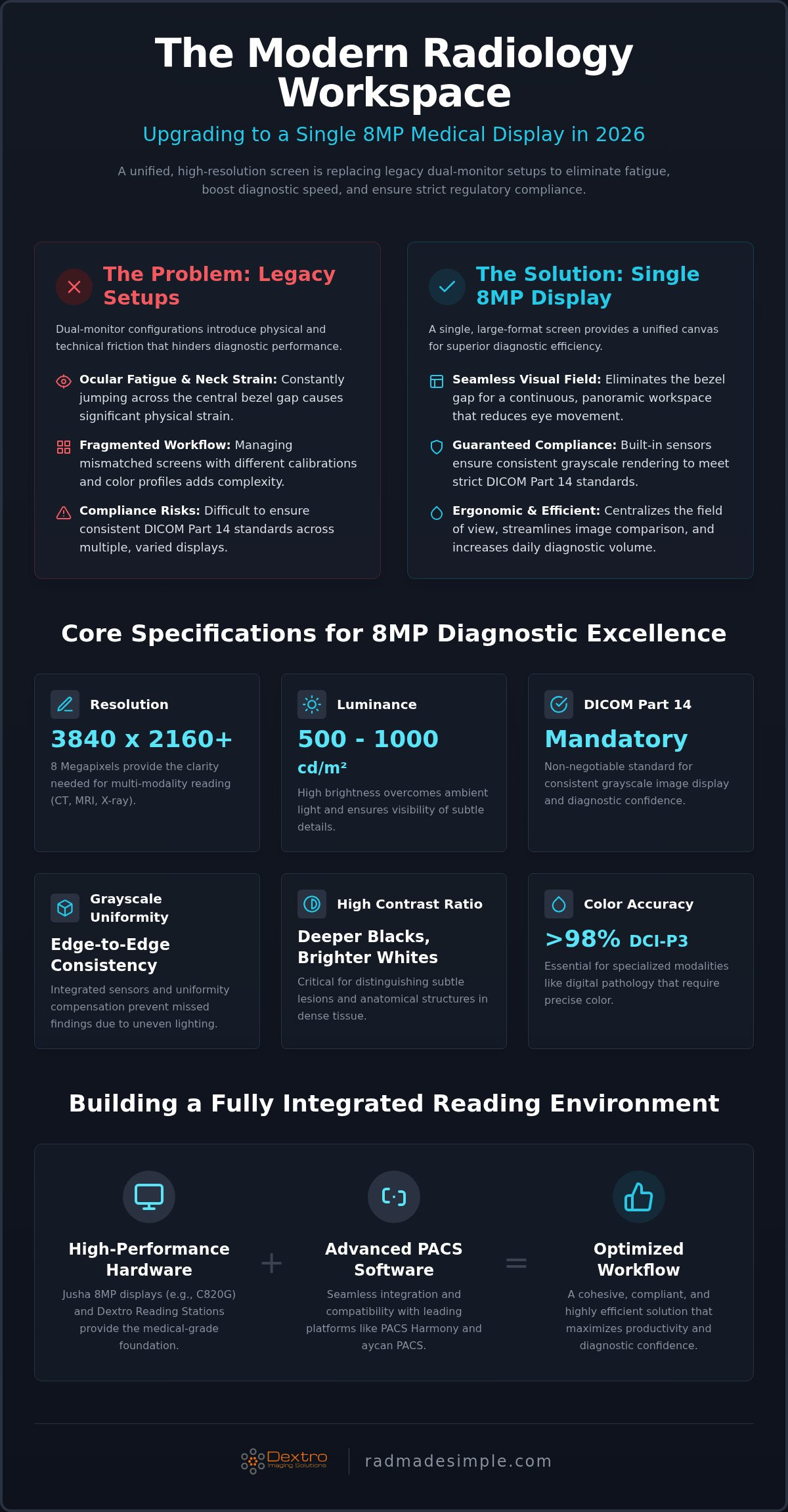
In the diagnostic environment, an 8MP medical display for radiology represents a technological leap beyond standard resolution. It specifically refers to a screen capability of 3840 x 2160 pixels or higher, engineered to meet the stringent demands of medical imaging. While consumer 4K monitors share the pixel count, they lack the specialized hardware required for clinical accuracy. The industry is rapidly moving away from legacy configurations of two 3MP or 5MP monitors. Instead, a single large-format 8MP screen provides a unified canvas for multi-modality reading. This allows radiologists to view CT, MRI, and X-ray images side-by-side without the physical interruptions of a traditional setup. The shift to 8MP isn't just about pixel density; it's about workflow optimization. In a legacy environment, a radiologist might have a 3MP screen for general radiology and a 5MP screen for mammography. Managing different calibration cycles and color profiles across mismatched hardware creates unnecessary complexity. A high-performance 8MP display replaces these fragmented systems with a single, high-fidelity point of truth.
The Ergonomic Advantage of Single-Screen 8MP Workflows
Traditional dual-monitor setups create a "bezel gap," a physical barrier that forces the human eye to refocus every time it crosses from one screen to the other. This constant adjustment leads to significant ocular fatigue and neck strain over an eight-hour shift. By adopting a single-screen 8MP workflow, you centralize the field of view. This streamlines window leveling and image comparison because there are no physical borders to navigate. You can arrange your workspace more flexibly, placing reporting software and imaging windows exactly where they feel most natural. A single 8MP display fundamentally increases daily diagnostic volume by minimizing the physical friction inherent in multi-screen navigation.
DICOM Part 14 Compliance: Non-Negotiable for 8MP Displays
Compliance isn't optional in medical imaging. Consumer-grade monitors fail because they can't maintain the DICOM standard for image consistency required for diagnostic reporting. An 8MP medical display for radiology includes automatic luminance stabilization and internal calibration sensors. These components work together to ensure that the grayscale rendering is perfectly consistent across the entire 31.5-inch surface. This precision is vital for detecting subtle lesions in dense tissue that might be invisible on a non-medical screen. By choosing medical-grade hardware, you eliminate the anxiety of non-compliance and ensure your facility meets current regulatory benchmarks. These displays also feature advanced backlight control, which prevents the brightness fluctuations common in standard office monitors. This level of reliability is what makes 8MP the modern standard for professional radiology departments.
Core Specifications for 8MP Diagnostic Excellence in 2026
Selecting an 8MP medical display for radiology requires looking beyond simple pixel counts. In 2026, diagnostic-grade performance is defined by luminance and contrast capabilities that ensure clinical safety. For general radiology, a minimum calibrated brightness of 500 cd/m² is standard, though many high-end units now target 1000 cd/m² to provide greater headroom for aging backlights. High contrast ratios are equally critical; they allow radiologists to distinguish subtle lesions in dense tissue by providing deeper blacks and brighter whites. Modern displays also offer multi-resolution modes, enabling users to switch between 8MP, 6MP, and 4MP. This flexibility is essential for maintaining aspect ratio integrity when viewing legacy PACS images or specific modalities like digital pathology, which demands DCI-P3 color accuracy of 98% or higher.
Luminance and Grayscale Uniformity
Consistency across the screen surface is a primary differentiator between clinical and consumer hardware. The FDA guidance on diagnostic displays emphasizes the need for devices that maintain stable performance over time. To meet this, 2026-era monitors utilize integrated front-bezel sensors that continuously monitor and adjust backlight output. Uniformity compensation technology further ensures that brightness levels remain identical from the center to the edges. This edge-to-edge accuracy prevents false positives or missed findings caused by uneven screen lighting, especially in high-ambient-light teleradiology environments where peak luminance must overcome surrounding glare.
Connectivity and Multi-Device Integration
Driving an 8MP resolution at a smooth 60Hz requires robust hardware interfaces. You should prioritize displays equipped with DisplayPort 1.4 or HDMI 2.1 to ensure sufficient bandwidth for high-bit-depth imaging without lag. Picture-by-Picture (PBP) functionality is another vital feature, allowing the monitor to split the 8MP canvas into two distinct 4MP sections. This enables the simultaneous display of two different PACS inputs or clinical software windows on a single panel. For the most efficient setup, these monitors should be integrated into professional radiology reading workstations to ensure cable management and ergonomic positioning are fully optimized. If you're looking to upgrade your facility's diagnostic capabilities, consider exploring how Jusha diagnostic monitors can provide the technical precision your team requires.
8MP vs. Dual-Monitor Configurations: A Comparative Analysis
Transitioning to a single 8MP medical display for radiology offers a streamlined alternative to traditional dual-head setups. A primary advantage is space efficiency. Reclaiming desk real estate is vital in modern reading rooms where workstations are increasingly crowded. By consolidating your view into a single footprint, you eliminate the clutter of extra power cables and video leads. This modernization simplifies the physical environment and reduces the footprint of the diagnostic station.
From a cost perspective, investing in one 8MP monitor is often more economical than purchasing two 5MP monitors and the specialized graphics cards required to drive them. Beyond the hardware cost, you reduce the administrative burden of software management. Handling a single desktop is simpler than managing window snapping across two displays, where images can accidentally jump between panels or align incorrectly. A single-screen approach makes the digital workspace feel cohesive and intentional.
Consistency remains the most compelling technical reason for the switch. Every panel has slight variances in color temperature and luminance. Achieving perfect uniformity between two distinct monitors is nearly impossible, even with frequent calibration. A single 8MP display ensures that every pixel across the diagnostic canvas adheres to the same calibration profile. This removes the risk of a lesion appearing differently on one side of the workspace versus the other.
Clinical Impact on Diagnostic Accuracy
Bezel-free viewing directly improves the detection of small abnormalities by removing the physical interruption in the center of the workspace. This unified field of view facilitates seamless side-by-side comparison of current and prior studies without visual breaks. An 8MP display provides approximately 8.3 million pixels, which is nearly 40% more resolution than a standard dual 3MP configuration that offers only 6 million pixels. This density allows for more information to be displayed at a diagnostic quality level without excessive zooming or panning. Adhering to the ACR Technical Standard for Medical Imaging ensures that this extra detail translates into clinical reliability and faster interpretation times.
Hardware Requirements: Graphics Cards and Processing
Driving such high resolution without lag requires a workstation with significant processing power. You must ensure your system includes specialized medical graphics cards capable of rendering high-bitrate DICOM images. These cards are optimized for grayscale precision and high-speed data throughput. Without the right card, you may experience stuttering when scrolling through large CT or MRI stacks. For a detailed breakdown of the investment required for these components, see the Diagnostic Radiology Monitors: 2026 Pricing & Guide. Selecting the right hardware ensures that your 8MP environment stays responsive during heavy multi-modality reading sessions.
Choosing Your 8MP Display: Jusha vs. Industry Alternatives
Selecting an 8MP medical display for radiology often comes down to balancing technical performance with long-term reliability. Jusha monitors stand out as a flagship choice because they offer high-end resolution without the prohibitive costs associated with some legacy brands. While the 31.5-inch C820G is the standard for individual diagnostic workstations, Jusha also provides specialized large-format displays like the 84-inch S8420S and the 98-inch S9820. These massive screens are ideal for clinical review or multidisciplinary team meetings where multiple high-resolution images must be viewed simultaneously. Beyond standard radiology, these units feature pathology-specific modes that ensure true-to-life color reproduction. This versatility, combined with high durability, ensures a strong return on investment for facilities looking to modernize their imaging infrastructure.
Stationary vs. Portable 8MP Solutions
The choice between stationary and portable setups depends on your specific workflow requirements. Traditional hospital reading rooms benefit from fixed 8MP installations integrated into Dextro Reading Stations for maximum stability. However, teleradiology is shifting toward more mobile solutions. You can now adapt an 8MP medical display for radiology into a traveling radiologist workstation setup to maintain diagnostic accuracy on the go. Radcom Compact plays a vital role in these scenarios by managing complex connectivity and ensuring that remote 8MP setups remain stable across various network environments. This flexibility allows radiologists to maintain a high-performance reading environment regardless of their physical location.
Maintenance and Compliance Support
Maintaining medical-grade standards requires more than just high-quality hardware; it requires a proactive approach to calibration. Jusha diagnostic displays feature automated calibration schedules that run in the background to ensure ongoing DICOM accuracy without manual intervention. Utilizing a 2026 radiology equipment compliance checklist is essential for managing these units across a large facility or a distributed teleradiology network. Dextro Imaging Solutions provides global technical support to handle hardware maintenance and troubleshooting, giving you confidence that your equipment will perform during high-stakes diagnostic sessions. If you're ready to upgrade your department with the latest technology, you can explore our full range of Jusha diagnostic monitors to find the right fit for your facility.
Optimizing Your 8MP Setup with Dextro Imaging Solutions
High-performance hardware requires a matching software ecosystem to reach its full potential. Dextro Reading Stations are engineered to house your 8MP medical display for radiology within a turnkey environment that removes the complexity of sourcing individual components. These stations provide the ergonomic foundation needed for long shifts while ensuring your hardware is positioned for maximum clinical impact. By integrating Jusha monitors with PACS Harmony or aycan PACS, you create a unified diagnostic hub where images and patient data flow without interruption. This seamless integration ensures that your hardware and software communicate without latency or compatibility errors. You can also customize these workstations for specific modality needs. Mammography setups often require specialized luminance profiles, while general radiology configurations prioritize the expansive side-by-side comparative views that a single 8MP canvas provides.
Workflow Streamlining with Integrated Tools
Diagnostic speed is a critical metric in modern imaging departments. You can significantly enhance your reporting efficiency by utilizing voice recognition for radiologists. RadVoice allows you to dictate directly into the PACS interface while maintaining your visual focus on the 8MP screen. This integration removes the distracting need to toggle between different software windows or physical devices. High-resolution visual clarity paired with AI-driven reporting tools directly reduces report turnaround time and minimizes clerical errors. Dextro’s expertise in hospital-wide imaging upgrades ensures that every component is optimized for maximum throughput, from the specialized graphics cards to the dictation microphones.
Next Steps: Securing Your 2026 Diagnostic Infrastructure
Modernizing your facility requires a strategic approach to technology adoption. You should begin by evaluating your current hardware for 8MP compatibility; many legacy systems lack the bandwidth to support high-bitrate diagnostic imaging. Dextro Imaging Solutions offers a comprehensive assessment to help you identify necessary upgrades and ensure a smooth transition. You can request a customized quote for 8MP displays and PACS integration to fit your specific budget and clinical goals. Contacting Dextro for a demonstration of Jusha 8MP diagnostic displays is the most effective way to see how these integrated technologies perform in a real-world setting. Protecting your facility’s diagnostic accuracy starts with a robust, future-proof infrastructure designed for the demands of 2026 and beyond.
Future-Proofing Your Diagnostic Workspace
The transition to a single 8MP medical display for radiology is no longer just a luxury; it's a strategic necessity for modern departments aiming to maximize both accuracy and efficiency. By eliminating bezel gaps and consolidating your field of view, you reduce the physical strain that leads to diagnostic fatigue. These displays ensure you remain compliant with the latest DICOM and 2026 ADA standards while providing the high-fidelity clarity required for multi-modality reading.
Dextro Imaging Solutions acts as your authoritative partner in this technological transformation. As an authorized Jusha diagnostic monitor distributor, we provide expert integration with platforms like PACS Harmony and RadVoice to create a truly seamless reporting environment. Our commitment includes global technical support and compliance maintenance to protect your high-stakes investment and ensure operational reliability. Upgrade your facility with high-performance 8MP Jusha monitors and Dextro Reading Stations today to secure your clinical success and streamline your operations for the future.
Frequently Asked Questions
Is an 8MP display better than a dual 5MP monitor setup for radiology?
An 8MP display is often preferred for its bezel-free viewing and superior cost efficiency. It simplifies cable management and ensures perfect color uniformity across the entire canvas. While dual 5MP setups offer high resolution, the physical gap between screens can disrupt visual flow and cause fatigue. Choosing an 8MP medical display for radiology provides a more cohesive diagnostic environment without the risk of mismatched panel calibration.
Does an 8MP medical display require a specialized graphics card?
Yes, driving 8.3 million pixels at high bit depths requires a medical-grade graphics card. Standard consumer cards often lack the processing power to render DICOM images without significant lag or stutter. Specialized cards are optimized for grayscale precision and high data throughput. This ensures that scrolling through large CT or MRI stacks remains fluid and responsive during high-volume shifts, maintaining your diagnostic momentum.
What is the difference between an 8MP clinical review monitor and a diagnostic monitor?
Diagnostic monitors meet much higher standards for brightness, contrast, and grayscale consistency than clinical review models. A diagnostic monitor is cleared for primary interpretation and official reporting. Clinical review screens are intended for referring physicians to view images after the radiologist has finalized the report. They usually lack the internal sensors and specific regulatory clearances necessary for making primary diagnoses in a high-stakes environment.
How often do 8MP diagnostic displays need to be calibrated for DICOM compliance?
Most modern 8MP diagnostic displays perform automated daily self-checks using internal front sensors. However, a full manual calibration and quality assurance test is typically recommended every three to six months. This frequency ensures the monitor remains strictly compliant with DICOM Part 14 standards. Regular testing accounts for backlight aging and ensures that the grayscale rendering remains accurate over the entire life of the device.
Can I use an 8MP medical display for remote teleradiology from home?
You can absolutely use an 8MP medical display for radiology in a home setting. Teleradiologists frequently use these monitors to maintain the same diagnostic standards they have in the hospital. When paired with a Portable Radiology Workstation or Radcom Compact, you ensure a secure and stable connection to your facility's PACS. This setup allows for high-fidelity reporting from any location without compromising image quality or regulatory compliance.
Are Jusha 8MP monitors compatible with all major PACS vendors?
Jusha 8MP monitors are designed for universal compatibility with all major PACS vendors, including systems like PACS Harmony and aycan PACS. They utilize standard digital interfaces like DisplayPort and HDMI to ensure seamless hardware handshakes. Because they adhere to international DICOM standards, they function reliably across diverse software environments. This interoperability makes them a versatile and secure choice for facilities using multi-vendor imaging platforms.
What is the expected lifespan of a high-resolution 8MP diagnostic display?
High-resolution diagnostic displays typically offer an operational lifespan of 30,000 to 50,000 hours. Most facilities plan for a hardware refresh every five to seven years. While the panel may continue to function beyond this period, the backlight's peak luminance eventually declines. Integrated sensors help compensate for this aging, but once the monitor can no longer hit its calibrated brightness target, it's time for a replacement to ensure compliance.
Does an 8MP monitor help with reducing eye strain during long shifts?
An 8MP monitor significantly reduces eye strain by providing a unified, flicker-free canvas. Eliminating the bezel gap found in dual-monitor setups prevents the eye from having to refocus constantly when moving between screens. Many diagnostic units also include ambient light sensors that automatically adjust brightness to match the room's lighting. These features help radiologists maintain focus and comfort during demanding shifts by providing a more natural viewing experience.


