

Why is your high-stakes diagnostic environment still slowed down by manual window toggling and fragmented data entry? It's frustrating to manage high-resolution studies on a Jusha monitor while fighting a reporting client that refuses to sync with your viewer. You likely agree that every extra click and manual accession number entry increases the risk of error and pushes your turnaround times to the limit. These bottlenecks shouldn't exist in a modern clinical pipeline, especially when effective PACS software integration can solve these friction points immediately.
This guide provides the technical roadmap to master the connection between your imaging and voice recognition tools. You'll learn how to unify these systems into a single, cohesive interface that functions as one organism. By leveraging the latest 2026 DICOM standards and DICOMweb protocols, you can eliminate the software friction that leads to radiologist burnout. We'll preview the essential steps to configure tools like RadVoice and PACS Harmony for a faster, error-free reporting environment. This approach ensures your workflow is DICOM-compliant and optimized for the high-performance demands of the current year while meeting the latest interoperability mandates.
Key Takeaways
- Eliminate the "toggling tax" that adds minutes to every study by unifying your imaging and reporting workflows into a single, high-performance interface.
- Master the technical requirements of DICOM and HL7 FHIR to ensure your data exchange remains secure and compliant with 2026 interoperability mandates.
- Compare native reporting tools against best-of-breed third-party solutions to determine which architecture best supports your specific diagnostic accuracy and speed requirements.
- Follow a structured roadmap for successful PACS software integration, starting with hardware compatibility audits and moving through DICOM Modality Worklist configuration.
- Future-proof your clinical environment by using PACS Harmony and AI reporting agents to manage complex, multi-site workflows and increasing study volumes.
The Fragmentation Crisis: Why PACS Software Integration is Non-Negotiable in 2026
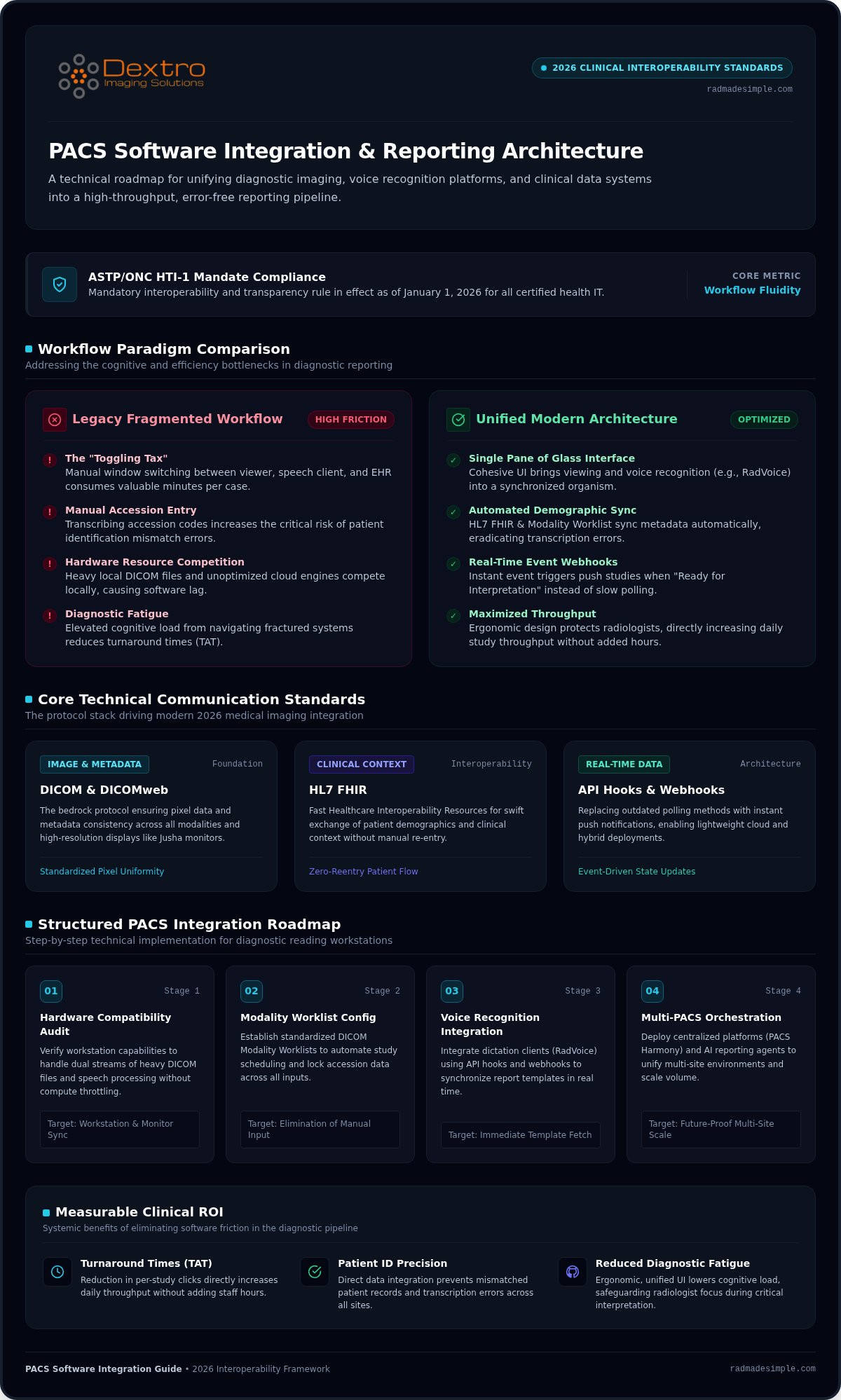
The current diagnostic landscape is defined by volume. Radiologists are facing higher study counts than ever, making the traditional, fragmented approach to reporting obsolete. Effective PACS software integration is the direct solution to this crisis. It represents the seamless data flow between imaging viewers, voice recognition platforms, and electronic health records. Without this technical bridge, clinicians are forced into a "toggling tax," where switching between disparate windows consumes valuable minutes and fractures concentration during critical interpretations.
Modern picture archiving and communication systems (PACS) must do more than just store and retrieve pixels; they must act as an active participant in the reporting cycle. Data silos aren't just inefficient; they're dangerous. Mismatched patient IDs and manual entry errors are frequently traced back to systems that don't talk to each other. As we move through 2026, unified reporting is a regulatory necessity. Mandates like the ASTP/ONC HTI-1 rule, which became effective January 1, 2026, demand higher standards for interoperability and transparency across all certified health IT.
Identifying Workflow Bottlenecks
The journey from image acquisition to the final signed report is often hindered by legacy friction points. Manual accession number entry is a primary culprit. When a radiologist has to transcribe a code from one screen into a dictation client, the risk of a patient identification error spikes. These delays are often exacerbated by underpowered hardware that can't handle simultaneous data streams. Utilizing high-performance radiology reading workstations is essential to reduce the software lag that occurs when heavy DICOM files and cloud-based voice engines compete for local resources.
The ROI of a Unified Interface
Investing in a unified interface provides a measurable return on investment through improved Turnaround Times (TAT). By reducing the number of clicks required per study, facilities can see a direct increase in daily throughput without increasing staff hours. Beyond the numbers, ergonomic software design protects your most valuable asset: the radiologist. Reducing the cognitive load of navigating fragmented systems directly lowers the risk of diagnostic fatigue. Workflow fluidity is the primary metric for 2026 radiology success, defined as the seamless transition between image interpretation and report finalization without manual data intervention.
Technical Foundations: DICOM, HL7, and API Hooks
Successful PACS software integration relies on a standardized communication layer that bridges the gap between imaging and text. DICOM remains the bedrock of this exchange, ensuring that pixel data and metadata remain consistent across every modality. However, the movement of patient demographics and clinical context now increasingly relies on HL7 FHIR (Fast Healthcare Interoperability Resources). These interoperability standards for medical image formats allow disparate systems to synchronize without manual data re-entry, creating a reliable foundation for diagnostic reporting.
The industry is moving away from "heavy" local installations that require constant desktop maintenance and localized database links. Modern integrations favor lightweight, API-driven architectures that reside in the cloud or hybrid environments. This shift enables faster deployment cycles and reduces the local compute burden, provided the network infrastructure is robust enough to handle the throughput. To see how these technical foundations come together in a live environment, you can explore our PACS Harmony solutions.
Understanding API Integration
Real-time data exchange is critical for urgent reads where every second counts. Traditional polling methods, where a system checks for updates every few seconds, are being replaced by webhooks. These hooks push data immediately when an event occurs, such as a study being marked "Ready for Interpretation." PACS Harmony utilizes these API hooks to create a "single pane of glass" experience, fetching reporting templates and patient history the moment an image is opened. Security remains a top priority; all inter-system transmissions must use encrypted protocols to protect Protected Health Information (PHI) during transit.
Hardware-Software Synergy
Software doesn't exist in a vacuum. Advanced integrated viewers require significant GPU performance to render multi-planar reconstructions alongside reporting dashboards. If your hardware lacks the necessary power, you'll experience frustrating frame-rate drops or software lag. This is why selecting Jusha medical monitors is a strategic decision for integrated workflows. These displays ensure that the unified UI is rendered with absolute clarity without resolution loss. Every pixel must remain DICOM Part 14 compliant, even when the screen is shared with reporting text. Managing multi-monitor setups for integrated dashboards requires a balance of high-resolution real estate and software-driven layout management to prevent eye strain and fatigue.
Native vs. Third-Party Voice Recognition Integration
Choosing between a native reporting module and a specialized third-party engine is a pivotal decision in PACS software integration. Native systems offer the allure of a single vendor and a unified interface out of the box. This simplicity is attractive for smaller facilities with lower study volumes. However, all-in-one systems often sacrifice the technical depth required for high-volume diagnostic environments. They may lack the advanced macro capabilities and specialized vocabularies that professional radiologists require for rapid, accurate reporting.
Specialized voice recognition for radiologists provides a level of accuracy and terminology support that generic modules cannot match. These best-of-breed tools are designed to work across multiple platforms, ensuring that your reporting workflow remains consistent even if you use different viewers for different modalities. Before committing to a specific path, perform an interoperability check to ensure your current image archive supports the necessary external "calls" to trigger a third-party reporting client.
The Case for Specialized Reporting
Platforms like RadVoice excel by offering structured reporting templates and macro-driven efficiency that native PACS modules frequently lack. These tools are built specifically to handle complex anatomical terminology and nuanced findings with high precision. A modular approach also future-proofs your department. It's much easier to upgrade a specialized AI reporting agent or implement a new generative reporting pipeline when your dictation software isn't hard-coded into the PACS viewer. This flexibility allows you to adopt the latest clinical innovations without waiting for a massive PACS version overhaul.
Integration Stability and Support
The "single vendor" myth suggests that all-in-one systems are inherently more stable, but 2026's mature API standards have changed that calculus. Modern bidirectional WebSocket messaging and RESTful APIs make multi-vendor setups incredibly resilient. Technical support in these environments is often superior because specialized vendors focus exclusively on reporting uptime and accuracy. Maintaining system availability during software updates is also more manageable when you can update your reporting engine independently of your image archive. This decoupling ensures that a minor PACS patch doesn't accidentally disable your dictation capabilities, keeping your diagnostic pipeline moving without interruption.
Step-by-Step: Integrating Voice Recognition with Your PACS
Executing a PACS software integration project requires a methodical approach to avoid clinical downtime. You should begin with a comprehensive pre-integration audit to verify that your current PACS version supports the necessary outbound triggers. Hardware compatibility is equally vital; ensure your Dextro Reading Station and diagnostic monitors meet the processing requirements for a side-by-side reporting environment. This audit prevents performance bottlenecks that can occur when heavy DICOM files and cloud-based voice engines compete for local CPU resources.
Configuring the DICOM Modality Worklist (MWL) to serve as the primary reporting trigger is the next critical step. This ensures that when a study is opened in the viewer, the reporting software immediately receives the correct Study Instance UID and accession number. While legacy environments might still rely on CCOW (Clinical Context Object Workgroup) for context management, modern facilities are shifting toward more resilient API bridges for patient synchronization. This transition allows for more stable connections between web-based viewers and cloud-hosted reporting platforms.
Phase 1: The Technical Handshake
Establishing a robust HL7 link between the RIS/PACS and the voice recognition server is the first major milestone. This link handles the bidirectional flow of patient demographics and report status updates. Mapping data fields with absolute precision is non-negotiable during this phase. Precise field mapping between the PACS and reporting software ensures that every finding is linked to the correct patient record, effectively preventing catastrophic misdiagnoses caused by data mismatch. Once the technical handshake is established, test the entire loop by opening an image and verifying that the report header auto-fills correctly with the matching accession number.
Phase 2: Optimizing the User Experience
A successful integration must feel natural to the end user to ensure high adoption rates. Customize hotkeys and foot-pedal commands to match the radiologist's existing muscle memory within the new integrated environment. You should also set up auto-launch protocols so the reporting template opens the instant a study loads on your diagnostic display. During the first week of go-live, implement a "Double-Check" protocol where radiologists verify the patient ID on both screens before signing. This validation phase minimizes the learning curve and builds confidence in the new, unified workflow. If you're ready to modernize your department's reporting efficiency, contact Dextro Imaging Solutions to discuss your custom integration roadmap.
Optimizing the Future: AI and Multi-PACS Environments
The future of radiology isn't just about faster hardware; it's about intelligent orchestration across multiple clinical sites. The rise of the "Super-PACS" model allows clinical directors to manage complex teleradiology networks through a single, unified entry point. Tools like PACS Harmony are essential here, as they provide the necessary translation layer to bridge disparate archives. This level of PACS software integration ensures that a radiologist can read for five different hospitals without ever leaving their primary interface, maintaining focus and diagnostic momentum.
AI reporting agents are no longer a luxury in the 2026 workflow. These tools work silently in the background, analyzing pixel data and prepopulating findings into your RadVoice templates. It's not just about speed; it's about a safety net that flags potential discrepancies between images and dictated text in real time. For long-term scalability, your architecture must support rapid retrieval and secure storage. Finalizing your setup with aycan PACS ensures you have a DICOM-compliant foundation that balances high performance with a sustainable total cost of ownership.
Unifying Disparate Interfaces
Hospital mergers frequently create a technical nightmare where a single reading room must manage five different PACS. This fragmentation leads to massive IT overhead and radiologist frustration. Vendor-neutral integration removes these barriers by creating a common workflow layer that sits above the individual archives. We've seen 10-site networks streamline their entire operation by implementing a unified reporting strategy. This approach reduces the need for site-specific training and allows for more flexible staffing across the entire network, regardless of the underlying legacy systems.
Next Steps for Your Facility
Transitioning to a unified environment starts with a comprehensive workflow efficiency audit. You need to identify exactly where your current software friction is costing you time and increasing the risk of error. Once you've mapped these bottlenecks, consult with Dextro Imaging Solutions to build a custom hardware-software roadmap. We specialize in simplifying complex, high-pressure environments through smart, integrated design. Optimize your radiology workflow today with Dextro's integrated solutions to ensure your facility is ready for the demands of 2026 and beyond.
Future-Proofing Your Clinical Reporting Environment
The transition toward a unified diagnostic workspace is no longer optional for facilities targeting high-volume efficiency. Mastering PACS software integration allows your team to move beyond manual data entry and fragmented windows; it creates a seamless environment where images and voice reporting work in perfect sync. By leveraging modern API hooks and the latest DICOM standards, you can significantly reduce turnaround times while protecting your staff from the fatigue of cognitive overload. This technical shift ensures your department remains agile in an increasingly demanding clinical landscape.
Dextro Imaging Solutions stands ready as your expert partner in this transformation. As a specialized Jusha diagnostic monitor distributor, we provide the high-resolution clarity required for integrated viewing. Our 2026 compliant teleradiology workstations are engineered specifically to handle the demands of multi-site connectivity and cloud-native reporting. We offer expert technical support for complex integrations, ensuring your transition is smooth and your uptime is guaranteed. Don't let software friction hold your department back from its full potential. You have the tools to build a faster, more reliable reporting environment today.
Streamline your reporting with RadVoice and PACS Harmony and take the first step toward a more agile, error-free diagnostic future.
Frequently Asked Questions
What is the difference between HL7 and DICOM in PACS integration?
DICOM is the global standard for medical imaging data exchange, focusing on how pixels and metadata are stored and transmitted. HL7, specifically the modern FHIR standard, manages the exchange of patient demographics, orders, and clinical reports between the EMR and the PACS. In a successful integration, these two protocols work together to ensure that the images you view match the patient record you are currently dictating.
Can I integrate RadVoice with any existing PACS system?
RadVoice is designed for broad compatibility and integrates with most modern imaging systems through direct API hooks or custom URI protocols. While older legacy systems may require additional configuration, our technical team specializes in establishing these connections to ensure a seamless reporting experience. This flexibility allows you to maintain your preferred image archive while upgrading to a high-performance voice recognition platform that reduces manual data entry.
How much downtime should we expect during a software integration project?
Most facilities experience minimal disruption when following a phased implementation strategy. We typically perform the technical handshake and data mapping in a staging environment before the clinical go-live to identify any bottlenecks. A standard project may involve a few hours of scheduled maintenance for the final switchover, but radiologists can often continue reading on legacy systems until the integrated environment is fully validated and ready.
Do I need specialized hardware to run integrated PACS and voice recognition software?
High-performance hardware is essential to handle the simultaneous processing of heavy DICOM files and cloud-based voice engines. Running integrated software on underpowered machines leads to frustrating frame-rate drops and software lag during critical reads. We recommend using Dextro Reading Stations equipped with professional-grade GPUs to ensure the unified interface remains responsive. This hardware synergy is critical for maintaining the sub-second synchronization required for efficient reporting.
What is CCOW and why is it important for radiology software?
Clinical Context Object Workgroup (CCOW) is a legacy standard used to synchronize different applications so they display data for the same patient simultaneously. It ensures that when you open a study in your PACS, your reporting software automatically loads the matching template. While modern PACS software integration is shifting toward more resilient API-driven bridges, CCOW remains a foundational concept for maintaining "context" across the disparate tools in a workstation.
How does integrated reporting improve patient safety?
Integrated reporting significantly improves patient safety by eliminating the need for manual accession number entry. When data flows automatically between the viewer and the report, the risk of a patient identification mismatch is virtually removed. This unified approach ensures that the findings you dictate are always linked to the correct study, preventing the catastrophic errors associated with wrong-patient reporting in high-volume diagnostic environments.
Is cloud-based PACS integration secure enough for HIPAA compliance?
Modern cloud-based integrations utilize enterprise-grade security that often exceeds on-premise capabilities. These systems employ end-to-end encryption and secure WebSocket messaging to protect PHI during transmission, ensuring full HIPAA compliance. Our solutions, including aycan PACS and RadVoice, adhere to strict regulatory standards and undergo regular security audits to protect your facility from data breaches while providing the flexibility of secure, remote diagnostic access from any location.
Can I use my existing consumer monitors for an integrated PACS workstation?
Consumer monitors lack the calibration and luminance consistency required for medical diagnostic tasks. Effective PACS software integration demands high-resolution clarity to display both images and reporting text without compromising diagnostic accuracy. You should use Jusha diagnostic monitors, which are specifically calibrated for DICOM Part 14 compliance. These professional displays ensure that subtle pathologies remain visible even when the screen real estate is shared with complex reporting dashboards.


