

What if the greatest threat to your diagnostic accuracy isn't the complexity of the pathology, but the vulnerability of the hardware you're using to view it? You already recognize that teleradiology is no longer just a convenience; it's the operational backbone of modern healthcare. As the global teleradiology market scales toward $23.9 billion in 2026, the technical burden of maintaining secure remote radiology reading has moved far beyond simple encryption. You're likely balancing the constant pressure of latency with the rigid demands of CMS 2026 supervision rules and the necessity for medical-grade endpoint security.
This guide removes that complexity. We'll show you how to master the technical and regulatory requirements needed to ensure diagnostic integrity and zero-friction compliance from any location. You'll learn how to deploy hardware that supports high-stakes decision-making while maintaining total data integrity. We'll explore the latest 2026 regulatory shifts, the necessity of medical-grade displays, and how to optimize your workflow using specialized solutions like Dextro Reading Stations and the Radcom Compact to protect your practice and your patients.
Key Takeaways
- Learn how to transition from legacy VPNs to Zero Trust Network Access (ZTNA) to protect sensitive patient data at every connection point.
- Understand why consumer-grade devices fail modern security audits and why it's essential that secure remote radiology reading relies on hardware-level encryption.
- Master the 2026 CMS requirements for remote supervision and the DICOM 2026c standards for grayscale display calibration.
- Identify the essential hardware components for a diagnostic-grade home office, including ambient light control and high-resolution medical monitors.
- Streamline your professional workflow by integrating specialized infrastructure that balances high-speed performance with rigid regulatory compliance.
What is Secure Remote Radiology Reading?
Modern Teleradiology has evolved from a simple convenience into a critical clinical necessity. Secure remote radiology reading is the practice of interpreting medical images outside a traditional hospital setting using a dedicated, compliant infrastructure. It's no longer enough to just log in from home. This practice requires a coordinated system of hardware and software that ensures every pixel remains uncompromised and every patient record remains private.
By 2026, the industry has moved beyond the traditional VPN. While VPNs once served as the standard for remote access, they often create broad tunnels into a hospital's network that attackers can exploit. Today, we utilize Zero Trust Network Access (ZTNA). This model operates on a "never trust, always verify" principle. It validates the user's identity, the health of their hardware, and the security of their connection before granting access to a specific study. This shift removes the complexity of managing large network perimeters and focuses security directly on the data and the user.
True security in teleradiology must encompass three specific areas: data privacy, file integrity, and diagnostic accuracy. If a system is secure but the image quality is degraded, the radiologist cannot provide an accurate report. The radiologist acts as the final, most critical endpoint in the healthcare data chain. Therefore, the security of the remote reading station is just as important as the security of the hospital's central server.
The Evolution of Teleradiology Security Standards
Security standards have transformed from basic encryption into modern multi-factor endpoint validation. Regulations in 2026 have tightened significantly, requiring that remote data access be strictly controlled and monitored. Modern reading software now must include comprehensive audit trails. These logs provide a clear record of who accessed an image and when they did it. This level of transparency is essential for maintaining HIPAA compliance and ensuring that the healthcare organization can respond quickly to any potential security event.
Why Remote Reading Security is a Patient Safety Issue
Maintaining high security standards isn't just about IT; it's a fundamental patient safety issue. Insecure transfers can lead to data corruption, where subtle image artifacts might interfere with a diagnosis. Additionally, insecure endpoints are prime targets for unauthorized access to Protected Health Information (PHI). We advocate for the "Right Image, Right Patient, Right Security" framework. This approach ensures that the diagnostic process remains untainted by technical failures or external threats, keeping the focus where it belongs: on the patient's health.
The Three Pillars of Teleradiology Security: Network, Software, and Endpoint
Effective secure remote radiology reading rests on a foundation where network protocols, software integrity, and physical hardware operate in total sync. If one pillar fails, the entire diagnostic chain breaks. In 2026, we've moved past the "firewall only" mindset. We now treat the remote environment as a high-stakes clinical extension that requires the same level of protection as the hospital's central server room.
Network: Ensuring High-Speed, Encrypted Data Tunnels
Network security has evolved beyond the limitations of traditional VPNs, which often struggle with the massive bandwidth requirements of modern MRI and CT datasets. We now implement Secure Access Service Edge (SASE) and SD-WAN to prioritize medical imaging traffic. The Radcom Compact serves as a vital tool here. It manages secure remote connectivity by creating a dedicated, encrypted tunnel that mitigates latency without sacrificing encryption depth. This ensures that radiologists don't have to wait for large DICOM files to load, maintaining a brisk and efficient workflow.
Software: PACS Harmony and Voice Recognition Security
Your software must do more than just display images. It must actively protect them. Integrating voice recognition for radiologists into these streams requires specialized security to prevent audio data breaches. Solutions like PACS Harmony or aycan PACS unify disparate interfaces under a single, secure login, reducing the credential fatigue that often leads to security shortcuts. These systems utilize the latest DICOM 2026c protocols to ensure data remains immutable during transit and storage.
The endpoint is where most security breaches occur. The physical workstation is often the most vulnerable link because it sits outside the hospital's direct control. Implementing Evidence-Based Cybersecurity Strategies at the device level is non-negotiable. This involves using radiology reading workstations that feature hardware-level encryption and Trusted Platform Module (TPM) chips. By securing the data at the point of visualization, you ensure that even if the network is compromised, the patient's PHI remains protected. For those seeking to eliminate technical friction, exploring Dextro Reading Stations provides a pre-configured, medical-grade solution that meets every 2026 compliance standard.
Why Hardware Integrity is the Missing Link in HIPAA Compliance
Network tunnels and software encryption provide a strong defense, but they're ineffective if the physical endpoint is compromised. Secure remote radiology reading requires hardware that's inherently resistant to unauthorized access and data corruption. Many institutions focus heavily on the data in transit while overlooking the device where that data is finally visualized. In 2026, the physical workstation isn't just a tool; it's a regulated medical device that must meet specific security and performance benchmarks.
Many radiologists fall into the "consumer device" trap by using high-end home laptops or gaming PCs for diagnostic work. These systems often fail medical security audits because they lack robust firmware protections. By 2026, HIPAA compliance standards have moved toward requiring hardware-level encryption. This relies on Trusted Platform Module (TPM) chips to secure cryptographic keys. Without a TPM 2.0 or higher, a stolen or lost device becomes an immediate PHI breach. Consumer hardware simply doesn't offer the same level of tamper-resistance found in professional-grade stations.
Diagnostic accuracy is also a compliance issue. If a monitor fails to display subtle grayscale differences, it compromises patient safety. Integrating Jusha medical monitors ensures that your setup adheres to DICOM Part 14 standards. These monitors provide the consistent luminance and contrast needed to prevent "ghosting" or artifacts that lead to misdiagnosis, which is a critical component of any remote security audit.
Medical-Grade vs. Consumer-Grade Hardware Security
Dextro Reading Stations offer a significantly longer lifecycle and more rigorous firmware security than off-the-shelf PCs. Consumer hardware often relies on frequent, unvetted driver updates that can introduce vulnerabilities or stability issues. Medical-grade units feature locked-down BIOS settings and specialized graphics hardware designed for 24/7 diagnostic performance. This ensures that the workstation remains a stable, secure endpoint that won't be compromised by background consumer software or unpatched OS vulnerabilities.
Securing the Physical Remote Office
Security extends to the room itself. You should place your workstation to prevent "shoulder surfing" or unauthorized viewing through windows. Best practices for 2026 include:
- Using screen privacy filters on secondary monitors used for non-diagnostic tasks.
- Implementing RFID card readers for quick, secure multi-factor authentication.
- Managing secure peripherals like encrypted dictation microphones.
For radiologists who require flexibility, a portable radiology workstation provides a self-contained, secure environment. These units maintain the same rigid compliance standards as a fixed office, allowing you to move between locations without leaving your data vulnerable to local network risks or physical theft.
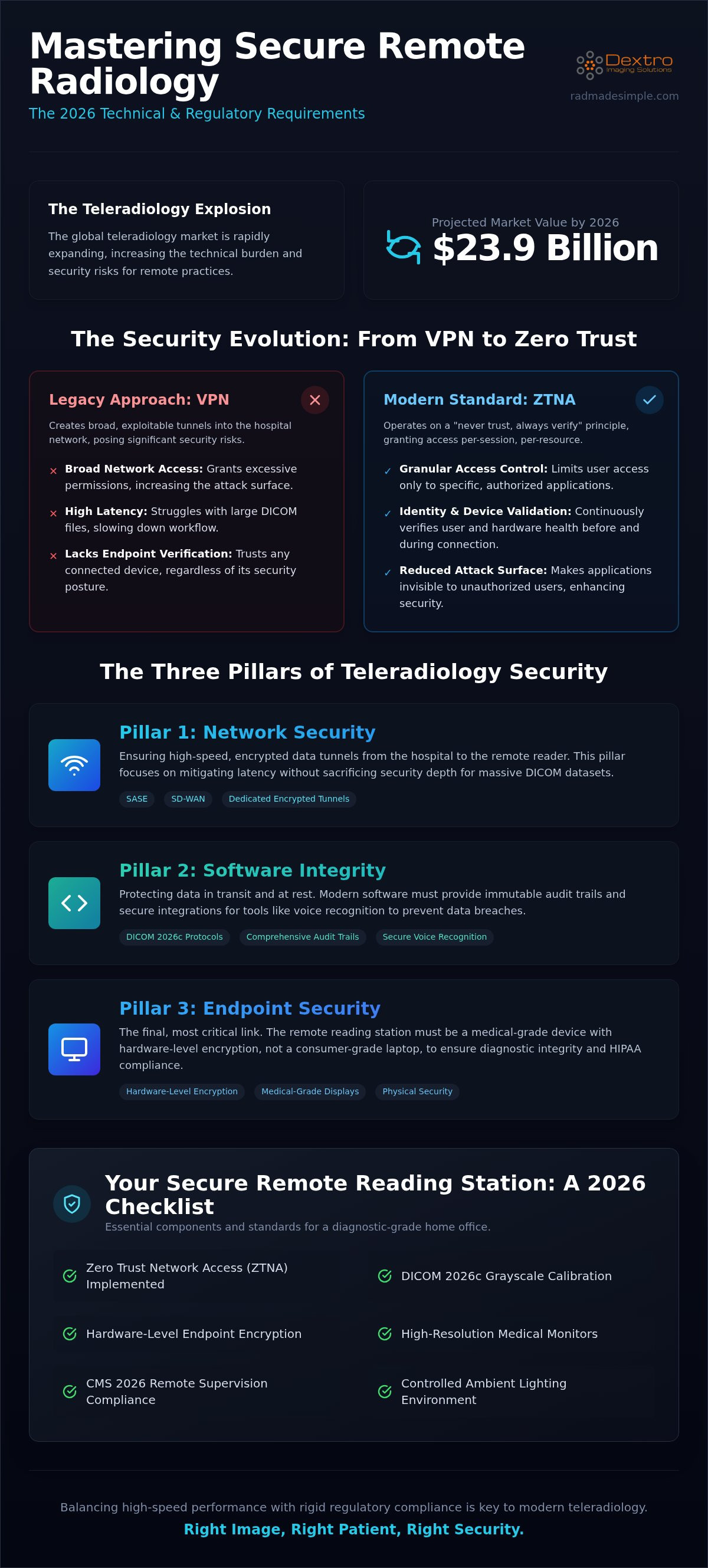
Building Your Secure Remote Reading Station: A 2026 Checklist
Transitioning to a secure remote radiology reading model requires more than just high-speed internet. It demands a systematic approach to environment, hardware, and access protocols. You must first assess your physical surroundings. Ambient light control is critical for diagnostic accuracy; excessive glare can hide subtle pathologies. Physical access must be restricted to authorized personnel to prevent unauthorized PHI viewing. Once the environment is controlled, you can focus on the technical layers that ensure HIPAA compliance and clinical excellence.
Implementing Zero Trust Access is a non-negotiable step for maintaining secure remote radiology reading standards. This means moving beyond simple passwords to Multi-Factor Authentication (MFA) and device-level validation. Every workstation must be recognized and authenticated by the network before a single DICOM file is transferred. Additionally, establish a strict maintenance schedule. This includes regular software security patches and monthly hardware calibration to maintain DICOM Part 14 standards. Consistency here prevents both security breaches and diagnostic drift.
Step 1: Hardware Selection for Diagnostic Accuracy
Your choice of workstation depends on your mobility needs. The Radcom Compact offers a specialized portable unit for teleradiology, ideal for those who move between sites. For a permanent home office, Dextro Reading Stations provide the standard for remote endpoint integrity. You must ensure your Jusha medical monitors meet the resolution requirements for your modality. For instance, mammography and CT often require 5 to 10-megapixel displays to discern grayscale differences. Don't overlook processing power. AI-driven image analysis and 3D rendering tools require high-performance graphics hardware to maintain a zero-friction workflow.
Step 2: Software and Connectivity Configuration
Software integration should be seamless and secure. Configure aycan PACS or PACS Harmony to provide a unified interface for all studies. This reduces the risk of errors and speeds up the reporting process. For dictation, use RadVoice to ensure all voice data remains encrypted from the moment it's recorded. Finally, test your network throughput during peak hours. You need reliable bandwidth to handle large file transfers without experiencing latency. If you're ready to upgrade your setup, you can browse our diagnostic workstation solutions to find a compliant fit for your practice.
Optimizing Remote Workflows with Dextro Imaging Solutions
Dextro Imaging Solutions acts as a specialized partner that removes the technical burden from the radiologist. We eliminate the fragmentation that often plagues remote setups by providing a unified ecosystem where every component is designed to work together. This approach simplifies the complexity of secure remote radiology reading, allowing you to focus on clinical decisions rather than troubleshooting network or hardware conflicts. By consolidating your infrastructure, you replace a patchwork of consumer devices with a professional, medical-grade environment.
The primary advantage of a single-vendor solution is the elimination of "finger-pointing" when technical issues arise. When your hardware, PACS, and connectivity tools come from one source, support becomes proactive and streamlined. Dextro provides specialized technical support that understands the nuances of DICOM protocols and HIPAA requirements. This reduces downtime significantly compared to general IT services. Our maintenance contracts include regular health checks and remote monitoring, ensuring that your station remains a high-performance clinical endpoint without requiring your constant attention.
A Unified Approach to Teleradiology
Integrating Jusha Diagnostic Monitors with Dextro Reading Stations ensures that your hardware is pre-optimized for maximum clinical performance. These monitors provide the precision needed for complex modalities, while the workstations offer the processing power required for modern AI-assisted reporting. To further accelerate your workflow, RadVoice integration allows for secure, encrypted report turnaround times that meet the demands of high-volume practices. Whether you need the mobility of the Radcom Compact or the full-scale power of a fixed Dextro Reading Station, your setup remains consistent and secure.
Ensuring Long-Term Compliance and Performance
Future-proofing your practice requires more than just a one-time purchase. It demands a commitment to ongoing radiology equipment compliance support. Dextro manages this lifecycle for you, ensuring that firmware updates and security patches are applied without disrupting your reading schedule. We also help you manage regular hardware refresh cycles. In a remote environment, keeping hardware current is essential to maintaining the encryption standards and processing speeds required for 2026 and beyond. This methodical approach protects your investment and ensures your practice stays at the forefront of technological shifts.
Don't let technical complexity compromise your diagnostic integrity or your regulatory standing. You can explore Dextro’s secure remote radiology solutions today to build a workflow that is as reliable as it is efficient.
Secure Your Practice for the Next Era of Teleradiology
Maintaining a secure remote radiology reading environment is no longer just about encryption; it's about the physical integrity of the endpoint. By transitioning to Zero Trust Network Access and medical-grade hardware, you remove the vulnerabilities inherent in consumer devices. You've learned that diagnostic accuracy and HIPAA compliance are inextricably linked to your equipment's calibration and firmware security. A professional setup isn't a luxury; it's a regulatory necessity in the 2026 landscape.
Dextro Imaging Solutions simplifies this transition by providing a unified ecosystem of hardware and software. As an authorized Jusha distributor, we provide the medical-grade hardware for 100% compliance. Our specialized teleradiology support teams are dedicated to ensuring your workflow remains uninterrupted, allowing you to focus on high-stakes clinical decisions rather than technical troubleshooting. You don't have to manage these complexities alone. Upgrade your remote reading setup with Dextro’s secure workstations to ensure your practice remains agile, compliant, and efficient. We're here to help you lead the way in modern teleradiology.
Frequently Asked Questions
Is a standard VPN enough for secure remote radiology reading?
A standard VPN is no longer sufficient for secure remote radiology reading in the current regulatory landscape. While VPNs provide basic encryption, they often create broad network tunnels that attackers can exploit. Modern standards favor Zero Trust Network Access (ZTNA) or SASE. These models validate user identity, device health, and specific access rights for every session. This granular control is essential for preventing unauthorized access to sensitive hospital networks.
What are the minimum hardware requirements for a HIPAA-compliant remote station?
HIPAA compliance for secure remote radiology reading demands more than just software passwords. A compliant station requires a workstation with hardware-level encryption, such as a TPM 2.0 chip, and a DICOM-calibrated monitor. It must support Multi-Factor Authentication at the device level. Using specialized Dextro Reading Stations ensures these technical requirements are met out of the box, preventing the security gaps common in consumer-grade laptops or home PCs.
How does DICOM Part 14 calibration affect remote reading security?
Calibration ensures diagnostic integrity, which is a core pillar of clinical security. The DICOM Part 14 Grayscale Standard Display Function ensures that the luminance and contrast of Jusha Diagnostic Monitors remain consistent over time. This prevents image artifacts or "ghosting" that could lead to a misdiagnosis. Regular calibration is now a mandatory part of 2026 remote security audits to prove that the radiologist is viewing an untainted clinical image.
Can I use a high-end consumer 4K monitor for remote diagnostic reading?
Consumer 4K monitors lack the specialized backlight sensors and internal lookup tables required for medical-grade grayscale consistency. They cannot maintain the strict DICOM Part 14 standards needed for high-stakes modalities like mammography or CT. Using non-medical displays risks diagnostic errors and will fail professional compliance audits. Medical-grade monitors are designed to provide the stable luminance levels required for accurate interpretation in varied ambient light environments.
What is the role of Radcom Compact in remote radiology connectivity?
The Radcom Compact is a specialized connectivity tool designed to manage encrypted tunnels for teleradiology. It creates a dedicated link that prioritizes medical imaging traffic while actively mitigating latency. This hardware-based approach ensures that large DICOM datasets move quickly and securely. It provides a more stable and resilient connection than software-only VPN solutions, making it an ideal choice for radiologists who require high-performance access from multiple remote locations.
How do I ensure my remote PACS connection doesn’t slow down my workflow?
You can optimize your workflow by using PACS Harmony or aycan PACS, which are engineered for high-speed remote performance. These systems utilize zero-footprint viewers and efficient streaming protocols to reduce load times. Pairing this software with high-performance Dextro workstations and a SASE-enabled network ensures that large MRI or CT studies load instantly. This setup maintains a zero-friction experience even during peak hospital hours when network traffic is highest.
Are portable radiology workstations as secure as fixed hospital stations?
Portable Radiology Workstations from Dextro are just as secure as fixed hospital stations when they are purpose-built for medical use. These units include the same hardware-level encryption, TPM chips, and secure BIOS settings found in traditional desktop stations. When you combine them with a Radcom Compact for secure connectivity, these portable units provide a self-contained, compliant environment. They meet all hospital-grade security standards regardless of your physical location.
What are the 2026 reporting requirements for remote radiologists?
The CY 2026 Medicare Physician Fee Schedule requires real-time, two-way audio and video technology for remote contrast supervision. Radiologists must also maintain comprehensive, time-stamped audit trails within their reporting software. Using RadVoice integrated with a secure PACS ensures that all dictations are encrypted from the point of capture. This integration ensures that every access event is logged, providing the transparency required for modern regulatory audits and patient safety standards.


