

What if the primary obstacle to your imaging center's productivity isn't a lack of staff, but the friction within your digital environment? By 2026, the most successful facilities are proving that high-performance hardware and interoperable software must function as a single, unified engine to stay competitive. You've likely felt the strain of managing report bottlenecks and the persistent frustration of handling fragmented, multi-PACS environments. It's exhausting to watch your team battle eye strain from sub-par monitors while struggling with legacy systems that slow down every diagnosis.
This trend analysis demonstrates how the strategic implementation of radiology workflow software for imaging centers is redefining clinical efficiency through AI integration and advanced interoperability. You'll discover how tools like PACS Harmony and RadVoice voice recognition create a seamless reading environment that scales with your growth. We'll also examine how pairing this software with advanced diagnostic monitors and Dextro reading stations eliminates physical fatigue and technical complexity. By the end of this guide, you'll have a clear roadmap for modernizing your infrastructure to achieve faster reporting and a more agile, teleradiology-ready operation.
Key Takeaways
- Learn how vendor-neutral ecosystems and AI-driven orchestration are replacing legacy, siloed systems to streamline clinical operations.
- Identify the essential features of modern radiology workflow software for imaging centers, including unified worklists and integrated voice recognition for real-time reporting.
- Understand why hardware-software synergy is critical, pairing DICOM-calibrated Jusha monitors with advanced PACS to ensure diagnostic precision.
- Discover how to eliminate "swivel-chair" medicine by using integration platforms like PACS Harmony to create a single point of access for all imaging data.
- Gain a clear framework for conducting workflow audits and selecting scalable infrastructure that grows alongside your imaging center’s demands.
Trends Shaping Radiology Workflow Software for Imaging Centers in 2026
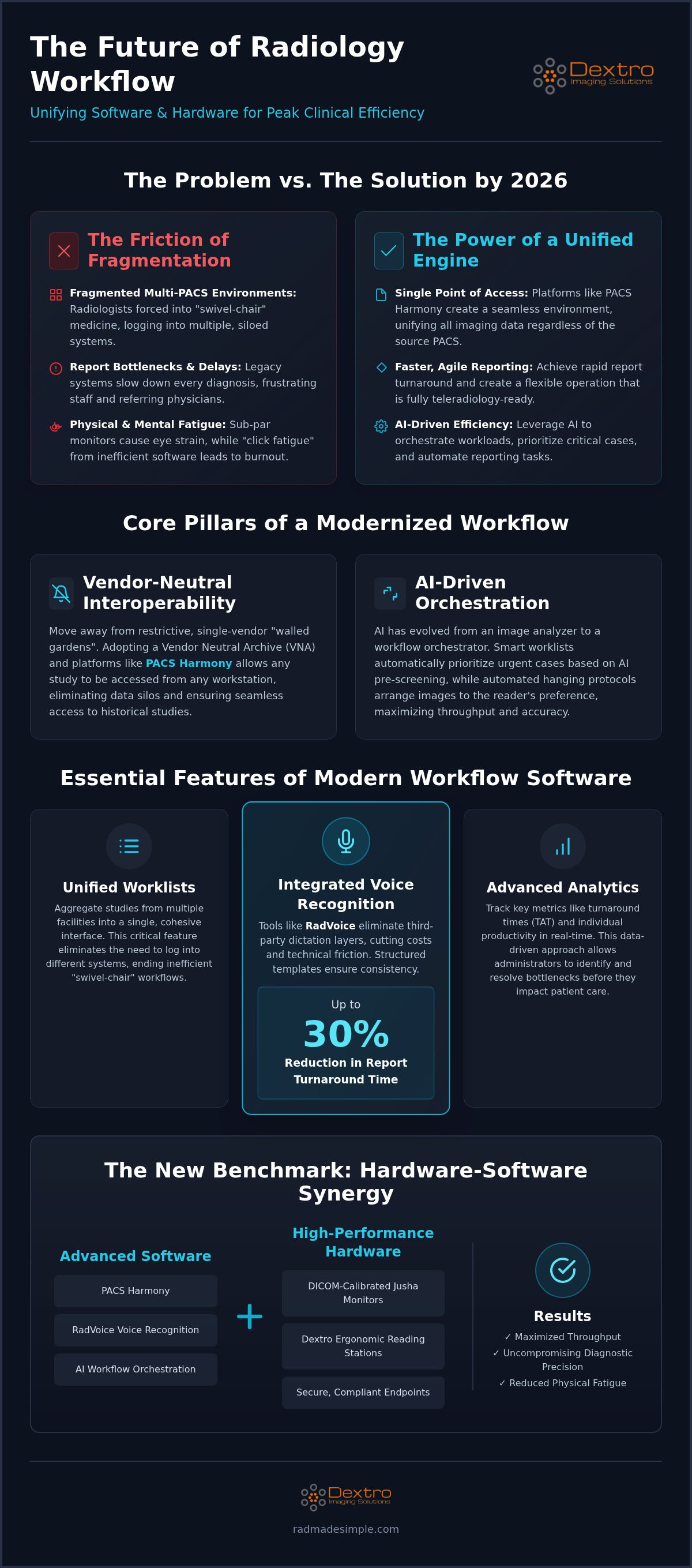
Efficiency in 2026 is no longer defined by the speed of a single application. It's defined by the seamless integration of the entire diagnostic stack. Modern imaging centers are moving away from fragmented systems that create data silos and technician burnout. Choosing the right radiology workflow software for imaging centers now requires a focus on how software interacts with high-performance hardware to create a unified diagnostic engine. This shift is driven by a need for agility, especially as centers balance hybrid reading models that mix on-site expertise with teleradiology. Success depends on maintaining strict data security and DICOM Part 14 compliance across all endpoints, ensuring that a diagnosis made in a home office is as accurate as one made in the hospital.
The Move Toward Vendor-Neutral Interoperability
Imaging centers are aggressively moving away from restrictive, single-vendor contracts that lock their data into proprietary formats. These legacy "walled gardens" prevent radiologists from accessing historical studies efficiently, leading to delays. The solution lies in adopting a Vendor Neutral Archive (VNA) and interoperable platforms like PACS Harmony. This architecture allows for true interoperability, which we define as the ability to access any study from any workstation regardless of the source PACS. By centralizing data through a robust Radiological Information System (RIS), facilities can ensure that patient records and imaging data flow logically between departments. This eliminates the need for manual data entry and reduces the risk of mismatched patient files.
AI-Driven Orchestration and Reporting
In 2026, AI has evolved from a simple image analyzer into a sophisticated workflow orchestrator. It doesn't just find anomalies; it manages the radiologist's time. Smart worklists now automatically prioritize urgent cases based on AI pre-screening, ensuring that critical findings are addressed within minutes. This intelligence extends to the reporting process itself. By using RadVoice, radiologists can integrate AI-detected measurements and findings directly into their reports via voice recognition, bypassing the need for manual typing. This significantly reduces "click-fatigue" and eye strain. Automated hanging protocols further streamline the experience by instantly arranging images according to the reader's preference. When these software capabilities are paired with DICOM-calibrated Jusha diagnostic monitors, the result is a high-performance environment that maximizes throughput without sacrificing accuracy.
Essential Features of Modern Workflow Management Systems
Modern radiology workflow software for imaging centers must prioritize the user experience to drive meaningful productivity gains. High-performance software is no longer just a viewer; it's a comprehensive management tool. Unified worklists are a critical component of this evolution. These worklists aggregate studies from multiple facilities into a single, cohesive interface. This prevents radiologists from having to log into different systems, which often leads to inefficient "swivel-chair" medicine. Additionally, advanced analytics allow administrators to track turnaround times (TAT) and individual productivity in real-time. This data-driven approach identifies bottlenecks before they impact patient care or referring physician satisfaction.
Streamlined Reporting with Voice Recognition
Reporting efficiency is the heartbeat of a productive imaging center. RadVoice represents a significant leap forward by integrating voice recognition directly into the radiology workflow software for imaging centers. By removing the need for third-party dictation layers, centers can virtually eliminate transcription costs and reduce technical friction. Structured reporting templates ensure every diagnosis follows a consistent format, which is vital for maintaining high clinical standards. Industry data indicates that integrated dictation reduces report turnaround by up to 30%, allowing for a much faster diagnostic cycle and improved patient outcomes.
If you're looking to optimize your reporting environment, consider how PACS Harmony can unify your disparate systems into a single point of truth.
Cloud-Native vs. On-Premise PACS
The choice between cloud-native and on-premise PACS depends on your center’s scale and teleradiology requirements. Cloud systems offer superior accessibility for remote readers but require robust security to meet modern interoperability standards for diagnostic imaging. These platforms allow radiologists to work from anywhere without compromising on speed or data integrity. When evaluating these options, it's essential to consider the Radiology PACS Pricing: The 2026 Guide to Total Cost of Ownership. A well-designed cloud infrastructure provides the scalability needed for a teleradiology-heavy market without the heavy burden of local server maintenance. This flexibility is a key differentiator for centers aiming to attract top-tier talent in a competitive landscape.
Security remains a paramount concern for any deployment model. Protecting patient data while ensuring high-speed access requires a sophisticated balance of encryption and optimized network protocols. Whether you choose on-premise hardware or a cloud-based solution, the goal remains the same: a secure, fast, and reliable environment that empowers your clinical team to perform at their best.
Why Hardware-Software Synergy is the New Efficiency Benchmark
True operational efficiency occurs when radiology workflow software for imaging centers and high-performance hardware act as a single, cohesive unit. This synergy ensures that software features, such as AI-driven hanging protocols or advanced 3D rendering, aren't throttled by hardware limitations. In 2026, the benchmark for success is no longer just having a functional PACS; it's about how that PACS interacts with diagnostic displays and the workstations powering them. When these elements are misaligned, technical friction increases, leading to delayed load times and diagnostic uncertainty. A high-end software suite can only perform as well as the monitor displaying the pixels and the processor crunching the data.
Hardware-software synergy also directly addresses the human element of the diagnostic process. When software is optimized for the specific GPU and CPU configurations of a workstation, the interface feels responsive and fluid. This responsiveness reduces the cognitive load on the radiologist, allowing them to focus entirely on the clinical data rather than the technology. Achieving this level of integration transforms a standard imaging center into a high-throughput diagnostic powerhouse where technology supports, rather than hinders, the physician's expertise.
The Impact of Diagnostic Monitor Quality
Consumer-grade screens simply cannot meet the rigorous demands of a professional radiology workflow. These monitors often lack the consistent luminance and contrast ratios required for accurate interpretation, especially in subtle grey-scale imaging. Professional setups rely on DICOM-calibrated monitors to ensure that the image seen by the radiologist exactly matches the data captured by the modality. Using Jusha diagnostic monitors provides the high-fidelity representation necessary for clinical confidence. These medical-grade displays maintain calibration over time, preventing the gradual drift that compromises diagnostic accuracy in standard monitors. For a deeper look at specific hardware specifications and calibration requirements, consult the Jusha Medical Monitors: The 2026 Professional Reference Guide.
Workstation Performance and Data Throughput
Processing large 3D datasets from modern CT or MRI modalities requires specialized hardware that goes beyond standard office computers. Modern radiology workflow software for imaging centers demands high-speed CPU and GPU configurations to handle real-time reconstruction and multi-planar reformatting without lag. Dextro reading stations are specifically engineered to optimize this data throughput, significantly reducing study load times. This speed allows radiologists to maintain their diagnostic "flow" without the interruption of frustrating "spinning wheel" delays. Beyond raw power, ergonomic hardware design plays a vital role in reducing radiologist burnout. Adjustable stations and specialized input devices help clinicians manage high study volumes while minimizing the physical strain and eye fatigue often associated with long shifts. By investing in medical-grade workstations, centers ensure they remain compliant with industry standards while providing a high-performance environment that attracts and retains top diagnostic talent.
Solving the Multi-PACS Interoperability Crisis
Managing multiple PACS interfaces is a significant operational burden for many modern facilities. This fragmentation leads to "swivel-chair" medicine, where radiologists must constantly jump between different software environments to access patient data. It's an inefficient process that increases the risk of error and slows down report generation. High-quality radiology workflow software for imaging centers should act as a bridge, not a barrier. By implementing a unified integration platform, you create a single point of access for all imaging data, allowing your team to focus on diagnosis rather than technical navigation.
PACS Harmony: The Unified Interface Solution
The most effective way to eliminate digital silos is through a comprehensive overlay that brings all data into one view. Radiology Imaging Interoperability: Solving the Multi-PACS Integration Challenge highlights how a unified approach can transform your daily operations. PACS Harmony integration allows radiologists to stay in one environment, pulling studies from various sources into a single, familiar viewer. This eliminates the need for multiple logins and the frustration of searching through disparate patient databases. It's a proactive solution that empowers your staff to work with precision and speed.
Best Practices for Multi-System Integration
Successful integration depends on more than just software compatibility. It requires precise mapping of data fields to ensure consistent patient identification across all modalities and archives. You must ensure that every integrated platform strictly adheres to HL7 and DICOM standards to maintain data integrity. For a detailed roadmap on achieving this, refer to the PACS Harmony Integration: The 2026 Guide to Unified Radiology Workflows. Following these standards prevents the data mismatches that often plague un-optimized radiology workflow software for imaging centers.
If you're ready to simplify your complex reading environment, explore how PACS Harmony can unify your clinical operations today.
Implementing a Future-Proof Workflow Strategy
A future-proof strategy begins with a comprehensive workflow audit to identify existing bottlenecks. You cannot optimize what you haven't measured. By pinpointing exactly where delays occur, such as laggy image transfers or manual data entry, you can prioritize the right upgrades. Selecting radiology workflow software for imaging centers that scales with your growth prevents the need for a total system overhaul every few years. It's about building a foundation that handles increasing study volumes and new modalities without degrading performance or increasing technical friction.
High adoption rates for new technology depend on effective staff training. If your team doesn't understand how to use AI-integrated reporting tools, you won't see the efficiency gains you expect. Ongoing technical support and maintenance contracts are equally vital. They ensure your software remains secure and your hardware stays calibrated to clinical standards. This proactive approach minimizes downtime and protects your investment from becoming obsolete as industry requirements evolve.
Scaling with Portable and Teleradiology Solutions
Integrating Portable Radiology Workstations allows for highly flexible staffing models. As the demand for remote reading grows, ensuring home-reading setups match the quality of the on-site reading room is non-negotiable. Modern radiology workflow software for imaging centers must provide the same speed and security for a teleradiologist as it does for an on-site physician. Maintaining diagnostic consistency across all endpoints is essential for clinical accuracy and regulatory compliance. For a detailed breakdown of the hardware requirements for remote environments, refer to Radiology Reading Workstations: The 2026 Guide to Performance & Compliance.
Partnering for Long-Term Efficiency
Choosing a single-source provider for both hardware and software simplifies your support structure and reduces operational complexity. When technical issues arise, you don't want different vendors blaming each other for glitches. A specialized partner acts as a "simplifier," taking ownership of the entire diagnostic stack from Jusha diagnostic monitors to PACS Harmony integration. This unified support model ensures that your hardware and software are always in sync. To begin your modernization journey, contact Dextro Imaging Solutions for a custom workflow assessment. Their team can help you design a high-performance environment that maximizes your center's productivity and diagnostic accuracy.
Redefining Your Diagnostic Engine for 2026
The landscape of medical imaging is shifting toward a model where diagnostic speed and clinical precision are inseparable. You've seen how the right radiology workflow software for imaging centers eliminates the friction of multi-system environments and leverages AI to prioritize critical care. Success in 2026 requires more than just modern software; it demands a synergy between high-performance workstations and interoperable platforms. By unifying your data and investing in DICOM-compliant hardware, you protect your staff from burnout and ensure your center remains agile in a competitive market.
Dextro Imaging Solutions provides the complete stack needed to achieve this level of operational excellence. As a direct distributor of Jusha medical monitors and specialized Dextro reading stations, we bridge the gap between technical capability and clinical reality. Our integrated PACS Harmony and RadVoice solutions simplify your workflow, allowing your team to focus entirely on accurate diagnosis. Optimize your imaging center workflow with Dextro Imaging Solutions and build a foundation that scales with your ambition. Your path to a more efficient, future-proof reading environment is within reach.
Frequently Asked Questions
What is the most important feature of radiology workflow software in 2026?
Interoperability is the defining feature of radiology workflow software for imaging centers in 2026. A modern system must act as a central hub that aggregates data from various sources into a single, cohesive worklist. This prevents radiologists from navigating multiple proprietary interfaces. Effective software now includes AI-driven orchestration to automate mundane tasks, allowing physicians to focus entirely on complex diagnostic interpretations rather than technical navigation.
How does a unified PACS interface improve imaging center efficiency?
A unified PACS interface eliminates the need for radiologists to toggle between different software platforms to view historical studies. By consolidating disparate data into one viewer, you remove the technical friction that leads to diagnostic delays. This streamlined approach significantly reduces the cognitive load on your staff. It ensures that every study is presented in a consistent format, which accelerates report generation and improves overall throughput.
Can I use my existing monitors with new radiology workflow software?
While new software will run on most hardware, using consumer-grade monitors compromises diagnostic accuracy. Modern radiology workflow software for imaging centers requires DICOM-calibrated displays, such as Jusha diagnostic monitors, to ensure high-fidelity image representation. These professional screens maintain the precise luminance and contrast ratios needed for clinical interpretation. Relying on sub-par hardware often leads to eye strain and increased error rates during long shifts.
How does voice recognition software like RadVoice integrate with my PACS?
RadVoice integrates natively with your PACS to enable real-time dictation without the need for cumbersome third-party software layers. This direct connection allows radiologists to populate report templates instantly using voice commands. By removing transcription delays, you can finalize reports within seconds of completing an interpretation. This integration is essential for centers looking to achieve a truly paperless and highly efficient diagnostic environment where speed is paramount.
What are the benefits of a vendor-neutral approach to radiology software?
A vendor-neutral approach prevents your facility from being locked into restrictive, single-vendor contracts that limit data accessibility. It allows you to select the best-in-class hardware and software components from different providers without facing compatibility issues. This flexibility ensures that your infrastructure remains agile. You can easily scale your operations or adopt new technologies as they emerge, protecting your long-term investment in clinical technology and data ownership.
How does AI improve the daily workflow for a radiologist?
AI improves the daily workflow by automatically prioritizing urgent cases on the worklist based on pre-screening findings. It also reduces "click-fatigue" by automating hanging protocols and pre-populating certain data fields in the diagnostic report. These small automations add up to significant time savings over a full shift. By handling routine organizational tasks, AI allows radiologists to dedicate more time to nuanced clinical analysis and complex decision-making.
Is cloud-based radiology software secure for imaging centers?
Cloud-based software is highly secure when it employs end-to-end encryption and adheres to modern HITRUST or HIPAA standards. These platforms offer robust data redundancy and disaster recovery capabilities that are often superior to local on-premise servers. For imaging centers, the cloud provides the secure accessibility required for teleradiology. It ensures that remote readers can access studies safely without compromising the integrity of the patient’s protected health information.
What hardware is required to support modern radiology workflow software?
Modern software requires specialized hardware like Dextro reading stations equipped with high-performance CPUs and GPUs to process large 3D datasets. You also need medical-grade, DICOM-calibrated monitors to ensure the software's visual output is clinically accurate. Standard office PCs often don't have the throughput necessary for real-time image reconstruction. Investing in medical-grade hardware ensures your software performs at its peak, providing a seamless and responsive user experience for your team.


