

What if the primary cause of radiologist burnout isn't the volume of cases, but the friction of the software used to read them? You likely feel the weight of interface fatigue every time you toggle between different viewers or hunt for historical data across disconnected archives. It's an exhausting way to work that creates unnecessary bottlenecks and slows down critical patient care. You're not alone in wanting a more streamlined way to manage your high-stakes professional requirements with precision and ease.
Implementing a robust PACS Harmony integration transforms these fragmented systems into a high-performance, unified diagnostic environment. This guide explores how to collapse your disparate tools into a single, efficient "cockpit" that eliminates redundant logins and inconsistent shortcuts. By centralizing your workflow, you can achieve seamless access to aycan PACS and other third-party archives without ever leaving your primary reading station.
We'll show you how this modernization strategy improves reporting turnaround times through streamlined dictation integration and advanced interoperability. You'll discover how to leverage the latest 2026 standards to create a reading environment that feels reliable, sophisticated, and deeply invested in your productivity. It's time to move past traditional, cumbersome methods and embrace a more agile way of working that prioritizes your success.
Key Takeaways
- Understand how a vendor-neutral orchestration layer solves the multi-PACS headache by creating a unified diagnostic cockpit.
- Discover how PACS Harmony integration centralizes disparate data from aycan PACS and legacy systems into a single, high-performance worklist.
- Identify the critical technical steps for implementation, including workflow audits and network infrastructure assessments for high-resolution transfers.
- Learn how to maximize software efficiency by pairing your integration with specialized Dextro reading stations and high-fidelity, DICOM-calibrated monitors.
- Reduce cognitive load and improve reporting turnaround times by eliminating redundant logins and inconsistent toolsets across your department.
Solving the Fragmented Imaging Landscape with PACS Harmony Integration
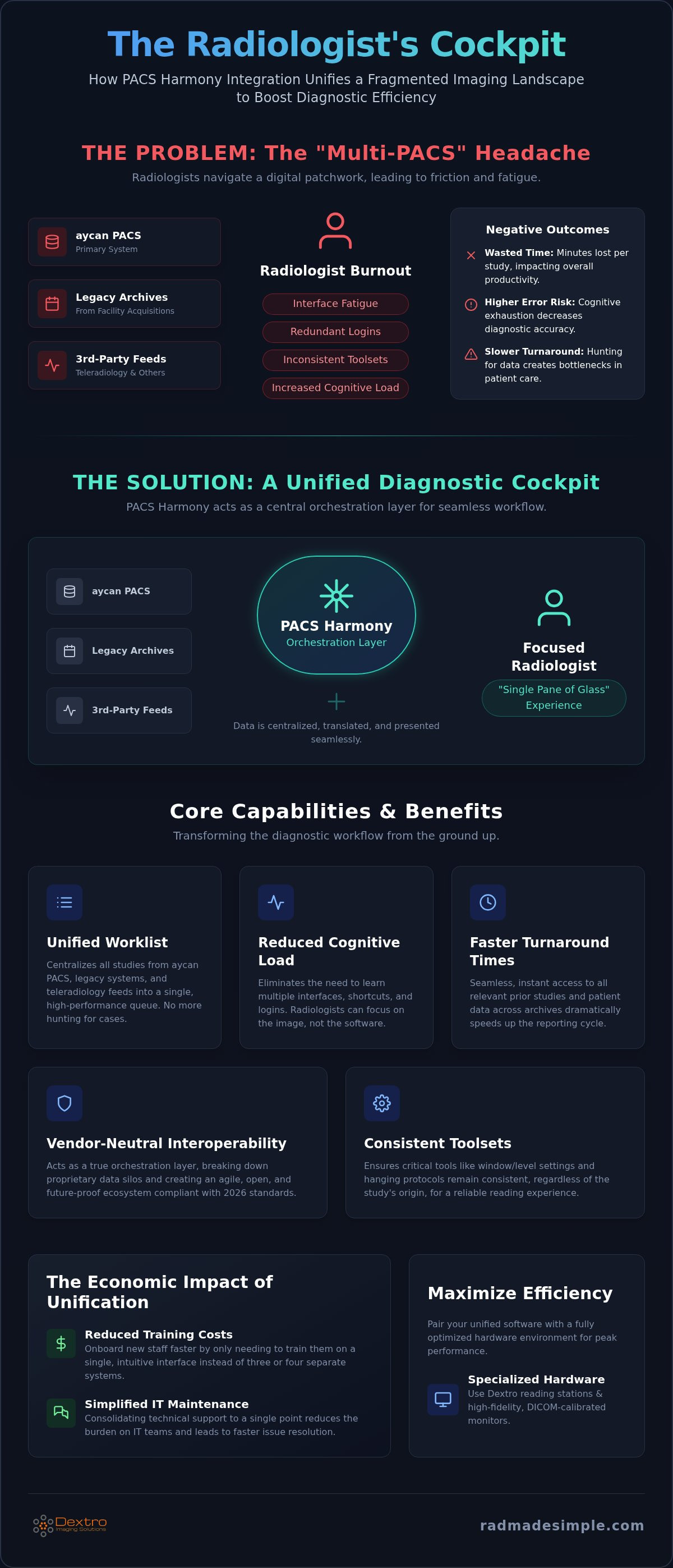
The modern radiology department often resembles a digital patchwork rather than a streamlined operation. Hospitals frequently manage multiple systems due to facility acquisitions or the specific requirements of different clinical departments. This "Multi-PACS" headache forces radiologists to jump between various viewers, each with its own set of shortcuts and login credentials. PACS Harmony integration addresses this fragmentation by serving as a vendor-neutral workflow orchestration layer. It doesn't just store images; it intelligently manages how those images move and how they are presented to the clinician. By breaking down these data silos, the system provides a longitudinal patient view that is essential for accurate diagnosis. This level of interoperability is a critical tool for reducing diagnostic errors and mitigating the rising rates of physician burnout.
What is a Unified PACS Interface?
Traditional PACS architectures often rely on standalone viewers that exist in isolation. In contrast, a unified interface acts as a central hub that pulls data from various sources, including Vendor Neutral Archive (VNA) architectures. This shift represents a move away from proprietary silos toward a more agile, open ecosystem. Interface fatigue is the cognitive exhaustion caused by managing multiple software environments; it's a primary driver of decreased diagnostic accuracy and increased reporting times in 2026 radiology metrics. A unified layer replaces this chaos with a consistent, high-performance environment that allows radiologists to focus on the image rather than the interface.
The Economic Impact of Poor Integration
Efficiency isn't just a clinical goal; it's a financial necessity. When radiologists toggle between interfaces, they lose minutes per study, which translates into significant productivity losses over a fiscal year. Implementing radiology imaging interoperability reduces the total cost of ownership by consolidating technical support and reducing the need for expensive, redundant software licenses. Consider the benefits of a streamlined system:
- Reduced Training Costs: Staff only need to master one interface instead of three or four.
- Faster Turnaround Times: Seamless data retrieval speeds up the reporting cycle for urgent cases.
- Simplified IT Maintenance: Centralized support reduces the burden on internal IT teams.
Centralizing your technical support through an integrated system means fewer points of failure and faster resolution times. This proactive approach ensures that your high-stakes professional requirements are met with precision while protecting the bottom line. By choosing a unified path, you transform complex, high-pressure environments into manageable, profitable operations. It's a strategic shift that empowers your team to work at their highest potential without the drag of technical friction.
Core Capabilities: How PACS Harmony Unifies Disparate Interfaces
Efficiency in a high-volume reading room depends on more than just fast hardware. It requires a software layer that eliminates the friction of manual task management. A PACS Harmony integration acts as the central intelligence of your diagnostic environment, directing the right study to the right radiologist at the optimal time. Instead of logging into separate viewers for aycan PACS, legacy archives, and incoming teleradiology feeds, you work from a single, unified worklist. This technical synergy creates a "single pane of glass" experience that eliminates the need for radiologists to learn multiple user interfaces. The system handles the heavy lifting of data translation in the background, allowing for a seamless transition between complex cases without losing momentum.
Consolidation ensures that toolsets, such as window/level settings and hanging protocols, remain consistent regardless of the original data source. It removes the need for constant recalibration, allowing your focus to stay where it belongs: on the diagnostic data. This reduction in technical complexity directly supports a more secure and reassuring work environment where professionals can trust their tools. By maintaining these consistent standards across vendors, you reduce the cognitive load that often leads to errors in high-pressure situations.
Dynamic Worklist Management
Modern departments can't rely on manual sorting or outdated "first-in, first-out" queues. Harmony uses sophisticated prioritization logic to elevate STAT cases and route studies based on sub-specialty expertise, such as neuroradiology or musculoskeletal imaging. This automated assignment mechanism effectively ends "cherry-picking" in the reading room, ensuring a balanced and fair workload for the entire team. Real-time status updates across the hospital enterprise provide immediate visibility into study progress, which is vital for maintaining high clinical standards and meeting demanding turnaround times. If you're looking to optimize your facility's output, exploring advanced workflow solutions is a logical next step toward total operational efficiency.
Seamless Dictation and Reporting Integration
The integration extends beyond image viewing to encompass the entire reporting cycle. By linking with RadVoice, Harmony enables a "one-click" report launch mechanism that significantly reduces manual entry and administrative lag. The system triggers specific reporting templates based on study metadata, ensuring that the radiologist has the correct tools ready the moment an image opens. This tight coupling between the PACS image and the final report protects data integrity and minimizes the risk of transcription errors. You don't have to worry about mismatched patient IDs or incorrect study dates. It's a transformative approach that turns a cumbersome multi-step process into a streamlined, single-action workflow that empowers the physician.
Aycan PACS and Harmony: The Architecture of a Modern Imaging Hub
Building a high-performance imaging hub requires a clear distinction between data storage and workflow management. In this model, aycan PACS functions as the robust storage engine, while a PACS Harmony integration serves as the intelligent orchestration layer. This specialized architecture enables you to manage petabytes of diagnostic data without the retrieval delays common in older systems. It's a scalable framework designed to grow alongside your facility's volume. As you plan for expansion, analyzing radiology PACS pricing helps you maintain a predictable total cost of ownership. Beyond performance, the system prioritizes security through built-in redundancy and disaster recovery protocols that safeguard your diagnostic assets.
Aycan PACS as the Central Repository
aycan PACS provides the speed necessary for modern clinical demands. Version 4.00 offers image loading times up to six times faster than earlier versions, which is a critical benefit when handling large 3D datasets or complex mammography studies. The platform goes beyond standard DICOM images by managing non-DICOM data, such as clinical PDFs and photos. This ensures a complete longitudinal record for every patient. Security is never an afterthought; advanced encryption and access controls protect PHI across the entire integrated environment. This allows your team to focus on patient care with the reassurance that their high-stakes professional requirements are met with precision.
Harmony as the Intelligence Layer
The intelligence layer provided by Harmony creates a level of flexibility that single-vendor legacy systems simply cannot match. Legacy architectures often force you into proprietary silos that are difficult to upgrade or modify. By contrast, the aycan and Harmony synergy allows you to add or swap archives without forcing radiologists to learn a new interface. This setup is inherently future-proof, providing the necessary infrastructure to integrate AI-assisted tools for triaging and automated measurements. It positions your practice as a bold innovator, ready to adopt the next generation of diagnostic technology while maintaining a stable, reliable workflow today. You gain a sophisticated partner that stays at the forefront of technological shifts to empower your clinical team.
Technical Roadmap: Implementing a Unified PACS Strategy
Executing a successful PACS Harmony integration requires a methodical approach that balances technical precision with clinical continuity. This isn't a simple software installation; it's a strategic transformation of your diagnostic environment. The process begins with a comprehensive workflow audit to identify where data silos and manual workarounds currently create bottlenecks. Simultaneously, your team must perform a network infrastructure assessment. High-resolution imaging transfers in 2026 demand robust bandwidth, and your local network must be optimized to handle peak loads without latency.
User acceptance testing (UAT) serves as the bridge between technical configuration and clinical reality. By involving radiologists early in the interface setup, you ensure the system supports their specific diagnostic needs. The transition doesn't end at go-live; it's an iterative process. You'll need to refine hanging protocols and worklist filters based on real-world feedback to ensure the system delivers the promised performance gains. This proactive refinement is what separates a standard upgrade from a high-performance modernization project.
Phase 1: Discovery and Architecture Design
Start by mapping every HL7 and DICOM node across your facility to create a clear inventory of your imaging ecosystem. This stage identifies which legacy systems require specialized gateway connectors to communicate with the Harmony orchestration layer. Achieving a "clean data migration" is the priority here. This involves scrubbing metadata and resolving patient ID mismatches before records enter the unified environment. This step is vital for maintaining data integrity and ensuring that historical studies are immediately accessible and accurately linked to the correct patient record.
Phase 2: Configuration and Training
Customization allows you to tailor the Harmony interface for different sub-specialties, ensuring that each radiologist has the exact tools they need for their specific modality. To facilitate department-wide adoption, identify and train super-users who can provide immediate, peer-to-peer support during the transition. Minimizing clinical downtime is essential, so we recommend a phased rollout strategy that maintains diagnostic capacity while the team adjusts to the new workflow. For a personalized assessment of your facility's readiness, consult with our technical implementation team to begin your transition.
Optimizing Your Diagnostic Environment with Dextro Imaging Solutions
Software excellence requires a physical foundation. A PACS Harmony integration reaches its full potential only when paired with high-performance radiology reading workstations. Dextro Imaging Solutions provides the "Simplified Reading Room" by unifying specialized hardware with advanced orchestration software. This holistic approach ensures that the speed gained from workflow automation isn't lost to hardware latency or display limitations. By managing both the software integration and the hardware performance, we act as a partner that stays at the forefront of technological shifts to empower your clinical team with a truly optimized diagnostic environment.
Hardware-Software Synergy
The Harmony interface is specifically optimized for high-resolution 5MP and 12MP displays. Using Jusha medical monitors ensures that unified diagnostic data is rendered with clinical precision, meeting the PS3.14 2026c grayscale standard for consistent image rendering across the enterprise. Dextro workstations are engineered to handle the heavy data streams of integrated environments, significantly reducing the "wait time" for large study retrieval. You benefit from having a single point of contact for your monitors, workstations, and PACS licenses. This eliminates the technical friction and finger-pointing often found in multi-vendor setups, providing a more secure and reassuring work environment for every user.
Modern radiology isn't confined to the hospital campus. We offer specialized portable radiology workstations designed for integrated home reading and teleradiology. By extending your PACS Harmony integration to these portable units, radiologists can access the same unified worklists and dictation tools from home as they do in the hospital. These mobile units maintain the same clinical standards as their desktop counterparts, allowing for a seamless transition between on-site and remote diagnostic environments. This flexibility is essential for maintaining productivity and reducing burnout in the current high-demand clinical landscape.
Ongoing Support and Compliance
Reliability is the cornerstone of any integrated imaging system. Dextro provides proactive maintenance and support to ensure 24/7 uptime for your critical hospital workflows. Our team manages the complexity of technical shifts and regulatory compliance, allowing you to focus on diagnostic excellence without the burden of IT troubleshooting. We act as a highly competent guide, leading your department toward more efficient and effective outcomes through smart design. Modernize your workflow with PACS Harmony and aycan PACS today to experience a truly unified, high-performance diagnostic cockpit that respects your time and enhances your clinical output.
Advancing Your Practice Through Unified Workflow Orchestration
Modernizing your radiology department requires a shift from fragmented software silos to a high-performance diagnostic cockpit. Implementing a PACS Harmony integration eliminates the cognitive load of interface fatigue and creates a seamless environment for your clinical team. This strategic move unifies disparate archives while leveraging the storage power of aycan PACS. It's a transformative step that ensures your radiologists focus on accuracy and speed rather than technical friction.
Dextro Imaging Solutions provides the specialized hardware and expert technical support necessary for these complex hospital integrations. We offer direct licensing for both aycan and Harmony software, ensuring your system is backed by professional authority and reliable uptime. Pairing this integration with specialized Jusha diagnostic monitors guarantees your imaging output meets the highest clinical standards. Transforming your reading room into a streamlined operation protects your team's productivity and your facility's reputation.
Streamline your radiology workflow with aycan PACS and Harmony integration. Your journey toward a more efficient and empowered future starts with the right technical partner today.
Frequently Asked Questions
What is the difference between PACS Harmony and a traditional PACS?
PACS Harmony is a vendor-neutral workflow orchestration layer rather than a standalone storage system. While a traditional PACS stores and displays images from a single source, Harmony unifies multiple systems into one interface. It intelligently routes studies and synchronizes tools across different vendors. This approach eliminates the need to switch between proprietary viewers, creating a high-performance "cockpit" for all diagnostic reading.
Can PACS Harmony integrate with my existing legacy imaging system?
Yes, PACS Harmony integration is designed to work with your current legacy infrastructure. It uses specialized gateway connectors to communicate with older HL7 and DICOM nodes. This allows you to centralize worklists without the immediate expense of a total system replacement. You can maintain your existing archives while benefiting from a modern, unified user interface that simplifies complex multi-system environments.
How does aycan PACS improve storage efficiency in 2026?
aycan PACS Version 4.00 delivers up to six times faster image loading than previous versions. It's optimized for the Apple Silicon platform and meets the latest European MDR and FDA MIMPS standards for 2026. This high-performance engine manages both DICOM and non-DICOM data, such as clinical PDFs. It ensures rapid retrieval for large 3D datasets, reducing the administrative lag that often slows down diagnostic cycles.
Is PACS Harmony integration compatible with remote teleradiology setups?
PACS Harmony integration is fully compatible with remote and teleradiology workflows. When paired with specialized portable radiology workstations, it allows clinicians to access unified worklists from any location. The system maintains consistent hanging protocols and dictation tools, ensuring that the remote experience matches the on-site hospital environment. This flexibility is critical for maintaining 24/7 diagnostic coverage and supporting modern hybrid work models.
What are the hardware requirements for running a unified PACS interface?
High-performance hardware is essential for managing the integrated data streams of a unified interface. We recommend Dextro reading stations equipped with DICOM-calibrated Jusha medical monitors. These monitors must adhere to the PS3.14 2026c grayscale standard to ensure consistent image rendering. Robust network bandwidth is also necessary to handle the high-resolution transfers required for advanced 3D datasets and mammography studies without latency.
How long does a typical PACS Harmony integration project take?
A typical integration project follows a structured roadmap that includes discovery, architecture design, and user acceptance testing. While timelines vary based on the number of legacy systems and facility size, most projects transition through the primary configuration phases in several weeks. We prioritize minimizing clinical downtime by using a phased rollout strategy. This ensures that diagnostic capacity remains stable while your team adapts to the new orchestrated workflow.
Does PACS Harmony support voice recognition software like RadVoice?
Yes, the system features deep integration with RadVoice for seamless dictation and reporting. Harmony triggers specific reporting templates based on study metadata, allowing for a "one-click" report launch mechanism. This tight coupling between the PACS image and the reporting software protects data integrity. It significantly reduces manual entry and administrative lag, allowing radiologists to finalize reports faster and with greater precision.
How does unified integration impact radiologist productivity metrics?
Unified integration significantly improves key metrics like reporting turnaround time (TAT). By eliminating interface fatigue and redundant logins, radiologists can focus entirely on diagnostic tasks. Independent studies have shown that specialized diagnostic reading stations can increase productivity by an average of 20%. This optimization reduces cognitive load and mitigates burnout, allowing your department to handle higher volumes without sacrificing clinical accuracy or employee well-being.


