

In 2026, the difference between a high-performance radiology environment and a professional liability isn't just the software; it's the specific silicon and glass you choose to power it. You've likely experienced the frustration of system latency during high-resolution image scrolling or felt the uncertainty of DICOM Part 14 monitor compliance. These technical bottlenecks don't just hinder your workflow; they compromise diagnostic precision and increase the risk of security gaps in remote reading setups.
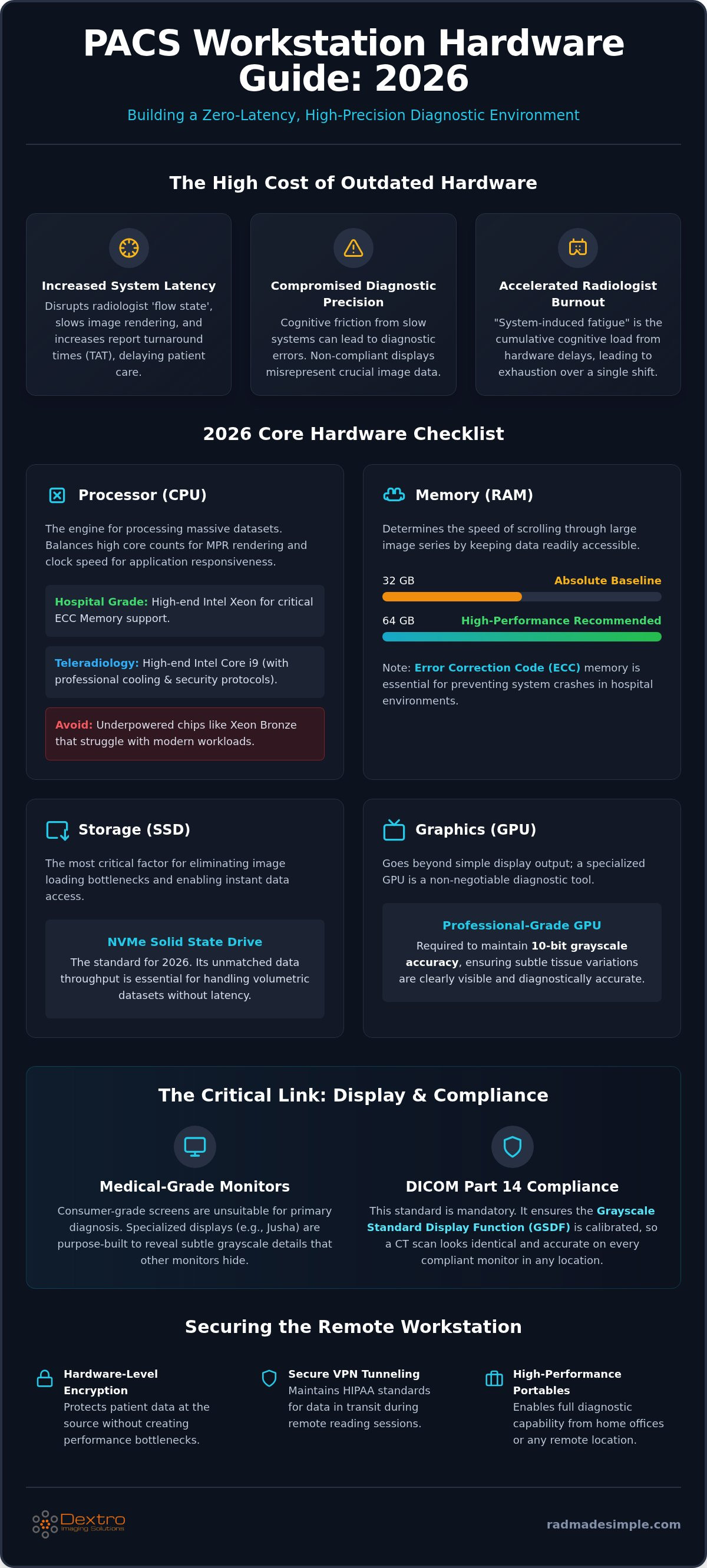
Managing modern PACS workstation hardware requirements shouldn't feel like solving a moving puzzle. This Dextro Imaging Solutions guide empowers you to master the technical specifications and compliance standards required to build a zero-latency reading environment. By aligning your procurement with 2026 benchmarks, such as 64GB RAM minimums and professional-grade GPUs, you'll ensure absolute diagnostic accuracy and seamless image manipulation. We'll provide a definitive hardware checklist, examine medical-grade monitor standards, and outline the path to full regulatory compliance for both hospital and home office configurations.
Key Takeaways
- Identify the specific CPU, RAM, and NVMe storage benchmarks necessary to meet 2026 PACS workstation hardware requirements and eliminate image latency.
- Understand the technical necessity of specialized GPUs and Jusha diagnostic monitors for maintaining 10-bit grayscale accuracy and DICOM Part 14 compliance.
- Learn how to secure remote reading environments with hardware-level encryption and high-performance portable radiology workstations for teleradiology.
- Discover why upgrading from "minimum specs" to high-performance configurations reduces diagnostic errors and mitigates radiologist burnout.
- Explore how Dextro Reading Stations provide a turnkey, pre-configured solution that integrates hardware and software into a single, high-efficiency workflow.
Understanding Modern PACS Workstation Standards in 2026
The workstation serves as the primary touchpoint for modern imaging. It's the vital link between a Picture Archiving and Communication System (PACS) and the physician's diagnostic eye. In 2026, these units aren't just office PCs; they're specialized engines designed to process massive volumetric datasets instantly. A high-performance setup transforms complex data into actionable insights, while an underpowered system acts as a bottleneck for the entire clinical team.
Relying on "minimum specs" is a significant risk factor in a modern radiology department. When hardware struggles to keep pace with high-resolution scrolling, it creates cognitive friction that leads to diagnostic errors and physician burnout. Modern PACS workstation hardware requirements must prioritize peak performance to prevent these outcomes. The shift toward AI-integrated platforms has changed the landscape further. Today’s systems require high local processing power to run AI-driven image analysis and auto-segmentation tools in real-time. While a general clinical review station might suffice for simple viewing, intensive diagnostic reading demands a much more robust configuration.
The Clinical Impact of Hardware Latency
Slow image loading times disrupt the "flow state" that radiologists rely on for accurate interpretation. Every second spent waiting for a multi-planar reformatting (MPR) to render is a second lost to distraction. This latency directly correlates with increased report turnaround times (TAT), which can delay critical patient care. System-induced fatigue is the cumulative cognitive load caused by hardware delays, leading to decreased diagnostic efficiency and physical exhaustion over a single shift.
Regulatory and Compliance Foundations
Hardware choices aren't just about speed; they're about legality and precision. Diagnostic displays must adhere to DICOM Part 14 Grayscale Standard Display Function (GSDF) to ensure visual consistency across all reading environments. This standard ensures that the subtle gray tones in a CT scan look exactly the same on every compliant monitor. Proper hardware also serves as the first line of defense for data security. High-performance workstations facilitate the encryption and secure VPN tunneling required to maintain HIPAA standards. For a deeper look at these requirements, see our radiology reading workstations guide for more on performance and compliance. Investing in compliant hardware protects your practice from liability while ensuring every diagnosis is based on the highest quality data available.
The Core Internal Hardware: CPU, RAM, and Storage for Imaging
Selecting the right components for PACS workstation hardware requirements in 2026 means moving past basic specifications. If your hardware just meets the "minimums," you're likely facing system hangs during intensive 3D rendering or AI-driven analysis. Today's diagnostic workflows require an architecture that prioritizes data throughput and parallel processing to keep pace with modern imaging volumes.
Step 1 is selecting a processor (CPU) capable of handling massive multi-slice CT and MRI datasets. Don't settle for underpowered chips like the Xeon Bronze; these often struggle with modern multi-modality reconstructions. Instead, look for processors that balance high clock speeds with significant core counts to ensure background tasks don't interrupt your primary diagnostic view. High-end Intel Xeon workstations remain the standard for hospital environments due to their support for Error Correction Code (ECC) memory, which prevents system crashes during long, high-stakes shifts.
Processor Selection: Beyond Clock Speed
Multi-core performance is the engine behind seamless multi-planar reformatting (MPR). While single-core speed helps with basic application launches, it's the core count that determines how quickly a 1,000-slice CT stack renders. You should choose CPUs that support hardware-level encryption to maintain patient data security without sacrificing speed. For teleradiologists, high-end consumer alternatives like the Core i9 can be effective, provided they're paired with professional-grade cooling and security protocols.
Memory and Storage Optimization
Determining your memory (RAM) needs is Step 2. In 2026, 32GB is the absolute baseline for any professional workstation, though 64GB is recommended for high-performance environments. Sufficient RAM affects the speed of "stacking" and scrolling through large image series by keeping the data in the fastest possible tier of memory. Without enough RAM, the system is forced to swap data to the disk, which creates the "stutter" often seen in older systems.
Step 3 involves architecting your storage. You must use NVMe M.2 drives for the operating system and the active PACS cache to ensure rapid image loading. Primary storage refers to the long-term server-side archive where all historical data is kept, while local workstation cache is the ultra-fast temporary storage on your device that enables instant scrolling and zooming. Finally, Step 4 is ensuring network throughput; Gigabit Ethernet is the absolute minimum requirement to pull large datasets from the server. If you want to simplify this process, exploring a turnkey solution like Dextro Reading Stations can ensure every internal component is perfectly balanced for your specific workflow.
Graphics and Display: Navigating GPU and Diagnostic Monitor Compliance
While internal processing power handles the data, the visual output determines the final diagnostic outcome. On-board graphics cards simply don't provide the bandwidth needed to drive multiple high-resolution displays at professional refresh rates. For modern PACS workstation hardware requirements, a dedicated professional-grade GPU is non-negotiable. These cards are specifically engineered to handle intensive 3D reconstructions and complex MIP/MPR rendering without stuttering. Crucially, they support 10-bit or 12-bit grayscale output. This is essential for rendering the subtle variations in tissue density that consumer-grade cards often clip or compress.
Diagnostic-grade monitors, such as Jusha Diagnostic Monitors, represent the gold standard for this level of precision. Unlike clinical review monitors used for general reference by nursing staff or referring physicians, diagnostic displays are regulated medical devices. They offer the extreme brightness and high contrast ratios necessary to detect microcalcifications or faint pulmonary nodules. These pathologies often remain invisible on a standard office screen, making the choice of display a matter of patient safety.
Monitor Resolution and Grayscale Requirements
Resolution needs vary significantly by modality. A 3MP display is generally the standard for CT and MRI interpretation, providing enough pixel density for detailed cross-sectional imaging. However, mammography demands at least 5MP to ensure the highest level of spatial resolution for screening. Luminance is equally critical; diagnostic monitors maintain much higher sustained brightness levels to ensure the human eye can perceive the full range of the DICOM grayscale. For a detailed breakdown of specific display models and their capabilities, consult the Jusha medical monitors guide.
DICOM Calibration and Quality Assurance
Maintaining compliance isn't a one-time setup; it requires ongoing quality assurance (QA). Consumer-grade "4K" monitors often fail medical compliance because they lack consistent luminance across the entire panel and can't be calibrated to the DICOM Part 14 GSDF standard at a hardware level. Professional displays feature integrated front sensors that automate daily QA tasks. These sensors measure light output directly from the screen surface and adjust the internal lookup tables to compensate for backlight aging. This hardware-based calibration is far more reliable than software-based alternatives. It ensures your reading environment remains compliant and accurate every single day without manual intervention.
Teleradiology and Remote Setup: Hardware for the Off-Site Radiologist
The rise of teleradiology has shifted PACS workstation hardware requirements from the hospital basement to the home office. Remote reading demands a delicate balance between mobility and diagnostic power. While consumer-grade hardware might seem tempting, it often fails to provide the security and performance necessary for high-stakes clinical work. A professional remote setup must replicate the speed and reliability of an in-hospital environment to ensure patient safety and radiologist productivity.
Managing the "last mile" connectivity issue is the primary hurdle for off-site readers. Traditional VPNs often struggle with the latency caused by massive imaging files. You need secure communication hardware that prioritizes data packets for imaging to prevent stuttering during high-speed scrolling. Ergonomics also play a critical role in long-duration remote sessions. Without a professional desk and lighting setup, even the fastest computer won't prevent the physical strain that leads to fatigue. Using PACS Harmony helps bridge these remote locations into a unified interface, ensuring your hardware works as part of a seamless, integrated ecosystem.
Portable Diagnostic Reading Stations
Portable radiology workstations have evolved into high-performance mobile units that rival their desktop counterparts. These machines require high-end mobile CPUs and dedicated GPUs to ensure that DICOM compliance isn't sacrificed for portability. Maintaining a consistent data flow is the biggest challenge for remote readers in variable network environments. We recommend Radcom Compact as a specialized solution for managing secure connectivity and ensuring data flow remains uninterrupted. It acts as a dedicated bridge between your home internet and the hospital's core infrastructure, protecting patient data while maximizing speed.
Remote Workflow Integration
Achieving a seamless remote experience requires more than just a fast laptop. You must integrate AI-enhanced tools like RadVoice directly into your home hardware to maintain reporting speed. Interoperability is the key to making this distributed model work. Your home hardware must communicate flawlessly with multiple hospital systems without creating data silos. To understand how to manage these complex data exchanges, see our guide on radiology imaging interoperability. This integration ensures that your local hardware performance translates into faster patient care across the entire network.
If you're ready to upgrade your remote environment with professional-grade gear, explore our Portable Radiology Workstations to find a solution that meets every diagnostic standard.
Optimizing Your Workflow with Dextro Imaging Solutions
Integrating the various components of a radiology environment requires more than just buying the right parts; it demands a unified strategy. Dextro Reading Stations simplify this entire procurement process by pre-configuring all hardware to meet or exceed 2026 standards. Instead of managing multiple vendors for CPUs, GPUs, and displays, you get a single, validated ecosystem designed for immediate deployment. This approach eliminates the compatibility issues that often plague custom builds and ensures that your PACS workstation hardware requirements are met with precision from day one.
A unified support model offers a significant operational advantage. When your hardware and software come from a single partner, troubleshooting becomes a streamlined exercise rather than a series of finger-pointing between different vendors. Whether the issue lies with a Jusha monitor's calibration or a software lag, a single call resolves the bottleneck. This reliability is essential when scaling your hardware footprint from a few specialized reading rooms to a hospital-wide deployment. It allows IT teams to replicate high-performance environments quickly across the entire facility without reinventing the configuration each time.
Turnkey Radiology Solutions
The real strength of an integrated approach is the synergy between the hardware and the software layer. Running aycan PACS or PACS Harmony on validated Dextro Imaging Solutions hardware ensures that the software can leverage every bit of local processing power available. These builds are highly customizable to meet the specific needs of different modalities. For instance, an orthopedic station might prioritize 3D rendering speed, while a mammography station focuses on the extreme spatial resolution provided by 5MP displays. For more details on streamlining your operations, read our PACS Harmony integration guide.
Future-Proofing and Total Cost of Ownership
Planning for a 3 to 5 year hardware lifecycle is critical in a field where technology evolves rapidly. While the initial investment in high-performance gear is higher, the long-term efficiency gains and reduced downtime offer a much better total cost of ownership. Balancing upfront costs with these long-term benefits ensures your department remains competitive and compliant. You can find a detailed breakdown of these financial considerations in our radiology PACS pricing guide.
Before deploying any new station, IT teams should verify this final checklist:
- Confirm DICOM Part 14 calibration is active and automated on all diagnostic displays.
- Validate that NVMe cache drives are correctly partitioned for local image storage to ensure zero-lag scrolling.
- Test secure VPN tunneling and hardware-level encryption for all remote or portable units.
- Ensure all AI-native reporting tools are synchronized with the local GPU for real-time analysis.
Securing Your Diagnostic Future Through Technical Excellence
Modernizing your imaging infrastructure is a strategic investment in diagnostic accuracy and physician well-being. By prioritizing high-performance benchmarks over minimum specs, you eliminate the latency that causes cognitive fatigue. Ensuring your ecosystem adheres to PACS workstation hardware requirements, particularly through DICOM-compliant displays and robust NVMe storage, protects your practice from liability and operational bottlenecks. Whether you're outfitting a central hospital hub or a distributed teleradiology network, the goal remains the same: zero-lag performance and absolute visual precision.
As an authorized Jusha Medical Monitor distributor, Dextro Imaging Solutions provides the gold standard in diagnostic clarity. We offer expert technical support for PACS integration and specialized teleradiology hardware configurations to ensure your team stays productive anywhere. It's time to remove the complexity from your procurement process and focus on patient care. Build your high-performance reading station with Dextro Imaging Solutions today. Your path to a streamlined, modern radiology environment is within reach.
Frequently Asked Questions
What is the minimum RAM required for a PACS workstation in 2026?
64GB of RAM is the 2026 standard for any high-performance radiology environment. While 16GB is the recommended minimum for standard 64-bit diagnostic workstations, 32GB is the practical baseline for modern imaging workflows. Investing in 64GB ensures your system can handle simultaneous PACS operation and complex AI-driven image analysis without the risk of system hangs or lag during high-resolution scrolling.
Can I use a high-end gaming GPU for diagnostic radiology reading?
No, consumer gaming GPUs aren't recommended for primary diagnostic reading. While they offer high clock speeds, they lack the specialized 10-bit or 12-bit grayscale support required for medical-grade accuracy. Professional GPUs are engineered for 24/7 reliability and superior thermal management. This ensures they can drive multiple 5MP or 12MP displays without the risk of driver instability or distracting image artifacts.
Why is DICOM Part 14 compliance necessary for my monitors?
DICOM Part 14 Grayscale Standard Display Function (GSDF) ensures that every gray tone is rendered consistently across all compliant devices. This standard is mandatory because it guarantees that subtle pathologies, like faint nodules or calcifications, remain visible regardless of the monitor's age or lighting conditions. It's the key regulatory foundation for maintaining diagnostic accuracy and legal compliance in any professional radiology department.
How much storage space does a typical radiology workstation need for local caching?
A typical workstation requires at least 1TB to 2TB of high-speed NVMe SSD storage dedicated to local caching. This space allows the system to store active and recent image series locally, enabling instant scrolling and zooming without waiting for server downloads. High-speed NVMe drives are essential because they provide the necessary bandwidth to load massive 3D datasets in seconds rather than minutes.
What are the network speed requirements for remote teleradiology?
Teleradiologists should aim for a minimum of 100 Mbps download and 20 Mbps upload speeds for reliable remote reading. However, a Gigabit Ethernet connection remains the gold standard for hospital environments. For remote setups, using specialized hardware like Radcom Compact helps manage data flow and secure VPN tunneling. This ensures that even large CT or MRI stacks load without disrupting your professional workflow.
Do I need a different workstation for mammography compared to general X-ray?
Yes, mammography has stricter hardware requirements, specifically regarding display resolution and luminance. While 3MP monitors are sufficient for general X-ray, CT, and MRI, mammography requires 5MP or 12MP displays to capture microcalcifications accurately. The GPU must also be powerful enough to drive these higher resolutions while maintaining the high brightness levels required by federal regulatory standards for breast imaging.
Is an Intel Core i9 better than a Xeon for PACS applications?
Intel Xeon processors are the preferred choice for professional PACS applications because they support Error Correction Code (ECC) memory. While a high-end Core i9 offers excellent clock speeds, ECC memory is vital for preventing system crashes during intense diagnostic shifts. This stability is a core component of PACS workstation hardware requirements in clinical settings where reliability directly impacts patient outcomes and reporting efficiency.
How often should diagnostic monitors be calibrated?
Diagnostic monitors must undergo formal calibration annually to meet federal and state regulatory requirements. However, many professional displays, like Jusha monitors, feature integrated front sensors that perform automated daily quality assurance tests. These daily checks ensure the luminance and contrast remain within DICOM limits between formal annual calibrations, providing a constant baseline of diagnostic safety and performance for the radiologist.


