

A successful PACS Harmony setup is a hardware-software handshake, not just a software installation. You probably feel the daily friction of fragmented imaging data across departments or the frustration of latency when reading studies from remote environments. These technical hurdles don't just slow you down; they introduce compliance risks when your displays aren't properly calibrated for diagnostic precision. This PACS Harmony setup guide provides the technical roadmap you need to unify disparate imaging systems into a single, high-performance diagnostic interface. We'll show you how to move beyond the complexity of multiple silos toward a streamlined and professional environment.
You'll learn the precise steps to achieve a single login for all patient images, ensuring seamless integration with voice recognition software like RadVoice. We also address the critical hardware side of the equation, focusing on maintaining full DICOM Part 14 compliance across your Jusha diagnostic monitors and Dextro reading stations. By optimizing your configuration, you can reclaim the 44 percent of the day typically lost to administrative tasks. This guide transforms your workstation into a reliable, modern hub that empowers you to focus on clinical accuracy rather than technical troubleshooting. We will walk through the integration of the Universal Worklist and the Workflow Optimizer Engine to ensure your system performs with maximum efficiency.
Key Takeaways
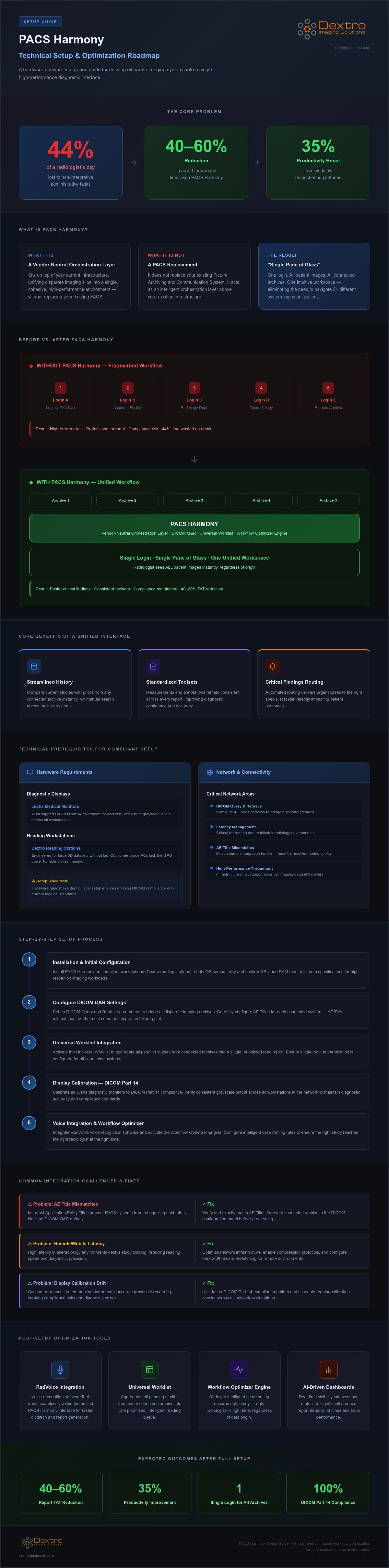
- Understand how PACS Harmony acts as a vendor-neutral interface to create a "Single Pane of Glass" for all your imaging studies.
- This PACS Harmony setup guide details the minimum workstation specifications and network requirements necessary for seamless diagnostic performance.
- Learn the step-by-step process for configuring DICOM Query and Retrieve settings to bridge disparate imaging archives effectively.
- Identify and resolve common integration hurdles, including AE Title mismatches and latency issues in remote or mobile environments.
- Explore post-setup optimization techniques using RadVoice and AI-driven dashboards to significantly reduce report turnaround times.
What is PACS Harmony and Why Does Your Workflow Need It?
PACS Harmony isn't a replacement for your existing Picture Archiving and Communication System (PACS). It functions as a sophisticated, vendor-neutral orchestration layer. It unifies disparate imaging silos into a cohesive, high-performance environment. This integration is the core focus of this PACS Harmony setup guide. By sitting on top of your current infrastructure, it creates a "Single Pane of Glass." Radiologists no longer need to navigate five different logins to see one patient's history. It brings everything into a single, intuitive workspace.
System hopping is a major contributor to professional burnout. Research indicates that radiologists spend approximately 44% of their day on non-interpretive administrative tasks. Constant switching between interfaces wastes time and increases the margin for error. PACS Harmony removes these barriers. It provides a standardized toolset that works across all connected archives. This consistency is vital in the modern teleradiology landscape where speed and accuracy are non-negotiable. It transforms a fragmented workflow into a streamlined operation that respects the clinician's time.
The Problem of Imaging Silos
Traditional imaging systems often struggle with multi-departmental data. Hospitals frequently acquire different facilities, each with its own legacy software. This creates data silos that don't communicate. The cost of this inefficiency is high. Workflow orchestration platforms can reduce report turnaround times by 40-60% while improving productivity by up to 35%. PACS Harmony acts as an orchestration layer that intelligently routes cases. It ensures that the right study reaches the right radiologist at the right time, regardless of where the data lives. It simplifies complex, high-pressure environments through smart design.
Core Benefits of a Unified Interface
A unified interface does more than just save time; it improves diagnostic confidence. Accessing patient history across different archives becomes a streamlined process rather than a manual search. The primary advantages include:
- Streamlined History: Compare current studies with priors from any connected archive instantly.
- Standardized Toolsets: Ensure measurements and annotations remain consistent across every report.
- Critical Findings: Automated routing delivers urgent cases to the right specialist faster.
These improvements lead to faster turnaround times for critical findings, which directly impacts patient outcomes. A successful PACS Harmony setup guide ensures your hardware, such as Jusha diagnostic monitors, is ready to handle this consolidated data stream with precision. When paired with Dextro reading stations, the software provides a secure and reliable platform for high-stakes professional requirements.
Technical Prerequisites for a Compliant Setup
Achieving a seamless diagnostic workflow requires more than just installing software. This PACS Harmony setup guide emphasizes that hardware and network integrity are the true pillars of a compliant environment. Without high-performance infrastructure, even the most advanced workflow orchestrator will face latency and display inaccuracies. Understanding the advantages and disadvantages of PACS systems helps clarify why specialized hardware is non-negotiable for professional diagnostic reading. You don't want your software to outpace your hardware's ability to render complex studies.
Hardware Optimization: Workstations and Displays
Consumer-grade monitors often fail the rigorous performance tests required for medical imaging. For diagnostic accuracy, you must utilize Jusha medical monitors that support DICOM Part 14 calibration. These displays ensure that grayscale levels are consistent and accurate across every workstation in your network. Similarly, radiology reading workstations like those from Dextro are engineered to handle large 3D datasets without lag. While a standard PC might handle administrative tasks, it lacks the GPU power and processing speed required for high-stakes imaging. A proper hardware handshake during the initial setup ensures that your system remains compliant with current medical standards.
Network and Connectivity Readiness
Seamless image streaming depends on robust network throughput. Multi-modality reading, particularly with high-slice CT or large MRI studies, requires a minimum sustained bandwidth to prevent loading delays. You should configure your firewall to allow specific DICOM port communication, typically port 104 or 11112. Latency is the enemy of teleradiology. For remote environments, keep your ping below 50ms to maintain a fluid interface. If your connection is unstable, even the best software configuration won't prevent study loading errors or interface "freezing."
Security protocols must be established before the first image is queried. All remote connections must utilize secure VPN tunnels. While most modern systems rely on SSL/TLS for data encryption, it's vital to check your specific facility requirements. For example, some government facilities have strict internal technology usage requirements that may dictate specific encryption methods. Protecting patient data is a technical and legal necessity that starts with your network configuration. For those looking to upgrade their current hardware to meet these standards, exploring the latest Dextro reading stations can provide the necessary performance boost to support a unified workflow.
Step-by-Step PACS Harmony Installation and Configuration
After ensuring your hardware meets the prerequisites discussed previously, the actual installation of the PACS Harmony software version 2.1 begins. This PACS Harmony setup guide moves from physical preparation to the technical execution of the software environment. The primary workstation installation acts as the central hub for your unified workflow. It requires administrative privileges and a secure network handshake with your local server. Once the core files are in place, the system acts as a simplifier, taking the complex web of your existing databases and preparing them for a single, unified interface.
Establishing Archive Connectivity
Archive connectivity is the most critical phase of the technical integration. You must input the Application Entity (AE) Titles, static IP addresses, and port numbers for every source Picture Archiving and Communication System (PACS) in your network. Testing the C-FIND and C-MOVE commands is essential to ensure data fluidity. C-FIND allows the system to search for patient studies, while C-MOVE handles the actual transfer of DICOM data to your workstation. If these commands fail, studies won't populate correctly in your Universal Worklist. Mapping metadata fields ensures that patient searches remain consistent across different platforms, preventing duplicate records or lost studies. This step creates the "handshake" that allows disparate silos to function as one.
Customizing the Radiologist Interface
Efficiency depends on how well you customize the interface to match clinical needs. Designing hanging protocols that follow specific clinical sub-specialties allows the software to present images exactly how a radiologist prefers to read them. For example, a musculoskeletal protocol should automatically tile images differently than a neuroradiology setup. You can also configure hotkeys and mouse shortcuts to reduce manual clicks and speed up navigation. Synchronizing these local settings with cloud-based user profiles ensures that your preferences follow you across different Dextro reading stations. This level of personalization is what differentiates a standard PACS Harmony setup guide from a truly optimized workflow configuration.
Finally, integrate your peripheral tools to complete the diagnostic hub. Linking RadVoice for high-speed, AI-driven reporting is the logical next step for maximizing throughput. This integration allows for seamless voice-to-text conversion directly within the Harmony dashboard, removing the need to switch windows for dictation. By following this structured approach, you transform a standard software installation into a high-performance diagnostic engine that protects your productivity and reduces the risk of reporting errors. Each configuration choice should focus on removing friction and empowering the user to focus on clinical accuracy.
Troubleshooting Common Integration Challenges
Even a meticulous technical integration can encounter friction. Most issues stem from minor configuration mismatches rather than software failure. This section of our PACS Harmony setup guide focuses on identifying and resolving these hurdles to maintain peak uptime. Addressing these problems quickly ensures that your diagnostic throughput remains high and your frustration remains low.
"Image Not Found" errors are the most common complaint during the initial rollout. This is almost always caused by an AE Title mismatch between the source archive and the Harmony interface. If the source PACS doesn't recognize the Harmony workstation's AE Title, the C-MOVE command will be rejected. You must verify that both the calling and called AE Titles are identical in both systems. A single character error in the configuration panel can break the entire imaging chain.
Latency also poses a significant challenge, particularly for those using a traveling radiologist workstation setup. If you experience lag during large study loading, check your concurrent download settings. Reducing the number of simultaneous image streams can often stabilize the interface in low-bandwidth environments. Additionally, display calibration alerts within Harmony usually indicate that the monitor's internal sensor has detected a shift in luminance. Re-running the calibration tool on your Jusha monitors will typically resolve this and restore DICOM Part 14 compliance.
Resolving Connectivity and Speed Issues
Diagnosing bottlenecks requires looking at the entire imaging chain. A slow study load might not be a PACS issue; it could be a local hardware limitation or a saturated network switch. Remote teleradiology users should optimize their local cache settings to pre-fetch studies. This ensures that the next case is ready before the current one is signed. If persistent performance issues remain, it may be time to consult professional radiology equipment compliance support to verify your hardware's integrity and network throughput.
Data Integrity and Synchronization
Unified systems sometimes struggle with duplicate patient records. This occurs when different source archives use slightly different naming conventions or ID formats. Harmony relies on clean HL7 message flows to update patient demographics in real-time. You must ensure your RIS is correctly pushing these updates to the Harmony server. If reports aren't synchronizing, check the outbound message queue to confirm that the final signed report is reaching the intended destination. Correcting these data silos is essential for maintaining a reliable "Single Pane of Glass" interface.
Maintaining a high-performance environment requires proactive monitoring and expert configuration. If you need professional assistance with your technical integration or hardware validation, consider the specialized technical support contracts offered by Dextro Imaging Solutions to keep your workflow uninterrupted.
Maximizing Efficiency: Post-Setup Optimization
Completing the technical integration outlined in this PACS Harmony setup guide is the first step toward a high-performance environment. True optimization happens when you move beyond the initial installation to refine the daily user experience. By leveraging the software's "Simplifier" personality, you can transform high-pressure reading environments into manageable, streamlined operations. This phase focuses on integrating advanced tools and establishing a culture of proactive system maintenance.
Integrating Advanced Voice Recognition
Linking RadVoice to your PACS Harmony dashboard creates a seamless bridge between imaging and documentation. This integration allows for high-speed, AI-driven reporting that eliminates the need for manual data entry. Understanding how voice recognition for radiologists reduces turnaround times is essential for maximizing your department's ROI. You should set up specialized templates for different modalities, such as CT or MRI, to ensure that the reporting structure remains consistent. This removes the complexity of switching between different software interfaces, allowing the radiologist to remain focused on the diagnostic task. AI-powered tools within the dashboard can also highlight critical oculomics and clinical insights, providing an extra layer of diagnostic support during the reporting phase.
Long-term System Health and Support
A unified radiology workflow is only as reliable as its ongoing maintenance. Establishing a routine schedule for hardware and software updates ensures that your system remains secure and compliant with evolving standards. Technical support contracts are a vital component of this strategy. They provide a safety net for medical imaging compliance and ensure that your uptime is never compromised by technical glitches. As your imaging volumes increase, you must plan for scalable storage solutions to prevent performance degradation. This proactive approach protects your investment and ensures that your Dextro reading stations continue to perform at their peak for years to come.
Finally, the success of a PACS Harmony setup guide depends on the proficiency of the clinical staff. Training sessions should focus on the unified workflow, teaching users how to navigate the Universal Worklist and the Workflow Optimizer Engine efficiently. Continuous professional development for both IT and clinical teams ensures that everyone stays at the forefront of technological shifts. By investing in staff training and long-term support, you empower your team to provide the highest level of patient care with precision and reliability. This holistic approach to optimization turns a technical tool into a powerful clinical asset.
Unifying Your Radiology Enterprise for Peak Performance
Transforming your radiology workflow isn't just about software; it's about creating a reliable handshake between your archives and your diagnostic hardware. We've explored how a unified interface removes the complexity of imaging silos and improves clinical turnaround times. By following this PACS Harmony setup guide, you can establish a foundation for long-term operational success and diagnostic accuracy. Establishing this "Single Pane of Glass" environment ensures that your team remains focused on high-stakes clinical results rather than administrative hurdles.
Dextro Imaging Solutions provides end-to-end support for both hardware and software integration. Our specialized workstations and Jusha monitors are designed for 24/7 diagnostic reliability, ensuring your system stays compliant and high-performing. If you're ready to master your technical integration and reclaim your productivity, Request a PACS Harmony Integration Consultation to get started. You're now equipped to simplify your professional environment and focus on what matters most: delivering precise patient care with total confidence.
Frequently Asked Questions
Is PACS Harmony compatible with all major imaging modalities?
PACS Harmony is a vendor-neutral workflow orchestrator that supports all major DICOM-compliant imaging modalities, including CT, MRI, X-ray, and ultrasound. It functions as a "Single Pane of Glass," allowing you to query and retrieve studies from disparate archives regardless of the original manufacturer. This compatibility ensures that radiologists can access a complete patient history without switching between multiple legacy systems, which is a core benefit highlighted in this PACS Harmony setup guide.
What are the minimum hardware requirements for a PACS Harmony workstation?
To ensure stability, you should use high-performance hardware such as Dextro reading stations equipped with professional-grade GPUs. While specific system requirements depend on your study volume, utilizing specialized workstations prevents the performance bottlenecks often seen with consumer-grade PCs. These stations are engineered for 24/7 reliability, which is essential for maintaining a high-performance diagnostic environment. High-stakes professional requirements demand hardware that can render complex 3D datasets without latency or interface lag.
How does PACS Harmony handle DICOM Part 14 monitor compliance?
The software works in tandem with Jusha diagnostic monitors to maintain strict DICOM Part 14 grayscale standards. Harmony's interface includes built-in alerts that notify the user if a display's luminance or calibration falls out of the required range. This proactive monitoring ensures that every image is rendered with diagnostic precision. Regular calibration routines are essential to meet 2026 compliance standards, protecting both the radiologist's accuracy and the facility's high regulatory standing.
Can I use PACS Harmony for remote teleradiology reading?
Yes, PACS Harmony is specifically designed to support remote and mobile reading environments. When configured correctly on portable radiology workstations, the system uses advanced cache settings to pre-fetch studies, which minimizes loading delays even on limited bandwidth. Secure remote access is maintained through VPN tunnels and SSL/TLS encryption. This flexibility allows radiologists to maintain the same high-performance workflow they experience on-site, regardless of their physical location or the time of day.
Does PACS Harmony integrate with existing voice recognition software?
PACS Harmony integrates seamlessly with advanced reporting tools like RadVoice to create a unified diagnostic hub. This integration allows for AI-driven, high-speed dictation directly within the Harmony dashboard, removing the need to toggle between different software windows. By linking voice recognition to the universal worklist, you can reduce report turnaround times by 40 to 60 percent. This streamlined approach significantly lowers the administrative burden on clinicians and helps prevent professional burnout.
What is the typical timeline for a full PACS Harmony implementation?
The implementation timeline varies based on the number of disparate imaging silos and archives that require integration. A typical rollout involves an initial hardware handshake, followed by the configuration of DICOM Query and Retrieve settings for each source archive. Testing C-FIND and C-MOVE commands ensures data fluidity before the final phase of clinical staff training. Dextro Imaging Solutions provides end-to-end support throughout this process to ensure the transition is methodical and highly organized.
How does unified PACS integration affect patient data security?
Unified integration through this PACS Harmony setup guide actually strengthens security by centralizing access control. Instead of managing multiple logins across fragmented systems, administrators can enforce strict security protocols, including multi-factor authentication and encrypted VPN connections, from a single point. Data integrity is maintained through HL7 message synchronization, ensuring that patient demographics are updated in real-time. This centralized approach reduces the risk of data leaks and ensures compliance with global healthcare privacy regulations.
What happens if one of the connected source PACS goes offline?
If a source archive goes offline, PACS Harmony will typically display a connectivity alert, but the rest of the unified interface remains functional. Radiologists can continue reading studies from all other active archives without interruption. The system's intelligent routing and Universal Worklist ensure that your workflow isn't paralyzed by a single point of failure. Once the offline source PACS is restored, Harmony automatically resumes the Query and Retrieve handshake to re-populate the study list.


