

Could a slight luminance deviation or a subtle loss of contrast be the only thing standing between a routine report and a missed pathology? For radiologists facing long shifts, the physical toll of eye fatigue is just as real as the technical pressure of regulatory compliance. You already know that your workstation is a precision medical instrument where every grayscale value matters. Selecting high-performance diagnostic monitors for CT scans requires a balance of ergonomic design and strict adherence to the latest imaging standards.
This guide clarifies the technical specifications and compliance standards necessary to optimize your reading station for 2026. You'll discover how to navigate the transition to the DICOM 2026c standard and the new FDA Quality Management System Regulation (QMSR) requirements. We'll preview the essential hardware features, from 3MP resolution standards to automated calibration tools, that improve diagnostic confidence while reducing reporting turnaround. By the end of this article, you'll have a clear roadmap to a streamlined, compliant environment that protects your productivity and your patients.
Key Takeaways
- Learn the essential DICOM Part 14 standards and luminance benchmarks required to maintain regulatory compliance through 2026.
- Understand why high-performance diagnostic monitors for CT scans are necessary to render the full 4,096 shades of gray required for accurate pathology detection.
- Identify specific contrast and spatial resolution needs to differentiate subtle tissue changes in CT imaging versus hairline fractures in X-rays.
- Explore how to optimize your workflow using ergonomic Dextro reading stations and portable solutions like the Radcom Compact for teleradiology.
- Discover how integrating advanced diagnostic monitors with PACS Harmony and RadVoice simplifies complex reporting environments and improves diagnostic confidence.
Why CT Scans Require Specialized Diagnostic Monitors
In a high-stakes clinical environment, the line between visual detection and a definitive clinical diagnosis often depends on the hardware used for interpretation. Emergency CT scans for trauma or acute stroke require immediate, precise analysis where every pixel carries diagnostic weight. Standard office displays are designed for vibrant colors and high motion; however, they lack the precision required to render the complex data sets found in modern radiology. Using diagnostic monitors for CT scans ensures that the subtle density changes indicating a small hemorrhage or a low-contrast tumor are visible to the human eye.
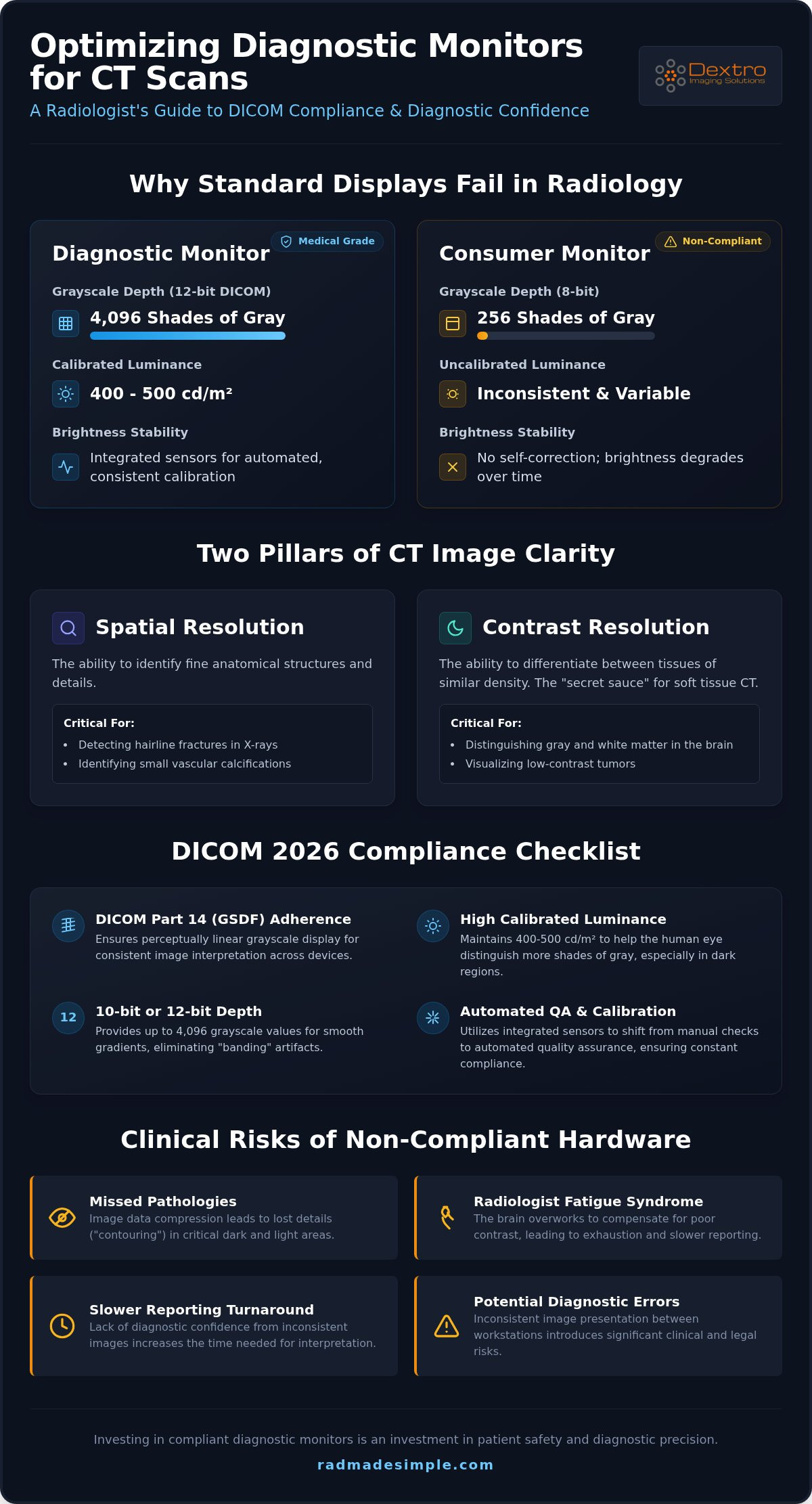
The technical gap is most evident when considering grayscale depth. While a consumer screen typically displays 256 shades of gray, a true medical display must handle the 4,096 shades found in 12-bit DICOM files. Without this depth, the monitor compresses the image data, leading to "contouring" or lost details in dark and light areas. This rendering is governed by the DICOM standard, which ensures that an image looks identical across different compliant workstations. When hardware fails to meet these standards, it increases the risk of "Radiologist Fatigue Syndrome." This condition stems from the brain overworking to compensate for poor contrast and inconsistent luminance, eventually leading to slower reporting turnarounds and potential diagnostic errors.
Spatial vs. Contrast Resolution in CT Imaging
Effective CT interpretation requires a balance between spatial and contrast resolution. Spatial resolution allows you to identify fine anatomical structures, such as hairline fractures or small vascular calcifications. While high megapixel counts support spatial detail, contrast resolution is often the "secret sauce" for soft tissue CT scans. It's the ability to differentiate between two objects of similar density, such as gray and white matter in the brain. Jusha diagnostic monitors prioritize high bit-depth and superior contrast ratios, allowing for the subtle transitions needed to identify pathologies that would otherwise blend into the background on inferior screens.
Diagnostic Monitor vs Consumer Monitor for Radiology
Choosing a non-medical display for primary interpretation introduces significant clinical and legal risks. Consumer monitors lack the internal stabilization needed to maintain consistent brightness over time. In contrast, medical-grade displays feature integrated backlight sensors that constantly monitor and adjust luminance to keep the screen within calibrated limits. This ensures the first study of the morning looks exactly like the last study of the night. For a deeper analysis of these differences, consult our diagnostic monitor vs consumer monitor radiology guide. Investing in diagnostic monitors for CT scans isn't just about image quality; it's about creating a stable, reliable environment that supports your professional expertise and patient safety.
Technical Requirements for DICOM Compliant Diagnostic Monitors
Diagnostic precision requires more than just high resolution. It demands strict adherence to the Grayscale Standard Display Function (GSDF) defined in DICOM Part 14. This standard ensures that equal changes in digital image values result in equal changes in perceived brightness. For radiologists, this perceptual linearity is vital when identifying subtle tissue densities on diagnostic monitors for CT scans. Without this consistency, a study viewed in the reading room might look significantly different when opened on a teleradiology station, potentially compromising diagnostic accuracy.
To meet modern clinical needs, diagnostic monitors for CT scans should maintain a calibrated luminance between 400 and 500 cd/m². Higher brightness levels allow the human eye to distinguish more shades of gray, especially in the darker regions of an image. This capability is enhanced by 10-bit or 12-bit depth, which provides smooth gradients and eliminates the "banding" often seen on lower-quality screens. Following the FDA guidance on diagnostic displays ensures that your equipment meets the necessary safety and performance criteria for primary interpretation.
DICOM Compliant Diagnostic Monitors: A 2026 Checklist
DICOM compliance is the rigorous adherence to the GSDF curve to ensure that grayscale images are displayed with consistent perceptual linearity across all compliant devices. In 2026, the shift from manual to automated Quality Assurance (QA) is standard. While external sensors were once common, integrated internal sensors are now preferred for their ability to perform hands-free, scheduled calibrations. Jusha's 'Ins-guard' technology exemplifies this modernization by providing real-time luminance stability. It automatically compensates for backlight fluctuations, ensuring the display remains within DICOM limits without any user intervention.
Radiology Monitor Resolution: 3MP vs. 5MP
Selecting the correct radiology monitor resolution is a matter of matching hardware to your specific modality. For most CT and MRI applications, a 3MP resolution remains the industry standard. This configuration provides the ideal balance of spatial detail and screen real estate without the excessive cost of 5MP units, which are typically reserved for mammography. Beyond pixel count, consider the pixel pitch. A smaller pixel pitch creates a sharper image, which can significantly reduce eye strain during 12-hour shifts by minimizing the "screen door effect." If you're looking to modernize your workflow, you can view our Jusha diagnostic solutions to find the right fit for your department.
Evaluating Modality-Specific Needs: CT, X-ray, and MRI
Selecting the right hardware requires an understanding of how different imaging modalities interact with display technology. While diagnostic monitors for CT scans must prioritize contrast, X-ray interpretation demands higher spatial clarity. Adhering to the ACR Technical Standard for Displays provides a foundation for quality, but the specific demands of CT, X-ray, and MRI require a more nuanced approach to workstation design.
CT interpretation centers on contrast resolution. You need the ability to differentiate between tissues with nearly identical Hounsfield units, such as gray and white matter in the brain or subtle lesions within the liver. MRI demands similar contrast but adds the requirement for absolute screen uniformity. Large-field-of-view imaging can be compromised if the luminance drops off at the edges of the panel. To manage these diverse needs, many radiologists are adopting 6MP or 12MP large-format displays. These high-performance Jusha diagnostic monitors replace traditional dual-monitor configurations, offering a seamless, bezel-free workspace for multimodality interpretation.
Selecting X-ray Diagnostic Monitors
In thoracic imaging, high peak luminance is vital. It allows you to identify subtle lung nodules that might be obscured by dense anatomical structures. Jusha diagnostic monitors feature specialized grayscale enhancement specifically for X-ray interpretation, providing the clarity needed for hairline fractures and complex pulmonary assessments. These monitors also utilize 'Sub-division' technology. This feature allows you to partition the screen for efficient side-by-side comparisons of current and prior studies, which simplifies the workflow and speeds up reporting.
CT-Specific Display Features
When you select diagnostic monitors for CT scans, focus on the dynamic range. This technical specification determines how smoothly you can perform windowing and leveling tasks. A broad dynamic range ensures that transitions between different tissue windows are instantaneous and clear, without digital artifacts. Collaborative environments also benefit from panels with wide viewing angles, ensuring that colleagues can see the same high-quality image from any position during a consultation. Finally, for those working with 3D reconstructions, fast response times are essential to eliminate motion blur during image rotation, ensuring that complex anatomical relationships remain sharp and defined.
Optimizing the Radiology Reading Station for Efficiency
A high-performance reading environment extends beyond diagnostic monitors for CT scans. It requires a cohesive integration of hardware and software designed to reduce cognitive load and physical strain. Ergonomic adjustments like adjustable monitor arms and precise ambient lighting control are essential for maintaining focus during long shifts. Modern Jusha panels often include integrated blue light filters to mitigate eye fatigue. To create a truly seamless workflow, we integrate RadVoice voice recognition directly into the hardware environment. This allows for real-time, hands-free reporting, which significantly accelerates the diagnostic cycle and improves accuracy.
Managing multi-modality inputs is another critical challenge in a busy department. The Radcom Compact connectivity solution allows you to toggle between different imaging sources without the clutter of multiple cables or workstations. This streamlined approach ensures that your primary diagnostic monitors for CT scans remain the central focus of your workflow. By simplifying the physical and digital workspace, you can achieve faster reporting turnarounds while maintaining the highest levels of diagnostic confidence.
Building a High-Performance Radiology Setup
Driving medical-grade pixels requires a specialized Graphics Processing Unit (GPU) capable of handling 10-bit grayscale output without latency. Standard consumer cards often fail to maintain the necessary stability for professional interpretation. Equally important is the use of silent, medical-grade CPUs. These units eliminate the distracting fan noise common in high-end PCs, allowing for better concentration in quiet reading rooms. For a comprehensive look at hardware requirements, explore our guide on radiology reading workstations. These components must work in harmony to ensure that your PACS Harmony or aycan PACS interface remains responsive under heavy data loads.
Portable Solutions for Teleradiology
The rise of remote work has made portable radiology workstations a necessity for modern departments. As of January 1, 2026, CMS has made virtual direct supervision permanent for diagnostic tests, increasing the demand for reliable home-based setups. The Radcom Compact simplifies this transition by providing secure, high-speed connectivity for remote environments. It ensures that your home office meets the same DICOM 2026c standards as the hospital reading room. By maintaining technical consistency across locations, these portable solutions play a major role in reducing physician burnout and maintaining reporting speed. Explore our Dextro Reading Stations to see how we unify these technologies into a single, efficient platform.
Dextro Imaging Solutions: Your Partner in Diagnostic Excellence
Selecting the right diagnostic monitors for CT scans is only the first step toward building a modern radiology department. True efficiency comes from a partner that understands the intersection of hardware, software, and regulatory compliance. Dextro Imaging Solutions acts as a single-source provider, removing the complexity of dealing with multiple vendors. We ensure that every component of your workstation, from the high-resolution displays to the underlying reporting software, is optimized for maximum performance and seamless integration.
Our approach centers on the Dextro advantage, which provides full integration with PACS Harmony and aycan PACS. This unified interface allows radiologists to move between studies with zero friction, ensuring your diagnostic monitors for CT scans are utilized to their full potential. We back our technology with customized support and maintenance contracts designed to ensure 99.9% uptime. In a field where every minute of downtime can delay critical patient care, our proactive monitoring and rapid response teams provide the security and reliability your facility requires.
Featured Hardware: Jusha Diagnostic Monitors
Jusha medical monitors are the preferred choice for modern CT departments due to their uncompromising clinical reliability. These displays are engineered specifically for the high-stakes world of medical imaging, offering the bit-depth and luminance stability discussed earlier in this guide. For detailed technical specifications on current models, consult our Jusha medical monitors professional reference guide. Investing in professional-grade displays ensures long-term performance that consumer-grade alternatives simply cannot match, protecting both your diagnostic accuracy and your capital investment.
Next Steps: Modernizing Your Workflow
Modernizing your reading station doesn't have to be a complex or overwhelming process. Dextro simplifies the transition by offering comprehensive diagnostic display audits for your facility. Our experts evaluate your current hardware and software landscape to identify bottlenecks and compliance gaps. We also provide bundled software licenses that combine RadVoice voice recognition with advanced PACS solutions, creating an all-in-one reporting environment. This holistic strategy reduces procurement headaches and ensures that your team has the best tools available for 2026 and beyond. Explore the full range of Dextro Imaging Solutions to discover how we can empower your practice with precision and ease.
Advancing Your Diagnostic Capabilities for 2026
Success in modern radiology depends on the seamless integration of high-performance hardware and intuitive software. You've seen how specialized diagnostic monitors for CT scans bridge the gap between complex data and clinical clarity by adhering to strict DICOM Part 14 standards. By optimizing your reading station with ergonomic supports and automated calibration, you significantly reduce eye strain while improving reporting speed. These technical choices aren't just about equipment; they are about protecting your professional longevity and ensuring patient safety in high-stakes environments.
As a leading Jusha Medical Monitors Distributor, Dextro Imaging Solutions provides the DICOM Part 14 compliant solutions you need to excel. Our ecosystems feature integrated RadVoice reporting and PACS Harmony connectivity to simplify your daily workflow. We are committed to removing operational complexity so you can deliver precise diagnoses with total confidence. Upgrade your diagnostic accuracy with Dextro Imaging Solutions and transform your workstation into a center of excellence. The future of medical imaging is clearer than ever, and we are here to help you lead the way.
Frequently Asked Questions
Is a 4K consumer monitor sufficient for reading CT scans?
No, a consumer 4K monitor is not sufficient for primary CT interpretation. These displays lack FDA 510(k) clearance and cannot maintain the 4,096 shades of gray required by the DICOM standard. Consumer screens also lack the internal sensors necessary to prevent luminance drift over time. Relying on non-medical hardware increases the risk of missing subtle pathologies and creates significant legal liability for the facility.
What is the minimum brightness (luminance) required for a CT diagnostic monitor?
The minimum calibrated luminance for CT diagnostic monitors is 400 to 500 cd/m². This benchmark ensures that the human eye can accurately differentiate between subtle density changes in soft tissue. While clinical review monitors are often dimmer, diagnostic monitors for CT scans require this high output to maintain the contrast resolution necessary for identifying tumors or small hemorrhages in complex anatomical regions.
How often should I calibrate my diagnostic monitor for DICOM compliance?
You should verify DICOM compliance at least every three to six months to meet regulatory standards. However, modern Jusha monitors simplify this process by using integrated 'Ins-guard' sensors for real-time, daily calibration. This automated approach ensures the display always adheres to the GSDF curve without manual intervention. It provides a 'set and forget' solution that maintains consistent diagnostic quality and high operational uptime.
Do I need a 3MP or 5MP monitor for general radiology and CT?
A 3MP monitor is the industry standard for general radiology and CT. This resolution provides the ideal balance of spatial detail and screen real estate for cross-sectional imaging. While 5MP monitors offer higher resolution, they are typically reserved for mammography, where detecting microcalcifications requires extreme precision. For most departments, 3MP units offer the best performance and value for daily diagnostic workflows.
Can I use a portable workstation for official diagnostic reporting?
Yes, you can use a portable workstation for official diagnostic reporting if it meets DICOM Part 14 standards. Solutions like the Radcom Compact enable radiologists to maintain a compliant environment in remote or home offices. These workstations integrate secure connectivity and high-performance hardware, allowing for seamless teleradiology. This flexibility is essential for meeting the 2026 CMS rules regarding virtual direct supervision of diagnostic tests.
What is the difference between GSDF and standard gamma curves?
GSDF is a medical standard designed for perceptual linearity, ensuring that equal changes in image data result in equal changes in perceived brightness. In contrast, standard gamma curves are optimized for consumer video and photography, where aesthetic color vibrancy is the priority. Using GSDF ensures that grayscale images are rendered consistently across different workstations, which is vital for accurate pathology detection and clinical reliability.
How does voice recognition software like RadVoice integrate with my monitor setup?
RadVoice integrates directly into the Dextro Reading Station environment to enable hands-free reporting. This configuration allows you to dictate findings in real-time without moving your eyes away from the diagnostic monitors for CT scans. By unifying voice recognition with the display hardware, the system reduces cognitive load and eliminates the need to toggle between different software windows during the reporting process.
Are Jusha monitors compatible with all major PACS systems?
Yes, Jusha monitors are fully compatible with all major PACS systems, including PACS Harmony and aycan PACS. They utilize standard connectivity protocols to ensure they work seamlessly within your existing hospital or clinic infrastructure. This broad compatibility allows departments to upgrade their display technology without the need for extensive software reconfigurations, making Jusha a versatile choice for modernizing any radiology department.


