

A standard 4K consumer display often provides more total pixels than a 3MP diagnostic monitor, yet it remains legally and technically unfit for primary radiology interpretation. Achieving the correct radiology monitor resolution is a matter of spatial frequency and specialized luminance, not just a high pixel count. You're likely facing the constant challenge of balancing strict ACR compliance with the need to reduce diagnostic fatigue during heavy workloads. It's difficult to filter through consumer marketing noise when the wrong hardware choice impacts both patient outcomes and your regulatory standing.
This guide provides a clear, authoritative path to mastering 2026 technical requirements. You'll learn the specific megapixel benchmarks required for every modality, ensuring your Dextro Reading Station or hospital setup is both compliant and clinically effective. We'll examine the critical relationship between pixel pitch and diagnostic accuracy to eliminate the guesswork from your next upgrade. By the end, you'll have the confidence to select high-performance hardware, such as Jusha diagnostic monitors, to streamline your workflow and protect your vision.
Key Takeaways
- Learn how to align your hardware with specific modality needs, ranging from standard 3MP displays for general radiography to 5MP units for digital mammography.
- Master the 2026 ACR-AAPM-SIIM guidelines to ensure your radiology monitor resolution meets the legal and technical standards required for primary interpretation.
- Understand the critical limitations of consumer 4K screens and why medical-grade luminance levels of 350-500 cd/m² are non-negotiable for diagnostic accuracy.
- Discover the importance of DICOM Part 14 GSDF compliance in maintaining consistent grayscale performance across your entire imaging network.
- Develop a practical strategy for auditing your current display inventory and prioritizing upgrades to high-performance Jusha diagnostic monitors.
Understanding the Basics of Radiology Monitor Resolution
Radiology monitor resolution is the total pixel count required to render medical images without interpolation. It's the fundamental metric that determines the spatial detail visible in a medical image, which directly impacts diagnostic accuracy. In a clinical environment, resolution isn't just about image clarity; it's about the ability to perceive subtle anatomical variations that a lower-quality screen might obscure. If a display lacks sufficient pixels, critical findings like microcalcifications or fine fractures can appear blurred or vanish entirely.
There's a significant difference between a high-resolution office monitor and a true diagnostic display. You might use a 4K screen for administrative tasks, but it's not a diagnostic tool. Standard monitors prioritize color saturation and motion smoothing for entertainment. Diagnostic displays focus on grayscale precision, consistent luminance, and bit depth. Using non-medical hardware introduces the risk of non-compliance with ACR standards and increases the likelihood of missed diagnoses. High-performance hardware, such as Jusha diagnostic monitors, is designed specifically to handle the complex requirements of medical imaging.
The Role of Megapixels (MP) in Medical Imaging
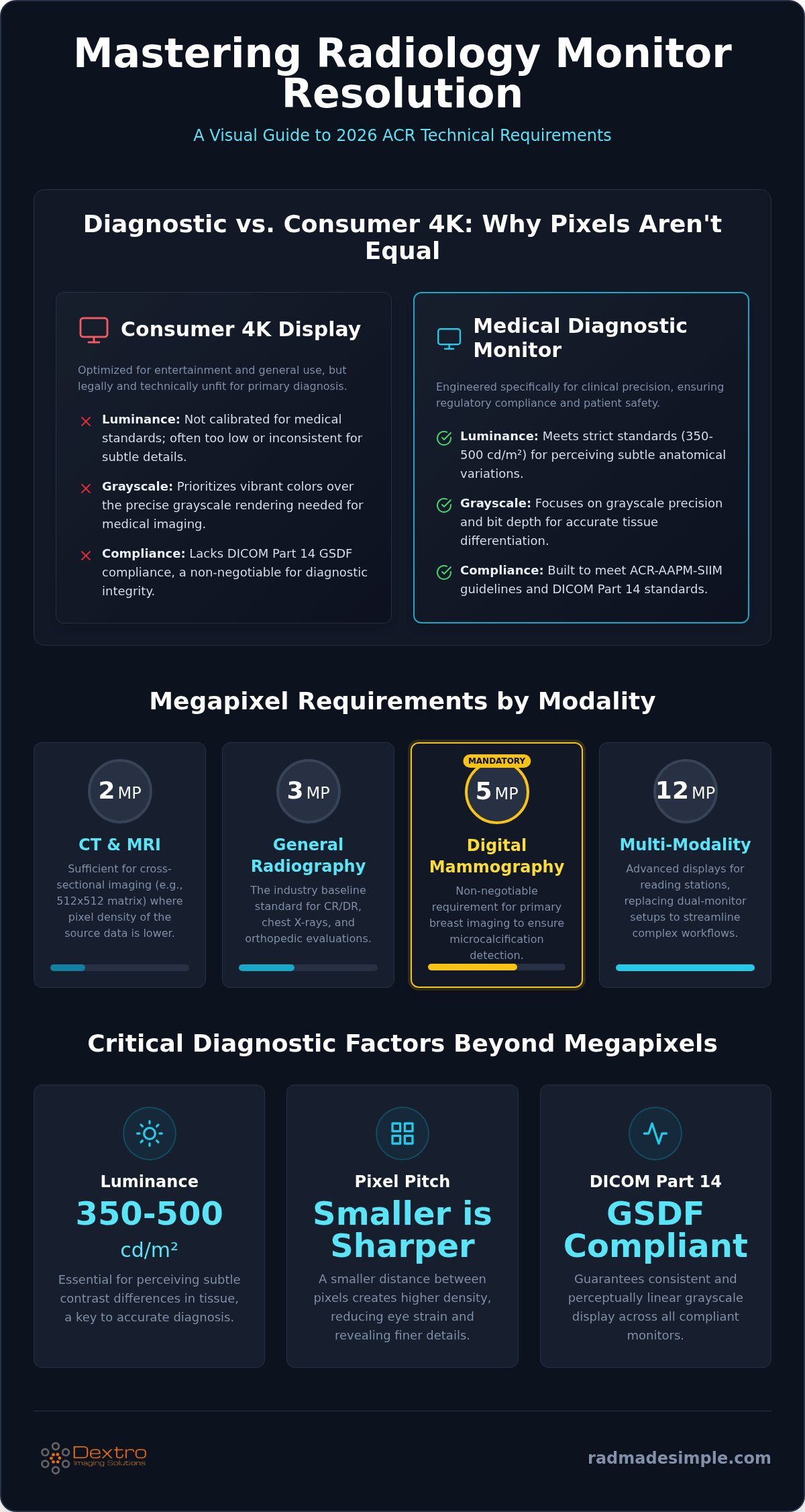
In the medical field, we measure resolution in megapixels (MP). You calculate this by multiplying the horizontal and vertical pixel counts. For example, a display with 2048 x 1536 pixels provides approximately 3.1 million pixels, which we categorize as a 3MP monitor. As we move into 2026, the industry relies on specific MP tiers for different modalities:
- 2MP: Common for viewing CT and MRI slices where ultra-fine detail isn't the primary focus.
- 3MP: The baseline standard for general radiography and CR/DR imaging.
- 5MP: The mandatory requirement for digital mammography and high-detail breast imaging.
- 12MP: Advanced multi-modality displays often found in Dextro Reading Stations to replace traditional dual-monitor configurations.
Higher radiology monitor resolution also expands your field of view (FOV). This allows you to view a patient's anatomy at 100% scale without excessive panning or zooming, which streamlines your daily workflow.
Pixel Pitch and Spatial Resolution
Pixel pitch is the distance between the centers of two adjacent pixels. It's a critical factor that often matters more than raw pixel count. A smaller pixel pitch results in higher pixel density, which creates a sharper image for close-up diagnostic reading. This density reduces the "screen door effect" and minimizes eye strain during long shifts. The relationship between screen size and perceived resolution is vital. A 5MP resolution on a 21-inch screen offers much higher spatial resolution than the same 5MP spread across a 32-inch panel. Choosing an optimized pixel pitch ensures that every detail is rendered with maximum precision.
The Megapixel Breakdown: Matching Resolution to Modality
Selecting the right hardware depends entirely on the clinical application. Diagnostic requirements vary wildly between a standard X-ray and high-detail digital mammography. You shouldn't expect a single resolution to serve every modality with the same efficacy. The ACR-AAPM-SIIM guidelines serve as the definitive industry standard for minimum resolution requirements. These benchmarks prevent the loss of critical data during the interpretation process. By aligning your radiology monitor resolution with these standards, you protect your practice from liability and ensure patient safety.
A minimum resolution of 5MP is technically non-negotiable for primary breast imaging interpretation to ensure microcalcification detection. This isn't just a recommendation; it's a requirement for diagnostic integrity. When you move beyond general radiography, the technical demands on your display hardware increase exponentially.
2MP and 3MP: Standard CT and MRI Reading
Cross-sectional imaging such as CT and MRI often produces images in a 512 x 512 matrix. For these specific studies, 2MP displays are often sufficient. The image data doesn't surpass the pixel density of the screen, so no detail is lost. However, 3MP has become the industry workhorse for general radiography and ultrasound. It offers superior grayscale performance compared to standard office displays. This resolution provides the clarity needed for complex chest X-rays and orthopedic evaluations. If you want to improve your facility's diagnostic consistency, exploring Jusha Diagnostic Monitors is an excellent starting point.
5MP and Beyond: The Gold Standard for Mammography
Digital mammography and tomosynthesis demand the highest spatial resolution available. 5MP is the non-negotiable standard for these modalities. Microcalcifications are often the first sign of malignancy, and they require high pixel density to be visible. Without a 5MP display, these tiny structures can be lost in the pixel grid. Many high-volume centers now opt for 10MP or 12MP fusion monitors. These large, high-resolution panels replace dual-monitor setups. They provide a seamless workspace within a Dextro Reading Station. This allows you to compare current mammograms with prior cross-sectional studies without the distraction of a central bezel.
Diagnostic Resolution vs. Consumer 4K: Why Pixels Aren’t Equal
The "4K Myth" persists in many healthcare procurement departments. While a consumer 4K display offers over 8 million pixels, it often fails to meet the specific requirements of radiology monitor resolution. Total pixel count is only one part of the diagnostic equation. You also need high-sustained luminance and precise grayscale reproduction to identify subtle pathology. Most consumer monitors are designed for vibrant colors and high motion, not the clinical accuracy required for a primary reading station.
Luminance levels are a key differentiator. Diagnostic monitors must consistently reach and maintain 350-500 cd/m² to ensure that the human eye can perceive the full range of the DICOM grayscale. Consumer screens rarely maintain these levels, often dimming significantly after just a few months of heavy use. Without this brightness, the subtle contrast differences in a chest X-ray or a brain CT become invisible. For a deeper dive into these technical differences, see our guide on diagnostic vs consumer monitor radiology.
Bit-depth also plays a critical role. A standard 8-bit monitor can only display 256 shades of gray. In contrast, 10-bit or 12-bit medical displays offer 1,024 to 4,096 shades. This increased depth is essential for detecting the minute density changes associated with early-stage tumors or hairline fractures. When you prioritize medical-grade hardware, you ensure that every pixel contributes to a safer and more accurate diagnosis.
The Problem with Consumer Backlight Uniformity
Consumer panels often suffer from "blooming" or uneven lighting. This happens when the backlight leaks through dark areas of the image, creating false positives or obscuring real findings. Medical-grade displays use Digital Uniformity Equalization (DUE) to ensure consistent brightness across every square inch of the screen. This technological precision reduces eye fatigue during long 8-hour shifts. When your eyes don't have to compensate for uneven lighting, you maintain higher diagnostic accuracy throughout the day.
Longevity and Calibration Stability
Reliability is a major factor in hardware ROI. Consumer monitors dim as they age, and they lack the internal hardware to correct this decline. Jusha diagnostic monitors include internal front-of-screen sensors that constantly monitor and adjust luminance. This ensures the display remains DICOM compliant for its entire 5-year lifespan. Most standard graphics cards and consumer panels cannot sustain the calibration required for medical imaging. Investing in a dedicated Dextro Reading Station ensures your hardware remains a stable, reliable tool rather than a liability.
Beyond the Pixels: Luminance, Contrast, and DICOM Compliance
Optimizing your radiology monitor resolution is only effective when paired with calibrated luminance and grayscale precision. While pixel count provides the canvas, the DICOM Part 14 Grayscale Standard Display Function (GSDF) ensures the image is rendered accurately. This standard maps the display's output to the human visual system (HVS), accounting for the fact that the human eye perceives brightness changes non-linearly. Without this calibration, the high resolution of your monitor is wasted on a display that cannot communicate the full range of clinical data.
DICOM compliance is a legal requirement for primary diagnostic interpretation. It's the benchmark that separates a professional workstation from a consumer screen. Beyond compliance, contrast ratio remains just as important as megapixel count for bone and lung imaging. These modalities rely on extreme ends of the grayscale spectrum. A high contrast ratio ensures that subtle lung nodules or hairline fractures don't disappear into the background noise of the display. When you balance radiology monitor resolution with superior contrast, you create a more reliable diagnostic environment.
The Importance of High Luminance for Detail Perception
High brightness levels do more than just make the screen easier to see; they expand the perceptible grayscale range. This expansion increases the number of "Just Noticeable Difference" (JND) steps available to the radiologist. More JND steps mean your eyes can distinguish more distinct shades of gray, which is vital for detecting subtle pathology. Modern medical displays also utilize ambient light sensors. These sensors monitor the reading room environment and adjust the display's output to maintain consistent perceived resolution. This proactive adjustment ensures your diagnostic accuracy doesn't fluctuate as the lighting in your office changes throughout the day.
Software Integration: PACS and Resolution
Your hardware's potential is often limited by the software driving it. It's essential to ensure your PACS software can render 1:1 pixel mapping. If your software uses interpolation to scale images, it introduces artifacts that can mimic or hide pathology. High-end graphics cards are also a necessity, especially when driving 12MP multi-modality displays or complex fusion setups. These cards provide the processing power to scroll through large datasets without latency. You can see how high-performance hardware handles these demanding high-resolution PACS streams in our guide on Jusha Medical Monitors. To achieve a fully optimized workflow, consider upgrading to a Dextro Reading Station that integrates these technical requirements into a single, high-performance solution.
Implementing the Right Resolution Strategy for Your Facility
Your first step toward clinical modernization is a comprehensive hardware audit. Many facilities still rely on legacy 2MP screens or "sub-diagnostic" consumer displays for primary interpretation. These units often fail to meet the 2026 standards for luminance and radiology monitor resolution. By identifying these gaps, you can develop a phased replacement strategy that prioritizes patient safety and regulatory compliance. Audit your inventory. Identify your weakest links. Then, move forward with a clear plan.
Focus your initial budget where the technical stakes are highest. If your facility performs breast imaging, moving from 3MP to 5MP displays should be your top priority. This upgrade ensures you meet the strict ACR requirements for mammography and tomosynthesis. For teleradiologists, the need for precision doesn't change based on location. Portable Radiology Workstations now offer the same high-resolution capabilities as fixed hospital setups, allowing for seamless remote interpretation. You can view our Jusha Diagnostic Monitors for high-performance reading to see how these units fit into your upgrade path.
Future-Proofing Your Workspace for 2026 and Beyond
The industry is rapidly moving away from traditional dual-monitor configurations in favor of 12MP "Dual-Head" replacement monitors. These large-format displays eliminate the central bezel and provide a unified workspace. Housing these setups within ergonomic Dextro Reading Stations further optimizes the environment for long shifts. As AI-assisted workflows become standard, you'll need this extra screen real estate to manage concurrent data streams and AI heatmaps without cluttering your primary diagnostic view. Plan for the space you'll need tomorrow, not just what you use today.
Compliance and Maintenance Contracts
Achieving the correct radiology monitor resolution is only half the battle. Ongoing calibration is essential to maintain DICOM compliance over the display's lifespan. Technical support contracts provide the necessary oversight to ensure your hardware remains within legal and clinical tolerances. These agreements take the complexity out of maintenance, allowing you to focus on interpretation. Before finalizing any purchase, perform a final check: does the workstation meet the specific MP requirements for your primary modality? Investing in high-performance hardware and a solid maintenance plan protects your facility from the risks of non-compliance and diagnostic error.
Securing Your Diagnostic Future
Transitioning to a high-performance imaging environment requires more than just a hardware purchase; it's a commitment to clinical precision. You've learned how specific radiology monitor resolution tiers define your ability to detect subtle pathology, ranging from 3MP general workhorses to 5MP mammography standards. By prioritizing medical-grade luminance and DICOM Part 14 compliance over consumer-grade pixel counts, you eliminate the technical risks that lead to diagnostic fatigue and regulatory non-compliance.
Dextro Imaging Solutions acts as your partner in this technical transformation. As an authorized Jusha Medical Monitor distributor and experts in specialized teleradiology workstations, we ensure your hardware meets the highest industry standards. Upgrade your diagnostic accuracy with Jusha Medical Monitors from Dextro Imaging Solutions. Taking control of your display technology today ensures your facility remains a leader in diagnostic excellence for years to come. Your patients and your practice deserve the clarity that only specialized medical hardware can provide.
Frequently Asked Questions
What is the minimum resolution required for diagnostic radiology?
Minimum resolution depends on the modality, but 3MP is the current standard for general radiography. While 2MP may suffice for cross-sectional imaging like CT or MRI, ACR guidelines require higher specifications for more detailed studies. Ensuring your radiology monitor resolution aligns with these standards is critical for both diagnostic accuracy and maintaining legal compliance in a clinical setting.
Can I use a 4K monitor for radiology reading?
You shouldn't use a consumer 4K monitor for primary diagnostic reading. These displays lack the DICOM Part 14 calibration and sustained luminance levels of 350-500 cd/m² required for medical interpretation. While they have many pixels, they don't offer the grayscale precision or backlight uniformity found in medical-grade Jusha monitors. Using non-medical hardware can lead to missed findings or false positives.
Why do mammography monitors need 5MP resolution?
Mammography requires 5MP resolution to visualize tiny microcalcifications that are often the first sign of breast cancer. These structures are extremely small and require high spatial resolution to be rendered clearly. Using a lower resolution display can cause these critical details to disappear into the pixel grid. This directly compromises patient safety and fails to meet ACR-AAPM-SIIM technical standards.
What is the difference between a 3MP and a 5MP monitor?
The primary difference is the pixel density and the clinical application they support. A 3MP monitor provides roughly 3 million pixels and serves as the workhorse for chest X-rays and orthopedic imaging. A 5MP monitor offers 5 million pixels, providing the increased spatial frequency necessary for high-detail breast imaging. Choosing between them depends on whether your primary workload involves general radiography or specialized mammography.
How does resolution affect radiologist eye strain?
Inadequate radiology monitor resolution often leads to eye strain because the radiologist must lean closer or zoom frequently to see fine details. Displays with a smaller pixel pitch create a smoother, sharper image that is easier for the human visual system to process over an 8-hour shift. Medical-grade monitors also use uniformity correction to prevent the uneven lighting that causes significant visual fatigue.
Do I need a special graphics card for a 12MP radiology monitor?
Yes, driving a 12MP diagnostic monitor requires a specialized medical-grade graphics card. Standard consumer cards often can't handle the 10-bit or 12-bit grayscale depth necessary for medical imaging. These specialized cards ensure your PACS software renders images with 1:1 pixel mapping. They also provide the high-speed processing power needed to scroll through large datasets without lag or image artifacts.
How often should I calibrate my high-resolution diagnostic monitor?
You should calibrate your monitor according to ACR recommendations, which often suggest monthly or quarterly checks. However, many Jusha monitors include internal front-of-screen sensors that perform real-time automated calibration. This constant monitoring ensures the display stays DICOM compliant every day. Even with automated systems, a manual audit once or twice a year is a professional best practice for hospital environments.
Is a higher megapixel count always better for radiology?
A higher megapixel count isn't always better if it results in a pixel pitch that doesn't match the modality's requirements. For example, using a 5MP screen for a low-resolution CT slice won't add more detail to the original image data. The goal is to match the display's resolution to the spatial frequency of the imaging modality. This ensures a 1:1 pixel representation without unnecessary scaling or interpolation.


