

A high-end 4K consumer display might look stunning for creative work, but in a clinical environment, resolution is a vanity metric that often masks dangerous luminance inconsistencies. You're likely facing the challenge of balancing tightening department budgets with the non-negotiable need for diagnostic precision. It's natural to question why a medical-grade display carries a premium when consumer screens seem to offer similar specs on paper. However, the gap between these two technologies involves much more than just price points; it's about the fundamental stability of the image you rely on for patient care.
This comparison guide clarifies the diagnostic monitor vs consumer monitor radiology debate by focusing on the 2026 technical standards and the legal necessity of DICOM Part 14 compliance. You'll discover why consumer hardware fails to maintain the long-term stability required for early pathology detection. We'll also examine how medical-grade systems, such as Jusha monitors, provide the automated calibration and FDA 510(k) clearance needed for regulatory safety. By the end of this guide, you'll have the technical justification required for budget approval and a clear path to establishing a reliable teleradiology setup that protects your patients and your professional reputation.
Key Takeaways
- Identify why FDA 510(k) clearance serves as your primary legal protection and how it distinguishes medical-grade hardware from high-end consumer screens.
- Master the technical requirements of DICOM Part 14 compliance to ensure your workstation provides the grayscale precision necessary for accurate pathology detection.
- Explore the 2026 performance benchmarks in the diagnostic monitor vs consumer monitor radiology comparison, focusing on luminance stability and backlight longevity.
- Discover how purpose-built solutions like Jusha monitors and Dextro reading stations maintain ACR and MQSA compliance for hybrid and home-based environments.
- Understand the long-term financial benefits of investing in displays with 30,000-hour life cycles rather than replacing consumer hardware every few years.
The Teleradiology Dilemma: Why Consumer Monitors Tempt Professionals
The shift toward teleradiology and hybrid work models has transformed the modern reading room. Many professionals now find themselves designing home offices that must mirror the performance of a hospital PACS suite. In this transition, the allure of high-end consumer displays is significant. With vibrant OLED panels and 8K resolutions available at a fraction of the cost of medical hardware, the "good enough" argument becomes tempting. However, the diagnostic monitor vs consumer monitor radiology comparison reveals that visual appeal often conflicts with clinical necessity.
Consumer displays are engineered for entertainment. They prioritize high contrast, saturated colors, and fluid motion for gaming or cinema. In contrast, primary diagnostic monitors are precision instruments designed to render the subtle nuances of human anatomy. While a clinical review display might suffice for a physician to view a report or look at an existing finding, it lacks the luminance stability and calibration required for a radiologist to make a primary diagnosis. Relying on uncertified hardware creates a hidden risk that compromises both patient outcomes and professional liability.
The "Resolution vs. Precision" Misconception
It's a common mistake to assume that an 8-megapixel consumer screen provides the same detail as an 8MP diagnostic display. Total pixel count is only one part of the equation. Diagnostic monitors feature a tighter pixel pitch and specialized sub-pixel architectures that ensure uniform sharpness across the entire panel. Consumer screens often use aggressive image enhancement algorithms to make pictures appear more vivid. These features actually distort raw DICOM data, smoothing over the very textures that indicate pathology. This lack of raw data integrity makes it difficult to distinguish between technical artifacts and actual clinical findings.
The Real Cost of Consumer Display Failure
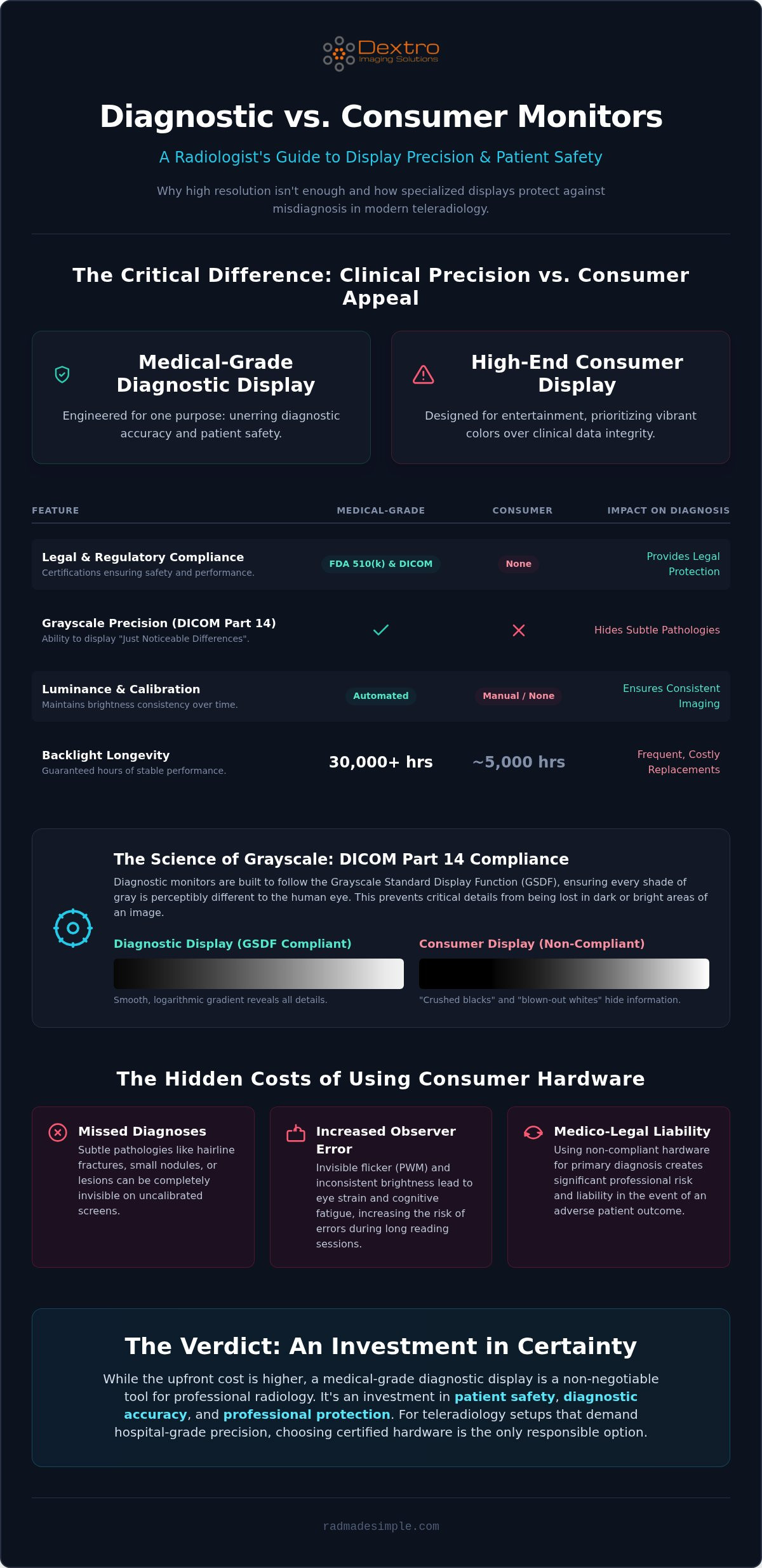
The most dangerous aspect of using consumer hardware is the gradual loss of grayscale integrity. Small nodules or hairline fractures often hide within the darkest or brightest areas of an image. If a monitor cannot distinguish between subtle shades of gray, these findings simply vanish. Additionally, consumer backlights often use pulse-width modulation (PWM) that creates invisible flicker. This leads to significant eye strain and cognitive fatigue during long shifts. Observer error, which refers to the increased rate of missed diagnoses caused by technical display limitations and visual fatigue, becomes a significant risk when using uncalibrated consumer hardware. This technical failure directly impacts the reliability of your teleradiology setup and your ability to deliver precise patient care.
DICOM Part 14 Compliance: The Science of Grayscale Accuracy
Achieving clinical accuracy requires more than just a high-resolution screen. It demands a display that adheres strictly to the Digital Imaging and Communications in Medicine (DICOM) Part 14 standard. This regulation defines how grayscale images should be displayed so they appear consistent across different devices. In the diagnostic monitor vs consumer monitor radiology comparison, the ability to maintain this standard is the primary differentiator. While consumer screens focus on vibrant color reproduction for entertainment, diagnostic displays prioritize the linear and predictable rendering of gray tones that the human eye needs to detect pathology.
Understanding the GSDF Curve
The Grayscale Standard Display Function (GSDF) is a mathematical model that maps digital input values to specific brightness levels. This mapping is based on the way the human eye perceives light, which isn't linear but logarithmic. DICOM Part 14 ensures that each step in grayscale represents a "Just Noticeable Difference" (JND). Diagnostic monitors are engineered to display these JNDs accurately from the deepest blacks to the brightest whites. Consumer monitors often "crush" blacks to create a more dramatic image for movies. In a clinical setting, this crushing effect is dangerous; it hides subtle details in dark regions, such as small lesions or fluid collections, making them invisible to the radiologist.
To achieve this precision, diagnostic hardware utilizes advanced 10-bit or 14-bit Look-Up Tables (LUT). These tables provide a massive palette of gray shades, allowing the monitor to select the exact values needed to fit the GSDF curve perfectly. Consumer backlight controllers lack the fine-grained voltage control required to maintain stability at the low end of the luminance scale. This physical limitation means a consumer screen can never truly meet the rigorous demands of primary diagnostic reading, regardless of the software used.
Hardware-Based vs. Software-Based Calibration
Many professionals attempt to bridge the gap by using software-only calibration on consumer displays. This is a temporary and flawed fix. Software calibration works by adjusting the output of the workstation's graphics card, which actually reduces the number of available gray shades to force the monitor into a DICOM-like appearance. This leads to "banding" or "contouring," where smooth gradients become blocky. True medical-grade systems, such as Jusha medical monitors, utilize internal front sensors that measure luminance directly from the screen surface.
These sensors perform autonomous, hardware-based calibration. They adjust the monitor's internal settings in real-time to compensate for backlight aging and ambient light changes. This ensures the display remains compliant every hour of every day without manual intervention. For those designing a high-performance home office, choosing integrated teleradiology workstations ensures that your hardware provides the continuous, reliable accuracy that software-only solutions simply cannot match.
Diagnostic vs. Consumer Displays: Side-by-Side Comparison
Comparing a professional medical display to a high-end retail screen reveals differences that go far beyond aesthetics. In the diagnostic monitor vs consumer monitor radiology debate, the physical construction of the panel determines whether your workstation remains a reliable clinical tool or becomes a liability. While consumer brands prioritize thin profiles and high refresh rates for gaming, medical-grade hardware focuses on sustained performance and environmental adaptability. These engineering choices directly impact your ability to provide accurate interpretations over long-term use.
Luminance Stability and Backlight Aging
Diagnostic monitors provide significantly higher luminance levels than standard office hardware. While a standard office monitor typically peaks at 250 to 300 cd/m², a Jusha diagnostic display maintains a calibrated luminance of up to 1,000 cd/m² to ensure every grayscale detail remains visible. This high brightness isn't just for clarity; it provides the necessary headroom to maintain DICOM compliance as the backlight inevitably ages. Medical displays feature a 30,000-hour life cycle where internal sensors compensate for LED aging in real-time. Conversely, consumer-grade OLED panels face the risk of permanent burn-in and ghosting when displaying static PACS toolbars for extended periods, leading to rapid image degradation.
Screen Uniformity and Viewing Angles
Uniformity is a critical requirement for multi-planar reconstruction (MPR) and cross-sectional imaging. Consumer screens often suffer from "vignetting," where the corners of the display are dimmer than the center. This inconsistency can lead to false positives or missed findings during a demanding shift. Diagnostic monitors use advanced uniformity compensation technology to ensure the center of the screen matches the corners perfectly. Additionally, medical-grade glass coatings reduce ambient glare without sacrificing sharpness, maintaining grayscale consistency even at off-axis viewing angles. This level of precision is essential for radiologists who move frequently or work in rooms with varying light conditions.
The operational support for these devices also differs significantly. Retail monitors usually come with standard warranties that require you to ship the unit back and wait weeks for a repair. Medical-grade solutions offer professional hot-swap programs. If a unit fails, a replacement arrives immediately to minimize downtime. This ensures your teleradiology workflow remains uninterrupted, protecting both your productivity and your clinical commitments. Investing in a purpose-built system like a Dextro Reading Station provides the peace of mind that comes with enterprise-level support and hardware longevity.
Legal Compliance and Audit Trails in Radiology
Choosing between a diagnostic monitor vs consumer monitor radiology setup often comes down to risk management. Beyond the technical ability to see an image, you must consider the legal framework that protects your practice. The FDA 510(k) clearance is not merely a technical certification. It is a legal classification that identifies the device as a medical instrument intended for primary diagnosis. If a diagnostic error occurs, using a device that lacks this clearance can significantly weaken your legal defense. In a malpractice environment, your equipment is as much a part of the record as your report.
Compliance with the American College of Radiology (ACR) and Mammography Quality Standards Act (MQSA) guidelines is mandatory for home reading environments. These standards require specific luminance levels and regular quality assurance (QA) testing. Consumer displays lack the integrated tools to perform these tests automatically. This creates a manual burden that is often neglected, leading to non-compliance during hospital credentialing or ACR audits. Professional radiology reading workstations solve this by automating the documentation process, ensuring you are always audit-ready without manual effort.
The Liability of Using Non-Cleared Hardware
In the event of a malpractice suit, the defense must prove that the standard of care was met. This includes the environment in which the study was interpreted. If a display is found to be non-compliant with DICOM standards, it becomes difficult to argue that the interpretation was based on accurate data. Can you prove your monitor was calibrated on the day of the read? Diagnostic monitors with automated reporting software maintain a digital paper trail of every calibration and QA test. This data serves as your primary shield, providing objective proof that your hardware met all clinical standards at the time of diagnosis.
Remote Management and Enterprise Compliance
For hospital IT departments, managing a fleet of remote radiologists is a significant security and compliance challenge. They prefer standardized workstations because they allow for centralized monitoring and uniform performance. Tools like PACS Harmony enable PACS administrators to monitor the health and calibration status of every remote node from a single dashboard. This ensures that a radiologist reading from home in 2026 meets the exact same standards as those in the main hospital reading room. This centralized approach removes the complexity of individual hardware maintenance and ensures network-wide integrity. To secure your remote practice against regulatory scrutiny, explore our certified diagnostic workstation solutions.
Selecting the Right Solution: Dextro and Jusha for 2026
Making the final decision in the diagnostic monitor vs consumer monitor radiology comparison is about more than just hardware. It's about selecting a partner that understands the high-stakes nature of clinical interpretation. Dextro Imaging Solutions bridges the gap between hospital-grade performance and the flexibility required by the modern teleradiologist. By integrating Jusha diagnostic monitors into purpose-built workstations, we remove the technical complexity of calibration and compliance, allowing you to focus entirely on patient care.
The Jusha Advantage for Primary Diagnostics
Jusha medical monitors are engineered for the specific demands of primary diagnostic reading. For specialized imaging such as digital mammography or complex musculoskeletal studies, Jusha offers high-resolution 5MP and 12MP options that provide the pixel density required for early pathology detection. These units feature built-in front sensors that handle DICOM calibration and daily self-testing autonomously. This automation ensures your display is always ready for a clinical shift without requiring manual intervention or external tools.
While the initial cost of a medical-grade display is higher than a consumer screen, the long-term ROI is significantly better. Jusha monitors are designed for a 5 to 7 year operational life. During this period, a consumer monitor would likely require two or three replacements due to backlight degradation or failure to maintain DICOM standards. When you factor in the cost of downtime, the risk of non-compliance, and the frequency of hardware replacement, the medical-grade choice is the more fiscally responsible investment for a professional practice.
Modernizing Teleradiology with Portable Workstations
The 2026 landscape requires solutions for radiologists who move between hospital, home, and satellite clinics. Dextro addresses this need with the Radcom Compact and our range of Portable Radiology Workstations. These systems provide high-performance connectivity and clinical-grade display quality in a mobile format. They are ideal for emergency teleradiology and hybrid work environments where a traditional fixed desk isn't always available. These portable units maintain the same FDA 510(k) cleared standards as stationary setups, ensuring you never sacrifice safety for mobility.
The technical and legal evidence is clear. Consumer displays lack the luminance stability, calibration hardware, and regulatory clearance necessary for safe diagnostic reading. Don't compromise patient safety or your professional reputation for a consumer price tag. Investing in a Dextro Reading Station equipped with Jusha monitors provides the precision, longevity, and legal protection your career deserves. Transitioning to a certified medical-grade setup is the most important step you can take to modernize your teleradiology workflow today.
Secure Your Diagnostic Future
The 2026 comparison of diagnostic monitor vs consumer monitor radiology clearly shows that clinical precision is not optional. Relying on consumer hardware introduces risks that go far beyond visual clarity. It directly affects your legal liability and patient safety. By choosing medical-grade systems, you ensure your workstation meets the rigorous demands of DICOM Part 14 and FDA 510(k) clearance. This professional investment provides built-in DICOM self-calibration and a 30,000-hour life cycle that consumer screens simply cannot sustain.
Dextro Imaging Solutions simplifies this transition with purpose-built workstations and high-performance Jusha monitors. You gain the confidence of 24/7 specialized technical support and hardware designed to protect your practice from audit failures or diagnostic errors. Don't let technical limitations hinder your clinical excellence or your productivity. We are here to help you modernize your setup with ease and reliability.
Upgrade to DICOM-compliant Jusha monitors and Dextro workstations today
We look forward to empowering your professional success and providing the precision your expertise requires.
Frequently Asked Questions
Is it illegal to read radiology cases on a consumer monitor?
It isn't a criminal offense, but it violates the professional standards of care established by the FDA, ACR, and MQSA. If a missed diagnosis results in a malpractice claim, using a monitor without FDA 510(k) clearance significantly weakens your legal position. You must be able to prove your equipment was calibrated and compliant on the day of the interpretation to meet clinical requirements.
Can a high-end gaming monitor be calibrated to DICOM standards?
No, a gaming monitor cannot maintain a true DICOM Part 14 calibration because it lacks the internal Look-Up Tables (LUT) necessary for grayscale precision. While software can attempt to mimic a DICOM curve, the hardware can't sustain it as the backlight ages. This lack of stability is the deciding factor in the diagnostic monitor vs consumer monitor radiology choice. Without hardware-based sensors, the display will drift within days.
How often should a diagnostic radiology monitor be calibrated?
You should calibrate your diagnostic display at least monthly, though many hospital protocols demand weekly validation. Purpose-built systems like Jusha monitors simplify this by using integrated front sensors for autonomous calibration. This prevents the luminance degradation that occurs naturally as backlights age. Regular testing ensures you stay compliant with ACR and MQSA standards without interrupting your daily workflow.
What is the minimum resolution required for diagnostic radiology monitors?
For general radiology, the minimum requirement is typically a 2MP or 3MP display. However, specific modalities like mammography require at least a 5MP resolution to visualize fine details like microcalcifications. Most modern workstations now favor 5MP or 12MP displays to provide the flexibility needed for all types of clinical interpretation. Higher resolution ensures you don't have to zoom and pan excessively during a busy shift.
Do I need a 5MP monitor for everything, or is 3MP enough?
You only strictly need 5MP for mammography and breast tomosynthesis. For most other modalities, such as CT, MRI, and general X-ray, 3MP remains the industry standard. Many teleradiologists choose 5MP or 12MP multi-modality displays because they provide a larger workspace. This allows you to view multiple series side-by-side without sacrificing the clarity required for a primary diagnosis.
What is the difference between a clinical review monitor and a diagnostic monitor?
A diagnostic monitor is a primary tool used to identify pathology and issue a medical report. It must meet strict FDA 510(k) clearance and DICOM standards. A clinical review monitor is a secondary display for non-radiologists to view images after the diagnosis is made. Review monitors aren't bright enough and don't have the grayscale precision needed to find subtle findings in raw imaging data.
Can I use an iPad Pro for diagnostic radiology reading?
No, an iPad Pro is not currently cleared for primary diagnostic interpretation. It lacks the necessary medical-grade hardware and automated QA tools to ensure consistent DICOM compliance. While it's helpful for clinical review or consultation, it doesn't provide the luminance stability required for primary reads. Using it for diagnosis can lead to significant legal and clinical risks for your practice.
How does ambient lighting affect the performance of a radiology monitor?
Ambient light reduces the visible contrast of your monitor and can wash out subtle grayscale findings. If your room is too bright, you'll miss pathologies hidden in dark areas of the image. Diagnostic displays use specialized anti-glare coatings to mitigate this effect. They also feature ambient light sensors that automatically adjust the screen's luminance to maintain a consistent viewing experience in any environment.


