

Teleradiology reporting often fails not because of the radiologist's skill, but because standard software isn't built for the last mile of home connectivity. You've likely felt the frustration of dictation lag over a residential internet connection or struggled with a home workstation that won't communicate effectively with the hospital PACS. These technical friction points add unnecessary cognitive load to an already high-pressure environment where every second counts. It's a professional reality that many specialists accept as inevitable, but it doesn't have to be your experience.
This article demonstrates how RadVoice for remote radiology streamlines your workflow by eliminating latency and integrating seamlessly with your diagnostic environment. You'll see how this browser-based tool works in harmony with Dextro reading stations and Jusha monitors to create a high-performance home office. We'll also examine how the latest 2026 AI reporting standards help reduce error rates and accelerate report turnaround times. By the end of this guide, you'll understand how a unified stack can transform your remote practice into a more efficient, secure, and productive operation.
Key Takeaways
- Identify the common technical bottlenecks like VPN latency and bandwidth fluctuations that compromise remote reporting efficiency.
- Explore how RadVoice for remote radiology utilizes low-latency processing to maintain high-speed dictation even on home internet connections.
- Learn the specific hardware and network configurations required to prioritize dictation traffic and minimize PACS desync.
- Compare the performance of cloud-based versus local processing to understand how modern tools handle intermittent connectivity without data loss.
- Discover the productivity benefits of a unified stack by pairing RadVoice software with high-performance Dextro Reading Stations.
The Teleradiology Reporting Gap: Why Traditional Dictation Fails Remotely
The professional landscape for radiologists has changed forever. Teleradiology is no longer a niche convenience; it's a primary operational model for modern healthcare systems. As the demand for rapid report turnaround times increases, the gap between hospital-based performance and home-based reality becomes more apparent. Traditional dictation software, designed for high-speed local area networks, often fails when moved outside the hospital's four walls. This failure isn't just a minor inconvenience. It directly impacts your ability to process high volumes of complex cases effectively.
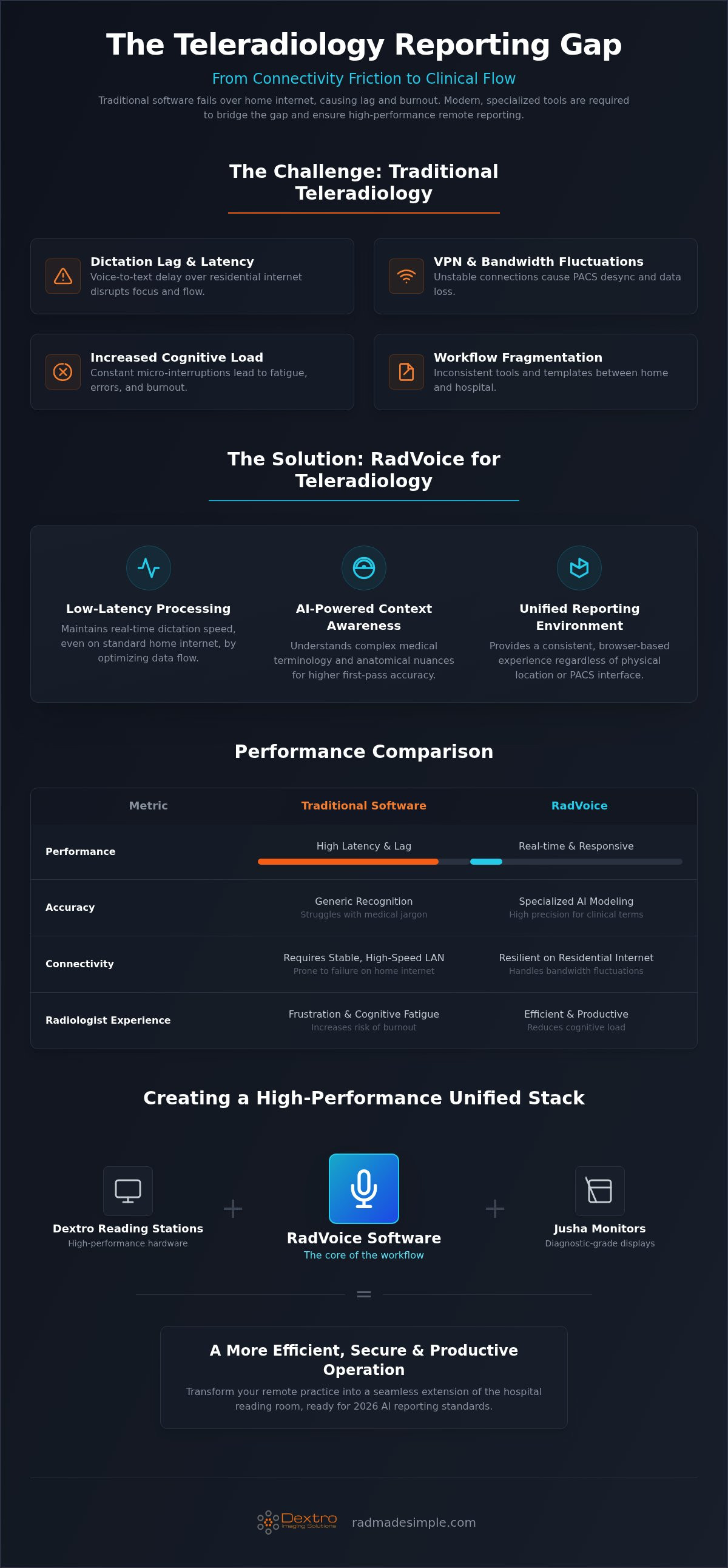
Remote reporting introduces unique technical hurdles that don't exist in a clinical setting. VPN latency and bandwidth fluctuations create a disconnect between your voice and the screen. When the PACS desyncs from the reporting software, the resulting "dictation lag" forces you to pause, wait, or repeat yourself. This friction accumulates over a long shift. It leads to cognitive fatigue and eventual burnout. Transitioning to a remote-first reporting strategy requires tools like RadVoice for remote radiology that prioritize network resilience over raw bandwidth consumption.
The Reality of Latency in Remote Reporting
The "last mile" problem remains the biggest challenge for teleradiology connectivity. While your home fiber connection might seem fast, it isn't optimized for the constant, bi-directional data flow required by high-resolution imaging workflows. Standard cloud-based voice recognition often struggles with these demands. Even a sub-second delay between speech and text can disrupt your diagnostic focus. These micro-interruptions force your brain to switch tasks constantly, which increases the likelihood of errors in complex reports. Precision requires a seamless interface where the technology disappears.
Workflow Fragmentation Between Home and Hospital
Maintaining consistent templates across different PACS interfaces is another common point of failure. When your reporting tools aren't unified, you risk miscommunication and formatting errors. This fragmentation makes it difficult to maintain the high standards expected in 2026. Using RadVoice for remote radiology helps bridge this gap by providing a consistent reporting experience regardless of your physical location. For a deeper look at how software is evolving to meet these challenges, consult our 2026 AI Reporting Guide. A unified stack ensures that your home office functions with the same technical authority as a hospital reading room.
What is RadVoice? AI-Powered Dictation Built for Teleradiology
RadVoice isn't just another voice recognition tool; it's a specialized engine built specifically to handle the unique demands of modern teleradiology. While general-purpose software often fails at the "last mile" connectivity points discussed previously, RadVoice for remote radiology uses optimized low-latency processing to ensure that your dictation appears in real-time, even on residential internet connections. This tool moves beyond simple transcription by employing AI-driven context awareness. It understands the nuances of complex anatomy and specific pathological findings, which ensures that your reports are accurate from the very first draft. It's designed to align with the ACR Practice Parameters and Technical Standards, providing a level of reliability and clinical authority that matches hospital-grade systems.
The platform functions as a "simplifier" in high-pressure environments. It removes the technical complexity of remote reporting by focusing on high-performance integration and modernization. By transforming traditional, cumbersome dictation methods into an agile, contemporary workflow, it empowers radiologists to maintain their productivity without being tethered to a physical hospital location. This proactive approach to software design ensures that your high-stakes professional requirements are met with precision and absolute reliability.
Advanced Acoustic Modeling for Medical Terminology
Specialized medical jargon requires a high degree of precision that standard software simply can't provide. RadVoice utilizes advanced acoustic modeling to handle diverse dialects and complex terminology with ease. By leveraging deep learning algorithms, the system significantly reduces word error rates (WER), which minimizes the time you spend on manual corrections after a long shift. The software continuously learns your unique vocal patterns and phrasing. RadVoice adapts to your individual dictation style by creating a personalized speech profile that evolves with every report you sign. This continuous optimization allows for a more natural communication rhythm and faster completion of complex diagnostic findings.
Seamless PACS and RIS Integration
Efficiency in a remote setting depends on a unified workflow that removes technical friction. RadVoice eliminates the cumbersome "cut and paste" process by integrating directly with major PACS and vendor-neutral archives (VNA). It synchronizes with your existing worklists to enable automated data entry, which reduces clerical errors and significantly speeds up the reporting cycle. When integrated with PACS Harmony, the system creates a unified imaging interface that allows you to focus entirely on diagnosis rather than software management. This seamless connectivity ensures that your home-based diagnostic workstation mirrors the full functionality of an on-site hospital station. If you're looking to streamline your current setup, you can explore how these tools work together at radmadesimple.com.
RadVoice vs. Traditional Software: Performance in Remote Environments
Traditional dictation platforms often struggle when moved from a high-speed hospital LAN to a residential internet connection. These legacy systems depend on constant, high-bandwidth streams that aren't always available in a home office. RadVoice for remote radiology solves this by using a modern architecture that balances processing between the local workstation and the cloud. This hybrid approach ensures that your dictation remains fluid even when your network experiences jitter or temporary bandwidth drops. Unlike traditional software that may freeze or lose data during a sync error, RadVoice maintains network resilience to protect your work during high-pressure shifts.
Resource management is another critical differentiator. High-volume shifts require your workstation to handle massive DICOM datasets while simultaneously running reporting software. RadVoice is engineered to be lightweight, which prevents the CPU spikes and lag commonly associated with older, bloated dictation suites. This efficiency allows for seamless scalability across teleradiology groups managing hundreds of remote sites. It transforms the reporting process from a technical burden into a streamlined, high-performance operation that respects the radiologist's time and focus.
Benchmarking Speed and Accuracy Over VPN
Report turnaround time (TAT) is the primary metric of success in teleradiology. Recent developments in next-generation speech recognition technology have shifted the focus from simple speech-to-text to intent-based reporting. While traditional tools merely transcribe sounds, RadVoice understands the clinical context of your findings. RadVoice minimizes the need for manual corrections because its AI engine recognizes complex anatomical relationships and automatically formats them into the correct report sections. This reduces the time spent on "cleanup" and allows you to move to the next study with total confidence in your accuracy.
Security and Compliance in the Home Office
Operating from home doesn't exempt a practice from strict HIPAA and GDPR requirements. RadVoice employs enterprise-grade encryption protocols for all data in transit between your home and the hospital servers. This ensures that patient information remains secure without sacrificing the speed needed for real-time reporting. To maintain professional standards, this software works best when paired with high-performance hardware. For example, maintaining DICOM Part 14 standards is essential for diagnostic integrity, which is why many remote specialists utilize Jusha medical monitors to ensure their visual output matches their reporting precision. This synergy between secure software and calibrated hardware creates a compliant, hospital-grade environment in any location.
Setting Up Your Remote Reporting Environment with RadVoice
Creating a hospital-grade environment at home requires more than just a fast internet connection. It involves a systematic approach to hardware and network configuration to ensure your tools function at peak performance. RadVoice for remote radiology performs best when the underlying infrastructure is tuned for low-latency data transmission. You should start by configuring your network to prioritize dictation traffic. Most modern routers allow you to set Quality of Service (QoS) rules. By assigning high priority to your reporting software and PACS client, you prevent household bandwidth spikes from causing the dictation lag that disrupts your diagnostic rhythm.
Hardware Optimization for Voice Recognition
Your audio input is the foundation of reporting accuracy. While built-in laptop microphones are often insufficient, specialized noise-canceling microphones with high-fidelity audio interfaces ensure that the AI engine receives a clean signal. This is critical in non-clinical settings where ambient noise is unpredictable. For the local processing tasks that RadVoice handles, your workstation should ideally feature a modern multi-core CPU and at least 16GB of RAM to maintain responsiveness during high-volume shifts. If your practice takes you on the road, integrating these tools into a traveling radiologist workstation setup allows you to maintain diagnostic accuracy regardless of your physical location. High-performance hardware removes the technical barriers between your expertise and the final report.
Customizing the Teleradiologist Workflow
True efficiency comes from reducing repetitive motions through smart software customization. Use RadVoice to create voice-activated macros for routine findings and standard negative reports. Instead of manually typing a full description of a normal chest X-ray, a single voice command can populate the entire field and move your cursor to the next required finding. You can even set up multi-monitor navigation via voice commands. This allows you to toggle between different imaging planes or window settings without taking your hands off the mouse. Integrating RadVoice for remote radiology with your specific PACS client is a straightforward process. Most configurations involve a simple synchronization wizard that maps the dictation cursor directly to your reporting window, which ensures that your templates and macros are available the moment you log in.
Ready to optimize your home office for maximum throughput? You can find detailed configuration guides and technical support at radmadesimple.com.
The Unified Stack: RadVoice and Dextro Reading Stations
High-performance software requires a hardware environment that can keep up with its processing demands. Using RadVoice for remote radiology on a standard consumer-grade PC often creates a technical bottleneck that negates the speed of AI-driven dictation. True optimization occurs when you pair advanced voice recognition with Dextro Reading Stations. These stations are specifically engineered to handle the high-load tasks of 2026 teleradiology, from rendering massive DICOM files to executing real-time speech-to-text algorithms without CPU spikes. This ensures that the software stays responsive during even the most demanding clinical shifts.
This synergy creates a seamless workflow that protects your productivity and mental focus. When your hardware and software are designed to work together, you eliminate the "last mile" friction points that lead to fatigue. A unified stack also provides a significant administrative advantage: a single-vendor support model. Instead of navigating conflicting technical advice from different software and hardware providers, you have one authoritative partner for your entire diagnostic environment. This streamlined approach ensures that your remote practice stays operational and efficient, which removes the complexity of troubleshooting fragmented systems.
Synergy Between AI and Ergonomics
Modernizing your practice isn't just about digital speed; it's about physical longevity. Integrating RadVoice with Dextro hardware allows for voice-driven PACS control, which significantly reduces the thousands of repetitive mouse clicks that cause strain over a long shift. This software complements the extreme clarity of Jusha Diagnostic Monitors by providing a non-intrusive reporting interface that doesn't distract from the image. You can manipulate studies and dictate findings simultaneously, which maintains a natural diagnostic flow. This "simplifier" approach transforms a high-pressure environment into a manageable, high-performance workspace that supports your best work.
Next Steps: Modernizing Your Remote Practice
Future-proofing your practice for 2026 and beyond requires a proactive look at your current technical stack. If you're still struggling with dictation lag or fragmented workflows, it's time to evaluate a unified solution. You can request a personalized demonstration of RadVoice to see how it performs within your specific network and PACS environment. Consulting with the experts at Dextro for a complete hardware-software audit will help you identify hidden bottlenecks in your home office setup. For a comprehensive look at the equipment that supports these professional workflows, explore our Radiology Reading Workstations Pillar. Taking these steps today ensures your remote practice remains at the forefront of diagnostic accuracy and operational efficiency.
Elevate Your Remote Practice with Integrated Diagnostic Tools
Remote radiology reporting no longer needs to be defined by technical friction or bandwidth limitations. You've seen how specialized software bridges the gap between home-based workstations and hospital systems by eliminating dictation latency. Precision requires the right tools. By prioritizing the last mile of connectivity, RadVoice for remote radiology ensures your reporting speed matches your diagnostic pace. This tool is specifically optimized for Dextro Reading Stations, creating a unified stack that handles the most demanding 2026 clinical standards with ease.
Maintaining professional standards from a home office requires a HIPAA-compliant remote architecture that protects patient data without sacrificing throughput. With 24/7 technical support for software integration, you can focus on complex findings while the technology works silently in the background. It's time to move beyond fragmented systems and embrace a streamlined, modern workflow that respects your expertise. Streamline your remote reporting with a RadVoice demo today. Your success in a remote-first world depends on tools that empower your productivity and provide total peace of mind.
Frequently Asked Questions
Does RadVoice require a high-speed fiber connection for remote use?
RadVoice doesn't require a high-speed fiber connection to function effectively. The software is specifically engineered for RadVoice for remote radiology workflows, utilizing low-latency processing to remain stable on standard residential internet. It manages bandwidth fluctuations and jitter by balancing the processing load between your local workstation and the cloud. This ensures that your dictation remains fluid and responsive even during peak household usage times.
Can I use RadVoice with my existing hospital PACS system?
You can absolutely use RadVoice with your existing hospital PACS. It's designed for seamless integration with major diagnostic platforms and vendor-neutral archives. Specifically, it offers deep integration with PACS Harmony to create a unified imaging and reporting interface. This connectivity eliminates the need for manual data entry or "cut and paste" workflows. It allows you to maintain high throughput from any remote location without technical friction.
How does RadVoice handle background noise in a home office?
RadVoice utilizes advanced acoustic modeling to isolate your voice from common home office distractions. The AI-driven engine's trained to recognize radiology-specific terminology while filtering out non-clinical background sounds like air conditioning or distant traffic. For the best results, we recommend pairing the software with a high-fidelity noise-canceling microphone. This combination ensures that your dictation remains accurate regardless of the unpredictable noise levels in your physical environment.
Is RadVoice compatible with Mac and Windows-based workstations?
RadVoice is highly compatible with both Mac and Windows-based workstations. Because it's a browser-based tool, it doesn't require a complex local installation process. This flexibility allows you to integrate the software into your preferred diagnostic environment without worrying about operating system conflicts. Whether you're using a dedicated Dextro Reading Station or a mobile laptop setup, the interface remains consistent and high-performing across all modern platforms.
What makes RadVoice different from standard voice recognition software?
The primary difference lies in its intent-based reporting and remote optimization. Standard voice recognition software often struggles with specialized medical jargon and high-latency home networks. RadVoice for remote radiology is built with deep learning algorithms that understand clinical context and anatomical relationships. It moves beyond simple transcription to provide a resilient, low-latency experience. It's specifically tuned for the high-stakes requirements of modern diagnostic imaging professionals.
How long does it take to train the AI to recognize my specific dictation style?
Training is nearly instantaneous because the software utilizes pre-trained deep learning models for medical terminology. While it starts with high accuracy out of the box, it'll continuously adapt to your unique vocal patterns and phrasing. The system creates a personalized speech profile that evolves with every signed report. Most users find the software reaches peak optimization within their first few shifts without requiring dedicated training sessions.
Can RadVoice be used offline if my internet connection drops?
RadVoice is designed to handle intermittent connectivity without data loss, though it primarily operates as a cloud-connected tool. If your internet connection drops momentarily, the software's network resilience protocols protect your current dictation until the link is restored. This prevents the frustrating loss of work common with legacy systems. While a live connection's needed for full AI processing, the system is robust against the realities of remote networking.
Does RadVoice support multi-language reporting for international teleradiology?
RadVoice supports specialized dialects and complex terminology to accommodate a wide range of professional requirements. While the core focus is on high-precision English medical reporting, the AI engine's built on a flexible architecture that understands diverse linguistic nuances. This makes it a capable partner for international teleradiology groups. It ensures that specialized findings are captured accurately regardless of the radiologist's natural accent or professional dialect.


