

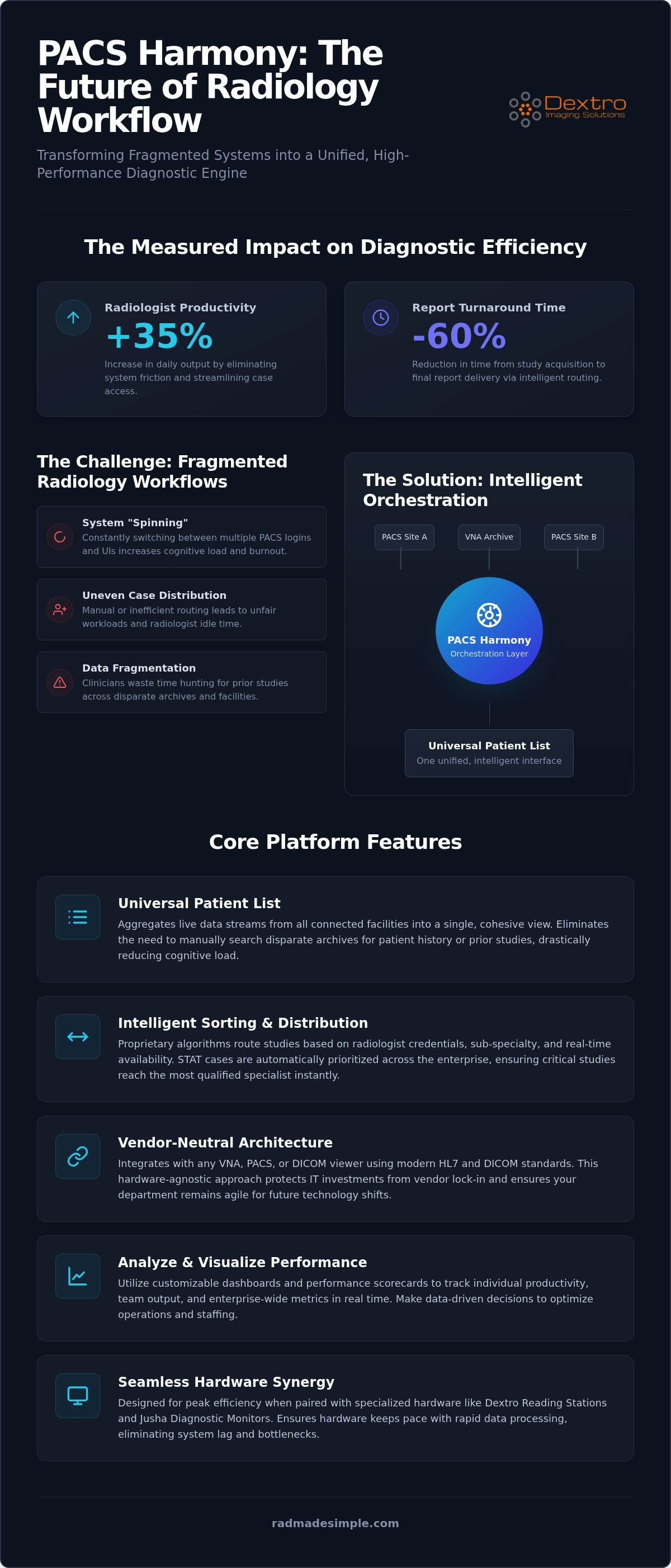
Recent data shows that modern workflow orchestration platforms can improve radiologist productivity by up to 35% while slashing turnaround times by as much as 60%. Despite these clear benefits, many practices still struggle with fragmented systems that force clinicians to jump between multiple screens and logins. You likely feel the daily friction of uneven case distribution and the frustration of being unable to track real-time performance metrics across your enterprise. Understanding the core PACS Harmony features is the first step toward reclaiming your efficiency and focus.
In this guide, you'll discover how PACS Harmony acts as the intelligent brain of your diagnostic ecosystem, unifying disparate imaging systems into a single, high-performance environment. We'll explore how its vendor-neutral architecture creates a true universal worklist and uses proprietary algorithms to ensure fair workload balancing among your staff. You'll also see how this software integrates seamlessly with Dextro Reading Stations and Jusha Diagnostic Monitors to eliminate the technical complexity that slows down your clinical output. By the end of this guide, you'll understand how to transform your fragmented data into a streamlined, high-stakes diagnostic engine.
Key Takeaways
- Learn how the vendor-neutral orchestration layer acts as a simplifier to remove technical friction across your entire imaging ecosystem.
- Discover how core PACS Harmony features consolidate disparate data streams into a single, intelligent interface for precise sub-specialty routing.
- Explore advanced tools like the PH Optimizer and interruption management systems designed to stabilize high-pressure reading room environments.
- Identify how to use customizable dashboards and performance scorecards to track individual productivity and enterprise metrics in real time.
- Understand the critical synergy between high-performance software and specialized hardware like Dextro Reading Stations and Jusha Diagnostic Monitors.
Vendor-Neutral Architecture
The system's primary strength is its ability to integrate with any Vendor Neutral Archive (VNA), PACS, or DICOM viewer currently in use. It utilizes the latest HL7 and DICOM standards to ensure seamless connectivity across different platforms, regardless of the manufacturer. This hardware-agnostic approach is one of the most vital PACS Harmony features, as it protects your long-term IT investment from vendor lock-in. You aren't forced into a single provider's ecosystem, which allows you to upgrade specific components or adopt new imaging modalities without dismantling your entire workflow. It ensures that your department remains agile and ready for future technological shifts.
The Problem of "Spinning"
One of the most significant challenges in modern radiology is the efficiency loss caused by "spinning" between disparate interfaces. When a radiologist has to log into multiple systems or navigate different UI layouts for every case, their cognitive load increases significantly. This constant context switching is a leading contributor to professional burnout and diagnostic fatigue. "Spinning" is defined as the primary obstacle to 2026 diagnostic throughput. By providing a single, unified layer, PACS Harmony features eliminate this friction. Clinicians can focus entirely on the images and patient data rather than managing software interfaces, leading to more accurate and faster interpretations.
Universal Patient List: The Core of Diagnostic Efficiency
The Universal Patient List serves as the central nervous system for the entire imaging enterprise. It aggregates live data streams from every connected facility, presenting a unified view that eliminates the need to manually search through disparate archives for patient history or prior studies. By centralizing these streams into a single interface, PACS Harmony features ensure that clinicians spend their time interpreting images rather than hunting for data across various logins. This consolidation significantly reduces the cognitive load on staff, allowing them to maintain focus on high-stakes diagnostic tasks without the distraction of administrative navigation.
Intelligent Sorting and Distribution
Efficiency in a modern radiology department depends on intelligent allocation rather than just simple visibility. The system utilizes sophisticated algorithms to route studies based on specific radiologist credentials, sub-specialty expertise, and real-time availability. If an urgent STAT case arrives at a satellite facility, the list prioritizes it immediately across the entire enterprise. This ensures that critical studies reach the most qualified eyes without any manual intervention or phone calls. Automated case assignment further minimizes idle time by pushing the next most relevant study to the radiologist as soon as they complete a report. You can customize these worklists to match the unique staffing patterns of your group, ensuring that workload is distributed fairly and effectively.
Multi-PACS Synchronization
Maintaining data integrity across different vendor archives is a complex technical requirement that this platform handles seamlessly. The software ensures that patient identifiers and study metadata remain synchronized, even when pulling from a mix of legacy systems and modern cloud archives. For a unified list to be truly effective, the visual output must be flawless and consistent. High-performance software requires hardware that can handle dense data streams without lag. Utilizing Jusha medical monitors ensures that every detail on the worklist and the associated images is rendered with strict DICOM Part 14 compliance. This synergy between software-driven orchestration and hardware precision creates a reliable diagnostic environment that scales with your needs. To see how these tools can transform your daily operations, you can explore our integrated radiology solutions for a more detailed look at the full ecosystem.
Sophisticated workflow orchestration goes beyond a static list; it manages the dynamic reality of a high-pressure reading room. PACS Harmony features include advanced tools designed to stabilize the diagnostic environment during complex shifts. One critical component is the PH Optimizer, an integrated radiologist scheduler that aligns available staffing with real-time study volume. This ensures that the right number of sub-specialists are active when peak volumes hit, preventing bottlenecks before they occur. Additionally, the system uses proprietary algorithms for real-time case distribution. This prevents "cherry-picking," where easier cases are selected first, by automatically assigning studies based on clinical priority and physician specialty.Interruption and Case Management
In a busy clinical setting, interruptions are inevitable. Whether it's a phone consult or an urgent request from the emergency department, these distractions often lead to lost progress and re-reading. The Interruption Management tool allows radiologists to bookmark their progress instantly. When they return to a study, the system restores the exact state of the viewer, including measurements and window levels. Automated interruption tracking saves 15% of daily reporting time by eliminating the need for clinicians to re-orient themselves after a distraction. This seamless transition between complex cases and urgent consults maintains diagnostic momentum and reduces the mental fatigue associated with constant context switching.
Integrated Peer Review and Quality Assurance
Quality oversight is a core requirement for modern accreditation and patient safety. PACS Harmony features include direct integration with RadPeer and other third-party peer review tools, allowing quality assurance tasks to be completed within the standard reporting workflow. Instead of navigating to a separate portal, radiologists can submit or review cases with a single click. This integration ensures that patient safety oversight remains a consistent part of the daily routine rather than an administrative burden. Automated double-checks and randomized case assignments for review help improve overall department compliance scores. By embedding these quality assurance steps into the diagnostic engine, the platform reinforces a culture of accuracy and accountability without sacrificing throughput.
Analyze & Visualize: Data-Driven Radiology Insights
Efficiency is only as good as the data supporting it. While previous sections detailed how the system orchestrates movement, the Analyze and Visualize suite provides the clarity needed to refine those movements. PACS Harmony features include comprehensive, customizable dashboards that transform raw metadata into actionable intelligence for department managers. By providing real-time visualization of case turnaround times (TAT), the platform allows clinical leads to identify and address delays as they happen. You can pinpoint exactly where a study is stalled, whether it's in the initial triage phase or awaiting final sign-off. This level of transparency is essential for maintaining a high-performance diagnostic environment where every minute counts.
Performance Scorecards and Metrics
Individual and group productivity tracking relies on objective metrics. Performance scorecards within the platform track Relative Value Units (RVUs) and reporting accuracy with precision. This data serves a dual purpose. First, it fosters a culture of accountability by providing radiologists with clear feedback on their output relative to their peers. Second, it provides the empirical evidence needed to justify business decisions. When you can demonstrate a consistent increase in volume, you have a solid foundation to justify staffing levels or equipment upgrades. These insights move the department away from anecdotal management toward a truly data-driven model. It empowers leadership to make informed choices that protect both the bottom line and patient care quality.
Real-Time Departmental Dashboards
The status of the entire imaging enterprise is visible at a glance through specialized dashboards. These views are fully customizable to meet the specific needs of different stakeholders. An IT director might focus on system uptime and DICOM transfer speeds, while a clinical lead monitors the pending worklist volume across multiple facilities. To provide a complete picture of the reporting lifecycle, these analytics integrate seamlessly with voice recognition for radiologists. This integration allows managers to track report completion rates and identify if technical issues with dictation are impacting overall TAT. By unifying these data points, the platform acts as the central intelligence hub for your operations.
By leveraging these insights, you can turn a reactive department into a proactive one. To see how these metrics can be integrated into your specific environment, you should contact our workflow optimization experts for a personalized demonstration of these reporting tools.
Implementation: Harmony and Dextro Hardware Synergy
Sophisticated software like PACS Harmony requires a robust hardware foundation to deliver on its promise of efficiency. While the software orchestrates the data, the physical workspace determines how effectively a radiologist interacts with that information. A mismatch between advanced software and legacy hardware creates latency, which defeats the purpose of a unified diagnostic layer. The total value of an integrated hardware-software suite lies in the elimination of technical bottlenecks that slow down reporting. By treating the software as the brain and the hardware as the body, you create a high-performance diagnostic engine.
Optimizing Hardware for Harmony
Processing multiple high-resolution PACS streams simultaneously demands significant local resources. To leverage the full range of PACS Harmony features, workstations must be equipped with high-end GPUs and sufficient RAM to ensure smooth scrolling and rapid image rendering. Visual precision is maintained through Jusha medical monitors, which provide the consistent brightness and contrast ratios required for diagnostic accuracy. Ergonomics also play a vital role in long-term productivity. Dextro Reading Stations are designed specifically for high-volume environments. They offer motorized height adjustments and optimized monitor placement to reduce the physical strain and eye fatigue often associated with long shifts.
Seamless Integration Process
A methodical approach is required for rolling out a unified orchestration layer across an enterprise. The first step involves connecting existing vendor archives to the Universal List using standard HL7 and DICOM protocols. This allows the software to pull metadata without disrupting the underlying storage architecture. Training radiologists is the next priority. Because the system uses a "Simplified" interface, the learning curve is minimal. Training focuses on navigating the consolidated worklist rather than learning new diagnostic tools. Ongoing support and maintenance ensure that the integrated ecosystem remains stable as imaging volumes grow and new facilities are added to the network.
IT teams preparing for a rollout should follow this focused checklist:
- Verify network bandwidth between satellite facilities and the central SQL server database.
- Confirm GPU drivers are updated to support multi-stream rendering across all displays.
- Map user credentials across all disparate PACS for single sign-on (SSO) functionality.
- Perform a DICOM Part 14 calibration on all connected Jusha monitors to ensure visual consistency.
By aligning PACS Harmony features with specialized hardware, you create a future-proof environment. This synergy protects your staff from burnout and ensures your facility stays at the forefront of 2026 radiology standards.
Modernizing Your Diagnostic Workflow for 2026
The future of radiology depends on the removal of technical friction. By centralizing disparate data streams into a single, high-performance interface, you reclaim the cognitive energy often lost to system hopping. This guide has detailed how core PACS Harmony features, such as the Universal Patient List and advanced interruption management, stabilize high-pressure environments. These tools can reduce radiologist "spinning" by up to 30%, allowing your team to focus on diagnostic precision rather than navigating complex software interfaces.
Choosing a fully vendor-neutral orchestration layer ensures your practice remains agile as imaging technology evolves. When you combine this software with the ergonomic precision of Dextro Reading Stations, you create a secure and productive ecosystem for your staff. It's time to transition from fragmented operations to a unified, data-driven workflow that protects both your clinicians and your bottom line. Request a PACS Harmony Demo from Dextro Imaging Solutions to see how this integration can transform your daily throughput. You don't have to manage complexity alone; let the right tools do the heavy lifting for you.
Frequently Asked Questions
Does PACS Harmony replace my existing PACS software?
PACS Harmony doesn't replace your current PACS software. It acts as a vendor-neutral orchestration layer that sits on top of your existing imaging ecosystem. While your PACS remains the primary storage and archive for DICOM data, this software unifies multiple disparate systems into a single interface. This allows you to leverage advanced PACS Harmony features without the cost or disruption of a full data migration or system replacement.
Can I use PACS Harmony with teleradiology setups?
You can absolutely use this platform within teleradiology environments. It's specifically designed to handle the complexities of remote reading by consolidating studies from various client sites into one universal worklist. This setup eliminates the need for radiologists to maintain multiple workstations or logins for different hospitals. It provides a seamless, secure connection that allows remote clinicians to maintain high diagnostic throughput regardless of their physical location or the source facility.
How does the Universal Patient List handle different hospital VNAs?
The Universal Patient List uses standard HL7 and DICOM protocols to communicate with different hospital Vendor Neutral Archives (VNAs). It queries metadata from these disparate archives and presents it in a unified, searchable interface. This means clinicians don't have to navigate different folder structures or search parameters for every facility. The software handles the translation between systems in the background, ensuring that patient history and prior studies are always visible in one place.
What is the PH Optimizer and how does it help with scheduling?
The PH Optimizer is an integrated radiologist scheduler that aligns your staffing levels with real-time and historical study volumes. It helps managers predict peak periods and ensure that enough sub-specialists are on the clock to handle the expected workload. By matching the right number of radiologists to the current demand, the tool prevents bottlenecks and reduces the stress associated with unexpected volume surges. It's a proactive solution for maintaining consistent turnaround times.
Is PACS Harmony compatible with Jusha diagnostic monitors?
This software is fully compatible with Jusha diagnostic monitors and is often deployed alongside them as part of a complete diagnostic suite. Because the platform is hardware-agnostic, it works with any DICOM-compliant display; however, using high-performance monitors ensures that the visual output matches the software's processing capabilities. Dextro Imaging Solutions provides the necessary integration support to ensure that monitor calibration and DICOM Part 14 compliance are maintained throughout the unified workflow.
How does the software manage case distribution to prevent radiologist burnout?
The software uses a proprietary algorithm to automate case assignment based on sub-specialty, availability, and current workload. This prevents burnout by ensuring that no single radiologist is overwhelmed while others remain idle. By removing the ability for staff to manually select or "cherry-pick" cases, the system creates a fair and transparent environment. These PACS Harmony features promote a balanced pace of work, which is critical for maintaining long-term diagnostic accuracy and staff satisfaction.
Does PACS Harmony support third-party voice recognition software?
PACS Harmony supports seamless integration with leading third-party voice recognition software, including RadVoice. This connectivity allows the dictation system to follow the active study on the worklist automatically, which eliminates the risk of reporting on the wrong patient. When a radiologist opens a case in the universal viewer, the reporting template is populated with the correct metadata instantly. This tight integration speeds up the reporting lifecycle and significantly reduces potential manual data entry errors.
What are the technical requirements for a Dextro workstation running Harmony?
A Dextro workstation running this software requires a high-performance GPU and at least 32GB of RAM to handle multiple concurrent data streams. Because the system pulls studies from various locations, a stable, high-bandwidth network connection is also essential for rapid image loading. The workstation should be configured with a 64-bit operating system and a multi-monitor setup that supports high-resolution diagnostic displays. These specifications ensure that the hardware can keep pace with the software's advanced tools.


