

Buying a high-end laptop and calling it a diagnostic tool is the most expensive mistake a teleradiologist can make in 2026. You likely recognize that true mobility shouldn't come at the expense of DICOM compliance or clinical precision. However, the sheer variety of hardware options makes it difficult to calculate the actual mobile radiology workstation cost without worrying about hidden software fees or technical bottlenecks.
This guide simplifies your investment by breaking down the essential components of a professional setup. We'll show you how to distinguish between entry-level portable units and full diagnostic-grade systems that utilize high-resolution Jusha diagnostic monitors. You'll gain a clear understanding of how specialized hardware like the Radcom Compact ensures reliable connectivity and image fidelity in high-stakes environments.
We'll explore the three primary investment tiers, uncover the frequently overlooked costs of PACS integration, and provide a structured framework to help you justify these critical upgrades to your stakeholders. By the end of this guide, you'll have the technical clarity needed to build a mobile station that balances high-performance output with long-term operational value.
Key Takeaways
- Identify the essential hardware requirements, such as DICOM-compliant Jusha monitors, that separate professional diagnostic units from standard consumer electronics.
- Calculate your total mobile radiology workstation cost by evaluating the three core pillars: medical-grade hardware, specialized software licensing, and secure connectivity.
- Differentiate between clinical review tiers and high-performance teleradiology setups to ensure your budget aligns with your specific diagnostic needs.
- Protect your long-term investment by factoring in the costs of annual compliance audits, DICOM calibration, and 24/7 technical support contracts.
- Learn how integrating tools like the Radcom Compact and PACS Harmony removes workflow complexity and enhances diagnostic accuracy in remote environments.
What Defines a Mobile Radiology Workstation in 2026?
Modern teleradiology demands more than just a fast processor. In 2026, a professional mobile radiology workstation is defined by its ability to deliver diagnostic-grade imaging and secure, seamless access to a Picture Archiving and Communication System (PACS). The industry has moved decisively away from traditional, centralized reading rooms toward agile, remote environments. This transition makes the mobile radiology workstation cost a strategic investment in both clinical accuracy and operational flexibility.
Standard consumer hardware cannot support the high-stakes requirements of medical imaging. Most retail laptops lack the thermal capacity to maintain the performance of a high-end GPU during intensive 3D rendering. A true workstation integrates a diagnostic-grade display, a professional-grade GPU, and specialized connectivity hardware like the Radcom Compact. These components ensure that radiologists can interpret complex studies with the same confidence they would feel in a hospital setting. Without these specific tools, the risk of technical bottlenecks or image degradation increases significantly.
The Difference Between Portable and Mobile
It's helpful to distinguish between portable and mobile units. Portable stations are typically built for home offices where they remain stationary for long periods. Truly mobile units are designed for radiologists who travel between facilities or work from varying locations. These units must balance weight and battery life against the power needs of diagnostic GPUs. Cooling is a critical factor. Compact form factors require advanced thermal management to prevent performance throttling during long reading sessions. If a system cannot dissipate heat effectively, the GPU will slow down, leading to frustrating lag while scrolling through large imaging stacks.
Compliance: The Non-Negotiable Cost Factor
Meeting DICOM Part 14 calibration standards is the most critical requirement for any mobile setup. This standard ensures that grayscale levels are displayed consistently, which is vital for detecting subtle pathologies. Achieving this on a mobile screen often requires integrated sensors or the use of external Jusha diagnostic monitors. While non-compliant hardware might seem cheaper initially, the legal and clinical risks of using consumer screens for final interpretations are immense. Investing in compliant hardware protects the integrity of your diagnosis and the safety of the patient. This compliance is a core driver of the mobile radiology workstation cost, but it's the only way to guarantee clinical reliability.
The Three Pillars of Mobile Radiology Workstation Cost
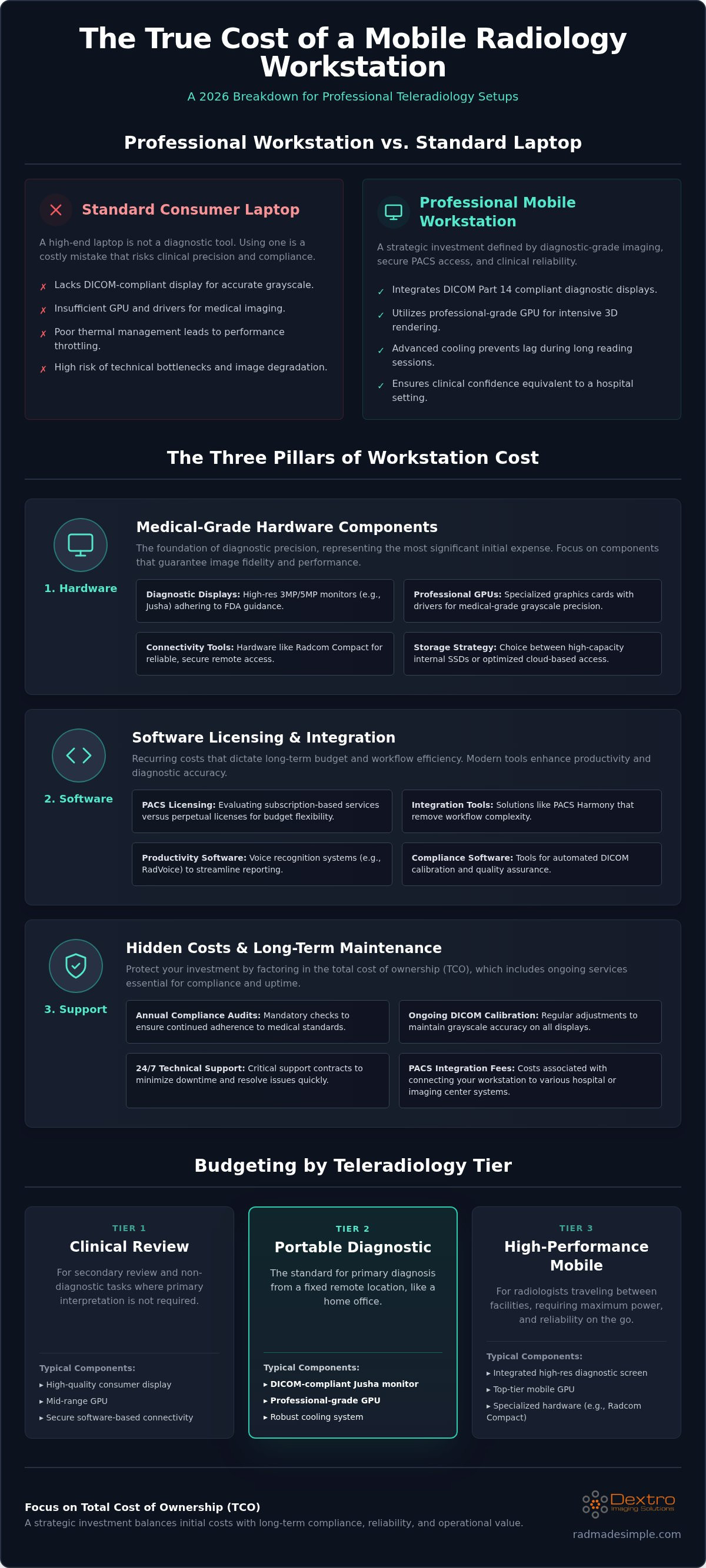
Hardware is only one part of the financial equation. To accurately project your mobile radiology workstation cost, you must evaluate three distinct pillars: hardware, software, and implementation. Balancing these categories ensures that you don't just buy a device, but invest in a high-performance environment that remains compliant and efficient for years. Focusing on the Total Cost of Ownership (TCO) rather than just the initial Capital Expenditure (CapEx) helps prevent budget overruns caused by unforeseen technical requirements.
Medical-Grade Hardware Components
High-resolution displays represent the most significant hardware expense. Portable diagnostic screens, particularly 3MP or 5MP Jusha Diagnostic Monitors, carry a price premium because they adhere to strict FDA guidance on diagnostic displays. These screens require specialized GPUs to render 3D imaging without latency. While consumer-grade graphics cards might handle standard video, they often lack the specific drivers needed for medical-grade grayscale precision. You must also decide between high-capacity internal storage or optimized cloud-based access. Cloud-centric models reduce local hardware costs but demand more robust networking equipment to maintain performance.
Software Licensing and Integration
Software often accounts for a substantial portion of the recurring mobile radiology workstation cost. Your choice of radiology PACS pricing models, such as subscription-based services versus perpetual licenses, will dictate your long-term budget flexibility. Modern mobile setups gain immense value from integrated tools like RadVoice. These voice recognition systems eliminate the friction of manual reporting and speed up your turnaround times. Subscription models are attractive for their lower entry costs, while perpetual licenses might offer better value over a five-year period if you have the upfront capital available.
Implementation is the third, frequently overlooked, pillar. Professional setup involves meticulous DICOM calibration and network optimization to ensure large imaging datasets move securely and quickly. A cheaper initial setup that lacks expert technical support can quickly become more expensive if downtime occurs during critical reading hours. Investing in a streamlined solution like Dextro Reading Stations allows you to consolidate these pillars into a single, predictable investment that prioritizes both performance and reliability.
Budgeting by Tier: From Entry-Level to High-Performance
Selecting the right tier is the most effective way to manage your mobile radiology workstation cost without sacrificing clinical accuracy. Not every radiologist requires a maximum-spec machine; however, under-investing in hardware for complex sub-specialties can lead to diagnostic errors or hardware failure. By categorizing your needs into specific tiers, you can align your capital expenditure with the actual demands of your daily workload. This structured approach ensures you pay for the performance you need while maintaining compliance with ACR technical standards for image quality and luminance.
Tier 1 stations are designed primarily for clinical reference and review. These are non-diagnostic units used by physicians to view images after a final report is issued. While they don't require the strict calibration of a primary reading station, they still need to be reliable and secure. For radiologists performing primary interpretations, the investment must move into Tier 2 or Tier 3 to meet legal and professional standards.
Standard Teleradiology Setups
Tier 2 represents the standard for most teleradiologists reading X-ray, CT, and MRI studies. A reliable teleradiology equipment cost profile for this tier focuses on balancing screen size with portability. These setups frequently utilize 3MP Jusha diagnostic monitors to provide the necessary grayscale precision for cross-sectional imaging. Radiologists in this tier often prioritize a lightweight form factor that allows for quick transitions between a home office and a clinical site. The goal is a seamless experience where the hardware doesn't hinder the speed of the interpretation workflow.
Advanced Diagnostic Powerhouses
Tier 3 stations are high-performance powerhouses built for mammography and complex 3D rendering. These units require 5MP or higher resolution displays to visualize the minute details necessary for breast imaging. Because these studies are data-intensive, maximum-spec CPUs and professional GPUs are non-negotiable requirements. Many specialists in this tier opt for dual-monitor portable configurations to maintain a large viewing area while traveling. Additionally, these stations must have the processing power to handle modern AI-assisted workflows. High-performance units represent a higher mobile radiology workstation cost, but they are essential for maintaining diagnostic confidence in specialized fields where image clarity is the highest priority.
Hidden Costs and Maintenance: Protecting Your Investment
The initial purchase price isn't the final number you'll need to budget for. To understand the true mobile radiology workstation cost, you must account for the ongoing maintenance required to keep the system compliant and operational. Neglecting these hidden expenses can lead to unexpected downtime or clinical inaccuracies that compromise patient care. A professional setup requires a commitment to technical upkeep that extends well beyond the day of installation.
Connectivity remains a primary bottleneck for mobile users. Specialized hardware like the Radcom Compact plays a vital role in reducing the costs associated with network instability. By optimizing data transfer between the mobile unit and the PACS, it prevents the frustrating lag that often plagues remote reading. Additionally, you must budget for annual DICOM calibration and compliance audits. These ensure your Jusha diagnostic monitors continue to meet the luminance and grayscale standards required for primary interpretation. Planning for these recurring expenses is the only way to stabilize your long-term mobile radiology workstation cost.
Support and Maintenance Contracts
High-volume teleradiology practices often choose between pay-per-incident support and comprehensive annual service agreements. While pay-per-incident might seem cheaper upfront, a single hour of workstation downtime can cost a practice thousands in lost productivity. Annual contracts provide the security of 24/7 uptime and prioritized remote troubleshooting. In many cases, the ability to swap out hardware quickly through a professional support partner outweighs the cost of managing repairs internally. It's a proactive approach that keeps your workflow moving without interruption.
Professional imaging hardware typically has a lifespan of three to five years. Planning for this refresh cycle allows you to maintain peak performance and avoid the technical debt of running outdated GPUs or aging display panels. Staying on a structured replacement schedule ensures you're always working with the most reliable technology available.
Workflow ROI: Efficiency as a Cost Offset
Efficiency acts as a direct offset to your total investment. Integrating tools like PACS Harmony can save several minutes per study by streamlining image retrieval and reporting. Investing in ergonomic radiology reading workstations reduces physical strain and helps prevent radiologist burnout. A well-designed mobile environment allows you to maintain a high study volume without sacrificing accuracy or comfort. When you calculate ROI, you'll see that faster turnaround times and improved physician longevity quickly pay for the premium hardware.
Protect your investment by choosing a partner that understands the technical nuances of medical imaging. Explore Dextro Reading Stations to find a support-backed solution tailored to your practice.
Customizing Your Mobile Setup with Dextro Imaging Solutions
Purchasing professional hardware shouldn't feel like a gamble. While understanding the mobile radiology workstation cost is essential for budgeting, the real value lies in how that investment is tailored to your specific clinical workflow. Dextro Imaging Solutions acts as a simplifier, taking the technical complexity of diagnostic hardware and turning it into a streamlined, high-performance asset. We don't just provide equipment; we build bespoke ecosystems that prioritize accuracy and reliability.
Our approach centers on the integration of medical-grade components like Jusha diagnostic monitors. These displays provide the uncompromised grayscale precision required for mobile interpretations. When paired with our software synergy, including RadVoice for efficient reporting and PACS Harmony for image management, the result is a seamless environment that mirrors the performance of a traditional reading room. Dextro simplifies the procurement and installation process for hospitals by handling the technical heavy lifting, ensuring that every unit is ready for immediate diagnostic use.
The Dextro Advantage for Teleradiologists
Modern teleradiologists need more than a powerful laptop; they need a mobile office that stays compliant across different environments. Dextro provides expert guidance on traveling radiologist workstation setup to ensure you maintain diagnostic accuracy regardless of your location. Our solutions include access to specialized hardware like the Radcom Compact, which manages connectivity challenges and reduces the risk of downtime. We provide ongoing technical support to protect your investment and ensure your hardware remains in full compliance with evolving medical imaging standards.
Next Steps: Getting a Custom Quote
Every facility has unique requirements for PACS integration and reporting. Because of these variables, a personalized consultation is always more effective than an off-the-shelf purchase. We'll help you evaluate your specific needs, from the number of studies you interpret daily to the security protocols required by your network. This ensures your final mobile radiology workstation cost reflects only the features and performance levels you actually need.
Ready to modernize your teleradiology capabilities? Contact Dextro for a tailored mobile workstation quote and let our team design a solution that empowers your practice with precision and mobility.
Investing in Diagnostic Mobility for 2026 and Beyond
Building a professional teleradiology environment requires a shift from viewing hardware as a simple expense to seeing it as a strategic clinical asset. You've seen that the true mobile radiology workstation cost involves balancing high-resolution hardware, specialized software integration, and the ongoing maintenance required for medical compliance. By selecting a system that prioritizes DICOM standards and robust connectivity, you eliminate the technical friction that often hinders remote diagnosis.
Protecting your investment means choosing a partner that understands the nuances of the field. Dextro Imaging Solutions provides the expertise needed to simplify this complex transition. Our approach combines high-resolution Jusha medical monitors with seamless integration with PACS Harmony, ensuring your workflow remains efficient and accurate. We also offer expert DICOM compliance consulting to keep your practice ahead of regulatory shifts. This proactive support ensures your equipment delivers long-term value and clinical precision.
Don't let technical uncertainty slow your practice down. Take the next step toward a more agile and reliable diagnostic future today. Request a Professional Quote for Your Mobile Radiology Setup
Frequently Asked Questions
Is a medical-grade monitor really necessary for mobile radiology?
Yes, a medical-grade monitor is essential for primary diagnostic interpretations. Consumer screens lack the consistent luminance and grayscale precision required by DICOM Part 14 standards. Using non-compliant hardware increases the risk of missing subtle pathologies and introduces legal liabilities. High-resolution Jusha diagnostic monitors provide the necessary accuracy for mobile environments. These specialized displays ensure that the images you see in a remote setting are identical to those in a hospital reading room.
How much does DICOM calibration software cost?
The cost of DICOM calibration software depends on whether it's integrated into the hardware or purchased as a standalone license. This software is a critical component of the overall mobile radiology workstation cost because it guarantees ongoing compliance. Some professional monitors include built-in sensors and automated calibration tools to simplify the process. Budgeting for these licenses ensures your display remains accurate throughout its entire lifespan, protecting both your diagnosis and your clinical reputation.
Can I use a Mac for mobile radiology reading?
You can use a Mac, but it often introduces technical complexities. Most diagnostic imaging software and PACS viewers are optimized for Windows environments. While some web-based viewers work on macOS, achieving full DICOM compliance usually requires an external medical-grade monitor. Many teleradiologists find that Windows-based systems provide more seamless integration with specialized hardware like the Radcom Compact. Choosing a dedicated workstation avoids the performance bottlenecks associated with virtualization or non-native software.
What is the typical lifespan of a portable radiology workstation?
A professional portable radiology workstation typically has a lifespan of three to five years. While the physical hardware might last longer, the rapid advancement of GPU technology and display standards often necessitates a refresh. As imaging datasets grow and AI-assisted workflows become more demanding, older processors can struggle to maintain diagnostic speed. Planning for a replacement cycle within this timeframe ensures you always have the performance required for high-volume interpretation and modern compliance.
Are there financing options for expensive radiology hardware?
Many professional hardware providers offer structured payment plans or leasing arrangements to manage the initial investment. While Dextro focuses on delivering high-performance equipment, you should consult with your financial team to determine if a lease or a capital purchase better suits your budget. These options help facilities acquire advanced technology like Jusha monitors without a massive upfront cash outlay. Flexible arrangements allow you to modernize your mobile capabilities while maintaining predictable monthly operational expenses.
What happens if my mobile workstation fails during a shift?
Professional support contracts are designed to minimize the impact of hardware failure during a shift. If your system fails, 24/7 technical assistance can often resolve software issues through remote troubleshooting. For hardware problems, some agreements include expedited replacement services to get you back online quickly. Investing in a reliable setup like a Dextro Reading Station ensures you have a dedicated partner ready to handle high-pressure technical challenges when every minute of uptime counts.
How does voice recognition software impact the total cost?
Voice recognition software adds to the initial mobile radiology workstation cost but offers a significant return on investment. Tools like RadVoice accelerate the reporting process by allowing you to dictate directly into the PACS. This efficiency reduces the time spent on manual data entry and helps prevent radiologist burnout. While there is a licensing fee, the resulting increase in study volume and faster turnaround times usually offsets the additional software expense within the first year.
Does the cost of a mobile station include PACS integration?
PACS integration is typically treated as a separate implementation or subscription cost. While the workstation provides the hardware platform, connecting it to a system like PACS Harmony requires specialized configuration and network optimization. This ensures that large imaging files move securely and quickly across remote connections. You should always verify whether a quote includes these setup fees to avoid surprises. Proper integration is a non-negotiable pillar for maintaining a truly professional and efficient mobile workflow.


