

What if the consumer-grade monitor on your desk is actually costing you thousands in missed diagnoses and legal liability? As remote reading becomes the standard for 2026, many radiologists struggle to balance professional-grade performance with a sustainable teleradiology equipment cost. You likely feel the pressure to create a setup that is both clinically accurate and financially viable, yet the market is flooded with hidden fees and hardware that doesn't meet medical standards. It's frustrating to face eye strain from poor displays or the uncertainty of non-compliant software while trying to maintain a high reading volume.
I'll show you how to calculate the true total cost of a teleradiology setup without falling into the trap of cheap gear that fails under pressure. We'll explore everything from DICOM Part 14 compliant professional monitors to high-performance Dextro reading stations that prioritize ergonomic health and diagnostic precision. This guide breaks down the essential components of a modern home office, covering workstations, PACS Harmony integration, and the hidden lifecycle expenses often overlooked. You'll gain a clear roadmap to building a workspace that reduces fatigue, increases your reading speed, and ensures every pixel meets the highest regulatory standards.
Key Takeaways
- Professional diagnostic accuracy depends on DICOM Part 14 compliance, which prevents misdiagnosis and reduces eye strain during long shifts.
- Calculating your total teleradiology equipment cost requires accounting for hardware lifecycles, software integration, and the hidden risks of using consumer-grade gear.
- High-performance workstations like Dextro reading stations streamline remote workflows, allowing for faster interpretation and reduced physical fatigue.
- Integrated PACS solutions and voice reporting tools are critical budget items that ensure seamless connectivity and regulatory security for home offices.
- A successful home setup begins with a structured 5-step audit of your clinical requirements and home infrastructure to ensure long-term reliability.
Understanding the Teleradiology Equipment Landscape in 2026
The 2026 teleradiology landscape has transitioned from a convenience to a high-performance clinical necessity. A teleradiology workstation is no longer just a powerful PC; it is a specialized diagnostic environment built for precision and speed. For a foundational Teleradiology Overview, it's important to recognize that these systems must support advanced 3D rendering and AI-assisted workflows. When you calculate your teleradiology equipment cost, you are investing in a system that ensures clinical accuracy and regulatory compliance over a multi-year lifecycle.
Modern radiologists act as their own IT directors in many remote settings. This is where the "simplifier" role becomes essential. By choosing pre-configured, medical-grade solutions, you remove the technical friction that often leads to downtime. The shift from hospital-bound reading to remote excellence requires a specialized approach to hardware procurement that prioritizes DICOM Part 14 compliance. This standard ensures that the grayscale representation of medical images is consistent across all platforms, which is vital for reliable diagnosis.
The Core Components of a Professional Setup
Diagnostic displays are the most critical element of your setup. Jusha medical monitors provide the high-resolution grayscale precision necessary to detect subtle pathologies that consumer-grade screens often mask. Processing power is equally vital. Standard desktops often struggle with the heavy data loads of modern PACS, leading to latency that disrupts your diagnostic rhythm. Your workstation must handle large datasets and complex image processing without hesitation. Finally, the connectivity layer, often anchored by the Radcom Compact, facilitates secure, high-speed data transmission. This ensures that patient data moves quickly and safely between the hospital and your home office.
Teleradiology vs. On-Site: Cost and Performance Shifts
The move to remote reading shifts the focus from massive hospital capital expenditure to personal operational efficiency. Professional Dextro reading stations provide the 24/7 uptime required by modern teleradiology contracts. Unlike consumer furniture, these stations are designed for the ergonomic demands of long shifts, reducing physical fatigue and increasing reading speed.
Transitioning to medical-grade expectations means prioritizing reliability and precision. The teleradiology equipment cost reflects the specialized engineering required to maintain performance over thousands of hours of use. By integrating workflow tools like PACS Harmony, you create a seamless environment that mirrors the hospital's capabilities. This proactive approach to hardware procurement protects your practice from the hidden costs of equipment failure and diagnostic errors.
Primary Cost Drivers: Diagnostic Hardware and Workstations
A professional home reading setup requires more than a standard office computer. While many focus solely on the screen, the total teleradiology equipment cost encompasses the entire diagnostic chain. A high-performance GPU is essential for 3D rendering and rapid study loading, preventing the lag that disrupts clinical focus. Investing in Jusha medical monitors pays off over a 5-year period because they maintain calibration and luminance longer than consumer alternatives. Don't ignore physical costs; high-quality chairs and adjustable desks are productivity multipliers that prevent burnout during long shifts.
The Diagnostic Monitor: Your Primary Investment
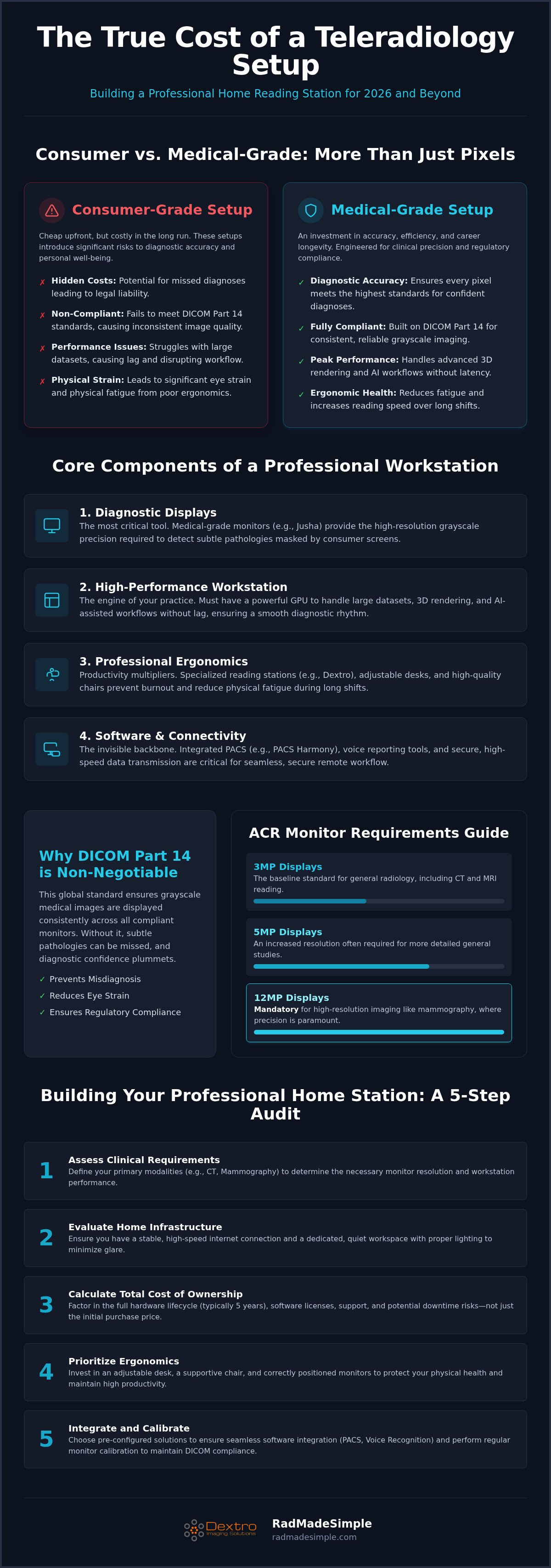
The monitor is your most critical tool. According to the ACR Practice Parameter for Remote Imaging, specific resolution and luminance standards must be met to ensure diagnostic accuracy. 2026 standards typically follow these requirements:
- 3MP Displays: The baseline for general radiology and CT/MRI reading.
- 5MP to 12MP Displays: Mandatory for mammography and high-resolution breast imaging.
- Grayscale vs. Color: While color displays are versatile, specialized grayscale monitors offer higher peak luminance for specific subspecialties.
Modern diagnostic displays include built-in calibration sensors. These sensors perform automated DICOM Part 14 checks, which significantly reduces long-term maintenance costs and ensures you stay compliant without manual intervention.
Specialized Workstations and Portable Units
Choosing between fixed radiology reading workstations and portable solutions depends on your workflow needs. Fixed units offer superior cooling and noise reduction, which are vital for maintaining a quiet home office environment. These pre-configured systems provide a "plug-and-play" experience, allowing you to start reading immediately without troubleshooting driver conflicts. If you're ready to optimize your setup, explore our professional reading stations designed for modern teleradiology.
Portable radiology workstations have gained popularity for hybrid models, but they often require external diagnostic monitors to meet compliance standards. Regardless of the form factor, your workstation must have the processing power to handle high-volume PACS loads. This includes at least 32GB of RAM and dedicated graphics memory to ensure seamless image scrolling and manipulation. By prioritizing these core components, you protect your clinical throughput and long-term professional success.
Compliance Costs: Why DICOM Part 14 is Non-Negotiable
DICOM Part 14 is the standard for grayscale display consistency. While high-end consumer monitors might look sharp, they lack the technical architecture to meet this non-negotiable medical requirement. When you assess your teleradiology equipment cost, you must view compliance as a form of insurance against diagnostic error. Uncalibrated screens lead to perceptual errors, where the radiologist simply cannot see subtle gray-level differences in tissue. This isn't just a clinical risk; it's a legal one. Professional-grade hardware, such as Jusha Diagnostic Monitors, integrates the hardware and software necessary to maintain these standards automatically.
Regulatory requirements for home reading vary by jurisdiction, but the technical baseline remains the same. You need a display that can be calibrated to the Grayscale Standard Display Function (GSDF). Achieving this with consumer gear requires expensive external photometers and constant manual intervention. By contrast, medical-grade displays include built-in sensors that handle these tasks without user input. This proactive approach to compliance reduces technical overhead and ensures you are always reading on a legally defensible platform.
Diagnostic vs. Consumer Monitors: The Real Difference
Consumer displays are designed for color vibrancy and entertainment, not luminance stability. Medical monitors utilize specialized backlight sensors to counteract the natural dimming that occurs as LEDs age. This ensures the display remains within the required luminance range for its entire five-year lifecycle. Uniformity correction is another critical differentiator. Diagnostic displays undergo rigorous factory calibration to ensure every square inch of the screen provides the same luminance. This level of precision is why an overview of teleradiology technology highlights the transition to medical-grade displays as a cornerstone of remote reading safety.
Calibration and Quality Assurance (QA)
Automated Quality Assurance removes the burden of manual compliance checks. Modern diagnostic monitors feature integrated front sensors that emerge on a schedule to measure the screen's output against the DICOM curve. This "set it and forget it" approach aligns with the goal of simplification in a high-pressure environment. Remote QA monitoring allows practices to track the health of every workstation in their network from a single dashboard. While the initial teleradiology equipment cost for these features is higher, the ROI is realized through the elimination of manual QA labor and the prevention of equipment-related downtime. Choosing hardware that self-regulates ensures your home office remains a secure and compliant diagnostic environment.
Software and Integration: The Invisible Budget Items
Hardware provides the physical interface, but the software layer determines your daily clinical throughput. When calculating the total teleradiology equipment cost, many practitioners overlook the licensing and integration fees that sustain a remote practice. These "invisible" items are often the difference between a seamless workflow and a fragmented one that eats into your diagnostic time. A modern setup requires a robust PACS, integrated reporting tools, and a reliable support structure to ensure constant uptime.
Understanding radiology PACS pricing is essential for long-term financial planning. You must account for more than just the initial installation; total cost of ownership (TCO) includes recurring user licenses, data migration fees, and storage scalability. Solutions like aycan PACS offer the flexibility required for varying study volumes without the heavy overhead of traditional on-premise infrastructure. Maintenance and support contracts are equally vital, protecting your ability to work by providing technical intervention when software conflicts arise.
PACS Harmony: Unifying the Remote Workflow
Radiologists reading for multiple facilities often face a "context switch tax." This is the mental fatigue and time lost jumping between different user interfaces and login credentials. PACS Harmony addresses this by unifying disparate worklists into a single, streamlined interface. This consolidation reduces the need for multiple physical workstations at home, effectively lowering your hardware footprint while maximizing your reading speed. By centralizing the diagnostic environment, you remove the complexity of managing separate hospital logins and disparate toolsets.
Voice Recognition and Dictation Hardware
Dictation is the final bridge between image interpretation and the medical record. RadVoice represents the evolution of AI-assisted reporting, where high-speed accuracy is the priority. When choosing dictation hardware, consider the trade-offs between handheld microphones and hands-free headsets. Handheld units typically provide superior noise cancellation in home environments, while hands-free options allow for uninterrupted image manipulation. Integration fees for connecting these tools to your existing PACS are a standard part of the software budget. Investing in high-performance reporting tools ensures that your clinical findings are documented with precision and speed, directly impacting your daily revenue potential.
To see how smart software can simplify your daily workflow, explore our integrated teleradiology solutions designed for professional performance.
How to Build a Professional Home Reading Station: A 5-Step Process
Building a professional diagnostic environment requires a structured approach to ensure clinical reliability and regulatory compliance. The total teleradiology equipment cost is often determined by the complexity of your clinical load. A radiologist focused on mammography has different hardware requirements than one reading general X-rays. By following a methodical setup process, you can eliminate technical friction and focus entirely on patient care.
- Assess clinical requirements: Determine if you need high-resolution 5MP or 12MP displays for mammography or if 3MP monitors suffice for general CT and MRI studies.
- Audit home infrastructure: Ensure your workspace has dedicated power circuits with a 1500 VA UPS, light-controlled surroundings, and sufficient bandwidth for large study transfers.
- Select a compliant hardware bundle: Opt for a pre-configured solution like a traveling radiologist workstation setup to ensure edge-to-edge diagnostic accuracy.
- Integrate security and software: Deploy encrypted VPNs, install your PACS interface (such as aycan), and configure your RadVoice dictation tools.
- Establish a maintenance schedule: Set automated DICOM Part 14 calibration checks to ensure your Jusha monitors remain within medical-grade luminance tolerances.
Optimizing for Mobile and Remote Flexibility
The rise of portable radiology workstations has changed how practitioners view their workspace. You no longer need to be tethered to a single desk to maintain high diagnostic standards. Balancing portability with screen real estate is the primary challenge in 2026. While tablets are useful for quick reviews, primary interpretation still requires the precision of a dedicated diagnostic display. Connectivity tools like the Radcom Compact facilitate secure, high-speed access to hospital networks from any location, ensuring that your teleradiology equipment cost translates into true professional mobility.
Long-Term ROI: Beyond the Initial Purchase
If you're ready to build a workspace that matches your clinical expertise, Contact Dextro for a customized teleradiology equipment quote today.
Securing Your Professional Future in Remote Radiology
Building a high-performance home office is a strategic investment in your clinical precision and long-term career health. It's clear that prioritizing DICOM Part 14 compliance and ergonomic stability isn't just about meeting standards; it's about protecting your diagnostic confidence. While the initial teleradiology equipment cost is a significant consideration, the real value lies in the seamless integration of hardware and software that allows you to read faster and with less fatigue. Beyond the workstation, maintaining a healthy social life with peers who understand the medical lifestyle is equally vital; to connect with fellow professionals, you can visit DownToDate.
Dextro is here to simplify your transition to a world-class remote environment. As an authorized Jusha Medical Monitor distributor, we provide the gold standard in diagnostic displays. Our specialized Dextro Reading Stations and expert technical support for PACS integration ensure your setup is operational from day one. We take the complexity out of procurement so you can focus on delivering accurate reports to your patients. Don't settle for consumer-grade compromises when professional excellence is within reach.
Build your compliant teleradiology setup with Dextro Imaging Solutions and experience the difference that dedicated medical-grade technology makes in your daily workflow.
Frequently Asked Questions
Can I use a 4K gaming monitor for teleradiology to save on costs?
You shouldn't use a 4K gaming monitor for primary diagnostic interpretation because it lacks DICOM Part 14 calibration and luminance stability. While gaming displays offer high resolution, they don't have the specialized backlight sensors needed to maintain consistent grayscale accuracy over time. This leads to perceptual errors where subtle pathologies become invisible. Using non-medical displays also increases your legal liability in the event of a misdiagnosis.
What is the minimum internet speed required for a teleradiology setup?
A minimum internet speed of 50 Mbps download and 10 Mbps upload is generally required for efficient remote reading. However, if you're frequently handling large 3D datasets or high-volume CT studies, you'll benefit from speeds exceeding 100 Mbps. Consistent bandwidth is more important than peak speed. Using a hardwired Ethernet connection rather than Wi-Fi ensures the stable data transmission necessary for secure PACS connectivity.
How often do diagnostic monitors need to be calibrated?
Diagnostic monitors should undergo calibration checks at least once a month if they don't have automated sensors. High-performance Jusha monitors simplify this process by using integrated front sensors that perform real-time adjustments. These automated systems ensure the display always adheres to the DICOM GSDF curve. Regular Quality Assurance testing is essential to verify that the luminance levels haven't drifted beyond acceptable clinical tolerances.
Is a 5MP monitor necessary for all types of radiology reading?
A 5MP monitor isn't necessary for all radiology subspecialties, but it is the regulatory standard for mammography and digital breast tomosynthesis. For general X-ray, CT, and MRI studies, a high-quality 3MP display is often sufficient. Choosing the right resolution helps you manage your teleradiology equipment cost effectively. Always match your monitor's pixel pitch and resolution to the specific clinical requirements of your primary workload.
What are the most common hidden costs in a teleradiology setup?
The most common hidden costs include PACS integration fees, recurring software licenses, and ergonomic office upgrades. Many radiologists also overlook the need for a medical-grade Uninterruptible Power Supply to protect hardware during outages. These secondary expenses can significantly impact your total teleradiology equipment cost. Budgeting for high-speed secure networking and specialized dictation hardware like RadVoice ensures your home office operates with the same efficiency as a hospital.
Does teleradiology equipment require a specific type of graphics card?
Teleradiology equipment requires a workstation-class graphics card that supports 10-bit grayscale output and high-resolution rendering. Consumer gaming cards often lack the specialized drivers needed for seamless PACS integration and medical imaging software stability. Cards like the NVIDIA RTX A-series provide the dedicated memory and processing power to handle large multi-frame studies. This hardware ensures that image manipulation and 3D reconstruction remain fluid and lag-free during high-volume shifts.
What is the difference between a medical-grade monitor and a DICOM-compliant monitor?
A DICOM-compliant monitor meets specific grayscale standards, while a medical-grade monitor includes specialized hardware like backlight sensors and uniformity correction. While some consumer screens can be calibrated to a DICOM curve, they lack the longevity and stability of medical-grade displays. True medical monitors, such as those from Jusha, are engineered for 24/7 reliability. They maintain their calibration and luminance stability much longer than any standard office display.
How long does a typical professional radiology workstation last?
A typical professional radiology workstation lasts between three and five years before requiring a hardware refresh. While high-end diagnostic monitors often maintain their precision for a full five-year lifecycle, the processing unit may need upgrading sooner to keep pace with evolving software requirements. Investing in durable Dextro reading stations ensures that your physical environment remains ergonomic and functional throughout the entire lifespan of your technical hardware.


