

Recent data shows that 65% of radiologists report reduced stress when working remotely, yet a successful transition requires more than just a quiet room. Meeting the latest home teleradiology station requirements means bridging the gap between residential convenience and clinical-grade reliability. You shouldn't have to choose between a comfortable environment and the diagnostic precision required by the 2026 ACR and DICOM standards. If your current setup feels like a compromise, you're not just losing comfort; you're potentially risking diagnostic accuracy and workflow efficiency.
It's common to feel uncertain about whether your home network security or monitor calibration truly meets hospital benchmarks. We understand that technical lag in PACS loading or eye strain from sub-par displays can compromise your reporting workflow. This guide serves as your professional-grade checklist for hardware procurement and compliance. You'll gain the confidence that your home setup matches hospital performance exactly. We will explore the essential diagnostic monitors, processing power, and software integrations like PACS Harmony and RadVoice needed to streamline your diagnostic environment. This is your roadmap to a modernized, high-performance reading room that removes complexity and focuses on your professional success.
Key Takeaways
- Master the latest ACR and DICOM Part 14 standards to ensure your remote environment maintains full clinical compliance and diagnostic integrity.
- Determine your ideal home teleradiology station requirements by matching monitor resolutions and workstation processing power to your specific subspecialty needs.
- Optimize your physical workspace using precise ambient light controls and ergonomic seating to minimize fatigue and protect long-term health.
- Streamline your reporting workflow by integrating unified PACS interfaces and AI-driven voice recognition for a seamless, hospital-grade experience.
- Identify the critical hardware benchmarks for 2026, including 64GB RAM and high-speed NVMe storage, to eliminate technical lag in image loading.
The Compliance Foundation: ACR and DICOM Standards for Home Offices
Transitioning to a remote environment requires a shift in mindset from consumer convenience to clinical necessity. The home teleradiology station requirements for 2026 are defined by strict adherence to the ACR-AAPM-SIIM Technical Standard. Using a non-calibrated consumer display isn't just a technical shortcut. It's a significant clinical liability. Diagnostic grade equipment is engineered to visualize subtle pathologies that consumer screens simply cannot render. While a "review" monitor might suffice for a quick reference, true diagnostic work demands hardware that meets DICOM Part 14 standards. This ensures every gray level is mapped correctly, preventing the loss of critical information during interpretation. Failure to meet these benchmarks can lead to missed findings and increased medical-legal risk.
DICOM Part 14 GSDF Compliance
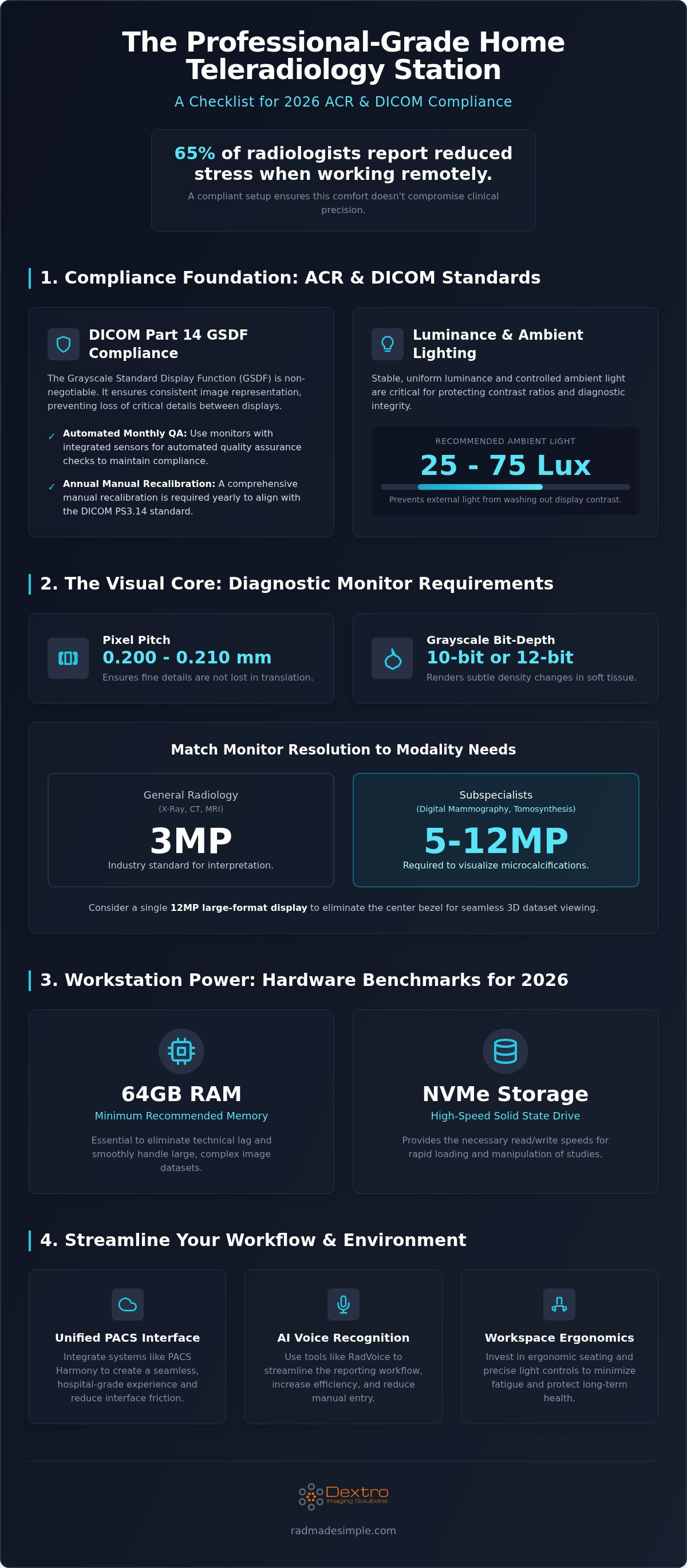
The Grayscale Standard Display Function (GSDF) is the technical backbone of modern Teleradiology. It provides a mathematical model for how digital values translate into perceived luminance. Without this consistency, a nodule visible on a hospital workstation might disappear on a home screen. Jusha Diagnostic Monitors solve this problem through integrated front-facing sensors. These sensors perform automated quality assurance checks monthly, which is the current 2026 recommendation for maintaining compliance. This automation removes the complexity of manual calibration, ensuring the display remains within the required tolerances for every shift. However, you must still conduct a comprehensive manual recalibration annually to stay in full alignment with the DICOM PS3.14 standard.
Luminance and Contrast Ratio Requirements
Standardized luminance is non-negotiable for professional-grade setups. For general radiology, the 2026 standards emphasize a calibrated luminance that remains uniform across the entire panel. While consumer "HDR" displays claim high peak brightness, they lack the sustained, stable output required for medical imaging. Contrast ratios must be robust enough to handle complex CT and MRI datasets without losing detail in the shadows or highlights. The physical environment also affects these ratios. Ambient lighting in your home office should be kept between 25 and 75 lux. This prevents external light from washing out the monitor's contrast, protecting the integrity of your interpretation. High-performance setups like those found in Dextro Reading Stations are specifically designed to maintain these ratios even when home lighting conditions fluctuate.
The Visual Core: Diagnostic Radiology Monitor Requirements
The display is the most critical component of any professional setup. Meeting home teleradiology station requirements starts with selecting a monitor that offers a pixel pitch between 0.200 mm and 0.210 mm. This precision ensures that fine details aren't lost in translation. While consumer 4K screens might seem sharp, they lack the luminance uniformity and medical-grade bit-depth required for diagnostic work. High-performance reading environments typically utilize 10-bit or 12-bit grayscale to render subtle density changes in soft tissue. Choosing the right display technology transforms a standard home office into a clinical-grade suite.
Selecting the Right Megapixel (MP) Count
The modality you read determines your resolution needs. A 3MP monitor is the industry standard for general X-rays, CT scans, and MRI interpretation. However, subspecialists in digital mammography or tomosynthesis require 5MP to 12MP displays to accurately visualize microcalcifications. Jusha diagnostic monitors are engineered to meet these specific modality requirements, providing the necessary clarity for high-stakes diagnostics. Many radiologists now debate between dual-monitor setups and single large-format displays. While dual monitors offer traditional separation, a single 12MP large-format display eliminates the center bezel. This creates a more seamless workspace for handling the massive 3D datasets common in 2026 workflows.
Calibration and Quality Assurance (QA)
Consistency is the enemy of distance. For a remote workstation to be effective, it must be calibrated as rigorously as a hospital-based system. Automated quality assurance software is essential for this task. Internal sensors, found in premium displays, allow for background calibration without interrupting your workflow. This technology enables hospital IT departments to monitor home displays remotely, ensuring every station in the network stays within DICOM tolerances. External sensors are an alternative, but they require manual intervention and are often less efficient for high-volume readers.
Adhering to The Royal College of Radiologists guidance helps ensure your remote environment supports both clinical safety and professional efficiency. If you're managing a traveling radiologist workstation, these automated checks become even more vital to account for varying ambient conditions. Maintaining this level of precision doesn't have to be complex. You can explore integrated display solutions that handle calibration automatically, allowing you to focus entirely on the images. By prioritizing medical-grade hardware over consumer electronics, you protect both your diagnostic accuracy and your professional reputation.
Workstation Processing Power and Connectivity
High-performance computing is the engine that drives your diagnostic display. Without sufficient processing power, even the most advanced monitor will suffer from frustrating lag during image manipulation. Meeting modern home teleradiology station requirements in 2026 demands a multi-core CPU with high clock speeds and a dedicated GPU featuring AI-processing cores. These specialized graphics cards are essential for handling large 3D datasets and high-resolution images without latency. A medical-grade Uninterruptible Power Supply (UPS) is also a mandatory component. It protects your hardware from power surges and provides enough runtime to save your work and safely shut down during an outage.
High-Performance Computing for PACS
Memory and storage speeds directly impact your reporting efficiency. The minimum requirement for a radiology workstation in 2026 is 64GB of RAM. This capacity allows for the simultaneous loading of multiple large studies and complex 3D reconstructions. To eliminate bottlenecks, you should utilize high-speed NVMe SSDs for rapid image loading and local caching. When choosing your hardware, consider your specific workflow needs. Dextro Reading Stations offer a fixed, robust environment for high-volume readers who prioritize maximum stability. Conversely, Portable Radiology Workstations provide a flexible solution for hybrid models, ensuring you maintain professional standards while moving between locations. Both options are designed to handle the intensive workloads of modern PACS imaging without compromise.
Connectivity and Security Solutions
Network stability is about more than just raw speed. While a minimum sustained bandwidth of 50 to 100 Mbps is necessary for general teleradiology, high-volume subspecialty work often requires over 200 Mbps. However, latency is often the more critical factor for a seamless experience. Residential fiber typically provides the best balance of speed and reliability, though some practitioners opt for dedicated lines to ensure consistent performance. Security remains a primary concern in a distributed work environment. You must use robust VPNs and encryption standards to remain HIPAA compliant. The Radcom Compact serves as a specialized tool for managing these secure medical communications in a small footprint. It simplifies the technical complexity of maintaining a secure link between your home office and the hospital network, protecting sensitive patient data while you work.
The Professional Environment: Ergonomics and Lighting
Success in remote reading depends on more than just high-end specs. The physical environment directly influences diagnostic stamina and accuracy. While hardware handles the data, your office environment manages your physical well-being. Overlooking the room's configuration is a common mistake that leads to premature fatigue and decreased productivity. A well-designed space ensures that your home teleradiology station requirements extend beyond the circuit board to the very air and light around you. To complement these physical adjustments, you can explore Remote Neurofeedback to help regulate brain activity for improved focus and mental health. Creating a clinical-grade atmosphere at home isn't about replicating a hospital office; it's about optimizing a space for high-stakes interpretation.
Controlling ambient light is often the most neglected factor in home setups. For optimal diagnostic performance, your reading room should maintain an ambient light level between 25 and 75 lux. This specific range prevents the "washout" effect that occurs when external light competes with your monitor's luminance. Position your diagnostic displays perpendicular to windows to eliminate direct glare and reflections. You should also consider bias lighting. Placing a dim, neutral light source behind your monitor reduces eye strain by narrowing the contrast between the screen and the surrounding wall. This simple addition improves perceived contrast and allows for longer, more comfortable shifts without the headaches associated with harsh lighting transitions. To further optimize your health in a high-tech office, you can learn more about Radiation-Free Living and how to mitigate environmental stressors from your equipment.
Ergonomic Checklist for Radiologists
Physical longevity in radiology requires a proactive approach to ergonomics. Sit-stand desks and medical-grade seating are no longer optional luxuries. They're essential tools for maintaining focus and preventing chronic strain. Your monitors should be positioned so the top third of the screen is at eye level, promoting neutral cervical spine alignment. A viewing distance of 20 to 30 inches is typically ideal for most diagnostic displays, ensuring you can see the full image without excessive head movement.
- Utilize programmable mice to map frequent PACS commands, reducing repetitive wrist movements.
- Invest in dedicated radiology keypads to centralize workflow controls and minimize reaching.
- Maintain room temperatures between 20 and 24 °C to support both hardware cooling and personal comfort.
- Keep ambient noise below 40 decibels to ensure your dictation software captures every nuance without interference.
Acoustic conditions play a vital role, especially for accurate voice recognition. If your room is too reflective, your dictation accuracy will suffer, leading to more time spent on manual corrections. For a deeper dive into optimizing your physical workspace, refer to our Essential Guide to Radiology Reading Station Ergonomics. If you're ready to upgrade your physical workspace, view our ergonomic workstation solutions to find the perfect fit for your home office. By addressing these environmental factors, you create a sustainable workflow that protects your health as much as your diagnostic accuracy.
Software Integration: PACS and Voice Recognition
The final layer of a professional-grade setup is the software ecosystem that bridges your home office to multiple clinical sites. Meeting home teleradiology station requirements isn't just about the display; it's about how you interact with the data. A unified workflow prevents the mental fatigue caused by switching between disparate hospital systems. Modern solutions like PACS Harmony allow you to manage multi-site reading lists through a single, vendor-neutral interface. This integration eliminates the need for multiple workstations or constant re-logging, which directly improves your report turnaround time. When your software layer is optimized, the technical complexity of remote reading disappears, leaving only the clinical task at hand.
Streamlining Reporting with RadVoice
Reporting efficiency is heavily dependent on the quality of your voice recognition integration. RadVoice provides a seamless link between your PACS and your final report, utilizing advanced algorithms that leverage the high-performance CPU power discussed in previous sections. To achieve high-fidelity audio capture, you need medical-grade microphones with specialized noise-canceling capabilities. These tools ensure that your dictation remains accurate even in a home environment where minor ambient sounds might occur. Integrated voice recognition is consistently faster than traditional dictation methods. It allows for real-time corrections and immediate report finalization. This speed is critical for meeting the high-volume demands of 2026 teleradiology workflows.
Unified PACS Harmony
Managing various hospital connections can be a significant logistical challenge. A vendor-neutral system like aycan PACS or PACS Harmony provides a centralized hub for all incoming studies. This approach allows you to maintain a consistent toolset regardless of where the images originated. By standardizing your interface, you reduce the risk of errors that occur when switching between different software layouts. This streamlined methodology supports a more rhythmic and focused reading session. For more on budgeting for these integrated systems, see our guide on teleradiology equipment cost.
Protecting patient data on a home network is a non-negotiable legal requirement. The 2026 HIPAA guidelines require advanced encryption and secure data transmission protocols for every remote link. Your home network must be hardened against vulnerabilities, typically through managed firewalls and secure VPN tunnels. Beyond security, your home teleradiology station requirements include a plan for remote technical support. Dextro specializes in providing proactive maintenance and remote troubleshooting for home hardware. This ensures that your system remains operational without requiring you to manage complex IT tasks yourself. When experts support your workstation, you can read with the confidence that your infrastructure is as secure and reliable as any hospital-based system.
Future-Proofing Your Remote Diagnostic Suite
Modernizing your workspace is about more than just buying a new screen. It's about building a clinical ecosystem that mirrors the precision of a hospital reading room. By prioritizing DICOM-calibrated hardware and high-performance processing, you ensure that your home teleradiology station requirements are met with zero compromise on diagnostic accuracy. You've seen how the right resolution, ambient light control, and unified PACS integration transform a standard home office into a sophisticated diagnostic hub. These elements work together to eliminate technical lag and physical fatigue, allowing you to focus entirely on patient care.
Transitioning to remote work shouldn't feel like a technical burden. Dextro simplifies this process by redefining remote accuracy with DICOM-calibrated Jusha displays and providing 24/7 technical support for home teleradiology setups. It's why we're trusted by leading radiology groups nationwide to deliver reliable, high-performance environments. You can Explore Dextro Reading Stations and Jusha Monitors for Your Home Office today to streamline your workflow and secure your professional infrastructure. It's time to read with the confidence that your home setup is as advanced as your clinical expertise.
Frequently Asked Questions
Do I really need a diagnostic monitor for home reading, or is a 4K consumer monitor okay?
You must use a diagnostic monitor to ensure DICOM Part 14 compliance and clinical accuracy. Consumer 4K monitors lack the grayscale consistency and luminance stability required for identifying subtle pathologies. While 4K displays offer high resolution, they don't provide the automated calibration or the 10-bit bit-depth found in medical-grade Jusha monitors. Using non-calibrated screens increases both legal and clinical risks during interpretation.
What is the minimum internet speed required for teleradiology?
A minimum sustained bandwidth of 50 to 100 Mbps is required for general teleradiology applications. For high-volume workflows or subspecialty work involving large 3D datasets, speeds over 200 Mbps are recommended to prevent loading delays. Latency is equally critical; residential fiber typically offers the stability needed for seamless image transfers. Meeting these home teleradiology station requirements ensures that your PACS interface remains responsive throughout your shift.
How often do home radiology monitors need to be calibrated?
Automated quality assurance checks should be performed monthly to adhere to 2026 standards. In addition to these monthly checks, a comprehensive manual recalibration must be conducted annually to ensure ongoing DICOM PS3.14 compliance. Systems with integrated front-facing sensors, such as Jusha monitors, handle the monthly tasks automatically. This proactive approach maintains luminance uniformity and prevents the gradual degradation of image quality over time.
Can I use a laptop for professional teleradiology reading?
You can use a high-performance laptop as the processing unit, but it must be connected to external diagnostic monitors for the actual interpretation. The internal screens of consumer or professional laptops do not meet the ACR luminance or grayscale standards required for primary diagnosis. A portable radiology workstation often uses a powerful laptop paired with medical-grade displays to provide a flexible yet fully compliant reading environment for mobile practitioners.
What are the HIPAA requirements for a home teleradiology office?
HIPAA compliance requires secure data transmission and physical privacy in your home office. You must use encrypted VPN tunnels and managed firewalls to protect patient data on your home network. Additionally, your reading room should be a private space where unauthorized individuals cannot view diagnostic screens. 2026 guidelines also emphasize the importance of secure, encrypted communications for all reporting tasks, often managed through specialized hardware like the Radcom Compact.
How do I manage multiple PACS logins from different hospitals at home?
Managing disparate hospital systems is best handled through a vendor-neutral interface like PACS Harmony. This software integrates multiple reading lists into a single, unified workflow, eliminating the need to switch between different workstations or manage repeated logins. By centralizing your tasks, you reduce the logistical complexity of remote work. This streamlined approach allows you to focus on clinical interpretation rather than navigating different software layouts across various clinical sites.
Is a dedicated graphics card necessary for a teleradiology station?
Yes, a dedicated GPU with AI-processing cores is necessary to handle modern imaging workloads without latency. These specialized cards are designed to render large 3D reconstructions and high-resolution datasets smoothly. Integrated graphics found in standard consumer PCs often fail to meet the performance demands of 2026 PACS software. A robust GPU ensures that zooming, panning, and multi-planar reformatting occur instantaneously, which is a key component of home teleradiology station requirements.
What ergonomic chair features are most important for radiologists?
The most important features include adjustable lumbar support, seat depth customization, and 4D armrests to prevent repetitive strain. A medical-grade ergonomic chair should support neutral spine alignment during long shifts. Look for breathable materials and a waterfall seat edge to maintain circulation. Proper seating, combined with a sit-to-stand desk, reduces physical fatigue and protects your cervical spine health, allowing for sustained focus during intensive remote reading sessions.


