

Modern PACS integration is no longer about simply linking two software programs; it's about creating a context-aware ecosystem where hardware and software function as a single diagnostic unit. Achieving seamless voice recognition PACS integration is the key to eliminating the friction of context switching and high latency that plagues many radiology departments. You've likely felt the frustration of losing focus as you wait for a report to sync with an image. These delays aren't just an annoyance, they're a barrier to diagnostic precision that impacts patient care.
This guide provides a comprehensive technical roadmap to unifying your radiology reporting workflow in 2026. You'll learn how to eliminate manual errors and drastically reduce turnaround times through smarter system synchronization. We will explore the critical synergy between high-performance workstations, vendor-neutral software unification, and the hardware specifications required for zero-latency dictation. By optimizing the relationship between your diagnostic monitors and AI-driven dictation tools, you can finally achieve a single-click workflow that prioritizes speed and accuracy.
Key Takeaways
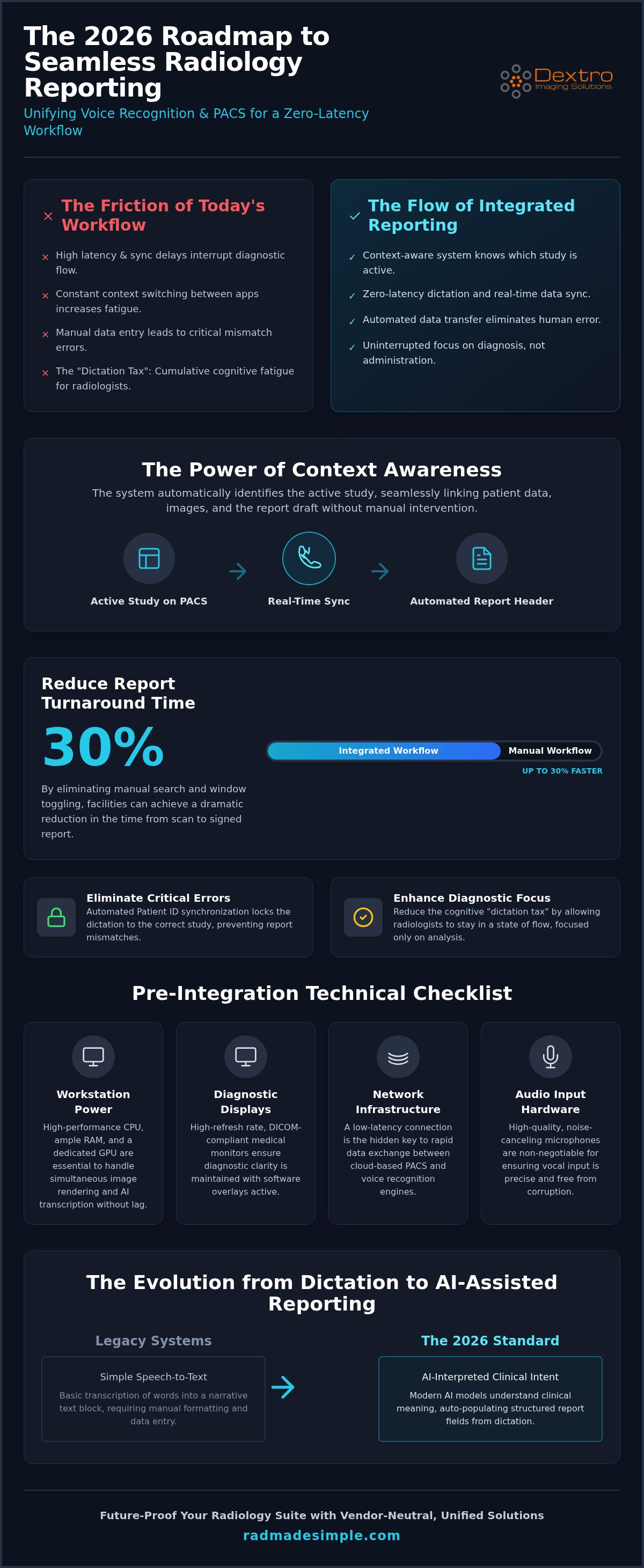
- Understand the strategic importance of context awareness to reduce report turnaround times by up to 30%.
- Identify the critical hardware specifications and monitor standards required for seamless voice recognition PACS integration without processing lag.
- Master the technical steps for configuring API interfaces and mapping data fields to automate your reporting headers.
- Optimize your workflow using voice-activated navigation macros and structured templates for improved diagnostic focus.
- Learn how to future-proof your radiology suite with vendor-neutral solutions that unify hardware and software layers.
The Strategic Value of Voice Recognition PACS Integration in 2026
Integrated reporting is the synchronization of patient metadata and vocal input. In 2026, the benchmark for clinical excellence is defined by "Context Awareness." This technical capability ensures that your dictation software identifies exactly which study is active on the diagnostic monitor without manual intervention. When the PACS and the reporting tool communicate in real time, the system automatically aligns the patient's history, current images, and the report draft. This level of voice recognition PACS integration is no longer a luxury; it's a foundational requirement for high-volume practices.
The return on investment for this integration is immediate and measurable. By removing the need to manually search for patient records or toggle between windows, facilities can reduce report turnaround time (TAT) by up to 30%. Beyond the speed, this synergy eliminates the "dictation tax." This tax is the cumulative cognitive fatigue radiologists experience when they must repeatedly switch their focus from clinical analysis to administrative data entry. A seamless link allows the radiologist to remain in a state of "flow," focusing entirely on the pixels that lead to a diagnosis.
Reducing Diagnostic Errors Through Contextual Linking
Mismatching patient files with reports is a leading cause of critical medical errors in radiology. When a radiologist has multiple studies open, it's easy to dictate findings into the wrong window if the software isn't contextually linked. Automated patient ID synchronization solves this by locking the dictation interface to the specific study displayed on the workstation. This creates a secure environment where data integrity is guaranteed. For a deeper look at how these systems interact with modern hardware, see our guide on optimizing radiology workflow.
The Shift from Standalone Dictation to AI-Assisted Reporting
We're witnessing a major shift from simple speech-to-text tools toward structured data capture. Modern AI models in 2026 don't just transcribe words; they interpret clinical intent. If a radiologist mentions a specific measurement, the integrated system can automatically populate the corresponding field in the structured report template. This evolution transforms the reporting process from a narrative task into a data-driven one. You can explore these advancements further in our voice recognition for radiologists AI reporting guide, which highlights how intent-based models are replacing traditional transcription.
Pre-Integration Checklist: Hardware and Software Requirements
Successful voice recognition PACS integration requires more than just software installation; it demands a hardware environment capable of handling high-intensity data processing. When you layer AI-driven dictation over a diagnostic imaging platform, the demand on your system's resources spikes. Insufficient hardware leads to the very latency and synchronization errors you're trying to avoid. You need a setup that treats hardware and software as a unified ecosystem.
Diagnostic display standards are equally vital. High-performance specialized medical monitors ensure that DICOM compliance remains uncompromised even when software overlays are active. If your monitor can't handle the refresh rate required for simultaneous image rendering and real-time text transcription, your diagnostic accuracy suffers. Clarity in the image must be matched by clarity in the reporting interface.
Network latency often acts as the hidden killer of cloud-based integration. For a seamless experience, your facility needs a low-latency connection that can handle rapid data exchange between the patient record and the dictation engine. Additionally, microphone selection shouldn't be an afterthought. High-quality, noise-canceling hardware is essential in busy reading rooms to prevent background chatter from corrupting your reports. Precision starts at the point of vocal input.
Workstation Power for Integrated Environments
Running PACS Harmony and RadVoice simultaneously puts a heavy load on your CPU and RAM. To maintain zero-latency performance, your system should exceed standard office requirements. A dedicated GPU is also critical. It handles the heavy lifting of image rendering, which frees up your processor to manage the vocal transcription without stuttering. For a detailed breakdown of the necessary specs, review our guide on radiology reading workstations.
Software Compatibility and Security Protocols
Before beginning your voice recognition PACS integration, verify that all systems adhere to HL7 and DICOM standards. These protocols are the language of medical data exchange. Without them, your patient headers won't populate correctly. Cybersecurity is another non-negotiable factor, especially for teleradiology setups. You must ensure HIPAA compliance across all integrated software silos to protect sensitive patient data. If you're looking to simplify this complex setup, you can browse our integration solutions to find the right hardware-software balance.
Step-by-Step Guide to Seamless PACS Software Integration
Transitioning from compatible hardware to a functional software link requires a methodical approach. The integration process transforms two separate tools into a unified diagnostic engine. Precision is mandatory. A successful voice recognition PACS integration ensures that data flows without friction between the image viewer and the report draft. Follow these five technical steps to establish a reliable connection.
- Step 1: Configure the API or COM Interface. Establish the primary communication channel between the PACS and the dictation software. This handshake allows the programs to exchange commands in real time.
- Step 2: Map the Patient Data Fields. Align the metadata tags from the PACS with the report headers. This automation ensures that patient names, IDs, and accession numbers populate correctly without manual typing.
- Step 3: Establish Focus Control. Configure the system so the dictation cursor automatically follows PACS navigation. When you move to a new study, the reporting window must gain "focus" instantly.
- Step 4: Implement Single Sign-On (SSO). Reduce login friction by linking credentials. This allows radiologists to access both systems with a single secure authentication, saving time during shift changes.
- Step 5: Conduct a Shadow Test. Run the integrated system alongside your current workflow for a set period. Verify data integrity and check for any synchronization "hangs" before decommissioning the old process.
Choosing Between API and Desktop Integration
You must decide between deep API integration and visual "screen scraping" methods. Screen scraping is often easier to set up but lacks the stability of a native link. Modern, vendor-neutral systems like PACS Harmony prefer native API hooks. These hooks provide a more resilient connection that doesn't break when a software window is resized or moved. API-based voice recognition PACS integration also offers better long-term maintenance, as it relies on standardized data protocols rather than visual cues.
Configuring HL7 Message Triggers
Data synchronization relies heavily on HL7 message triggers. You must set up an "Order Entry" trigger that signals the dictation software to open a new report the moment a study is selected. Equally important is the "Final Sign-off" trigger. This ensures that once a report is vocally authorized, the text is pushed back to the PACS or RIS immediately. Troubleshooting these triggers early prevents common handshake errors where reports are "lost" between systems. Reliable triggers are the backbone of a zero-latency workflow.
Optimizing the Integrated Workflow: Beyond Basic Dictation
True voice recognition PACS integration extends far beyond simple speech-to-text transcription. It transforms the workstation into a voice-controlled diagnostic hub where the radiologist rarely needs to touch a mouse or keyboard. By leveraging advanced integration layers, you can automate repetitive navigation tasks and ensure every report follows a standardized, data-rich format. This level of optimization is what separates a basic digital setup from a high-performance clinical environment.
Voice-Activated PACS Commands
You can map specific vocal triggers directly to the keyboard shortcuts within your PACS interface. Commands like "Next Series," "Zoom In," or "Apply Bone Window" allow for fluid, hands-free navigation through complex datasets. This reduction in manual clicks minimizes physical strain and keeps your focus on the diagnostic images. For those working outside the hospital, using RadVoice for remote radiology ensures these commands remain responsive even over varied network conditions.
Structured Reporting and Auto-Templates
Structured reporting is the most effective way to standardize clinical output and reduce errors. By building "Normal" templates for common exams, you can dictate a single trigger word to populate an entire negative report. The integration allows the system to pull measurement data directly from the PACS and insert it into the text without manual entry. Structured reporting improves downstream data mining by turning narrative descriptions into searchable, discrete data points. This helps your facility track clinical trends and outcomes with greater precision.
Modern integration also allows for AI-driven clinical decision support to be embedded directly into the voice interface. If you dictate a finding that requires a specific follow-up, the system can provide real-time prompts based on current clinical guidelines. You should also customize your radiologist profile based on your environment. A profile optimized for high-stakes teleradiology may prioritize different macros than one used for on-site interventional work. Customization ensures the tool adapts to your specific clinical needs rather than forcing you to adapt to the software.
If you're ready to modernize your reporting suite, you can view our integrated radiology solutions to see how we simplify these complex hardware and software layers.
Future-Proofing Your Radiology Suite with Dextro Solutions
Dextro Imaging Solutions addresses the fragmentation often found in modern radiology departments. While many vendors focus solely on software, our approach integrates high-performance hardware with specialized software layers to create a cohesive diagnostic environment. Achieving a reliable voice recognition PACS integration requires this level of synergy to prevent the latency and synchronization errors that disrupt clinical focus. We provide the full stack, from the workstation to the dictation engine, ensuring every component is optimized for speed.
PACS Harmony serves as the central engine for this unification. It allows you to view multiple PACS interfaces through a single, voice-ready window. This eliminates the need to learn different navigation patterns for different systems. For teleradiologists, RadVoice provides an optimized dictation experience that maintains high accuracy even in low-bandwidth environments. When paired with Jusha Diagnostic Monitors, you ensure that DICOM compliance is maintained during the reporting process, providing the visual precision required for complex cases.
The Dextro "Simplifier" Advantage
Choosing a single partner for both your hardware and software needs reduces the technical headaches associated with cross-vendor troubleshooting. Dextro acts as a "simplifier," taking on the heavy lifting of integration so your internal IT team doesn't have to manage multiple support tickets. We provide ongoing maintenance and compliance support to ensure your system remains secure and efficient. As your facility grows, our modular Reading Stations and Portable Radiology Workstations allow you to scale your operations without a complete system overhaul. This reliability projects confidence throughout the clinical team.
Getting Started with Your Integration
Every radiology department has unique requirements based on their volume and specialized modalities. Whether you're focusing on MRI, CT, or X-ray workflows, your voice recognition PACS integration must be tailored to your specific clinical tasks. We begin with a comprehensive workflow audit to identify current bottlenecks and determine the best hardware-software configuration for your team. Our specialists analyze your data exchange points to ensure HL7 message triggers function perfectly.
By customizing the integration for specific modalities, we ensure that the voice macros and templates are perfectly aligned with your daily reporting needs. This proactive approach ensures that your new system delivers immediate value from the first day of use. Expert support from Dextro means your transition is smooth, secure, and focused on long-term diagnostic success. Simplify your reporting workflow with Dextro Imaging Solutions today.
Advancing Your Diagnostic Capabilities in 2026
Modernizing your radiology workflow isn't just about software updates; it's about building a context-aware ecosystem that supports your clinical expertise. By prioritizing high-performance hardware and seamless software hooks, you eliminate the cognitive fatigue that slows down reporting. Achieving high-performance voice recognition PACS integration requires a unified approach where your workstation and dictation engine act as a single unit. This synergy reduces turnaround times and ensures diagnostic data flows accurately from the image to the final report.
Dextro Imaging Solutions provides the complete stack needed to reach this level of efficiency. From vendor-neutral PACS Harmony software to DICOM-compliant Jusha monitors and specialized teleradiology workstations, we handle the technical complexity so you can focus on patient care. You don't have to navigate these technical shifts alone. Our team acts as the simplifier in your high-pressure environment.
Explore Dextro Imaging Solutions for Faster Radiology Reporting and take the first step toward a more streamlined, zero-latency future. Your productivity and diagnostic precision deserve a platform built for the demands of 2026. We're here to help you lead the way in clinical excellence.
Frequently Asked Questions
What is the difference between deep integration and desktop integration for PACS?
Deep integration uses APIs or COM interfaces to create a native link between systems, allowing data to flow directly through standardized protocols. Desktop integration often relies on visual cues or "screen scraping" to synchronize windows. Deep integration is far more stable and resilient to user interface changes. Solutions like PACS Harmony utilize these native hooks to ensure patient metadata always matches the active study, providing a reliable foundation for voice recognition PACS integration.
Will integrating voice recognition slow down my PACS performance?
Integration won't slow down your PACS if your workstation has sufficient processing power. Latency typically occurs when the CPU or RAM is overwhelmed by running imaging and dictation threads simultaneously. Using high-performance reading stations prevents this bottleneck. By offloading image rendering to a dedicated GPU, you ensure that voice-to-text processing remains snappy and PACS navigation stays fluid throughout your entire shift, even with large datasets.
Do I need special hardware to run integrated voice recognition software?
Professional-grade hardware is essential for a zero-latency experience in 2026. You need a workstation with a high-clock-speed CPU and ample RAM to handle the background AI processing of RadVoice. Additionally, DICOM-compliant Jusha monitors are necessary to maintain visual accuracy while software overlays are active. Standard consumer PCs lack the stability and specialized components required to manage the heavy data throughput of a modern, integrated radiology workflow.
Can I integrate voice recognition with a legacy PACS system?
Most legacy systems can be integrated, though the method may differ from modern web-based platforms. Older PACS might require HL7 message triggers or visual integration if they lack contemporary APIs. Vendor-neutral solutions like PACS Harmony are designed to bridge the gap between older software and modern dictation tools. This allows you to modernize your reporting workflow without the immediate expense of a full PACS replacement, extending the life of your existing investments.
How does PACS integration improve radiologist productivity?
Integration improves productivity by eliminating manual data entry and reducing context switching. When the report opens automatically with the correct patient metadata, you save valuable seconds on every study. These gains accumulate over a shift, often reducing report turnaround times by up to 30%. By using voice macros for navigation, you stay focused on the images rather than the interface. This streamlined approach allows for higher throughput without increasing diagnostic errors.
What happens to the integration if I upgrade my PACS software?
A native API-based integration is generally resilient to software updates, though minor re-configurations may be needed. If the PACS vendor changes their data tags or API endpoints, the handshake between systems must be verified. Dextro provides ongoing support to manage these transitions, ensuring that your voice recognition PACS integration remains functional after a version jump. Regular testing in a "shadow" environment before going live helps prevent unexpected downtime or data mismatches.
Is cloud-based voice recognition safe for HIPAA-compliant reporting?
Modern cloud-based dictation tools like RadVoice are built with enterprise-grade encryption to meet HIPAA standards. Data is encrypted both in transit and at rest, ensuring patient identifiers remain secure. These systems are optimized for high-stakes environments and teleradiology, providing a secure bridge between your local workstation and the cloud engine. This architecture allows for high accuracy and rapid updates while maintaining the strict privacy controls required by medical regulations.
How long does a typical PACS software integration project take?
A typical project timeline ranges from a few weeks to a few months depending on system complexity. The process begins with a workflow audit and hardware assessment, followed by the technical configuration of APIs and HL7 triggers. Testing phases are crucial to ensure data integrity before the final live rollout. Dextro handles the technical heavy lifting, coordinating between software vendors to minimize disruption to your daily clinical operations and ensure a smooth transition.


