

A five-second delay in image rendering isn't just a technical glitch; it's a cumulative drain on diagnostic precision that costs your practice hours of productivity every week. As imaging volumes increase and study complexity grows, your high-performance radiology workstation must function as a seamless extension of your expertise rather than a bottleneck. You likely already feel the strain of slow loading times and the physical fatigue that comes from a setup that isn't optimized for high-pressure shifts.
It's time to move beyond makeshift solutions and embrace a configuration built for the 2026 clinical environment. This guide provides a comprehensive comparison of the hardware and software configurations required to maximize diagnostic accuracy and workflow efficiency. We'll explore how integrating specialized tools like Jusha diagnostic monitors and Dextro reading stations can eliminate compliance risks and reduce physical burnout. You'll discover a clear roadmap to future-proof your technology, achieve faster report turnaround times, and maintain a competitive edge in an increasingly demanding field.
Key Takeaways
- Understand the critical differences between standard enterprise hardware and specialized medical-grade components to eliminate latency when processing large imaging datasets.
- Identify the essential hardware specifications, including DICOM-compliant Jusha monitors, required to build a high-performance radiology workstation for 2026 standards.
- Discover how ergonomic Dextro Reading Stations reduce physical fatigue and improve diagnostic focus through optimized, sit-to-stand workstation designs.
- Learn how to maintain clinical-grade accuracy in teleradiology settings using portable radiology workstations and integrated PACS Harmony software.
- Explore the workflow benefits of combining high-speed processing with RadVoice recognition to significantly decrease report turnaround times and streamline documentation.
The Evolution of Radiology Hardware: Why Standard PCs Fail
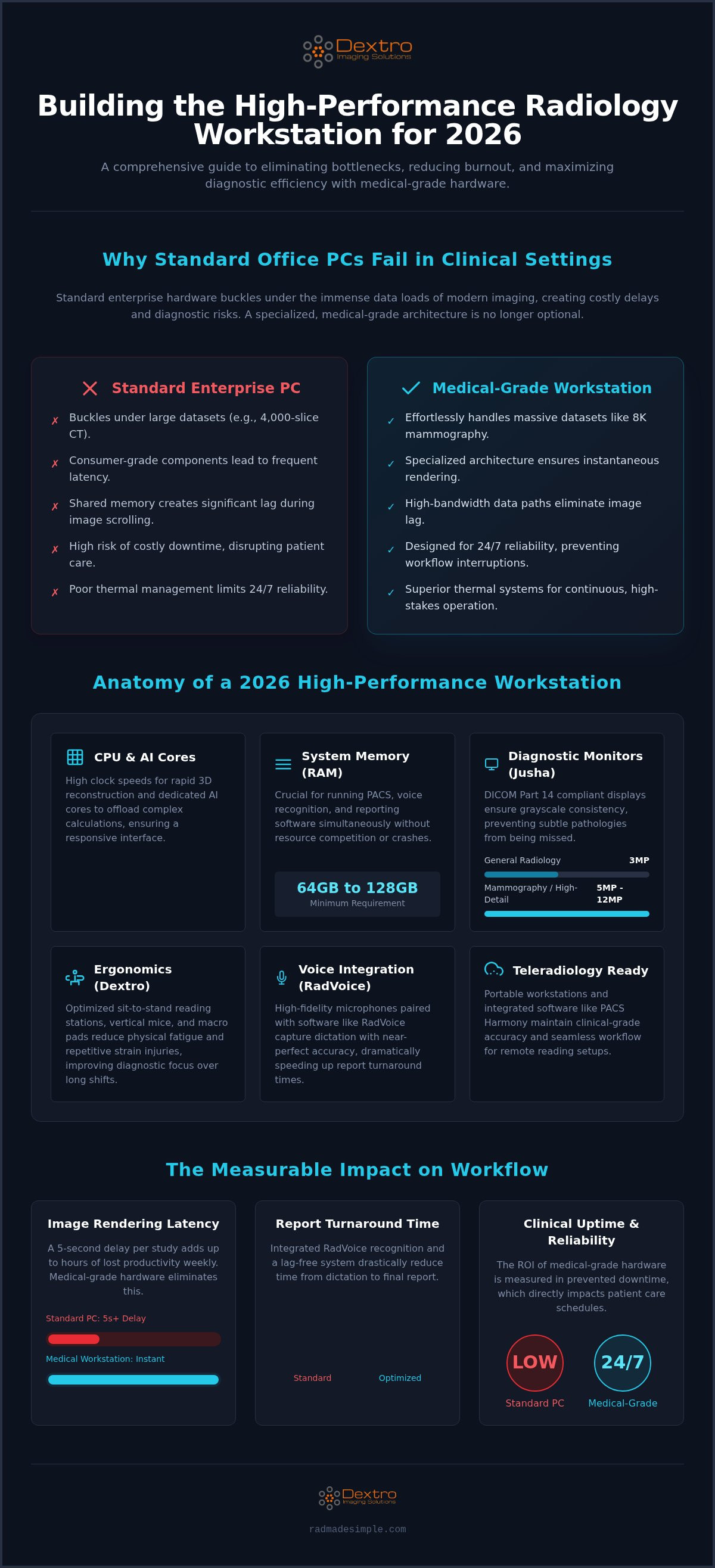
Standard office computers aren't built for the extreme data throughput of modern medical imaging. They fail under pressure. While a standard enterprise PC handles spreadsheets or web browsing with ease, it will buckle under the weight of a 4,000-slice CT study or high-resolution 8K mammography. The 2026 standard for a high-performance radiology workstation requires more than just raw speed; it demands a specialized architecture designed for 24/7 reliability and massive parallel processing.
Latency is the primary enemy of diagnostic efficiency. When a radiologist waits for a large MRI dataset to render, the resulting workflow bottleneck ripples through the entire department. Standard enterprise hardware often utilizes shared memory and consumer-grade bus speeds that create significant lag during image scrolling. In contrast, medical-grade components prioritize stability and high-bandwidth data paths. This ensures that every image load is instantaneous, allowing clinicians to maintain their diagnostic rhythm without technical interruption.
Processing Power vs. Diagnostic Accuracy
Diagnostic accuracy starts with how quickly and clearly data reaches the screen. High CPU clock speeds are essential for multi-planar reformatting and 3D reconstruction. If the processor lags, the visualization suffers. Modern hardware has shifted toward dedicated AI-processing cores to support real-time triage and automated measurements. These specialized cores offload complex calculations from the main processor, keeping the interface responsive. To ensure a seamless experience, a high-performance radiology workstation now requires a minimum of 64GB or 128GB of RAM. This capacity allows for the simultaneous operation of PACS, voice recognition, and advanced reporting software without resource competition or system crashes.
The Cost of Downtime in Clinical Settings
When a workstation fails in a clinical environment, patient care stops. The ROI of medical-grade hardware isn't found in the purchase price, but in the prevention of costly downtime. Medical workstations use superior thermal management systems and high-quality capacitors that are rated for continuous operation. This durability is a cornerstone of modernizing the radiology workstation for hospital efficiency in 2026. Beyond the hardware itself, enterprise-grade technical support and proactive maintenance contracts are non-negotiable. These services ensure that if a component does fail, it's replaced before it impacts your diagnostic schedule or patient outcomes. Reliability is the ultimate metric of performance in a high-stakes hospital setting.
Core Components of a High-Performance Radiology Workstation
Building a high-performance radiology workstation requires moving beyond the internal processor. The interface between the clinician and the data is where diagnostic accuracy truly lives. This ecosystem includes specialized displays, ergonomic supports, and high-fidelity input devices that must work in unison. If one component fails to meet medical standards, the entire workflow suffers, leading to increased fatigue and potential diagnostic errors.
Diagnostic displays are the center of this environment. They must meet DICOM Part 14 standards for grayscale consistency to ensure that subtle pathologies aren't hidden in poorly rendered shadows. Beyond the screen, input devices like vertical mice and offhand macro pads reduce repetitive strain while accelerating navigation through complex datasets. These tools allow you to map frequent PACS commands to single button presses, significantly cutting down on manual clicks per study.
Audio quality is often overlooked but remains critical for the 2026 reporting standard. High-fidelity microphones are essential for seamless voice recognition integration. When you pair professional-grade audio hardware with software like RadVoice, the system captures dictation with near-perfect accuracy. This integration reduces the time spent on manual corrections and allows for a much faster turnaround on clinical reports. It's a vital part of creating a truly integrated high-performance environment.
Advanced Diagnostic Monitors (Jusha)
Jusha diagnostic monitors provide the precision required for diverse clinical needs. While a 3MP display might suffice for general radiology, 5MP and 12MP monitors are necessary for mammography and high-detail chest imaging. These medical-grade screens offer superior luminance and contrast ratios compared to consumer displays. They also feature automated calibration sensors that monitor performance in real-time. This ensures ongoing compliance with regulatory standards without requiring manual intervention from IT staff, maintaining a secure and reliable diagnostic environment.
Ergonomic Setup for the Reading Room
A modern radiologist workstation must prioritize physical health to sustain long-term productivity. Sit-to-stand desks are now non-negotiable. They allow for postural changes that prevent the chronic back and neck pain associated with sedentary shifts. Designing for a neutral posture involves more than just desk height; it requires integrated task lighting and ambient backlighting to minimize eye strain in dark reading rooms. Effective cable management is also vital when managing multi-monitor arrays of four or more displays. By utilizing a specialized solution like Dextro Reading Stations, you can integrate all these elements into a single, streamlined environment that supports your daily clinical demands.
Commercial vs. Medical-Grade Hardware: A Performance Breakdown
Selecting the right components for a high-performance radiology workstation often involves a choice between high-end commercial hardware and specialized medical-grade systems. While premium consumer electronics, such as gaming PCs and high-resolution monitors, may appear impressive on paper, they lack the specific engineering required for clinical interpretation. The primary distinction lies in consistency. A medical-grade system is designed to maintain the exact same performance levels during hour one of a shift as it does during hour twelve, ensuring that your diagnostic environment remains stable and predictable.
Longevity and thermal management are where consumer hardware often fails in a clinical setting. Gaming PCs are built for intermittent bursts of high activity, whereas medical workstations are engineered for 24/7 operation. Medical-grade components utilize superior cooling systems and industrial-strength power supplies to prevent the hardware degradation that leads to system crashes. Relying on consumer-grade gear often results in higher long-term costs due to frequent replacements and the inherent risks of hardware failure during critical diagnostic windows. Understanding the medical grade monitor for radiologist myths helps prevent these common purchasing errors that compromise both workflow and patient safety.
The Grayscale Calibration Gap
Diagnostic accuracy depends heavily on a monitor's ability to render subtle variations in grayscale. Consumer screens, even those marketed as "calibrated," often mask pathology in the darkest and brightest areas of an image because they lack the necessary luminance and bit depth. Medical monitors, such as those from Jusha, provide the high nit levels required to distinguish between similar tissue densities with confidence. DICOM Part 14 compliance is the baseline for diagnostic safety. Without this specific calibration standard, a high-performance radiology workstation cannot guarantee that the image you see matches the actual clinical data, which directly impacts your diagnostic speed and certainty.
Liability and Quality Assurance
The legal implications of hardware choice are significant. Using non-compliant, commercial-grade monitors for primary interpretation can expose a practice to massive liability risks if a finding is missed. Regulatory bodies like the ACR set strict standards for the equipment used in diagnostic reporting. High-performance medical systems simplify this burden by including automated quality assurance tools that log calibration data and performance history. This makes peer review and internal audits far more manageable. Furthermore, medical service agreements offer a level of protection that consumer warranties cannot match. These agreements prioritize clinical uptime, offering rapid on-site support and guaranteed part availability to ensure your reading room never goes dark when patients are waiting for results.
Optimizing Your Teleradiology and Remote Reading Setup
The shift to remote reading has transformed how diagnostic services are delivered. A high-performance radiology workstation for the home must meet the same rigorous standards as those found in a hospital reading room. Achieving this requires a strategic approach to hardware selection and network security to ensure that diagnostic accuracy remains uncompromised regardless of location. It's no longer enough to simply have a powerful PC; the entire remote ecosystem must be optimized for 2026 data volumes and clinical compliance.
Maintaining hospital-grade standards off-site involves more than just software access. It requires a dedicated physical environment where lighting and ergonomics are strictly controlled. When these elements are integrated correctly, teleradiologists can achieve the same diagnostic confidence they have in a clinical setting, reducing the risk of fatigue-related errors during long remote shifts.
Fixed Home Office vs. Mobile Units
A fixed home office requires a stable, multi-monitor configuration that supports modern imaging standards. This setup should include at least two 5MP diagnostic displays and a dedicated processing unit capable of handling complex 3D reconstructions. For radiologists who require flexibility, Portable Radiology Workstations offer a solution that doesn't sacrifice resolution for mobility. These units are engineered to handle the massive datasets of modern MRI and CT studies while remaining easy to transport between clinical sites.
Managing monitor profiles is a significant challenge when working across different environments. Advanced workstation software now allows for the storage of environment-specific calibration settings. This ensures that your DICOM Part 14 compliance is maintained whether you are in a controlled home office or a varying on-call environment. For those who need a truly versatile solution, the Radcom Compact provides a unified platform for high-performance mobile communication and imaging, bridging the gap between field work and the reading room.
Security and Remote PACS Integration
HIPAA compliance is non-negotiable for remote reading. Secure VPNs and hardware-level encryption are essential components of a remote high-performance radiology workstation. To handle large file transfers over residential networks, software optimization is key. Platforms like aycan PACS and PACS Harmony are designed to streamline data flow, ensuring that images load quickly without taxing the local connection. These systems use intelligent caching to prioritize the images you need most, effectively eliminating the lag that often plagues remote workflows.
System uptime is just as critical at home as it is in the hospital. Dextro provides remote technical support to maintain these systems, ensuring that hardware or software issues don't interrupt your diagnostic workflow. This level of integrated support allows teleradiologists to focus on interpretation rather than troubleshooting technical bottlenecks. If you are ready to upgrade your remote capabilities, explore our range of Portable Radiology Workstations to find the right fit for your workflow.
Dextro Imaging Solutions: Integrated High-Performance Environments
Dextro Imaging Solutions understands that a high-performance radiology workstation is more than the sum of its parts. It's a unified ecosystem where hardware and software work in perfect synchronization. While many vendors offer isolated components like desks or monitors, we provide a cohesive environment that addresses the specific bottlenecks of modern imaging. By integrating Jusha diagnostic monitors directly with PACS Harmony, we ensure that images load instantly and render with absolute precision. This integration eliminates the technical friction that often interrupts a radiologist's diagnostic rhythm.
Documentation shouldn't slow your workflow down. Integrating RadVoice into your daily routine reduces reporting turnaround times by eliminating the complexities of traditional dictation. This seamless software integration allows you to focus entirely on the patient study while the technology handles the administrative burden. We design our systems to remove layers of complexity, replacing them with streamlined operations that empower clinicians to work more effectively during high-pressure shifts.
A Solution-Oriented Approach to Radiology
We act as a simplifier for departments facing complex technological upgrades. Moving toward the 2026 standard doesn't have to be an overwhelming process. Dextro provides professional on-site installation and deep software integration to ensure every component is optimized from the first day of use. Our expertise in radiology reading workstations ensures your investment delivers a long-term ROI through improved throughput and reduced clinician burnout. We customize Dextro Reading Stations to match specific hospital modalities, ensuring that the physical and digital setup perfectly supports the task at hand, whether it is high-volume CT interpretation or specialized mammography.
Next Steps: Upgrading Your Diagnostic Workflow
Assessing your current infrastructure is the first step toward modernization. Many departments operate with performance gaps that lead to subtle delays, physical strain, and compliance risks. We recommend a comprehensive audit of your existing hardware to identify where 2026 standards are not being met. Our team evaluates your entire environment to ensure a high-performance radiology workstation setup that includes:
- Verification of DICOM Part 14 compliance for all primary diagnostic displays.
- Evaluation of CPU and GPU processing power for large 3D and 4K datasets.
- Assessment of ergonomic alignment to prevent repetitive strain and fatigue.
- Integration testing for voice recognition and PACS software efficiency.
Take the next step in optimizing your clinical environment. We are ready to help you bridge the gap between your current hardware and the future of diagnostic imaging. Contact Dextro for a high-performance workstation consultation to build a customized solution that meets your department's unique requirements and protects your team's productivity.
Modernize Your Diagnostic Environment for 2026
Transitioning to a high-performance radiology workstation is a strategic investment in both clinical accuracy and professional longevity. By moving away from standard enterprise hardware and embracing medical-grade components like Jusha diagnostic monitors and ergonomic Dextro Reading Stations, you eliminate the technical bottlenecks that impede patient care. This shift ensures your practice remains compliant with evolving diagnostic standards while significantly reducing the physical strain of long shifts.
True efficiency comes from the seamless integration of your physical workspace with powerful software tools like PACS Harmony and RadVoice recognition. This unified approach does more than just reduce reporting turnaround times; it creates a secure and reliable environment that supports your expertise. Dextro Imaging Solutions is your authorized Jusha distributor and specialized partner for teleradiology and remote reading hardware. We are ready to simplify your next technological shift with comprehensive PACS and voice recognition integration.
Explore High-Performance Radiology Workstations at Dextro Imaging Solutions
Empower your practice with the tools built for the future of medical imaging and take control of your workflow today.
Frequently Asked Questions
What are the minimum hardware requirements for a radiology workstation in 2026?
2026 standards require at least 64GB of RAM, a dedicated GPU with AI-processing cores, and high-speed NVMe SSDs for rapid image loading. These specifications ensure that a high-performance radiology workstation can handle large 3D datasets and high-resolution imaging without latency. You'll also need a multi-core CPU with high clock speeds to support simultaneous PACS operation and complex multi-planar reformatting.
Why is DICOM Part 14 calibration necessary for diagnostic monitors?
DICOM Part 14 calibration is essential for ensuring grayscale consistency and diagnostic safety across all medical monitors. Without this standard, monitors cannot accurately render the subtle variations in tissue density required for precise interpretation. It guarantees that the image seen by the radiologist matches the raw clinical data, significantly reducing the risk of missed findings or diagnostic errors.
Can I use a high-end gaming PC for radiology reading?
Using a gaming PC for primary diagnostic reading is not recommended because it lacks medical-grade reliability and regulatory compliance. While gaming hardware is fast, it isn't designed for 24/7 clinical operation or DICOM-compliant output. Medical-grade workstations prioritize thermal management and long-term stability, preventing the hardware degradation and liability risks associated with consumer-grade electronics.
How many monitors does a high-performance radiology setup typically require?
A typical high-performance setup requires two to four monitors to manage imaging, PACS, and reporting software effectively. Most radiologists utilize two high-resolution diagnostic displays for primary interpretation, alongside one or two peripheral monitors for patient records and dictation. This multi-screen configuration minimizes window switching and streamlines the diagnostic workflow for faster turnaround times.
What is the difference between a portable and a fixed radiology workstation?
A fixed workstation is a permanent installation for hospital reading rooms, while a portable workstation offers mobility for on-call or remote environments. Fixed units prioritize maximum processing power and extensive multi-monitor integration. Portable radiology workstations, such as the Radcom Compact, balance this performance with a smaller footprint, allowing clinicians to maintain hospital-grade standards while working from diverse locations.
How does an ergonomic workstation reduce radiologist burnout?
Ergonomic workstations reduce physical strain and eye fatigue, allowing radiologists to maintain focus during demanding shifts. Features like sit-to-stand desks and optimized task lighting prevent chronic back pain and digital eye strain. By creating a comfortable physical environment, a high-performance radiology workstation lowers the cognitive load and helps prevent the cumulative exhaustion that leads to professional burnout.
Is voice recognition software compatible with all radiology hardware?
Modern voice recognition software like RadVoice is compatible with most medical-grade hardware, provided the system has a high-fidelity microphone and sufficient RAM. Integration works best when the workstation is optimized for low-latency audio processing. This ensures that dictation is captured accurately and rendered instantly, which is a key component of a modern, streamlined reporting workflow.
What is the expected lifespan of a medical-grade diagnostic monitor?
A medical-grade diagnostic monitor typically has an expected lifespan of five to seven years under continuous clinical use. Unlike consumer screens, monitors from Jusha are built with high-quality components that resist luminance decay. Regular calibration ensures they maintain DICOM compliance throughout their service life, protecting your diagnostic accuracy and ensuring a strong return on your technology investment.


