

A radiology workstation is no longer just a desk; it's the high-stakes engine room of diagnostic accuracy where every millisecond of lag or millimeter of misalignment impacts patient outcomes. You're likely facing the mounting pressure of high volume, the frustration of juggling incompatible PACS systems, and the physical toll of eye strain. Selecting the right radiology workstation for hospital environments in 2026 is critical to maintaining diagnostic precision while preventing radiologist burnout. It's a complex challenge that requires a shift from fragmented components to a unified, professional ecosystem.
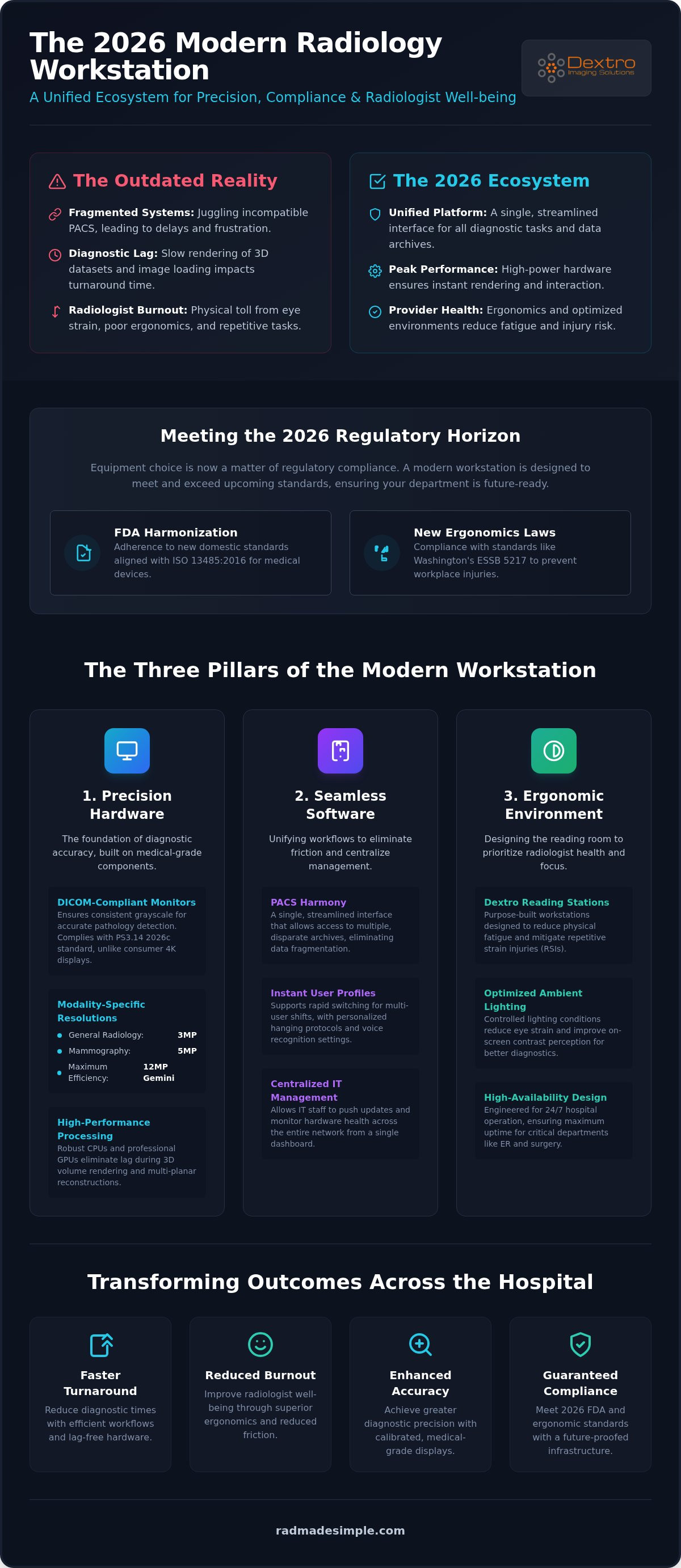
Modernizing your department means moving beyond standalone hardware to an integrated system that prioritizes both performance and provider health. With the 2026 FDA harmonization of domestic standards with ISO 13485:2016 and new ergonomics laws like Washington’s ESSB 5217 taking effect in July, your equipment choice is now a matter of regulatory compliance. This article explores how DICOM-compliant professional-grade diagnostic monitors, ergonomic Dextro reading stations, and seamless software like PACS Harmony eliminate technical friction. You'll discover how to reduce repetitive strain injuries, achieve faster diagnostic turnaround times, and secure long-term hardware reliability through smart, integrated design.
Key Takeaways
- Learn how to select DICOM-compliant Jusha monitors with precise resolutions to meet the technical standards required for 2026 diagnostic environments.
- Discover how a unified PACS Harmony interface eliminates data fragmentation by allowing access to multiple archives through a single, streamlined interface.
- Identify the essential ergonomic features of a high-performance radiology workstation for hospital use, including ambient lighting and Dextro Reading Stations designed to reduce fatigue.
- Understand the necessity of tailoring workstation configurations to specific modalities, such as Mammography or Neurology, to ensure maximum diagnostic accuracy.
- Master the roadmap for hospital-wide infrastructure upgrades that transform outdated reading rooms into integrated, future-ready diagnostic ecosystems.
What Defines a Modern Radiology Workstation for Hospital Environments?
By 2026, the definition of a radiology workstation for hospital use has moved far beyond a simple desk and monitor setup. It's now a high-performance diagnostic ecosystem where hardware precision and software harmony converge. In acute care settings, where seconds matter, the workstation must provide absolute reliability and technical transparency. This allows radiologists to focus entirely on the image rather than the interface. A professional setup integrates Jusha Diagnostic Monitors, high-specification processing units, and specialized input devices like programmable macro pads. Unlike home-office teleradiology stations, hospital units are designed for high-availability environments. They require maximum uptime to support emergency departments and surgical suites where delayed imaging isn't an option.
Diagnostic Accuracy vs. Consumer-Grade Displays
Standard 4K monitors often fail hospital diagnostic standards because they lack the necessary luminance uniformity and grayscale precision. Subtle pathologies can easily be missed if the monitor's backlight is inconsistent or if the contrast ratio isn't calibrated to human visual perception. DICOM Part 14 compliance in 2026 requires that clinical monitors adhere to the PS3.14 2026c grayscale standard to ensure consistent image rendering across all diagnostic platforms. Without this calibration, a lesion visible on one screen might be invisible on another, creating significant clinical risk. High-performance Jusha monitors solve this by maintaining stable brightness levels and automated calibration, ensuring every pixel meets regulatory requirements.
The Hospital Workflow Challenge: High Volume and Multi-User Shifts
Radiology departments never sleep. A professional workstation must withstand 24/7 operation while facilitating rapid transitions between different users. Modern systems utilize a picture archiving and communication system (PACS) that supports instant user-profile switching. This allows a specialist to log in and immediately access their personalized hanging protocols and voice recognition settings. Centralized management of these workstations reduces the burden on IT departments. Instead of troubleshooting individual units, staff can push updates and monitor hardware health across the entire hospital network from a single dashboard. This proactive approach ensures that every station remains operational and compliant with evolving healthcare regulations. When hardware and software are unified, the complexity of high-volume environments becomes manageable, allowing for faster diagnostic turnaround times and improved patient care.
Hardware Essentials: Diagnostic Monitors and Processing Power
Selecting the ideal radiology workstation for hospital environments starts with matching resolution to clinical modality. A standard 3MP display serves general radiology well, but specialized tasks like mammography require the higher pixel density of 5MP monitors. For departments seeking maximum efficiency, 12MP Gemini configurations provide a massive, bezel-free workspace that allows for side-by-side comparisons without the visual interruption of a plastic frame. Beyond the screen, the underlying processing power must be robust. High-specification CPUs paired with professional-grade GPUs are non-negotiable for rendering 3D imaging datasets. Without this dedicated power, radiologists face frustrating lag during volume rendering or multi-planar reconstructions, which directly slows down diagnostic turnaround times.
Connectivity and storage also play a vital role in hardware reliability. Modern workstations require high-speed interfaces to pull massive files from both local servers and cloud-native PACS platforms. If you're looking to optimize your hardware stack, you can explore diagnostic hardware options that bridge the gap between technical specs and clinical performance.
Jusha Medical Monitors: The Gold Standard for Clarity
Jusha Diagnostic Monitors are engineered specifically for the nuances of medical imaging. Unlike consumer screens, these units feature built-in sensors that constantly monitor and adjust luminance to maintain DICOM Part 14 compliance. This long-term stability ensures that the grayscale precision you see today remains identical three years from now. Adhering to ergonomic guidelines for monitor placement is easier with Jusha's wide viewing angles and anti-reflective coatings. These features minimize glare from hospital overhead lighting, reducing the visual fatigue that often leads to diagnostic errors late in a shift.
Radcom Compact: High Performance in Small Hospital Footprints
Many older hospital facilities struggle with limited physical space in reading rooms. The Radcom Compact solves this issue by offering a portable yet powerful solution that doesn't compromise on diagnostic quality. These units bring high-performance reading capabilities to the bedside or the emergency department, where permanent installations aren't feasible. Despite their smaller footprint, they integrate seamlessly with existing hospital networks and maintain the same security protocols as full-sized stations. This flexibility allows hospitals to scale their diagnostic capacity quickly during peak volumes or emergency surges without requiring major architectural changes.
Software Integration: PACS Harmony and Unified Workflows
Modern hospitals often struggle with data fragmentation across multiple departments. This fragmentation forces radiologists to toggle between disparate systems, leading to significant click fatigue and a heavy cognitive load. A high-performance radiology workstation for hospital environments must consolidate these workflows into a single, unified interface. By accessing disparate archives through a single pane of glass, providers can maintain their focus on diagnostic tasks rather than navigating software hurdles. This integration is essential for maintaining high-volume throughput without compromising accuracy. When software functions as a cohesive ecosystem, it transforms the workstation from a simple viewing tool into a proactive diagnostic partner.
Cybersecurity remains a top priority for hospital IT departments in 2026. Protecting patient data at the workstation level requires more than just passwords; it demands integrated security protocols that meet HIPAA standards without slowing down the user. When evaluating the technical requirements for teleradiology workstations, seamless software integration stands out as a critical factor for both data security and operational efficiency. Unified systems allow for centralized auditing and rapid deployment of security patches across the entire hospital network, ensuring that sensitive information remains protected against evolving threats.
PACS Harmony: Unifying Disparate Hospital Systems
PACS Harmony serves as a powerful simplifier in complex imaging environments. It utilizes a vendor-neutral archive (VNA) to provide a consistent view of patient data, regardless of the original source or department. This system ensures real-time synchronization between imaging studies and electronic patient records, eliminating the need for manual data entry. As hospitals grow, the aycan PACS framework offers the scalability needed to add new modalities or facilities without disrupting existing workflows. This approach removes the complexity of managing multiple proprietary interfaces, allowing for a more agile and responsive diagnostic environment.
RadVoice: Accelerating Reporting with Integrated Voice Recognition
Reporting is often the primary bottleneck in the modern radiology cycle. RadVoice addresses this challenge by integrating AI-driven voice recognition directly into the diagnostic workflow. It handles complex medical terminology with 2026-standard precision, significantly reducing the time spent on manual corrections. Because RadVoice feeds data back into the PACS automatically, it eliminates the lag between interpretation and report availability. This direct integration empowers radiologists to complete their work faster, leading to quicker results for referring physicians and better outcomes for patients in acute care settings.
Ergonomics and Environment: Designing the Professional Reading Room
Designing a radiology workstation for hospital use requires looking beyond the hardware specs to the physical environment where the radiologist spends their shift. A Dextro Reading Station provides a holistic ergonomic framework that addresses the physiological demands of long-duration diagnostic sessions. It isn't enough to provide a high-resolution screen; the surrounding ambient lighting must be controlled to minimize glare and maximize contrast perception. In high-traffic hospital environments, acoustic management also plays a vital role. Sound-dampening materials and strategic layout design help maintain the focus required for complex interpretations in busy clinical departments. You can configure your ergonomic reading station to meet the specific demands of your clinical team and facility footprint.
Scientific research supports frequent sit-stand intervals to prevent musculoskeletal disorders. Modern reading stations automate these transitions, encouraging movement without disrupting the diagnostic workflow. By alternating between sitting and standing, radiologists maintain better circulation and higher energy levels throughout their shifts. This proactive approach to physical health directly correlates with sustained diagnostic accuracy and reduced error rates during the final hours of a long workday. When the environment supports the user, the focus remains where it belongs: on the patient images.
Physical Setup: Desks, Chairs, and Monitor Mounts
The configuration of monitor mounts significantly impacts neck strain and overall comfort. While dual monitors are common, triple monitor setups often provide the ergonomic sweet spot by centralizing the primary diagnostic view while keeping secondary data within the peripheral range. Spine-supporting seating is another critical investment for 10-hour shifts, providing the lumbar stability necessary to prevent long-term injury. Safety is also a priority in a radiology workstation for hospital settings. Integrated cable management strategies ensure clean hospital floors, removing trip hazards and making the workspace easier for environmental services to sanitize effectively.
Reducing Eye Strain and Cognitive Load
In 2026, medical displays feature advanced blue light filtration and high refresh rates to protect the user's vision during extended use. Beyond the screen, software shortcuts and macro tools minimize repetitive wrist motion, which is a leading cause of strain injuries in the field. Radiologists should also implement the '20-20-20 rule' by looking at something 20 feet away for 20 seconds every 20 minutes to reset their focal range. By combining smart hardware with healthy habits, hospitals can significantly reduce provider burnout and protect their most valuable clinical assets.
Implementing Your Hospital Upgrade with Dextro Imaging Solutions
Modernizing a radiology department requires a structured approach that aligns technical capabilities with clinical demands. Upgrading a radiology workstation for hospital use isn't merely a hardware purchase; it's a strategic infrastructure investment. Dextro Imaging Solutions acts as a simplifier throughout this process, providing a clear roadmap from initial assessment to final calibration. We evaluate your current environment to identify bottlenecks in data flow and physical layout. This ensures that new installations integrate seamlessly with existing networks while providing the high-performance diagnostic ecosystem your team deserves.
Customization is central to maximizing diagnostic throughput. A workstation configured for mammography requires different monitor specifications than one dedicated to neuro-radiology. Dextro Reading Stations allow for these modality-specific adjustments, ensuring that every radiologist has the precise tools required for their sub-specialty. We focus on four key stages of implementation:
- Infrastructure Audit: Identifying current hardware limitations and network bottlenecks.
- Custom Configuration: Matching Jusha monitors and Dextro stations to specific departmental needs.
- Professional Integration: Ensuring PACS Harmony and RadVoice sync perfectly with hospital records.
- Compliance Validation: Performing initial DICOM Part 14 calibration for immediate clinical use.
Professional installation eliminates the risk of technical non-compliance from day one. Balancing equipment longevity with high diagnostic volume provides a superior long-term ROI compared to piecemeal consumer-grade setups. When you invest in medical-grade hardware, you reduce the frequency of replacements and the hidden costs of technical downtime.
Technical Support and Medical Imaging Compliance
Uptime is the most critical metric in acute care settings. Comprehensive maintenance contracts protect your investment by providing rapid response to technical issues. Ongoing calibration services ensure that every Jusha monitor remains DICOM compliant throughout its lifecycle, preserving the grayscale precision established at installation. Remote troubleshooting and proactive software updates for PACS Harmony minimize downtime, allowing your IT staff to focus on broader hospital initiatives. This secure, supportive framework instills confidence that your diagnostic engine will remain operational 24/7 without unexpected interruptions.
Next Steps: Consultation and Custom Quotes
The path to a more efficient department begins with a professional site audit. Our experts evaluate your physical space and technical requirements to recommend the ideal mix of Dextro Reading Stations and software integrations. If your facility requires mobile solutions, evaluating the Radcom Compact for your mobile imaging needs provides a high-performance alternative for ER or bedside use. Take the first step toward a streamlined diagnostic environment today. You can optimize your hospital workflow with Dextro Imaging Solutions to ensure your team has the precision and reliability they need to succeed.
Future-Proofing Your Diagnostic Environment
Modernizing your imaging department requires more than just new screens; it demands a shift toward integrated diagnostic ecosystems. By combining Jusha Diagnostic Monitors with DICOM Part 14 calibration and unified PACS Harmony software, you remove the friction that leads to clinician burnout and diagnostic delay. A high-performance radiology workstation for hospital use is the foundation of a resilient, high-volume department. It transforms complex, high-pressure environments into streamlined workspaces where precision is the standard. It's the most effective way to ensure your team stays productive without compromising their health.
Investing in medical-grade hardware and comprehensive technical support agreements protects your facility from the risks of downtime and regulatory non-compliance. These systems empower your team to work with greater accuracy while maintaining the physical health necessary for long-term professional success. You can take the next step toward operational excellence today. Upgrade your hospital's diagnostic capabilities with Dextro Reading Stations. Embracing these technological shifts ensures your hospital remains at the forefront of patient care and imaging efficiency.
Frequently Asked Questions
What are the minimum monitor requirements for a hospital radiology workstation in 2026?
In 2026, a radiology workstation for hospital use must feature monitors that are FDA-cleared and strictly adhere to the DICOM Part 14 GSDF PS3.14 2026c standard. General radiology requires a minimum resolution of 3MP, while mammography mandates at least 5MP. These units must also meet ISO 13485:2016 precision requirements as part of the FDA's Quality Management System Regulation harmonization implemented in February 2026.
How does DICOM Part 14 compliance affect diagnostic accuracy?
DICOM Part 14 compliance ensures that grayscale images are rendered consistently across different devices by following a standardized display function. This precision is vital for detecting subtle pathologies that might be lost on uncalibrated screens. By maintaining stable luminance and contrast, radiologists can make more accurate diagnoses with confidence that the image they see is technically perfect and reproducible across the entire hospital network.
Can PACS Harmony integrate with legacy hospital imaging systems?
PACS Harmony integrates seamlessly with legacy hospital imaging systems through a vendor-neutral archive (VNA). It acts as a central hub that pulls data from disparate silos into a single, unified interface for the provider. This capability allows hospitals to modernize their diagnostic workflow without the immediate need to replace every existing piece of archival software, protecting previous investments while improving current efficiency.
What is the difference between a portable radiology workstation and a desktop setup?
Portable units like the Radcom Compact offer high-performance diagnostic capabilities in a smaller footprint designed for bedside or emergency use. In contrast, desktop Dextro Reading Stations are optimized for fixed reading rooms where multi-monitor configurations and holistic environmental controls are the priority. While both provide medical-grade performance, the portable option focuses on agility and space efficiency in acute care settings where fixed stations aren't feasible.
How does RadVoice software improve radiology report turnaround times?
RadVoice improves report turnaround times by using AI-driven voice recognition to handle complex medical terminology with 2026-standard accuracy. It eliminates the manual dictation bottleneck by feeding data directly into the PACS automatically. This immediate synchronization allows referring physicians to access finalized reports much faster, which is critical for patient management and reducing overall length of stay in high-volume hospital environments.
Why should hospitals invest in medical-grade monitors instead of high-end consumer 4K screens?
Hospitals must invest in medical-grade Jusha monitors because they offer long-term luminance stability and automated calibration that consumer 4K screens lack. Standard consumer displays often have inconsistent backlighting and fail to meet the strict DICOM standards required for primary diagnosis. Medical monitors are specifically engineered to maintain technical precision and regulatory compliance over thousands of hours of continuous, 24/7 hospital operation.
What are the key ergonomic features to look for in a radiology reading station?
Key ergonomic features include automated sit-stand adjustments, integrated ambient lighting control, and flexible monitor mounting systems that support proper neck alignment. A professional radiology workstation for hospital use should also prioritize cable management and acoustic dampening to reduce environmental distractions. These features help prevent repetitive strain injuries and cognitive fatigue, which are essential for maintaining productivity and accuracy during long diagnostic shifts.
How does Dextro support hospital IT teams during the installation process?
Dextro supports hospital IT teams by providing comprehensive site audits, professional installation, and initial DICOM calibration services. We handle the technical heavy lifting of integrating PACS Harmony and RadVoice into existing hospital networks. Our maintenance contracts also include remote troubleshooting and proactive software updates, which significantly reduces the long-term management burden and risk-mitigation responsibilities for internal hospital IT staff.


