

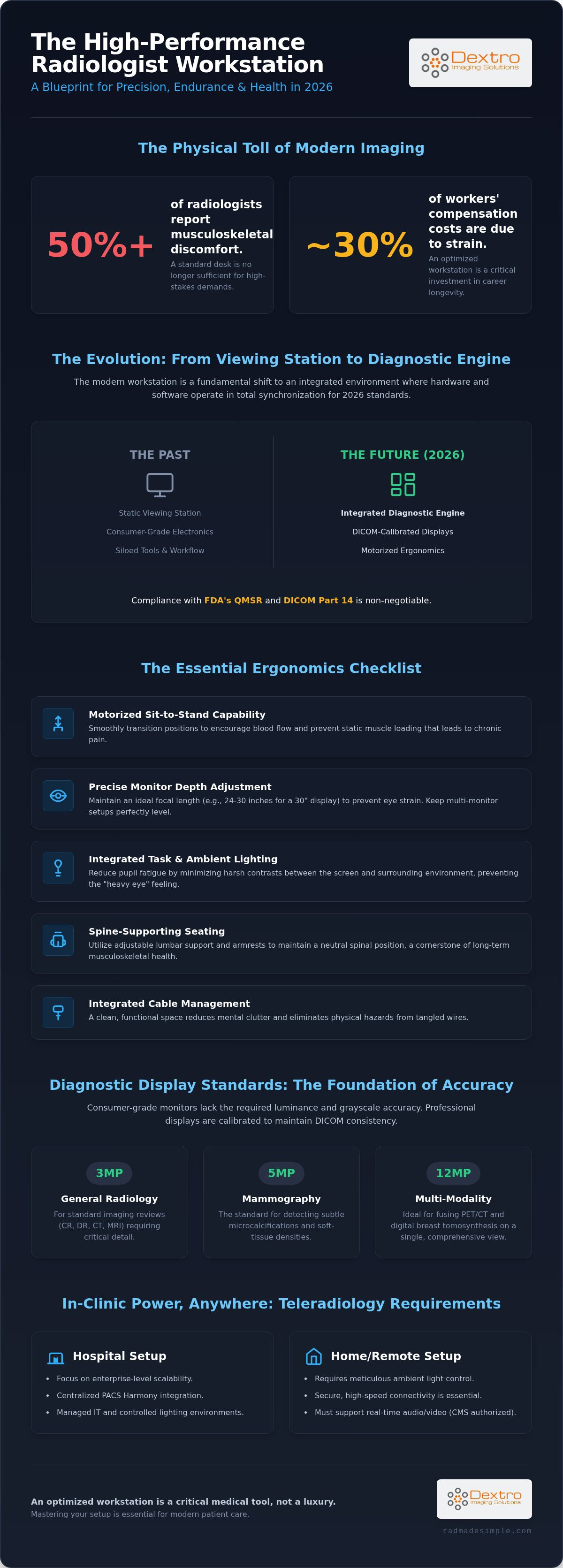
Over 50% of radiologists report experiencing musculoskeletal discomfort, while strain now accounts for nearly 30% of all workers' compensation costs in the industry. You've likely felt the physical toll of a long shift where diagnostic fatigue begins to cloud your focus and repetitive strain starts to set in. It's clear that a standard desk is no longer sufficient for the high-stakes demands of modern imaging. Optimizing your radiologist workstation is a critical step toward protecting your health and ensuring clinical precision.
We understand that a cluttered or poorly calibrated environment slows down your reporting and compromises accuracy. This guide provides a roadmap to mastering the essential components of a high-performance setup, designed to reduce fatigue and streamline your clinical workflow. You'll learn how to integrate advanced reading stations from Dextro Imaging Solutions and high-performance diagnostic monitors to achieve full compliance with 2026 medical standards. We'll preview the latest ergonomic configurations and technological integrations that allow you to increase throughput without sacrificing your physical well-being.
Key Takeaways
- Understand the transition from simple viewing stations to the modern radiologist workstation, designed as a fully integrated diagnostic engine for 2026.
- Master an ergonomics checklist that utilizes motorized sit-to-stand capabilities and precise depth adjustment to prevent musculoskeletal strain.
- Identify the specific resolution and luminance standards required for 3MP, 5MP, and 12MP displays to maintain DICOM-calibrated accuracy.
- Explore portable and teleradiology solutions like the Radcom Compact that maintain high-speed connectivity in any clinical or home setting.
- Streamline your reporting workflow by integrating high-performance hardware with advanced software tools like RadVoice and PACS Harmony.
What is a modern radiologist workstation in 2026?
A modern radiologist workstation in 2026 is a precision-engineered environment designed for high-stakes medical imaging interpretation. It represents a fundamental shift from the static viewing stations of the past. Today, these setups function as integrated diagnostic engines where hardware and software operate in total synchronization. This transformation is driven by the need for higher throughput and the rising complexity of imaging data. A complete system includes DICOM-calibrated displays, motorized ergonomic furniture, and optimized reporting software. Using consumer-grade electronics is a significant risk. Standard monitors lack the luminance consistency and grayscale accuracy required by the FDA's updated Quality Management System Regulation (QMSR), which took effect in February 2026.
The role of the workstation in diagnostic accuracy
Hardware performance directly dictates lesion detection rates. If a monitor can't render subtle contrast differences, a radiologist might miss critical findings. This physical strain is more than an inconvenience; it's a diagnostic hazard. Research shows that visual fatigue increases the likelihood of errors during long shifts. To mitigate this, every radiologist workstation must adhere to DICOM Part 14 compliance as a non-negotiable baseline. Jusha Diagnostic Monitors provide this necessary precision, ensuring that grayscale representation remains consistent across the entire screen. High-resolution displays allow for faster, more confident interpretations, which reduces the cognitive load on the physician.
Hospital vs. home reading setup requirements
The rise of teleradiology has blurred the lines between clinical and home environments, but the technical requirements remain stringent. Hospital setups often focus on enterprise-level scalability and centralized PACS Harmony integration. Home setups require careful ambient light control to prevent screen glare from washing out diagnostic detail. Secure, high-speed connectivity is essential for handling massive datasets without lag. For those working in smaller spaces or transitioning between locations, solutions like the Radcom Compact offer the same diagnostic power as a full-sized department. Every professional setup must now support real-time, two-way audio-video technology, which CMS permanently authorized for direct supervision in January 2026. This allows for remote oversight of diagnostic tests while maintaining strict clinical standards.
The Essential Radiologist Workstation Ergonomics Checklist
A high-performance radiologist workstation isn't just a desk; it's a specialized medical tool. When you spend over seven hours a day seated at a digital display, every centimeter of adjustment matters. Musculoskeletal strain accounts for nearly 30% of all workers' compensation costs in radiology, making an ergonomic checklist essential for both health and professional longevity. You need a setup that adapts to your body, not the other way around.
- Motorized sit-to-stand capability: You need the ability to transition between sitting and standing smoothly. This movement encourages blood flow and prevents the static muscle loading that leads to chronic pain.
- Monitor depth adjustment: Your eyes shouldn't have to strain to find focus. Precise depth adjustment allows you to maintain the ideal focal length throughout the day as your posture shifts.
- Integrated task and ambient lighting: Proper lighting reduces the constant contraction and expansion of your pupils. This prevents the "heavy eye" feeling that often occurs mid-shift.
- Spine-supporting seating: Your chair must provide adjustable lumbar support and armrests to keep your spine in a neutral position.
- Cable management: A tangle of wires creates mental clutter and physical hazards. Integrated systems keep your space clean and functional.
If you're looking to upgrade your current environment, exploring Dextro Reading Stations provides a foundation for these ergonomic standards.
Perfecting the monitor focal point
Eye fatigue is a primary driver of diagnostic error. We recommend adapting the 20-20-20 rule: every 20 minutes, look at an object 20 feet away for at least 20 seconds. This simple habit resets your eye muscles. For physical alignment, use EZ-track systems to ensure multi-monitor setups remain perfectly level. You should calculate your ideal viewing distance based on monitor size. For a standard 30-inch diagnostic display, a distance of 24 to 30 inches is generally the sweet spot to capture the full field of view without excessive head movement.
Ambient light and glare reduction
Total darkness in a reading room is a mistake. It creates too much contrast between the screen and the room, leading to rapid fatigue. Bias lighting, or backlighting, is critical. It provides a soft glow behind the monitors that stabilizes the pupil's response. Position your radiologist workstation away from windows to eliminate unpredictable glare. Finally, ensure your desk surface has a matte finish. This prevents light from bouncing off the table and into your eyes, keeping your focus where it belongs: on the images.
Diagnostic Display Standards: Resolution and Accuracy
The visual interface of a radiologist workstation is its most critical component. Without high-resolution displays that meet strict medical standards, even the most ergonomic desk cannot prevent diagnostic errors. Precision in imaging relies on two factors: spatial resolution and contrast resolution. Grayscale consistency and luminance levels must remain stable across the entire screen surface to ensure that subtle lesions are visible. Modern radiologist workstation setups now utilize automated calibration and quality assurance (QA) software to maintain these levels without manual intervention. Jusha Diagnostic Monitors are engineered specifically for this purpose, providing the technical reliability required for high-volume clinical environments.
Luminance is more than just brightness; it's about the display's ability to maintain a consistent light output over years of use. High-performance monitors typically target a calibrated luminance of at least 350 to 500 cd/m² for general radiology. If these levels drop, the human eye's ability to distinguish between different shades of gray diminishes, which directly impacts diagnostic throughput. Automated QA software works in the background, scheduling calibration tasks during off-hours so the equipment is always ready for the next shift. This data-driven approach to quality control is necessary as the global medical image analysis software market reaches $2.80 billion in 2026. As software becomes more complex, the hardware must keep pace to render that data accurately.
Choosing monitors for X-ray, CT, and MRI
General radiography, such as chest X-rays or skeletal imaging, typically requires 3MP to 5MP monitors to capture necessary detail. Cross-sectional imaging for CT and MRI interpretation also thrives on this resolution range, allowing for clear slice-by-slice viewing and detailed multi-planar reconstructions. However, specialized modalities like mammography demand 5MP to 12MP displays to identify tiny microcalcifications that could indicate early-stage cancer. We're seeing a significant shift toward 12MP 'all-in-one' displays. These large-format screens replace traditional dual-monitor setups, offering a seamless canvas for multi-modality reading without the physical bezel interruption that can distract a clinician during a complex review.
DICOM Part 14 compliance explained
DICOM Part 14 establishes the Grayscale Standard Display Function (GSDF). This standard ensures that a specific digital value always produces the same perceived brightness on any compliant screen. Internal sensors are vastly superior to manual calibration methods. They perform real-time adjustments as the monitor ages or as ambient light in the reading room shifts. This is particularly vital for maintaining compliance across a teleradiology fleet. By using displays with integrated QA software, enterprise-level departments can remotely monitor the health of every workstation. This ensures every radiologist sees the same accurate image, whether they're in a hospital basement or a home office, maintaining the high standards required for 2026 clinical practice.
Teleradiology and Portable Workstation Solutions
The landscape of medical imaging has fundamentally changed with the permanent adoption of virtual supervision. Effective January 1, 2026, CMS authorized real-time audio-video technology for direct supervision of diagnostic tests. This regulatory shift, supported by state laws like California's AB 460, has made the remote radiologist workstation a permanent fixture in modern healthcare. Transitioning from a hospital environment to a home office requires more than just a high-speed connection; it requires a specialized infrastructure that maintains diagnostic integrity and HIPAA compliance. You need a setup that replicates the clinical experience without the massive footprint of a traditional reading room.
Security protocols are the foundation of any remote setup. Encrypted VPNs and multi-factor authentication ensure that PACS access remains secure and patient data is protected. A seamless transition between locations allows you to maintain your clinical workflow without technical interruptions. If your remote environment lacks the stability of your hospital office, your diagnostic throughput will suffer. High-performance hardware must be paired with robust security software to create a reliable and efficient diagnostic engine.
Setting up a remote radiology reading station
A professional home setup demands a dedicated space with controlled ambient lighting to prevent screen glare. Managing bandwidth is critical, as large imaging datasets like 3D reconstructions require significant data transfer speeds. If your network lags, your reporting speed drops. For clinicians who need flexibility, Portable Radiology Workstations offer a self-contained solution. These units provide the processing power and display quality necessary for accurate interpretation while allowing you to move between different sites or outreach programs without losing your preferred configuration.
Compact hardware for teleradiology
Space constraints often limit the ability to install a full-scale diagnostic setup at home. The Radcom Compact addresses this challenge by streamlining connectivity and integration in a small form factor. It provides the essential communication bridge between your local hardware and the hospital's network. By using integrated portable reading stations, you can maintain diagnostic quality on the move. These compact systems ensure that every pixel is rendered accurately, allowing you to provide high-level care from any location. If you want to optimize your remote workflow, view our latest portable radiology workstation options to find the right fit for your needs.
Optimizing Workflow: Integrating Hardware and Software
A high-performance radiologist workstation is only as effective as the software it runs. When hardware and software are siloed, clinicians face "toggle fatigue," a state where switching between disparate applications creates cognitive friction. By synchronizing Dextro reading stations with PACS Harmony, you create a unified environment that eliminates these delays. This integration ensures that your physical controls, such as motorized desk height and monitor alignment, complement the digital workflow. It's about removing the technical barriers that stand between the physician and the image.
Future-proofing your setup is essential as the global medical image analysis software market reaches $2.80 billion in 2026. AI-assisted diagnostic tools are no longer optional extras; they're becoming standard components of the diagnostic engine. Integrating these tools into your radiologist workstation today ensures you're prepared for the next wave of technological shifts. These AI layers help prioritize urgent cases and highlight subtle findings, acting as a second set of eyes that further reduces the risk of diagnostic fatigue. By unifying these advanced capabilities into a single, cohesive setup, you protect both your clinical accuracy and your professional well-being.
Streamlining with PACS Harmony and aycan PACS
PACS Harmony and aycan PACS provide the backbone for this synergy. Vendor-neutral archiving (VNA) is a critical component, as it allows for high-speed image retrieval regardless of the original data source. This is essential in multi-PACS environments where a radiologist might need to access historical data from several different hospital systems simultaneously. Managing these complex streams from a single interface accelerates interpretation and ensures that the hardware's processing power isn't wasted on software lag. For growing imaging centers, these scalable storage solutions provide the necessary infrastructure to handle the increasing volume of high-resolution datasets.
Voice recognition and dictation efficiency
Reporting speed is the final metric of productivity. RadVoice voice recognition is designed to integrate directly into the PACS environment, allowing you to dictate findings without taking your eyes off the diagnostic display. This direct integration reduces turnaround time (TAT) by eliminating the need for manual transcription or external dictation software. RadVoice provides seamless, real-time integration with all major PACS providers in 2026, ensuring that your reports are synchronized with the images as you interpret them. This level of connectivity allows you to maintain a steady rhythm throughout your shift, turning a complex process into a streamlined, one-touch operation.
Future-Proofing Your Diagnostic Environment
The landscape of medical imaging in 2026 demands a shift from passive viewing to active, integrated diagnostic engines. By prioritizing motorized ergonomics and DICOM-calibrated precision, you eliminate the physical and cognitive barriers that lead to burnout. A properly configured radiologist workstation isn't just a luxury; it's a critical investment in clinical accuracy and long-term health. We've explored how motorized sit-to-stand stations, high-resolution displays, and seamless voice recognition software create a workflow that actually supports the physician. These components work together to ensure you stay compliant with evolving FDA and CMS standards while maintaining peak performance.
Dextro Imaging Solutions acts as your partner in this transformation. As an authorized Jusha Diagnostic Monitor distributor, we specialize in teleradiology hardware compliance and integrated PACS and voice recognition solutions. We simplify the complexity of modern imaging setups so you can focus on what matters most: patient care. Build your high-performance Dextro reading station today and experience a workspace designed for the future of radiology. You've dedicated your career to precision; it's time your environment reflects that same commitment.
Frequently Asked Questions
What are the minimum monitor requirements for a radiologist workstation?
Minimum requirements depend on the imaging modality you're interpreting. For general radiology such as CT, MRI, and X-ray, you need 3MP to 5MP displays. Mammography requires a higher resolution range of 5MP to 12MP to detect subtle microcalcifications. All monitors must be DICOM Part 14 compliant to ensure accurate and consistent grayscale representation across the radiologist workstation.
Is a sit-stand desk really necessary for radiology reading?
A motorized sit-stand desk is essential for reducing musculoskeletal discomfort, which affects over 50% of radiologists. These desks allow for dynamic posture changes that prevent static muscle loading during long shifts. By alternating between sitting and standing, you reduce the risk of repetitive strain injuries. This flexibility is a core feature of a modern radiologist workstation designed for long-term health.
How often should a diagnostic radiology monitor be calibrated?
Diagnostic monitors require regular calibration to maintain DICOM Part 14 compliance and grayscale accuracy. While manual checks were common in the past, modern Jusha Diagnostic Monitors use internal sensors for automated, real-time calibration. This ensures luminance remains consistent without manual intervention. You should still perform a comprehensive quality assurance review quarterly to meet 2026 accreditation and Medicare reimbursement standards.
Can I use a high-end gaming monitor for radiology reading?
You shouldn't use gaming monitors for diagnostic interpretation because they lack DICOM Part 14 calibration. While high-end consumer displays have impressive refresh rates, they don't offer the grayscale consistency or luminance stability required for medical imaging. Using non-medical displays can lead to misdiagnosis and fails to meet the FDA's updated Quality Management System Regulations that took effect in February 2026.
What is the difference between a clinical display and a diagnostic display?
Diagnostic displays are engineered for primary interpretation and offer much higher resolution, luminance, and contrast ratios. Clinical displays are intended for reference and review by non-radiologists in hospital wards or consultation rooms. Only diagnostic displays provide the precision needed for lesion detection and meet the strict regulatory requirements for a professional imaging environment.
How do I ensure HIPAA compliance for a home radiology workstation?
Ensure HIPAA compliance by using encrypted VPNs and multi-factor authentication for all remote PACS access. Your home office must be a secure, private location where patient information isn't visible to unauthorized individuals. You must also maintain clinical standards for ambient light to ensure diagnostic accuracy isn't compromised. Secure hardware integration is vital for protecting sensitive patient data in teleradiology environments.
What is Radcom Compact and how does it help teleradiologists?
Radcom Compact is a specialized connectivity solution designed to streamline the remote workflow in small spaces. It provides the essential communication link between your home hardware and the hospital network. This device helps teleradiologists maintain high-speed data transfer and seamless integration with PACS Harmony. It ensures that diagnostic quality remains high even when interpreting images outside of a traditional hospital setting.
Why is ambient lighting important in a radiology reading room?
Ambient lighting is critical because it stabilizes the pupil's response and reduces eye strain. Total darkness creates excessive contrast between the bright monitor and the room, leading to rapid visual fatigue. Using bias lighting behind the display helps maintain a consistent visual field. This prevents the "heavy eye" feeling that can cloud your focus during intensive, high-volume imaging reviews.


