

Is your high-end 4K consumer display actually hiding the very pathologies you're trained to find? While a retail screen might look sharp, choosing a dedicated medical grade monitor for radiologist use is about more than just pixel count. It's about the security of knowing every subtle grayscale nuance is visible and compliant with the latest DICOM PS3.14 2026c standards. We understand the fatigue of long shifts and the persistent fear that a slight lack of contrast could lead to a missed diagnosis or a regulatory headache.
We're here to simplify the complexity of modern diagnostic display requirements. This article dismantles the five most dangerous myths surrounding medical monitors to help you build a workstation that's both ergonomic and fully compliant with 2026 FDA Quality Management System Regulations. You'll gain a clear understanding of why "set and forget" calibration is a thing of the past and how to optimize your reading environment for maximum accuracy. From teleradiology setups to hospital-wide deployments, we'll show you how to streamline your workflow while protecting your clinical integrity and reducing diagnostic error risks.
Key Takeaways
- Understand why consumer 4K screens fail to meet DICOM PS3.14 standards and how medical-grade ASICs protect your ability to see subtle pathologies.
- Discover the risks of "set and forget" calibration and how modern internal sensors ensure your display remains compliant with 2026 regulatory requirements.
- Learn the technical differences in duty cycles that allow diagnostic displays to handle 24/7 operation without the rapid degradation seen in retail hardware.
- Identify how consistent luminance and screen uniformity directly reduce eye strain and combat "Radiologist Fatigue Syndrome" during high-volume shifts.
- Verify why a dedicated medical grade monitor for radiologist use is non-negotiable for teleradiology to meet mandatory ACR luminance standards for primary interpretation.
Myth #1: A 4K Consumer Monitor is Sufficient for Diagnostic Reading
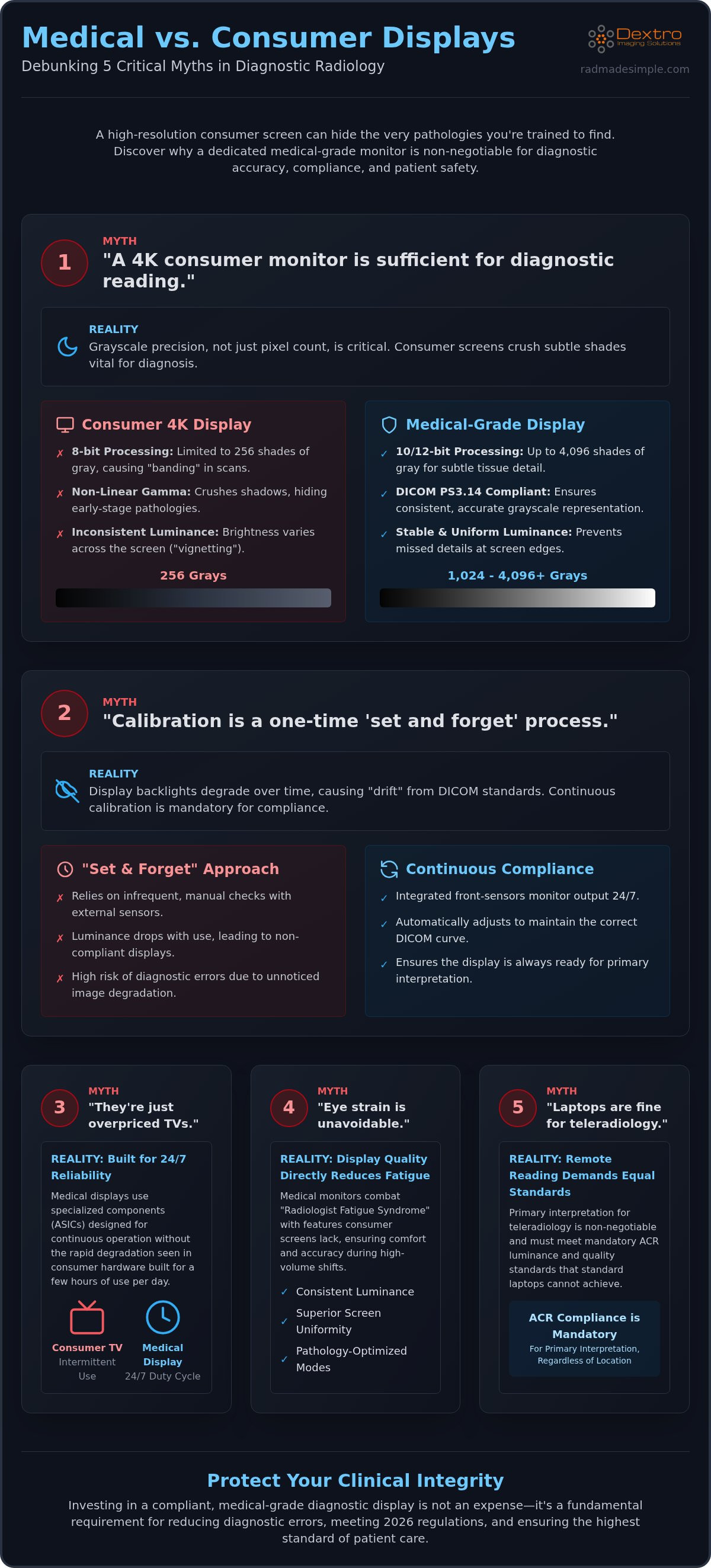
High resolution is a common red herring in the radiology world. While a retail 4K monitor offers 8 million pixels, those pixels are useless if they cannot render the subtle grayscale nuances required for an accurate diagnosis. The DICOM standard, specifically the PS3.14 2026c Grayscale Standard Display Function (GSDF), dictates how these shades must appear to ensure clinical consistency. Consumer screens are designed for entertainment. They use non-linear gamma curves that prioritize vibrant colors and deep blacks, which often results in "crushing" the very shadows where early-stage pathologies hide.
The technical gap is most evident in bit-depth. Most consumer panels operate on an 8-bit architecture, which provides only 256 shades of gray. This limited range often leads to "banding" in CT and MRI scans, where smooth gradients become blocky and distorted. A medical grade monitor for radiologist use utilizes 10-bit or 12-bit processing, delivering up to 1,024 or 4,096 shades. This precision allows you to distinguish between subtle tissue densities that would simply disappear on a standard office screen. When you're looking for a faint lesion, those extra shades of gray aren't a luxury; they're a diagnostic necessity.
Resolution vs. Grayscale Precision
A medical grade monitor for radiologist professionals prioritizes luminance stability over simple pixel density. Medical-grade monitors for radiologists utilize integrated front-sensors to maintain a consistent brightness curve across the entire panel. This prevents the "vignetting" effect common in consumer monitors, where the edges of the screen are dimmer than the center. These displays also include specialized features like Pathology Mode, which adjusts the luminance curve specifically for high-contrast clinical viewing. Consumer screens lack these hardware-level optimizations, leaving you to struggle with inconsistent image quality that changes as the monitor warms up or ages.
The Clinical Risk of 'Good Enough' Hardware
Choosing "good enough" hardware introduces significant professional and legal liability. The American College of Radiology (ACR) maintains strict standards for diagnostic image presentation, including specific luminance and contrast requirements that standard monitors cannot sustain. If a missed diagnosis is traced back to a non-compliant display, the institutional risk is substantial. For a comprehensive look at building a compliant environment, explore our guide on Radiology Reading Workstations: The 2026 Guide to Performance & Compliance. Investing in specialized hardware isn't just about clarity; it's about meeting the mandatory 2026 clinical standards that protect both the patient and the practitioner.
Myth #2: Calibration is a One-Time 'Set and Forget' Process
Many facilities assume a display remains compliant simply because it was calibrated during installation. This is a dangerous misconception. Backlight technology, whether LED or CCFL, degrades with every hour of operation. As the luminance drops, the monitor inevitably drifts away from the ACR Technical Standard for Displays. This drift isn't just a technicality. It directly impacts your ability to visualize subtle contrast differences in soft tissue, potentially compromising patient outcomes.
Relying on manual calibration with external sensors is unsustainable in high-volume environments. It requires a technician to physically visit each workstation, which often leads to neglected schedules and non-compliant hardware. A high-performance medical grade monitor for radiologist use solves this by integrating internal front-sensors that monitor output 24/7. These sensors detect even the slightest drop in brightness and automatically adjust the power supply to maintain the correct DICOM curve. This proactive approach ensures that your workstation is always ready for primary interpretation without manual intervention.
Understanding Backlight Stabilization
Jusha diagnostic displays feature integrated sensors that perform real-time adjustments without user intervention. This technology ensures that the display you use at 8:00 AM provides the exact same luminance at 8:00 PM. Dextro Imaging Solutions take this a step further by automating the compliance reporting process. Instead of manual logs, you receive automated QA reports that satisfy regulatory audits. Maintaining this consistency requires a structured approach to quality assurance:
- Monthly: Automated DICOM consistency checks performed by internal sensors.
- Quarterly: Visual grayscale evaluations to verify image integrity.
- Annual: Comprehensive luminance uniformity testing to ensure the entire panel meets 2026 standards.
The Cost of Manual Compliance
Manual calibration is an invisible drain on hospital resources. If an IT professional spends 30 minutes per monitor every month, a department with 20 stations loses 120 hours of productivity annually. We provide a "simplifier" approach through PACS Harmony. This unified interface tracks the health of every medical grade monitor for radiologist in your network. It flags displays that are reaching their end-of-life or failing to meet standards before they impact clinical operations. By moving to an automated model, you reduce IT overhead and ensure your fleet is always compliant. You can explore our integrated diagnostic solutions to see how automation eliminates these manual hurdles and protects your diagnostic accuracy.
Myth #3: Medical Grade Monitors are Just Overpriced Consumer TVs
The price gap between a retail television and a diagnostic display often causes sticker shock. However, the internal engineering of these devices is fundamentally different. Consumer TVs use image processors designed to saturate colors and smooth motion for entertainment. In contrast, a medical grade monitor for radiologist use relies on Application-Specific Integrated Circuits (ASICs). These specialized chips ensure the signal remains pure and adheres strictly to the FDA guidance on diagnostic display devices. Unlike consumer processors that "guess" pixels to enhance a movie, medical ASICs provide exact mapping and precise luminance control across every inch of the screen.
Duty cycle is another critical differentiator. A consumer TV is built for a standard 8-hour daily use in a temperature-controlled living room. Radiology environments require 24/7 operation. Medical displays utilize industrial-grade components that handle constant heat and voltage without the rapid degradation seen in retail hardware. This reliability is backed by clinical-grade support. A "Next Business Day" replacement guarantee is standard for diagnostic displays. This prevents the catastrophic downtime that occurs when a retail screen fails and leaves a workstation dark for days while waiting for a consumer repair service.
Engineering for the Reading Room
Cooling systems are the unsung heroes of diagnostic hardware. While consumer TVs are designed for slim aesthetics and often trap heat, medical displays feature robust heat sinks and ventilation to protect the backlight from thermal drift. Pixel pitch is also significantly tighter. This ensures that fine details in mammography or musculoskeletal imaging aren't lost to "screen door" effects. These monitors also integrate seamlessly with reporting tools like RadVoice, ensuring your hardware supports your speech-to-text workflow. Specialized anti-reflective glass coatings further reduce glare from overhead lighting, a feature often missing on the glossy panels of consumer screens.
Total Cost of Ownership (TCO) Analysis
A 5-year failure rate comparison reveals the true value of specialized hardware. Consumer monitors often require replacement every 24 months in a high-volume clinical setting due to backlight dimming or pixel failure. Jusha diagnostic monitors are engineered for a 5-7 year lifespan, offering a significantly better long-term ROI. For those setting up a home office, use this teleradiology hardware checklist to budget effectively:
- Industrial-grade cooling: Essential for preventing luminance drift.
- Anti-glare coatings: Reduces eye re-accommodation during long shifts.
- Medical-grade power supplies: Compliance with IEC 60601-1 standards for safety.
- 5-year clinical warranty: Protects your uptime and your investment.
Myth #4: Eye Strain is an Unavoidable Part of the Profession
Chronic headaches and blurred vision are often dismissed as occupational hazards. This condition, frequently called 'Radiologist Fatigue Syndrome', is actually a direct result of poor hardware integration. When you use a consumer-grade screen, the backlight often flickers at a high frequency to control brightness. While this flicker is invisible to the naked eye, it forces the brain to process constant visual interruptions. A dedicated medical grade monitor for radiologist use eliminates this strain by utilizing DC (Direct Current) dimming. This 'Flicker-Free' technology ensures a steady light output that allows your eyes to remain relaxed even during a twelve-hour shift.
Consistency across the panel is equally vital. Consumer monitors typically suffer from poor luminance uniformity, where the center is significantly brighter than the corners. This forces your eyes to perform constant micro-re-accommodations as you scan from one side of a study to the other. High-performance diagnostic displays use internal sensors to ensure every square inch of the panel delivers the exact same brightness. By reducing the physical work your eyes must perform, you maintain higher diagnostic accuracy and feel less exhausted at the end of the day.
The Physiology of Eye Fatigue
When a display lacks luminance uniformity, the iris and ciliary muscles must constantly re-adjust to different brightness levels as your eyes scan the image, leading to micro-stretching and rapid muscle exhaustion. Beyond the panel itself, the reading room environment plays a major role. Many radiologists work in near-total darkness, which increases the contrast between the screen and the room, further straining the vision. Integrated workstation lamps and ambient light sensors solve this by automatically adjusting the monitor's brightness to match the room's conditions. This creates a seamless visual transition that protects your long-term ocular health.
Optimizing Your Workstation Ergonomics
Physical posture and eye health are deeply connected. In a portable radiology workstation, the monitor should be positioned so the top third of the screen is at eye level, with a slight tilt of 10 to 20 degrees. This reduces the strain on the neck and prevents the eyes from drying out. Integrating tools like RadVoice further optimizes this workflow. By using high-accuracy voice recognition, you reduce the 'keyboard-to-screen' eye movement that causes repetitive fatigue. If you're ready to modernize your environment, you can view our ergonomic Dextro Reading Stations to see how integrated design protects your health while streamlining your workflow.
Myth #5: Teleradiologists Can Use Standard Laptops for Remote Reading
Teleradiology has revolutionized the field, but it has also introduced a dangerous trend: the attempt to perform primary interpretation on standard laptop screens. While modern laptops boast impressive resolutions, they are fundamentally incapable of meeting the rigorous demands of diagnostic imaging. A laptop screen is engineered for portability and battery life, not for sustained luminance or grayscale precision. Attempting to "read on the go" without a calibrated medical grade monitor for radiologist use introduces significant clinical risk and fails to meet the American College of Radiology (ACR) technical standards.
Laptop displays lack the internal stabilization sensors found in Jusha diagnostic monitors. As a result, they cannot maintain the consistent brightness levels required by the DICOM GSDF curve. For 2026, compliance with the FDA’s harmonized Quality Management System Regulation (QMSR) means that every device in your diagnostic chain must meet international quality standards. A standard laptop simply doesn't have the hardware-level ASICs needed to prevent "crushing" blacks or losing detail in high-density areas. Using uncalibrated hardware for remote reading isn't just an ergonomic issue; it's a professional liability.
The Rise of Portable Diagnostic Solutions
You don't have to sacrifice mobility for compliance. Portable radiology workstations bridge the gap between the flexibility of remote work and the necessity of medical-grade precision. The Radcom Compact serves as a secure, high-performance anchor for these setups, providing the connectivity needed for large imaging datasets. When paired with a Jusha display, you create a station that meets every ACR luminance requirement. Integration with aycan PACS ensures that your remote data access is as seamless and secure as it would be inside a hospital’s primary reading room.
Final Recommendation: Building a Compliant Future
The transition from a "consumer-hybrid" home office to a fully medical-grade environment is a critical step for the modern teleradiologist. A dedicated medical grade monitor for radiologist use is a non-negotiable tool that protects both your patients and your career. By investing in a turnkey Dextro Reading Station, you remove the complexity of hardware integration and ensure your workspace meets the 2026 standards for clinical performance. Don't let your hardware be the weak link in your diagnostic workflow.
Explore Jusha Diagnostic Monitors and Dextro Reading Stations
Future-Proof Your Diagnostic Workflow for 2026
Adopting modern clinical standards requires moving beyond the "good enough" mindset of consumer hardware. Diagnostic accuracy depends on sustained luminance and grayscale precision that retail screens simply cannot replicate. Investing in a medical grade monitor for radiologist use is the most direct path to ensuring compliance with 2026 standards while protecting your long-term ocular health. Automated calibration and industrial-grade ASICs aren't just technical specs; they're the foundation of a reliable reading environment that eliminates the guesswork of pathology detection.
We're here to simplify your transition to a high-performance workstation. Our Jusha Diagnostic Monitors utilize integrated QA sensors to maintain perfect DICOM compliance without manual intervention. For a turnkey solution, Dextro Reading Stations offer the ergonomic efficiency required for high-volume shifts, while PACS Harmony provides seamless integration across your entire imaging network. You deserve a workspace that works as hard as you do, regardless of whether you're in a hospital or a home office.
Upgrade to a Compliant Jusha Diagnostic Monitor Today. Your precision is your profession, and the right tools make all the difference.
Frequently Asked Questions
What is the minimum resolution required for a medical grade monitor for radiologist use?
The minimum resolution for a medical grade monitor for radiologist use is 2MP for general radiography, though 3MP is the industry standard for most diagnostic workflows. For specialized interpretations like digital mammography, a minimum of 5MP is mandatory to visualize fine microcalcifications accurately. Choosing the correct resolution ensures that the pixel pitch matches the clinical requirements of the specific modality you're interpreting.
Why is DICOM Part 14 compliance necessary for diagnostic monitors?
DICOM Part 14 compliance is essential because it standardizes the Grayscale Standard Display Function (GSDF) across all medical imaging devices. This ensures that a CT scan looks identical on every calibrated screen, regardless of the manufacturer or location. Without this compliance, subtle variations in gray values could lead to missed findings or incorrect interpretations, which directly compromises patient safety and clinical reliability.
Can I use an Apple Pro Display XDR for radiology reading?
No, the Apple Pro Display XDR isn't suitable for primary diagnostic interpretation. It lacks FDA Class II clearance and the integrated front-sensors required for continuous DICOM GSDF calibration. A true medical grade monitor for radiologist professionals includes hardware-level ASICs and stabilized backlights that consumer-grade screens don't provide, ensuring the display remains compliant with 2026 medical device regulations and ACR standards.
How often should a diagnostic radiology monitor be calibrated?
You should perform automated QA checks monthly and a comprehensive manual recalibration annually. While modern Jusha monitors use internal sensors for real-time luminance stabilization, these periodic checks verify that the display still adheres to the DICOM PS3.14 2026c standard. Regular maintenance is a requirement under the 2026 FDA Quality Management System Regulation to ensure long-term diagnostic accuracy and equipment reliability.
What is the difference between a clinical review monitor and a diagnostic monitor?
Diagnostic monitors are engineered for primary interpretation and feature high calibrated luminance and strict DICOM tolerances. Clinical review monitors are designed for surgeons or specialists to view images after the initial report is generated. These review displays typically operate at a lower calibrated luminance, between 250 and 450 cd/m², which is optimized for the brighter ambient light found in clinical wards or operating rooms.
How does monitor luminance affect the detection of breast cancer in mammography?
High luminance is critical in mammography because it increases the perceptible number of gray shades, which helps in identifying subtle microcalcifications. Calibrated luminance levels for mammography displays must be significantly higher than standard diagnostic screens. This increased brightness improves the contrast-to-noise ratio, allowing radiologists to detect early-stage breast cancer with greater confidence and significantly fewer false negatives.
Are OLED monitors safe for diagnostic radiology use in 2026?
OLED monitors are safe and represent the fastest-growing technology segment for surgical and advanced diagnostic applications in 2026. They provide superior contrast ratios and faster response times compared to traditional LED-backlit LCDs. However, they must still incorporate medical-grade power supplies compliant with IEC 60601-1 and specialized QA software to manage potential "burn-in" and ensure consistent DICOM GSDF adherence over time.
Do I need a 5MP monitor for all types of radiology reading?
You don't need a 5MP monitor for every modality. Displays with 2-4 MP resolution currently account for 35.6% of the market and are the standard for interpreting CT, MRI, and general radiography. While resolutions above 8MP are growing rapidly for digital pathology, a 3MP setup remains the most efficient and cost-effective choice for the majority of general radiology workstations today.


