

The traditional belief that remote reading requires a sacrifice in image quality is officially obsolete. In 2026, portability is no longer a compromise; a true portable diagnostic reading station must now match the raw GPU power and luminance standards of a fixed hospital setup to maintain clinical safety. When comparing portable radiology workstations, many professionals find that standard consumer laptops fail to meet the rigorous demands of modern imaging. You've likely experienced the frustration of lagging PACS performance or the physical strain of a long shift on an unoptimized mobile unit.
It's reasonable to expect a workflow that feels as stable at home as it does in the hospital. This professional reference guide evaluates high-performance portable workstations against current diagnostic standards to ensure teleradiology accuracy and seamless workflow efficiency. We'll explore how to achieve primary-grade diagnostic accuracy in a mobile form factor while integrating tools like PACS Harmony and RadVoice. By the end of this guide, you'll understand the hardware specifications and calibration requirements necessary to eliminate eye strain and physical fatigue during remote shifts.
Key Takeaways
- Identify the 2026 benchmarks for GPU power and luminance required to maintain strict DICOM Part 14 compliance in any remote environment.
- Understand the critical performance trade-offs when comparing portable radiology workstations, specifically the choice between integrated units like the Radcom Compact and modular diagnostic monitor setups.
- Learn how to achieve seamless software synergy by integrating PACS Harmony and RadVoice to maintain hospital-grade turnaround times while away from the department.
- Discover ergonomic strategies and hardware configurations designed to eliminate eye strain and physical fatigue during extended remote reading shifts.
- Evaluate the importance of dedicated technical support and specialized maintenance in transforming portable units from backup devices into primary diagnostic workstations.
The Evolution of Portable Diagnostic Reading Stations in 2026
The landscape of medical imaging has undergone a definitive shift. For years, mobile units served as secondary tools or emergency backups. By 2026, this hierarchy has dissolved. Modern portable hardware now integrates the processing power once reserved for massive desktop towers, allowing for full-scale 3D rendering directly in the field. This evolution is driven by advancements in Digital Radiography Technology and the necessity for radiologists to maintain productivity outside the hospital walls. The shift is absolute. High-performance mobile units are now the primary choice for many teleradiologists.
Institutional standards are no longer confined to the reading room. They follow the radiologist home. High-speed connectivity and advanced GPUs mean that the latency once associated with remote work is gone. When comparing portable radiology workstations, the focus has moved from basic software compatibility to matching the hospital's primary diagnostic performance. Professional-grade units like the Radcom Compact provide the stability required for high-stakes clinical decisions without geographical constraints. You're no longer tethered to a specific desk to achieve high-end results.
Teleradiology vs. Traditional Reading Rooms
The flexibility of mobile units is redefining healthcare staffing models. Hospitals now rely on teleradiology to manage surging imaging volumes, which are projected to increase by nearly 27% by 2055. Dextro Reading Stations bridge the gap between the traditional reading room and the home office. They provide the high-resolution diagnostic displays necessary for accurate interpretation while remaining agile. This balance ensures that radiologists don't lose diagnostic confidence when they step away from a fixed setup. It allows for a seamless transition between various clinical environments without compromising workflow speed.
Meeting 2026 Regulatory and Compliance Standards
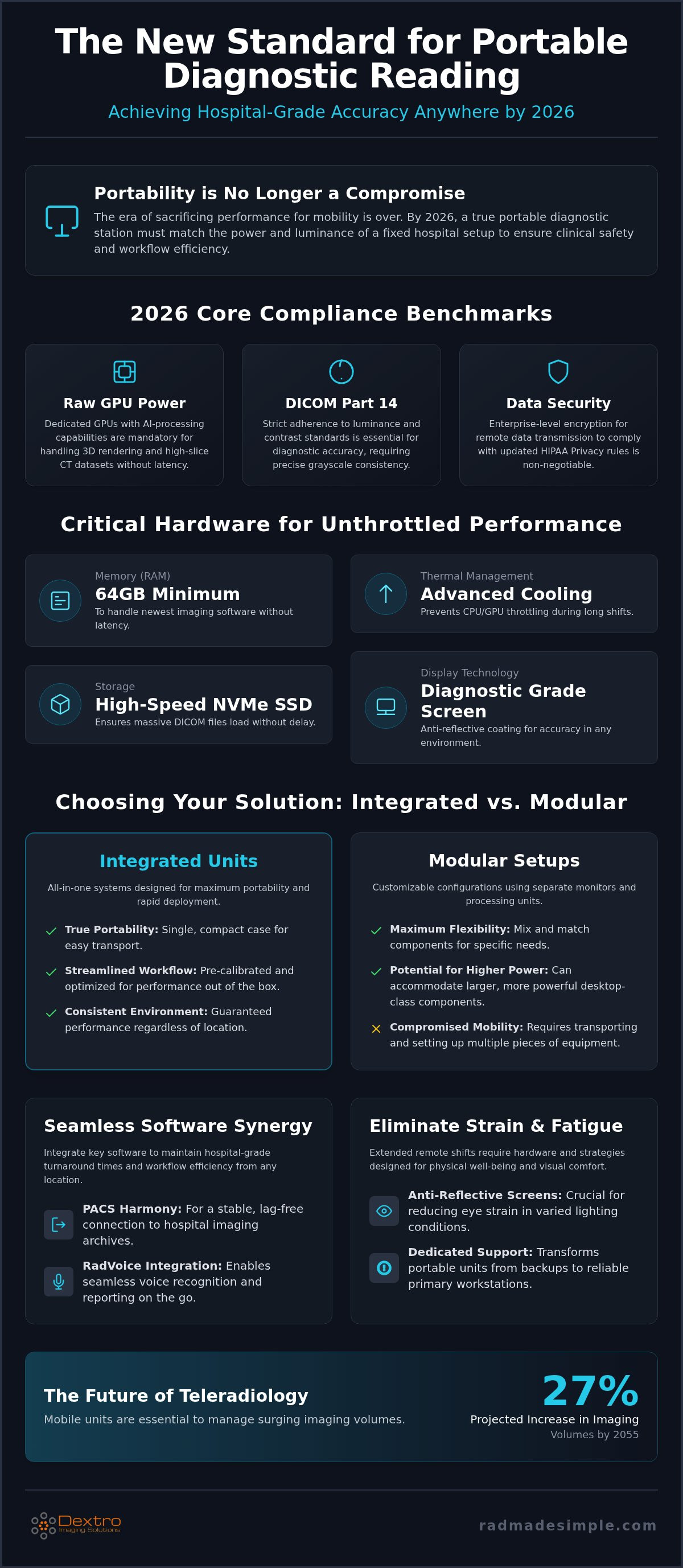
Compliance isn't optional for remote work. As of June 19, 2026, the DICOM 2026c standard is the benchmark for all diagnostic imaging. Portable workstations must adhere strictly to DICOM Part 14 luminance and contrast requirements to ensure diagnostic accuracy. Security is equally critical. With a final rule on HIPAA Privacy changes expected in August 2026, remote data transmission must be secured with enterprise-level encryption. Mobile hardware also requires annual calibration to ensure that Jusha Diagnostic Monitors or integrated screens maintain hospital-grade accuracy over time. These regulations ensure that the transition to portable systems doesn't introduce legal or clinical risks to the practice.
Critical Hardware Specifications for Portable Radiology
Selecting the right hardware for a mobile setup requires more than just looking at raw speed. When comparing portable radiology workstations, the focus must be on sustained performance under heavy diagnostic loads. Modern 3D reconstruction and high-slice CT datasets demand hardware that won't throttle or lag during a critical review. In 2026, the baseline for a high-performance system has shifted. You now need at least 64GB of RAM and a dedicated GPU with AI-processing capabilities to handle the newest imaging software without latency.
A dedicated GPU is mandatory. Integrated graphics are insufficient for multi-planar reformatting (MPR) and volume rendering. This power should be balanced by high-speed NVMe SSDs, which ensure that massive DICOM files load without delay. According to the WHO technical specifications for portable radiography, hardware must support these intensive data management tasks to maintain clinical utility. When comparing portable radiology workstations for long-term use, thermal management also becomes a deciding factor. Continuous diagnostic reading generates significant heat. Professional-grade units utilize advanced cooling systems to prevent CPU and GPU throttling, ensuring your processing speed doesn't drop mid-shift.
Display Technology: Beyond Resolution
Resolution is only one piece of the puzzle. Grayscale consistency defines a true diagnostic screen. Jusha Diagnostic Monitors provide the precise luminance and contrast ratios required by DICOM Part 14 standards. Portable screens often struggle with ambient light, making anti-reflective coatings essential for maintaining accuracy in varied remote environments. These coatings ensure that subtle pathologies aren't obscured by glare or inconsistent backlighting. It's this commitment to visual precision that separates medical-grade hardware from consumer electronics.
Connectivity and I/O Requirements
Stability is paramount when accessing hospital servers from a distance. Thunderbolt 4 ports are the gold standard for 2026. They provide the bandwidth needed for external diagnostic displays and high-speed data transfer. These connections facilitate a reliable link to PACS Harmony, ensuring that image retrieval is instantaneous. Many radiologists utilize compact radiology communication devices to manage these connections efficiently. If you're looking to optimize your remote workflow, the Radcom Compact represents the gold standard for mobile connectivity and compliance.
Comparing Integrated vs. Modular Portable Solutions
Architecture defines reliability when you're working outside the hospital. When comparing portable radiology workstations, the primary decision lies between an integrated, all-in-one unit and a modular setup. Integrated workstations prioritize stability and compliance by housing all diagnostic components within a single, reinforced chassis. Modular setups offer flexibility by combining a high-performance laptop with external medical monitors. Both paths lead to diagnostic accuracy, but the choice depends on your specific teleradiology profile and how often you're in transit.
Weight and performance often exist in tension. A traveling radiologist needs a system that's light enough for transport but powerful enough to process 3D reconstructions without lag. Dextro Reading Stations are engineered to find this sweet spot. While consumer-grade laptops often prioritize aesthetics over heat dissipation, professional-grade portable units ensure that your hardware doesn't throttle during intensive reading sessions. This architectural integrity protects your workflow from the unpredictable performance drops common in standard mobile hardware.
The Case for Purpose-Built Medical Portables
The Radcom Compact represents the pinnacle of integrated design. Unlike consumer electronics, it's built specifically for clinical environments. These units often feature integrated calibration sensors that maintain DICOM Part 14 standards automatically. You don't have to carry external colorimeters or worry about inconsistent grayscale rendering. The durability standards for these workstations are also significantly higher. They're designed to withstand the physical rigors of moving between a home office, a clinical site, and travel without losing their calibration or structural integrity. It's a "plug-and-read" solution for professionals who refuse to compromise.
Building a Modular Traveling Setup
Some professionals prefer the versatility of a modular approach. This involves selecting a powerful laptop base and pairing it with portable Jusha Diagnostic Monitors. When designing a traveling radiologist workstation setup, the laptop must have the I/O capacity to drive multiple high-resolution displays through Thunderbolt 4. Modular setups allow you to leave the heavy diagnostic monitors at a fixed remote location while using the laptop for administrative tasks on the go. However, this approach requires careful cable management to maintain a streamlined workflow. If you choose this path, ensure your peripherals are as robust as your primary machine to avoid connectivity bottlenecks that can disrupt your reading rhythm.
Software Synergy: PACS and Voice Recognition on the Go
Hardware performance is meaningless without software that can keep pace with a radiologist's workflow. When comparing portable radiology workstations, the integration of PACS and dictation software often determines the actual throughput of a remote session. PACS Harmony provides a unified interface that feels identical to a hospital setup, which significantly reduces the cognitive load of switching between platforms. For environments requiring scalable remote storage, aycan PACS offers a robust solution that manages large-scale datasets without compromising speed. This software synergy ensures that the transition to a mobile form factor doesn't come at the cost of diagnostic efficiency.
Turnaround times are the primary metric of success in any teleradiology environment. RadVoice is essential in this regard, offering high-accuracy voice recognition that functions seamlessly on mobile hardware. The global market for medical voice recognition software is projected to reach USD 4.1 billion by 2026, reflecting its critical role in modern workflows. By using tools optimized for portable units, you avoid the processing lag often associated with generic transcription services. Balancing cloud-based data flow with local caching allows portable workstations to maintain high performance even when bandwidth fluctuates.
Optimizing the Reporting Workflow
Reporting bottlenecks often occur when software isn't properly mapped to mobile hardware. Low-latency interfaces are non-negotiable in teleradiology. Customizing hotkeys for a mobile environment allows you to navigate complex studies with the same speed as a multi-monitor desktop setup. Integrated dictation tools remove the need for external hardware, keeping your mobile station compact and efficient. This level of optimization ensures that the radiologist's focus remains on the image rather than the interface. It's about creating a streamlined path from initial interpretation to the final impression.
Data Security and System Integrity
Security is a foundational requirement for any remote diagnostic setup. Encrypted software licenses and secure remote access protocols protect patient data according to 2026 HIPAA standards. Since the expiration of COVID-era telehealth waivers, full HIPAA enforcement is back in place, making system integrity a top priority. Professional technical support plays a vital role in maintaining this compliance, ensuring that hardware and software configurations remain compatible as new updates are released. To maintain hospital-grade compliance while remote, you can explore our integrated software solutions for mobile professionals.
The Dextro Advantage: Precision-Engineered Portable Excellence
Dextro Reading Stations represent the pinnacle of 2026 portable design, moving beyond simple hardware assembly to provide a fully integrated diagnostic ecosystem. While general retailers focus on the volume of sales, we focus on the specific clinical outcomes of the individual radiologist. This commitment to excellence ensures that you don't just have a mobile device; you have a professional-grade environment that maintains hospital standards in any setting. When comparing portable radiology workstations, the Dextro advantage becomes clear through our focus on reliability, compliance, and long-term technical support.
Peace of mind is a standard feature of our service model. We provide dedicated technical support and proactive maintenance to ensure your station remains calibrated and secure. This is critical as healthcare organizations face increasing cybersecurity threats, with 772 large data breaches recorded in 2025 alone. Our systems are built to withstand these pressures while offering customization options for specific sub-specialties like neuroradiology or musculoskeletal imaging. If you're ready to upgrade, you can explore the financial considerations in our mobile radiology workstation investment guide.
The Radcom Compact: Redefining Mobile Radiology
The Radcom Compact addresses the primary objection to remote reading: field reliability. It's engineered to perform under high-stakes conditions without the performance dips common in consumer hardware. Key features include specialized cooling and integrated calibration sensors that ensure your display never drifts from DICOM Part 14 requirements. For those who require more screen real estate, the unit integrates seamlessly with Jusha Diagnostic Monitors. This allows for a dual-screen mobile setup that mirrors the diagnostic power of a traditional hospital workstation while remaining entirely portable.
Your Partner in Diagnostic Accuracy
We take a consultative approach to every setup. We don't just sell hardware; we help you build a compliant home teleradiology station that meets your specific workflow needs. Investing in medical-grade hardware provides long-term value by reducing eye strain, preventing physical fatigue, and ensuring diagnostic confidence. As imaging utilization is projected to rise by nearly 27% by 2055, having a partner that stays at the forefront of technological shifts is essential. Our goal is to simplify your professional life through smart design and unwavering reliability. Contact Dextro Imaging Solutions for a custom workstation quote to secure your professional future.
Securing Your Remote Diagnostic Future
The shift to teleradiology is no longer just a trend; it's a fundamental restructuring of the medical imaging field. By 2026, the performance gap between hospital reading rooms and mobile setups has closed. When comparing portable radiology workstations, the decision rests on finding a system that balances raw processing power with strict DICOM Part 14 compliance. You now have the tools to maintain primary-grade diagnostic accuracy without being tethered to a traditional office environment.
Dextro Imaging Solutions simplifies this transition. As an authorized Jusha Medical Monitor distributor, we provide the visual precision required for high-stakes interpretations. Our expert technical support ensures seamless integration for PACS Harmony and RadVoice, a combination trusted by leading teleradiology groups worldwide. You don't have to navigate these complex technical shifts alone. View our range of professional portable radiology workstations to find a setup that empowers your productivity and protects your clinical accuracy. Your career deserves hardware that works as hard as you do.
Frequently Asked Questions
What is the minimum monitor resolution required for a portable diagnostic workstation in 2026?
The minimum resolution for a primary diagnostic monitor in 2026 depends on the specific sub-specialty, but 3 Megapixels (MP) is the absolute baseline for general radiography. For mammography, the requirement increases to 5MP to ensure clinical accuracy. High-performance units like the Radcom Compact often exceed these standards by offering 6MP or 8MP screens. This level of detail ensures that subtle pathologies are visible during remote interpretation. Always verify that your display meets the specific luminance benchmarks required.
Can I use a high-end gaming laptop for primary radiology reading?
You shouldn't use a consumer-grade gaming laptop for primary diagnostic reading. While these machines offer high GPU power, their screens lack the DICOM Part 14 calibration necessary for medical accuracy. Gaming monitors prioritize color saturation and refresh rates over grayscale consistency. This discrepancy can lead to missed diagnoses and legal liability. Professional Dextro Reading Stations are engineered specifically to handle medical imaging datasets with the required visual precision and regulatory compliance.
How often does a portable diagnostic reading station need to be calibrated?
A portable diagnostic reading station requires professional calibration at least once per year to maintain medical compliance. However, many radiologists prefer monthly or quarterly checks to account for the physical rigors of frequent travel. Modern units with integrated sensors can perform automatic calibration even more frequently. Regular audits ensure that your Jusha Diagnostic Monitors continue to meet strict luminance standards. This proactive maintenance protects the integrity of your clinical findings and ensures your equipment remains hospital-grade.
Is DICOM Part 14 compliance mandatory for teleradiology setups?
DICOM Part 14 compliance is a non-negotiable requirement for any teleradiology setup used for primary diagnosis. It ensures that grayscale images are displayed consistently across different hardware platforms. Without this standard, the interpretation of medical images becomes subjective and unreliable, which increases clinical risk. When comparing portable radiology workstations, verify that the display system is specifically rated for medical use. This compliance is essential for clinical safety and meeting the strict institutional regulatory standards of 2026.
What are the ergonomic best practices for using a portable workstation?
Ergonomic health starts with positioning your primary diagnostic screen at eye level to prevent neck strain. Use external peripherals like a medical-grade mouse and a separate keyboard to allow for a neutral wrist position. It's also important to manage ambient lighting to reduce eye fatigue and maintain contrast. Taking short, frequent breaks during long remote shifts helps maintain diagnostic focus. These practices ensure that your physical comfort matches the high performance of your mobile workstation.
How does voice recognition software like RadVoice handle background noise in remote environments?
Modern voice recognition software like RadVoice uses advanced AI-powered noise cancellation to filter out environmental sounds. This technology allows for accurate dictation even in less-than-ideal remote settings. Using a high-quality directional microphone further enhances this performance by isolating your voice from background chatter or traffic. These tools ensure that your reporting turnaround times remain consistent regardless of your location. It's a critical component for maintaining a hospital-grade workflow while you are traveling or working off-site.
What is the difference between an integrated and a modular portable workstation?
An integrated workstation is an all-in-one unit where the diagnostic screen and processing hardware are housed in a single chassis. A modular workstation involves connecting a high-performance laptop to external Jusha Diagnostic Monitors. Integrated solutions offer superior reliability and easier calibration for frequent travel. Modular setups provide more flexibility for users who need a separate laptop for administrative tasks. When comparing portable radiology workstations, the choice between these two architectures depends on your specific mobility needs and diagnostic requirements.
Does Dextro offer technical support for remote radiology hardware?
Dextro provides comprehensive technical support for all remote radiology hardware, including the Radcom Compact and Jusha monitors. Our team assists with the initial setup and the ongoing integration of PACS Harmony and RadVoice software. We understand the high-stakes nature of teleradiology and provide the expertise needed to keep your workstation compliant and efficient. This dedicated support ensures that you can focus on diagnostic interpretation while we manage the underlying technology and system integrity.


