What if the right radiology reading room monitor isn’t the one with the highest resolution? Radiology reading room monitor specifications should reflect the images you interpret, your diagnostic responsibilities, and the conditions in the room. No single number can tell you whether a display is suitable for your workload.
Product sheets can be difficult to compare. Resolution, luminance, grayscale performance, calibration, and workstation compatibility all matter, but their importance depends on the task. Radiology, IT, procurement, and quality teams may also have different requirements to consider.
This 2026 guide turns those considerations into a practical requirements checklist. Learn how to match display characteristics to diagnostic use and room conditions, distinguish primary diagnostic displays from clinical review monitors, and plan for calibration and quality assurance. You’ll also see how to assess the monitor alongside the reading station and PACS workflow, so your specification supports a complete setup rather than focusing on resolution alone.
Key Takeaways
- Document whether each display supports primary interpretation, image review, teaching, or a combination of clinical tasks.
- Compare the full set of radiology reading room monitor specifications, including grayscale response, uniformity, calibration, connectivity, and intended viewing setup.
- Separate manufacturer-stated capabilities from performance confirmed through measurement, calibration, or acceptance testing.
- Assess room lighting, reflections, monitor placement, viewing distance, and ergonomics alongside display requirements.
- Check compatibility across the monitor, workstation hardware, PACS, and quality processes as one reading-room configuration.
Radiology reading room monitor specifications start with the diagnostic task
A monitor specification documents how a display will be used, how it must perform, the environment in which it will operate, and the quality processes that will support it. This is more useful than setting a resolution target alone. A display for primary interpretation may have different requirements from one used for image review, teaching, or administrative work.
Start by listing the intended tasks for each monitor. Identify the modalities and image types involved, such as cross-sectional studies, radiographs, or mammography. Then consider how images are compared, how many displays are used, and whether a screen will serve more than one purpose. Facility policy and applicable requirements determine which criteria apply. No single resolution, feature, or manufacturer specification guarantees that a monitor is suitable for diagnostic use. Confirm the intended configuration with qualified clinical, technical, and quality stakeholders.
Primary interpretation versus image review
Primary interpretation uses a display to make diagnostic decisions. Secondary review, teaching, and administrative tasks have different purposes and may be subject to different requirements. Don’t assume all reading-room screens are interchangeable. For each display, document its intended use, modalities, image types, and whether it will support interpretation or another task. Check the applicable requirements against local policy before comparing models.
Who should define the reading-room requirements?
Develop the specification with radiologists, imaging leadership, clinical engineering, IT, procurement, and quality teams. Each group can assess a different part of the system, from reading workflow and room layout to compatibility, purchasing criteria, and ongoing quality processes. Document support expectations and the planned room configuration alongside display requirements. For broader system planning, see this radiology reading workstation guide.
Consider the image pathway, too. A Picture Archiving and Communication System (PACS) stores and provides access to medical images, while workstations provide the environment for viewing them. This context helps teams evaluate display selection as part of a connected workflow rather than as an isolated purchase.
- Clinical use: Identify the tasks, modalities, and image types assigned to each display.
- Technical fit: Document compatibility needs for the workstation, graphics hardware, and PACS.
- Room and quality: Record the planned setup, support expectations, and quality processes for review.
Once the intended use is agreed and documented, the team can compare technical specifications with real requirements instead of assuming one impressive number settles the decision.
Which radiology monitor specifications affect image interpretation?
Image interpretation depends on how a display renders detail and subtle grayscale differences in the actual reading setup. Resolution matters, but so do screen size, pixel density, image layout, luminance, uniformity, viewing angle, and room reflections. Evaluate these characteristics together against the task, image type, and intended viewing distance.
Resolution alone cannot establish whether a display is suitable for diagnostic interpretation.
Resolution, screen size, and pixel density
Resolution describes the number of pixels, while screen size describes the physical display area. Pixel density relates the number of pixels to that area. Together, these characteristics affect how images and interface elements appear at the workstation. Consider the studies being read, how many images are typically compared side by side, the available screen space, and the reader’s viewing distance. There’s no universal resolution target for every modality or application. Confirm requirements for the intended use, and review the radiology monitor resolution guide for a deeper discussion.
Luminance, grayscale, and consistency
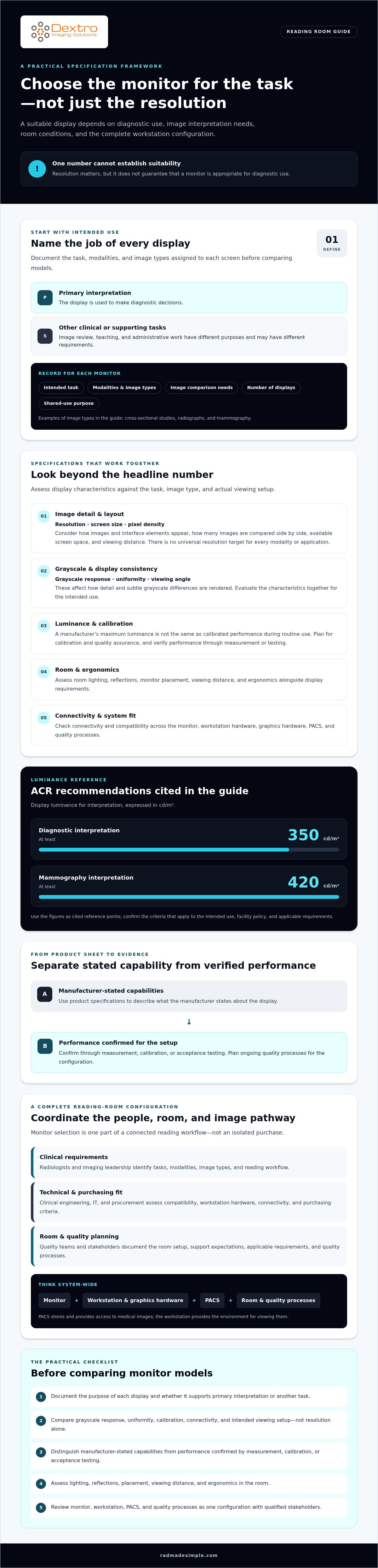
Luminance affects perceived brightness, but a manufacturer’s maximum luminance isn’t the same as calibrated performance during routine use. As a reference point, the ACR recommends a display luminance of at least 350 cd/m² for diagnostic interpretation and 420 cd/m² for mammography interpretation. Consider these figures alongside the applicable protocol and use case, rather than treating them as universal purchasing rules. Consult the ACR-AAPM-SIIM Technical Standard, and verify model documentation and local requirements.
Grayscale response describes how consistently a display presents changes from dark to light. DICOM PS3.14 defines the Grayscale Standard Display Function (GSDF), a framework for consistent grayscale presentation. A claim of DICOM or GSDF support alone doesn’t prove that a display is calibrated or performing as required. Check how calibration is performed and how the result will be verified.
Bit depth describes how many tonal values a display system can represent. A higher stated bit depth may support finer grayscale gradation, but the signal path, display processing, calibration, and image application all affect what reaches the viewer. Confirm the supported configuration rather than relying on one specification in isolation.
- Uniformity: Assess whether brightness and grayscale appearance remain consistent across the usable screen area.
- Contrast and viewing angle: Check whether relevant detail is visible from the reader’s normal position, including across the intended multi-monitor layout.
- Ambient reflections: Evaluate room lighting and screen placement, since reflections can interfere with image viewing.
Teams assessing diagnostic monitors and reading stations can use these factors to frame model-specific questions before procurement.
How to compare radiology reading room monitors without relying on one number
Start every comparison with the same clinical task. Build a radiology reading room monitor specifications matrix that separates manufacturer-stated information from performance your team can confirm through measurement, calibration, or acceptance testing. This prevents a high resolution or marketing label from overshadowing configuration, workflow, and quality requirements.
Compare displays against the same use case
Create separate profiles if primary interpretation and secondary review have different requirements. For each profile, record the modality, image types, number of images typically displayed, reading conditions, and required integrations. Mark each criterion as required, preferred, or subject to clinical and technical review. Apply the same profile to each candidate before comparing results.
Comparison matrix: Record the evidence and status for each display. Treat these prompts as fields to complete, not as assumed product capabilities.
- Intended task: Primary interpretation, secondary review, teaching, or another defined use.
- Resolution: Manufacturer-stated resolution, assessed against the modality, application, and image layout.
- Grayscale support: Supported presentation and relevant documentation for the proposed configuration.
- Luminance: Stated maximum, calibrated operating target, and measured result where available.
- Uniformity: Manufacturer claim and any measured or acceptance-tested performance.
- Calibration: Calibration method, available records, and planned verification process.
- Connectivity: Confirmed compatibility with graphics hardware, workstation, and imaging software.
- Service: Warranty terms, support arrangements, and maintenance expectations to verify.
Evaluate evidence, calibration, and lifecycle support
Ask vendors for current, model-specific technical documentation and details about calibration, warranty, and service. Label each entry by evidence type: manufacturer-stated, independently measured, calibrated, or acceptance-tested. A specification sheet describes claimed capability, but it doesn’t establish how a complete setup performs after installation. Define who will test the display, what records will be retained, and how performance will be checked over time. For related process planning, review the 2026 radiology equipment compliance checklist.
Compare the complete configuration, including graphics hardware, viewing setup, software compatibility, and quality procedures. Then apply weighted requirements. Treat required criteria as pass-or-review gates, and give greater importance to preferred criteria that directly support the intended task. Don’t let price or marketing labels decide the outcome on their own. This approach makes trade-offs visible and gives clinical, IT, procurement, and quality teams a shared basis for review.
How to turn monitor specifications into a reading-room procurement checklist
Turn agreed requirements into a procurement process with clear owners and decision points. This helps teams assess radiology reading room monitor specifications in the environment where the displays will be used, rather than selecting from a datasheet alone.
Document the room and workflow
- Define clinical use. List reading tasks, modalities, image types, user groups, and whether each display supports primary interpretation, review, teaching, or mixed work.
- Map the workstation setup. Record the planned monitor arrangement, workstation layout, connected systems, and PACS and software compatibility needs. Include graphics hardware and any required integrations in the review.
- Assess room conditions. Note ambient lighting, reflections from windows or fixtures, typical viewing distance, monitor placement, and screen position relative to the reader. Coordinate these choices with workstation ergonomics.
- Confirm applicable requirements. Ask qualified clinical, technical, and quality stakeholders to verify organizational policies and jurisdiction-specific standards or regulations. Tie claims to the relevant jurisdiction and current guidance.
Make the checklist specific enough to compare proposed configurations. For example, record whether a screen faces a window, whether the planned layout places displays at different angles, and whether room lighting can be controlled during interpretation. These details can affect the evaluation even when two candidate displays appear similar on paper.
Validate the proposed configuration before rollout
- Review evidence. Gather model-specific documentation and confirm compatibility with the intended workstation, graphics hardware, PACS, and software. Identify which claims are manufacturer-stated and which require testing.
- Evaluate a representative setup. Have clinical, IT, and quality stakeholders assess the proposed display arrangement under realistic room and workflow conditions. Record issues and resolve them before broader deployment.
- Set acceptance and follow-up responsibilities. Agree in advance on acceptance criteria, calibration steps, quality-assurance checks, documentation, and who handles exceptions or escalation. Confirm applicable protocols with the responsible experts.
Acceptance testing should assess the installed display, workstation, software, and room together, not just the monitor datasheet. This gives the team evidence about the configuration it will actually use and a defined process for addressing gaps.
For teams evaluating diagnostic monitors alongside reading stations and PACS workflow, review monitor and workstation options as part of the complete room plan.
Integrate monitor specifications with the workstation and PACS
A diagnostic display is one part of a reading-station configuration. Its performance in practice depends on the workstation, graphics hardware, PACS, software, room setup, and quality processes working together. Review radiology reading room monitor specifications against the complete configuration, rather than treating them as a standalone purchase list.
Check the complete reading-station configuration
Before selecting components, confirm how the monitor will connect to the workstation and whether the graphics hardware supports the planned display arrangement and image workflow. Check that the operating environment and PACS can support the intended use, including how images are opened, compared, and displayed. Verify each point against documentation for the specific models and software versions under consideration. Confirm compatibility for the proposed configuration instead of assuming it from a product category or a single component’s capabilities.
Assign ownership for the work that continues after setup. Document who manages calibration and quality checks, who coordinates maintenance and software updates, and where technical issues should be escalated. Clarify responsibilities across clinical, IT, quality, and vendor teams before deployment. This makes it easier to track configuration changes, investigate display issues, and determine whether a system still matches the approved setup.
Move from requirements to a supported solution
Bring the clinical-use definition and technical checklist together for review. Radiology and imaging leadership can confirm the intended workflow, IT can assess system and software fit, procurement can compare documented requirements, and quality stakeholders can confirm the planned verification process. Ask the vendor to validate model-specific specifications, supported configurations, and relevant integration details before purchase. A general compatibility statement doesn’t prove that a particular setup meets clinical or organizational requirements.
Dextro Imaging Solutions offers advanced diagnostic monitors, Dextro Reading Stations, and PACS solutions for teams to assess against their documented needs. Its offerings also include installation, maintenance, and software-integration support. Ask specific questions: Which monitor and workstation configuration fits the intended tasks? How will it connect to the existing PACS and software environment? Who will verify and maintain the setup? Confirm the answers for the exact models and configuration under review.
Once your clinical and technical requirements are defined, bring them into a focused configuration discussion. Discuss a radiology reading-room configuration with your requirements in hand.
Build a specification your whole team can stand behind
Strong radiology reading room monitor specifications start with the clinical task, then account for display performance, room conditions, and quality processes. Resolution is only one part of the decision. Comparing calibrated performance and the complete workstation and PACS configuration helps teams make choices that fit their workflows.
Bring radiology, IT, procurement, and quality stakeholders together to document requirements, confirm compatibility, and agree on how the installed setup will be evaluated and maintained. Dextro Imaging Solutions offers Jusha diagnostic monitors, Dextro Reading Stations, and PACS solutions, with installation, maintenance, and software-integration support. Verify current model details and supported configurations against your needs.
Once your clinical and technical requirements are clear, discuss a radiology reading-room configuration with Dextro Imaging Solutions. A well-defined plan gives your team a practical starting point for a display environment built around the work it needs to support.
Frequently Asked Questions
What specifications matter most for a radiology reading room monitor?
The intended diagnostic task determines which specifications matter most. Compare resolution, screen size, grayscale response, luminance, uniformity, contrast, calibration capabilities, and connectivity against the modalities and images the display will serve. Also assess viewing distance, room lighting, reflections, and workstation compatibility. Radiology reading room monitor specifications should distinguish required criteria from preferences and state how performance will be verified after installation.
Is resolution alone enough to choose a diagnostic radiology monitor?
No. Resolution indicates how many pixels a display has, but it doesn’t establish grayscale presentation, luminance, uniformity, calibration, or suitability for a particular diagnostic task. Screen size, pixel density, image layout, and viewing distance also affect how images appear. Compare candidates using the same intended-use profile, then verify model documentation and assess the complete installed setup. Higher resolution can’t compensate for a mismatch in other critical requirements.
How does DICOM GSDF relate to radiology monitor calibration?
DICOM Part 14 defines the Grayscale Standard Display Function, or GSDF, which describes a standardized relationship between grayscale values and perceived luminance steps. Calibration adjusts a display’s output toward that function so grayscale images can be presented consistently. A GSDF or DICOM claim alone doesn’t confirm that a specific monitor is calibrated or performing as required. Check the model documentation, calibration process, measurement results, and applicable quality protocol.
Can one monitor configuration support every imaging modality?
Not automatically. Different modalities, image types, and clinical tasks can place different demands on resolution, grayscale presentation, luminance, screen layout, and quality checks. A configuration may support more than one use, but the team should verify that the monitor, workstation, software, and local policy cover each intended task. Document the modalities and workflows first, then confirm the exact configuration with qualified clinical and technical stakeholders.
What is the difference between a diagnostic monitor and a review monitor?
A diagnostic monitor is used for primary interpretation, where the reader makes diagnostic decisions. A review monitor supports secondary viewing, teaching, or other clinical tasks that may have different requirements. The distinction depends on intended use and applicable organizational policy, not simply a product label. Specify how each display will be used, then confirm which performance, calibration, and quality-assurance requirements apply to that role.
How often should radiology reading-room monitors be calibrated?
Follow the facility’s quality-assurance protocol, applicable guidance, and the monitor manufacturer’s instructions rather than relying on a universal interval. The responsible team should define calibration and verification timing, keep records, and identify who reviews results. Also confirm whether checks are needed after maintenance, repairs, configuration changes, or a failed performance test. A documented schedule helps the department respond when display output no longer meets its established criteria.
What should a radiology department test before accepting a new monitor?
Test the monitor in its intended workstation configuration, not in isolation. Confirm connectivity, software and PACS workflow, calibration, grayscale performance, luminance, and uniformity against the department’s acceptance criteria. Evaluate the planned display arrangement under actual room lighting and viewing conditions, checking for reflections and usability in typical image layouts. Clinical, IT, and quality stakeholders should document results, outstanding issues, maintenance responsibilities, and the process for technical escalation before rollout.