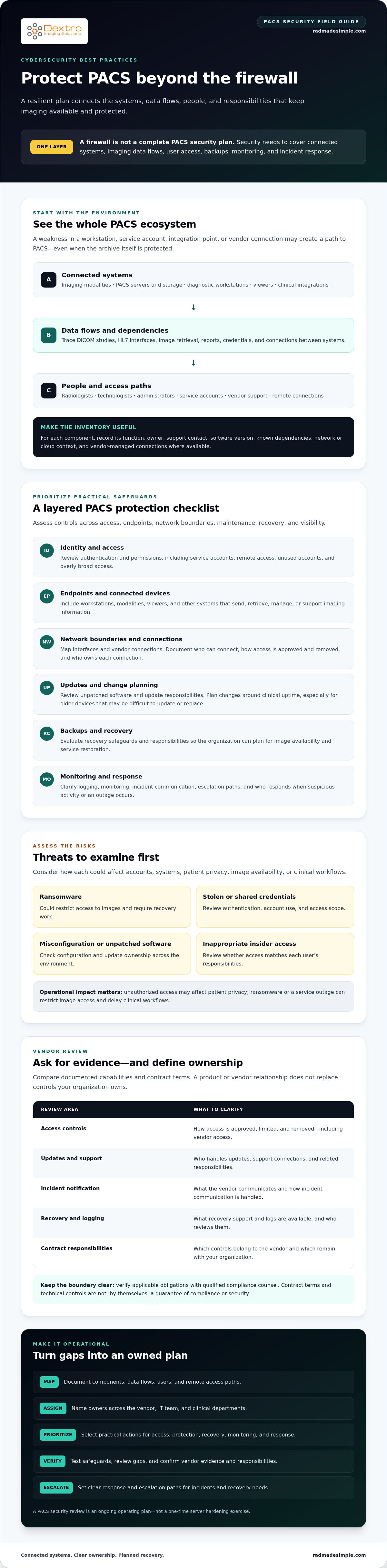
A firewall alone can’t secure a PACS. The cybersecurity best practices for PACS that matter most cover connected systems, imaging data flows, user access, backups, monitoring, and incident response. Protecting a PACS takes more than checking whether one technical safeguard is in place.
When responsibility is split between your PACS vendor, IT team, and clinical departments, it can be hard to know who owns each risk. And when ransomware or unauthorized access threatens imaging workflows, general security advice isn’t enough. Your organization needs clear priorities and controls it can put into practice.
This 2026 checklist will help you identify and prioritize risks across PACS-connected systems and data, then evaluate safeguards for access, recovery, monitoring, and response. It also includes questions to ask vendors before you purchase or renew a solution. Use it to assess technical controls and contractual responsibilities, without treating either as a guarantee of compliance or security.
Key Takeaways
- Map PACS components, DICOM and HL7 data flows, user groups, and remote access paths to identify where risks can enter.
- Use cybersecurity best practices for PACS to prioritize practical safeguards for identity, endpoints, network boundaries, updates, backups, and monitoring.
- Compare vendors using documented evidence and contract terms covering access controls, updates, incident notification, recovery, logging, and support.
- Separate vendor responsibilities from controls your organization owns, and verify applicable obligations with qualified compliance counsel.
- Turn identified gaps into an operating plan with assigned owners, prioritized actions, testing, review, and clear escalation paths.
Why PACS cybersecurity requires more than protecting the network perimeter
A firewall is one layer of protection, not a complete PACS security plan. Even when leveraging advanced traffic inspection and application control from network security specialists like Lionic, cybersecurity best practices for PACS address imaging data, systems, access, and availability throughout their lifecycle, from implementation and integration through routine operation, updates, and recovery. That means looking beyond the archive server to the devices and people that send, view, manage, or support imaging information.
A Picture Archiving and Communication System (PACS) commonly connects imaging modalities, archives, diagnostic viewers, and reporting systems through clinical networks and interfaces. A weakness in a workstation, service account, integration point, or vendor connection can create a path to PACS even when the archive itself is protected. Security planning should account for how these components interact, not just whether one application is configured securely.
What makes PACS a distinct security environment?
PACS supports workflows that move images from acquisition to storage and clinical review. DICOM communications link imaging equipment and systems, while other interfaces may connect PACS with clinical applications. Older devices can be difficult to update or replace, and changes need to be planned around clinical uptime. PACS protection therefore calls for coordination between technical safeguards and workflow needs, not a one-time server hardening exercise.
The consequences of an incident can extend beyond exposed information. Unauthorized access may affect patient privacy. Ransomware or a service outage can restrict access to images, require recovery work, and delay clinical workflows. These are risks to assess, not inevitable outcomes. Safeguards can reduce exposure and improve resilience, but no control guarantees that a breach will be prevented or that an organization meets every applicable compliance obligation.
Which threats should imaging teams assess first?
Start with threats that could compromise accounts, systems, or image availability: ransomware, stolen or shared credentials, misconfiguration, unpatched software, and inappropriate insider access. Keeping up with emerging threats through specialized monitoring resources like Radar Cyber & IA can help security teams anticipate new risks before they impact clinical networks. Review how users authenticate and what they can access, including service accounts and remote connections. Unused accounts and overly broad permissions can create avoidable exposure, even when perimeter protections are in place.
Third-party access also deserves attention. Vendor support connections and integrated systems may extend the PACS environment beyond your organization’s direct control. Document who can connect, how access is approved and removed, and which party handles updates, logging, and incident communication. Confirm each vendor’s current capabilities and contractual responsibilities. A practical PACS security review assigns owners to these risks and considers their operational impact, rather than assuming a product or perimeter control resolves them.
Map PACS data flows, connected systems, and access paths before choosing controls
Before selecting safeguards, establish what they need to protect. Inventory PACS components and trace how images, reports, and access credentials move between them. This helps your team identify where data crosses trust boundaries, which connections have an owner, and where existing controls need closer review.
Include imaging modalities, PACS servers and storage, diagnostic workstations, viewers, and integrations with clinical systems. For each asset, record its owner, support contact, software version, and known dependencies where available. Note whether it sits on a hospital network, connects to a cloud service, or relies on a vendor-managed connection. A PACS workstation setup guide can provide useful context when documenting endpoint configuration.
Build a PACS asset and dependency inventory
Make the inventory practical to maintain, not just a list of device names. Record each component’s function, owner, and upstream or downstream dependencies. For example, identify which modalities send DICOM studies to the archive, which viewers retrieve them, and which clinical systems exchange patient or report information through HL7 interfaces. The NIST Cybersecurity Practice Guide for PACS offers a risk-based example for examining the wider PACS ecosystem.
Trace users, interfaces, and remote connections
Map how radiologists, technologists, administrators, service accounts, and vendors authenticate to and access PACS-connected systems. Record remote support paths and note where images, reports, or credentials cross between organizational networks, endpoints, cloud services, and vendor environments. If a connection lacks clear documentation, flag it for the relevant owner to review. Confirm its purpose and controls before deciding whether it is safe or unsafe.
Turn your findings into a simple data-flow diagram. Use boxes for systems and user groups, arrows for data or access paths, and boundary lines for network or organizational transitions. Label each arrow with what moves, such as DICOM images, HL7 messages, or remote support access. Add the responsible owner beside each component or connection. This gives IT, clinical teams, and vendors a shared reference for the next risk review.
Once the map is complete, use it to prioritize the cybersecurity best practices for PACS that fit your environment. During implementation or integration planning, discuss system dependencies and support responsibilities with a PACS provider. This can clarify which safeguards your organization must manage and which details need vendor confirmation. You can explore PACS planning options as part of that assessment.
PACS cybersecurity checklist: prioritize access, protection, and recovery controls
Use your system map to select safeguards that fit your PACS environment. The cybersecurity best practices for PACS below cover account access, connected endpoints, network boundaries, maintenance, data protection, and recovery. Prioritize gaps based on their potential impact on imaging data and clinical workflows, then assign an owner and a way to verify each control.
The NIST SP 1800-24: Securing PACS guide provides a practical reference for assessing risks across a PACS ecosystem. Use it to inform your review, not as a substitute for evaluating your architecture, vendor responsibilities, and organizational requirements.
Control PACS access and secure connected endpoints
Make access specific to each person and task. Individual accounts support accountability, while role-based permissions limit access to what users need. Remove access promptly when roles change, and review active accounts and permissions on a defined schedule. Assess multifactor authentication (MFA) for administrators, remote users, and vendor connections, especially when those accounts can reach sensitive systems.
- Identity: Review accounts, permissions, service accounts, and access removal processes.
- Endpoints: Coordinate protective software and patch testing with clinical teams before changes that could affect imaging workflows.
- Networks: Assess whether PACS components and connected devices are appropriately separated, with only necessary communications allowed.
- Maintenance: Track updates and vulnerabilities, then plan testing and deployment with system owners and vendors.
Protect imaging data and prepare recoverable backups
Assess encryption in transit and at rest against the system architecture and organizational requirements. Document exceptions, why they exist, and any compensating safeguards. Set appropriate logging and retention practices so teams can investigate activity while managing records according to operational and compliance needs.
- Protect backups from compromised production accounts, using isolation or other safeguards suited to the environment.
- Test restoration of PACS data and services, not just whether backup files exist.
- Record test results, recovery owners, dependencies, and any steps that rely on vendor support.
- Monitor relevant systems and define who reviews alerts and escalates suspected incidents.
A resilient PACS security program prevents what it can, detects suspicious activity, responds through clear ownership, and recovers by testing that data and services can be restored. Use this checklist as a working control register, and confirm current product capabilities and responsibilities directly with each vendor. For PACS implementation and integration planning, review PACS options and support considerations alongside your security requirements.
How to compare PACS security practices, vendors, and compliance evidence
Compare vendors against the same criteria and deployment needs. For each item, distinguish what the vendor says, what current documentation demonstrates, what the contract commits each party to do, and what your organization must manage. A security feature is a capability. Deployment-specific evidence helps show whether it is configured and operating as intended.
| Area | Questions to ask | Evidence to review |
|---|---|---|
| Access controls | How are user roles, administrator access, MFA, and vendor accounts managed? | Access-control documentation and a clear responsibility split |
| Updates | How are vulnerabilities reported, prioritized, remediated, and communicated? | Update and vulnerability-management process for the proposed deployment |
| Incident notification | Who notifies whom, through which channels, and under what contract terms? | Incident-response procedures and relevant contractual commitments |
| Backups | Who manages backups, protects them, and tests restoration? | Backup responsibilities and recovery-test documentation |
| Logging | Which events are recorded, who can review them, and how is retention handled? | Logging capabilities and the organization’s retention requirements |
| Support | How is remote support approved, limited, and removed? | Support procedures, access paths, and responsibility assignments |
Questions to ask PACS vendors during due diligence
Request current documentation for the specific product version, hosting model, interfaces, and support arrangement under consideration. Ask how the vendor handles security vulnerabilities, from discovery through customer communication, and clarify responsibilities for identity management, backups, incident response, and subcontractors. Have technical, procurement, and security reviewers assess the evidence and contract terms together. Treat broad assurances as starting points for verification, not proof.
Assess risk without confusing compliance with security
HIPAA obligations depend on the organization and its relationship to the data and services involved. A PACS product alone doesn’t make an organization compliant. Use the NIST Cybersecurity Framework as a risk-management reference to structure governance and security work, not as a compliance guarantee. Confirm applicable HHS Office for Civil Rights guidance and organizational duties with qualified compliance professionals. For related equipment governance, see the 2026 radiology equipment compliance checklist.
Use these cybersecurity best practices for PACS to compare options based on evidence, accountability, and fit with your environment. For help evaluating PACS options and integration requirements, discuss your PACS needs with Dextro Imaging Solutions.
Turn the PACS security checklist into an operating and recovery plan
A checklist becomes useful when each action has an owner, a priority, and a way to confirm it is working. Turn your PACS findings into a staged plan, then keep it current as systems, workflows, and vendor relationships change. This makes cybersecurity best practices for PACS part of daily operations, not a one-time review.
- Assign owners: Name accountable contacts for PACS components, interfaces, user access, backups, and vendor coordination.
- Assess gaps: Compare current safeguards with the data-flow map, vendor documentation, and operational needs.
- Prioritize risks: Address issues based on potential impact to imaging data, system availability, and clinical workflows.
- Implement and test: Schedule changes with affected teams, then verify controls and recovery steps.
- Review and update: Revisit the plan after changes and track open risks until they have a clear disposition.
Create an incident-response and continuity playbook
Define who makes decisions across IT, security, radiology operations, privacy, and vendor support. Document escalation paths for suspected compromise, PACS service interruption, and incidents that require vendor action. Include incident contacts, evidence-preservation steps, and safe downtime workflows that align with organizational policy. Set clear criteria for restoring PACS services, including who confirms readiness and how clinical teams are informed.
Exercise the plan before an incident occurs. Tabletop scenarios can test how teams coordinate if users can’t access images or a vendor connection is involved. Recovery testing should cover the dependencies that support clinical workflows, not just whether data can be restored. Record gaps, decisions, and assigned follow-up actions after each exercise.
Maintain controls as systems and responsibilities change
Keep the asset inventory, access records, and data-flow diagram aligned with the actual environment. Recheck them after meaningful changes, such as a new interface, workstation deployment, vendor connection, or change in support responsibility. Track restoration-test results, patch exceptions, unresolved risks, and accountable owners in a shared record that teams can review.
Implementation and integration planning is a useful time to clarify system dependencies, support roles, and security responsibilities. Dextro offers PACS software and software integration support to explore, but confirm specific security capabilities and contractual responsibilities directly with the relevant vendor. Explore PACS software and integration options as part of your planning.
Make PACS security a continuous practice
Effective PACS security depends on more than selecting technical controls. Map how imaging systems connect, assign clear ownership across your organization and vendors, and use documented evidence to assess safeguards. Then make access reviews, recovery tests, and incident exercises part of ongoing operations.
The cybersecurity best practices for PACS in this checklist can help your team turn broad recommendations into specific priorities. Keep compliance and security distinct: controls can reduce risk, but they don’t guarantee that a breach won’t occur or establish compliance on their own. Confirm vendor capabilities, responsibilities, and applicable obligations for your environment.
Dextro lists PACS Harmony and aycan PACS among its PACS software offerings, and provides installation, maintenance, and software integration support. Explore these options as you plan implementation and integration, while verifying each solution’s current security details directly with the vendor.
Explore PACS software and integration options to consider how they may fit your imaging environment and planning needs. With clear ownership and a practical review process, your team can make steady progress toward more resilient PACS operations.
Frequently Asked Questions
What are the most important cybersecurity best practices for PACS?
Start by mapping connected systems, data flows, and access paths, then prioritize safeguards for the risks you identify. Use individual accounts, role-based permissions, and multifactor authentication where appropriate. Manage endpoint security, network boundaries, software updates, and monitoring. Protect backups from compromised production access and test recovery of PACS data and services. Assign owners across IT, security, clinical operations, and vendors so each safeguard is maintained and reviewed.
Does HIPAA require a specific PACS cybersecurity product?
No single PACS product automatically makes an organization compliant with HIPAA. An organization’s obligations depend on its role, relationships, and circumstances, while its safeguards must be assessed in context. Evaluate the system, configuration, integrations, and responsibilities shared with vendors. Keep evidence of decisions and controls, and consult qualified compliance professionals about applicable requirements. Treat vendor statements as claims to verify, not as a substitute for your organization’s own compliance assessment.
Can ransomware affect a PACS?
Yes. Ransomware can affect PACS-connected servers, workstations, or other systems and may disrupt access to imaging data or related workflows. The extent of the impact depends on the environment and the incident. Reduce risk by limiting account privileges, protecting connected endpoints, reviewing network access, and maintaining backups that attackers cannot easily reach through compromised production credentials. Test restoration and document recovery dependencies so teams understand how PACS services can be brought back.
How should a healthcare organization secure remote PACS access?
Limit remote access to approved users, systems, and tasks. Require individual accounts and assess multifactor authentication, particularly for administrators, vendor support, and other accounts with elevated access. Document connection methods, approvals, access duration, and who is responsible for monitoring and removal. Review logs for relevant activity and disable accounts or paths that are no longer needed. Confirm the vendor’s remote-support practices and contractual responsibilities before enabling access.
How often should PACS backups and recovery procedures be tested?
Set a testing schedule based on your organization’s risk assessment, recovery needs, operational capacity, and applicable requirements. Don’t rely only on successful backup jobs. Periodically test restoration of PACS data and the services and dependencies needed to use it. Record what was tested, the results, issues, owners, and follow-up actions. Reassess the schedule after meaningful system or workflow changes, and consult qualified compliance professionals about requirements that apply to your organization.
What should we ask a PACS vendor about cybersecurity?
Ask how the vendor reports, prioritizes, remediates, and communicates vulnerabilities. Clarify who manages user access, remote support, updates, backups, logging, incident notification, and recovery. Ask how subcontractors are involved and what documentation applies to your specific deployment, including its version, hosting model, and integrations. Compare vendor statements with written evidence and contract terms, then identify controls your organization must operate. Have appropriate technical, security, and compliance reviewers assess the answers.
Does using cloud PACS automatically make imaging data more secure?
No. Cloud hosting changes where systems operate and may shift some operational responsibilities, but it doesn’t automatically make imaging data more secure. Review how access, encryption, backups, logging, updates, incident response, and recovery are managed in the proposed arrangement. Clarify which controls the provider operates and which remain your organization’s responsibility. Assess the actual architecture, contract terms, and integration paths, then verify vendor claims against deployment-specific documentation and your own security requirements.