The monitor with the most impressive headline specifications may still be the wrong choice for breast imaging. A diagnostic monitor for mammography needs to suit the intended interpretation use, with documented performance, calibration, and quality assurance considered alongside resolution and luminance.
Choosing a display takes more than comparing spec sheets. You need to know whether the exact model is suitable for the intended use, how its performance will be checked and maintained, and whether it fits your imaging systems. This guide explains how to define requirements before requesting quotes and compare options using clinical, technical, and workflow criteria.
You’ll also learn what to confirm about model-specific documentation, validation, integration, and ongoing support before purchase. Dextro Imaging Solutions offers advanced diagnostic displays, but mammography-specific suitability and technical details must be verified for each model. The aim is an evidence-based decision, not a purchase based on headline numbers alone.
Key Takeaways
- Define the monitor’s intended clinical use and imaging environment before comparing models.
- Evaluate a diagnostic monitor for mammography using documented display performance, calibration, and quality-assurance evidence, not headline specifications alone.
- Compare options by compatibility, workflow fit, support responsibilities, and lifecycle planning.
- Use a procurement checklist to verify the exact model, configuration, validation needs, and accountable stakeholders before deployment.
- Ask vendors for model-specific suitability information and confirm integration and support requirements before making a selection.
Why a Diagnostic Monitor for Mammography Requires a Use-Case Check
A diagnostic display used for mammography interpretation is part of the clinical imaging chain. It presents images that a qualified professional evaluates to make clinical decisions. That purpose differs from routine office viewing, education, or administrative review, where the display may not be selected or assessed for diagnostic interpretation. Suitability depends on the intended use and facility configuration, not simply on whether a product is described as “medical-grade.”
As imaging moved from film to digital mammography, displays became a direct part of how image data is presented for review. Buyers should consider image presentation and the reader’s workflow together. A monitor used alongside a particular imaging modality or workstation is not necessarily appropriate for mammography interpretation.
What makes mammography display selection a distinct decision?
Start by clarifying the task. Diagnostic interpretation, non-diagnostic image review, teaching, and administrative viewing are different use cases. Requirements can vary with clinical intent, the monitor and workstation configuration, applicable professional guidance, and facility policy.
Procurement definition: A mammography diagnostic display is a monitor configured for the facility’s intended interpretation workflow, with model-specific documentation and evidence that its performance and quality assurance meet applicable requirements.
Before requesting quotes, ask for evidence tied to the exact model and proposed configuration. Review documentation on image presentation, calibration, quality-assurance processes, and intended use. Confirm applicable current guidance and facility requirements with the responsible clinical and technical stakeholders. A product label or resolution claim alone does not establish suitability.
Can a general diagnostic monitor be used for mammography?
Possibly, but don’t assume it. Verify the specific model, intended use, configuration, and your facility’s requirements before relying on it for interpretation. A specification that supports one radiology workflow may not demonstrate suitability for another. Assess the complete setup, including the display, workstation, image pathway, and how performance will be checked and maintained.
Ask the vendor for model-specific documentation and identify who in your organization will review it. Compare the evidence with current authoritative guidance and local clinical governance. Record the rationale for the decision and any validation steps required before clinical deployment.
- Verify: the exact model’s stated intended use and supporting documentation.
- Confirm: configuration, compatibility, and quality-assurance responsibilities.
- Document: clinical and technical approval before the monitor enters interpretation use.
Which Display Specifications Matter When Evaluating Mammography Monitors?
Compare more than the numbers on a product sheet. For a diagnostic monitor for mammography, distinguish the manufacturer’s stated capabilities from documented performance in the exact proposed configuration, including the workstation and image pathway. Appropriate values depend on intended use and current authoritative guidance, so don’t treat any single specification as a universal pass-or-fail threshold.
Use this table to organize vendor questions. Ask for model-specific documentation and have the appropriate clinical and technical stakeholders assess it against your facility’s requirements. The FDA’s FDA Mammography Quality Standards resource provides information on mammography quality standards. Consult applicable guidance and local governance to determine what applies to your facility.
| Specification | What to compare and verify |
|---|---|
| Resolution | Pixel count describes the detail a display can present. Confirm the model’s native resolution and how the proposed setup presents images used in your workflow. |
| Luminance | Ask for documented luminance capability and the calibrated operating conditions, rather than relying on a maximum figure alone. |
| Grayscale presentation | Check how grayscale output is supported and assessed in the proposed configuration. Request documentation relevant to the image-viewing workflow. |
| Calibration | Confirm the calibration method, what is recorded, and how performance is checked and maintained over time. |
| Quality assurance | Request the applicable procedures, records, and evidence for routine checks, issue escalation, and ongoing oversight. |
How should buyers compare resolution and grayscale performance?
Resolution is the number of pixels available to display image information. Grayscale capability concerns how shades are presented, which can affect the visibility and consistency of image detail. Neither figure establishes suitability by itself. Ask vendors to document both characteristics for the precise model and configuration under review, then assess them against intended use and current guidance. Don’t assume a value used for another modality is automatically sufficient for mammography.
What should calibration and quality assurance include?
Ask how calibration is performed, recorded, checked, and maintained. DICOM Part 14 describes the Grayscale Standard Display Function (GSDF), a framework for consistent grayscale presentation. Confirm whether and how the proposed system addresses applicable DICOM guidance, then verify requirements with authoritative sources and local governance. Assign facility ownership for routine checks, documentation, and escalation when results fall outside established criteria.
Key takeaway: Evaluate the display, configuration, calibration, and quality-assurance evidence as one system. A strong individual specification cannot substitute for documented performance in the workflow you plan to use. If you’re assessing Jusha Diagnostic Monitors, you can discuss monitor options and integration requirements with Dextro Imaging Solutions, while confirming model-specific mammography suitability before purchase.
How to Compare Mammography Monitor Options Without Overlooking Workflow
A monitor can meet a specification on paper and still be a poor fit for the reading environment. Compare each option against the same criteria: intended clinical task, proposed configuration, supporting evidence, calibration approach, compatibility, support, and lifecycle responsibilities. Keep mammography interpretation distinct from digital pathology and other imaging workloads. A display’s suitability for one use does not establish suitability for another.
Use the same questions for each option instead of ranking displays by a single feature. Record the vendor’s answers and the evidence provided for the specific model and setup.
| Comparison area | Questions to ask |
|---|---|
| Intended use and evidence | Is the specific model documented for the intended workflow? What model-level materials support that use? |
| Viewing workflow | How will images be presented, accessed, and reviewed in the proposed workstation configuration? |
| Compatibility | Has the setup been checked against the facility’s existing workstation, imaging systems, and software? |
| Calibration and QA | How are calibration and quality checks handled, recorded, and maintained? Who owns each task? |
| Support and lifecycle | What installation, maintenance, documentation, and escalation responsibilities are included, and which party owns them? |
Which questions reveal whether a monitor fits the reading workflow?
Map the proposed setup to the facility’s documented image-review process. Confirm workstation compatibility, how readers access and compare images, and whether the display configuration supports the intended use. In a multi-modality environment, assess each workload separately. Mammography interpretation, digital pathology, and other diagnostic tasks should not be treated as interchangeable simply because they share a reading room or workstation.
When reviewing Jusha medical monitors, use the vendor’s model-specific materials to guide your questions. Verify each relevant claim against the exact model documentation. General product information can help frame a discussion, but it does not replace configuration-specific review.
How should procurement teams weigh support and lifecycle factors?
Clarify responsibilities before purchase. Ask who handles installation, maintenance, calibration support, quality records, and service escalation. Define the respective roles of the vendor, system integrator, and clinical engineering team, including who responds when a check identifies a problem. Put these responsibilities in writing to reduce the risk of gaps after deployment.
Apply the same discipline to wider procurement controls. A radiology equipment compliance checklist can help teams organize approvals and responsibilities; use the version relevant to your organization and confirm its requirements with internal stakeholders. Dextro sells Jusha Diagnostic Monitors and supports installation, maintenance, and software integration. Confirm model-specific mammography suitability, compatibility, and the precise scope of support before selecting a monitor.
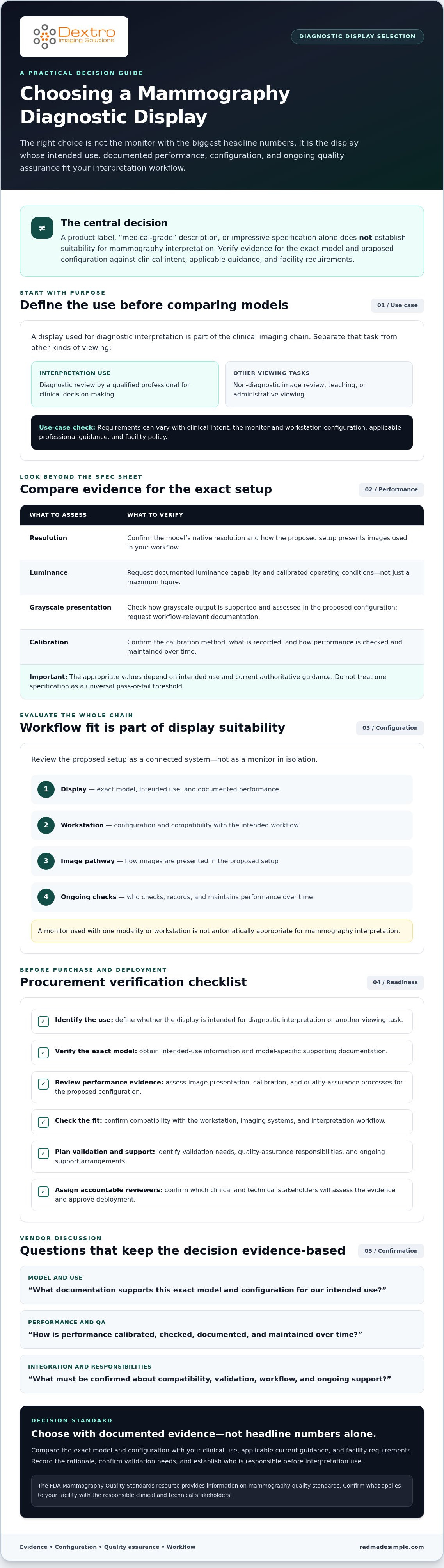
A Mammography Monitor Buying Checklist for Validation and Deployment
A structured procurement sequence helps your team move from clinical need to a documented deployment decision. For a diagnostic monitor for mammography, keep vendor evidence separate from facility validation. The vendor provides model and configuration documentation; your organization determines whether the complete setup meets its requirements for clinical use.
What should a buyer confirm before requesting a quote?
Prepare the use case and system details first. This gives vendors a clear basis for proposing a configuration and makes their responses easier to compare.
- Define intended use. Record the clinical task, users, and applicable facility requirements. Distinguish interpretation from non-diagnostic review.
- Document the environment. Identify the existing workstation, image sources, relevant software, and any compatibility constraints.
- Request model-specific evidence. Ask for technical documentation tied to the exact monitor model and proposed configuration, including intended-use information, performance details, calibration approach, and quality-assurance materials.
- Confirm system compatibility. Have the relevant technical stakeholders review how the proposed setup will connect with existing systems and support the documented workflow.
- Clarify responsibilities in writing. Confirm the scope of installation, maintenance options, integration support, documentation, and service contacts. Identify which responsibilities sit with the vendor, integrator, and facility.
Keep the responses with your procurement records. If the proposal changes, such as a different monitor configuration or workstation, request updated documentation and review the change before approval.
What should happen after installation?
Installation does not replace facility review. Assign qualified personnel to follow the organization’s acceptance and quality-assurance procedures before the monitor is used for its intended clinical task. Verify the installed configuration against the approved proposal, and document calibration status, test results, and any unresolved issues. Record how each open issue is addressed before treating it as closed.
- Check the installed setup against the documented model, configuration, and compatibility requirements.
- Complete facility acceptance procedures and retain the results with deployment records.
- Assign ongoing ownership for routine checks, documentation, and escalation if performance concerns arise.
- Set a review schedule based on applicable current guidance and facility policy. Verify the schedule and procedures with responsible stakeholders.
Checklist summary: Vendor documentation describes the proposed equipment and configuration; facility validation determines whether the installed system meets local clinical and quality requirements. Record both, along with the people accountable for review and ongoing checks.
To discuss monitor options and system integration support, contact Dextro Imaging Solutions and confirm model-specific suitability and deployment responsibilities before purchase.
Selecting a Mammography Monitor Vendor and Planning Your Next Step
A useful vendor evaluation connects documented product evidence to your facility’s actual workflow. Use a consistent scorecard so proposals can be compared on more than headline specifications. For a diagnostic monitor for mammography, request evidence for the exact model and intended use, then verify technical, clinical, and regulatory claims with the vendor and relevant authorities.
What should a vendor demonstrate before you select a monitor?
Ask for model-specific documentation that addresses the intended mammography workflow and proposed configuration. Then establish what happens after delivery: who handles installation and integration, what maintenance options are available, how technical issues are escalated, and which party maintains relevant records. Get the scope and responsibilities in writing. A broad claim about a product category is not a substitute for evidence tied to the specific model.
- Suitability evidence: Does documentation support the exact model’s proposed use?
- Technical documentation: Are specifications, calibration information, quality-assurance features, and applicable records available for review?
- Integration: Has compatibility with the facility’s workstation, software, and image pathway been addressed?
- Support: Are installation, maintenance, and escalation responsibilities clearly defined?
- Lifecycle ownership: Is it clear who manages routine checks, documentation, and follow-up?
How can Dextro support the evaluation process?
Dextro Imaging Solutions sells Jusha Diagnostic Monitors and supports installation, maintenance, and software integration. The available product information does not identify a specific Jusha model as suitable for mammography interpretation. Treat the monitor offering as a starting point for a model-specific discussion, not confirmation of clinical suitability. Ask which models are available and request documentation for the configuration you’re considering.
Before contacting a vendor, gather your intended-use requirements, system details, and facility validation questions. That preparation helps focus the discussion on compatibility and the support scope your team needs. When reviewing diagnostic radiology monitor pricing and product information, assess any details against your requirements and current model documentation.
Once your criteria are defined, discuss monitor options and integration requirements with Dextro. Confirm model-level evidence, configuration, and support responsibilities with the vendor, then have the appropriate facility stakeholders review the proposed setup before purchase.
Make Your Next Monitor Decision With Confidence
The right diagnostic monitor for mammography is selected through documented clinical suitability, not a product label or specification in isolation. Define the intended workflow, compare model-specific evidence and system compatibility, and plan how your facility will validate and maintain the installed configuration.
Keep vendor documentation distinct from your organization’s review and approval. Confirm the exact model, configuration, technical records, and support responsibilities before purchase. These checks help your team make a decision grounded in its clinical needs and imaging environment.
Dextro sells Jusha Diagnostic Monitors and provides installation, maintenance, and software integration support. Mammography suitability depends on the specific model and configuration, so verify those details directly before proceeding. Discuss your diagnostic monitor requirements with Dextro and clarify which options, documentation, and support align with your workflow.
With clear requirements and the right stakeholders involved, you can move forward with greater confidence.
Frequently Asked Questions
Can any diagnostic monitor be used for mammography?
No, a general diagnostic label alone does not establish suitability for mammography interpretation. Verify the exact model, its configuration with the workstation and image pathway, and the manufacturer’s stated intended use. Compare that evidence with your clinical workflow and facility requirements. Before clinical deployment, have qualified stakeholders review manufacturer documentation and applicable current professional guidance. Record any required validation steps and confirm they’re completed before the display is used diagnostically.
What resolution should a mammography diagnostic monitor have?
There isn’t one resolution value that’s universally sufficient for every mammography workflow. The appropriate choice depends on intended use, image workflow, the complete system configuration, and applicable guidance. Ask the vendor for model-specific documentation and confirm how the proposed monitor works with the workstation and image pathway. Your facility’s clinical and technical stakeholders should assess whether the complete system meets its requirements, rather than relying on the panel’s resolution alone.
Does a mammography monitor need DICOM calibration?
DICOM GSDF is relevant context for consistent grayscale display, but confirm the requirements that apply to your specific use case and facility. Ask how calibration is performed, what measurement method is used, and how calibration status and results are recorded. Also establish who performs and reviews ongoing checks. The vendor can explain the proposed process, while qualified facility personnel should confirm it aligns with applicable guidance and local quality procedures before clinical use.
How often should a diagnostic monitor for mammography be calibrated?
There’s no universal calibration interval that applies to every diagnostic monitor for mammography. Frequency depends on applicable guidance, manufacturer instructions, and facility policy. Before clinical service, document who is responsible for calibration and quality checks, how often they occur under your requirements, and how results are retained. Define escalation steps for failed or overdue checks as well. Confirm the schedule with the vendor and qualified facility stakeholders, and update it if requirements or configuration change.
Can a consumer monitor replace a mammography diagnostic monitor?
Don’t assume a consumer display is suitable for diagnostic mammography interpretation. Its documented performance, calibration approach, stated intended use, and quality-assurance support may differ from what your clinical workflow and facility require. Evaluate the exact model and proposed setup, and request evidence specific to that use. Have qualified stakeholders assess the documentation against applicable guidance before making a clinical decision. High resolution or an attractive image alone doesn’t demonstrate diagnostic suitability.
What should I ask a vendor before buying a mammography monitor?
Request intended-use documentation and model-specific performance information for the proposed configuration. Ask how calibration and quality assurance are handled, whether the monitor is compatible with your workstation and imaging systems, and what installation and support responsibilities are included. Document the vendor’s answers, including who handles maintenance and issue escalation. Then have qualified clinical and technical stakeholders confirm the evidence meets your facility’s requirements. Don’t select a monitor based on resolution or marketing claims alone.
Can the same monitor be used for mammography and digital pathology?
Possibly, but suitability for one imaging workflow doesn’t establish suitability for the other. Mammography and digital pathology are distinct clinical uses, so assess the exact monitor model and configuration separately for each intended use. Confirm how each display setup fits its workflow and applicable guidance, and document the facility’s review. This guide focuses on mammography monitor selection; digital-pathology-specific requirements need their own current professional and facility review before a shared display is considered.