

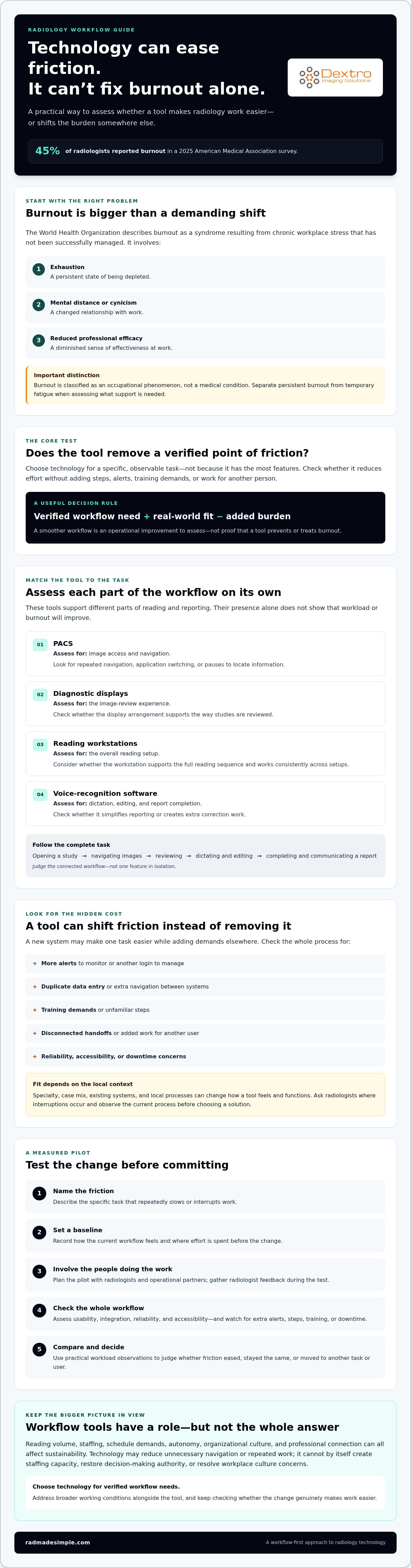
Radiology burnout remains a serious concern: a 2025 American Medical Association survey found that 45% of radiologists reported burnout. For teams exploring avoiding radiologist burnout with technology, the key question isn’t which tool has the most features. It’s whether the tool reduces a specific, observable source of workflow friction without creating more work elsewhere.
Heavy reading and reporting workloads can be difficult to sustain. New technology may add alerts, extra steps, or training demands instead of easing the day. A tool’s value depends on how it fits into existing workflows and whether it reduces effort without shifting the burden to another task or user.
This guide explains where technology may help, what it can’t solve, and how to assess changes before committing. You’ll learn how to identify friction points, evaluate usability and integration, and track practical workload measures.
We’ll look at PACS, reading workstations, diagnostic monitors, and voice-recognition software as options to assess, not guaranteed burnout treatments. You’ll also find a cautious implementation approach that includes radiologist feedback and checks whether a change is genuinely making work easier.
Key Takeaways
- Separate persistent burnout from temporary fatigue, then consider how workload, staffing, autonomy, and workplace culture interact.
- For avoiding radiologist burnout with technology, match each tool to a specific task and assess whether it fits the way your team works.
- Look beyond features: check usability, integration, reliability, accessibility, and the added demands of alerts, training, and downtime.
- Plan a measured pilot with radiologists and operational partners. Set a baseline to judge whether the change eases friction or creates more work.
- Choose technology for verified workflow needs while addressing the broader working conditions that affect sustainability.
Why Radiologist Burnout Needs More Than a Technology Fix
Burnout is more than a demanding shift or a short period of fatigue. The World Health Organization defines it as “a syndrome conceptualized as resulting from chronic workplace stress that has not been successfully managed,” involving exhaustion, mental distance or cynicism about work, and reduced professional efficacy. It is classified as an occupational phenomenon, not a medical condition. The definition is outlined in the WHO’s burn-out guidance and summarized in this overview of occupational burnout.
In radiology, workflow is only one part of the picture. Reading volume, staffing levels, schedule demands, autonomy, organizational culture, and opportunities for professional connection can interact. A smoother interface may remove unnecessary navigation, but it can’t create staffing capacity, restore decision-making authority, or resolve a workplace culture problem. Avoiding radiologist burnout with technology starts by identifying which pressures a tool can reasonably address and which require organizational action.
Which pressures in radiology workflows can technology address?
Technology is most relevant when a process repeatedly interrupts or slows a defined task. Examples include switching between fragmented interfaces, re-entering information, navigating studies, or dictating and correcting reports. PACS, reading workstations, diagnostic monitors, and voice-recognition software are workflow tools teams can assess for fit. Their presence alone doesn’t show that workload or burnout will improve.
The American Medical Association’s 2025 survey identified bureaucratic tasks and long work hours among physicians’ reported contributors to burnout. These findings describe reported associations, not proof that a particular system causes burnout or that a new tool will prevent it. Separate fixable process friction from persistent workload, staffing, or autonomy concerns that need broader operational attention.
Why new tools can also increase cognitive load
A new system may add alerts to monitor, another login, duplicate data entry, unfamiliar steps, or training time. Even a feature designed to streamline one task can create extra work elsewhere if it doesn’t connect well with the rest of the workflow. Evaluate the full sequence, from opening a study through completing and communicating a report, rather than judging a tool by a single feature.
Experiences will differ across radiologists and departments. Specialty, case mix, existing systems, and local processes all shape whether a change feels simpler or more demanding. Ask users where interruptions occur, observe the current process, and check whether a proposed tool removes steps without introducing new ones. That evidence is a more dependable starting point than assuming technology will solve a human and organizational challenge.
How Radiology Technology Can Reduce Workflow Friction
Technology is most useful when it supports a clear task in the reading or reporting process. PACS supports image access and navigation; diagnostic displays provide the viewing surface; reading workstations bring the reading environment together; and speech recognition supports report dictation. These are distinct components, so assess each against the task it is meant to support rather than assuming that adding tools will improve the whole workflow.
A practical evaluation rule: assess PACS against image access and navigation, displays against image review, workstations against the reading setup, and speech recognition against dictation, editing, and report completion.
For teams considering avoiding radiologist burnout with technology, the useful question is whether a tool removes a verified point of friction without adding work elsewhere. That’s an operational test, not evidence that a particular tool reduces burnout. Integration and usability matter: a function that works in isolation may still complicate the task if it requires extra navigation, duplicate entry, or a disconnected handoff.
PACS, workstations, and displays: reduce task switching
Map the image-review sequence from opening a study to moving between relevant images and completing the review. Note where radiologists switch applications, repeat navigation, or pause to locate information. Then assess whether the PACS interface, workstation configuration, and display arrangement support that sequence in practice. Consistency across reading setups is an operational consideration, not a burnout treatment or a substitute for addressing workload.
For practical considerations when reviewing a reading setup, see this radiology reading workstation guide.
Voice recognition: assess reporting workflow, not just speed
Dictation speed alone doesn’t show whether speech recognition fits the reporting task. Observe how much editing is needed, how recognition errors are corrected, and whether the correction process interrupts report completion. Ask radiologists about their preferences and evaluate the complete sequence, including review and finalization. Don’t assume time savings or improved accuracy without evidence for the specific system and workflow being assessed.
This voice recognition guide for radiologists offers more context for evaluating reporting tools. Teams can also review radiology workflow resources as they define what to assess.
How to Judge Whether Technology Helps or Adds Another Burden
A promising feature isn’t enough to justify a workflow change. Evaluate whether the tool fits a defined task, integrates with existing systems, feels usable to radiologists, works reliably, supports the ways people need to access it, and has clear support and escalation processes. For avoiding radiologist burnout with technology, judge the tool by local workflow evidence, not by feature count or vendor claims alone.
| Potential benefit to assess | Burden to monitor |
|---|---|
| Fewer steps to complete a defined task | Extra logins, duplicate data entry, or new handoffs |
| More consistent access to workflow tools | Downtime, access barriers, or workarounds |
| Clearer prioritization or communication | Alert volume, interruptions, or missed notifications |
| Smoother adoption across the team | Training time, inconsistent use, or additional support requests |
What should a radiology technology evaluation measure?
Start with a baseline before the pilot. Choose measures that reflect the task under review, such as steps to complete it, interruptions, rework, or user feedback. Define how each measure will be collected, over what period, and who will review the results. These indicators can show workflow effects; they shouldn’t be treated on their own as proof that burnout has changed.
Collect only the information needed for the evaluation. Follow institutional privacy requirements and governance processes, and explain to staff what data is being gathered and how it will be used. Combine workflow observations with radiologist feedback so the numbers don’t obscure problems users experience directly.
Why usability and integration matter more than feature count
Review how the tool fits into the department’s existing PACS, reporting systems, and day-to-day processes. Ask qualified technical teams to assess DICOM and other relevant interoperability requirements. Check whether the interface is consistent and accessible for intended users, and clarify what escalation support is available if integration problems or downtime occur.
Compare vendor statements with the results of a local pilot and any published evidence that applies to the specific tool and use case. A capability may be valuable in theory but still add steps in a particular department. The strongest choice is the one that addresses a verified need, works within the local environment, and shows an acceptable balance between practical benefit and added burden.
A Practical Pilot Plan for Radiology Teams
A pilot should test a specific workflow change under real working conditions, with radiologists involved from planning through review. Include IT, informatics, operations, and relevant clinical leadership so the team can consider technical fit, day-to-day impact, and operational requirements together. A structured approach helps reveal whether a tool addresses the intended problem or introduces new burden.
Start with one clearly defined workflow problem
Ask radiologists where delays, repeated actions, interruptions, or frustration occur. Choose one manageable use case rather than changing multiple tools or processes at once. Document the current workflow and agree on baseline measures before implementation, so the team has a meaningful point of comparison.
- Identify the friction. Describe the task and the specific problem the team wants to address.
- Involve the right users and partners. Include radiologists, IT, informatics, operations, and clinical leadership in planning.
- Set the baseline. Record relevant workflow measures and define how feedback and technical issues will be collected.
- Prepare and pilot. Plan training, technical support, downtime contingencies, and clear feedback channels before launch. Test the change in the selected workflow.
- Review and adjust. Compare observed results with the intended benefit. Continue, modify, pause, or stop the pilot based on the evidence and user experience.
Review outcomes with the people doing the work
Operational measures alone won’t explain how a change affects daily work. Collect structured feedback from radiologists alongside observations such as task steps, interruptions, rework, and technical incidents. Compare the intended benefit with usability, training demands, support needs, and any workarounds users adopted. If the tool adds unacceptable burden or creates unresolved workflow or technical problems, pause or adjust the pilot rather than pressing ahead.
For a related equipment review, consult the radiology equipment compliance checklist. A careful pilot supports avoiding radiologist burnout with technology by testing workflow fit, not by assuming that a new tool will solve broader workplace pressures.
Planning a technology review? Explore radiology workflow resources as you define the problem and prepare your evaluation.
Building a Sustainable Technology Strategy With the Right Support
A sustainable strategy starts with a documented workflow need, not a long list of features. A tool may address a specific process bottleneck, but it can’t replace organizational attention to reading workloads, staffing, autonomy, and working conditions. Treat technology as one part of improvement, then review whether changes remain useful as department needs evolve.
Match the solution category to the documented need
Use the evaluation findings to guide selection. If the issue relates to image viewing, assess diagnostic monitors. If the reading setup is the concern, consider reading stations. Evaluate PACS or voice-recognition software only when the team has defined the task and identified how the tool could fit that workflow. The category alone doesn’t establish that a solution is suitable or will reduce workload.
Before deciding, confirm compatibility with the department’s environment, relevant capabilities, implementation scope, and support arrangements. Check product details against the intended use rather than relying on assumptions or general claims. A good fit should be clear to the people who will use and maintain the system.
Make integration and ongoing support part of the decision
Clarify who is responsible for installation, software integration, maintenance, and troubleshooting. Agree on training needs, how updates will be handled, where users can report problems, and how issues will be escalated. Plan a post-launch review to check whether the solution still fits the workflow and whether new burdens have emerged. These details help teams assess implementation demands alongside the tool itself.
Dextro Imaging Solutions supplies diagnostic imaging hardware, PACS solutions, and voice-recognition software licenses. Its offerings can be considered within a neutral evaluation process, not as proven treatments for burnout. Verify current specifications and capabilities for any solution under consideration, and discuss how it may fit the department’s documented workflow requirements.
Technology can contribute to avoiding radiologist burnout with technology only when it addresses a real source of friction and works within sustainable operating conditions. If your team is assessing its next step, explore relevant Dextro solutions and discuss your workflow requirements without assuming that a product alone will resolve broader workplace challenges.
Make the Next Workflow Change Count
A sustainable approach to avoiding radiologist burnout with technology begins with a clear distinction: tools can address specific workflow friction, but they can’t resolve every source of burnout. Choose solutions for documented needs, involve radiologists in evaluation, and use a measured pilot to check whether the change helps or adds steps, interruptions, or training demands.
Technology decisions also sit within a wider responsibility to review workload, staffing, autonomy, and working conditions. The goal isn’t to add more features. It’s to make thoughtful changes that fit the department and continue to serve its needs over time.
Dextro Imaging Solutions offers diagnostic radiology monitors, specialized reading workstations, PACS solutions, and voice-recognition software licenses, along with installation, integration, and technical support. These are options to assess against your requirements, not guaranteed burnout solutions. Explore Dextro Imaging Solutions and discuss your workflow needs.
With clear priorities, practical evaluation, and radiologist feedback, teams can take a more confident next step toward a workable, sustainable environment.
Frequently Asked Questions
Can technology prevent radiologist burnout?
No single technology can prevent radiologist burnout. Tools may reduce specific workflow friction, such as repeated navigation or reporting steps, but burnout can also reflect workload, staffing, autonomy, and workplace culture. A thoughtful approach to avoiding radiologist burnout with technology starts by identifying what a tool can realistically address, then testing its effects with radiologists. Departments also need to consider broader working conditions that software and equipment can’t change.
Which technologies can help reduce radiology workflow friction?
PACS can support image access and navigation, diagnostic monitors provide the display for image review, and reading workstations support the reading setup. Voice-recognition software can support report dictation. These tools address different tasks, so assess each against a defined need. Their usefulness depends on fit with existing systems and processes, as well as usability. Don’t assume a tool will ease work simply because it offers more features.
How can a department tell whether new technology is adding to workload?
Compare the workflow before and after implementation. Track relevant signs such as extra steps, interruptions, duplicate data entry, rework, alert burden, training demands, and technical issues. Ask radiologists what feels easier or harder, and provide a clear way to report problems. If the tool shifts effort to another task or requires workarounds, that matters. Review the findings together and adjust or pause the change if the added burden is unacceptable.
Can voice recognition reduce the burden of radiology reporting?
It may support reporting by enabling dictation, but whether it reduces effort depends on the system and local workflow. Evaluate the full process, including recognition errors, editing time, correction steps, and report review. Ask radiologists whether the interface and dictation approach suit their preferences. Don’t judge a tool only by how quickly speech becomes text, and don’t assume time or accuracy improvements without evidence for the specific system in use.
Does PACS integration affect radiologist workflow?
Yes. Integration can influence how radiologists access studies and move between imaging and reporting tasks. A well-fitting workflow may avoid unnecessary application switching, while poor integration can create extra navigation, duplicate entry, or interruptions. Before choosing or changing a PACS, map the current process and review compatibility with relevant systems alongside qualified technical staff. Test the intended workflow with users, because the effect depends on the department’s configuration and practices.
What should a radiology department measure during a technology pilot?
Choose measures tied to the task being tested. These might include workflow steps, interruptions, rework, technical incidents, and structured radiologist feedback. Establish a baseline before the pilot and decide how and by whom information will be collected. Protect privacy and follow institutional governance when gathering workflow data. Review operational measures alongside user experience; neither alone proves that a tool has changed burnout or resolved broader staffing and workload concerns.
How can radiologists be involved in choosing new workflow technology?
Involve radiologists before selecting a tool, while defining the workflow problem and criteria for success. Ask them to identify delays, repeated actions, interruptions, and reporting difficulties, then include their input in demonstrations or pilot testing. Provide a feedback channel during implementation and review their experiences alongside operational measures. Include IT, informatics, and operations too, so user needs, integration requirements, and support responsibilities are considered together before a decision is made.


