

Choosing a diagnostic monitor for ultrasound imaging takes more than comparing specification sheets. A standard office monitor may display images, but whether it fits your workflow depends on its intended use, the connected systems, and your facility’s requirements.
Start by defining the task: will the display support image acquisition, review, consultation, or diagnostic interpretation? The answer helps determine which model details to check and which facility stakeholders should be involved.
This 2026 buying guide offers a practical way to define requirements, compare display options, and check compatibility with your imaging systems. Use it to focus on model-specific details that affect your workflow, rather than paying for specifications that don’t address your needs.
Key Takeaways
- Decide whether the display will support ultrasound acquisition, image review, or interpretation. Each task may have different requirements.
- Assess grayscale detail, contrast, presets, and viewing conditions together. Resolution alone can’t establish whether a diagnostic monitor for ultrasound imaging is suitable.
- Compare intended use, calibration support, display performance, service considerations, and system compatibility instead of relying on one specification.
- Gather model documentation and check it against your workstation, PACS, facility policy, and workflow before selecting a display.
- Evaluate high-grade diagnostic monitors as a product category, then confirm the intended use and model-specific suitability for ultrasound with Dextro Imaging Solutions.
What Is a Diagnostic Monitor for Ultrasound Imaging?
Definition: A diagnostic monitor for ultrasound imaging is a display used to view ultrasound images for a specific purpose, such as acquisition, review, consultation, or diagnostic interpretation. It is separate from the ultrasound scanner, which generates the images. Whether a monitor is suitable depends on its intended role, the system it connects to, and the requirements set by the facility.
That distinction matters: a screen can show an ultrasound image without necessarily meeting the needs of every clinical task. The DICOM standard supports the exchange and management of medical images across systems, but compatibility with an imaging standard alone doesn’t establish that a particular display is appropriate for clinical use.
Which ultrasound display workflow are you supporting?
Identify what users do at the display and who relies on the images. A sonographer may use the scanner’s built-in screen during acquisition, while a clinician may review saved studies in a consultation. Diagnostic interpretation may take place at a separate workstation and involve different facility requirements.
Note the display’s location, its users, and the clinical responsibility attached to the task. An examination-room display may have a different role from one used for formal interpretation. Requirements vary by setting, so confirm the intended use with facility decision-makers and relevant policies.
How does a diagnostic display differ from a general-purpose screen?
A general-purpose monitor may be adequate for some non-diagnostic viewing, but that doesn’t establish its suitability for interpretation. Check the manufacturer’s stated intended use, display consistency, calibration options, and support information. Also confirm how the display connects to the ultrasound system or workstation and whether the complete setup supports the required workflow.
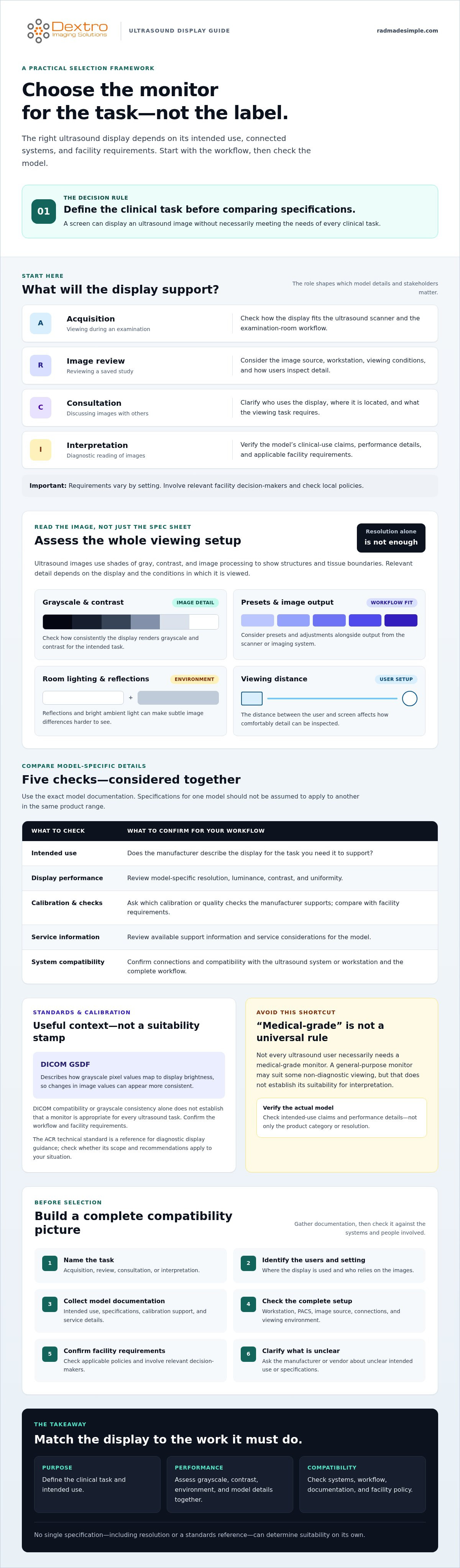
There’s no universal rule that every ultrasound user needs a medical-grade monitor. Instead, check the product documentation and local requirements for the task. If the display will support diagnostic interpretation, verify the model’s clinical-use claims and performance details rather than relying on its product category or resolution alone.
Define the use first, then compare the display and connected systems against that use. This grounds the decision in workflow and policy rather than assumptions about what a “diagnostic” label guarantees. If documentation leaves intended use or specifications unclear, ask the manufacturer or vendor to clarify them before purchase.
How Ultrasound Images Shape Diagnostic Monitor Requirements
Ultrasound images use shades of gray, contrast, and image processing to show structures and tissue boundaries. The display should make relevant detail visible for its intended task, whether users are checking images during an examination or reviewing a saved study. Presets and image adjustments matter too: consider how the display presents output from the scanner or imaging system within the workflow.
A headline resolution can’t answer whether a display meets those needs. Resolution describes the number of pixels, but not how consistently the screen renders grayscale, how it performs under room lighting, or whether its capabilities match the clinical task. Evaluate the whole viewing setup, including the display, workstation, image source, and environment.
Which display characteristics matter when reviewing ultrasound?
Check the exact model documentation for resolution, luminance, contrast, and uniformity. Then consider viewing distance and room conditions. Reflections or bright ambient light can make subtle image differences harder to see, while the distance between the user and screen affects how comfortably they can inspect detail. Assess these factors together rather than treating each specification in isolation.
Compare the manufacturer’s stated values and intended use with your workflow and facility requirements. Don’t assume specifications for one model apply to another, even when both belong to the same product range.
How do DICOM and calibration fit into the workflow?
DICOM GSDF, or the Grayscale Standard Display Function, describes how grayscale pixel values map to display brightness so changes in image values can appear more consistent. It may be relevant when the imaging workflow and facility requirements call for grayscale display consistency, but it doesn’t by itself establish that a monitor is suitable for every ultrasound task.
Distinguish standards from product claims. Ask what calibration or quality checks the manufacturer supports, then confirm whether your facility requires them for the intended use. The ACR technical standard is a reference for diagnostic display guidance, but check whether its scope and recommendations apply to your setting. Confirm the relevance of applicable AAPM or facility guidance before using it as a purchasing requirement.
Before comparing models for a diagnostic monitor for ultrasound imaging, record the use case, viewing conditions, and required checks. Then verify each candidate’s specifications and intended use in its documentation. For more context on display needs within an imaging workflow, see these imaging workflow resources.
Diagnostic Monitor vs. Standard Monitor: What Should Buyers Compare?
Higher resolution doesn’t automatically make a display better for ultrasound. Resolution describes how many pixels the screen can show, but it doesn’t confirm grayscale consistency, calibration support, suitability for a particular clinical task, or compatibility with your imaging setup. Compare the full use case, not one headline specification.
A general-purpose monitor may be adequate for some routine or consultation viewing. Its suitability depends on who is viewing the images, whether they’re making clinical decisions, and what your facility requires. Verify claims about diagnostic use or compliance against current manufacturer documentation and applicable policy.
Can a standard monitor be used for ultrasound imaging?
It may suit some workflows, but there’s no universal answer. Casual viewing or discussion can have different requirements from professional interpretation, where display performance and clinical responsibility may be more demanding. Before choosing a screen for clinical work, confirm the intended use with clinical leadership, IT, and relevant facility decision-makers.
Which specifications deserve closer scrutiny?
Review specifications in context. Brightness and contrast affect how image tones appear; uniformity and calibration support relate to consistency across the screen and over time. Check connectivity as well, including whether the display can work with the ultrasound system or workstation and the image sources in your workflow. The Jusha medical monitor reference guide offers additional context, but verify each candidate model’s details independently.
| Comparison area | What to check |
|---|---|
| Intended use | Manufacturer-stated purpose, intended users, and whether that aligns with your workflow. Verify clinical-use claims. |
| Display performance | Resolution, brightness, contrast, and uniformity in the exact model documentation. Avoid ranking by resolution alone. |
| Calibration | Available calibration features and any quality-check process your facility requires. Confirm applicable guidance. |
| Support and service | Support arrangements, maintenance information, and warranty terms documented for the model. |
| System compatibility | Connections and compatibility with the ultrasound system, workstation, and image workflow. |
Use this comparison to create a shortlist, then verify each model’s specifications, intended use, and compatibility before buying a diagnostic monitor for ultrasound imaging. No single feature establishes clinical suitability. The final choice should fit both the workflow and facility policy.
How to Evaluate an Ultrasound Diagnostic Monitor Before Buying
Write down your requirements before comparing models. Assess a diagnostic monitor for ultrasound imaging in context: the task it will support, its users, its installation location, and its connections to the existing imaging environment. This helps catch a display that looks suitable on paper but misses a workflow or facility requirement.
What should a procurement checklist include?
Use this five-step checklist to turn clinical and technical needs into questions a vendor can answer with documentation:
- Define the use. Record whether the display supports acquisition, routine review, consultation, or diagnostic interpretation.
- Map users and image sources. Identify user groups, where images are generated, and how they reach the display.
- Document the environment. Note room conditions, the viewing setup, facility requirements, and relevant local policy.
- Confirm system fit. List required connections, workstation configuration, PACS workflow, and software compatibility for review with imaging IT.
- Request supporting documentation. Ask for model-specific documents covering intended use, specifications, calibration features, compatibility, support, and maintenance.
Check model-level information rather than relying on a product family name. If you’re considering Jusha diagnostic monitors, confirm which models, if any, are appropriate for the intended ultrasound use. Verify their specifications and supporting documentation before making a selection.
How can a facility validate a display before deployment?
Plan the evaluation with clinical users, imaging IT, and procurement stakeholders. Agree in advance how you’ll assess image presentation, connections, workstation and PACS workflow, and any calibration or quality-check process required by facility policy. Set acceptance criteria before testing, and document the findings and any unresolved questions.
Use the radiology equipment compliance checklist as a reference alongside your facility’s requirements. It doesn’t replace model documentation or local review. Confirm that each stated capability applies to the exact configuration under consideration.
Reusable summary: Select an ultrasound display by matching its documented intended use and capabilities to the clinical workflow, facility requirements, and existing imaging systems.
For related context on workstation and PACS needs, see Dextro’s imaging workflow resources.
Match the Monitor to Your Ultrasound Workflow and Imaging System
A monitor is one part of the viewing environment. Fit depends on how images will be used, the display requirements for that task, and how the screen works with the workstation and PACS. User roles, room conditions, and facility policy also influence the decision. Assess the complete setup rather than treating the monitor as a standalone purchase.
What should you confirm with a monitor supplier?
Ask the supplier to identify the exact model and confirm whether its documented intended use and specifications suit your ultrasound workflow. Request documentation for display performance, calibration options, connectivity, and compatibility with your workstation and PACS. Confirm service and maintenance details for the specific model and configuration as well.
Dextro Imaging Solutions offers Jusha diagnostic monitors, specialized workstations, and PACS solutions. The Jusha offering is a category to evaluate, not a blanket indication that any particular model is suitable for ultrasound. Verify model-level suitability and requirements before selecting a display. Dextro also supports installation, maintenance, and software integration, which can be discussed for the proposed setup.
How does the display fit into a complete reading environment?
Consider how the workstation will access images, whether the PACS workflow supports users’ tasks, and whether the room setup allows comfortable viewing. A configuration that works in one environment may not suit another. Review the radiology reading workstation guide, then validate the monitor, workstation, and imaging-system combination with the appropriate clinical and IT stakeholders.
Before purchase, check that the proposed configuration matches your documented workflow and facility requirements. Review intended use, specifications, connections, software compatibility, calibration process, and support arrangements. Keep the vendor’s model-specific documentation with your evaluation so decision-makers can review the same information.
For a diagnostic monitor for ultrasound imaging, bring display, workstation, and PACS requirements together in the final review. Discuss your monitor and workflow requirements with Dextro to review the proposed configuration and identify which details need model-level verification.
Choose a Display That Fits the Way You Work
Start with the display’s clinical role, not a single specification. Match its documented intended use and performance to your workflow, then check calibration needs, workstation and PACS compatibility, room conditions, and facility policy. Resolution alone can’t establish whether a setup is appropriate.
Dextro Imaging Solutions sells Jusha diagnostic monitors and specialized imaging workstations. Because ultrasound suitability depends on the exact model and configuration, verify intended use, specifications, and system compatibility before choosing a diagnostic monitor for ultrasound imaging. Dextro also supports installation, maintenance, and software integration; confirm which support applies to the proposed setup.
To begin, discuss your ultrasound display requirements with Dextro and review the setup against your workflow.
Frequently Asked Questions
Can I use a standard monitor for ultrasound imaging?
It depends on the task. A screen for teaching, consultation, or non-diagnostic review may have different requirements from one used for clinical interpretation. Check the monitor’s intended use, facility policy, and any applicable accreditation or quality requirements. Ask clinical leadership and imaging IT to review the exact model documentation. Resolution alone doesn’t determine whether a display fits your workflow.
What resolution should a diagnostic monitor for ultrasound imaging have?
There isn’t one resolution that suits every ultrasound workflow. The right choice depends on the image source, viewing task, workstation configuration, and manufacturer guidance. Compare resolution with luminance, contrast, uniformity, calibration options, and viewing conditions rather than treating it as a standalone measure. Confirm requirements with your clinical team and check that the proposed display aligns with facility policy.
Does an ultrasound monitor need to be DICOM calibrated?
Calibration needs depend on the display, its intended use, and applicable facility requirements. DICOM GSDF describes a grayscale display function, but that doesn’t mean every ultrasound workflow needs the same calibration approach. Ask the supplier for documentation about the exact model’s calibration features and process. Then confirm expectations with imaging IT, clinical leadership, and relevant facility policy before making calibration a procurement requirement.
How do I choose a monitor for ultrasound image review?
Start by identifying who will review the images, where they’ll work, and whether the review includes diagnostic interpretation. Assess the image source, display documentation, room conditions, workstation and PACS compatibility, calibration process, and ongoing support needs. Shortlist models only after checking manufacturer guidance. Have facility stakeholders confirm the requirements so the final choice supports the intended workflow and fits the existing imaging environment.
Is a medical-grade monitor always necessary for ultrasound?
Not necessarily. Display requirements depend on the clinical task, intended use, organizational policy, and applicable standards or accreditation expectations. A monitor used for diagnostic interpretation may need a different evaluation from one used for education or general review. Define the use case first, then verify requirements with qualified clinical and IT stakeholders. A product label alone doesn’t establish suitability for your facility.
What should I ask a supplier before buying an ultrasound diagnostic monitor?
Ask which exact models suit your intended workflow, then request documentation for relevant display specifications, calibration, connectivity, and compatibility. Confirm how the proposed monitor works with your workstation and PACS, and ask what installation, maintenance, or software integration support is available for that configuration. Have clinical and IT stakeholders review the answers and identify any facility requirements that still need confirmation before purchase.
Can a diagnostic monitor connect to an existing PACS workstation?
Compatibility depends on the monitor, workstation, PACS environment, interfaces, and configuration. Before procurement, confirm supported connections and system requirements with the relevant monitor and software providers. Include imaging IT in the review and validate the complete setup before deployment. A matching connector or operating system alone doesn’t guarantee workflow compatibility, so check how images will move from the PACS to the display in your environment.


