

Choosing the best monitor for viewing MRI images takes more than comparing resolution. Grayscale performance, luminance, calibration, and the reading environment all affect how a display fits a diagnostic workflow. A specification that looks impressive on a product page may not answer the practical question: will this monitor work with the studies, workstation, and PACS you use?
That uncertainty is understandable. Resolution numbers can be difficult to compare, and a monitor that looks suitable on its own may not integrate smoothly with your workstation or calibration process. No single specification guarantees a suitable diagnostic display. The right choice depends on the intended task, the complete display system, and the requirements that apply to your facility and professional practice.
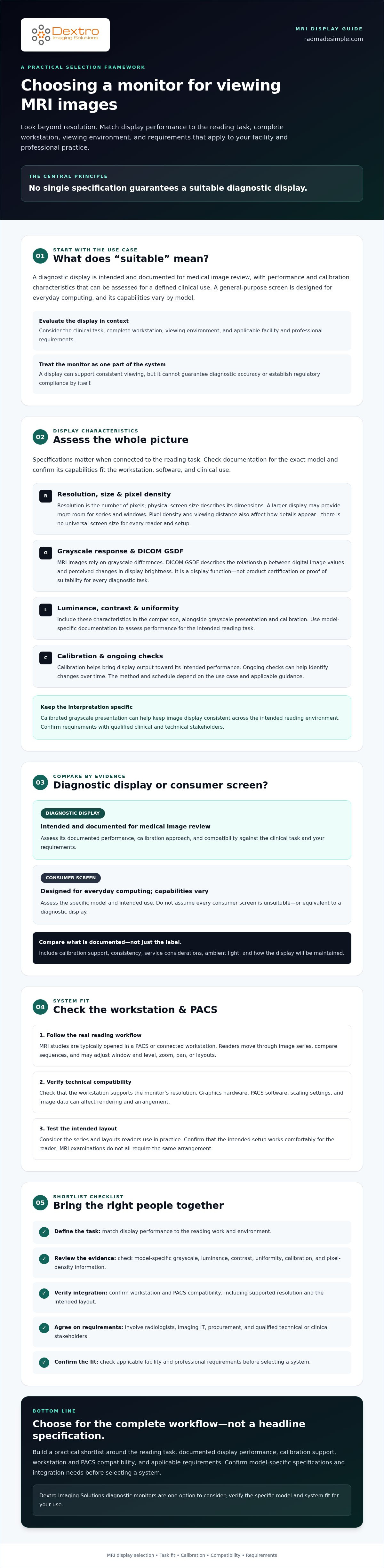
This guide explains how to compare diagnostic displays for MRI reading without relying on resolution alone. You’ll learn what to check in grayscale, luminance, contrast, uniformity, calibration, and pixel density, as well as how to assess workstation and PACS compatibility. Use these checks to build a practical shortlist that fits your clinical workflow.
Key Takeaways
- Choose the best monitor for viewing MRI images by matching display performance to the reading task, viewing environment, and facility requirements.
- Assess resolution alongside grayscale presentation, DICOM GSDF, calibration, and source-image detail rather than treating one specification as decisive.
- Compare diagnostic and consumer displays by documented performance, calibration support, service considerations, and fit with your workflow.
- Bring radiologists, imaging IT, and procurement stakeholders together to define requirements and verify workstation and PACS compatibility.
- Consider Dextro Imaging Solutions diagnostic monitors, then confirm model-specific specifications and integration needs before selecting a system.
What makes a monitor suitable for viewing MRI images?
A diagnostic display is intended and documented for medical image review, with performance and calibration characteristics that can be assessed for a defined clinical use. A general-purpose screen is designed for everyday computing and may not offer the same documentation or calibration support. The label alone doesn’t establish suitability: assess the reading task, complete workstation, viewing environment, and applicable facility and professional requirements.
The best monitor for viewing MRI images isn’t selected by resolution alone. MRI interpretation involves reviewing image series and comparing sequences, often while adjusting how images are displayed. The monitor is one part of that system. It can support consistent viewing, but it cannot guarantee diagnostic accuracy or, by itself, establish regulatory compliance.
How are MRI images viewed during diagnostic interpretation?
MRI studies are typically opened in a PACS or connected workstation, where readers move through image series and compare sequences as part of the examination. A Picture Archiving and Communication System (PACS) helps manage and display medical images from different modalities, including MRI.
Readers may adjust window and level, zoom, pan, or change layouts to examine images. The right setup depends on the study, the reader’s tasks, and the workstation configuration. When evaluating a display, consider the series and layouts readers use in practice rather than assuming every MRI examination calls for the same arrangement.
What is the difference between a diagnostic and consumer monitor?
Compare displays by intended use, calibration support, consistency, and model-specific documentation. Diagnostic displays may provide information about these capabilities for clinical review. Consumer monitors vary widely, so assess the specific model and intended use rather than assuming every consumer screen is unsuitable or equivalent to a diagnostic display.
A diagnostic display is intended and documented for medical image review, with performance that can be evaluated for the clinical task. Check whether its specifications, calibration approach, and workstation compatibility meet your requirements. Also consider ambient light and how the display will be maintained. Confirm applicable requirements with your facility and qualified technical or clinical stakeholders.
Which display characteristics matter when reading MRI images?
Display specifications are useful when connected to the reading task. Resolution, grayscale response, luminance, uniformity, and calibration all contribute to how MRI images appear, but none should be treated as a stand-alone measure of suitability. Check documentation for the exact monitor model, then confirm its capabilities fit your workstation, software, and clinical use.
How do resolution and screen size affect MRI image review?
Resolution is the number of pixels on the screen; physical screen size describes its dimensions. They’re related, but not interchangeable. A larger display can provide more room for viewing multiple series or arranging windows. Pixel density and viewing distance also affect how details appear at a given size, so there’s no universal screen size that suits every reader and setup.
The source images and the rest of the workstation matter too. Graphics hardware, PACS software, scaling settings, and image data can affect how studies are rendered and arranged. Confirm that the monitor’s resolution is supported by the workstation, and check that the intended layout works comfortably for the reader.
Why do grayscale response and calibration matter?
MRI images rely on grayscale differences to show anatomy and tissue characteristics. DICOM GSDF, or the DICOM Grayscale Standard Display Function, describes a relationship between digital image values and perceived changes in display brightness. It’s a display function, not a product certification or proof that a monitor suits every diagnostic task. The FDA guidance on diagnostic display devices offers context on regulatory considerations for diagnostic radiology display devices.
Calibration helps bring a display’s output toward its intended performance. Ongoing checks can help teams identify changes over time. The appropriate method and schedule depend on the use case and applicable guidance, so confirm requirements with qualified clinical and technical stakeholders.
Calibrated grayscale presentation can help keep image display consistent across the intended reading environment.
Which brightness and uniformity claims should buyers verify?
Compare documented specifications for the exact model, including luminance range, contrast, grayscale support, and screen uniformity. Marketing terms such as “medical-grade” or “high brightness” don’t replace measurable specifications or information about calibration. Avoid relying on a generic threshold without verifying that it applies to your task and requirements.
Ambient lighting and calibration affect how display performance is experienced. Ask how uniformity is measured, which calibration tools or procedures are supported, and how performance can be checked across the screen. The best monitor for viewing MRI images is the one whose documented capabilities fit the reading workflow, not simply the one with the strongest headline specification. For a workflow-focused review, explore diagnostic monitor and workstation options.
MRI monitor comparison: diagnostic display or consumer screen?
A display’s role matters as much as its specifications. A screen used for education or administrative review has a different purpose from one used for formal diagnostic interpretation. Consumer displays aren’t automatically unsuitable, but their capabilities and limitations need to be assessed for the intended task. Choosing a diagnostic display also doesn’t establish compliance or guarantee a correct reading.
| Factor | Diagnostic display | Consumer display |
|---|---|---|
| Intended use | Designed and documented for medical image review; confirm it matches the planned diagnostic task. | Designed for general computing; suitability depends on the particular review context and model. |
| Calibration support | Review available calibration methods and verification documentation. | Support varies by model; check whether calibration can meet the facility’s requirements. |
| Documented performance | Assess model-specific grayscale, luminance, uniformity, and other relevant specifications. | Specifications vary. Verify technical documentation rather than relying on headline claims. |
| Service | Compare available maintenance and support arrangements with the organization’s needs. | Check the manufacturer’s support and maintenance options for the specific display. |
| Workflow fit | Confirm compatibility with the workstation, graphics hardware, PACS, and reading setup. | Check the same connections and workflow requirements; consumer positioning alone doesn’t establish fit. |
When might a consumer monitor be considered for image review?
Consumer screens may be considered for preliminary, administrative, or educational image review, but appropriate use depends on local policy and the task. Don’t assume a display is suitable for diagnostic interpretation based only on its resolution or appearance. Confirm facility policy and applicable professional requirements before using any monitor for clinical decisions.
When should a diagnostic monitor be evaluated?
For formal diagnostic reading, assess displays with documented capabilities against requirements defined by the clinical team and facility. Compare calibration support, service arrangements, and integration with the existing workstation and PACS. The ACR-AAPM Technical Standard for Display Performance can help inform that review. Buyers looking for further context can also consult material on diagnostic monitor versus consumer monitor choices for radiology.
Does a higher resolution always mean a better MRI monitor?
No. Resolution is one consideration alongside grayscale presentation, calibration, screen layout, and compatibility. Match it to the source image data, PACS software, graphics hardware, viewing distance, and reading tasks. A higher pixel count may not improve the workflow if the workstation can’t support it or the display’s other characteristics don’t meet the intended requirements. The best monitor for viewing MRI images is selected as part of a fit-for-purpose system, not ranked by resolution alone.
How to evaluate an MRI monitor before you buy
Use a structured review to connect clinical needs with technical documentation and day-to-day workflow. Involve radiologists, imaging IT, and procurement stakeholders early. Their combined input can surface requirements that a monitor specification sheet alone won’t capture.
What should a radiology team document first?
Record the tasks the display will support, who will use it, how MRI studies move through the image workflow, and where each workstation will be located. Note existing PACS and operating system details, graphics hardware, and required display connections. Flag facility policies and jurisdiction-specific requirements for confirmation by the appropriate experts.
How can buyers verify monitor and workstation compatibility?
Check the proposed display against the workstation configuration, not in isolation. Confirm supported resolution, graphics capability, connection types, and software requirements. Clarify which calibration tools and procedures are supported, who is responsible for setup and ongoing checks, and what technical support is available. Treat the monitor, workstation, and PACS as a connected system.
Which questions should you ask a monitor supplier?
Request current documentation for the exact model under consideration. Ask about specifications, calibration procedures, warranty terms, service information, and integration with your facility’s PACS and workstation. Verify compliance-related statements against current product documentation and applicable local requirements. If a detail isn’t documented, ask for clarification before making it part of the purchase decision.
Use this five-step process to turn those discussions into a clear buying plan:
- Define reading tasks. Identify the MRI workflows and intended uses the display must support.
- Document requirements. Gather clinical, facility, technical, and procurement criteria, including anything that needs expert confirmation.
- Check system compatibility. Verify display connections, resolution support, workstation graphics capability, operating system, and PACS workflow.
- Assess support. Compare documented calibration, service, warranty, and integration information with your organization’s needs.
- Validate the setup. Before routine use, have qualified stakeholders review the installed configuration and confirm that it meets the documented requirements.
This process helps buyers evaluate the best monitor for viewing MRI images as part of a complete reading setup rather than as a standalone purchase. Dextro Imaging Solutions offers Jusha diagnostic monitors, Dextro Imaging Solutions reading stations, and portable radiology workstations. Discuss monitor and workstation fit with Dextro Imaging Solutions, and confirm model-specific specifications and integration needs with the sales or technical team.
Match an MRI diagnostic monitor to your reading workflow
The right display configuration depends on who reads the studies, where they work, and how images move through the department. An individual workstation, a shared department setup, and a remote-reading environment may have different needs for screen layout, system compatibility, calibration, and support. The best monitor for viewing MRI images is the one whose documented capabilities and configuration match the team’s defined workflow.
How do you match a display to a radiology team’s needs?
Start with the readers and the work they do. An individual workstation may be planned around one person’s established review procedures, while a department-wide deployment must account for multiple users and a consistent setup. Remote reading adds questions about workstation location, system configuration, and how display performance will be checked. Review user volume, service expectations, and existing procedures before standardizing a configuration.
For broader product-category context, consult a Jusha medical monitor reference guide and compare its information with current, model-specific documentation. Product names and general category descriptions aren’t substitutes for verifying the exact display’s specifications and fit.
What role can an integrated reading station play?
A monitor is one component of a reading environment. Consider it alongside the workstation, graphics capability, PACS, software, and calibration process to assess whether the full setup supports the intended workflow. Dextro offers Jusha diagnostic monitors and Dextro reading stations. Confirm specific features and compatibility for the proposed configuration.
Teams can also review a radiology equipment compliance checklist as a prompt for related verification. Confirm applicable requirements with the appropriate clinical, technical, and procurement stakeholders rather than assuming that any single product or configuration establishes compliance.
What is the next step before selecting a monitor?
Prepare a short requirements brief before comparing options. Include the reading tasks, intended users and locations, existing PACS and workstation details, display and calibration needs, and support expectations. Then request current documentation for each monitor under consideration and confirm how the proposed setup will integrate with your systems.
Before finalizing the configuration, clarify installation, software integration, maintenance, and support needs with the relevant team. Dextro offers monitor and workstation options, along with installation, maintenance, and software integration support. Contact Dextro to discuss your diagnostic monitor and workstation requirements and confirm current product details.
Build a display setup around your clinical workflow
The best monitor for viewing MRI images fits the diagnostic task, has documented capabilities suited to that use, and works with your calibration process, workstation, and PACS. Resolution matters, but it isn’t a complete measure of suitability. Bring radiology, imaging IT, and procurement requirements together before finalizing a configuration.
Dextro offers Jusha diagnostic monitors, Dextro reading stations, and portable radiology workstations. Installation, maintenance, and software integration support are also available. Specifications and compatibility can vary by model and setup, so confirm current product details and integration needs before making a decision.
Discuss diagnostic monitor and workstation options with Dextro to review your requirements and identify what to verify for your environment. Use a workflow-first approach to compare options and confirm the proposed setup with your team.
Frequently Asked Questions
Is a 4K monitor the best monitor for viewing MRI images?
No. A 4K label alone can’t identify the best monitor for viewing MRI images. Suitability also depends on the source image data, physical screen size, graphics capability, grayscale presentation, calibration, reading task, and facility requirements. A higher resolution may not help if the workstation or software can’t support the intended setup. Verify the complete monitor, workstation, and PACS configuration against your team’s workflow before selecting a display.
Can I use a consumer monitor to view MRI images?
Possibly for some non-diagnostic review, but don’t assume a consumer monitor is suitable for formal diagnostic interpretation. Appropriate use depends on the task, facility policy, applicable professional or jurisdictional requirements, and the display’s documented performance. Consumer displays vary by model, so assess the exact monitor and system rather than approving or rejecting the category as a whole. Confirm the intended use with your organization’s clinical and technical stakeholders.
What monitor resolution do radiologists need to read MRI images?
There’s no single resolution that fits every MRI reading task. Requirements depend on the image data, PACS software, graphics hardware, screen layout, and facility criteria. Start by documenting how readers need to view and compare studies, then confirm the proposed display is supported by the workstation and software. Imaging IT and clinical stakeholders can assess current model specifications against the actual workflow without relying on a resolution label alone.
Does a monitor need DICOM calibration to display MRI images?
Not every display use has the same calibration requirements. DICOM GSDF is a grayscale display function that describes how changes in image values correspond to perceived brightness changes. It isn’t, by itself, a product certification or proof of suitability. For diagnostic use, verify the monitor’s documented support, calibration procedures, and ongoing verification approach against the specific task, facility policy, and applicable jurisdictional or professional requirements.
Is a medical-grade monitor always more accurate than a consumer monitor?
Not automatically. A category label doesn’t establish how a specific monitor performs in a particular setup. Compare documented specifications, calibration support, consistency, service information, and intended use for the exact model. Then assess the complete configuration against facility requirements. Don’t assume a consumer display is equivalent, but don’t treat a medical-grade label as a substitute for verification. The display alone can’t guarantee diagnostic accuracy or compliance.
How often should a diagnostic monitor be calibrated for MRI reading?
There’s no universal calibration interval that applies to every diagnostic monitor or reading environment. The appropriate schedule depends on manufacturer guidance, facility policy, applicable requirements, and how the display is used. Check current documentation and have qualified personnel determine the procedure and frequency for your setup. Keep a record of calibration activity and make responsibilities clear within the organization so checks are managed consistently.
Do I need a special workstation as well as an MRI monitor?
Not necessarily, but the workstation must support the intended display and workflow. Graphics hardware, operating system, PACS, connections, and software configuration can all affect compatibility. A specialized workstation may be appropriate when existing equipment doesn’t meet documented requirements. Before procurement, ask imaging IT to check the complete setup, including supported resolution and software needs. Assess the monitor and workstation together rather than treating either as an isolated purchase.
How do I choose between a standalone diagnostic monitor and a reading station?
Base the choice on your existing hardware, PACS compatibility, installation needs, support expectations, and service requirements. A standalone display may fit a workstation that already meets the team’s needs, while a reading station may suit a different configuration. Neither option is universally better. Document the workflow first, then ask suppliers to confirm current specifications, integration requirements, and support details for the proposed setup.


