

Could a large 4K screen suit your clinical environment but still be the wrong display for its intended task? A retailer listing describes the jusha e550eg as a 55-inch 4K surgical display, but those headline details alone don’t establish whether it fits a particular workflow. Buyers should look beyond screen size and resolution, especially because surgical displays and diagnostic monitors serve different roles.
This guide explains what the listing says about the E550EG and how to assess its fit against your room, image sources, and clinical use. We’ll cover the specifications and intended-use details to review, distinguish surgical visualization from diagnostic interpretation, and outline practical steps for evaluating a display within a wider imaging workflow. For radiology image review, Dextro Imaging Solutions offers Jusha diagnostic monitors, workstations, PACS solutions, and imaging integration support.
Key Takeaways
- A retailer listing describes the Jusha E550EG as a 55-inch 4K surgical display. Treat those details as listing claims and verify specifications in current manufacturer documentation.
- Screen size and resolution don’t establish a display’s intended use, performance, or suitability for a clinical task.
- Distinguish surgical visualization from diagnostic interpretation by matching the display’s documented purpose to the task and image workflow.
- Assess fit systematically: define the task, map image sources and signal paths, and review mounting, room conditions, and workflow.
- Dextro offers Jusha diagnostic monitors, workstations, PACS solutions, and imaging integration support for radiology workflows.
What Is the Jusha E550EG, and What Do the Listings Actually Say?
A retailer listing identifies the Jusha E550EG as a surgical display. That category is a useful starting point, but it doesn’t answer every question about the model’s technical capabilities or clinical role. The listing describes it as a 55-inch 4K display; use current manufacturer documentation to establish the model’s specifications and intended use before assessing it for a specific task.
What does the available E550EG listing identify?
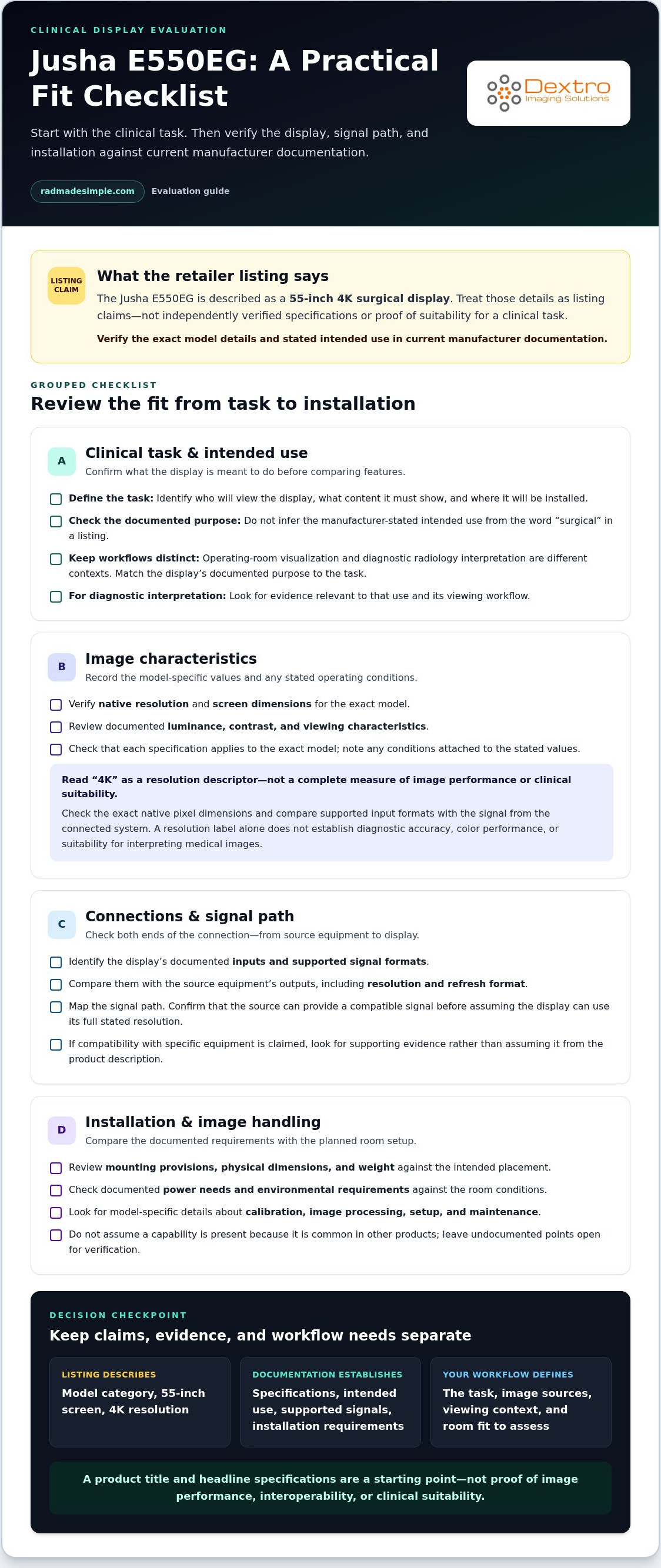
The retailer listing describes the Jusha E550EG as a 55-inch 4K surgical display. Treat those details as claims in the listing, not as independently verified specifications. The description alone doesn’t establish performance or suitability for a particular clinical task.
Separate the listing description from the details your evaluation needs to establish:
- Listing description: The model name and surgical-display category, along with the listed 55-inch screen size and 4K resolution.
- Manufacturer documentation to review: The current model specification sheet, stated intended use, supported signal formats and inputs, and installation requirements.
- Claims that need supporting evidence: Image performance, certifications, compatibility with specific equipment, and suitability for a defined clinical workflow.
This distinction prevents a product title from carrying more weight than it should. Screen size and resolution are useful for an initial comparison, but they don’t establish image quality, interoperability, or clinical suitability.
Why does intended use matter?
Assess a display against the task it will perform and the conditions in which staff will use it. Operating-room visualization and diagnostic radiology interpretation are different contexts. A surgical display may be considered as part of a room’s visualization setup, while a diagnostic monitor belongs to an image-review workflow. The E550EG’s listing category alone doesn’t establish its manufacturer-stated intended use, so don’t infer its role from the word “surgical.”
The intended task determines which documentation to review. For diagnostic interpretation, look for evidence relevant to that use and its viewing workflow. For operating-room use, establish the display’s documented role and how it fits the room’s equipment and signal path. The broader field of Medical Imaging includes different techniques and workflows, so the clinical task should guide your evaluation rather than a headline specification.
Before comparing the E550EG with other displays, identify who will view it, what content it must show, and where it will be installed. Then compare those needs with the model’s current manufacturer documentation. This gives your team a sound basis for a detailed specification review.
Which Jusha E550EG Specifications Should Buyers Evaluate?
Start a specification review with the clinical task, not a feature list copied from another display. The retailer listing describes the Jusha E550EG as 55-inch and 4K, but those descriptors don’t establish its full technical profile or suitability for a particular workflow. Use current manufacturer documentation to distinguish verified model details from assumptions.
Which display details belong on a technical checklist?
Build the checklist around the room, the content to be displayed, and the equipment feeding the screen. Record the manufacturer’s stated value or requirement for each item, then compare it with your installation plan. If the documentation doesn’t address a point, leave it open rather than filling the gap with typical values for medical displays.
- Image characteristics: Verify native resolution, screen dimensions, luminance, contrast, and viewing characteristics in the model documentation. Check that each figure applies to the exact model and note any stated operating conditions.
- Connections and signals: Identify the available inputs and supported signal formats. Compare them with the source equipment’s outputs, including resolution and refresh format, to map the signal path.
- Installation: Review mounting provisions, physical dimensions, weight, power needs, and environmental requirements. Compare these details with the planned location and room setup.
- Image handling: Look for model-specific information about calibration, image-processing functions, and setup or maintenance procedures. Don’t assume these capabilities are present because they’re common in other products.
This turns a broad specification sheet into a practical fit assessment. An input may be listed but still require a signal format the source equipment can’t provide. Physical dimensions and mounting details can also affect placement, even when the image specifications look suitable.
How should buyers interpret the listed 4K description?
Read “4K” as a resolution descriptor, not a complete measure of image performance or clinical suitability. Check the manufacturer documentation for the exact native pixel dimensions and supported input formats, then compare them with the signal from the connected system. If the source can’t deliver a compatible signal, the display may not use its full stated resolution.
Viewing distance and task matter, too. The same screen can be used at different distances in different rooms, and the relevant image detail depends on what the viewer needs to see. A resolution label by itself can’t establish diagnostic accuracy, color performance, or suitability for interpreting medical images. Those judgments require evidence tied to the intended use and specific workflow.
Before making a purchase decision, record each verified value and the document that supports it. Resolve gaps using current manufacturer materials rather than retailer headings or specifications for a different model. Teams evaluating diagnostic viewing needs can also consider Dextro’s Jusha diagnostic monitor options alongside the wider imaging workflow.
Jusha E550EG Surgical Display vs. Diagnostic Radiology Monitor
A display category points toward a use context, not a universal clinical role. The retailer listing identifies the jusha e550eg as a surgical display, while diagnostic radiology monitors are used in image-interpretation workflows. These categories call for different questions about the task, image handling, documentation, and workstation setup. Neither label alone proves a model is suitable for another clinical purpose.
What distinguishes surgical visualization from diagnostic reading?
Surgical displays are evaluated in relation to visualization during procedures and the equipment and room workflow supplying the images. Diagnostic monitors are part of radiology interpretation workflows, where staff review medical images at a workstation. The display, source, software, and viewing task work together. These are general distinctions, not claims about the E550EG’s specific capabilities or manufacturer-stated intended use.
| Evaluation point | Surgical visualization | Diagnostic radiology |
|---|---|---|
| Intended task | Viewing content in a procedural environment | Reviewing medical images for interpretation |
| Image workflow | Consider the procedural source equipment and signal path | Consider image sources, viewing software, and interpretation workflow |
| Documentation | Review the model’s stated use and installation requirements | Review specifications and documentation relevant to the diagnostic task |
| Workstation context | Assess room placement and connections to procedural equipment | Assess the reading workstation and its image-review setup |
This distinction helps prevent a common buying error: assuming that headline specifications automatically make a display suitable for a different clinical need. For example, don’t treat a display considered for an operating room as a diagnostic reading monitor unless its documented intended use and relevant specifications support that application.
When should buyers assess diagnostic-monitor requirements separately?
Assess diagnostic requirements separately whenever the task involves radiology image interpretation, even if the department also uses displays for procedural visualization. Start with the images being reviewed, the software and workstation involved, and the institution’s clinical workflow. Then identify applicable display standards and internal requirements. Standards such as the DICOM Grayscale Standard Display Function may be relevant to diagnostic display evaluation, but don’t infer compliance for a particular model without supporting documentation.
For a model-specific decision, connect the stated use, technical specifications, and relevant documentation to the intended task. A product category or title isn’t a substitute for that evidence. Dextro offers Jusha diagnostic monitors for radiology workflows, alongside workstations and imaging systems that support them.
For a broader overview of Jusha monitor categories and professional evaluation points, consult the Jusha medical monitor reference guide. Use it to frame your questions, then base any clinical-use determination on documentation for the specific model and workflow.
How to Assess Whether the Jusha E550EG Fits Your Environment
A display fits when its documented purpose, technical requirements, and physical setup align with the work happening in the room. Evaluate the jusha e550eg through an ordered review rather than relying on one specification or product-category label. Bring clinical users and technical stakeholders into the process early so workflow needs and installation constraints are considered together.
- Define the clinical task and installation environment. Establish whether the screen is intended for procedural visualization, diagnostic image reading, or another role. Identify the room, users, viewing position, and conditions around the planned installation. The task comes first because it determines which requirements your team must assess.
- Map the image sources. List each camera, imaging system, workstation, or other source expected to send content to the display. Record the outputs and signal formats each source can provide. This gives the team a concrete basis for comparing source capabilities with the display’s documented inputs.
- Trace the signal path. Diagram how the image travels from source equipment to screen, including any routing or processing components. Note where format conversion may be needed and who will maintain the connection. A clear signal map helps identify integration questions before procurement.
- Check physical placement and mounting. Compare the display’s documented dimensions, weight, mounting requirements, and environmental needs with the proposed location. Consider sightlines, staff movement, nearby equipment, and access for installation or maintenance. Check the room plan rather than assuming the screen will fit because its size seems appropriate.
- Review the room workflow. Walk through how staff will use the display during a typical procedure or reading session. Include source switching, workstation access, and the placement of related equipment. Clinical users can identify workflow needs, while biomedical engineering and IT can assess equipment and integration considerations.
- Validate documentation and institutional requirements. Use current manufacturer documentation for technical values and intended use. Have qualified stakeholders review applicable standards and institutional requirements for the planned task. Record the evidence supporting each requirement, along with open items that still need resolution.
Involve the right people for the project. Clinical staff define the task; biomedical engineering can assess equipment and installation; IT reviews relevant system and signal-path needs; procurement tracks documentation and approval requirements. The participants will depend on the facility and intended workflow. When sourcing the underlying computer hardware and office workstations that support departmental operations, IT specialists like Computech-Solutions offer commercial desktop options to build out enterprise infrastructure.
For context on diagnostic reading environments, Dextro’s diagnostic radiology monitor market guide can help frame a separate review of radiology display needs. If your assessment points toward diagnostic imaging, explore Jusha diagnostic monitor and imaging solutions as part of the wider workflow evaluation.
Explore Jusha Monitor and Imaging Solutions with Dextro
A sound display decision comes down to three points: documented intended use, specifications that meet the clinical task, and fit with the surrounding workflow. These checks matter when evaluating the jusha e550eg because its listing category alone can’t determine whether it suits your environment. Dextro Imaging Solutions supports broader imaging workflows with Jusha diagnostic monitors, workstations, PACS solutions, and related integration and support.
How can Dextro Imaging Solutions support a wider imaging workflow?
Monitor selection is one part of the imaging environment. Radiology teams also need to consider where images are reviewed, how staff access them, and how hardware and software fit together. Dextro Imaging Solutions offers Jusha diagnostic monitors alongside Dextro Reading Stations and Portable Radiology Workstations, so teams can consider display options in the context of their reading setup.
PACS is another part of the workflow. Dextro Imaging Solutions’s PACS offerings include PACS Harmony and aycan PACS. Together with medical imaging hardware and software integration support, these solutions help teams plan around the workflow rather than a screen in isolation. The right configuration depends on the facility’s clinical task, existing systems, and operational requirements.
For diagnostic workflows, consider Dextro Imaging Solutions’s Jusha monitors alongside the workstations, PACS, and integration support that help connect imaging systems. Match each component to the documented requirements of your clinical task and workflow.
What are practical next steps for a purchasing team?
Before comparing options, put the project requirements in one place. A concise brief can keep clinical and technical reviews aligned:
- Clinical use: Describe the task, users, image types, and viewing location.
- Technical requirements: Record source equipment, signal path, workstation needs, and installation constraints.
- Documentation: Gather current manufacturer specifications and intended-use information for each model under consideration.
- Stakeholder roles: Identify who will review clinical fit, equipment integration, IT requirements, and procurement decisions.
Then compare documented Jusha diagnostic monitor options against that brief. Consider the display alongside its workstation and PACS context, and record any unresolved requirements for the team to address before procurement. This structured approach connects specifications with everyday use without treating a product title as proof of fit.
For a broader view of how Jusha monitor categories relate to professional imaging needs, explore the Jusha medical monitor reference guide. If your team is planning diagnostic display, workstation, PACS, or integration needs, Explore Dextro Imaging Solutions and bring your workflow requirements into the conversation.
Turn Your Display Review Into a Clear Workflow Plan
Turn your Jusha E550EG evaluation into a shared plan your clinical and technical teams can use. Identify the decision owner, record open documentation questions, and align the display choice with the room and image workflow it needs to support. That preparation can also clarify whether your project calls for diagnostic monitors, workstation changes, PACS planning, or a combination of imaging components.
Dextro supports imaging environments with Jusha diagnostic monitors, imaging hardware, PACS solutions, and integration support. These offerings help radiology departments, hospitals, and independent imaging centers consider equipment in the context of their broader workflow, rather than as a standalone purchase.
Bring your priorities into focus and take the next step. Explore Dextro imaging solutions to consider options for your imaging environment.
Frequently Asked Questions
Is the Jusha E550EG a surgical display or a diagnostic radiology monitor?
The retailer listing identifies the Jusha E550EG as a surgical display. That category doesn’t establish that it’s intended or suitable for diagnostic radiology interpretation. For a clinical decision, review the current manufacturer documentation, including the intended-use statement and instructions for use, then compare them with your team’s planned task. A product title alone isn’t a basis for assigning a different clinical role.
What screen size and resolution are listed for the Jusha E550EG?
The retailer listing describes the E550EG as a 55-inch 4K display. Those are listing descriptors, not independently verified specifications. Before using them for a room plan or technical comparison, check the current manufacturer documentation for the exact model’s display dimensions and native resolution. This prevents a retailer title from being mistaken for a complete technical specification.
Can the Jusha E550EG be used for diagnostic radiology interpretation?
The listing doesn’t establish that the E550EG is intended for diagnostic interpretation. Base that decision on the manufacturer’s stated intended use and model-specific documentation, reviewed against the diagnostic workflow and institutional requirements. For example, a team replacing a radiology reading-room display needs evidence relevant to image interpretation, not simply a screen category or resolution label. Don’t assume suitability across clinical tasks.
What specifications should I verify before evaluating the Jusha E550EG?
Review the model’s documented native resolution, dimensions, luminance, contrast, viewing characteristics, inputs, supported signal formats, mounting requirements, and environmental conditions. Also look for any stated calibration or image-processing functions. Compare each item with the source device and installation plan. Record the document name and model identifier alongside each value so the purchasing team can trace its assumptions to current manufacturer information rather than rely on a similarly named display.
How does a surgical display differ from a diagnostic monitor?
The difference centers on the task and workflow the display is designed to support. A surgical display may be evaluated for viewing images during a procedure, while a diagnostic monitor is evaluated for radiology interpretation. For example, a procedural video feed and a radiologist’s workstation image review have different source and use contexts. The display’s documented intended use should guide its role, not screen size or appearance alone.
Does a 4K label alone establish that a medical display is suitable for clinical use?
No. A 4K label describes resolution, but doesn’t establish intended use, performance for a particular task, or compatibility with the connected system. The source device must also provide a supported signal, and the display must meet the requirements of the planned workflow. For clinical evaluation, use current model documentation and institutional review. Don’t infer diagnostic accuracy or clinical suitability from resolution alone.
How should a hospital assess a medical display for its imaging workflow?
Start by defining the clinical task and where the display will be used. Map the image sources, workstation or other connected equipment, signal path, mounting location, and room workflow. Then have relevant clinical, biomedical engineering, IT, and procurement stakeholders compare these needs with current manufacturer documentation and institutional requirements. Document unresolved items and assign responsibility for reviewing them before making a procurement decision.


