

The right monitor can still be the wrong home setup. A diagnostic monitor for home teleradiology setup supports dependable interpretation only when it fits the modality, room conditions, calibration plan, workstation, and approved clinical workflow. Choosing by resolution alone leaves important questions unanswered.
Diagnostic requirements vary by imaging task, and a display’s stated capabilities don’t establish that an entire home reading environment is suitable or compliant. Your organization’s standards, medical-physics guidance, and IT requirements all matter.
This 2026 guide explains how to build a monitor shortlist against documented clinical and technical requirements, identify details that need review, and compare hardware and workflow options without assuming unverified compliance. You’ll learn what to assess across image characteristics, calibration, ambient light, connectivity, and workload, as well as where Jusha diagnostic monitors, Dextro reading stations, and PACS options may fit. Confirm model capabilities and configuration support against current documentation and your organization’s requirements before deciding. The goal is a practical path to a setup reviewed for your work.
Key Takeaways
- Define the clinical use and modality first so your diagnostic monitor for home teleradiology setup is assessed against the right workflow, not just a product label.
- Compare resolution, luminance, grayscale performance, uniformity, and calibration support with documented organizational requirements.
- Check whether your home workspace, lighting, monitor placement, and workstation can support dependable reading, and identify what needs IT or medical-physics review.
- Compare a standalone monitor with a workstation or integrated reading station by considering compatibility, connectivity, software workflow, and support responsibilities.
- Before selecting hardware, request current documentation and validate model specifications, calibration features, compatibility, warranty, and service terms.
What a diagnostic monitor for a home teleradiology setup must do
A diagnostic display is a monitor intended and configured to present medical images for a defined clinical task. Its role depends on the use case, documented capabilities, calibration approach, and your organization’s requirements, not simply on a “medical” or “diagnostic” label. Assess a diagnostic monitor for home teleradiology setup as part of the reading workflow, not as an isolated screen.
Teleradiology involves transmitting medical images from one location to another for interpretation or consultation. For home reading, the display is one part of a broader system that includes imaging software, the workstation, network, viewing environment, and applicable clinical procedures.
Diagnostic display versus consumer monitor in remote reading
A consumer monitor may offer high resolution and a crisp, attractive image, but those qualities alone don’t establish suitability for diagnostic interpretation. Compare displays by their intended use, available calibration options, technical documentation, and support arrangements. Consumer models vary, so don’t assume every one is unsuitable or that a product marketed for clinical use automatically meets your needs.
Request current manufacturer documentation and confirm how calibration and ongoing quality checks are handled. For a focused comparison, see this guide to diagnostic monitors versus consumer monitors. Treat product claims as details to verify against your organization’s requirements and the intended reading task.
Define the home reading use case before comparing products
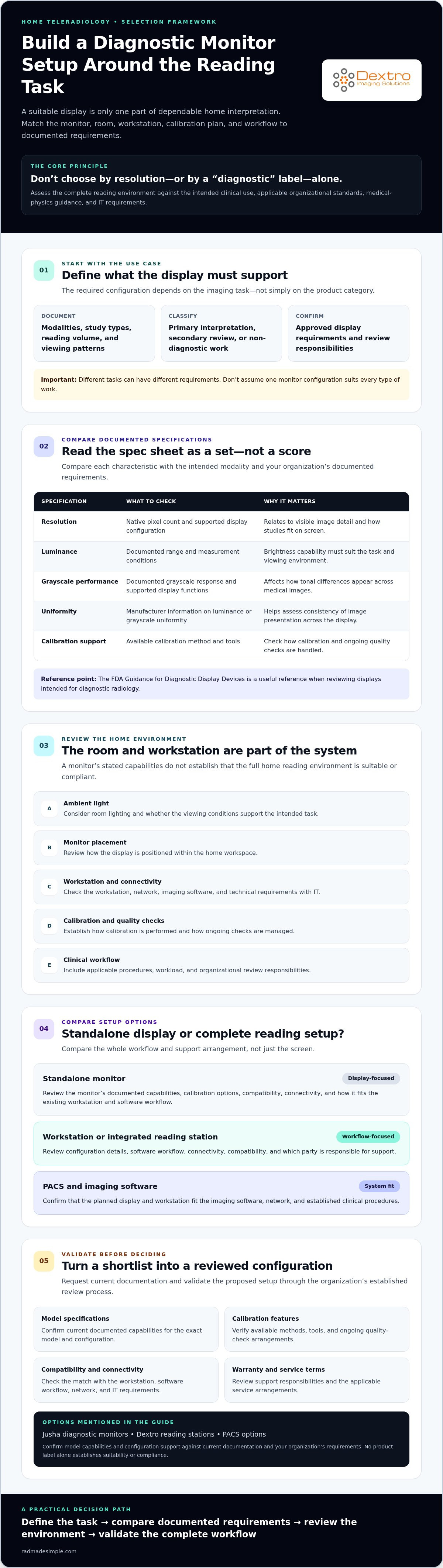
Start with the work the display needs to support. Record the modalities and study types, expected reading volume, and whether you’ll review images continuously or intermittently. Then classify each task as primary interpretation, secondary review, or non-diagnostic work. These categories can have different requirements, so don’t assume one monitor configuration suits all three.
Discuss the intended use with clinical leadership and check applicable organizational policy before shortlisting hardware. Requirements may also depend on workload and viewing conditions, including room lighting and workstation arrangement. If you’re considering Jusha diagnostic monitors or a Dextro reading station, request current specifications and configuration details, then have the proposed use reviewed through your organization’s established process.
- Document: modalities, study types, reading volume, and viewing patterns.
- Clarify: whether each task is primary interpretation, secondary review, or non-diagnostic.
- Confirm: approved display requirements and review responsibilities with clinical leadership and the relevant technical teams.
Once the use case is defined, you can compare each option against a documented need instead of relying on resolution or marketing language alone.
Which monitor specifications matter for home teleradiology?
Compare specifications as a group, then check them against the imaging task and your organization’s requirements. A higher number on a product sheet doesn’t automatically mean a better match. Monitor specifications must be evaluated against the intended clinical use, modality, and applicable organizational requirements. The FDA Guidance for Diagnostic Display Devices is a useful reference when reviewing displays intended for diagnostic radiology.
| Specification | What to compare | Why it matters |
|---|---|---|
| Resolution | Native pixel count and supported display configuration | Relates to visible image detail and how studies fit on screen. |
| Luminance | Documented luminance range and measurement conditions | Brightness capability must suit the task and viewing environment. |
| Grayscale performance | Documented grayscale response and supported display functions | Affects how tonal differences appear across medical images. |
| Uniformity | Manufacturer information on luminance or grayscale uniformity | Helps assess whether image presentation is consistent across the display. |
| Calibration support | Available calibration method, tools, and documentation | Shows what can be adjusted, but doesn’t establish ongoing quality assurance. |
Resolution, luminance, and grayscale performance
Resolution describes how many pixels a display can show. Whether that level of detail is appropriate depends on the modality, study, and reading task. Luminance measures display brightness, while grayscale performance relates to how image tones are presented. Review the manufacturer’s stated capabilities and measurement conditions, then compare them with facility requirements and manufacturer guidance. Don’t assume one resolution or luminance threshold applies to every home reading setup.
Calibration, DICOM GSDF, and quality assurance
DICOM PS3.14 describes the Grayscale Standard Display Function (GSDF), a standardized approach to grayscale display response. A reference to DICOM or GSDF doesn’t, by itself, confirm how a particular monitor implements or supports it. Verify the specific model’s documentation and calibration features. Calibration capability is also separate from ongoing quality assurance. Confirm acceptance procedures, testing intervals, responsibilities, and records with your organization.
For product-family context, review the Jusha medical monitor reference guide, then request current documentation for any model you’re considering. Dextro offers Jusha diagnostic monitors. Verify each model’s specifications, calibration features, and suitability for the proposed workflow before selection. If you’re comparing a monitor with a broader reading setup, explore diagnostic monitor and workstation options as part of your evaluation.
Can your home environment support dependable diagnostic reading?
A diagnostic monitor for home teleradiology setup depends on more than the display. Lighting, placement, workstation stability, ergonomics, and approved network access all affect whether the home workspace can support the intended workflow. Assess these conditions before finalizing equipment, then document them for review by the responsible clinical and technical teams.
Home viewing conditions and monitor placement
Check the room at different times of day. Daylight that shifts across the screen, a lamp reflected in the display, or bright surfaces behind the monitor can change viewing conditions and cause distraction. Position the display to reduce direct reflections, and note how nearby lighting affects the screen during typical reading hours. Check that room conditions remain suitable throughout your usual reading schedule.
Review the physical setup as well. The monitor should sit securely, remain steady during use, and allow a comfortable viewing posture. Consider screen height and distance, chair and desk support, and whether cables or other equipment could destabilize the workstation. Document the proposed arrangement, including lighting and monitor placement, and ask the responsible clinical team what acceptance criteria apply. For broader verification prompts, see the radiology equipment compliance checklist.
Calibration, security, and organizational approval
Calibration is one part of display management, not proof on its own that a monitor or room is approved for diagnostic use. Confirm with your organization who is responsible for initial assessment, ongoing quality assurance, and records. Follow established procedures rather than relying only on a monitor’s calibration feature or a supplier’s general description.
Plan a review of home connectivity too. Ask IT to confirm the approved device and operating configuration, secure remote-access method, endpoint-security requirements, and compatibility with the organization’s PACS workflow. Discuss network performance and what to do if access is interrupted or image delivery is delayed. Don’t use a personal device or connection in place of an approved one without authorization.
- Clinical team: Confirm viewing conditions and local acceptance criteria for the intended use.
- IT: Validate approved devices, remote access, endpoint controls, network requirements, and PACS connectivity.
- Compliance contact: Check organizational policies and consult a qualified adviser about obligations specific to your jurisdiction.
Approval should reflect the complete home workflow, not an isolated equipment specification. Keep the review documented, including conditions that must be maintained if the workspace, hardware, or network configuration changes.
How to compare a standalone monitor with a complete reading setup
A monitor-only purchase may fit when your existing workstation and clinical workflow have already been validated. If those pieces are still uncertain, assessing the display alongside its workstation and software can make compatibility questions easier to identify. The right path for a diagnostic monitor for home teleradiology setup depends on what you already have, what your organization supports, and who will resolve issues across the system.
| Approach | May suit | Validate before purchase |
|---|---|---|
| Monitor only | Buyers with an existing supported workstation and established workflow | Graphics capability, operating system, connections, PACS compatibility, calibration, and support ownership |
| Monitor plus workstation | Buyers who need to assess display and computer compatibility together | Hardware configuration, software workflow, connectivity, and which components each support team covers |
| Integrated reading station | Buyers seeking a coordinated configuration discussion, including for a defined or portable work location | Exact configuration, supported software, integration details, service terms, and future upgrade options |
When a standalone diagnostic monitor may fit
If your organization already supports the workstation and PACS workflow, adding a separate monitor may let you keep equipment that is working. Confirm that the computer’s graphics capability, operating system, and available connections support the specific display. Then check PACS compatibility and establish whether monitor, workstation, and software issues go to the same support team or different providers.
A standalone screen doesn’t resolve calibration, security, or workflow requirements by itself. Assign responsibility for these areas before treating a monitor-only option as a complete solution.
When an integrated reading station may reduce setup complexity
A coordinated workstation and display can bring configuration questions into one evaluation, but it doesn’t remove the need for technical validation. Compare portability, where the system will be used, how it connects to PACS, what software is supported, and whether the configuration can accommodate planned upgrades. Review the radiology reading workstation guide for broader workstation considerations.
Dextro offers Dextro Reading Stations and Portable Radiology Workstations, as well as Jusha diagnostic monitors and PACS solutions. These are categories to evaluate, not a claim that a particular configuration fits every workflow. Request current documentation and confirm exact specifications, compatibility, and support responsibilities with the supplier and your technical team.
Before choosing, list which components are already approved, which require replacement, and who supports each part. Explore reading station and workstation options to compare possible configurations with your documented needs.
Select and validate a diagnostic monitor with Dextro Imaging Solutions
Turn your documented clinical and technical requirements into a purchase process. Shortlist a diagnostic monitor for home teleradiology setup based on intended use, then validate it as part of the proposed workflow. Dextro Imaging Solutions offers Jusha diagnostic monitors, Dextro Reading Stations, PACS options, and portable radiology workstations. Confirm specific model capabilities, configurations, and suitability before selection.
Questions to ask before requesting a quote
Share the modality, intended diagnostic use, and existing workstation and software environment. Ask the supplier to identify options for evaluation, then request current information in writing. A clear scope helps your clinical and technical reviewers assess the same configuration.
- Which monitor configuration should be evaluated for the modality and intended use?
- What are the current model specifications, calibration approach, and manufacturer documentation?
- Is the proposed monitor compatible with your workstation, operating system, graphics capability, PACS, and other required software?
- What availability, warranty, installation, integration, maintenance, and technical-support terms apply?
- Which components and issues are covered by each support arrangement?
Request details for the specific model and configuration, not only general product-family information. Check that the written documentation answers your questions, and identify any open items for your organization’s IT or medical-physics reviewers.
Plan a supported home teleradiology purchase
Use this sequence to move from requirements to a validated decision:
- 1. Document the use. Record modalities, study types, workload, and whether the display is for primary interpretation, secondary review, or another task.
- 2. Confirm requirements. Ask clinical leadership, IT, and medical physics to specify the applicable display, workspace, network, and workflow criteria.
- 3. Shortlist options. Compare current Jusha monitor documentation with your requirements, and consider whether a Dextro Reading Station or portable radiology workstation should also be evaluated.
- 4. Validate compatibility. Have the proposed hardware and PACS workflow checked against the organization’s supported configuration. Resolve gaps before ordering.
- 5. Plan support. Confirm warranty and service terms, maintenance responsibilities, technical-support scope, and how future configuration changes will be reviewed.
Dextro can discuss diagnostic monitors, workstation options, and software integration needs. Gather your clinical, IT, and medical-physics requirements first so the conversation can focus on a specific workflow. Product documentation and organizational review should establish suitability. A product category or supplier discussion alone does not confirm compliance.
Discuss your home teleradiology setup with Dextro and bring your requirements and compatibility questions to the conversation.
Build a Home Reading Setup You Can Validate
A dependable home teleradiology setup involves more than a high-performing display. Choose a monitor against its intended clinical use and documented specifications, then assess calibration, viewing conditions, workstation compatibility, PACS connectivity, and your organization’s requirements as one workflow.
Before committing, define the modalities and tasks the display will support, confirm the home environment and technical configuration with the responsible teams, and request current documentation for the exact equipment under consideration. Product labels alone don’t establish suitability. Validation does.
Dextro Imaging Solutions sells Jusha diagnostic monitors and specialized radiology workstations, and offers PACS solutions, software integration, and technical support. These categories can help frame a discussion about monitor, workstation, and workflow needs. Confirm model specifications, configuration compatibility, and service terms for your situation.
Ready to move from a shortlist to a documented evaluation? Discuss your home teleradiology setup with Dextro. Bring clear requirements and the right technical reviewers into the process to take the next step toward a setup that fits your work.
Frequently Asked Questions
Is a consumer monitor suitable for home teleradiology?
It depends on the intended use and your organization’s policy. A consumer monitor’s resolution or image quality alone doesn’t establish suitability for diagnostic interpretation, but monitor type alone doesn’t settle the question either. Review its documented performance, calibration options, and compatibility against the modality and task. Before using one for clinical reading, get approval from clinical leadership and confirm applicable requirements with your organization’s technical reviewers.
What makes a monitor a diagnostic monitor?
A diagnostic monitor is a display intended and configured to present medical images for a defined clinical task. Its suitability depends on more than its product label. Consider documented specifications, calibration support, performance verification, and the reading workflow. Requirements may differ for primary interpretation, secondary review, and non-diagnostic image viewing. Confirm that the specific model and configuration meet your organization’s criteria for the intended use before relying on it clinically.
Does DICOM calibration guarantee a monitor is compliant?
No. A calibration feature or claim related to DICOM doesn’t, by itself, establish that a monitor is compliant or appropriate for a particular diagnostic task. Confirm the specific model’s documentation and what its calibration process supports. Also ask your organization about acceptance testing, ongoing quality assurance, and required records. Calibration is one element of display management, not a substitute for reviewing the complete setup and workflow against applicable requirements.
What resolution should a home teleradiology monitor have?
There isn’t one resolution that applies to every home teleradiology workflow. The appropriate choice depends on modality, study type, reading task, and the number and arrangement of images you need to review. Compare a model’s documented native resolution and supported configuration with your facility’s requirements and manufacturer guidance. For a diagnostic monitor for home teleradiology setup, confirm the exact model is suitable for your intended use rather than choosing by pixel count alone.
Can I use a laptop for diagnostic radiology reading at home?
Only if the laptop and its display are explicitly approved for the intended clinical workflow by your organization. Check the display’s documented capabilities, calibration support, operating configuration, graphics performance, security controls, and PACS compatibility. A laptop’s portability or sharp image doesn’t prove it meets diagnostic requirements. Ask clinical leadership and IT to review the complete setup, including home viewing conditions, before using it for primary interpretation.
What should I check before buying a home teleradiology monitor?
Document the modality, study types, reading volume, and whether the display will support primary interpretation, secondary review, or another task. Then compare specifications, calibration features, uniformity information, compatibility, warranty, availability, and service terms using current model documentation. Confirm requirements with clinical leadership, IT, and medical physics as appropriate. Also assess the home workspace, PACS connection, and who will handle support before selecting a specific monitor or configuration.
Do I need a separate workstation for a diagnostic monitor?
Not necessarily. A separate workstation may be useful if your existing computer isn’t supported or compatible with the display and PACS workflow. Before purchasing one, ask IT to verify the graphics capability, operating system, connections, security configuration, and software compatibility of your current setup. Dextro Imaging Solutions offers Jusha diagnostic monitors, Dextro Reading Stations, and Portable Radiology Workstations. Confirm each proposed configuration and its suitability for your workflow.


