

Cloud-based PACS can reduce the infrastructure a small clinic manages, but it does not remove the need to plan for IT responsibilities. It changes where some of those responsibilities sit. Choosing cloud based PACS for small clinics means comparing hosted infrastructure with practical needs such as secure data handling, staff access, service interruptions, and ongoing costs. Those questions matter whenever imaging workflows depend on reliable access to studies.
This guide helps you assess whether cloud PACS fits your clinic’s workflow and technical capacity. You’ll see how deployment affects day-to-day imaging operations, compare cloud and onsite systems using clinic-relevant criteria, and identify the responsibilities that remain with your team in either model. You’ll also learn what to include in an evaluation brief, from connectivity and integration needs to access controls, support, and continuity planning.
Key Takeaways
- Cloud-based PACS is a deployment model, not simply an online image viewer. Trace how studies move through your clinic before comparing systems.
- Compare cloud based PACS for small clinics with onsite PACS by looking at infrastructure, access, maintenance, scalability, and integration responsibilities.
- Build a readiness brief around your modalities, study volumes, user roles, existing systems, and reporting needs, rather than relying on generic benchmarks.
- Map the full imaging workflow, from study creation and worklists to review, reporting, and retrieval, to identify connection points and access requirements.
- Consider how PACS software fits with reading stations, diagnostic monitors, and support. PACS Harmony provides intelligent worklist management, while aycan PACS is described as secure enterprise imaging and image management.
What Is Cloud-Based PACS, and What Changes for a Small Clinic?
A Picture Archiving and Communication System (PACS) manages medical imaging studies, including their storage, organization, retrieval, and viewing. For a small clinic, PACS connects imaging equipment with the people who need to review and access the resulting studies. Its value depends on how well it fits the clinic’s equipment, staff roles, and daily processes, not just where its servers are located.
In one sentence: PACS manages medical imaging studies, cloud hosting describes where the system’s infrastructure runs, and DICOM is a standard for exchanging medical imaging information.
Cloud-based PACS for small clinics refers to a PACS deployment in which some or all of the system’s infrastructure is hosted in a cloud environment rather than managed entirely on clinic premises. It describes a deployment model, not every website or application that can display an image. For background on PACS components and development, see What is PACS?
How Is Cloud PACS Different From a DICOM Viewer?
A DICOM viewer focuses on opening and displaying images. PACS supports a broader management process that can include receiving studies, organizing them for review, and retrieving them later. DICOM is the imaging standard, not a PACS product or storage system.
For example, when a modality creates a study, the images and related information can enter a PACS workflow for organization and review. An authorized user can then open and examine the images in a viewer. A standalone viewer provides image access, but it does not, by itself, explain how the clinic manages a study before or after viewing.
What Does Cloud Deployment Change for a Small Clinic?
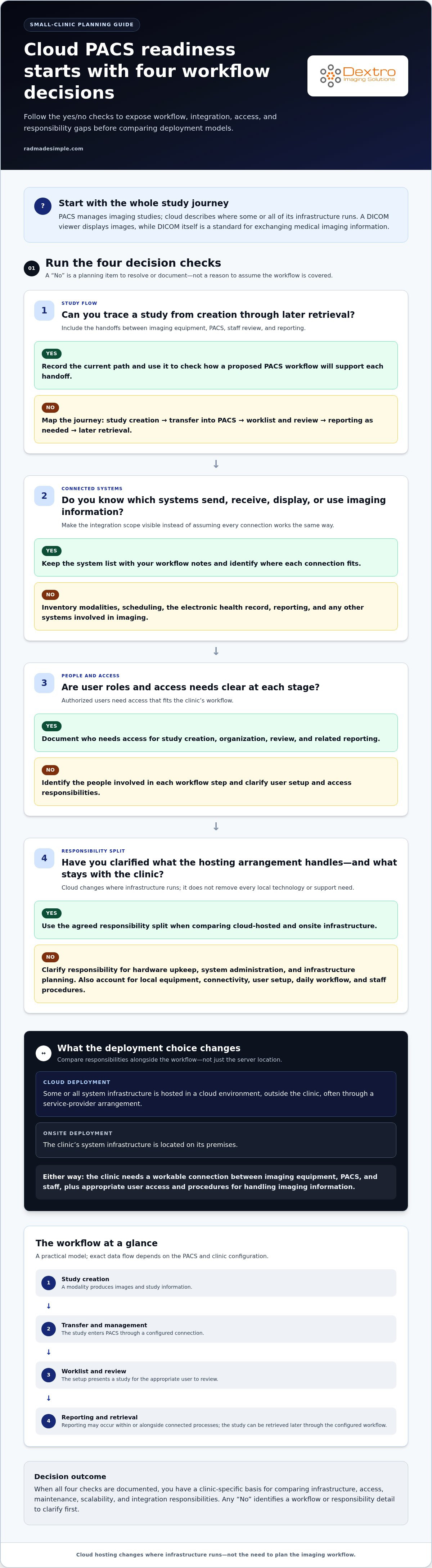
With cloud deployment, system infrastructure is hosted outside the clinic, often through an arrangement with a service provider. With onsite deployment, the clinic’s infrastructure is located on its premises. This difference can affect who handles hardware upkeep, system administration, and infrastructure planning. It does not automatically remove every local technology or support need.
The clinic still needs a workable connection between imaging equipment, PACS, and staff. Users need appropriate access, and the workflow must support image review and study retrieval. Staff also need to follow the clinic’s procedures for using the system and handling imaging information. Cloud hosting changes where infrastructure runs; it does not define the clinical workflow or assign responsibility for user access.
For a small team with limited IT capacity, identify which tasks fall under the hosting arrangement and which remain with the clinic. Clarify responsibilities for local equipment, connectivity, user setup, and daily workflow before comparing deployment options. This is more useful than assuming that “cloud” means either effortless operations or a complete loss of control.
How Cloud-Based PACS Moves Imaging Studies Through a Clinic
To assess cloud based PACS for small clinics, trace a study from creation through later retrieval. This shows where equipment, staff, and connected systems interact, and where a handoff or access requirement needs planning. The sequence below is a practical model. Exact data flow depends on the PACS and the clinic’s configuration.
Workflow summary: A modality creates an imaging study, the study enters the clinic’s configured PACS workflow, an authorized user reviews it, reporting is associated as needed, and the study is retrieved later when required.
From Modality to Worklist: Where PACS Fits
A modality is imaging equipment that produces a study, such as an X-ray or ultrasound system. A worklist is an organized list of studies or tasks for users to review. These terms help describe the path from image creation to the next step in a clinic’s workflow.
- Study creation: The modality produces images and study information. The processes and identifiers used at this stage can affect how the study is organized later.
- Transfer and management: The study moves from the imaging equipment into PACS through a configured connection. PACS manages the study so it can be reviewed and retrieved later.
- Worklist handling and review: The system presents a study for the appropriate user to review, according to its setup and the clinic’s workflow. PACS Harmony provides intelligent worklist management, an example of how worklist handling can fit into an imaging solution.
- Reporting and retrieval: Reporting may take place within or alongside connected clinical processes, depending on the setup. The study can then be retrieved through the clinic’s configured PACS workflow.
Where Integration and User Access Need Attention
The workflow depends on more than PACS. Before finalizing deployment decisions, document which systems send, receive, display, or use imaging information, and which people need access at each stage. This makes the integration scope visible and helps assign operational responsibilities instead of assuming every connection works the same way.
- Equipment: List each modality and note where studies are created and how staff currently send them for review.
- User roles: Identify who creates studies, organizes or reviews them, completes related reporting, and retrieves prior images.
- Access needs: Describe where users work and what information they need for their roles, without presuming a particular access method.
This inventory gives the clinic a concrete basis for discussing interfaces, workflow boundaries, and user responsibilities. Dextro Imaging Solutions offers PACS software alongside imaging workflow solutions and related hardware, so clinics can consider the wider operational picture rather than treating PACS as an isolated purchase.
Once the study path is documented, compare deployment trade-offs against your clinic’s actual responsibilities. Explore PACS and imaging workflow solutions as part of that planning.
Cloud PACS vs. Onsite PACS: Which Trade-Offs Matter Most?
The practical comparison is not “modern cloud” versus “outdated onsite.” It is about who manages each responsibility, what the clinic retains control over, and how well the arrangement meets its needs. When evaluating cloud based PACS for small clinics, compare documented responsibilities and service terms rather than relying on broad claims about savings, security, uptime, or performance.
| Decision area | Cloud PACS | Onsite PACS |
|---|---|---|
| Infrastructure | Hosting infrastructure is outside the clinic. Responsibilities depend on the service arrangement. | Infrastructure is located on clinic premises, so the clinic manages or arranges its operation. |
| Access | Access depends on the configured system, connectivity, and user permissions. | Access depends on the local setup, network design, and user permissions. |
| Maintenance | Some infrastructure tasks may fall to the provider. Document the division of responsibility. | Local hardware and system upkeep remain part of the clinic’s operational plan. |
| Scalability | Capacity changes depend on the service’s options and terms. | Changes may require planning and managing additional local resources. |
| Integration | Connections still need to fit the clinic’s equipment and clinical systems. | Local systems also require integration planning and ongoing coordination. |
Cloud hosting does not remove the need to assess security or continuity. Understand which safeguards and recovery processes are provided, which the clinic must manage, and what happens if connectivity or a service becomes unavailable. Onsite deployment offers more direct control over local infrastructure, along with responsibility for its operation and continuity planning.
Security, Privacy, and Continuity: Questions Clinics Should Evaluate
Responsibility may be shared between the clinic and service provider. Request clear documentation covering data protection, user permissions, backup and recovery, incident reporting, and each party’s role. A general security statement is not proof of a specific safeguard or regulatory status. Evaluate the evidence and service commitments that apply to the proposed setup.
- How are user roles and permissions assigned and reviewed?
- What backup and recovery processes apply, and who carries them out?
- How are incidents communicated, managed, and documented?
- What continuity steps apply during a connectivity or service interruption?
Total Cost and IT Workload Without False Savings Claims
Compare the full cost structure, not just hosting or hardware. Separate upfront expenses from recurring obligations, then account for infrastructure, licensing, support, connectivity, maintenance, and migration. Cloud may shift some infrastructure work into a service arrangement; onsite may require local infrastructure planning and upkeep. Neither model guarantees a lower total cost or less staff effort.
For a deeper cost analysis, use the radiology PACS pricing guide to organize the categories and assumptions in your comparison. Request vendor-specific details on service scope, continuity, capacity, and support so the decision reflects your clinic’s responsibilities.
How a Small Clinic Can Assess Cloud PACS Readiness
A readiness review turns the cloud PACS decision into a set of practical requirements. For cloud based PACS for small clinics, start with the work your team does today, then document what must stay connected, who needs access, and how the clinic will manage change. This helps keep important implementation needs from getting lost in a feature comparison.
Build a Clinic Requirements Brief Before Comparing Systems
Document current workflows and pain points before comparing options. Record how studies are created, reviewed, reported, and retrieved, along with the systems and user roles involved. Separate essential needs from desirable improvements and future possibilities. This keeps the evaluation grounded in the clinic’s operating context, including how staff access images and reports.
- Map the workflow. Trace each imaging process from study creation through review, reporting, and retrieval. Note handoffs, manual steps, and points where work can stall.
- Inventory equipment and systems. List each modality, current PACS or image viewer, relevant clinical systems, reading stations, and diagnostic monitors. Note how each connects to the workflow.
- Describe workload and users. Record study volumes using the clinic’s own records rather than generic benchmarks. Identify user roles and the tasks each person performs in the system.
- Set priorities. Mark requirements as essential, desirable, or future-facing. Include reporting needs, user access, integration scope, and expected handling of existing studies.
- Review operational readiness. Document connectivity, support responsibilities, maintenance expectations, and a fallback process for service or network interruptions.
- Plan implementation. Set out migration, validation, staff training, testing, and decision points before choosing a deployment path.
Keep the brief concise enough to use in meetings, but specific enough to compare how each proposed setup addresses the same workflow. For workstation considerations, the PACS workstation setup guide offers related planning context.
Plan Migration, Training, and Downtime Readiness
Migration planning should identify which existing studies and records need to move, who oversees the transfer, and who validates the results. Clarify what staff will test, how they will report problems, and how they will access prior images during the transition. A useful migration plan assigns responsibilities rather than leaving them implicit.
Training should reflect each role’s actual tasks. A staff member who prepares studies may need different instruction from a reader who reviews images or completes reports. Allow time to practice routine work and explain where users go for support. Define a fallback workflow for service or connectivity interruptions, including who communicates the issue and how pending imaging work is tracked. The radiology equipment compliance checklist adds broader equipment-planning context.
Once the brief is ready, connect it to the full imaging environment. Dextro Imaging Solutions provides PACS software, imaging hardware, software integration, and technical support. Explore Dextro’s PACS and imaging solutions to relate your requirements to the systems and workflow components your clinic uses.
Match a Small-Clinic PACS Plan to Dextro Imaging Solutions
A clinic-ready PACS plan connects software decisions to the equipment and people involved in image review. Define the workflow first, then consider how PACS, reading stations, diagnostic monitors, integration, and support fit together. This keeps the evaluation focused on operational fit rather than assuming that a cloud label alone determines the right setup.
Dextro Imaging Solutions offers PACS and imaging workflow software alongside diagnostic hardware and support. Its software options include PACS Harmony, which provides intelligent worklist management, and aycan PACS, described as secure enterprise imaging and image management. These options address different solution areas, without assuming a particular hosting model or additional product capabilities.
How PACS Software Fits Into a Complete Reading Setup
PACS is one part of the reading environment. A useful plan considers how imaging studies move through the clinic, where staff review them, and which hardware supports that work. Dextro Reading Stations, professional diagnostic monitors, and Portable Radiology Workstations are related equipment to consider alongside PACS software, based on the clinic’s workflow and reading needs.
Dextro also provides complete reading-station packages. Consider the reading setup as part of the broader system plan: align it with the PACS workflow, users’ tasks, and the clinic’s existing imaging environment. Avoid judging software and hardware in isolation. A requirements brief helps identify which workflow needs each component must address, while product specifications can be evaluated separately.
- PACS Harmony: Consider its stated role in intelligent worklist management when defining how studies are organized for review.
- aycan PACS: Consider its stated description as secure enterprise imaging and image management when outlining image-management requirements.
- Reading equipment: Include the reading stations and diagnostic monitors staff use in your workflow planning.
- Implementation support: Include software integration and technical support in the overall operational plan.
Define the Next Step for Your Clinic’s Evaluation
Before moving from assessment to selection, summarize the essentials in a practical evaluation brief. Keep it specific to your clinic rather than relying on generic assumptions about cloud based PACS for small clinics. Use the brief to compare options consistently and surface unresolved decisions before implementation planning begins.
- State the priority imaging workflows and the systems or equipment they depend on.
- Separate essential requirements from desirable improvements and future-facing needs.
- Record user roles, image and report access needs, and integration questions to resolve.
- Capture migration, training, support, connectivity, and downtime-planning responsibilities.
Use those priorities to connect PACS software with the reading setup and support your clinic needs. Dextro Imaging Solutions offers PACS, imaging hardware, software integration, and technical support to bring these components into the evaluation. Explore Dextro Imaging Solutions and its PACS and imaging options as you shape your clinic’s plan.
Turn Your PACS Evaluation Into a Practical Next Step
Turn your clinic’s requirements into a working decision document. Use it to align the people involved in imaging, administration, and IT around what the system must support, who owns each responsibility, and which questions remain open. That shared view keeps the evaluation focused on fit instead of assumptions about cloud hosting.
For cloud based PACS for small clinics, the right choice is the one that aligns the technology with your workflow and capacity. Dextro Imaging Solutions offers PACS software, integration, and technical support. PACS Harmony provides intelligent worklist management, while aycan PACS is described as secure enterprise imaging and image management. These products can be considered as part of a broader imaging setup.
Take your requirements brief into the next stage and explore the available options. Explore Dextro Imaging Solutions to plan the PACS and imaging workflow that fits your clinic.
Frequently Asked Questions
Can a small clinic use cloud PACS without an in-house IT team?
Yes. A clinic can use cloud PACS without dedicated in-house IT staff, but someone still needs to coordinate system access, connectivity, workflow changes, and support requests. For example, assign a staff member to manage user access and coordinate technical issues, with support responsibilities clearly defined between the clinic and PACS provider. Clear ownership helps prevent routine tasks from being overlooked.
Does cloud-based PACS require a dedicated server at the clinic?
Not necessarily. A cloud deployment may host the main PACS infrastructure outside the clinic, but local components can still depend on the system design and existing equipment. Before planning a server room or removing local hardware, map what currently stores, routes, or displays images. Then document which components remain onsite and who maintains them. The hosting label alone does not determine the clinic’s complete equipment needs.
What happens to image access if the clinic’s internet connection goes down?
Access to a cloud-hosted system may be interrupted if the clinic loses its internet connection, unless the configured system provides another available route or local access arrangement. Do not assume studies will remain viewable offline. Include this scenario in downtime planning: identify who should be notified, how pending work will be recorded, and what process staff should follow until access is restored. Document the steps where relevant staff can find them.
Can a clinic use cloud PACS with its existing imaging equipment?
Compatibility depends on the equipment, interfaces, and proposed system configuration. Start with an inventory of modality make and model, how each device sends studies, and any intermediate systems involved. Use that inventory to define the integration scope and test representative workflows before relying on the new setup for routine operations. This helps reveal equipment-specific requirements without assuming that all existing devices connect in the same way.
How should a small clinic plan a PACS migration?
Begin by defining what must move, such as prior imaging studies and associated records, then assign responsibility for export, transfer, and validation. Agree on how the clinic will confirm that selected studies can be found and opened after migration. Plan the transition around staff training and current work, including how users will handle new studies while older records are transferred. Keep an issue log and assign an owner to resolve each problem.
What is the difference between cloud PACS and a web-based DICOM viewer?
A web-based DICOM viewer primarily provides a way to view DICOM images through a browser or another interface. Cloud PACS refers to a PACS deployment with hosted infrastructure and broader image-management workflows. A viewer may be one component of a PACS environment, but image display alone does not explain how studies are organized, managed, or retained. For a practical comparison, list what staff need to do before and after opening an image.
Can a clinic change PACS providers and retain access to its imaging studies?
Continued access depends on export options, data formats, contract terms, and the migration plan. Before changing systems, establish which studies and related information can be exported, how the receiving environment will be populated, and how staff will retrieve records during the transition. Include validation and responsibility for resolving missing or unreadable studies. Preserve a documented access plan so future staff know where historical images are held and how to retrieve them.


