

The lower PACS bill can produce the higher five-year cost. For many small and mid-sized organizations, cloud PACS typically costs less over five years, but the result depends on study volume, storage growth, connectivity, and the services included. A cloud vs on-premise PACS cost analysis for 2026 needs to compare the full lifecycle, not just a subscription against an initial hardware purchase.
Cloud PACS may look simpler because it reduces the need for upfront local infrastructure, while on-premise PACS leaves hardware and capacity management to your organization. But subscriptions, support, upgrades, migration, internet connectivity, and disaster recovery can change the balance over time. This article explains how those costs add up, what to include in a five-year comparison, and how to weigh the trade-offs against your imaging operation’s needs.
Key Takeaways
- Compare migration, subscriptions, support, and upgrades alongside the initial PACS investment to see how costs build over time.
- Model total cost of ownership across five years, using your expected exam volume and storage growth rather than relying on headline prices.
- Factor in connectivity needs and data-transfer costs when assessing cloud PACS, especially as imaging workloads grow.
- Include hardware refreshes, IT effort, backups, and disaster recovery in the on-premise estimate.
- Use the comparison criteria to identify which PACS approach best fits your infrastructure, workflows, and growth plans.
Migration, subscription, support, and upgrade costs
Cloud and on-premise PACS differ in when costs arise and who manages the infrastructure. Cloud shifts more spending toward recurring service and usage charges; on-premise PACS typically requires more upfront capital and ongoing local maintenance.
Cloud Subscription and Usage Costs
Public-cloud infrastructure may bill compute, storage, and network use separately. Model study volume and retention needs, since higher usage can increase storage and data-transfer charges.
On-Premise Licensing and Maintenance
Annual maintenance and support contracts typically add 15 to 20 percent of the initial software licence cost. These costs apply whether a facility processes fewer studies or scales up, while capacity expansion can require new equipment.
Migration and Implementation Costs
On-premise deployment typically takes 3-6 months before the first study is read; cloud PACS can be deployed in days. Exam volume, facility size, retention, and integration needs shape implementation effort. Bandwidth, backup scope, and data egress also affect cloud budgets, so include them in usage estimates.
Support and Upgrade Costs
With on-premise PACS, your organization manages local hardware, software updates, and support-contract costs. Cloud subscriptions shift more infrastructure management to the service model, but recurring charges still depend on contract terms and usage. Compare included support, upgrade responsibilities, storage limits, network or transfer charges, backup provisions, service-level agreements, and exit or data-export fees. These terms show which costs recur and which may change as workloads grow.
For volume planning, a hospital processing 500 or more studies per day typically generates 1-2 TB of new imaging data per month. That growth can affect cloud storage and transfer use, while on-premise facilities must plan local capacity. Compare costs at expected volume and with realistic retention needs.
| Option | Cost structure | Key comparison |
|---|---|---|
| Cloud subscription | Monthly subscription | Usage, storage, network, and contract terms |
| Public cloud | Compute, storage, and network charges | Workload and data-transfer patterns |
| On-premise PACS | Hardware, licence, support, and maintenance | Capital investment and local capacity |
| Migration and integration | One-time project costs and workflow effort | Study volume and system connections |
Choose by comparing expected usage, implementation scope, support coverage, and five-year operating costs.
Five-year total cost of ownership
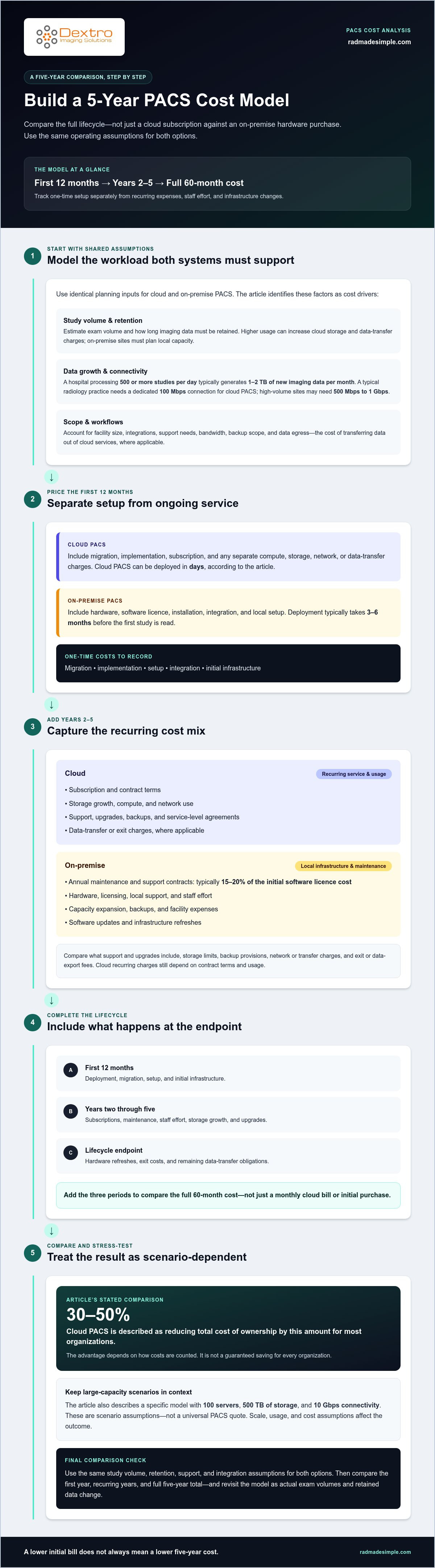
A useful PACS comparison tracks both the first 12 months and the full 60-month lifecycle. Include recurring expenses, staff effort, and infrastructure changes, not only the purchase or subscription.
Five-Year Cost Comparison
These figures provide a practice-level comparison; a separate large-capacity scenario shows why enterprise results can differ.
That scenario models 100 servers, 500 TB of storage, and 10 Gbps connectivity. Those figures describe a specific infrastructure model, not a universal PACS quote. Scale, usage, and cost assumptions affect the outcome.
Cloud PACS is described as reducing total cost of ownership by 30 to 50 percent for most organizations. Still, the advantage depends on how the comparison accounts for each cost category. Calculate the first 12 months separately, then sum all costs across 60 months. This reveals whether a lower deployment bill remains lower after recurring expenses accumulate.
Ownership Costs After Migration
Migration changes the cost mix, but ongoing budgeting remains essential. Add subscriptions, support, storage growth, upgrades, network use, and integration effort to the cloud estimate. For on-premise PACS, include licensing, maintenance, staff time, facility expenses, and infrastructure refreshes. Track exit costs too, since data export or migration away can affect the full lifecycle.
After deployment, compare annual costs with actual exam volumes and retained data. Higher-resolution studies and expanding archives can increase storage needs, while staff spend time managing interfaces and workflows. Include egress, meaning charges for transferring data out of cloud services, where applicable. A monthly cloud bill alone does not show the full cost of ownership.
Use the same worksheet for both options. Record identical assumptions for study volume, retention, support needs, and integration requirements. Then separate one-time implementation costs from recurring expenses and infrastructure refreshes.
- First 12 months: include deployment, migration, setup, and initial infrastructure.
- Years two through five: include subscriptions, maintenance, staff effort, storage growth, and upgrades.
- Lifecycle endpoint: include hardware refreshes, exit costs, and remaining data-transfer obligations.
The five-year cloud estimate is not automatically the better fit for every enterprise. The guide notes that cloud may or may not cost less over a 10-year period, depending on facility growth, usage, and contract terms. Use the five-year model to compare current plans, then test how growth changes costs beyond that window.
Internet connectivity and on-site data requirements
Cloud PACS users usually access studies through an internet connection; on-premise PACS stores imaging data on servers inside the facility. A typical radiology practice needs a dedicated 100 Mbps connection for cloud PACS. High-volume sites may need 500 Mbps to 1 Gbps, making bandwidth an operating requirement rather than an optional upgrade.
Start by estimating daily study volume, file sizes, and upload capacity. A hospital processing 500 or more studies per day typically generates 1-2 TB of new imaging data per month. Sustained upload connectivity below 100 Mbps can cause high-volume DICOM data to queue instead of reaching a cloud archive reliably. Those delays can affect how quickly remote teams access new studies.
Cloud performance also depends on internet quality, system design, and the viewer. Estimated cloud latency is 5-50 ms, depending on region and service; on-premise latency within a facility is estimated at less than 1 ms. For remote access to on-premise PACS, facilities typically route traffic through a VPN back to the hospital network. That setup can require firewall rules and additional IT configuration.
A hybrid PACS can use a local edge server to cache recent studies while keeping the full archive in the cloud. This can provide local access to cached images while connecting operations to cloud storage. Include both local infrastructure and internet connectivity in the budget. The right fit depends on which studies need fast local access and how much data moves between locations.
Data sovereignty is another infrastructure consideration. Some jurisdictions’ data residency laws prohibit storing patient data on infrastructure outside their borders. Cloud providers may offer evidence that their platforms comply with HIPAA, ISO, and PCI-DSS, but organizations must still ensure their computing practices and data handling align with relevant regulations. Identify where data will be stored and how access, backups, and transfers will be managed.
Portability affects future flexibility. HL7 and DICOM provide common methods for exchanging healthcare information and imaging data. Include data export, transfer, and migration in a vendor comparison, because moving a large archive can require network capacity and staff effort. Cloud cost comparisons should account for recurring data-transfer charges, while on-premise teams manage local access, maintenance, backups, and server security.
- Measure connectivity: compare available upload speed with study volume and data growth.
- Map data location: identify storage regions, access paths, and backup destinations.
- Plan portability: account for HL7 and DICOM exchange, export effort, and transfer charges.
Upfront hardware and disaster-recovery infrastructure
On-premise PACS places more disaster-recovery responsibility within the imaging center. Cloud PACS reduces the need for local server infrastructure, but recovery planning still depends on access, backups, and service availability. Compare the complete recovery design, not just the initial hardware budget, to understand who handles each task.
On-premise hardware refreshes typically occur every 3-5 years. Local capacity planning also needs to account for storage growth and replacement lead times. If servers, storage, or networking equipment fail, the facility must have a recovery path that protects access to imaging data.
Cloud providers are described as typically achieving 99.9 to 99.99 percent uptime, backed by service-level agreements. Well-managed on-premise PACS installations are described as typically achieving 99.0 to 99.5 percent uptime, corresponding to 44 to 88 hours of downtime per year. These availability figures help frame the comparison, but they don’t replace a facility-specific recovery plan.
Set recovery requirements around actual operations. Decide which workflows need the fastest restoration after a server failure, power issue, or network interruption. On-premise disaster recovery planning should also account for floods, fires, ransomware attacks, and hardware problems. Each scenario can affect image access differently, so identify the systems and data needed to restore clinical workflows.
Backups require their own infrastructure and protection. On-premise teams are responsible for protecting backup copies, securing servers, managing access, and updating systems. A backup stored beside the main PACS may be exposed to the same physical damage or network threats. Include separate backup capacity and the staff effort needed to maintain it in the cost model.
Cloud infrastructure shifts some underlying hardware management away from the facility, while internet access becomes part of system availability. A cloud recovery plan should account for access during outages and the role of backups in restoration. Compare service-level agreements by their stated availability and recovery terms, then match those terms to the facility’s operational priorities.
- List failure scenarios: include server failure, fire, flood, power loss, ransomware, and hardware problems.
- Assign responsibilities: identify who manages servers, access, updates, backups, and recovery tasks.
- Model lifecycle costs: include hardware refreshes, backup infrastructure, maintenance, and downtime planning.
Cloud can reduce upfront local hardware needs, while on-premise PACS gives the facility direct control over its infrastructure. The practical choice depends on each model’s recovery capabilities and the operational work required to maintain them. Include availability and recovery costs in a five-year comparison rather than treating backup as a separate technical detail.
Cloud and on-premises cost comparison
The lower invoice does not always mean the lower total cost. A sound comparison separates infrastructure expenses from ongoing operations, then tests both models against the same capacity, workload, and planning period. Include recurring charges and internal effort, not just visible vendor bills.
On-premises costs can be underestimated by 30 to 40 percent when budgets omit staffing, facility expenses, maintenance, or replacements. Cloud shifts more spending to recurring services, but that does not make every bill predictable. Cloud budgets ran 17% over plan on average, and 84% of organizations said they struggled to manage cloud spend. These figures reinforce the need to track usage and assign budget ownership.
Cloud platforms also differ in design. Cloud-enabled PACS runs legacy software on a virtual machine in AWS or Azure; cloud-native PACS uses microservices, allowing storage, rendering, authentication, and reporting to scale independently. Compare the architecture with your actual workload. Dedicated local infrastructure may suit organizations that prioritize direct capacity control, while a cloud-native platform can align resources with changing demand.
For a fair comparison, use the same operating assumptions for both options. Build a worksheet with these categories:
- Infrastructure: servers, storage, network, facility, power, and cooling.
- Operations: IT staffing, maintenance, support, and workflow effort.
- Cloud use: subscription, compute, storage growth, and data transfer.
- Lifecycle: upgrades, replacements, backups, migration, and exit costs.
Cloud costs can be harder to forecast when resources remain idle or exceed actual capacity needs. Industry surveys estimated that around 30% of cloud spending was wasted on idle, overprovisioned, or forgotten resources. Review usage regularly and align storage tiers and compute capacity with real workloads. On-premises budgets need a similar discipline: unused server capacity still carries facility and maintenance costs.
For a cloud-versus-on-premise PACS cost analysis in 2026, compare costs over five years first, then test a 10-year horizon. Cloud may or may not cost less over 10 years, depending on facility growth, usage, and contract terms. The clearest decision comes from applying one volume forecast, retention plan, and support scope to both options, then identifying which assumptions drive the difference.
Use PACS planning resources to continue shaping a comparison around your imaging operations and infrastructure priorities.
Dextro Imaging Solutions: Radcom Compact
Radcom Compact is one Dextro Imaging Solutions offering to consider as you evaluate PACS infrastructure and operating priorities. First clarify your requirements through the cost comparison: study volume, storage needs, connectivity, workflow integration, and responsibility for ongoing maintenance. These factors help determine whether a PACS option fits your facility’s operating model.
Dextro Imaging Solutions also offers PACS Harmony and aycan PACS, giving imaging teams PACS options to consider alongside infrastructure plans. Evaluate these offerings against the requirements identified in your comparison, rather than judging a system by subscription or hardware costs alone. Start with your workflow and the resources needed to support it.
Contact Dextro Imaging Solutions to discuss your PACS priorities and next steps.
Make your PACS decision actionable
Turn your cloud vs on-premise PACS cost analysis for 2026 into a decision brief your imaging and IT teams can use. Define the operational priorities behind the numbers: how readers access studies, which workflows need to remain efficient, and how infrastructure plans support future change. This makes the final choice easier to explain across clinical, technical, and finance stakeholders.
Dextro Imaging Solutions offers Radcom Compact, Dextro Reading Stations, and advanced diagnostic displays. Consider these products alongside PACS options as you plan your imaging environment. Bring your priorities and cost-model assumptions to the discussion so you can focus on fit with your organization’s requirements.
Contact Dextro Imaging Solutions to discuss your PACS and imaging priorities. A clear plan puts your team in a stronger position to move forward with confidence.
Frequently Asked Questions
Cloud vs on-premises cost, which one comes out on top?
Cloud may cost less over five years for small and mid-sized organizations, while on-premise PACS may suit facilities that prioritize local control. The result depends on exam volume, retention, staffing, connectivity, and contract terms. For example, a practice with steady workloads may value predictable infrastructure costs differently from one expecting rapid growth. Compare both options using the same operational assumptions before deciding.
How do on-prem costs compare to cloud over five years?
Use these estimates as a planning comparison, then test how staffing, interface work, retention policies, and expected growth affect your totals. Different workloads or cost structures can change the result.
First, what is PACS?
PACS, or Picture Archiving and Communication System, is software and storage for capturing, storing, viewing, retrieving, and sharing medical imaging studies. A radiology department, for example, can use PACS to access an examination after acquisition and make it available through its imaging workflow. When evaluating PACS, consider how the system connects with existing clinical information and imaging data, not just where images are stored.
How much money is at stake?
The amount depends on the deployment’s size and design. These figures illustrate how platform scale can create substantial budget differences. For an individual practice, assess the relevant workload and include internal labor, integration, and lifecycle costs before relying on a headline total.
How should an SMB decide where each workload belongs?
Place workloads according to access needs, data location, connectivity, and internal IT capacity. A small imaging center might keep frequently accessed studies close to readers and place its longer-term archive in cloud storage through a hybrid design. Consider whether the internet connection can handle image transfers and whether local policies require data to stay on-site. Then match each workflow to the infrastructure that supports it.
Is on-prem dead?
No. On-premise PACS remains relevant where facilities need local infrastructure or cannot use cloud services under organizational policy. Air-gapped military or government healthcare settings are examples of environments where policy excludes cloud infrastructure. Other organizations may choose on-premise systems for specific workloads while using cloud for others. The decision depends on operational requirements, data-handling needs, and the organization’s capacity to manage local systems.
What are the upfront and annual costs of cloud PACS in 2026?
Annual operating costs depend on subscription terms and usage, including storage and network activity. Build the budget around the practice’s expected workload and migration scope.
What are typical cloud PACS pricing models and per-study or per-user rates in the U.S.?
Cloud PACS pricing commonly uses a subscription structure, with costs also tied to services, usage, or storage. Per-study and per-user rates are not useful as standalone comparisons unless you understand the billing model and included services. For a U.S. practice, compare how the subscription responds to changes in exam volume, archive growth, network transfers, and support needs. This shows how workload changes may affect recurring costs.


