

Could a monitor that works well for clinical review be the wrong choice for primary image interpretation? That’s the question behind the clinical review monitor vs diagnostic monitor decision. The difference isn’t simply screen size or a higher specification. It starts with the task: primary interpretation calls for a display suited to that workflow, while clinical review supports secondary viewing, consultation, and follow-up.
There isn’t one set of technical thresholds that applies to every situation. Intended use, imaging modality, and applicable facility or jurisdictional requirements all shape the decision. This guide explains how the two display categories differ, which workflows they support, and what to assess before selecting a monitor.
Image quality, quality assurance, and workstation planning all matter when choosing a display for the way your team reads and reviews images. Dextro Imaging Solutions offers advanced medical displays, configured reading stations, and portable radiology workstations for professional imaging workflows. The goal is a practical setup aligned with your team’s use, not simply the highest specification on a product sheet.
Key Takeaways
- The clinical review monitor vs diagnostic monitor decision starts with the viewing task: primary interpretation and secondary review serve different purposes.
- Assess grayscale presentation, luminance, resolution, uniformity, and calibration in context. The right criteria depend on modality, workflow, and applicable requirements.
- Compare displays by intended task, user responsibility, and local governance rather than relying on labels or a single specification.
- Build a practical selection process around defined tasks, users, policy, equipment, and input from relevant radiology, IT, medical physics, and leadership teams.
- See how a Jusha diagnostic monitor and configured reading stations can fit into a broader professional imaging workflow.
Clinical Review Monitor vs. Diagnostic Monitor: Why Intended Use Matters
A diagnostic monitor is used in workflows where a qualified reader interprets medical images as part of primary interpretation. A clinical review monitor supports secondary viewing, consultation, or access to images when the user isn’t responsible for that primary interpretation. These categories describe intended use, not a universal legal status for every display.
The distinction matters because the same image can appear on screens used for different responsibilities. A clinician checking a prior study during a consultation has a different task from a radiologist reviewing images to produce a formal interpretation. Seeing a medical image doesn’t, by itself, make the screen or the viewing task diagnostic.
Choose a monitor based on the responsibility attached to the viewing task, not simply the fact that an image is visible. Intended use is the starting point, but local policy, imaging modality, and workflow also shape the decision. Department procedures and applicable requirements may affect which display is appropriate for a particular user and task. Don’t assume one category automatically suits every image-viewing situation.
What is a clinical review monitor used for?
A clinical review monitor can support secondary review, consultation, and convenient access to images as part of patient care. For example, a clinician might refer to an image during a discussion, or a care team might review studies to understand prior findings. In these situations, access supports communication and workflow. It doesn’t necessarily transfer responsibility for primary interpretation to the person viewing the image.
Review tasks still vary. Consider the image type, the detail the user needs to assess, and facility policy. A display used to glance at an image during a consultation may serve a different purpose from one used for a focused review. Treat the task and the user’s responsibility as separate questions.
What is a diagnostic monitor used for?
A diagnostic monitor belongs in a workflow where a qualified reader interprets images. The display is part of the broader interpretation environment, alongside the reader’s role, the imaging modality, and facility procedures. Assess its suitability against the intended use and applicable local requirements rather than assuming that the product label alone settles the question.
Map the actual workflow: who reviews the images, what decision they make, and whether they’re responsible for primary interpretation. A radiologist interpreting a study and a clinician consulting an image may use the same imaging system while performing distinct tasks. That difference helps teams evaluate display needs without treating every screen as interchangeable.
Image exchange is another part of the environment. The DICOM standard supports handling and transmitting medical imaging information, but using DICOM doesn’t by itself determine whether a display is suitable for a particular interpretation task. Consider the image format, the display’s role, and the user’s responsibility as separate parts of the decision.
For the clinical review monitor vs diagnostic monitor decision, start with the work being performed, then align the display choice with modality, local policy, and the people responsible for image review. This gives radiology, IT, medical physics, and department leadership a practical basis for the comparison that follows.
Which Display Characteristics Matter for Diagnostic and Review Work?
Monitor specifications help narrow the options, but they don’t establish whether a display suits a particular task. Consider how the screen presents grayscale, how much detail it can show, whether its output is consistent across the panel, and how its performance is managed over time. The importance of each characteristic depends on the image type, reading task, and applicable facility or jurisdictional requirements.
No single specification determines monitor suitability. The right choice meets the needs of the intended task within the relevant workflow and requirements. A manufacturer’s published capability describes the display, while a facility’s validated operating requirements describe what the workflow needs. Keep those two things distinct. Treat numerical values repeated across comparison articles as prompts for verification, not universal thresholds.
How do DICOM GSDF and calibration fit into monitor selection?
DICOM GSDF, the Grayscale Standard Display Function, describes a way to map grayscale values to display output so tonal differences are presented consistently. It provides a useful frame for evaluating grayscale performance, but a reference to DICOM alone doesn’t establish that a display is suitable for every imaging task.
Calibration and quality assurance are connected, but they aren’t the same step. Calibration adjusts display output toward a defined target. Quality assurance checks whether the display and its performance remain appropriate for the workflow over time. Follow established procedures and applicable guidance rather than assuming one calibration approach or interval works everywhere. For primary interpretation display considerations, the ACR Technical Standard for Electronic Practice of Medical Imaging offers a professional reference. Broader equipment-planning context is available in this radiology equipment compliance checklist.
Why do resolution, brightness, and uniformity need context?
Resolution describes how much image detail a display can represent. Its practical value depends on the source images and how the reader uses them. Luminance, or brightness, affects how clearly grayscale information appears under the conditions of use. Uniformity describes how consistently the screen presents its output across the viewing area. A panel that varies noticeably from one region to another may complicate consistent viewing, even if its headline specification looks strong.
Evaluate these characteristics together, not in isolation. The display needs for reviewing a study during a consultation may differ from those in a workflow where a reader interprets images. Modality and facility policy can also affect what matters. Instead of treating a published resolution or brightness figure as a universal pass mark, compare the stated capability with the requirements established for the task.
For the clinical review monitor vs diagnostic monitor decision, document the specification, intended workflow, and applicable acceptance criteria separately. That gives imaging and technical teams a clearer basis for discussion. For more context on equipment planning, explore radiology equipment compliance resources.
Clinical Review vs. Diagnostic Monitor: Compare by Task, Not Spec Sheet
Start the comparison with the work being done, not a checklist of monitor specifications. A radiologist interpreting images for a report, a clinician consulting a study during care, and a team using images for teaching may all view medical images, but their responsibilities and display needs can differ. The table below compares the decision by task, user, display evaluation, and governance.
| Workflow task | User responsibility | Display evaluation | Governance |
|---|---|---|---|
| Primary interpretation | A qualified reader interprets images to inform a formal clinical conclusion. | Assess the display as part of the intended interpretation setup, including image presentation and quality assurance. | Follow applicable facility policy and current authoritative standards. |
| Consultation or secondary review | A clinician views images to support discussion, care coordination, or review, without necessarily taking responsibility for primary interpretation. | Match display capability to the review task and the level of detail the user needs to assess. | Apply local rules for the setting and the user’s role. |
| Teaching or educational viewing | Learners or colleagues examine images for instruction or discussion. | Consider the teaching objective, image type, and conditions in which images are shown. | Use department procedures for educational displays and access. |
These are workflow examples, not fixed classifications. A department may use displays differently across reading rooms, consultation spaces, and teaching areas. The same person may also perform different roles at different times. A monitor’s label alone can’t establish suitability for every clinical workflow, and a display used for one purpose shouldn’t automatically be assumed appropriate for another. Local policies and current authoritative standards govern final decisions.
Which monitor fits primary interpretation, consultation, and teaching?
For primary interpretation, assess the complete display configuration against the intended task and the facility’s requirements. For consultation, focus on what the clinician needs to see and whether they’re responsible for interpreting the study. Teaching adds another context: an image may be used to demonstrate a finding rather than support a patient-specific interpretation. Make each decision according to the task, policy, and validated equipment configuration.
Are brightness and resolution enough to decide?
No. Brightness and resolution describe only part of a display’s performance. Consider grayscale behavior, calibration, uniformity, quality-assurance practices, and how the display fits the workflow. A high figure on a product sheet doesn’t automatically establish that the complete setup meets a facility’s needs. When comparing the clinical review monitor vs diagnostic monitor, document the use case and evaluation criteria alongside the specifications. For product-category detail, consult this Jusha medical monitors guide.
How to Choose a Monitor for Your Radiology Workflow
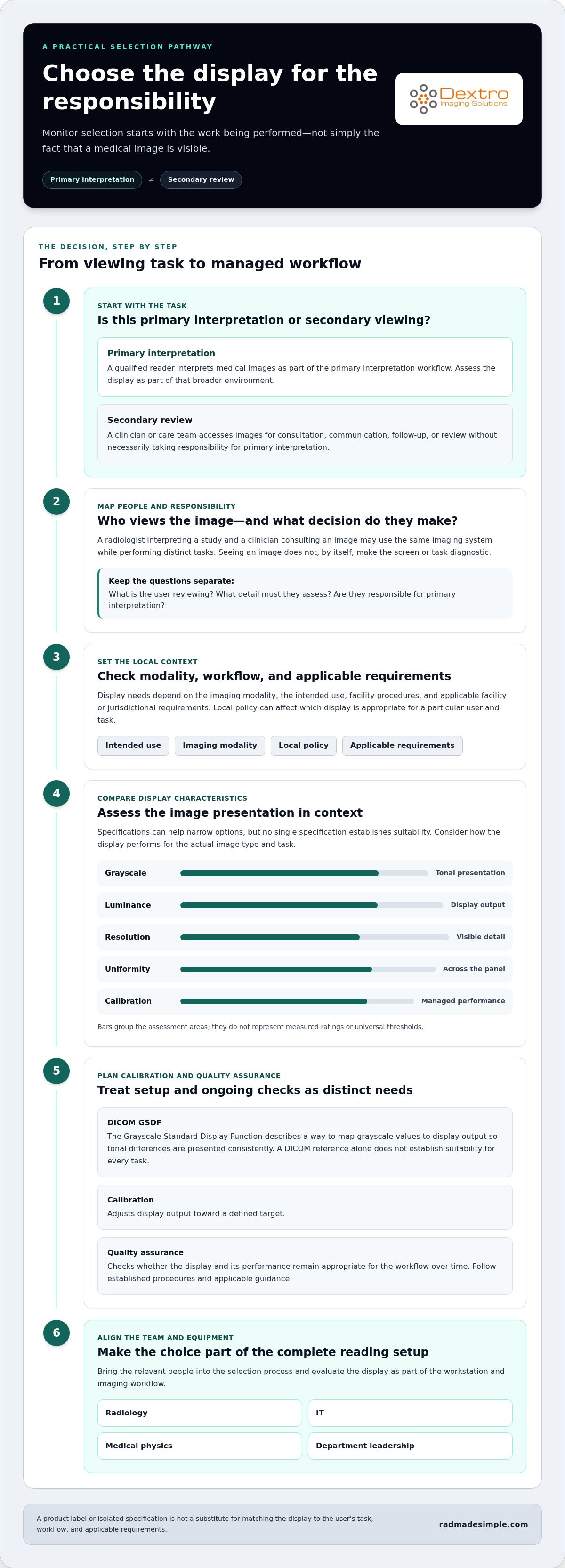
A reliable selection process treats monitor choice as a workflow decision. Before comparing models, clarify what people need to do, where they’ll do it, and who is accountable for approving the setup. This keeps the clinical review monitor vs diagnostic monitor discussion grounded in real responsibilities rather than assumptions based on labels or headline specifications.
Use this sequence to organize the assessment:
- Define the tasks. List primary interpretation, consultation, follow-up, teaching, and other image-viewing activities. Note the modality and the level of detail each task requires.
- Identify users and locations. Record who views images, where they work, and whether they’re responsible for primary interpretation. A reading room, clinic, and teaching space may support different roles.
- Review policy and requirements. Bring together applicable institutional, jurisdictional, and modality-specific requirements. Include existing quality-assurance procedures and clarify who maintains them.
- Assess the equipment and environment. Consider display performance alongside the workstation, image-viewing workflow, peripherals, and system integration needs, utilizing commercial AV distributors such as hdtvsupply.com when sourcing compatible video distribution hardware. Document those needs without assuming compatibility based on a product description alone.
- Document the decision. Record the use case, evaluation criteria, reviewers, outcome, and approval pathway so the rationale is clear to the teams who operate and oversee the setup.
What should a facility define before comparing monitors?
Build an inventory of image-reading tasks, rooms, users, and responsibilities. For example, distinguish a radiologist’s primary interpretation from a clinician’s consultation view, even if both happen in the same department. Then map current quality-assurance processes and institutional requirements to each use case. Include IT and system integration needs in the inventory, but document them as requirements to assess rather than presumed capabilities.
Radiology can define clinical tasks and reader responsibilities. IT can describe the workstation and system environment. Medical physics can contribute to display evaluation and quality processes, while department leadership clarifies governance and approval. Roles vary by organization, but assigning ownership early helps prevent gaps between clinical intent and technical planning.
How should teams document and review the decision?
Keep a concise record of the intended use, selected evaluation criteria, people responsible for review, and the approval pathway. State which facility policies or authoritative requirements informed the decision. A facility-led review can revisit the record when workflows, equipment, or institutional requirements change. The timing should follow local governance, not an assumed universal interval.
Monitor choice is also workstation planning. A reading setup may involve more than the display, including the user’s location and how the team accesses imaging systems. The radiology reading workstation guide explores that broader planning context. For additional planning information, see radiology workstation planning alongside your monitor requirements.
Build a Complete Reading Setup with Dextro Imaging Solutions
Once the reading task and local requirements are clear, consider the display as part of a complete workstation. Dextro Imaging Solutions supplies diagnostic monitors, including the Jusha diagnostic monitor, alongside configured reading stations and portable radiology workstations. This lets teams plan around the reader’s working environment, not just a monitor model.
When should monitor selection be part of a complete reading station?
Include workstation planning when the display decision affects how readers access systems, use peripherals, or work across rooms. Dextro’s turnkey reading-station configurations range from a single monitor to a complete setup. Its multi-system reading stations let users switch instantly between independent systems while using the same monitors, keyboard, mouse, and microphone. This helps teams plan the display, workstation, and day-to-day workflow together while keeping equipment evaluation aligned with the facility’s intended use and requirements.
The right configuration depends on the setup your team needs. A single-monitor configuration may suit one workflow, while a broader reading station may be relevant when the working environment calls for additional equipment. Define the reader’s tasks and workstation needs first, then evaluate how the display fits into that arrangement. The goal is a coherent setup, not simply adding specifications that don’t serve the task.
How can an integrated workflow support distributed radiology teams?
For teams working across locations or in remote reading contexts, portable radiology workstations are another option to consider as part of equipment planning. Dextro’s tagline, “Your Reading Room Anywhere,” reflects its focus on reading environments beyond a single fixed room. The workstation decision should still follow the team’s workflow and applicable requirements, including how readers access images and what responsibilities they hold.
Dextro’s imaging software offerings include PACS Harmony, aycan PACS, and RadVoice. These can be considered alongside the display and workstation when planning an imaging environment. Keep each part of the setup tied to the roles and processes your team has identified, and document how the configuration supports the intended work.
The clinical review monitor vs diagnostic monitor decision becomes more practical when it leads to a reading setup designed around real tasks, people, and locations. Dextro Imaging Solutions brings diagnostic monitors and reading-station options into that broader planning conversation. Explore Dextro Imaging Solutions to consider a reading setup suited to your workflow.
Turn Your Display Decision Into a Clear Next Step
Turn the monitor decision into a shared, documented plan. Bring together the people responsible for image interpretation, technology, and local quality processes around the tasks your team performs. Agree on who uses each display, what responsibility they hold, and how the facility will assess whether the setup continues to fit its workflow.
This makes the clinical review monitor vs diagnostic monitor choice more than a purchasing decision. It gives your team a practical basis for planning equipment, reviewing changes, and keeping display use aligned with evolving needs. Start with the workflow, then shape the reading environment around it.
Explore Dextro Imaging Solutions to discuss a reading setup that supports your team’s workflow.
Frequently Asked Questions
Can a clinical review monitor be used for primary diagnosis?
Not automatically. Suitability depends on the display’s intended use, the reader’s responsibility, facility policy, and requirements that apply to the setting and modality. If a clinician reviewing a study is expected to make the primary interpretation, the department should evaluate that workflow as primary interpretation rather than rely on the screen’s usual review role. Local governance should document the decision.
Is every medical monitor a diagnostic monitor?
No. “Medical monitor” is a broad product description, not proof that a display fits every diagnostic workflow. The clinical review monitor vs diagnostic monitor distinction depends on intended use and how the display will be evaluated within the department’s process. A screen used to access images for discussion may have a different role from one used for primary interpretation. Match the display and configuration to its assigned task, not its label alone.
Does DICOM calibration alone make a monitor suitable for diagnosis?
No. Calibration that aligns grayscale presentation with a target is only one part of evaluating a display. Suitability also depends on the intended task, facility requirements, and quality assurance over time. A calibration record doesn’t by itself show how a display performs after changes to the workstation or viewing environment. Follow documented local QA procedures to assess the full setup and record relevant findings.
Can one radiology department use both clinical review and diagnostic monitors?
Yes. A department can assign displays to different roles, such as primary interpretation in a reading room and image consultation in a clinic or teaching space. Make those assignments explicit. Staff should know which station is designated for interpretation and which supports secondary viewing. Local governance can define responsibilities, evaluation processes, and how changes to rooms or equipment are reviewed.
What happens if a display’s calibration or quality assurance is not maintained?
A display may no longer present images as consistently as expected. Grayscale appearance, luminance, or uniformity can change, making viewing conditions less dependable across sessions or workstations. That doesn’t by itself establish a specific clinical consequence, but it can undermine confidence in the display evaluation. Follow the facility’s QA process to identify deviations, record findings, and determine appropriate next steps.
Who should be involved in selecting monitors for a radiology department?
Involve radiologists, IT, and stakeholders responsible for quality and departmental decisions. Radiologists can describe interpretation tasks and image-viewing needs; IT can map the workstation and systems environment; medical physics can contribute display evaluation and QA expertise where relevant. Department leadership can clarify ownership, policy, and approval. Early input helps align clinical responsibilities with technical planning and makes review roles clear.
Do monitor requirements differ for mammography and other imaging tasks?
They can. Display considerations may vary by modality and task, so a criterion relevant to one type of image may not apply directly to another. Mammography is one example that may have specific display considerations. Don’t assume a general monitor specification applies across modalities. Check current authoritative guidance and applicable facility requirements for the intended use, then document how the selected setup will be evaluated.


