

Regular, deliberate breaks are a practical part of eye strain reduction for radiologists. A useful starting point is the 20/20 rule: every 20 minutes, look at an object 20 feet away for 20 seconds. This brief shift gives your eyes a pause from close screen work.
Long image-reading sessions can make it tempting to put off a break until the work is done. But eye fatigue, dryness, irritation, and headaches are signals to notice, not push through. Recognizing these symptoms can help you respond early and build more sustainable habits into your workday.
This article explains how breaks can support visual comfort, what computer vision syndrome may feel like, and how workplace wellness relates to radiologists’ visual health. You’ll also learn how display conditions and workstation choices fit into a practical approach to eye strain reduction for radiologists.
Key Takeaways
- Build regular pauses into image-reading work and notice signs such as eye fatigue, dryness, irritation, or headaches.
- Consider how workstation posture and lighting contribute to visual comfort over a long radiology career.
- Recognize computer vision syndrome symptoms and understand how screen conditions can contribute to discomfort.
- Explore how Dextro Imaging Solutions’ reading stations and PACS offerings relate to radiology workstation needs.
Work-break frequency and eye strain symptoms
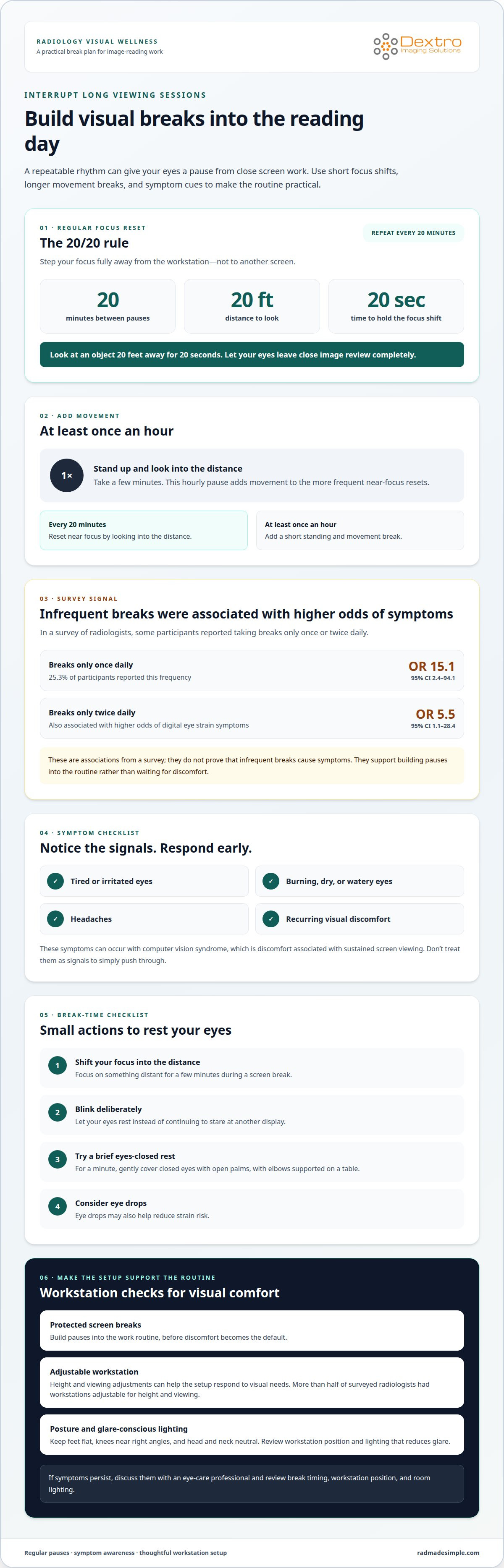
A workable break plan interrupts long image-reading sessions before discomfort becomes the day’s default. Use the 20/20 rule as a screen pause: every 20 minutes, look at an object 20 feet away for 20 seconds. During that break, shift your focus fully away from the workstation rather than checking another screen. At least once an hour, stand up and look into the distance for a few minutes. These short pauses serve different purposes: one resets near focus regularly, while the hourly pause adds movement.
Break frequency matters. In a survey of radiologists, 25.3% of participants took a break from work only once daily. Taking breaks only once a day was associated with higher odds of digital eye strain symptoms (OR 15.1; 95% CI 2.4-94.1); taking breaks only twice daily was also associated with higher odds (OR 5.5; 95% CI 1.1-28.4). These associations don’t prove that infrequent breaks cause symptoms, but they support building pauses into the work routine instead of waiting for discomfort.
Notice symptoms such as tired, irritated, burning, dry, or watery eyes, as well as headaches. During a screen break, blink deliberately and let your eyes rest; eye drops may also help reduce strain risk. The RSNA article recommends focusing on something in the distance for a few minutes during a screen break. Another suggested pause is to rest for a minute with open palms gently covering closed eyes and elbows supported on a table.
What workplace accommodations can help radiologists with persistent eye strain? Protected screen breaks, an adjustable workstation, and lighting that reduces glare can make the work setup more responsive to visual needs. More than half of surveyed radiologists had workstations adjustable for height and viewing. The RSNA article also recommends keeping feet flat, knees near right angles, and the head and neck neutral. If symptoms persist, discuss them with an eye-care professional and review break timing, workstation position, and room lighting.
2. Career longevity and wellness
Radiology can be a long-term career, so visual comfort belongs in workplace wellness planning. The RSNA article describes a radiology career as potentially lasting 20 or 30 years. That horizon makes daily viewing conditions more than a short-term convenience. A workstation should support consistent image review while allowing the reading environment to remain comfortable across changing tasks. Wellness planning can include screen placement, ambient light, posture, and routines that interrupt concentrated viewing.
Lighting deserves particular attention in dark reading rooms. A small, bright display against a dark background creates strong contrast. Bias lighting is a dim light behind the monitor that raises ambient light without shining directly toward the reader. Directing it toward the wall or panel behind the display can soften that contrast. This may reduce eye strain by limiting extreme pupil dilation in a dark room. The average light across the viewed area influences pupil dilation, not just the brightest point.
Workplace wellness also means treating visual symptoms as useful signals. A radiologist who notices recurring fatigue or discomfort can consider whether room lighting, monitor position, or viewing habits contribute. Eye examinations are another part of visual health: 26.8 percent of radiologists in the survey had an eye exam within the previous year. Recording when discomfort occurs, such as during prolonged image review or in a dark room, can give an eye-care professional practical context.
Departments can make visual comfort part of routine workstation discussions, rather than waiting for symptoms to disrupt work. Review whether adjustable equipment supports different tasks, whether ambient lighting reaches the reading area evenly, and whether wellness routines fit the workflow. A practical starting point is to include radiology workstation planning in that review. Small environmental adjustments can address avoidable sources of strain while keeping image interpretation demands central.
Keeping this in view makes lighting part of ongoing wellness planning, rather than treating discomfort only as an individual concern. Bias lighting may reduce eye strain by limiting extreme pupil dilation in a dark reading environment. Consider it alongside other workstation choices, taking into account the conditions in which image review takes place and whether visual comfort is supported throughout routine work.
3. Computer vision syndrome
Computer vision syndrome describes discomfort associated with sustained screen viewing. Symptoms can include tired or irritated eyes, dryness, watering, and headaches. Intense eye strain may also cause tension headaches or, in extreme cases, ocular migraines. Radiologists working in dark rooms with bright monitors may experience eye fatigue, headaches, and general discomfort.
No single monitor setting suits every reading room. Keep images comfortably visible without creating an isolated bright screen against a dark environment. Dim bias lighting directed toward the wall or panel behind monitors can reduce that contrast without shining into your eyes. Avoid relying on image magnification alone to solve visibility issues: viewing over-magnified images from a routine distance of two feet may be unhelpful.
Set up the workstation so the monitor sits comfortably in view, with your head and neck neutral. Keep your feet flat and knees near right angles while seated. Direct bias lighting toward the wall behind the displays, not toward your face. During a screen pause, use the 20/20 rule: look at an object 20 feet away for 20 seconds. This shifts focus away from close image review.
Computer glasses, blue-light filters, and anti-glare screens aren’t universal fixes for radiologists. Their usefulness depends on the specific visual concern, so discuss persistent symptoms or eyewear choices with an eye-care professional. For dry eyes, blink periodically during image review; eye drops may also help reduce strain risk. A brief pause to focus in the distance gives your eyes a break from sustained near work.
See an eye-care professional when eye discomfort persists, recurs, or interferes with image reading. Describe your symptoms, when they occur, and whether they arise under particular lighting or viewing conditions. Tired, burning, dry, or watery eyes and headaches are useful details to share. An eye examination can help assess symptoms and guide appropriate next steps.
Digital eye strain is estimated to affect approximately 60 million people globally each year. In a dark room, staring at a small bright area can make pupils continually expand and contract, contributing to eye fatigue.
4. Digital eye strain prevalence among radiologists
A survey of 198 radiologists found that 50.5 percent reported digital eye strain symptoms. Reported problems included irritated eyes, eye fatigue, and headaches within the past year. This makes visual discomfort a practical workforce concern, not merely an individual workstation preference. The result describes surveyed participants; it doesn’t mean every radiologist will experience symptoms or that screen time alone explains them. Eye strain reduction for radiologists starts with recognizing that symptoms can have several contributing factors.
Hours at the workstation appear relevant. A survey of RSNA members found eye strain increased among radiologists who worked longer than six hours a day. The survey was sent to 2,700 RSNA members, while a separate reported survey included 87 women radiologists. In that study, women had an almost four-times higher risk of tired, irritated, or burning eyes. The reported association highlights why symptom patterns deserve attention across a department, rather than assumptions based on one person’s experience.
Survey results also need context. In the radiologist survey, 71 percent of participants were under age 40, and its overall response rate was 75.3 percent. These details help describe who responded, but they don’t establish that age or gender causes eye strain. Eye pain was more common among radiology residents; researchers suggested longer image examination time related to inexperience might contribute. A useful takeaway is to track symptoms alongside workload, role, and viewing conditions, then identify patterns that can inform workplace adjustments. That evidence can help departments make eye strain reduction for radiologists part of their workstation review.
For radiologists in the United States, PACS workstation and diagnostic display requirements should be determined by the diagnostic task and the institution’s protocols. No single brightness or viewing-distance setting defines every clinical setup. Evaluate whether image presentation supports the intended interpretation workflow, and consider ambient lighting and workstation positioning together. Departments can use these factors to guide equipment decisions while monitoring staff feedback. Prevalence data points to a clear priority: treat recurring visual symptoms as a reason to review both work patterns and the reading environment.
Dextro Imaging Solutions
Dextro Imaging Solutions helps radiology teams consider workstation and imaging-system options as they review their reading environment. Dextro Reading Stations, PACS Harmony, aycan PACS, and Radcom Compact can support radiology workflow planning. The right setup depends on the department’s imaging needs and how radiologists work with diagnostic displays.
These technologies don’t replace regular breaks, appropriate lighting, or professional eye care. They can, however, form part of a broader review of the systems supporting image reading. If your team is reassessing its workstation or PACS environment alongside visual comfort, contact Dextro Imaging Solutions to discuss your needs.
Make visual comfort part of your next workstation review
Build eye strain reduction for radiologists into future workflow planning by treating visual comfort as an ongoing operational consideration. Track recurring concerns, then use them to guide conversations about workstation configuration, display needs, and reading-room conditions. That creates a practical starting point for evaluating how imaging systems fit the way your team works.
Dextro Imaging Solutions offers Radcom Compact and Dextro Reading Stations for radiology environments. Consider them as part of a broader workstation review, alongside healthy habits and environmental adjustments. They don’t replace eye-care advice or healthy work routines, but can inform equipment planning around your department’s needs.
Take the next step by identifying what your current setup needs to support, from daily image-reading workflows to a more considered reading environment. Contact Dextro Imaging Solutions to discuss your radiology technology requirements. A thoughtful review can help your team make informed decisions and keep visual comfort on the agenda.
Frequently Asked Questions
What causes eye strain in radiologists who read medical images?
Long periods of close image review, especially in a dark room with bright monitors, can contribute to visual fatigue. In a survey, most radiologists reported reading images for 7-to-9 hours daily. A practical way to spot possible triggers is to note whether discomfort appears during a particular task, such as comparing prior and current studies, or under specific room-lighting conditions.
Do the 20-20-20 rule and scheduled breaks reduce eye strain, and how often should they be taken?
Regular breaks were associated with decreased eye strain among radiologists. The 20/20 rule offers one schedule: every 20 minutes, look at something 20 feet away for 20 seconds. Also build in an hourly pause to stand and focus away from the workstation for a few minutes. A reminder between cases can make these pauses easier to maintain during a busy reading session.


