

A KLAS score can inform a PACS comparison, but it shouldn’t decide the purchase on its own. When evaluating PACS vendor support, weigh the score alongside response times, training, references, and how well the support model fits your organization. The evaluation timeline matters too: an imaging center’s selection and implementation process might take around 2 months, while an enterprise evaluation across multiple sites typically takes three to six months.
Before choosing a PACS platform, it’s reasonable to want a clear comparison of support and cost. A structured assessment helps you look beyond headline scores and account for the work involved in implementing and operating the system.
This guide explains how to use KLAS scores as one input, compare support needs across organization sizes, and estimate total ownership costs over 5 years. It also lays out a practical evaluation sequence, so you can plan the timeline around your organization’s scale and make a more informed decision.
Key Takeaways
- Use KLAS scores as one input, then weigh them against customer references, training, and the support your team needs.
- Match support expectations to your organization’s study volume and internal capacity; KLAS distinguishes small and large PACS products at 300K studies.
- Build a total ownership estimate that includes ongoing support, maintenance, licensing, and indirect costs, then model how growth could affect it.
- Plan the evaluation timeline around your organization’s scale, sites, and implementation complexity so key decisions and dependencies are addressed early.
Should I use KLAS scores as part of my PACS vendor comparison?
Use KLAS scores as one comparison point, not a substitute for assessing support directly. For EHR, modality, and DICOM integrations, identify which connection points the vendor supports and how its support team handles integration issues.
-
Assess Support, Training, and Customer Success
Map the vendor’s support process to your radiology team’s daily work. Ask how staff training, user documentation, and issue escalation fit into onboarding and ongoing operations. Assess whether support helps users solve recurring workflow problems, not just individual tickets. For example, consider how a new hospital user learns to manage imaging tasks and where staff can find help when workflows change.
-
Review Satisfaction and KLAS Rankings
Compare KLAS rankings with customer feedback that reflects your organization’s needs. KLAS validated PACS purchase decisions during the period from July 2023 through June 2025, according to KLAS. Treat that evidence as context rather than a guarantee of the experience your team will have. Peer referrals and case studies can reveal how customers describe vendor responsiveness, implementation, and support after launch.
-
Investigate Support Concerns and Integrations
Ask customers about unresolved concerns, response patterns, and the support they received when imaging workflows were disrupted. Confirm how the vendor supports EHR connections, modalities, and DICOM systems, including who investigates failures that cross systems. DICOM is a standard for secure medical-image data exchange and transfer. Include worklists in your review, since reliable exchange affects how studies reach radiology users.
- Test the workflow, not just the presentation. Use representative cases to assess worklists and customizable hanging protocols, including whether users can arrange images for their reading needs. Ask for a product roadmap covering the next three years and three customer references from organizations with a similar size and specialty mix. These steps connect customer-success claims to practical workflows and future plans.
Comparing support for organizations of different sizes
A disciplined framework for evaluating PACS vendor support starts with study volume, clinical workflows, and internal capacity. KLAS product categories provide one useful reference point, but each organization’s operating needs shape the comparison.
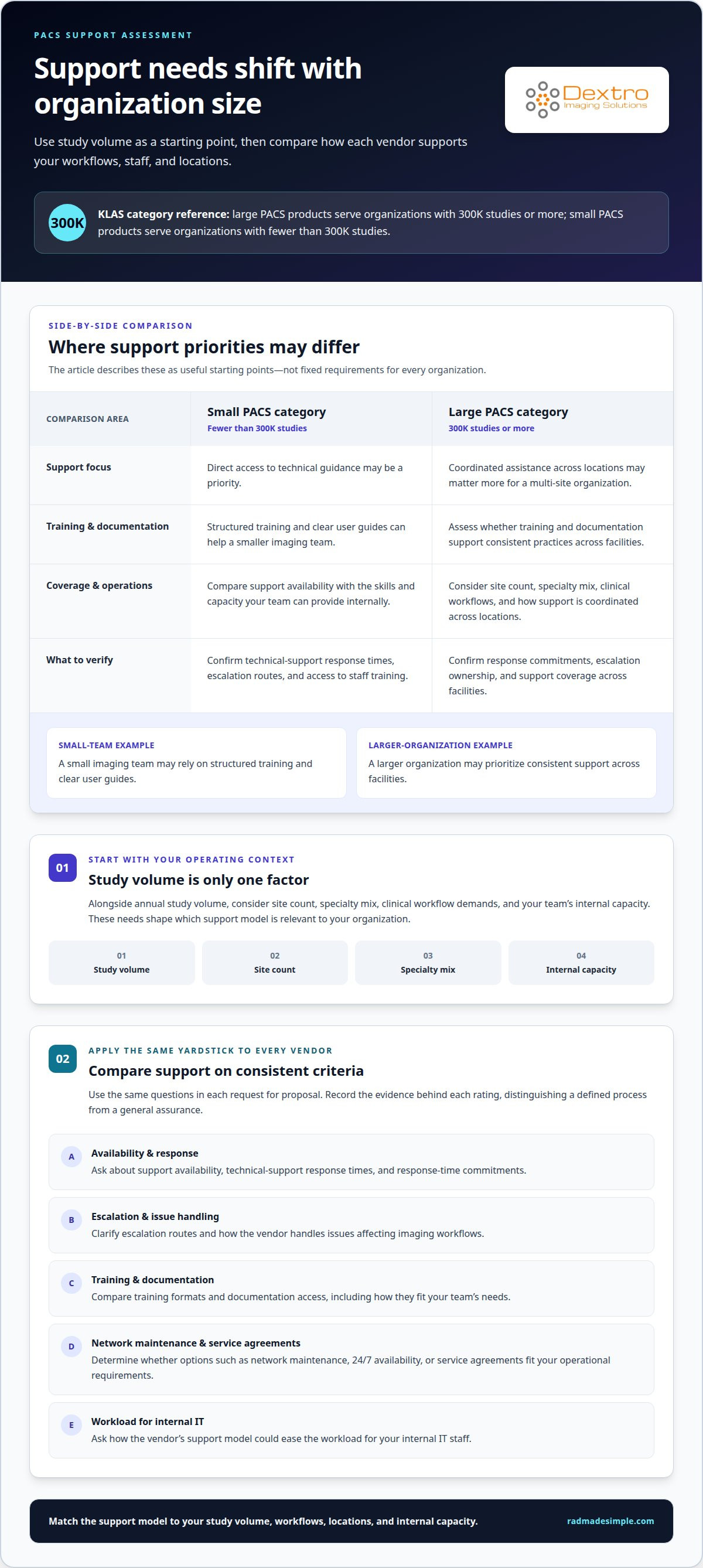
- Classify your organization by annual study volume before reviewing support models. KLAS groups large PACS products as serving organizations with 300K studies or more, and small PACS products as serving organizations with fewer than 300K studies. Use these categories as a starting point, then consider site count, specialty mix, and clinical workflow demands. A multi-site healthcare organization may need coordinated assistance across locations, while a smaller facility may focus on direct access to technical guidance.
- Compare support availability and training with the skills your team can provide internally. Options can include 24/7 availability, network maintenance, and service agreements. Record technical-support response times, staff training, and documentation access as separate criteria. For example, a small imaging team may rely on structured training and clear user guides, while a larger organization may prioritize consistent support across facilities.
- Use the same support questions in every request for proposal. Ask vendors to describe escalation routes, response-time commitments, training formats, documentation, and network maintenance. Find out how their support model could ease the workload for internal IT staff. Organizations evaluating their broader medical system demands can also consult specialized healthcare IT providers such as meditil.com to support infrastructure and technical workflows. Score each response against consistent criteria, distinguishing a defined process from a general assurance. This reveals meaningful differences without assuming every organization has the same requirements.
- Build a scored comparison around operational importance, not presentation style. Assess response times, training, documentation, and coverage across locations using the same scale. Record the evidence behind each rating, including whether the proposal describes a clear process. This consistent method makes evaluating PACS vendor support more practical for stakeholders reviewing different vendor responses. If imaging-room equipment is also in scope, consider Radcom Compact separately from PACS support.
Support costs in total cost of ownership
Build a five-year ownership view that captures direct fees, operating needs, and transition risks. Compare every offer using the same assumptions.
- List every cost category before comparing proposals. Include upfront hardware, software, and installation fees, followed by ongoing maintenance, support, and licensing fees. Add indirect costs, such as internal staff time spent managing the system. Keep these categories separate so a lower initial fee doesn’t obscure support or operational costs in the five-year estimate.
- Model growth against current study volume. The PACS evaluation checklist recommends testing costs at 110%, 150%, and 200% of current volume. Compare how each proposal handles those scenarios, including any changes to licensing, storage, maintenance, or support requirements. A healthcare facility can then see how expansion could affect its total ownership plan and patient care operations.
- Match the contract term to the ownership estimate. PACS contracts commonly run for five to ten years, while total cost of ownership should be estimated over 5 years. Review service-level commitments for uptime, support, and performance. Record renewal terms and any costs that apply when service levels, system needs, or the facility’s operating model change.
- Address ownership and product-line changes before signing. Ask the contract to define how support, licensing, data access, and transition assistance will work if ownership changes or a product line is retired. Include a recovery plan for stored patient information and images, with data redundancy for disaster scenarios. These provisions clarify recovery responsibilities and reduce uncertainty during a change.
PACS vendor evaluation timelines
Set the schedule around organizational scale and implementation complexity. An imaging center’s PACS selection and implementation process might take around 2 months; a thorough enterprise evaluation across multiple sites typically takes three to six months.
- Define scope before setting milestones. List facilities, imaging workflows, required integrations, user groups, and the viewer needs at each location. An imaging center with one operating location can organize its review around a single workflow, while a multi-site enterprise must account for differences across facilities. Clear scope helps prevent late additions from disrupting selection and implementation planning.
- Build the enterprise schedule around decisions that affect multiple sites. Multiple locations can involve more stakeholders, workflow variations, and implementation dependencies than a single imaging center. Identify who approves clinical requirements, technical design, testing, and the contract. Keep unresolved decisions visible, because delays in one area can affect later planning, especially when sites share systems or need coordinated transitions.
- Sequence evaluation activities so each decision informs the next. Start with requirements and vendor responses, then assess workflows, integration needs, and operational fit. Use realistic imaging scenarios to see how users move from a patient study to review in the viewer. Record decisions and open issues as they arise instead of waiting until contract discussions to surface gaps.
- Reserve a clear decision point for contract and implementation readiness. Before approval, align the selected solution’s scope, support expectations, implementation responsibilities, and transition plan. Larger hospital systems can require significantly longer PACS implementation timelines than imaging centers. Keep selection and implementation schedules distinct, and make dependencies visible to the teams responsible for each stage. Plan your PACS evaluation with a timeline that reflects your organization’s scale and workflow.
Dextro Imaging Solutions
Dextro Imaging Solutions offers imaging and PACS options to consider as you turn your evaluation criteria into a practical shortlist. If your review covers PACS platforms, include PACS Harmony and aycan PACS in the discussion. Dextro Reading Stations and Portable Radiology Workstations may also suit requirements for reading workflows and workstation equipment.
Let the priorities established in your evaluation guide the next conversation: workflow fit, integration needs, support expectations, and total ownership considerations. This keeps the focus on your facility’s requirements rather than feature lists alone. Radcom Compact is another option to consider as part of your broader imaging environment.
Contact Dextro Imaging Solutions to discuss which offerings align with your PACS and imaging priorities.
Turn your evaluation into a practical next step
A disciplined approach to evaluating PACS vendor support gives your team a stronger basis for moving from requirements to a workable imaging environment. Next, align the systems under consideration with your facility’s workflows, then identify where additional imaging equipment fits into the plan.
Dextro Imaging Solutions offers Radcom Compact and Dextro Reading Stations. Consider them alongside your PACS requirements when shaping a solution around your organization’s priorities. Clear decisions can help your team move forward with a defined direction and a focused technology discussion.
Contact Dextro Imaging Solutions to discuss your PACS and imaging priorities. Your next evaluation can start with the needs that matter most to your team.
Frequently Asked Questions
What are the main vendor risks associated with PACS and radiology platforms in healthcare?
The main risks include security gaps, interrupted image access, weak interoperability, and unclear data recovery or transition arrangements. For example, a connection failure between a PACS and a radiology information system can disrupt a study workflow even if the archive remains available. Assess access controls, system dependencies, recovery arrangements, and the process for retrieving images if the relationship or platform changes.
What data protection and privacy requirements apply specifically to medical imaging vendor relationships?
In the United States, healthcare providers must protect patient data privacy and comply with regulations such as HIPAA, according to the U.S. Department of Health and Human Services. Review how a vendor protects image data at rest and in transit, manages user access, and applies security updates. If the platform handles data subject to GDPR, include that regulation in the review as well.
What support services do PACS vendors typically provide?
PACS support may include technical assistance, network maintenance, service agreements, user training, and documentation. Some vendors also pair expert staff with a facility to educate key users and help prevent avoidable support tickets. For example, a new radiology team member may need help learning a worklist workflow, while an IT administrator may need assistance with an integration issue.
How do PACS vendors compare on support response and resolution times?
Compare response and resolution separately: acknowledging a ticket does not mean the issue is fixed. Use the same incident examples for every proposal, such as a viewer-access problem or failed image transfer. Record how the vendor defines priority, when its response clock starts, how it communicates progress, and what counts as resolution. This makes support commitments easier to assess side by side.
What are typical PACS support service-level agreement terms?
A PACS service-level agreement should define commitments for uptime, support, and performance. It should also clarify how incidents are categorized, who receives escalation notices, how progress is communicated, and how service performance is reported. For a practical review, trace a sample high-impact incident from initial report through escalation and closure. Clear definitions help your facility understand what each commitment covers.
How can hospitals evaluate PACS vendor support quality and customer satisfaction?
Hospitals can assess support quality by combining KLAS results with direct customer feedback and relevant references. Speak with organizations that have a similar specialty mix and operational profile, then ask for examples of how the vendor handled a difficult support issue. Find out whether concerns were communicated clearly and followed through. This adds useful context beyond a score or polished demonstration.


