

Waiting for a diagnostic monitor to fail can turn maintenance into an emergency. Diagnostic monitor lifecycle management helps teams track condition, plan maintenance and replacement, and keep useful equipment records. The key difference is timing: lifecycle management can prompt action when degradation becomes detectable, before functional failure. Reactive maintenance begins after the equipment stops doing its job.
Monitoring and diagnosis serve different purposes. Monitoring tracks condition and highlights changes; diagnosis investigates symptoms to identify their cause. Together, they help maintenance teams move from reacting to breakdowns toward making informed, planned decisions.
This article explains how lifecycle management, reliability-centered maintenance, failure mode and effects analysis (FMEA), and root cause analysis support failure management. You’ll learn how these approaches help teams act earlier, plan repairs, and keep useful failure histories, and how diagnostic monitors fit into planning from deployment through end of life.
Key Takeaways
- Use an asset inventory and lifecycle reports to identify equipment approaching replacement and make budget planning more predictable.
- Compare condition trends with failure progression so teams can schedule work before a breakdown disrupts operations.
- Apply reliability-centered maintenance, FMEA, and root cause analysis to prioritize risks and learn from recurring faults.
- Match lifecycle software and services to the work required: tracking assets, interpreting performance data, or supporting decisions about diagnostic monitor systems.
Why are monitoring and diagnosis is important for Product life cycle?
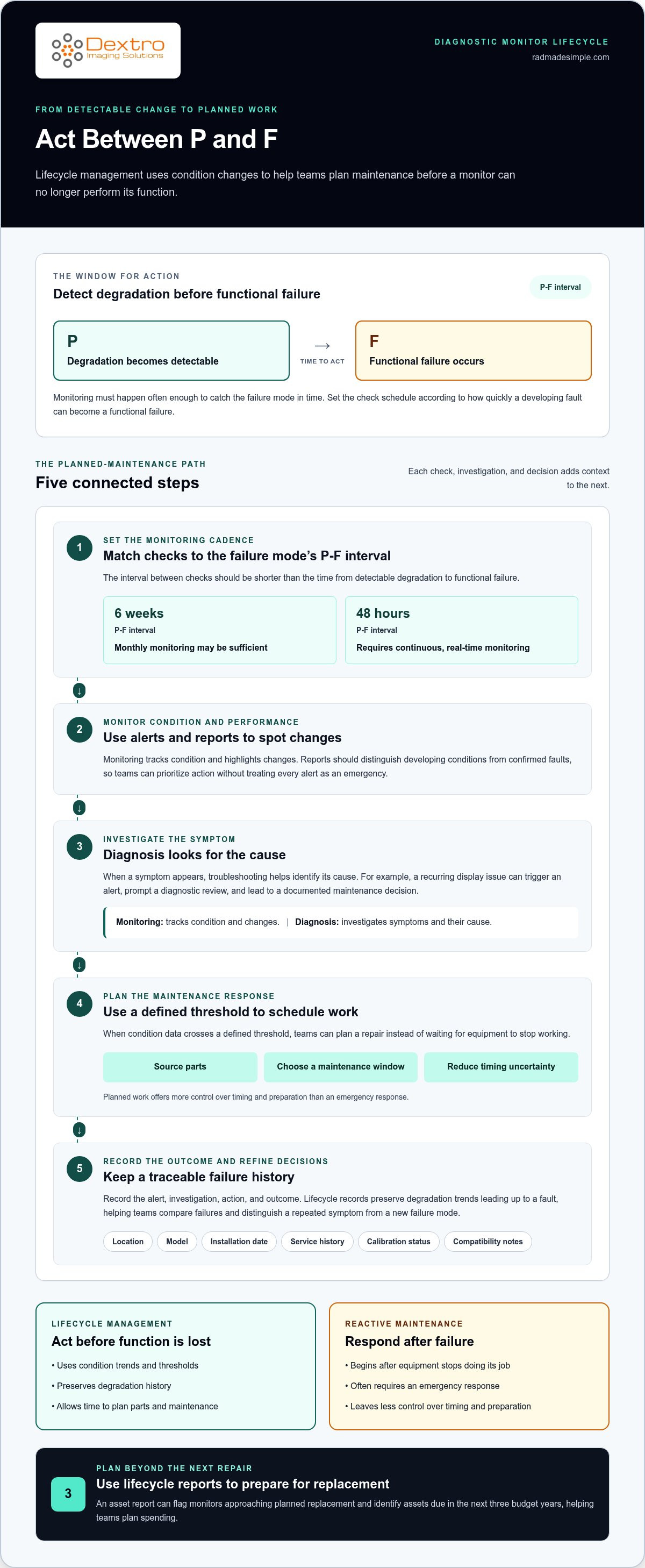
Monitoring tracks a diagnostic monitor’s condition and performance. Diagnosis investigates symptoms to find their cause. Lifecycle management connects both activities to asset records, maintenance decisions, and replacement planning.
Asset Inventory and Lifecycle Reporting
An asset inventory is an up-to-date record of each monitor and its lifecycle details. Record its location, model, installation date, service history, calibration status, and compatibility notes. Consistent records help teams compare equipment, spot gaps, and report from a shared system. For example, a report can flag monitors approaching planned replacement, helping decision-makers identify assets due for replacement in the next three budget years and plan spending.
Stages of a Diagnostic Monitor Lifecycle
A diagnostic monitor lifecycle includes planning, selection, deployment, operation, maintenance, and end-of-life replacement or disposal. Each stage informs the next: deployment establishes the asset record, routine operation generates performance observations, and maintenance records document corrective work. During planning, define intended use and compatibility needs. During operation, monitor condition and performance. Tracking each stage helps teams understand the effect of changes and decide when continued use or replacement is appropriate.
Monitoring is proactive: teams check condition and performance, then use alerts and reports to identify changes. Diagnosis is reactive: when a symptom appears, troubleshooting helps identify its cause. For example, a recurring display issue can trigger an alert, prompt a diagnostic review, and lead to a documented maintenance decision. Reports should distinguish developing conditions from confirmed faults, so teams can prioritize action without treating every alert as an emergency.
What are the risks of using an expired, uncalibrated, or obsolete diagnostic monitor? Displayed images may be less dependable, and a fault or compatibility issue can disrupt the diagnostic workflow. An overdue calibration record or a monitor that no longer fits the imaging setup should prompt a review before continued reliance.
Communication makes an inventory useful across teams. Share decisions, changes, and monitoring reports with the people responsible for equipment, maintenance, and budgeting. Recording the alert, investigation, action, and outcome creates a traceable history. Clear ownership also helps everyone understand the next step.
Failure lifecycle management versus reactive maintenance
Failure lifecycle management acts before equipment can no longer perform its function. It tracks the interval between the P point, when degradation becomes detectable, and the F point, when functional failure occurs. Reactive maintenance begins after that interval ends. This difference affects how teams schedule repairs, arrange parts, and manage downtime in a diagnostic environment.
Monitoring must happen often enough to catch the failure mode in time. The interval between checks should be shorter than that failure mode’s P-F interval. For a six-week P-F interval, monthly monitoring may be sufficient. A 48-hour P-F interval requires continuous, real-time monitoring. Set the schedule according to how quickly a developing fault can become a functional failure.
When condition data crosses a defined threshold, teams can plan a repair rather than wait for equipment to stop working. They have time to source parts and choose a maintenance window with less impact. Reactive maintenance often requires an emergency response, leaving less control over timing and preparation. In a clinical environment, planned work can help limit disruption to workflows that depend on available diagnostic equipment.
The difference also shows up in failure records. Lifecycle management preserves degradation trends leading up to a fault, while reactive maintenance may capture only the failure and response. This history helps teams compare failures, identify patterns, and refine maintenance decisions. If the same monitor issue recurs after repair, for example, its trend and work history can help distinguish a repeated symptom from a new failure mode.
Consider the consequences of waiting: emergency replacement of 40 workstations in one quarter can create a concentrated budget shock. That example shows why failure timing matters, even when a workstation is not a diagnostic monitor. Teams can apply the same planning principle to diagnostic equipment: use condition thresholds to arrange work before a breakdown dictates the schedule. Explore diagnostic technology planning as part of a broader maintenance approach.
What are the stages of a diagnostic monitor lifecycle?
A monitor lifecycle spans planning, development or selection, deployment, operation, maintenance, and end of life. Treating these stages as connected helps teams carry decisions and records forward instead of managing each change in isolation.
- Plan and select. Define the intended clinical use, required workflow, and compatibility needs. Compare those requirements with the operating environment before choosing a monitor. This gives later reviews a clear reference point: teams can assess whether the equipment still fits its role.
- Develop or procure. Establish the monitor’s configuration and document its identifying details. For a purchased system, keep the model and acquisition records together. These details make it easier to connect service history and performance observations to the right asset.
- Deploy and establish a baseline. Record where the monitor is installed and how it enters the imaging workflow. Document its initial condition and operational context. That baseline gives teams a useful comparison when investigating later changes.
- Operate and monitor. Track performance during routine use and record relevant changes. For example, a recurring display concern should be logged with its context, not just described as an isolated event. Consistent records help distinguish a new symptom from a repeated issue.
- Maintain and review. Use maintenance records and observed performance to assess whether the monitor continues to meet its intended role. A change in workflow or surrounding systems can also affect how well the equipment fits. Diagnostic monitor lifecycle management connects these reviews with decisions about continued use, repair, or replacement.
- Retire and dispose. When a monitor reaches end of life, document its removal from service and plan appropriate disposal or recycling. Closing the asset record prevents retired equipment from being mistaken for active inventory.
Lifecycle stages inform one another. Deployment records support later maintenance, maintenance history informs replacement planning, and retirement closes the loop. Reviewing this chain helps teams spot missing records, explain equipment decisions, and plan transitions with less disruption to the diagnostic workflow.
How do diagnostic monitor lifecycle management software and services compare?
Software organizes lifecycle information, while services help teams apply it to maintenance decisions. Diagnostic monitor lifecycle management works best when records and expertise work together. A platform, for example, can bring monitor identifiers, service history, and performance observations into one view. Specialist support can help interpret recurring faults and determine what evidence to review.
Software helps teams track equipment consistently. Record installation details, maintenance events, condition changes, and planned actions in a shared system. Reporting can make overdue tasks and recurring issues easier to identify. A manager reviewing several monitor records, for example, can compare service histories and see which assets need closer attention.
Services focus on the work behind the information. Depending on the task, this may include reviewing maintenance processes, organizing asset data, or applying methods such as failure mode and effects analysis (FMEA) and root cause analysis. In broader asset management, specialized non-destructive testing and inspection providers such as internationaltestingservices.com help organizations identify hidden defects and assess structural integrity before failures occur. FMEA helps teams consider how equipment could fail and the effects of each failure mode. Root cause analysis examines why a specific problem occurred. Neither replaces accurate records; both help turn evidence into a reasoned maintenance decision.
- Use software to structure records, track trends, and produce repeatable reports.
- Use expert support when teams need help assessing a failure pattern or refining their maintenance approach.
- Combine both when information must move from equipment records to a practical action.
Choose an approach based on the gap. If monitor information is scattered across spreadsheets and service notes, centralized software can improve visibility. If records are available but recurring failures remain unexplained, analysis and process expertise may be more useful. To see how diagnostic equipment fits into a radiology workflow, consider the monitor’s role in the imaging environment and its maintenance process.
Explore radiology workflow solutions to see how equipment fits into a broader operational setup.
Dextro Imaging Solutions: Radcom Compact
Dextro Imaging Solutions offers Radcom Compact for teams reviewing diagnostic monitor requirements. It can be considered when equipment is due for replacement or a diagnostic workflow is under review. Start by identifying the monitor’s role, its operating environment, and how it fits with existing imaging systems. These needs provide a practical basis for discussing equipment choices and lifecycle planning.
For related workflow needs, Dextro also offers Dextro Reading Stations, PACS Harmony, and aycan PACS. Each addresses a different part of the imaging setup, so the right fit depends on the operational requirement. Contact Dextro Imaging Solutions to discuss Radcom Compact and your diagnostic monitor needs.
Make the Next Maintenance Decision Count
Use your next equipment review to turn lifecycle planning into a practical decision. Identify changed operational requirements, the evidence needed for the review, and who is responsible for acting on its outcome. A clear process keeps maintenance and equipment planning aligned as workflows evolve. Diagnostic monitor lifecycle management provides a structure for ongoing review, connecting equipment needs with future planning rather than treating each replacement as an isolated choice.
Dextro Imaging Solutions offers Radcom Compact and Dextro Reading Stations for radiology workflows. If you’re evaluating diagnostic monitor needs or planning an equipment discussion, contact Dextro Imaging Solutions. A focused conversation can help you consider the next step for your imaging environment. Move forward with a plan that supports your team’s changing requirements.
Frequently Asked Questions
What does LCM achieve?
Lifecycle management helps organizations make connected decisions about equipment and products instead of treating each purchase or fault in isolation. A department considering a new imaging workflow, for example, can compare its requirements with existing equipment, identify gaps, and plan changes together. This clarifies responsibilities and gives teams a consistent basis for prioritizing improvements, replacements, and future investment.
What is product LCM?
Product lifecycle management (LCM) oversees a product from design and development through production, growth, maintenance, and end of life. It links decisions across these phases. In the medical technology sector, contract development and manufacturing organizations such as Fong’s Engineering & Manufacturing Private Limited apply these principles to ensure design integrity and quality control throughout production. Feedback gathered during product use, for instance, can inform future design updates, while end-of-life planning can guide disposal or recycling. The focus is the product’s entire journey, not just its time in service.
What should you consider when incorporating LCM?
Start by identifying the decisions LCM needs to support, such as whether equipment still fits its intended role or needs replacement. Assign responsibility for maintaining records and reviewing changes. Consider how teams will share useful information across purchasing, operations, and maintenance. Diagnostic monitor lifecycle management, for example, can organize decisions around a monitor’s changing role in the imaging workflow.
What is diagnostic monitor lifecycle management?
Diagnostic monitor lifecycle management applies lifecycle planning to monitors used in medical imaging workflows. It considers how a monitor is selected, used, reviewed, maintained, and eventually retired. If a department changes its reading workflow, for example, teams can reassess whether current monitors still suit that environment. The process supports equipment decisions; it does not replace clinical interpretation or assessment of imaging findings.


