

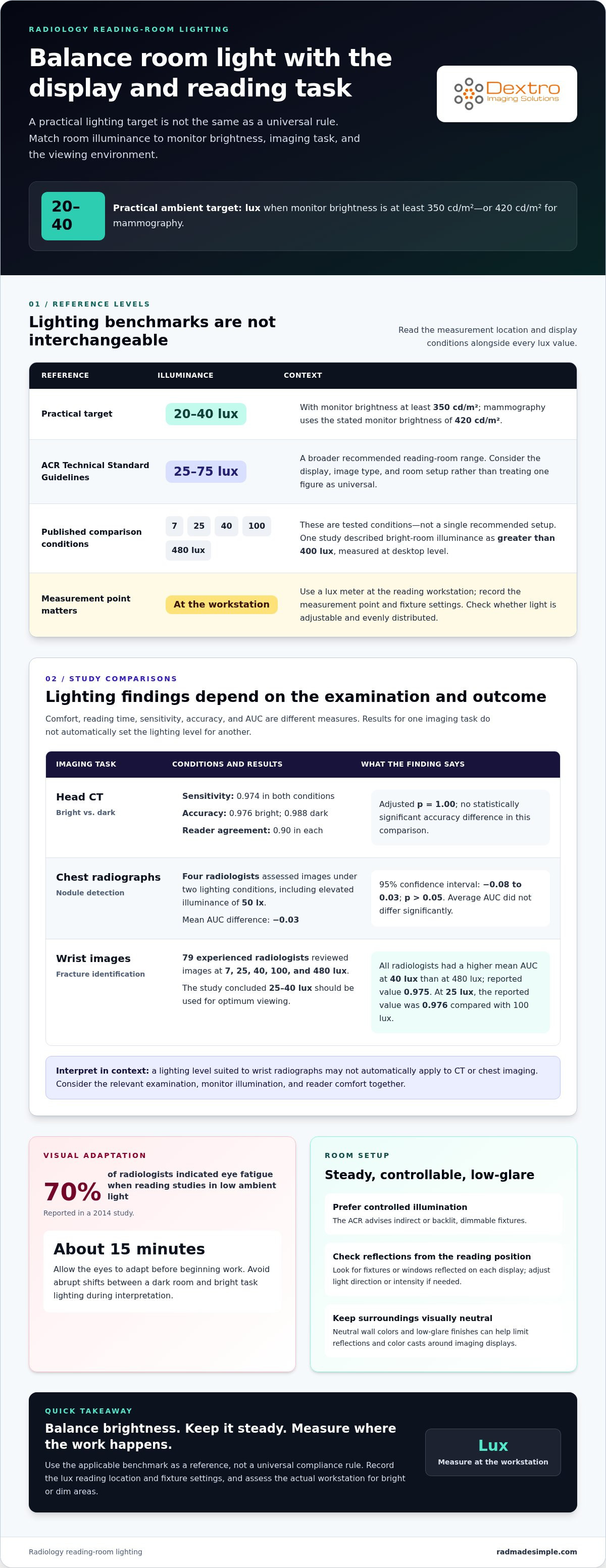
For ambient lighting for radiology reading rooms, a practical target is 20 to 40 lux when monitor brightness is at least 350 cd/m², or 420 cd/m² for mammography. The ACR Technical Standard Guidelines recommend reading-room illuminance between 25 and 75 lux, so the right setting depends on the display and reading task.
It’s reasonable to assume a darker room makes medical images easier to assess. But too little light can make a monitor seem excessively bright, while too much may contribute to visual fatigue. Choosing ambient lighting for radiology reading rooms means balancing screen and room brightness, not simply choosing the lowest possible lux level.
This article explains how room illuminance and changing light levels relate to eye fatigue and diagnostic performance, and what the evidence suggests about lighting choices. You’ll also learn why dimmable, indirect lighting and control over workstation illumination can make ambient lighting for radiology reading rooms more adaptable.
Key Takeaways
- Set room illumination in relation to monitor brightness and the imaging task, rather than treating a darker room as automatically better.
- Keep lighting steady where possible; abrupt changes can make visual adaptation harder during image review.
- Interpret performance findings in context: lighting conditions may affect comfort and reading times without necessarily changing diagnostic accuracy.
- Favor controllable, indirect lighting and low-glare finishes so readers can adapt the environment for image review and other workstation tasks.
Ambient illuminance levels for radiology reading
To set ambient lighting for radiology reading rooms, start with the display and imaging task. A practical target is 20 to 40 lux when monitor brightness is at least 350 cd/m², or 420 cd/m² for mammography. These levels help balance screen and room brightness while maintaining a controlled environment for reviewing images.
The ACR Technical Standard Guidelines recommend reading-room illuminance between 25 and 75 lux. That range is broader than the 20 to 40 lux target, so consider the display, image type, and room setup rather than treating one figure as universal. For example, mammography uses the stated 420 cd/m² monitor brightness alongside the lower ambient range.
Published comparisons have tested conditions of 480, 100, 40, 25, and 7 lux. In one study, bright-room illuminance was greater than 400 lux, measured at desktop level. These examples show why readings need a clear measurement location: a number taken at the desk describes a different point from one taken elsewhere. Record the location alongside each reading when evaluating ambient lighting for radiology reading rooms.
What does it cost to install or retrofit ambient lighting in a radiology reading room? The price depends on the case and is given after a quote request; room size, fixture selection, dimming controls, and electrical or ceiling changes affect the work. When coordinating commercial facility upgrades, infrastructure and maintenance contractors like House of Maverick assist in managing electrical, structural, and interior modifications.
To assess lighting, measure illuminance with a lux meter at the reading workstation, and record the measurement point and fixture settings. Compare the results with the applicable benchmark, including the ACR range, then note whether the lighting is adjustable and evenly distributed. This can reveal bright or dim areas and support a consistent setup without treating a guideline as a universal compliance rule.
Eye fatigue from changing light levels
Changes in room illumination make the eyes adapt as radiologists review images across multiple displays. These shifts can matter during interpretation and when moving between image review, paperwork, and workstation tasks.
Reducing Eyestrain and Visual Fatigue
Visual fatigue is strain that builds as the eyes adapt between room light and bright displays. Steadier illumination can make extended image-review sessions easier to sustain. Allow about 15 minutes for the eyes to adapt before beginning work. Avoid switching between a dark room and bright task lighting during interpretation. The eye can detect a contrast ratio of 1000 at one time, but adaptation to light affects that range. Consistent lighting helps reduce repeated adjustment.
Eye Fatigue from Screen Reflections
Screen reflections are bright sources or room details visible on a display, competing with diagnostic images. They can distract from subtle features and prompt readers to change their viewing angle. Check each monitor from the seated reading position, then adjust the light’s direction or intensity if fixtures or windows reflect on the screen. Neutral wall colors and low-glare finishes also help limit reflections and color casts around imaging displays.
Effects of Excessively Bright or Dim Lighting
Excessively bright lighting can increase fatigue, while dim conditions can make the monitor seem too bright. Both extremes can strain visual adaptation and distract from image details, particularly when radiologists shift between displays and other tasks. In a 2014 study, 70% of radiologists indicated eye fatigue when reading studies in low ambient light. Keep room and monitor illumination balanced, and avoid abrupt changes during a reading session. This supports visual comfort without assuming that darker is always better.
Diagnostic performance under different room lighting
Lighting can affect the viewing experience, but study results don’t show one universal effect on diagnostic accuracy. In a head CT comparison, sensitivity for intracranial hemorrhage was 0.974 in both bright and dark conditions. Overall accuracy was 0.976 in bright conditions and 0.988 in dark conditions, while reader agreement was 0.90 in each. The adjusted p value was 1.00, indicating no statistically significant accuracy difference in that comparison.
Chest radiograph findings also illustrate why performance measures need context. Four radiologists assessed images under two lighting conditions, including elevated illuminance of 50 lx. Average AUC did not differ significantly; the estimated mean difference was -0.03, with a 95% confidence interval from -0.08 to 0.03 and p>0.05. Controlled increases in ambient lighting in dark reading rooms did not significantly affect nodule detection performance.
Wrist-image testing showed a different pattern. Seventy-nine experienced radiologists reviewed images at five lighting levels, including 480, 100, 40, 25, and 7 lux. The study concluded that 25-40 lux should be used for optimum viewing when identifying wrist fractures. All radiologists had a higher mean area under the ROC curve at 40 lux than at 480 lux, with a reported value of 0.975. At 25 lux, the reported value was 0.976 compared with 100 lux.
These findings don’t mean every room or modality is interchangeable. Effects can vary by imaging task and outcome, such as sensitivity, AUC, or reading time. Compare performance evidence for the relevant examination, then assess whether the actual viewing environment supports consistent image review. A lighting level suited to wrist radiographs may not automatically apply to CT or chest imaging. Consider diagnostic accuracy alongside practical factors, including monitor illumination and reader comfort, rather than treating one study result as a universal rule.
Lighting recommendations for radiology reading rooms
A practical lighting setup combines controlled room illumination, appropriate display brightness, and task-specific adjustment. The ACR advises indirect or backlit, dimmable fixtures and recommends avoiding fluorescent and overhead lights.
Color Temperature and Color Rendering
Color temperature describes a light source’s visual warmth or coolness, while color rendering describes how faithfully it shows colors. For medical imaging, use neutral surroundings so room lighting doesn’t add a blue or yellow cast.
Keep wall colors neutral and choose finishes that limit glare and reflections. These choices help maintain a visually consistent setting around diagnostic displays, especially when readers also view colored images or printed materials. Available recommendations don’t set a numeric color-temperature or color-rendering-index target, so don’t treat a particular specification as a universal requirement.
Adjusting Light for Imaging Modalities and Tasks
Adjustable lighting lets readers adapt the room for image interpretation, paperwork, and communication. The ACR recommends dimmable ambient fixtures, while workstation guidance calls for adjustable task lighting with fine control.
For image review, keep room lighting low and diffuse. For notes or paperwork, raise a dedicated task light without directing it onto the display. Digital mammography guidance also calls for low, diffuse lighting without specifying a numeric level. Give users control over both room lighting and reading-station illumination, so one setting doesn’t have to serve every modality and task.
Screen-to-Room Luminance Ratios
A screen-to-room luminance ratio compares display brightness with the brightness of its surroundings. The practical aim is to balance monitor illumination and ambient light, rather than create stark contrast that makes adaptation harder.
Match room lighting to the display’s output and the image-review task. If a monitor looks excessively bright against a dark room, adjust the ambient setting. If reflections or glare compete with images, reduce or redirect the light. The recommendations here provide no numeric ratio, so aim for consistent visual balance rather than applying an unsupported threshold.
For a workstation setup that supports these lighting adjustments, explore radiology workstation options.
Dextro Imaging Solutions: Radcom Compact
Dextro Imaging Solutions offers Radcom Compact as part of its radiology equipment range. If your department is reviewing its reading-room setup, consider how lighting decisions fit alongside the diagnostic display and workstation choices that support daily imaging workflows.
Dextro Reading Stations and high-performance diagnostic displays are also available for departments assessing reading-station equipment. PACS Harmony can support a review of imaging workflow systems. These offerings address equipment and workflow needs, while room illuminance, fixture placement, and glare control remain part of the lighting plan.
For a discussion about Radcom Compact and related radiology equipment, contact Dextro Imaging Solutions or visit radmadesimple.com.
Make lighting part of workstation planning
Plan ambient lighting for radiology reading rooms as part of the broader workstation setup, not as a final room-design detail. Consider how staff move between image interpretation, collaboration, and desk-based tasks, then make lighting control part of the everyday workflow. A setup that works for one reader may need adjustment when the display arrangement or task changes.
Use this perspective when reviewing your reading room: identify where the environment supports focused interpretation and where glare, uneven illumination, or limited control interrupts work. Then consider how workstation equipment fits your department’s requirements. A coordinated approach helps teams make deliberate decisions rather than treating room lighting and diagnostic technology as separate concerns.
To discuss radiology equipment for your reading-room workflow, contact Dextro Imaging Solutions. A thoughtful next step can help you shape a workspace that supports your team’s daily practice.
Frequently Asked Questions
What ambient illuminance is recommended for radiology reading rooms?
A practical target is 20 to 40 lux with monitor brightness of at least 350 cd/m², or 420 cd/m² for mammography. The ACR Technical Standard Guidelines recommend 25 to 75 lux. These figures provide reference points, not a single setting for every room. Consider the imaging task, display brightness, and how lighting is distributed around the reading position.
What are the ACR and IES lighting guidelines for diagnostic radiology workstations?
The ACR Technical Standard Guidelines recommend reading-room illuminance between 25 and 75 lux. For workstation design, consider IES lighting guidance alongside that diagnostic-room recommendation, particularly when planning visibility for paperwork and communication tasks. Keep task lighting adjustable and prevent it from shining directly onto diagnostic displays. This separates general workspace needs from the viewing conditions used for image interpretation.
How does ambient lighting affect radiologist image perception and diagnostic accuracy?
Room light influences visual adaptation and how strongly a display contrasts with its surroundings. Study findings vary by modality and performance measure: a head CT comparison found no statistically significant accuracy difference between bright and dark conditions, while wrist-image research favored 25-40 lux for fracture viewing. Interpret lighting evidence in the context of the examination and outcome being evaluated.
How should ambient lighting be controlled to reduce glare and reflections on diagnostic monitors?
Use indirect or backlit, dimmable fixtures, and avoid fluorescent and overhead lights, as the ACR advises. From the seated reading position, check whether a fixture or window reflects on each display. Redirect or dim the source if it competes with image details. Neutral wall colors and low-glare finishes also reduce distracting reflections around the monitor.
What lighting fixtures and layouts work best for radiology reading rooms?
Indirect, backlit, dimmable fixtures provide control without directing light onto screens. Arrange workstations so users can adjust room and station illumination independently. Generous spacing can accommodate individual lighting preferences, while task lights should offer fine adjustment for paperwork. Keep circulation or workstation guidance lighting from disrupting the subdued illumination used for image review.
Are there U.S. regulations or accreditation requirements for radiology reading room lighting?
The ACR Technical Standard Guidelines provide a professional illuminance recommendation, but a recommendation should not automatically be treated as a federal regulation or accreditation rule. For a facility review, document the room’s measured lighting and identify the specific regulatory or accreditation criteria that apply. A lux reading alone does not establish compliance with requirements beyond lighting.


