

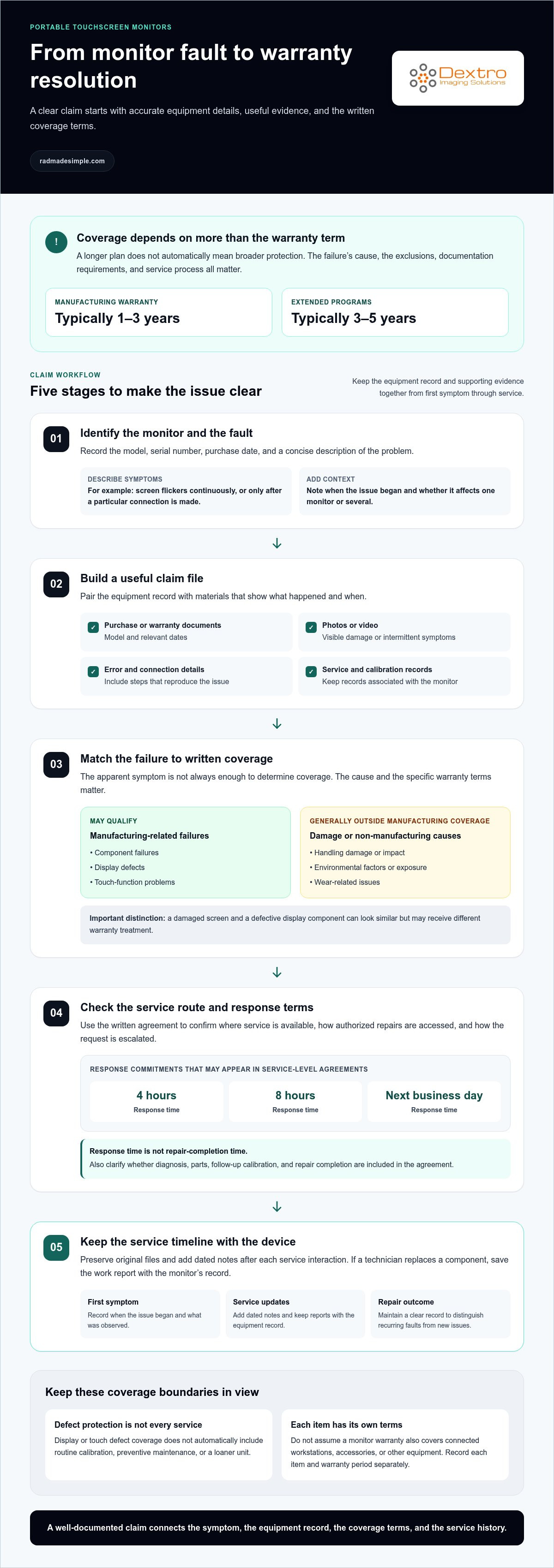
For professional-grade portable touchscreen monitors, manufacturing warranties typically last 1-3 years, while extended warranty programs typically extend coverage to 3-5 years. A diagnostic monitor warranty and support plan can vary in what it covers, so the duration is only part of the decision. The key is understanding which mechanical or electrical failures qualify and how a claim moves from report to resolution.
It’s reasonable to expect a longer plan to offer more protection, but a longer term does not automatically mean broader coverage. Exclusions, documentation requirements, and the service process all shape the support available when a monitor fails. This guide explains how standard and extended coverage compare, which failures may qualify, what to expect during a warranty claim, and how support arrangements affect equipment planning. Use these details to assess whether coverage fits your diagnostic workflow and prepare for what to do if a problem occurs.
Key Takeaways
- Compare service-network reach and response commitments so you can assess how support fits your operating needs.
- Separate manufacturing-related component, display, and touch failures from damage or environmental issues when evaluating coverage.
- Organize the monitor’s details and failure records to make the warranty claim process clearer and more efficient.
- Look beyond an extended plan’s term: review what failures it covers and how its protection fits your equipment lifecycle.
Authorized service networks and global support
Professional service-level agreements for portable touchscreen monitors may specify response times of 4 hours or 8 hours, or a next-business-day response. Coverage depends on the agreement’s stated service area and repair process.
On-Site Repair Networks
An on-site repair network is a group of authorized technicians who assess or service equipment at a customer’s location. This can matter when shipping a monitor would interrupt a reading room or complicate equipment handling. Before relying on on-site support, identify the service location, how requests are escalated, and whether the agreement covers diagnosis, parts, and follow-up calibration. A stated response time indicates when a response is due, not necessarily when the repair will be complete.
Manufacturer Support Across Brands
Manufacturer support varies by brand, model, and service agreement, so compare the written terms rather than assuming coverage is similar. Review the warranty period, access to authorized repairs, regional service availability, response commitments, and how calibration is handled after a repair. These details clarify how support works for a specific monitor and location. A brand name alone does not establish response times or the repair options included in an agreement.
An uncalibrated monitor can present images inconsistently, making visual review less dependable. An unsupported device can also leave staff without a clear repair route or model-specific service guidance. For example, if brightness or grayscale appearance changes, calibration records and service documentation can help distinguish a display problem from a configuration issue. A documented maintenance history and support path are practical parts of diagnostic monitor planning.
For a multi-location team, map each monitor’s model and location to its support route. Record the relevant agreement, service contact process, and calibration history alongside the equipment inventory. Then compare the written response commitment with operational needs: a 4-hour response, an 8-hour response, and next-business-day response represent different timelines. Also clarify how the process handles parts, repair completion, and escalation, since response time alone does not describe the full service experience.
Covered mechanical and electrical failures
Professional-grade portable touchscreen monitor manufacturing warranties typically last 1-3 years. No single brand can be identified as offering the longest warranty across the category; compare the specific model’s written term and coverage. A diagnostic monitor warranty and support plan should be assessed by both its duration and the failures it covers.
Manufacturing warranties generally cover component failures, display defects, and touch-function problems caused by manufacturing processes. For example, a touchscreen that stops responding because of a component defect may qualify. Damage caused by handling or environmental factors generally falls outside manufacturing coverage. The cause matters: a damaged screen and a defective display component can look similar but receive different warranty treatment.
Mechanical and electrical issues can affect components beyond the panel. A covered internal component failure may qualify when it results from manufacturing, while wear, impact, or exposure may not. Keep the device model, purchase date, and fault description together. These details help match the problem to the warranty’s covered failure categories and applicable term.
Read display and touch coverage separately from broader service support. A warranty may address a manufacturing-related display defect or touch malfunction, but that does not automatically include routine calibration, preventive maintenance, or a loaner unit. These are separate service provisions, so check each in the applicable terms. Reviewing diagnostic monitor warranty and support this way helps teams distinguish defect protection from services that may support workflow continuity during a repair.
Coverage for related equipment depends on each item and its own terms. Do not assume a monitor warranty covers connected workstations, accessories, or other equipment simply because they support the same imaging workflow. Record each item’s model and warranty period separately. For example, if a monitor and workstation develop related problems, report each fault against the appropriate equipment record. This helps distinguish a monitor defect from an issue elsewhere in the imaging setup.
No particular brand has the longest warranty in every case. The term depends on the specific model and its written coverage.
Warranty claim processing and documentation
A warranty claim connects a reported fault to the monitor’s coverage terms and service record. Start with the model, serial number, purchase date, and a concise description of the problem. For example, note whether the screen flickers continuously or only after a particular connection is made. Record when the issue began and whether it affects one monitor or several. These details help support teams assess the claim more effectively than a vague description such as “display failure.”
Build a claim file that identifies the equipment and clarifies the fault. Include:
- Purchase or warranty documents showing the model and relevant dates.
- Photos or video that capture visible damage or intermittent symptoms.
- Error messages, connection details, and steps that reproduce the issue.
- Service reports and calibration records associated with the monitor.
Keep original files and add dated notes after each service interaction. If a technician replaces a component, save the work report with the monitor’s record. This creates a clear timeline from the first symptom to the repair outcome and helps distinguish a recurring fault from a new issue.
Healthcare touchscreen deployments have additional documentation considerations. FDA compliance and medical device regulations can affect warranty terms, service procedures, and documentation requirements. Keep service records organized with equipment records, and follow the procedures applicable to the deployment. For instance, a repair report should identify the affected monitor and describe the work performed, rather than simply stating that the system was serviced.
Claims history also helps reveal patterns across a service network. Track each monitor by model, location, fault type, claim date, and repair result. If the same symptom appears in multiple units, those records make the pattern visible to the service team. Network scale matters because service access can vary by region, while a shared record structure makes cases easier to route and review. Compare the provider’s documented service locations and escalation process with the locations of your equipment. A consistent claim file helps teams coordinate follow-up, especially when monitors move between departments or facilities.
Extended warranty programs
Extended warranty programs for portable touchscreen monitors typically extend coverage to 3-5 years. That added term can protect equipment beyond its manufacturing warranty, but duration alone doesn’t show how useful the plan is. Compare the covered failure types, exclusions, service route, and the point when protection starts and ends. A longer plan with narrow exclusions may offer less practical protection than its headline term suggests.
Read the terms for each monitor model before comparing plans. Check how the program handles component failures, display defects, and touch-function problems, and note exclusions for user damage or environmental factors. See whether calibration, preventive maintenance, loaner equipment, and shipping are addressed separately. Treat each as a distinct service feature, not an automatic part of extended coverage. For example, coverage for a replacement component does not by itself mean a loaner monitor is included.
Timing can inform the decision. According to CPS, control-board and electronics claims for diagnostic equipment become more consequential around 4 to 7 years after purchase. CPS says bedside-equipment problems often become more visible 3 to 6 years into ownership. For refurbished clinical equipment, repair issues commonly surface 2 to 5 years after the refurbished unit enters service, according to CPS. These periods help frame when exposure could matter, but don’t define a specific monitor’s lifespan.
For a practical comparison, match the plan’s term to the equipment’s expected role and replacement cycle. Review exclusions alongside the claim process, and consider whether coverage lasts through the period when the monitor remains operationally important. For refurbished equipment, base the timeline on when that unit entered service, not just its original purchase date.
As you plan imaging equipment around its lifecycle, explore diagnostic imaging workflow options that fit your operational needs.
Dextro Imaging Solutions: Radcom Compact
Dextro Imaging Solutions offers Radcom Compact for teams considering diagnostic monitor options as part of a broader imaging workflow. If you’re evaluating equipment alongside reading stations or PACS, its offerings include Dextro Reading Stations, PACS Harmony, and aycan PACS. These options may be relevant when planning a connected diagnostic imaging setup rather than evaluating a monitor in isolation.
Use the warranty criteria in this guide to compare coverage for the monitor itself, then consider how your broader workflow fits the equipment you’re evaluating. Dextro Imaging Solutions is a natural next step if you’re exploring Radcom Compact or related imaging solutions for your organization.
Visit radmadesimple.com to learn more about Dextro Imaging Solutions.
Plan Your Next Equipment Decision
Use your warranty review as a starting point for broader equipment planning. Align each monitor’s documented coverage and service history with its role in your imaging workflow. This makes it easier to consider replacement timing, workflow needs, and the equipment your team uses together.
For teams evaluating diagnostic monitor warranty and support alongside imaging equipment, Dextro Imaging Solutions offers Radcom Compact and Dextro Reading Stations. Consider how these options fit your operational requirements and the way your team reads and manages imaging workflows. A well-defined equipment plan connects technology decisions to practical needs rather than treating each device as an isolated purchase.
When you’re ready to explore options for your workflow, contact Dextro Imaging Solutions. Take the next step with a clearer view of the equipment your team needs.
Frequently Asked Questions
How Long Can Coverage Last?
Manufacturing warranties for professional-grade portable touchscreen monitors typically last 1-3 years, while extended plans typically extend coverage to 3-5 years. Compare the applicable term with the equipment’s planned use and replacement cycle. For example, a monitor expected to remain in service after its standard warranty ends may need a different protection plan than equipment scheduled for earlier replacement.
What Questions Do Hospitals and Healthcare Operators Ask About Equipment Coverage?
Hospitals commonly ask which failures qualify, where service is available, and what information a claim requires. They may also ask whether repairs include calibration, whether loaner equipment is available, and how service records fit into equipment files. Consider a diagnostic monitor warranty and support plan alongside these operational needs to distinguish defect coverage from additional service arrangements.
What Should Hospitals and Healthcare Systems Look For in Equipment Protection Plans?
Compare covered components, exclusions, claim procedures, service access, and any separate provisions for calibration or loaner equipment. Check whether the terms address each monitor model and location. For systems operating across facilities, maintain a record of equipment and applicable coverage. This can simplify management when a monitor moves between departments or a facility updates its equipment inventory.
What Parts and Defects Are Covered by Diagnostic Monitor Warranties?
Manufacturing warranties generally cover component failures, display defects, and touchscreen problems caused by manufacturing processes. For example, a touch function that fails because of a defective component may fall within a covered category. User damage and environmental factors are generally excluded. Describe the symptoms clearly and preserve evidence that helps distinguish a manufacturing defect from accidental damage or exposure.
Are Diagnostic Monitor Warranties Valid for Pixel Defects, Backlight Failure, and Calibration Drift?
Pixel defects and backlight failure may affect display performance, but coverage depends on whether the fault meets the warranty’s terms for manufacturing defects. Calibration drift is a separate issue and should not be assumed to qualify as a display defect. Record what changed, when it appeared, and whether it occurs across different images or settings. These details help describe the problem accurately.
How Do I File a Diagnostic Monitor Warranty Claim in the United States?
Find the monitor’s model and serial number, purchase documentation, and applicable warranty terms. Describe the fault, when it began, and how it affects use. Include photos or video for visible or intermittent issues, then submit the details through the manufacturer’s claim process. Keep the claim reference and service communications with the equipment record. Matching documentation to the diagnostic monitor warranty and support terms helps keep follow-up organized.


